


inflearn logo

[Unity6] Creating a Visual Novel: A Story Directed by Me

This is a course where you can learn the actual workflow of creating a visual novel game using Unity 6. Together, we will implement core features necessary for story-based games, such as dialogue systems, branching choices, character presentation, and UI configuration. The course is based on the project currently under development, "NoNextStop," allowing you to experience practical production structures rather than simple examples.

8 learners are taking this course

Level Basic

Course period Unlimited

C#
C#
Unity
Unity
Unity6
Unity6
C#
C#
Unity
Unity
Unity6
Unity6

What you will gain after the course

  • Understanding the workflow of visual novel game production

  • Ability to implement dialogue output and branching choice systems

  • Understanding Unity 6 and Game Development

  • Completed the foundation for expanding and creating your own story game.

  • Experience in completing one playable visual novel prototype

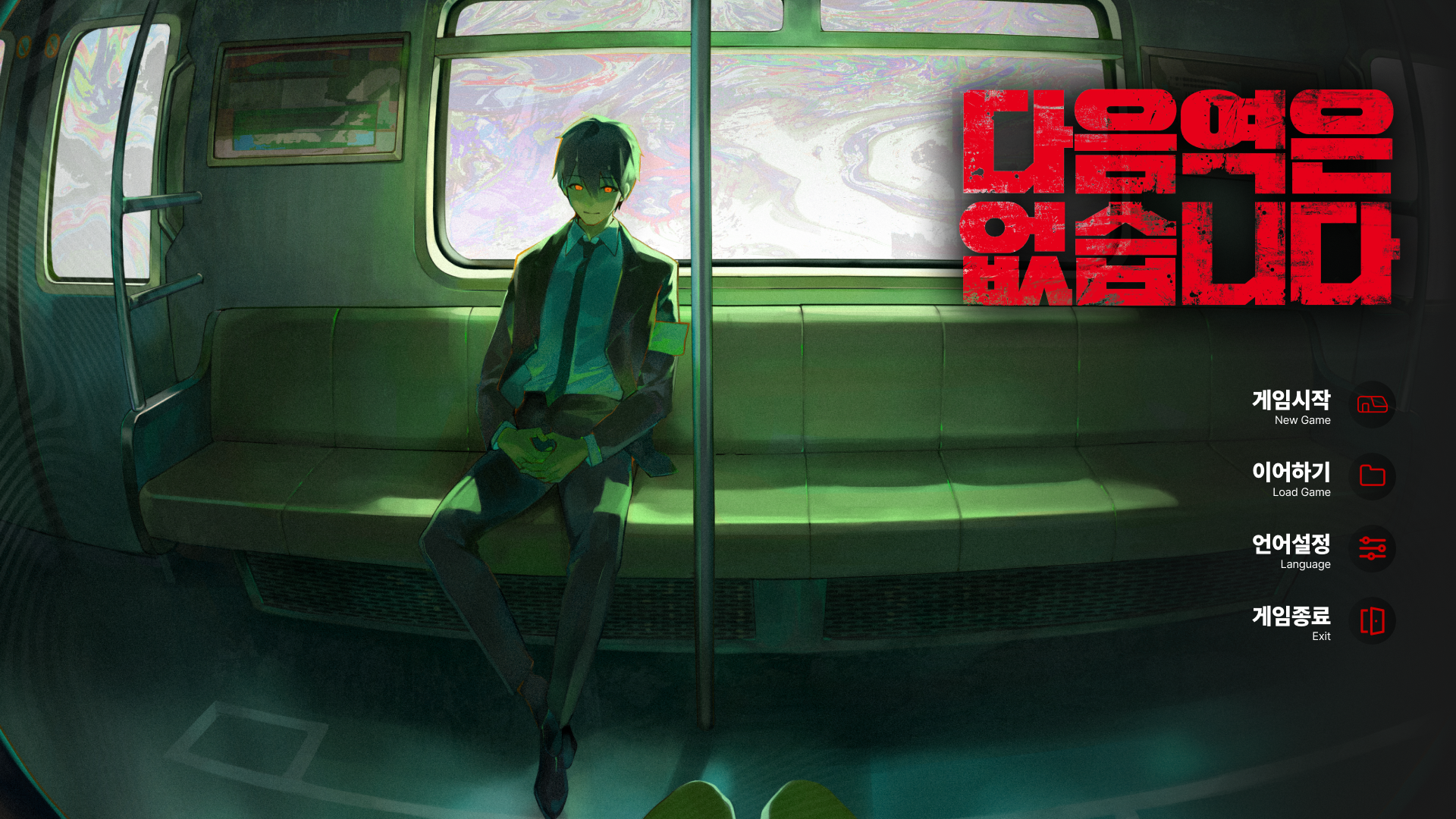
<There is no next station in-game intro screen>

This lecture was produced through a collaboration between HanPage and Pinous.

Based on part of the actual production process of the visual novel game 《NoNextStop》, which is currently being prepared for release by HanPage, this course captures the professional production workflow and implementation methods in a lecture format.

Rather than being a simple example project, this course aims to convey the structures and workflows used in actual game development as realistically as possible. It is designed to help those interested in visual novel production understand the flow of an actual commercial project.

Twitter : @nonextstop

A genre where you can learn the structure of game development while configuring various directions and story flows

Visual Novel

Visual novels are not just a genre that simply outputs dialogue, but one where various functions such as branching choice systems, character direction, UI composition, event flow, and data management are used together.
In this course, based on the production process of the game "NoNextStop" currently under development, you can learn by directly implementing the entire flow of how a visual novel game is created in Unity 6.

In this course, you will learn how to implement the following systems.

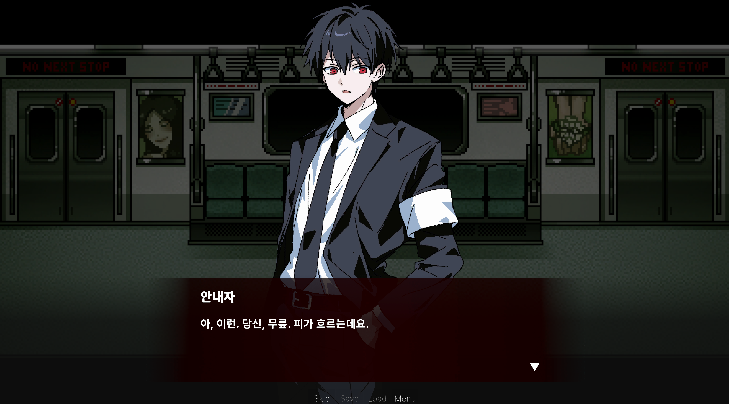
<Dialogue System>

<Choice System>

<Interaction Event>

<Dialogue System>

You will also learn about the Unity Editor system to easily carry out the tasks mentioned above.

Q. Why the visual novel genre?

1. A genre that can create high immersion even with few resources

Visual novels are a genre that can draw players in through story, direction, and character expression alone,
without the need for flashy action or large-scale map creation.
Even small teams or solo developers can create high-quality works.


2. It is a great way to naturally learn various features of Unity.

It may seem like a genre that only involves displaying dialogue, but in reality,
core structures necessary for game development, such as choice systems, UI animation, data saving, event flow, and direction control,
are widely used.


3. You can experience the game production flow centered on story and direction.

It is a genre where directing work to convey the player's emotions, such as character appearances, screen transitions, background changes, and emotional expressions, is very important.
You will find yourself contemplating not just simple functional implementation, but "how to present it" as well.


4. Results are visible quickly relative to the difficulty of production

Once the basic structure is completed, it is easy to add new characters, stories, and events,
allowing you to quickly improve the game's quality even within a short development period.
A major advantage is that you can immediately see the process of your own story operating like an actual game.

[Notes before taking the course]

Course Resources

Only some of the resources used in the lecture are provided as needed, and commercial use is restricted.
Additionally, the copyright for resources such as images, characters, and backgrounds included in the lecture belongs to Hanpage.

However, the code and script files created and used in the lecture can be used freely without any restrictions.
------------------------------------------------------------------------------------------

This lecture is based on Unity 6, so please check the details below before taking the course.

  1. Required Unity Version

    • The Unity version used in the lecture is Unity 6.xxxx or higher.


    • Please use the latest version to follow the lecture without compatibility issues.

  2. Recommended Development Environment

    • Windows or macOS operating system

    • Recommended to install a code editor such as Visual Studio or VSCode, Rider

    • Minimum recommended specifications: 8GB RAM, SSD, GPU with DirectX 11 or Metal support

This course is not just about following along to create a single feature;
it is designed so that you can experience the entire flow of how a visual novel game is produced.

Since it is based on an actual project, you will be able to naturally learn the overall game production process, such as story directing, UI composition, and data management, rather than just creating simple examples.

While there may be some shortcomings, I hope this course helps you take the first step in turning your own stories into games.
I hope this will be a time where we create together and deepen our understanding of Unity and game development.

Recommended for
these people

Who is this course right for?

  • Those who have experience making games with Unity but feel lost on how to structure the workflow for creating a story-based game.

  • Those who want to create a visual novel but find it difficult to design the dialogue system, choice branching, and production structure.

  • Those who want a project-based course rather than a simple explanation of features

  • A solo developer who wants to create their own story-driven game and release it on platforms like Steam.

  • Those who want to incorporate natural cinematic presentation and event flow, like in a video, into their games.

Need to know before starting?

  • Basic knowledge of Unity and C# is required.

Hello
This is Pinous

Inflearn Verified

1,783

Learners

126

Reviews

196

Answers

4.7

Rating

13

Courses

[Introduction]
Hello, I am the CEO of Pinus Co., Ltd.

I began teaching myself Unity, driven solely by my childhood dream of simply wanting to make games. With the mindset of working harder than anyone else because I was self-taught, I continued to learn and have now come to hold the position of CEO of a company.
About four years have passed since we began growing as a development studio. We are now moving forward with the goal of developing our own games, and we intend to film that process to create lectures on game development that can actually generate revenue.

Email
pinous.g@gmail.com


More

Reviews

Not enough reviews.
Please write a valuable review that helps everyone!

Pinous's other courses

Check out other courses by the instructor!

Similar courses

Explore other courses in the same field!

Limited time deal

$6,885.00

29%

$59.40