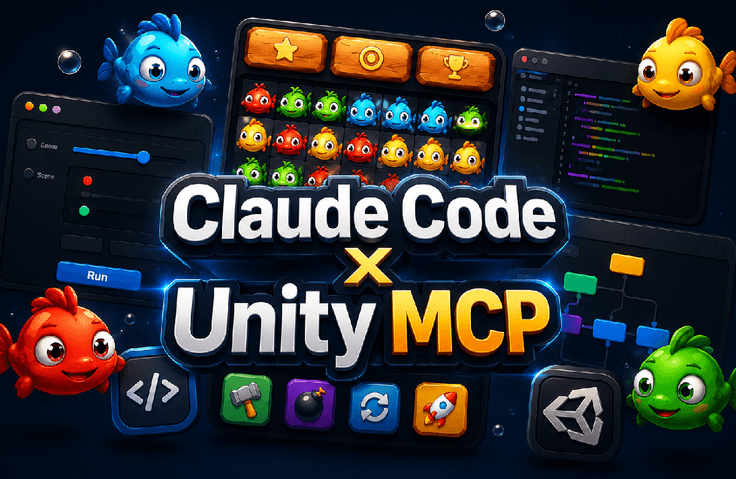


Unity MCP Casual Game Created with Claude Code Without Coding

Complete a Match-3 game by connecting Unity and Claude Code via MCP, allowing you to request development from AI even without coding knowledge. You can experience the entire process of practical game development, from environment setup to game system implementation, mobile optimization, and ad monetization.

9 learners are taking this course

Level Beginner

Course period Unlimited

Unity
Unity
Monetization
Monetization
Model Context Protocol
claude
claude
Vibe Coding
Vibe Coding
Unity
Unity
Monetization
Monetization
Model Context Protocol
claude
claude
Vibe Coding
Vibe Coding

What you will gain after the course

  • Setting up Unity MCP environment and integrating Claude Code

  • Completed AI prompt-based Match-3 casual game

  • Implementing mobile game ad monetization

Creating Your Own Game with AI
Without Coding

Complete your game by requesting AI to handle the development.


Do you want to create a game even without coding experience?
You will experience completing a Match-3 game from start to finish
by using a new method of requesting development from AI. AI utilization skills and practical game development experience are essential.


Making Games with AI Without Coding
Practical Game Development Experience with AI

Unity MCP and Claude Code will be used to
learn how to request game development from AI. From implementing a Match-3 game system to mobile optimization.


Going beyond simple tutorials, we provide the experience of completing a casual game using AI prompts.


Experience the entire end-to-end development process, from environment setup to game systems, UI, mobile optimization, and ad monetization.

We will utilize the GitHub Unity MCP.

Please check the official Unity MCP on the official Unity channel.

Creating your own game with AI
without coding

Section 1 - AI-Based Unity Casual Game Development Without Coding

You will learn how to integrate Unity MCP with Claude Code to request game development from AI without any coding. The course covers the process of implementing the core systems of a match-3 game, UI, and mobile optimization through AI prompts.

A new world of game development with AI!

Point 1. Complete a game with AI without coding

It's perfectly fine even if you have zero coding experience. By using Claude Code and Unity MCP to request game development from AI, you can complete a Match-3 casual game. Experience the joy of game creation by going through the entire development process together with AI.


Point 2. Practical Game Monetization Experience

You will learn not only game development but also monetization strategies. You can create games optimized for mobile environments, implement advertising systems yourself, and learn how to generate revenue through your games. We guide even beginner developers so they can create games that generate actual profit.

Point 3. Building Game Systems with AI Prompts

Leave complex game system development to AI. You will learn the process of requesting and developing everything from resource settings to main systems, UI, and victory conditions using Claude Code. Learn how to maximize game development efficiency through AI prompt engineering.


Point 4. VSC Integration and Mobile Optimization

This course covers everything from setting up Unity MCP using Visual Studio Code (VSC) to developing vertical mode UIs tailored for the latest mobile environments. You can systematically learn environment setup and optimization know-how to create games of actual release-ready quality.

Do you want to create a game without coding?
This course was made specifically for people like you.


✔️ Beginners with absolutely no coding experience

  • Those who want to create their own Unity games by making requests to AI

  • Those who want to experience completing their own casual game even without any coding knowledge

  • Those who want to learn the entire process of game development in an easy and fun way

✔️ Non-developers who want to start game development with AI tools

  • Those who want to experience AI development by integrating Claude Code with Unity MCP

  • Those who want to implement game systems using AI prompts instead of complex coding

  • Those who want to lower the barrier to game development by utilizing new AI technologies

✔️ Beginner developers who want to apply ad monetization to their Unity games

  • Those who want to generate revenue by adding advertisements to the Unity games they have developed

  • Those who want to learn ad monetization strategies optimized for the mobile game environment

  • Those who want to learn the entire process from practical game development to monetization


You no longer need to hesitate about game development because of coding.
With AI, anyone can create their own Unity game and even generate revenue.

Unity, Monetization, MCP, Claude, Vibe Coding

Notes before taking the course


Practice Environment

  • Since AI is used without coding, the installation of separate development tools is minimized.

  • Unity Hub and Unity Editor are required. We recommend installing the latest version.

  • We will proceed with the integration settings for Claude Code using VS Code.

Prerequisites and Important Notes

  • It's okay even if you have no coding experience at all. The process will be conducted by making requests to the AI.

  • The internet connection must be stable when setting up the Unity MCP environment.

  • The learning effect is enhanced once you become familiar with communicating with AI (writing prompts).

  • This course was recorded in a one-take format, capturing the actual development process and real-time debugging as it happened.
    By producing it quickly without re-shooting or excessive editing, we are able to offer it at an affordable price.
    We recommend this to those who want to learn by directly observing the practical workflow and problem-solving process.


  • Please keep this in mind when purchasing the course.

Learning Materials

  • We provide all the source code and project files used in the lecture.

  • We provide AI prompt examples and revised versions to increase utility.

  • You can review the entire process through the final completed game project file.


Recommended for
these people

Who is this course right for?

  • Beginners who want to make games without any coding experience

  • A non-developer looking to start game development with AI tools

  • A beginner developer who wants to apply ad monetization to a Unity game

Need to know before starting?

  • Installing Unity and Understanding the Basic Interface

  • Have a Claude Code account

  • Interest in mobile games and a willingness to learn

Hello
This is kosart

1,011

Learners

56

Reviews

53

Answers

4.4

Rating

21

Courses

Coding Academy Hard Training

Office workers, students, and indie developers gather here to study.

I mainly teach Java or game programming portfolio courses.

Blockchain exchanges, stock exchanges, game servers, game clients—company and freelance development.

CEO of a game development and game education company

Academy lecturing, freelance outsourcing, and indie development

(Unity Korea, Korea Chamber of Commerce and Industry, Etivers Learning) Unity Bootcamp Offline Lecture

Unity Certified Instructor

Extensive development and teaching experience, including Unity lectures at the Content Talent Campus (Hongneung).

R&D and lecture activities with current industry developers, indie developers, and the KOSAT team

 Unity Certified Professional: Programmer

Like Lion Education Instructor

KOSAT Indie Team, a 3-student team

111Percent, 3 Billion Won Support 'Super Fast Batch'

2nd Generation Winner


Recruitment for the 2nd generation of the new indie team has begun


More

Reviews

Not enough reviews.
Please write a valuable review that helps everyone!

kosart's other courses

Check out other courses by the instructor!

Similar courses

Explore other courses in the same field!

Limited time deal

$15.40

48%

$29.70