inflearn logo

Creating a Soulslike style game with Claude Code Unity Behavior

We will implement player controls, animations, and an attack system using Claude Code, and develop boss AI detection, pursuit, attack patterns, and phase transitions using the Behavior package. We will guide you through a step-by-step tutorial.

3 learners are taking this course

Level Basic

Course period Unlimited

Unity
Unity
UE Blueprint
UE Blueprint
Animation
Animation
multiplayer
multiplayer
game-ai
game-ai
Unity
Unity
UE Blueprint
UE Blueprint
Animation
Animation
multiplayer
multiplayer
game-ai
game-ai

What you will gain after the course

  • Full implementation of player controls, animations, and combat systems

  • Development of Boss AI patterns and phase transitions based on the Behavior package

  • Completion of UI, camera, and sound direction, as well as the build and deployment process


Studying Soulslike Style Games
with Claude Code Utniy6 Behavior


Do you vaguely want to learn game development?
From solid fundamentals to complex AI systems and practicing with real games,
you will now grow into a developer who creates actual games.


Learn the Behavior content through Claude Code AI.

Unity6 and the Behavior package are used to implement complex boss logic, such as AI detection/chase/attack and
phase transitions.


This is not just a simple tutorial; you will directly create a game using Claude Code, covering everything from player controls to HP bars and camera direction.


Experience the step-by-step process of game development with Claude Code. One-take recording, no editing.

Complete your own Soulslike game
with Claude Code and Behavior!

Section 1 - Laying the Foundation for Soulslike Game Development

We will proceed with the basic environment setup for utilizing Unity 6's Behavior package. Starting with NavMesh installation, we will focus on understanding AI target tracking and the fundamental operating principles of Behavior.

Section 2 - Player Character Implementation and Control System

Complete the core control system for the player character, including project settings, character and camera configuration, movement and animation, attack systems, rolling, and lock-on functionality. Establish the foundation of gameplay through HP, stamina, and hit/death processing.

Section 3 - Advanced Boss AI Design and Implementation (Behavior)

Design and implement the boss AI's detection, pursuit, various attack patterns, and special patterns using the Behavior package. Additionally, develop the boss's phase transition logic and hit stun processing to add depth to the combat.

Utilizing Claude Code and Unity Behavior


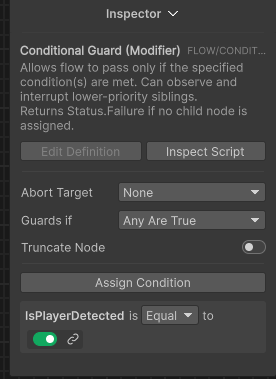
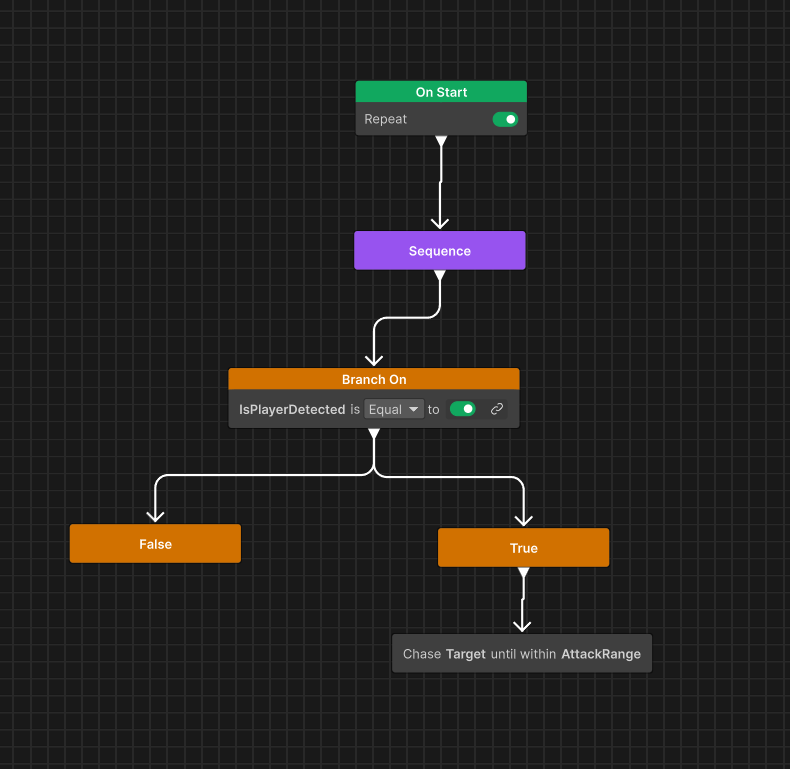
Creating Boss Phase 1, 2, and 3 AI using Unity Behavior

Using Unity Behavior

You can easily learn and utilize Boss AI by using Unity Behavior.


From boot camps to solo development, releases, and generating revenue, students are engaging in a wide range of activities.

Growing into an Indie Game Development Team

Just like the case where a 3-person team of online and offline students won the 2nd 'Super Fast Batch'—receiving 3 billion KRW in support from 111%—seize the opportunity to grow through actual team projects."


Are you feeling overwhelmed about where to start with Soulslike game development?
This course was created specifically for people like you.


✔️ Developers who want to solidify their Unity basics and complete a practical project

  • Those who want to build a solid foundation in Unity and apply it immediately to practical game development.

  • Those who want to learn by directly implementing everything from player controls to animations and attack systems.

  • Those who want to create a high-quality Soulslike game build with their own hands

✔️ Game development beginners who want to implement AI and boss battles using the Behavior package

  • Those who want to design efficient boss AI using Behavior Trees instead of complex AI programming

  • Those who want to implement various AI behavior logics such as sensing, chasing, attack patterns, and phase transitions.

  • Those who want to add more fun to their game by creating unique boss AI rather than simple monsters

✔️ Job seekers who want to create a game that leaves a strong impression on their portfolio

  • Those who want to complete a game at a commercially releasable level, rather than just finishing a simple tutorial.

  • Those who want to learn the details that enhance a game's polish, such as HP bars, camera effects, sound, and scene transitions

  • Those who want to gain practical game development experience to build competitiveness in the job market


Don't settle for vague game development anymore.
Complete your own Soulslike game with Claude Code and the Behavior package, and take your development skills to the next level.

Notes before taking the course


Practice Environment

  • Windows 10 or higher operating system recommended

  • Installation of Unity Hub and Unity 2022 LTS version is required

  • Latest graphics card and 16GB or more of RAM recommended

Prerequisite Knowledge and Important Notes

  • Basic Unity interface knowledge and C# programming fundamentals required

  • It is even more advantageous if you have game development experience.

  • This course is practice-oriented.

  • This course was recorded in a "one-take" format, capturing the actual development process and real-time debugging as they happened.
    By producing it quickly without re-shooting or excessive editing, we are able to offer it at an affordable price.
    We recommend this to those who want to learn by directly observing the workflow and problem-solving processes used in the field.


  • Please keep this in mind when purchasing the course.

Learning Materials

  • Provision of Unity project assets used in the lecture

  • Summary materials in md file (html) format for key concepts provided

  • Utilization of code snippets including practice examples


Recommended for
these people

Who is this course right for?

  • Developers who want to learn Unity basics and complete a real-world game project

  • Beginner game developers who want to learn how to implement AI systems and boss battles

  • Job seekers aiming to create high-quality games for their portfolios

Need to know before starting?

  • Basic interface of the Unity engine and experience with object manipulation

  • Understanding Basic C# Programming Syntax

  • Interest in game development and a willingness to learn

Hello
This is kosart

963

Learners

55

Reviews

52

Answers

4.3

Rating

20

Courses

Coding Academy Hard Training

Office workers, students, and indie developers gather here to study.

I mainly teach Java or game programming portfolio courses.

Blockchain exchanges, stock exchanges, game servers, game clients—company and freelance development.

CEO of a game development and game education company

Academy lecturing, freelance outsourcing, and indie development

(Unity Korea, Korea Chamber of Commerce and Industry, Etivers Learning) Unity Bootcamp Offline Lecture

Unity Certified Instructor

Extensive development and teaching experience, including Unity lectures at the Content Talent Campus (Hongneung).

R&D and lecture activities with current industry developers, indie developers, and the KOSAT team

 Unity Certified Professional: Programmer

Like Lion Education Instructor

KOSAT Indie Team, a 3-student team

111Percent, 3 Billion Won Support 'Super Fast Batch'

2nd Generation Winner


Recruitment for the 2nd generation of the new indie team has begun



More

Reviews

Not enough reviews.
Please write a valuable review that helps everyone!

kosart's other courses

Check out other courses by the instructor!

Similar courses

Explore other courses in the same field!

Limited time deal

$33,000.00

40%

$42.90