강의

멘토링

커뮤니티

Hardware

/

Embedded IoT

STM32 CAN Communication

This is a text-based lecture explaining how to implement CAN communication using STM32 MCU. Become a master of CAN communication implementation.

(4.3) 6 reviews

176 learners

  • alex
stm32
통신
네트워크
MCU
CAN

What you will gain after the course

  • CAN communication using STM32 MCU

  • Utilizing STM32 MCU

CAN communication feels vague,
We will guide you from the basics to practical application.

💾 Please check before taking the class!
  • This lecture is a text lecture in PDF format and does not provide separate video. (Total length: 7,384 characters)
  • All source files used in the lecture, as well as the Windows program source and executable files, will be provided to those taking the course. Lecture materials can be downloaded from Section 0 [Material Download Link].
  • This lecture will be conducted on the NUCLEO-F446RE training board . To implement CAN communication and verify the results following the lecture, please purchase the board in advance. (Two boards will be used.)

CAN communication master
If you want to be?

This lecture explains how to implement CAN communication using the STM32 microcontroller unit (MCU). The first half covers CAN communication with the STM32F446, and the second half covers CAN communication with the STM32H743.

CAN communication
Controller Area Network

This is a standard communications specification designed to enable microcontrollers and devices to communicate with each other within a vehicle without a host computer. Initially developed for vehicle networks, it is now being widely applied across all industries.

CAN communication is gradually expanding across all industries. However, implementing CAN communication can be challenging, even for those with extensive development experience. This course aims to cover everything about CAN communication, from its concepts to programming methods and applications, and even how to verify results through waveforms.

This course provides detailed instructions, from project creation to source file modification and analysis, to make it easy for even those new to ST MCUs to follow. You'll also use a debugging program to verify the transmission and reception process and results of CAN communication. Measuring and analyzing CAN waveforms will help you understand the CAN protocol.

If you are interested in CAN communication , I hope you will become a master of CAN communication through this lecture.


Features of the lecture
Check it out.

1️⃣
Easy even for beginners

We explain the entire process, from project creation to program implementation and result verification, so that even those with no experience with STM32 can easily follow along.

2️⃣
So that you can understand the flow

Not only will you gain a comprehensive understanding of CAN communication, you will also gain the ability to utilize CAN communication in practical applications.

3️⃣
Providing detailed information

You can even check CAN communication results through the provided Windows program. (Both source and executable files are provided.)
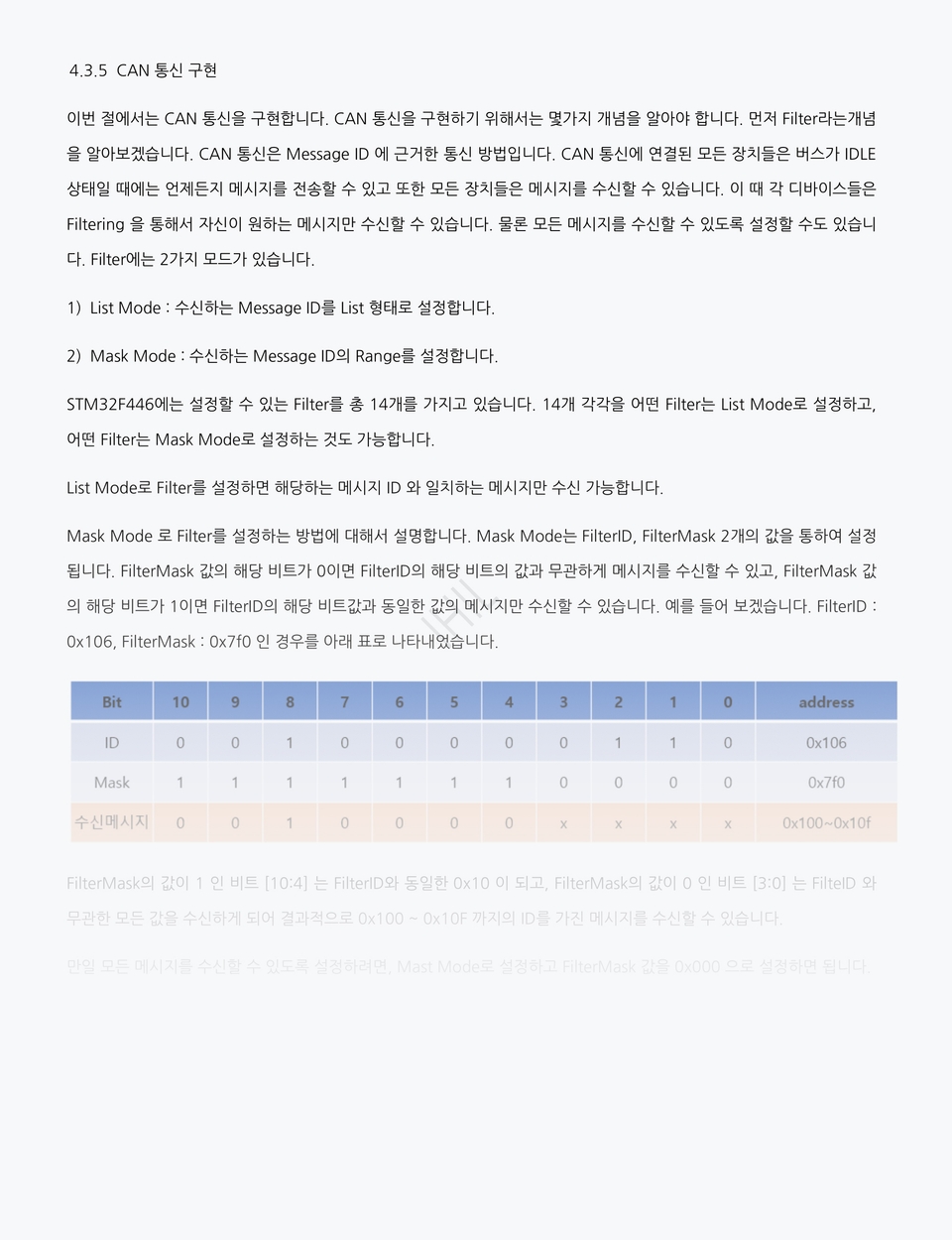
Learning Content and Structure

First half
STM32F446

We will implement data exchange using two NUCLEO-F446RE development boards.

Second half
STM32H743

This is a new feature added in version v1.3, which implements data exchange using the STM32F446 board and the STM32H743 board.

This lecture does not cover CAN-FD, but focuses on 2.0A (Standard) and 2.0B (Extended). (CAN-FD will be covered in the next version.) In addition, for practical training, we will use the NUCLEO-F446RE development board provided by ST, and STM32CubeIDE v.10.0 as the compiler tool.

Detailed Curriculum (Table of Contents)
  • 1 Overview (3)
  • 2 HW configuration (4)
  • 2.1 FW Download Pin Map (5)
  • 2.2 Power Pin Map (5)
  • 2.3 UART Pinmap (6)
  • 2.4 CAN Pinmap (6)
  • 2.5 Overall system configuration diagram (7)
  • 2.6 Program Download (8)
  • 2.6.1 ST-LINK FW Update (8)
  • 2.6.2 Board Connection (9)
  • 3 CAN Communication Overview (10)
  • 3.1 Data Frame Structure (10)
  • 3.2 Bit Timing (12)
  • 3.3 Arbitration (13)
  • 3.4 Bit Stuffing (15)
  • 4 SW Implementation (16)
  • 4.1 Creating a Project (16)
  • 4.2 Configuration (18)
  • 4.2.1 RCC, DEBUG (19)
  • 4.2.2 Clock Configuration (20)
  • 4.2.3 Timer Settings (21)
  • 4.2.4 UART Settings (22)
  • 4.2.5 CAN Settings (23)
  • 4.2.6 GPIO Settings (26)
  • 4.3 Code Implementation (27)
  • 4.3.1 Using the printf statement (27)
  • 4.3.2 Build & Download (28)
  • 4.3.3 LED On/Off using Timer Interrupt (30)
  • 4.3.4 UART1 Receive Interrupt Implementation (33)
  • 4.3.5 CAN Communication Implementation (35)
  • 4.3.5.1 main.h (40)
  • 4.3.5.2 can.c (40)
  • 4.3.5.3 can.h (43)
  • 4.3.5.4 usart.c (44)
  • 4.3.5.5 usart.h (46)
  • 4.3.5.6 main.c (46)
  • 5 Check Results (48)
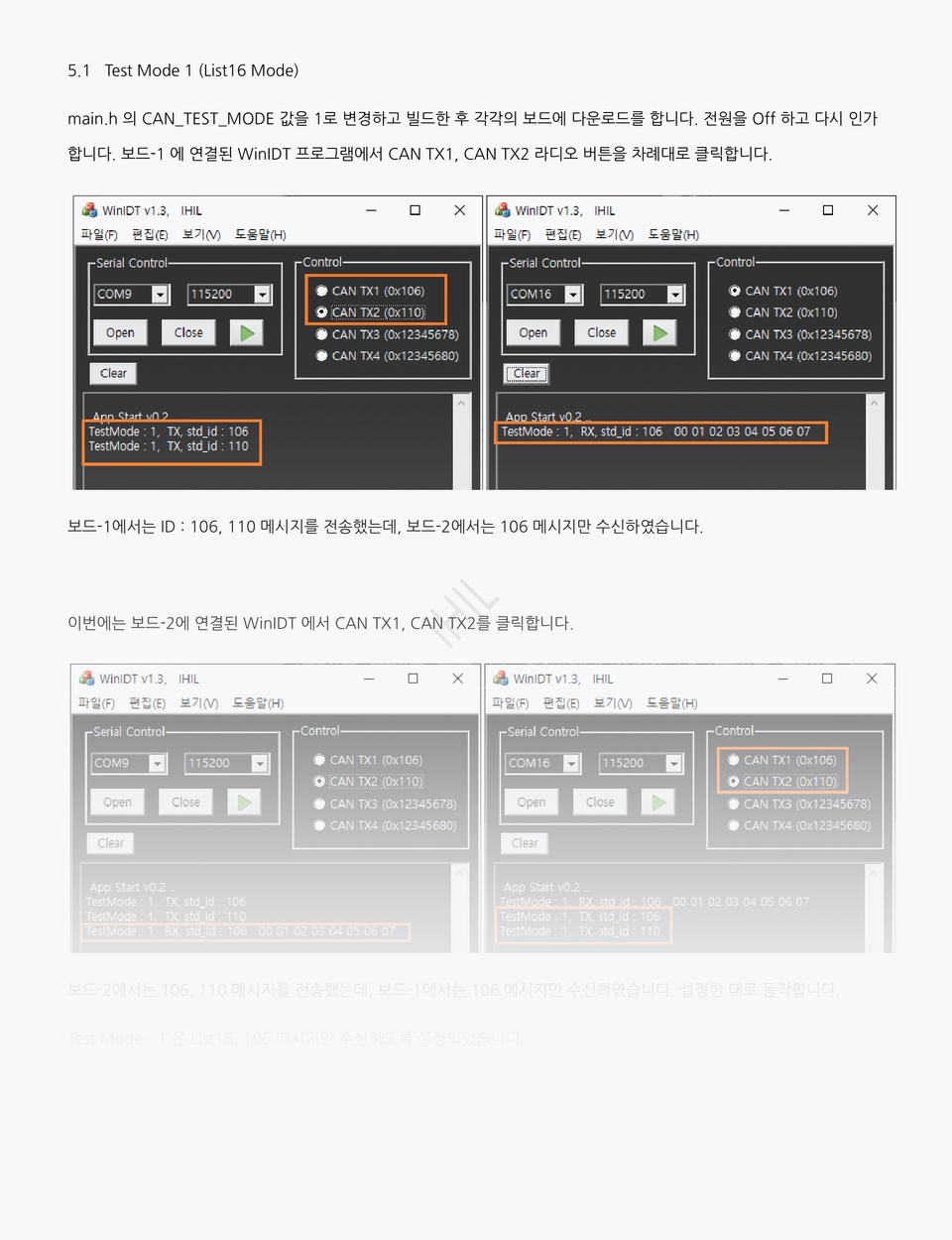
  • 5.1 Test Mode 1 (List16 Mode) (49)
  • 5.2 Test Mode 2 (List32 Mode) (50)
  • 5.3 Test Mode 3 (Mast16 Mode) (51)
  • 5.4 Test Mode 4 (Mask32 Mode) (52)
  • 5.5 Test Mode 5 (List16 2-Bank Mode) (53)
  • 5.6 Set up all message reception (54)
  • 6 Waveform Analysis (56)
  • 7 STM32H743 CAN Implementation (59)
  • 7.1 Creating a Project (59)
  • 7.2 Configuration (61)
  • 7.2.1 RCC, DEBUG (61)
  • 7.2.2 UART Settings (63)
  • 7.2.3 CAN Settings (64)
  • 7.2.4 Clock Configuration (67)
  • 7.2.5 CAN Baud Rate Setting (68)
  • 7.2.6 Code Generation (69)
  • 7.3 Code Implementation (70)
  • 7.3.1 main.h (70)
  • 7.3.2 main.c (70)
  • 7.3.3 fdcan.c (72)
  • 7.3.4 fdcan.h (81)
  • 7.3.5 usart.c (81)
  • 7.3.6 usart.h (83)
  • 8 Check Results (84)
  • 8.1 Test Mode 1 (84)
  • 8.2 Test Mode 2 (85)
  • 8.3 Test Mode 3 (86)
  • 8.4 Test Mode 4 (87)
  • 9 References (88)
  • 10 Revision History (89)

Q&A 💬

Q. Is there anything I need to prepare to attend the lecture?

This lecture will be conducted on the NUCLEO-F446RE hands-on board. We'll use two boards to verify CAN communication. If you don't have a board, please review the content first and then purchase one later to test it on your board.

Q. What program tools do you use?

We use STMCubeIDE v1.9.0, provided free of charge by ST. Please install it before attending the course.

🎙️ Introducing the knowledge sharer who created the lecture

I've worked as a developer for over 20 years at both large and small companies, and I currently run a small business. I've developed an ISP (Image Signal Processing) ASIC for CCTV, and I've developed numerous FPGA-based products, including OLED inspection equipment and DAQ (Data Acquisition System). Beyond FPGAs, I have extensive experience in software development (STM32, PIC32, AVR, ATMEGA, etc.), circuit design, and Windows programming. I hope my extensive experience will be helpful to you in your learning.
A great lecture to watch together 📖

Recommended for
these people

Who is this course right for?

  • Anyone interested in STM32 MCU

  • For those who want to implement CAN communication

Need to know before starting?

  • C language

Hello
This is

1,731

Learners

76

Reviews

127

Answers

4.8

Rating

19

Courses

저는 지난 20여년 동안 대기업, 중소기업에서 개발자로 일해왔고

현재는 작은 기업의 대표로 있습니다.

주요 경력사항은

  • Verilog HDL을 이용한 FPGA 설계

    • CCTV용 ISP ASIC 개발 (약 10년)

    • OLED Display 검사장비 개발 (약 3년)

    • FPGA를 이용한 장비 개발

  • MCU FW

    • STM32

    • PIC32

    • AVR, ATMEGA

    • DSP (TI)

  • Windows Application Program

    • Visual Studio MFC, C++

입니다.

Curriculum

All

89 lectures

Course Materials:

Lecture resources
Published: 
Last updated: 

Reviews

All

6 reviews

4.3

6 reviews

  • yonsoo6259님의 프로필 이미지
    yonsoo6259

    Reviews 9

    Average Rating 5.0

    5

    30% enrolled

    • kimht40403496님의 프로필 이미지
      kimht40403496

      Reviews 1

      Average Rating 4.0

      4

      30% enrolled

      • ssk47159485님의 프로필 이미지
        ssk47159485

        Reviews 1

        Average Rating 5.0

        5

        61% enrolled

        • somebody2100님의 프로필 이미지
          somebody2100

          Reviews 1

          Average Rating 5.0

          5

          61% enrolled

          • scryid8884님의 프로필 이미지
            scryid8884

            Reviews 4

            Average Rating 4.8

            5

            87% enrolled

            This is a great course for learning CAN communication. It was very helpful because I was at a loss. It was also great that the Q&A was answered quickly.

            • ihil
              Instructor

              It is good to know the basic concepts and approach to CAN communication. Thank you for finding the lecture helpful. I hope you become a good developer. Thank you~!!

          $17.60

          alex's other courses

          Check out other courses by the instructor!

          Similar courses

          Explore other courses in the same field!