
inflearn logo

AI Excel Macro Stock Analysis Program You Can Create Without Knowing How to Code

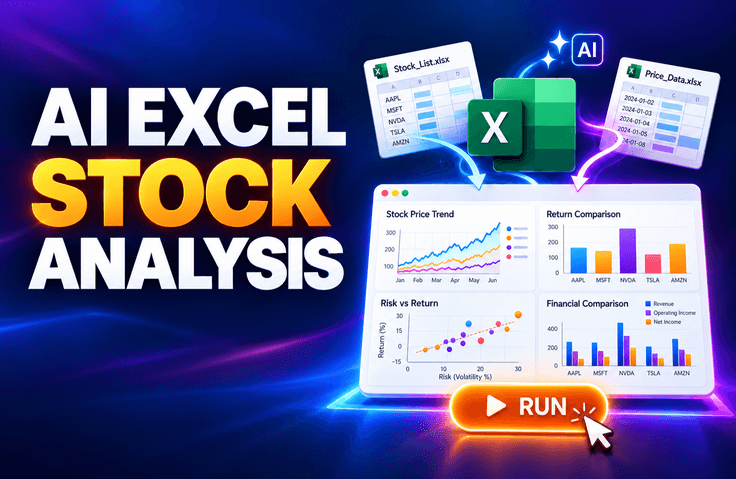
Use AI to build your own Excel macro-based stock analysis program. You will practice step by step how to retrieve data from the internet based on a stock ticker and date range, then record and organize the JSON data in an Excel sheet. Along with price changes, moving averages, trading volume, and changes in financial performance, you will analyze period returns, volatility, and maximum drawdown, completing everything from an individual stock analysis screen to a comprehensive dashboard for comparing multiple stocks of interest.

1 learners are taking this course

Level Basic

Course period Unlimited

Excel
Excel
VBA
VBA
AI
AI
ChatGPT
ChatGPT
Excel
Excel
VBA
VBA
AI
AI
ChatGPT
ChatGPT

What you will gain after the course

  • You can use AI to design the overall workflow of an Excel macro stock analysis program.

  • You can collect data matching a stock code and inquiry period, and record and organize the JSON data in an Excel sheet.

  • You can analyze price changes, moving averages, trading volume, changes in performance and returns, volatility, and maximum drawdown.

  • You can automatically generate stock price and performance charts and configure an individual stock analysis screen.

  • You can create a comprehensive dashboard to compare the indicators and performance of multiple watchlist items.


Creating Excel Macros with AI, Even Without Coding Knowledge

Create a stock analysis program.

Enter only the stock ticker and date range
and it retrieves stock data from the internet and organizes it into JSON and an Excel sheet,

We will create a program that directly analyzes price changes, moving averages, trading volume, and changes in performance.

✓ No Python installation required

✓ No paid ChatGPT subscription required

Practice environment: Windows PC · Desktop Excel required

It's okay if you've ever felt overwhelmed searching for stock data, copying it each time, and organizing it.
With help from AI chatbots such as ChatGPT, you can create your own Excel macro program that takes you all the way from data collection to analysis and visualization.

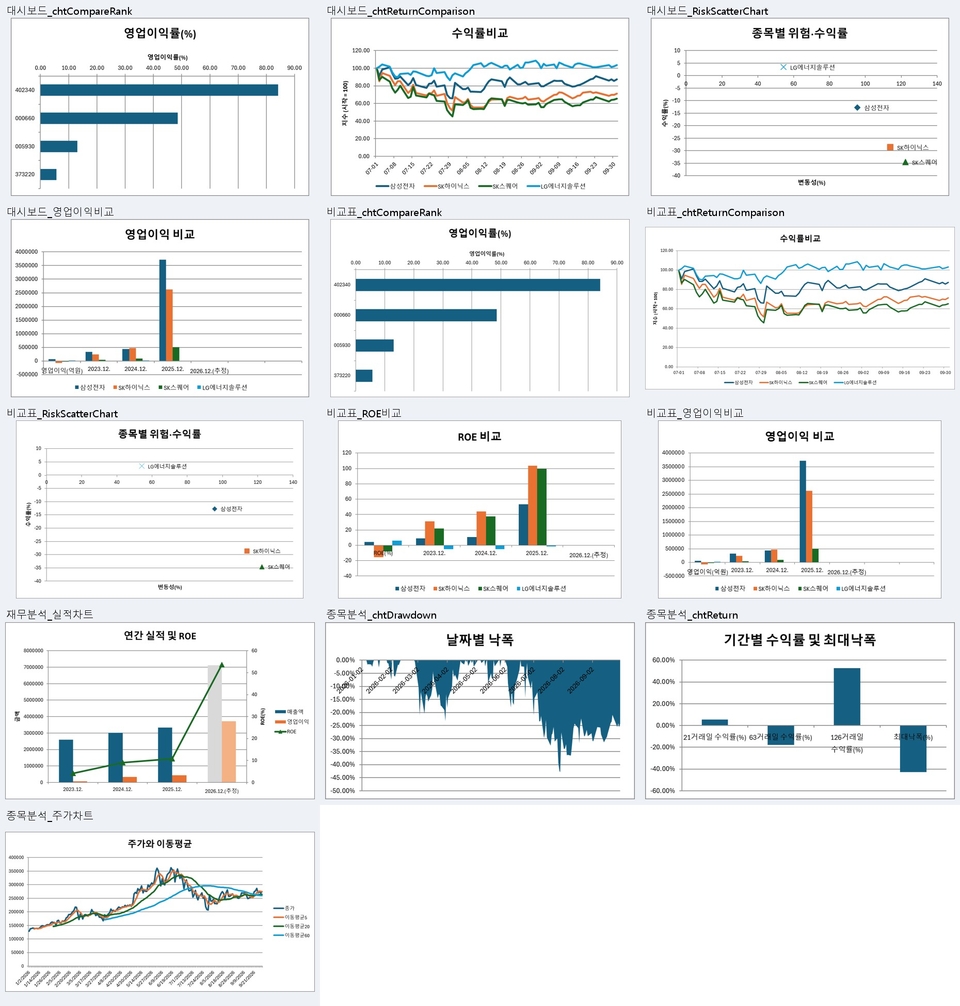
You can actually create an Excel macro stock analysis program like this.

Point 1.Automating various charts

Automatically generates charts showing stock prices, trading volume, and financial performance.

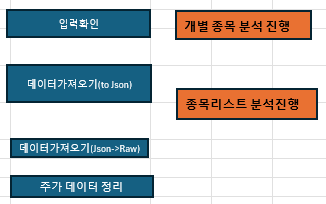
Point 2.Create buttons to run individual functions and the entire analysis

You can create individual buttons for each function and an integrated button for each track.


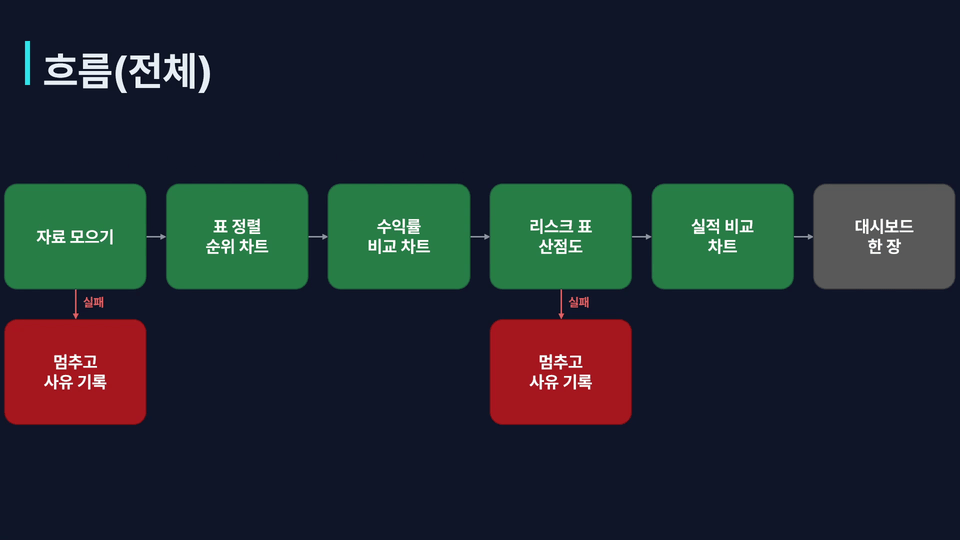
Point 3.Explain the processing flow for each function and provide it as learning material

Explain the processing sequence for each function and the behavior when errors occur using flowcharts, and provide them as learning materials.


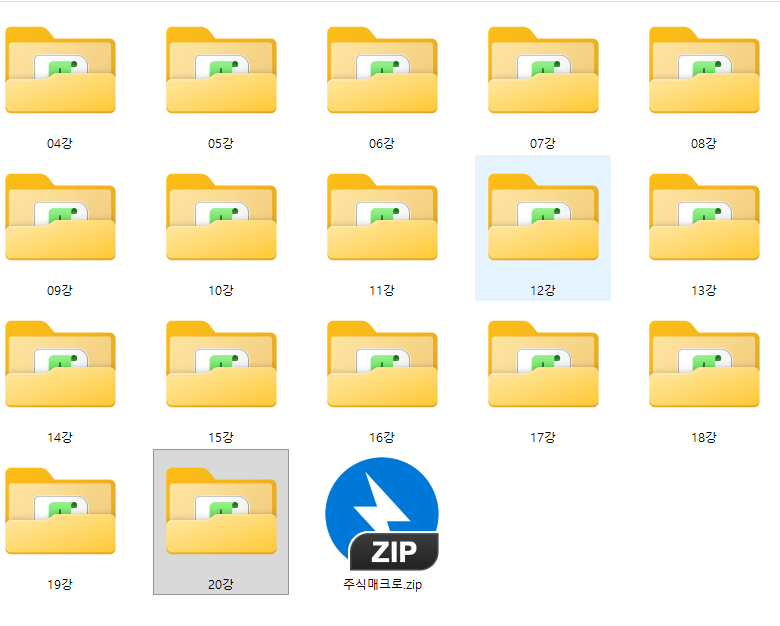
Point 4. Files containing the results for each lesson

We provide practice files for each lesson and the final completed file.

Even if you get stuck during the exercises, you can open the file for that lesson and continue learning.

Stock analysis programs created with Excel macros
Now automate them with AI.
This course is recommended for people like these.

✔ Those who want to organize and analyze stock data in Excel

  • Those who manually look up and organize stock prices and financial information for each stock

  • Those who want to automatically calculate key indicators such as price change rates, moving averages, and trading volume

  • ✔ Those who want to view changes in stock prices and performance at a glance in charts

✔ Those who want to create stock analysis macros with AI without coding

  • Those who want to explain their desired analysis features to AI and create VBA macros

  • Those who want to personally implement everything from data collection to organization, analysis, and chart creation

  • Those who want to create their own stock analysis tool based on the course examples

✔ Those who want to compare watchlist stocks and generate dashboards with a single click

  • Those who want to compare the returns and financial metrics of multiple stocks of interest at once

  • Those who want to examine volatility and returns together and understand the characteristics of each stock

  • Those who want to connect individual analysis macros and automatically create a comprehensive comparison dashboard

From stock price data collection to stock comparison and dashboard completion

Create your own stock analysis program with AI.

Create Excel macros with AI, and
connect your watchlist analysis to a single button.

Notes Before Taking the Course


Practice Environment

  • Please prepare a Windows PC and the desktop version of Excel that can run macros.

  • Paste the AI-generated code into Excel’s VBA editor and run it.

  • You need an environment where you can access AI chatbots such as ChatGPT.

  • If you are using a company PC, please check whether you can run macros and access AI services.

Prerequisites and Important Notes

  • You only need to know the basics of entering data into Excel cells, using sheets, and saving files.

  • You need to have experience asking AI chatbots questions and receiving answers.

  • Experience running macros and saving macro-enabled workbooks (.xlsm) will make the hands-on exercises easier.

  • No prior knowledge of VBA syntax or programming is required. Taking the previous course is not mandatory either.

Practice Format

  • You will practice step by step, from collecting stock price and financial data to calculating indicators, creating charts, and comparing stocks on your watchlist.

  • Explain the required functionality to the AI, run the generated macro, and check the results.

  • Connect individual macros into a single workflow to complete a comprehensive comparison dashboard.

  • First practice with the sample stock, then change the watchlist and query period to apply it.

  • Results may vary depending on the data provider and the time of access. This course covers the creation of analysis tools and does not recommend buying or selling any specific stocks.


Recommended for
these people

Who is this course right for?

  • Those who want to automate repetitive stock data collection and organization tasks in Excel

  • Those who want to create practical Excel macro programs themselves using AI

  • For those who want to compare stock prices, performance, returns, and risks of their watchlist stocks on a single screen

  • Those who want to gain hands-on experience with everything from data collection to analysis and visualization through a real-world project

Need to know before starting?

  • It would be helpful to know the basics of Excel, such as cells, sheets, and basic formulas.

  • It would be good to have a basic user experience that involves asking AI questions and copying or modifying the generated code.

  • Understanding basic stock market terms such as stock prices, trading volume, moving averages, and financial performance will help.

Hello
This is fasthome

Career Verified

Automate repetitive tasks and focus on what matters.

Hello. This is the Early-Leave Automation Lab.

Based on problem-solving methods developed through approximately 15 years of hands-on software experience, I teach AI and office automation that anyone can apply to their work.

What you can learn here

  • Automating repetitive tasks using Excel, VBA, and Python

  • Creating practical programs with ChatGPT to reduce the burden of coding

  • Automation of stock and real estate data collection and analysis

  • Business process automation connecting Word, PowerPoint, and Outlook

We focus not merely on learning functions, but on creating results that you can execute yourself.

Automation you can use, not just automation you learn.

This is the On-Time Departure Automation Lab.


YouTube: https://www.youtube.com/@fasthome8282

Blog: https://blog.naver.com/fasthome

More

Curriculum

All

22 lectures ∙ (3hr 55min)

Course Materials:

Lecture resources
Published: 
Last updated: 

Reviews

Not enough reviews.
Please write a valuable review that helps everyone!

fasthome's other courses

Check out other courses by the instructor!

Similar courses

Explore other courses in the same field!

Limited time deal

$3,763.00

50%

$46.20