

inflearn logo

Mastering Outlook Task Automation with Python

This is a practice-oriented course designed to increase work productivity by automating repetitive Outlook email tasks using Python. From composing emails and saving drafts to accessing the inbox, searching for emails, handling attachments, categorizing emails, and creating calendar events and contacts— you will learn how to automate frequently repeated Outlook tasks using Python and pywin32. Rather than just explaining simple functions, this course is structured to help you build your own reusable Outlook automation programs through automation code ready for immediate practical use and real-world project examples.

1 learners are taking this course

Level Beginner

Course period Unlimited

Python
Python
Outlook
Outlook
pywin32
pywin32
MS-Office
MS-Office
automation
automation
Python
Python
Outlook
Outlook
pywin32
pywin32
MS-Office
MS-Office
automation
automation

What you will gain after the course

  • Ability to implement Outlook automation using Python and pywin32

  • Automation of email drafting, saving, screen display, and pre-sending inspection

  • Accessing the inbox and subfolders, and retrieving email information

  • Building a condition-based email search and automatic classification process

  • Writing Reusable Outlook Automation Code Using Function-Based Structure


Are you still using Outlook manually?
[Python] Outlook Automation

The secret to solving repetitive email tasks with Python and leaving work on time
We focus on automation techniques that can be applied directly to real-world tasks, rather than just theory. Without complex explanations, you will follow the flow of 'Why it's needed → How to use it → Immediate application' to create your own reusable Outlook automation programs that can be used in practice right away.


Emails waiting for replies that keep piling up even as quitting time approaches

The experience of losing time by manually saving and organizing important attachments one by one

The hassle of having to draft emails every time according to a fixed format

I support you in discovering the new possibilities of automation
and maximizing your work efficiency in your daily routine.


Python and pywin32
Outlook Email, Calendar, and Contact Automation
From Implementation to Management


Finish repetitive tasks with code,
and turn your time into time to go home.


By the end of this course, you will

You can automate Outlook tasks with Python

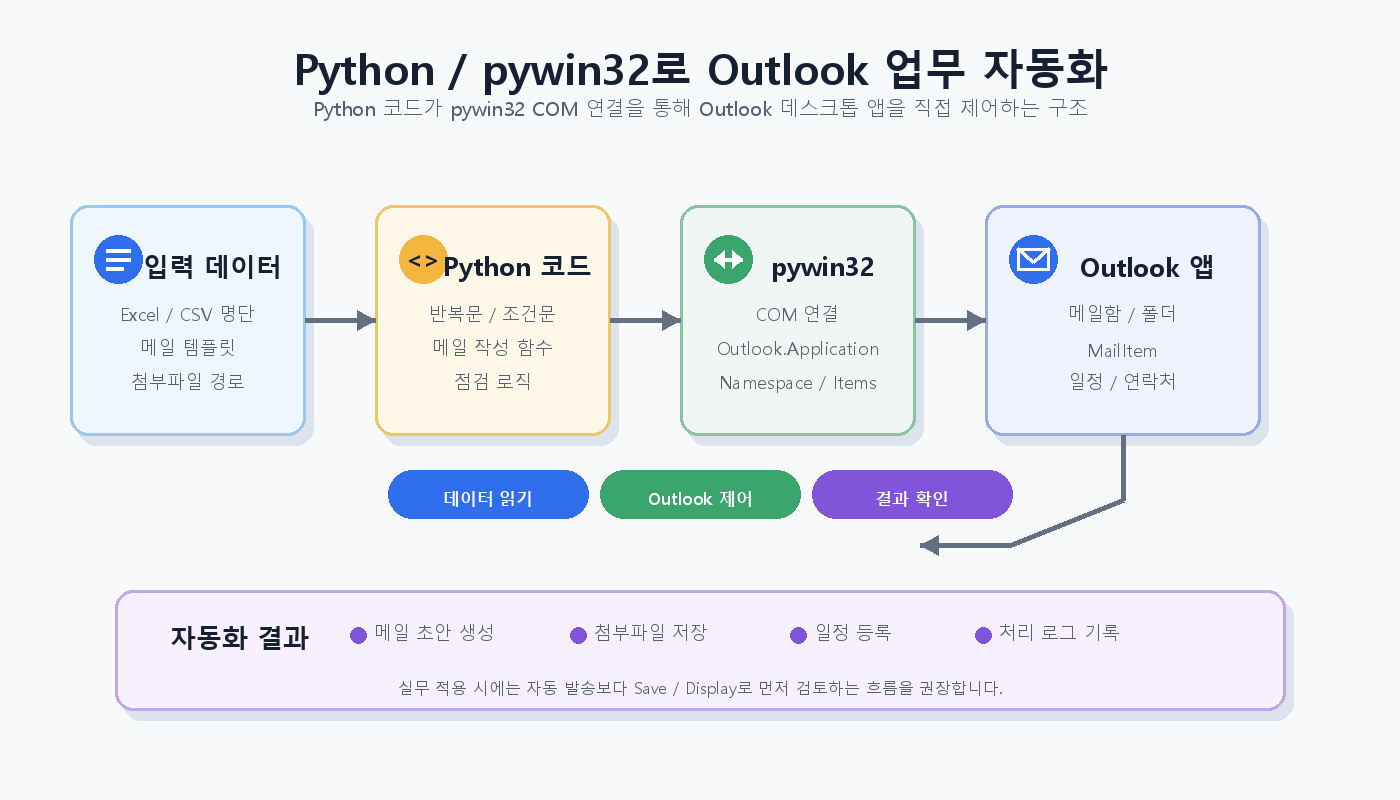
You can control the Outlook desktop app with Python code and handle tasks directly using a Python and pywin32-based automation method.

You can automatically handle repetitive tasks such as composing emails, saving drafts, accessing the inbox, and navigating folders.


You can quickly generate recurring email drafts.

Based on an Excel list or predefined input data

Configure the email subject, body, and attachments for each recipient, and

It can be automatically generated as a draft that can be reviewed before sending.


You can automatically collect necessary emails and attachments.

Search for emails based on conditions such as subject, sender, received time, and keywords,

You can create a workflow that saves attachments to a designated folder and organizes the processing results.


You can even expand automation to Outlook calendars and contacts.

Beyond just email automation,

You can expand the scope of automation to overall Outlook tasks, such as creating schedules, entering meeting information, and contact-based processing.


You can learn safe automation habits that are applicable to real-world tasks.

Check the recipients, CC, subject, body, and attachments before automatic sending, and

You will learn a business automation structure that reduces the possibility of errors by utilizing Save and Display.


✔️

Solve repetitive Outlook tasks effortlessly with Python!

Mastering Outlook Task Automation
with Python and pywin32

In this course, instead of complex theories, we focus on Outlook automation techniques using Python and pywin32 that can be applied immediately to real-world tasks. You will learn how to eliminate the inconveniences of practical work—such as repetitive email drafting, categorization, and attachment handling—to maximize your productivity.

Outlook Task Automation Workflow with Python and Pywin32

Implementing Core Practical Automation Functions

You will engage in hands-on practice to directly implement core Outlook functions using Python code, such as automating email composition and draft saving, accessing inboxes and retrieving email information, condition-based email searching and automatic classification, and creating calendar events and contacts. Through the pywin32 library, you will gain experience in building reusable automation programs.

Practical Project

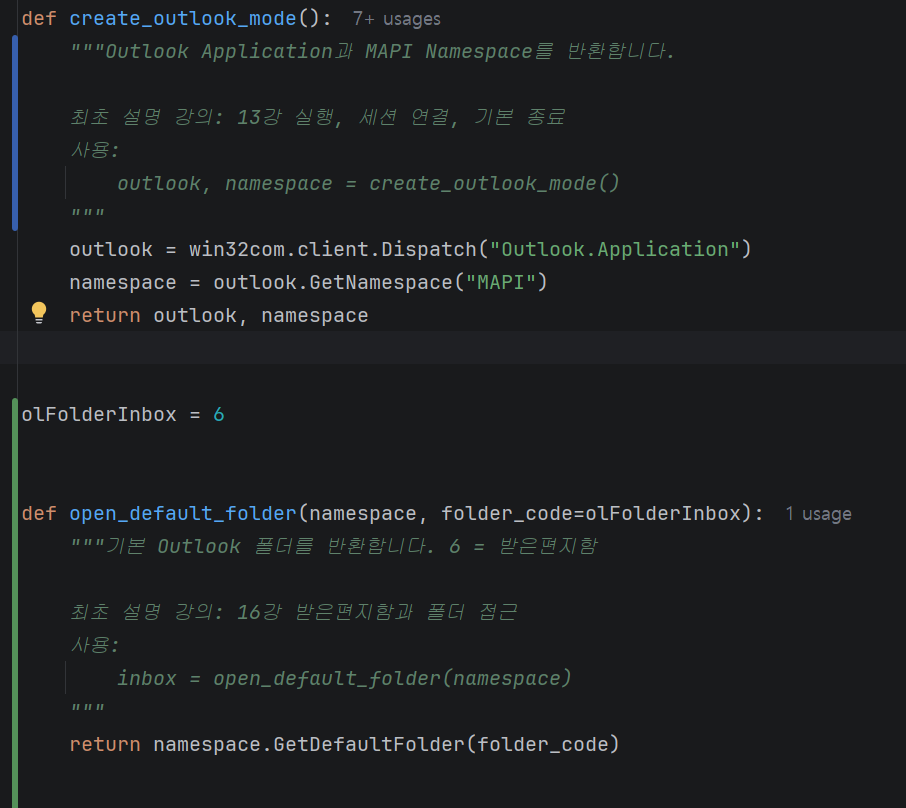
Ready-to-use automation codes and functions

The course provides a systematic curriculum starting from Python basics to Excel control using pywin32 and practical projects. By structuring and functionalizing automation code, you can reduce repetitive tasks and achieve practical results that dramatically improve work productivity.


📚

Designing practical automation logic

Section 1

Class Preparation and Python Fundamentals

In this section, you will download all the materials required for the course exercises and build a solid foundation for Outlook automation by setting up the Python development environment and mastering core syntax. You will learn essential content for implementing automation logic, ranging from programming concepts to data structures and function usage.


Section 2

Getting Started with Controlling Outlook Objects using Python

You will learn how to control the Outlook application using the pywin32 library. You will take your first steps in automating basic Outlook functions with Python code, including understanding the Outlook object structure and managing tasks such as composing, saving, and handling drafts, as well as accessing the inbox.


Section 3

Advanced Outlook Email Automation Techniques for Practical Business

Learn advanced techniques to automate mail processing tasks that frequently occur in actual work. You will implement various scenarios through code, such as reading emails, searching by conditions, managing attachments, composing HTML-formatted emails, categorizing and moving emails, and automating calendars/contacts.


Section 4

Completing Outlook Automation Through Real-World Projects

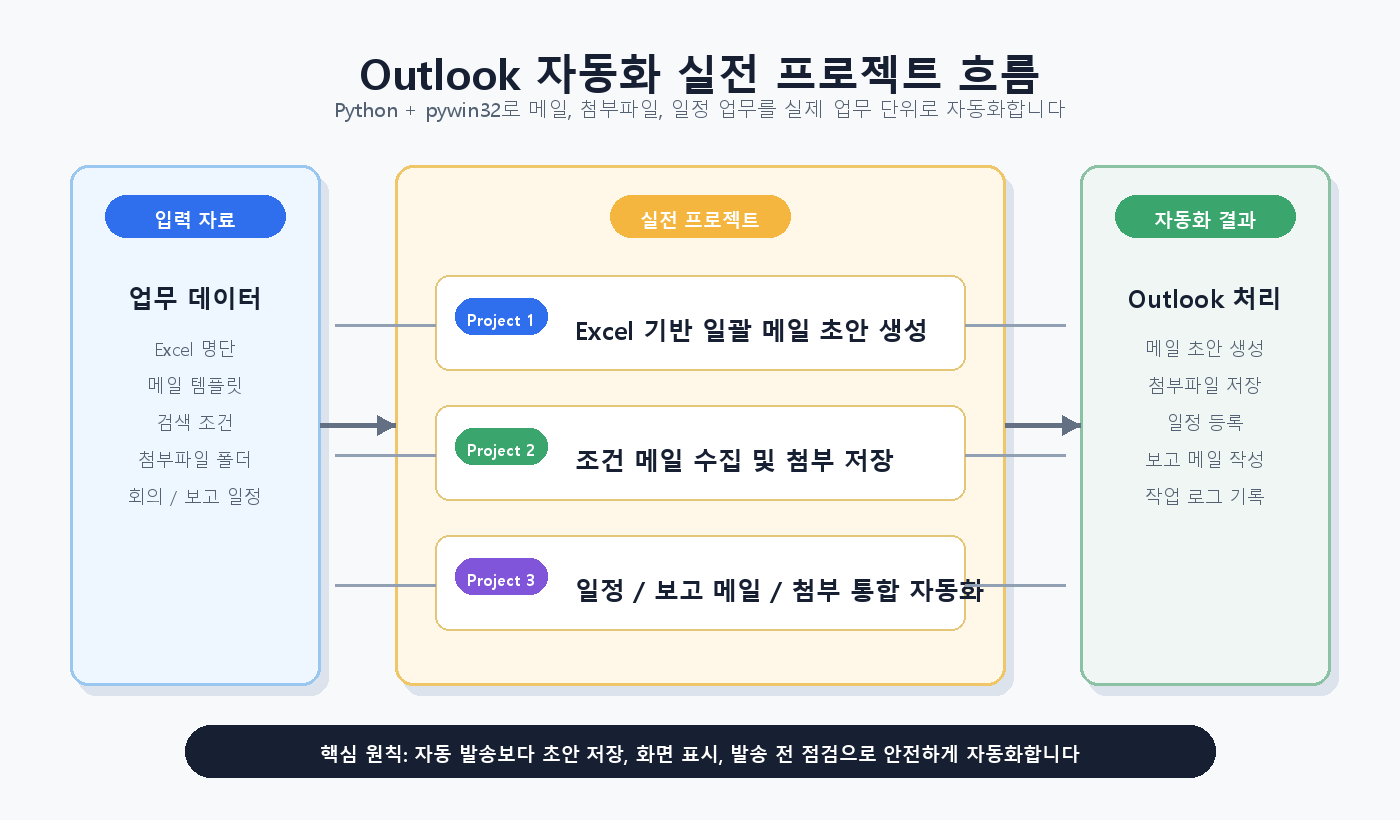
Based on what you have learned so far, you will carry out three practical projects to solve real-world business scenarios. You will personally complete reusable automation programs through projects such as Excel-linked bulk email generation, conditional email collection and automatic attachment saving, and integrated reporting email automation.

We can solve the concerns
of people like this!

📌

Office workers who spend a lot of time writing repetitive emails

Writing similar emails every time,

Check the recipients and attachments, and

If you are spending a lot of time creating drafts, this course is for you.

Automatically generate recurring email drafts with Python and

You can create a workflow that allows for review before sending.

📌

Those who want to automate the organization of their inbox and attachments

Find emails with specific subjects or from specific senders

If you are repeatedly saving attachments and organizing them into folders

You can immediately apply automated email collection based on specific conditions.


📌

Those who have learned Python but feel overwhelmed by how to apply it to work automation

Even if you have some knowledge of Python syntax

It is suitable for those who feel lost on how to actually connect it to their Outlook tasks.

It is not just a simple explanation of grammar, but

You will learn by directly controlling Outlook objects and connecting them to actual work processes.


Notes before taking the course


Practice Environment

  • A PC with the Windows operating system installed is required.

  • Python 3.x version and PyCharm IDE installation are recommended.

  • MS-Office Outlook must be installed.

Prerequisite Knowledge and Important Notes

  • Basic knowledge of Python programming will be helpful for learning.

  • If you are already familiar with the basics of Outlook, it will help you understand the practical exercises.

  • This course focuses more on hands-on practice than theory.

Learning Materials

  • We provide all Python sample codes used in the lecture.

  • You can review the core content through the PDF lecture materials.

  • You will run the practice project example code yourself.


Recommended for
these people

Who is this course right for?

  • Office workers who spend a lot of time on repetitive email drafting and handling attachments

  • Practitioners who want to automate email organization, search, and classification tasks using Outlook

  • Those who want to systematically automate repetitive tasks such as pre-mailing checks, condition searches, and saving attachments.

Need to know before starting?

  • Basic Outlook experience (writing emails, adding calendar events, adding contacts)

  • It is better if you have experience installing and running Python, but beginners can also take the course.

  • Understanding repetitive output tasks in work

Hello
This is fasthome

Career Verified

Hello. This is the On-Time Departure Automation Lab.

Having worked in SW practice for about 15 years,
I have been contemplating "ways to reduce repetitive tasks and bring forward the time to leave work."

In this course,
we focus on automation techniques that can be applied immediately in real-world tasks, rather than just theory.

Rather than complex explanations,
we focus on the flow of "Why it's needed → How to use it → Immediate application."

We will save you time through Excel, Word, and various task automations.

More

Curriculum

All

33 lectures ∙ (6hr 10min)

Course Materials:

Lecture resources
Published: 
Last updated: 

Reviews

Not enough reviews.
Please write a valuable review that helps everyone!

fasthome's other courses

Check out other courses by the instructor!

Similar courses

Explore other courses in the same field!

Limited time deal

$53,130.00

30%

$59.40