inflearn logo

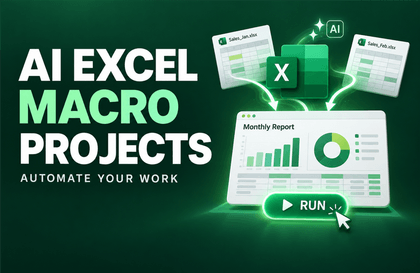
AI office automation you can create without knowing how to code

Automate repetitive Excel, Word, Outlook, and PowerPoint tasks with AI—without writing code yourself.

6 learners are taking this course

Level Beginner

Course period Unlimited

Python
Python
Excel
Excel
PowerPoint
PowerPoint
Word
Word
Outlook
Outlook
Python
Python
Excel
Excel
PowerPoint
PowerPoint
Word
Word
Outlook
Outlook

What you will gain after the course

  • E-book + prompts + practice materials

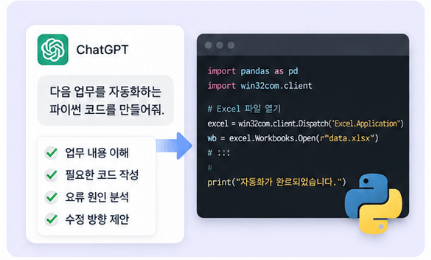
  • Learn how to ask AI to automate tasks.

  • Learn how to run and modify code created by AI.

  • Create your own Excel, Word, Outlook, and PowerPoint automation.

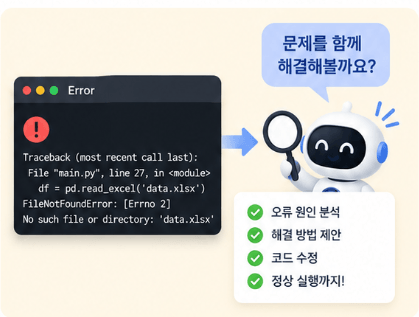
  • Even when errors occur, you’ll be able to resolve them with AI.

  • You’ll be able to connect multiple Office tasks into a single automation system.

Daily repetitive Office tasks
Let AI handle them for you

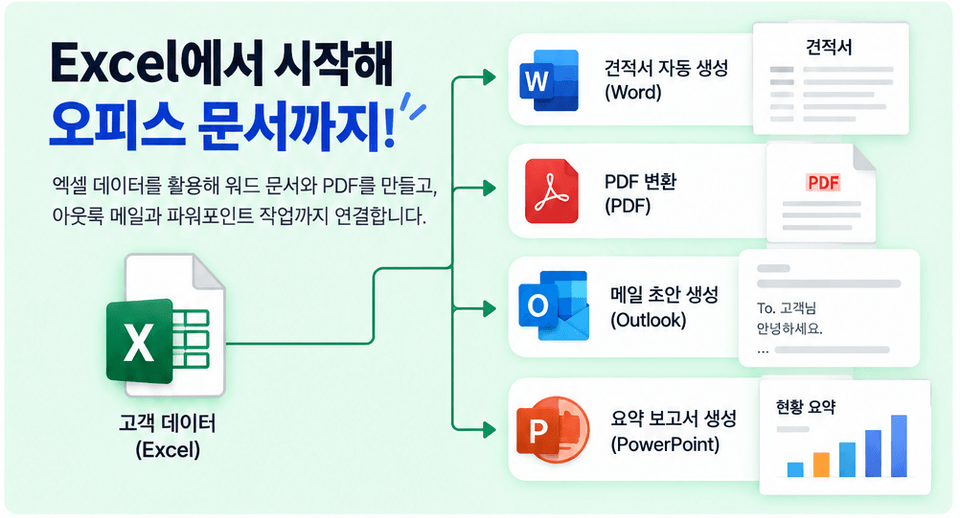
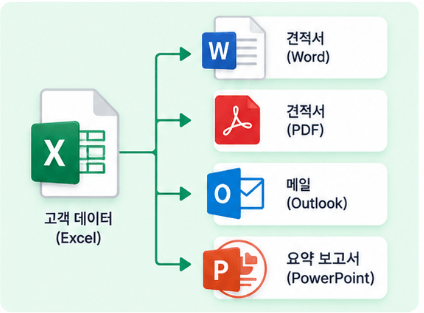
Excel → Word → PDF → Outlook → PowerPoint

This is not a course about memorizing code.


Learn how to explain your tasks to AI, create and run code, troubleshoot errors,
and turn it all into a single automation system.

🎁 E-book + practice files + automation prompt set included

Office automation you can start without writing code yourself
Reduce repetitive tasks with AI.

Implement ChatGPT, Python, Excel, Word, Outlook, and PowerPoint to handle
data organization, file consolidation, report generation, document conversion, and email drafting.
Without writing code from scratch, you will learn to make precise requests to AI,
run the generated code, and directly modify the necessary parts.
chạy mã được tạo và trực tiếp chỉnh sửa những phần cần thiết.


This goes beyond simply introducing features.
From repetitive Excel organization to processing Word documents and email,
you will complete an automation system based on real-world workflows.
Even when errors occur, we will cover the process of explaining the cause to AI and resolving the issue together.


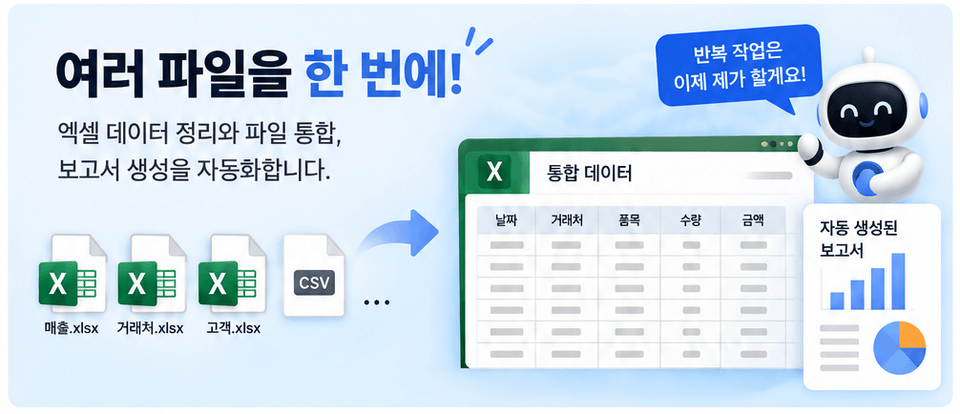
Combine multiple Excel files and automatically generate reports,
create format-based Word documents and convert them to PDF,
generate email drafts with attachments,
and organize received emails while saving processing records.
Finally, connect multiple office tasks into a single workflow.

Find repetitive tasks and
automate them with AI

Section 1 -Download Materials and Prepare the Environment

Download the course materials, e-book, prompt set, and environment configuration files needed for the exercises. Guidance is provided on how to use the attached materials and prepare for the exercises.


Section 2 - Orientation and Automation Basics

Understand the learning objectives of the course and identify tasks for automation in repetitive office work. After setting up the Python development environment, run simple code to learn the basic workflow of automation exercises.


Section 3 - Automation Prompt Framework

Learn how to turn work tasks into specific automation requirements and write prompts to request the desired code from AI. Review the basic structure of the generated code, and learn how to identify and fix the causes of errors with the help of AI.


Section 4 - Excel Automation with AI

Request Excel automation code using artificial intelligence, organize data, and consolidate multiple Excel files. This section also covers how to automatically generate practical Excel reports based on the organized data.


Section 5 - Word Automation with Artificial Intelligence

Automatically generates documents by entering data into a Word template and dynamically structures tables according to the number of data entries. Implements a workflow that automatically converts completed Word documents into PDF files.


Section 6 - Outlook automation with artificial intelligence

Learn how to ask AI for code to automate Outlook emails, and generate email drafts with files attached automatically. Learn how to organize received emails according to set criteria and record the processing history in a log.


Section 7 - PowerPoint Automation with Artificial Intelligence

Learn how to request PowerPoint automation code using artificial intelligence. This section covers the basic principles and hands-on workflow for automating the presentation creation process based on work materials.


Section 8 - Capstone Project and Automation Expansion

Define the requirements for an automation system that connects multiple office programs and ask artificial intelligence to implement it. Summarize how to fix errors discovered during execution and apply and expand the completed system in actual work.

Automate leaving work on time!

Point 1. Automate repetitive tasks

Automate Excel data organization, the consolidation of multiple files, and report generation to reduce repetitive work. Build automation systems yourself that you can use immediately in line with your actual workflow.


Point 2. Requesting Code from AI

Learn how to turn work processes into automation requirements and make specific requests to AI for the code you need. Even when errors occur, explain the cause and find the right direction for fixing them together.


Point 3. Connecting Office Documents

Use Excel data to create Word documents and PDFs, and connect them with Outlook emails and PowerPoint tasks. Organize work that was previously handled separately in each program into a single workflow.


Point 4. Hands-on practice without the burden of coding

You can run and modify Python code with AI without having to write it yourself from scratch. Follow along step by step, from downloading materials to completing the capstone project, and expand it to suit your own work.


Are you still manually handling repetitive Excel and document tasks every day?

This course was created specifically for people like you.


✔️ Office workers who want to reduce repetitive administrative tasks

  • Those who want to automate the organization and consolidation of Excel data and files

  • ✔️ Those who want to automate the creation of Word reports and PDF documents without repeating the same work

  • Those who want to streamline their workflows, from writing emails to handling attachments

✔️ Non-developers who want to start automating their work with AI

  • Those who want to ask AI to automate tasks without designing the code themselves

  • ✔️ Those who want to run code created by AI and modify it to suit their work needs

  • ✔️ Those who want to find and resolve the cause of errors together with AI

✔️ For those who want to connect multiple Office programs to create a workflow system

  • Those who want to automatically generate Word documents and reports based on Excel data

  • Those who want to automate Outlook email and attachment processing according to their business rules

  • Those who want to connect PowerPoint as well and implement a workflow that processes everything at once


Reduce repetitive tasks one by one.
Together with AI, automate everything from Excel to documents and email,
and build an automation system tailored to your work.

Notes Before Taking the Course


Practice environment

  • A Windows operating system environment is recommended.

  • Excel, Word, and Outlook are required.
    PowerPoint and Python are also used.
    At least 8 GB of memory is recommended.

Prerequisites and Notes

  • You can get started without any coding experience.
    Basic file and folder management skills are sufficient.

  • Basic experience using office software is required.
    You will create and fix code with ChatGPT.
    Error resolution is handled through hands-on practice.

Learning Materials

  • We provide the course materials as a PDF.
    We also provide an e-book and a set of prompts.

  • Use configuration files and instructional materials.
    With Excel, Word, and Outlook practice materials,
    you will create automations for repetitive tasks yourself.


Recommended for
these people

Who is this course right for?

  • Office worker looking to reduce repetitive tasks.

  • Those who want to use AI for work automation

  • Those who asked AI for code but had difficulty getting the desired results

  • Those who want to connect and automate multiple Office programs

  • Those who want to create their own automations tailored to their work

Need to know before starting?

  • No advanced programming knowledge is required.

  • Basic experience using PCs and Office is sufficient.

  • You need the Microsoft Office desktop app for Windows.

  • A Python execution environment is required (how to set up the development environment and run it will be covered in the course).

  • No paid AI subscription required, but experience using it on the web

Hello
This is fasthome

Career Verified

Automate repetitive tasks and focus on what matters.

Hello. This is the Early-Leave Automation Lab.

Based on problem-solving methods developed through approximately 15 years of hands-on software experience, I teach AI and office automation that anyone can apply to their work.

What you can learn here

  • Automating repetitive tasks using Excel, VBA, and Python

  • Creating practical programs with ChatGPT to reduce the burden of coding

  • Automation of stock and real estate data collection and analysis

  • Business process automation connecting Word, PowerPoint, and Outlook

We focus not merely on learning functions, but on creating results that you can execute yourself.

Automation you can use, not just automation you learn.

This is the On-Time Departure Automation Lab.


YouTube: https://www.youtube.com/@fasthome8282

Blog: https://blog.naver.com/fasthome

More

Curriculum

All

25 lectures ∙ (5hr 2min)

Course Materials:

Lecture resources
Published: 
Last updated: 

Reviews

Not enough reviews.
Please write a valuable review that helps everyone!

fasthome's other courses

Check out other courses by the instructor!

Similar courses

Explore other courses in the same field!

25% off for new members

$28.50

25%

$38.50