inflearn logo

Mastering PowerPoint Task Automation with Python

This is a practice-oriented course designed to increase work efficiency by automating repetitive PowerPoint tasks using Python. You will learn how to automate the entire document creation process—from creating slides to entering text, inserting images, generating tables, controlling shapes, and saving files. Practical PowerPoint automation code using pywin32 is also provided.

2 learners are taking this course

Level Beginner

Course period Unlimited

Python
Python
PowerPoint
PowerPoint
automation
automation
pywin32
pywin32
Business Productivity
Python
Python
PowerPoint
PowerPoint
automation
automation
pywin32
pywin32
Business Productivity

What you will gain after the course

  • Automating repetitive PowerPoint reports and presentation materials using Python

  • Understand the PowerPoint COM object structure based on pywin32 and the workflow for practical automation.

  • Implement a practical PPT automation project by controlling text, images, tables, and shapes through code.


Escape repetitive tasks,
PowerPoint automation

Are you tired of creating the same reports and presentation materials every time?
Break free from these tedious repetitive tasks using Python and pywin32. We offer an experience that brings forward your clock-out time through automation techniques that can be directly applied to real-world tasks, rather than just theory.


The experience of working overtime to recreate reports with similar content from scratch every time

Situations where you break a sweat manually modifying complex elements such as images, tables, and shapes.

The grueling process of manually copying and pasting dozens of slides to compile data

Experience an amazing transformation where you free yourself from repetitive PowerPoint tasks to maximize work efficiency and reborn as a confident professional.


From creating PPT slides with Python to
formatting and inserting images/tables,
completely automate repetitive tasks and


We will save your time and help you grow into an 'expert who maximizes work efficiency'.


By the end of this course, you will

You can automate PowerPoint tasks using Python

You can directly handle repetitive Word tasks using Python and pywin32-based automation.

From opening files to copying/pasting data, organizing, and saving,
everything can be performed automatically without manual labor.


You can reduce repetitive tasks and increase work efficiency

Through Python-based Word automation, you can reduce repetitive task time and increase work productivity,
creating an environment where you can focus on more important tasks.


You can learn practical Word control methods using pywin32

Beyond simply using libraries, you can understand the
automation method of directly controlling PowerPoint through pywin32,
and learn to a level where you can apply it to actual work.


It can be integrated with the automation of other MS-Office product families.

Even for Word automation, when taking related lectures on Excel, PowerPoint, and Outlook, you will be able to understand them more easily based on pywin32. Furthermore, you will be able to consider designing and building various automations integrated with other product suites.

✔️

Stop repetitive PowerPoint tasks now with Python!

Complete Automation of PowerPoint
Tasks with Python

You will learn how to automate repetitive Word tasks using Python and the pywin32 library with a focus on practical application. You can master specific code to efficiently automate the entire process, from opening files to data processing, inspection, merging, and saving.

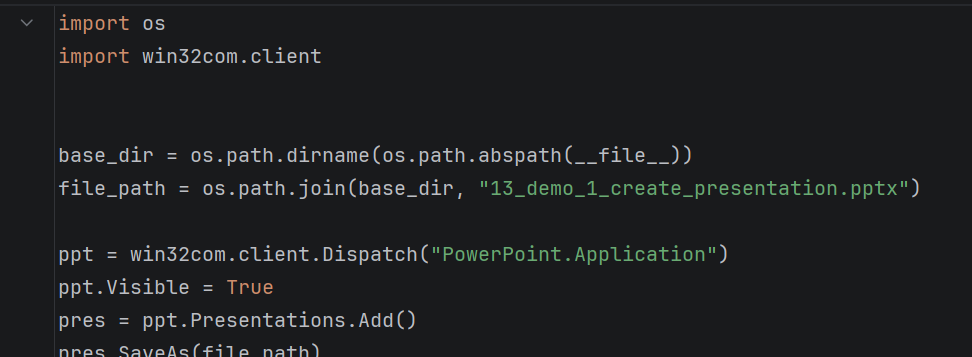
Example of PowerPoint automation code using pywin32

Practical PowerPoint Automation Project

You will learn how to directly create PowerPoint documents using Pywin32 and implement various practical functions such as adding slides, entering titles and body text, inserting tables and filling them with data, and inserting images/objects. Additionally, you will build practical skills through projects involving dynamic document generation using Word templates and the automatic merging of multiple documents.

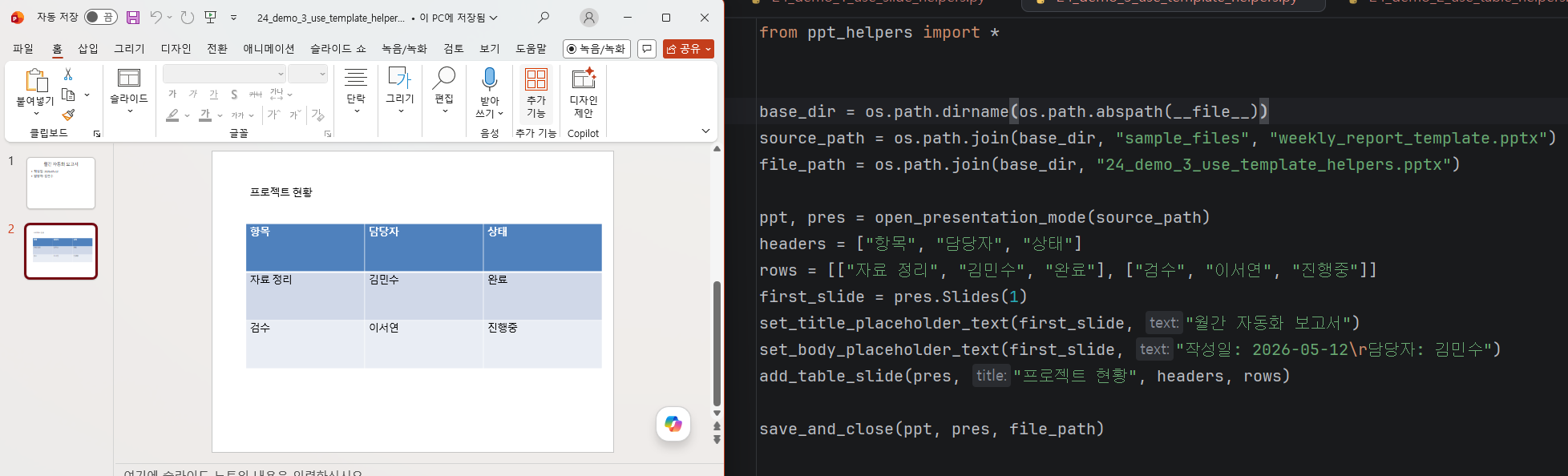
Real-world project code and result screens

Automation sample code and guide provided

In this course, we provide all source code, ranging from basic Python syntax for PowerPoint automation to the usage of pywin32. Through the 'ppt_helpers' functions and sample codes required for building automation, along with additional guide PDF materials, we help you quickly master the learning content and apply it to your actual work.

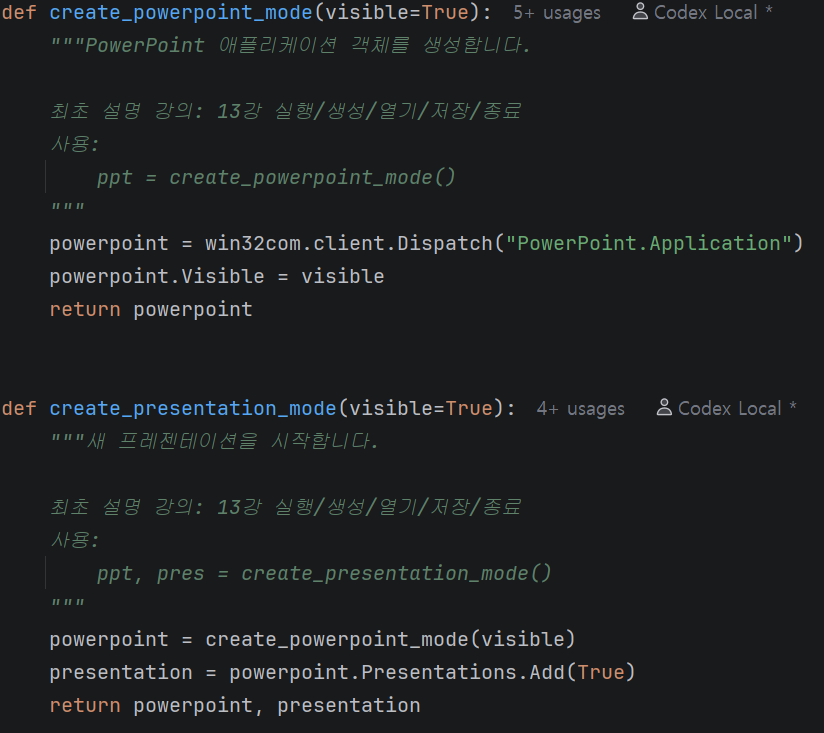
Ready-to-use automation code and functions (ppt_helpers code)


📚

Maximize your work efficiency
with Python PPT automation!

Section 1

Download Lecture Materials

You can download the PDFs, example codes, and results used in the lecture.

Section 2

Core Python Basics (Essential Syntax for Word Automation)

In this section, we will summarize the basic Python syntax required to implement PowerPoint automation.
Since this course does not cover Python itself in depth, we will not explain every rule of the language. Instead, we will focus on learning only the core syntax essential for implementing automation.

Rather than complex theories, the focus is on understanding the actual code flow and building a minimum foundation to implement PowerPoint automation features later on. It is structured so that even those unfamiliar with Python can follow along without feeling overwhelmed.


Section 3

Getting Started with PowerPoint Automation (Controlling Word with Pywin32)

In this section, you will learn how to directly control PowerPoint using Python and pywin32.
You will learn the basic flow of automation step-by-step, from launching the PowerPoint application to creating, opening, and saving presentations.

Additionally, by understanding the structure of PowerPoint objects such as Presentation, Slide, and Shape, you will gain a perspective on PowerPoint not just as a simple presentation tool, but as an automation tool that can be controlled through code. Through this process, you will be able to understand the overall flow of PowerPoint automation.


Section 4

PowerPoint Automation Features for Immediate Practical Use

In this section, we cover PowerPoint automation features that can be applied immediately to real-world tasks.
You will learn how to automatically generate slides, enter text, and configure title and body layouts.

Furthermore, we will expand into features such as inserting tables and images, and utilizing shapes and various objects to automatically organize slides, reaching a level where you can automatically generate actual presentation materials and reports.

This section focuses on going beyond simply learning features to creating a presentation automation workflow that can be used in practice by combining various functions.


Section 5

Practical Projects and Wrap-up

In the final section, you will carry out a real-world automation project based on what you have learned previously.
By directly implementing the entire flow for automatically generating presentation materials and reports, you will experience the process of organizing slide structures and filling in content based on data.

Through this process, you will go beyond simply using features and complete automation results that can be applied to actual work. Upon finishing the course, you will possess the practical capability to automate repetitive PowerPoint tasks.


We can solve the concerns of these people!


📌

Office workers tired of repetitive tasks
Those who feel they are wasting time making the same
PowerPoint reports and presentation materials every day

📌

Developers who want to expand their work automation experience
Those who have experience in Excel or Word automation
but want to extend their automation scope to PowerPoint.


📌

Those who haven't started because of the prejudice that coding is difficult,
but have a passion for increasing work efficiency


Notes before taking the course


Practice Environment

  • Windows operating system is required.

  • Microsoft 2016 or a later version must be installed.

  • The practice sessions will be conducted in a Python development environment, and the explanations are based on using PyCharm Community Edition.

Prerequisites and Important Notes

  • An understanding of basic Python syntax is required.

  • It is recommended to have basic programming knowledge, such as loops, conditional statements, and functions.

  • If you have experience creating PowerPoint documents, you will be able to understand the content better.

Learning Materials

  • We provide basic Python and automation sample codes.

  • We provide a PDF guide for PowerPoint automation.

  • Includes code and explanatory materials for the hands-on project.


Recommended for
these people

Who is this course right for?

  • Office workers who want to automate repetitive PowerPoint creation tasks

  • Those who want to learn practical Office automation using Python

  • Developers and beginners who want to learn pywin32-based document automation structures through hands-on practice.

  • Those who want to efficiently create reports, presentation materials, and weekly work documents

  • Those who want to expand from Excel and Word automation to PowerPoint automation

Need to know before starting?

  • Basic experience with PowerPoint is recommended (e.g., creating slides and entering text).

  • It is better if you have experience installing and running Python, but beginners can also take the course.

  • It is even more helpful if you have experience repeatedly creating PowerPoint reports or presentation materials.It is even more helpful if you have experience repeatedly creating PowerPoint reports or presentation materials.

Hello
This is fasthome

Hello. This is the On-Time Departure Automation Lab.

Having worked in SW practice for about 15 years,
I have been contemplating "ways to reduce repetitive tasks and bring forward the time to leave work."

In this course,
we focus on automation techniques that can be applied immediately in real-world tasks, rather than just theory.

Rather than complex explanations,
we focus on the flow of "Why it's needed → How to use it → Immediate application."

We will save you time through Excel, Word, and various task automations.

More

Curriculum

All

31 lectures ∙ (6hr 5min)

Course Materials:

Lecture resources
Published: 
Last updated: 

Reviews

Not enough reviews.
Please write a valuable review that helps everyone!

Similar courses

Explore other courses in the same field!

Limited time deal

$53,130.00

30%

$59.40