inflearn logo

[Free Special Lecture] Safeguards to Know Before Entrusting Your Email and Payments to an AI Assistant

A hands-on audit masterclass built from a single, continuous 2-hour-and-27-minute session in which a real AI assistant app handled portal email setup and subscription payment checks. Four analytics tools cross-logged the session (108 rows in the local conversation database · 42 completion responses · 321 total recorded steps). It includes a 26-minute bottleneck-prevention guide for email setup (Before), strategies to avoid using up 53% of the daily limit and to verify the last four digits against the source ledger (During), and a three-step removal protocol for manually terminating remote sessions that remain active even after a logout confirmation (After), along with a Lesson 1 PDF kit and free online practice lab.

18 learners are taking this course

Level Beginner

Course period Unlimited

AI
AI
ChatGPT
ChatGPT
prompt engineering
prompt engineering
AI Agent
AI Agent
AI
AI
ChatGPT
ChatGPT
prompt engineering
prompt engineering
AI Agent
AI Agent

What you will gain after the course

  • A preflight checklist for understanding the remote proxy access setup and preventing a 26-minute bottleneck during initial connection by preparing phone system and app notifications, two-factor authentication, and a physical smartphone camera.

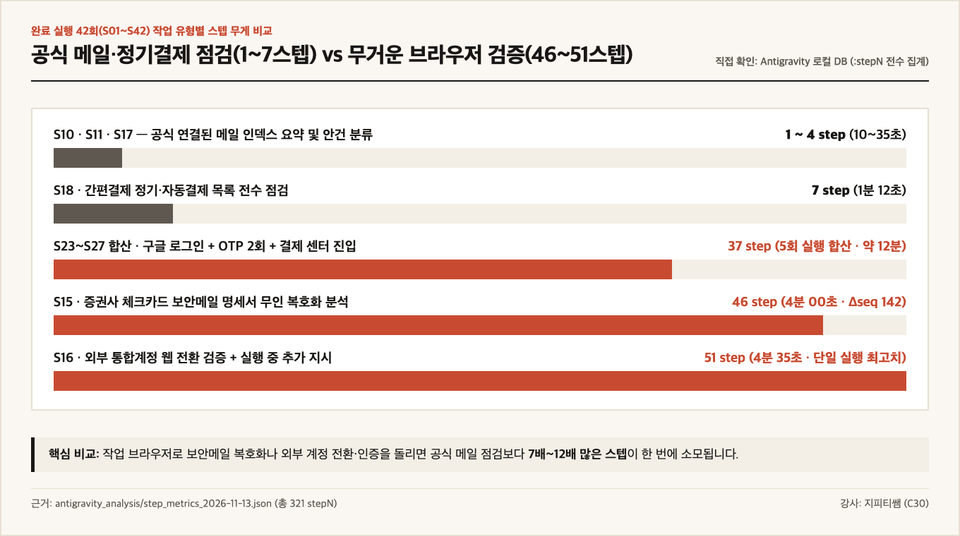
  • A prompt design technique for separating instructions to check the officially connected mailbox (steps 1–7) from resource-intensive external web browser verification (steps 46–51), conserving the daily usage quota available at 4 a.m. each day.

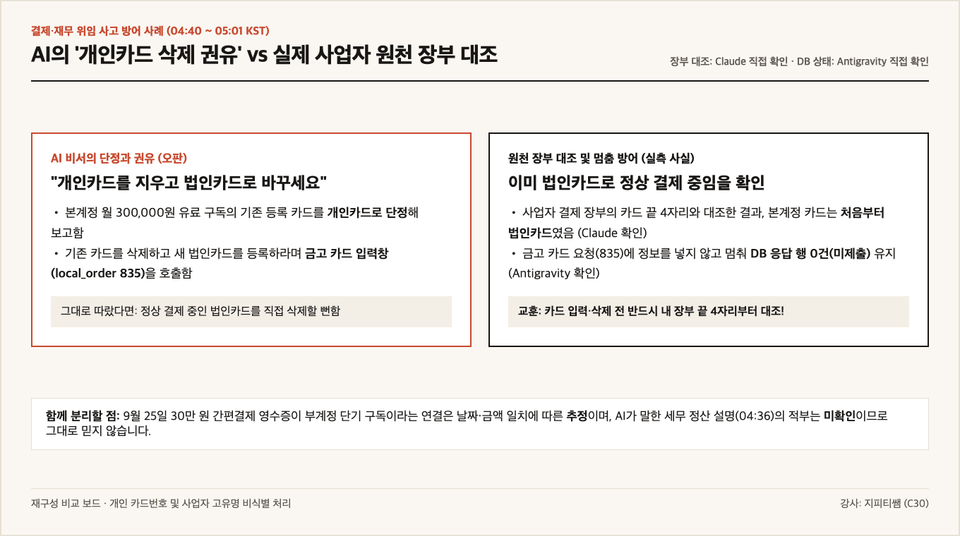
  • An audit rule requiring the last four digits in my business source ledger and the payment cycle to be checked before entering card details, to prevent a valid corporate card from being mistakenly classified as a personal card based on only partial information on an overseas payment screen.

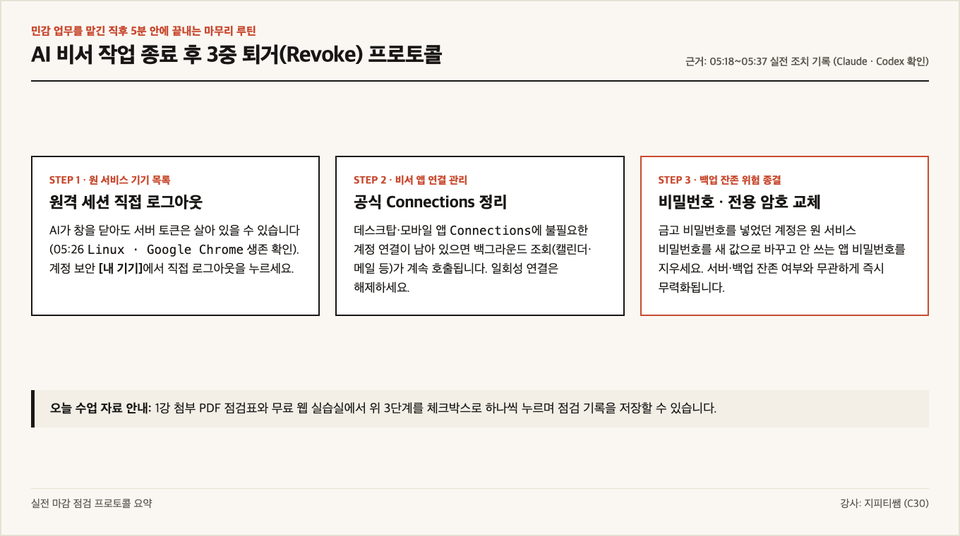
  • A three-step offboarding routine that distinguishes directly verified facts, assumptions, the assistant’s statements, and unverified areas, then immediately logs out of the original service device, disconnects it, and changes the password when the work is done.

AI Delegation Operating Standards Based on Real-World Measurements · Free Special Lecture (6 Main Lessons · 26 Minutes 32 Seconds Total)

Safety Measures to Know Before Entrusting Email and Payments to an AI Assistant
Connection bottlenecks, daily limit usage, and criteria for retiring the original service, based on a real 2-hour-and-27-minute delegation session in the early hours of the morning

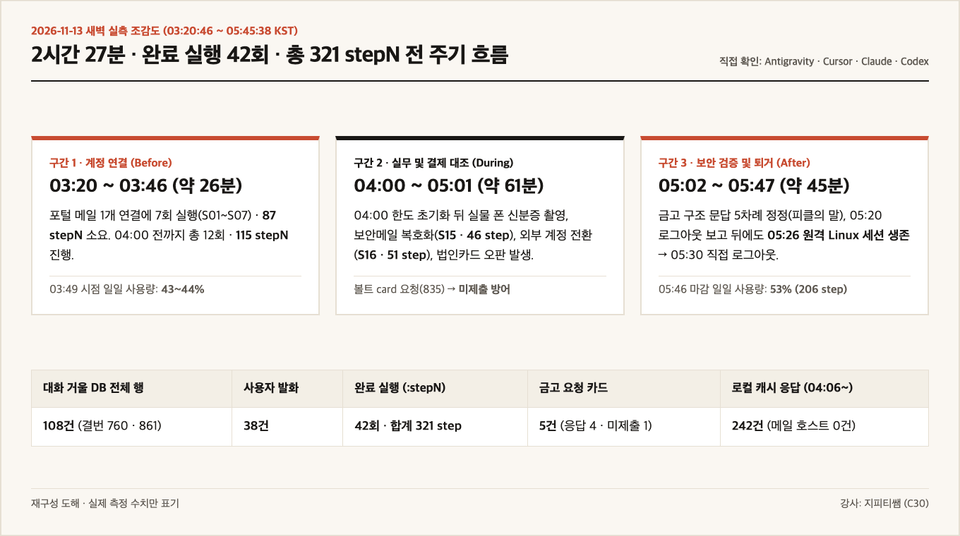
Four analysis tools simultaneously recorded one continuous 2-hour-and-27-minute session (108 rows in the local conversation database, 42 completion responses, and a total of 321 recorded steps) in which a real assistant app was tasked with connecting a portal email account and checking subscription payments. Strictly distinguishing what the assistant said in the chat that day from facts verified directly in the source systems (Google Account, merchant ledger, local database, and public code), we’ll walk you through practical safeguards to use before connecting, while giving instructions, and after the session.

Connect 1 portal email account
26 minutes · 87 steps
Notifications off · Two-factor authentication intervention
Closed after the 4 a.m. reset
53% of the limit used
30 executions · 206 cumulative steps
Payment Method Ledger Reconciliation
Corporate Card Misclassification Defense
Vault card request (835) not submitted
6 minutes after the logout report
Remote Session Persistence
Manually terminate the device within the original service

1. Three Practical Pitfalls Hidden Behind a One-Line Instruction

Asking an AI assistant to connect to your inbox and organize your subscription payment history seems simple. But when we checked every packet and screen in a real work environment, we found that without criteria set in advance, it was all too easy to waste time and daily usage limits—or nearly delete a card with valid payments.

2시간 27분 42회 실행 전 주기 실측 흐름도
  • Physical Boundaries Before Connecting: Since a remote environment connects on your behalf rather than your own computer (0 direct portal mail hosts out of 242 local network cache entries), if phone notifications are turned off or you try to photograph your ID using the PC mirroring screen, the process stalls and steps are consumed.
  • During the task, quota overuse and ledger errors: Summarizing officially connected emails takes only 1–4 steps, but decrypting security specifications (46 steps) or verifying a switch to an external account (51 steps) quickly uses up the quota. We also confirmed a judgment error in which, based on only partial information on an overseas payment screen, the assistant advised deleting a monthly subscription costing 300,000 won that was already being paid for with a corporate card, claiming it was on a personal card.
  • Remote session remaining after termination: Six minutes after the assistant reported that it had logged out of the work browser and that no sessions remained open, the [Your devices] list for the actual Google account still showed an active sign-out button for a remote Linux Chrome session, which I had to click myself to end it.

2. Rigorously distinguish confirmed facts, estimates, and unverified areas.

This special lecture does not overstate what has been verified. It clearly distinguishes facts directly verified through the original system screens, business records, local database, and public code (such as the fact that the security card’s original password was not left in the conversation database body, that the Google [My Devices] session remained active, and that the existing card was a corporate card); estimates inferred from the local packet’s total `step` count and the on-screen `%` (for example, an estimate of about 0.26 percentage points per step, assuming a linear relationship for 206 steps after 04:00 = 53% — the actual billing ledger has not been verified); the assistant’s own statements (Pickle’s words) that were revised five times after its initial assertion in that day’s conversation window (for example, the 05:05 statement treating the input process as plaintext is merely recorded in the conversation log and does not mean the internal processing of the production server was directly observed); and unverified areas explicitly identified as unknown because they cannot be proven externally (whether the current production server code is identical, a direct inventory confirming zero vault passwords, and whether backup snapshots were actually destroyed).

작업 유형별 스텝 무게 비교 차트 사업자 원천 장부 대조 및 카드 미제출 방어 사례

3. Two practical tools you can use as soon as you enroll

Tool 1 · Lesson 1 Practical Checklist & Safety Instructions PDF Kit (c30_pickle_guardrails_kit.pdf)
A three-minute preparation checklist before connecting an account, a quota-saving prompt to prevent heavy web browsing, a three-line cross-check rule to avoid misclassifying corporate card transactions, and a three-step sign-out checklist for after work—all in one guide.

Tool 2 · Free Web Practice Lab—No Login Required
Run the estimated step-weight diagnostic by task type, source ledger reconciliation training simulator, and triple-checklist for clearing out after a task directly in your web browser. (Open the free Web Practice Lab · Instructor home gptssam.com)

작업 종료 후 3중 퇴거 프로토콜 요약

4. Course Curriculum (6 Main Lessons + 3-Question Review Quiz)

  1. [See the finished product first] 2 hours 27 minutes · Summary of measurements from 42 runs — 3 safeguards to put in place before handing over email and payments (preview available · PDF kit included)
  2. [Connection Boundaries] Why did connecting email take 26 minutes? — The physical limits of notifications, two-factor authentication, and a real camera
  3. [Dissecting the Limit] Where did 53% of the daily limit go? — Costly instructions and ways to save, seen through 321 steps of data
  4. [Ledger Reconciliation] Why I Was Told to Delete It Even Though It Was Already a Corporate Card — How to Audit Payment and Financial Decisions Against the Source Ledger
  5. [Security Boundaries] Five rounds of corrections to the vault encryption explanation — separating pickle’s claims, public code, and unverified areas
  6. [Offboarding Check] Sessions That Survived After Logout Was Reported Complete — A Three-Layer Offboarding Protocol for the Original Service and Its Practical Application
  7. [3-Minute Check Quiz] Delegated Permissions · Saving on Usage Limits · Original-Service Revocation: 3 Key Questions (Answers and Explanations Provided Immediately Upon Submission)

Course Information and Scope Before Enrollment

  • Recommended for: Professionals, solo entrepreneurs, and creators who want to delegate portal email, Google account, or subscription review tasks to an AI assistant app.
  • Course Disclaimer: This course is not an official security audit certification for any particular service, nor is it legal or tax advice. It is educational content that covers practical methods for users to independently check and protect their accounts and payment methods, based on actual usage records as of November 13, 2026.
  • Voice Production Notice: To ensure clear pronunciation, all lessons use local AI voice synthesis (Qwen3-TTS), and Korean subtitles (.srt) are also provided. Instructor: GPT Teacher.

Recommended for
these people

Who is this course right for?

  • Professionals and creators looking to connect their portal email or Google account to an AI assistant app for the first time and start automating their work

  • A solopreneur who wants to delegate the monthly management of recurring subscriptions and bills while avoiding card information mix-ups or running out of daily usage limits.

  • For those who need criteria for distinguishing verification levels in security card (Vault) descriptions and cleanly reclaiming the original service session after a task.

Need to know before starting?

  • You can follow along right away using actual screens and simple analogies, even without any development or database knowledge.

  • What you’ll need: a smartphone, a PC web browser, and the PDF checklist kit downloaded in Lesson 1.

Hello
This is gptssam

532

Learners

17

Reviews

4.5

Rating

19

Courses

I’m GPT Teacher, researching and building AI agent workflows and content automation systems.

After implementing and validating trending global AI technologies and workflows firsthand, I teach them so that even non-developers can reproduce the same setup on their own computers in just 10 minutes by sharing the execution logs, prompt specifications, and open-source starter kits as complete files. Instead of making exaggerated promises about views or revenue, I show you with data and code what actually worked and how it was validated.

[Key Research and Course Areas]

  • Building AI Agents & a Second Brain: Knowledge compilation and workflow automation based on Claude Code · Google Antigravity · Karpathy LLM Wiki

  • AI video and content production systems: Fact-checking and automated rendering pipelines combining Google Flow (Veo), TTS, and agents

  • Integrity verification automation: A lint pipeline that comprehensively checks broken links and factual accuracy across scripts, wikis, and data

[Official Channels and Open-Source Practice Lab]

More

Reviews

Not enough reviews.
Please write a valuable review that helps everyone!

gptssam's other courses

Check out other courses by the instructor!

Similar courses

Explore other courses in the same field!

Free