[Free Special Lecture] Build Your Own Content Archive Site with AI—No Coding Required: 14-Minute Hands-On Guide to Design Rules That Ditch the Purple AI Look, Source Accordions, and KakaoTalk Preview Cards
When you try to bring together content scattered across your blog, Instagram, and Notion, why does asking AI to build a website without coding produce the same purple gradients, glass effects, and emoji overload (AI slop)? We’ll break it down and, using the code from the live static sites ainewground.com · gptssam.com, build a DESIGN_RULES.md design constitution, a single-JSON static build with a ✔/△ source-separation accordion, a GuideGate with instant, zero-second unlocking and email typo correction, a KakaoTalk 1200×630 preview card, and a three-step deployment check—in just 14 minutes.
How to use DESIGN_RULES.md to ban purple gradients, glass effects, and excessive emoji use before writing a single line of code—and lock in four-color tokens and Korean line breaking (keep-all)
How to build a single-JSON static structure that keeps numbering consistent even as the number of articles grows into the dozens, and an HTML5 source accordion that separates verified facts (✔) from inferences (△)
How to design GuideGate to let users read the top 35% for free without a paid server, catch email domain typos (gamil.com, navr.com, etc.), and open the full text instantly
Absolute path configuration for 1200×630 Open Graph (OG) cards that render correctly when shared on KakaoTalk, the latest alias (og-card-latest.png), and a 3-step pre-deployment validation routine
Free GPT Teacher Special Lecture / 6 Full Lessons / 5-Page Practical Kit PDF + Free Web Practice Tool (W1)
If you ask AI to build you a website without coding, why do you always end up with the same purple gradient and broken links?
This is a special class on using artificial intelligence (AI), designed for solo creators, instructors, and professionals who want to bring their writing and guides scattered across blogs, Instagram, and Notion together in an archive site on their own domain. If you vaguely ask coding AIs (Claude, ChatGPT, Gemini, etc.) to build you a site, they tend to produce eye-straining purple neon dark mode (AI slop), awkward Korean line breaks, and fake buttons that don’t work. In just 14 minutes, we’ll take apart real, actively running static sites (ainewground.com and gptssam.com, based on code as of November 5, 2026) and build everything from a design constitution to an accordion that separates sources, a subscription gate that unlocks instantly with zero wait, KakaoTalk preview cards at 1200x630, and automated pre-deployment validation.
Lock in the design constitution
Before coding, use a single DESIGN_RULES.md to permanently ban purple neon gradients and lock in the six-token cream palette and Korean word wrapping (keep-all).
Sources Accordion and Gate
Single JSON static build + an accordion separating primary verified sources (✔) from secondary references (△) + automatic correction of 6 domain typos and instant unlock in 0 ms (GuideGate)
KakaoTalk Cards and Deployment Audit
Automatic generation of a KakaoTalk 1200x630 Open Graph (OG) card with a dedicated title for each post + /latest 302 redirect (2500ms fallback) + 12-item pre-deployment audit
If you’ve ever hit this wall while trying to build your own content site, be sure to check this out.
Why does asking AI to make a clean website keep producing nothing but purple neon backgrounds, glass cards, and rocket emojis?
As my posts grew to 15, then 80, copying HTML files by hand broke all the menus and links to previous posts.
I want to share a free guide PDF and collect readers’ email addresses. Do I have to pay every month for a pricey website builder or a heavy-duty membership database server?
When I shared my article’s link in a KakaoTalk group chat, the preview image showed up as a blank box, or the old title wouldn’t update.
All four issues stem not from a lack of coding skills, but from not giving the AI the design rules file, static build structure, and OG meta tag standards it needs upfront. In lessons 1 through 6, I walk you through everything clearly using the actual code from a live site.
Finished Product: The Three Core Structures of a Live Editorial Static Archive Site
Rather than theoretical examples, we cross-checked the actual configuration files and scripts, one to one, from the static sites (ainewground.com and gptssam.com, as of November 5, 2026) operated by instructor GPT Ssam, who has published dozens of briefing articles and fifteen practical guides.
Step 1 Design Constitution: Blocking Purple AI Slop and 6-Token Editorial Typesetting
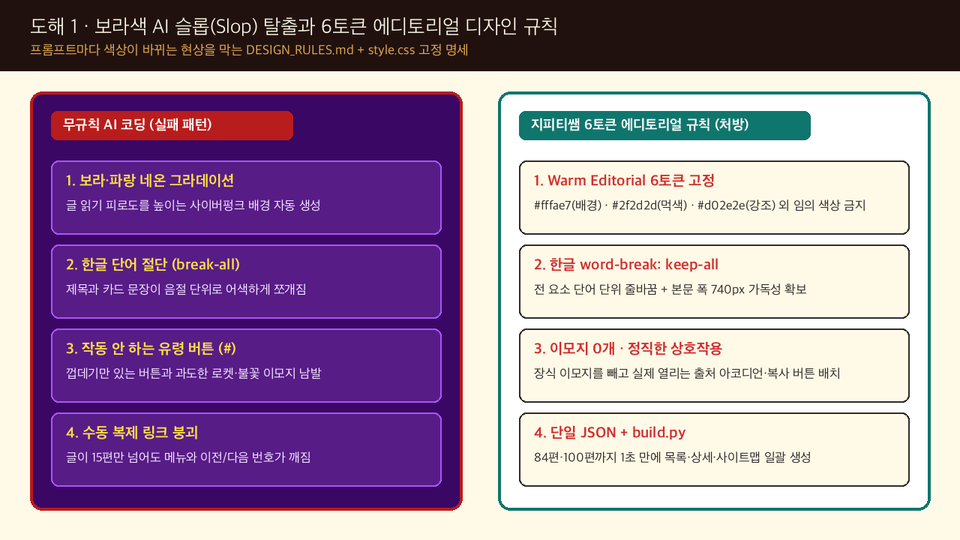
Core baseline (6 tokens in DESIGN_RULES.md and style.css): If you ask AI to design using abstract adjectives, you’ll get purple neon dark mode—the average of its training data. Before writing a single line of code, place [DESIGN_RULES.md] in the project root and ban purple gradients, glass effects (blur), and decorative emojis. Then lock in six tokens, including a cream paper background (#fffae7), ink-colored body text (#2f2d2d), and an accent red (#d02e2e), along with Korean word wrapping (word-break: keep-all).
Phase 2: Content credibility and subscription conversion—single-JSON build, source-separated accordion (✔/△), and 0ms instant-unlock gate.
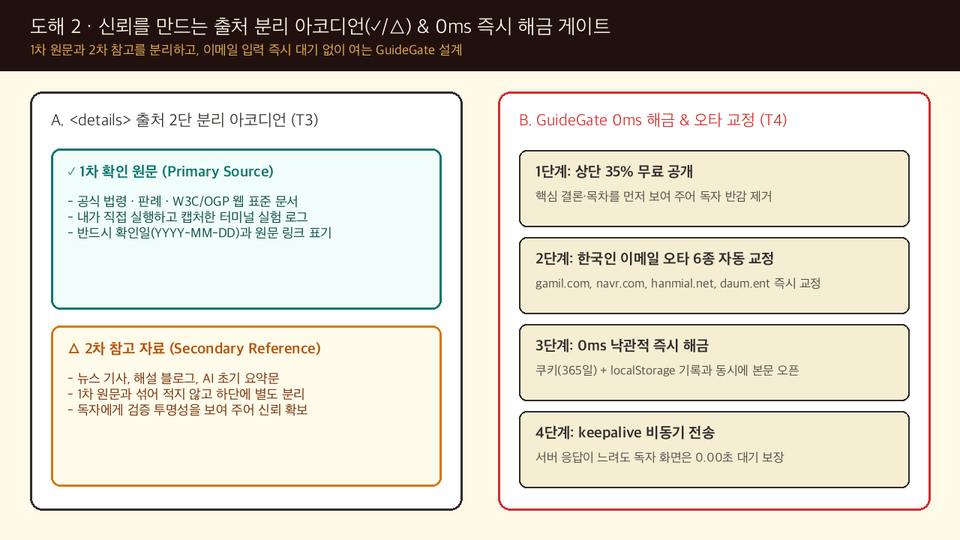
Single-JSON (guides.json) static build with a ✔/△ source-separated accordion: Instead of manually duplicating HTML as the number of articles grows, build.py generates all pages, numbering, the RSS feed, and the sitemap at once from a single JSON array. At the bottom of each article, a standard HTML5 <details> accordion clearly distinguishes ✔ primary sources verified firsthand, such as official legislation and standards documents, from △ secondary reference materials, such as commentary and supplementary resources.
0ms optimistic instant unlock (GuideGate) and automatic correction of 6 common Korean email typos: Keep the top 35% of the content freely accessible for search engines and first-time visitors. When users enter their email, unlock it instantly in 0ms using cookies (365 days) and localStorage, without waiting for a server response. Also automatically correct 6 common typos made by Korean users, such as gamil.com, navr.com, hanmial.net, and daum.ent, just before submission.
Stage 3: Messenger distribution and deployment verification: KakaoTalk 1200x630 OG card, /latest 302 redirect, and automated audit with verify_site.py
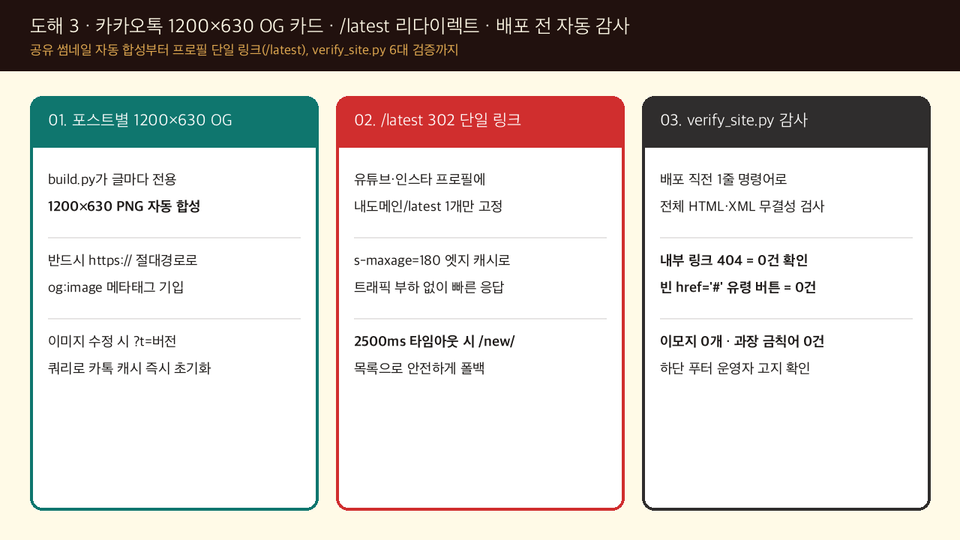
KakaoTalk 1200x630 OG cards, a single /latest link, and verify_site.py: Automatically generate a 1200x630 PNG for each post with its title and summary embedded, and link it using a full https:// URL. Add just one /latest link to your Instagram or open chat profile to automatically redirect to the newest post with a 302 (if the external service is delayed, fall back to /new/ after a 2500ms timeout). Just before deployment, run verify_site.py to check all broken internal links, empty anchors (href="#"), relative OG image paths, and prohibited exaggerated claims in one second.
Bottleneck 1 / Purple AI Slop and Garbled Korean Text
Fix DESIGN_RULES.md at 6 tokens
Ban neon gradients and glass effects, and declare paper cream (#fffae7), ink black (#2f2d2d), accent red (#d02e2e), and word-break: keep-all first.
Bottleneck 2 / Distrust of sources and subscription churn
✔/△ source separation and 0ms unlocking
Separate the primary source (✔) and secondary reference (△) into a collapsible accordion, then combine a free preview of the top 35% with email typo correction and instant access with 0ms delay.
Bottleneck 3 / Empty KakaoTalk Boxes and Link Mishaps
1200x630 Absolute Paths and Automated Audits
For each post, automate the absolute path to the 1200x630 OG PNG and cache refresh (?t=version), the /latest 2500ms fallback, and six pre-deployment audits with verify_site.py.
A Preview of Ready-to-Copy Settings and Code Templates
The Lesson 1 course PDF and free web practice tool (W1) include five practical templates (T1–T5), covering design rules, a single JSON schema, a sources accordion, GuideGate, and a /latest redirect. Here’s a preview of two of them.
Practical template examples: the DESIGN_RULES.md declaration (T1) and Korean email typo correction and 0ms unlock (T4)
Template T1 (DESIGN_RULES.md Editorial 6-Token and Anti-Slop Rules)
1. Prohibited: Do not use purple and blue neon gradients (linear-gradient), backdrop-filter glass effects, decorative emoji before headings, or empty anchor buttons with href="#". 2. Fixed 6-color palette: Use only cream background (#fffae7), secondary band (#f6eed2), ink-colored body text (#2f2d2d), secondary gray (#57534e), accent red (#d02e2e), and highlight teal (#0f766e). 3. Korean typography: Apply word-break: keep-all; overflow-wrap: break-word; by default to all headings, body text, and table cells so words do not break in the middle.
Template T4 (GuideGate Automatic Correction of 6 Domain Typos and Instant Unlock in 0ms)
When the reader enters their email and clicks submit, six common typos, including gamil.com, gmial.com, navr.com, nver.com, hanmial.net, and daum.ent, are immediately corrected using regular expressions. Then, without waiting for a server response, the unlocked state is recorded first in document.cookie(max-age=31536000) and localStorage, opening the entire guide in 0ms, while the webhook is sent in the background using fetch keepalive: true.
Three things you take away when the lecture is over
1. Six concise core videos and three-question review quizzes
6 concise lessons + an auto-explained quiz covering the DESIGN_RULES.md declaration, a single-JSON static build and source-separated accordion, 0ms GuideGate, a KakaoTalk 1200x630 OG card, and pre-deployment validation.
2. Course materials, PDF page 5 (c18_creator_media_site_kit.pdf)
Six design baseline tables, a three-way comparison table, five copy-and-paste templates (T1–T5), a 12-item pre-deployment audit checklist, and three AI coding prompts (P1–P3). You can download them directly from [Class Materials] in the upper-right corner of Lesson 1.
3. Ongoing Use of the Free Web Practice Simulator (W1)
You can try the purple AI slop vs. 6-token editorial real-time switcher, the ✔/△ source accordion and email typo correction demo, and the KakaoTalk 1200x630 preview card generator—all without logging in.
The sequence covered in six lessons
Lesson 1
[See the finished product first] We examine five common reasons projects fail when you let AI build a website without coding, then use the free web playground (W1) to try out the six-token design rules, source accordion, and finished KakaoTalk sharing card.
Lesson 2
[Design Rules] Before writing any code, use a single DESIGN_RULES.md file to prevent purple neon gradients and glass effects at the source, and lock in a cream 6-token palette and Korean line wrapping (word-break: keep-all).
Lesson 3
[Source Accordion] Implement a single-JSON (guides.json) static build structure that keeps numbering consistent even as the number of articles grows to 84, along with an HTML5 accordion that separates primary verified sources (✔) from secondary references (△).
Lesson 4
[Unlock the Free Guide] Complete GuideGate, which lets readers access the top 35% of the article for free without a paid server, catches 6 common typos in email domains used by Koreans, and opens the full article instantly using cookies and localStorage.
Lesson 5
[KakaoTalk Share Card] Set up an absolute path for a 1200x630 OG PNG that displays a custom typographic card for each post when shared on KakaoTalk, along with a single profile link that redirects to /latest with a 302 status (2500ms fallback).
Lesson 6
[3-Step Pre-Deployment Validation] Finish by running the verify_site.py automated audit, which catches broken links, empty anchors, relative-path OG images, and prohibited words in just one second, along with the execution routine for the three prompts (P1–P3).
Division of Roles Between Prompt Engineering and the Creator
Prompt Engineering: Entrusting the Design Constitution and Static Build Specifications to AI Coding Tools
The three-step build prompt (P1–P3) to give an AI like Claude before creating a website
If you vaguely ask an AI coding tool (Claude, ChatGPT, Gemini, Cursor, etc.) to “make me a pretty blog,” it will produce unmanageable spaghetti code. But if you give it clear requirements, as in the three prompt engineering templates (P1–P3) included in the course PDF, you can build a consistent static archive site even without knowing how to code: six DESIGN_RULES.md tokens and keep-all typography (P1), a single JSON schema, a ✔/△ source accordion, and a 0ms GuideGate (P2), plus 1200x630 OG card generation and automated verification with verify_site.py (P3).
Tasks people need to handle themselves in content planning and distribution
What AI Build Prompts (P1–P3) Help With
Write style.css with 6 tokens and responsive layout code based on DESIGN_RULES.md (P1) Implement a static builder (build.py) from a single JSON file (guides.json), a source accordion, and GuideGate (P2) Create a script to automatically generate 1200x630 OG PNGs for each post and a verify_site.py validator (P3)
Tasks the creator must decide on and verify themselves
Write the article body and cross-check the source links against the primary official sources (✔) and secondary reference materials (△) Connect the subscription form webhook destination and perform a final check of the personal information collection notice Before deployment, check line breaks on a 375px mobile screen and verify the OG card by sending it to yourself on KakaoTalk.
What This Course Is Not
This is not a course on heavyweight full-stack web frameworks (advanced React/Next.js), paid payment gateway integration, or guaranteeing specific view counts or advertising revenue.
This practical training material covers how non-developer creators can give AI clear instructions to build and run a website on their own domain, based on the design rules and validation scripts of real, operational static content archive sites (ainewground.com and gptssam.com; code as of November 5, 2026).
Account email addresses, internal work paths, and webhook identifiers shown in example code and settings screens have been obscured with solid opaque boxes. The lecture audio is AI-generated (TTS).
Next lesson
Follow GPT Teacher to get notified as soon as the next practical AI workshop is announced.
If you're unsure about your site's design tokens or OG card settings, check them this way.
In the prompts (P1–P3) in the class PDF, leave out real customer emails and API keys, and include only the HTML/CSS/JSON structure so AI can review it first. Share any other questions or AI web development tips on the Q&A board and in the open chat room.
Solo creators, instructors, and experts who want to neatly bring together their posts and guides scattered across blogs, Instagram, and Notion in an archive site on their own domain.
People who have tried creating a webpage with AI without coding, but hesitated to publish it because of the purple neon dark mode, awkward Korean line breaks, and broken links.
For those who want to automate reader email subscription gates and KakaoTalk share cards on free hosting without paying for an expensive website builder subscription
Need to know before starting?
Explained using screens from a live static site and five settings templates (T1–T5), so you can understand even if you have no HTML/CSS coding experience.
Materials: An AI tool (Claude, ChatGPT, Gemini, etc.) for pasting in the AI prompts (P1–P3) from the lesson PDF, and the free web-based practice tool (ainewground.com)
I’m GPT Teacher, researching and building AI agent workflows and content automation systems.
After implementing and validating trending global AI technologies and workflows firsthand, I teach them so that even non-developers can reproduce the same setup on their own computers in just 10 minutes by sharing the execution logs, prompt specifications, and open-source starter kits as complete files. Instead of making exaggerated promises about views or revenue, I show you with data and code what actually worked and how it was validated.
[Key Research and Course Areas]
Building AI Agents & a Second Brain: Knowledge compilation and workflow automation based on Claude Code · Google Antigravity · Karpathy LLM Wiki
AI video and content production systems: Fact-checking and automated rendering pipelines combining Google Flow (Veo), TTS, and agents
Integrity verification automation: A lint pipeline that comprehensively checks broken links and factual accuracy across scripts, wikis, and data