

inflearn logo

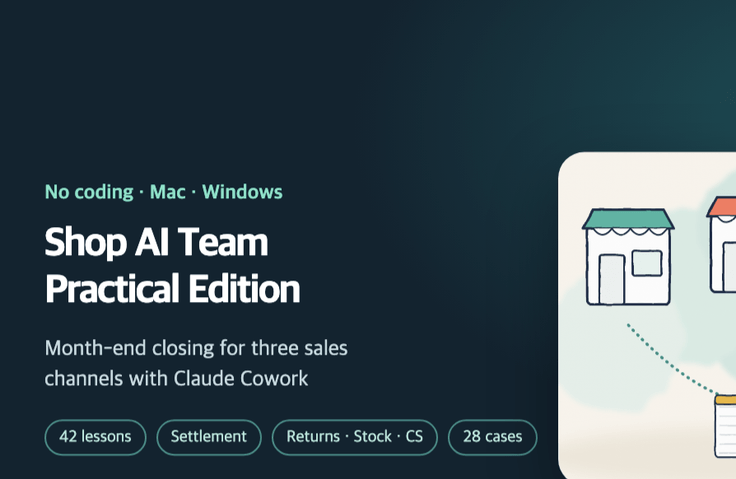
E-commerce AI Operations Team: A Practical Guide — Automating Month-End Close Tasks for Settlements, Returns, Inventory, and Customer Service on Naver Smart Store, Coupang, and Cafe24 with Claude Cowork

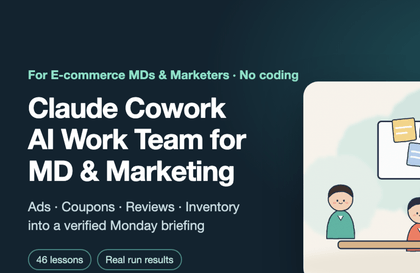
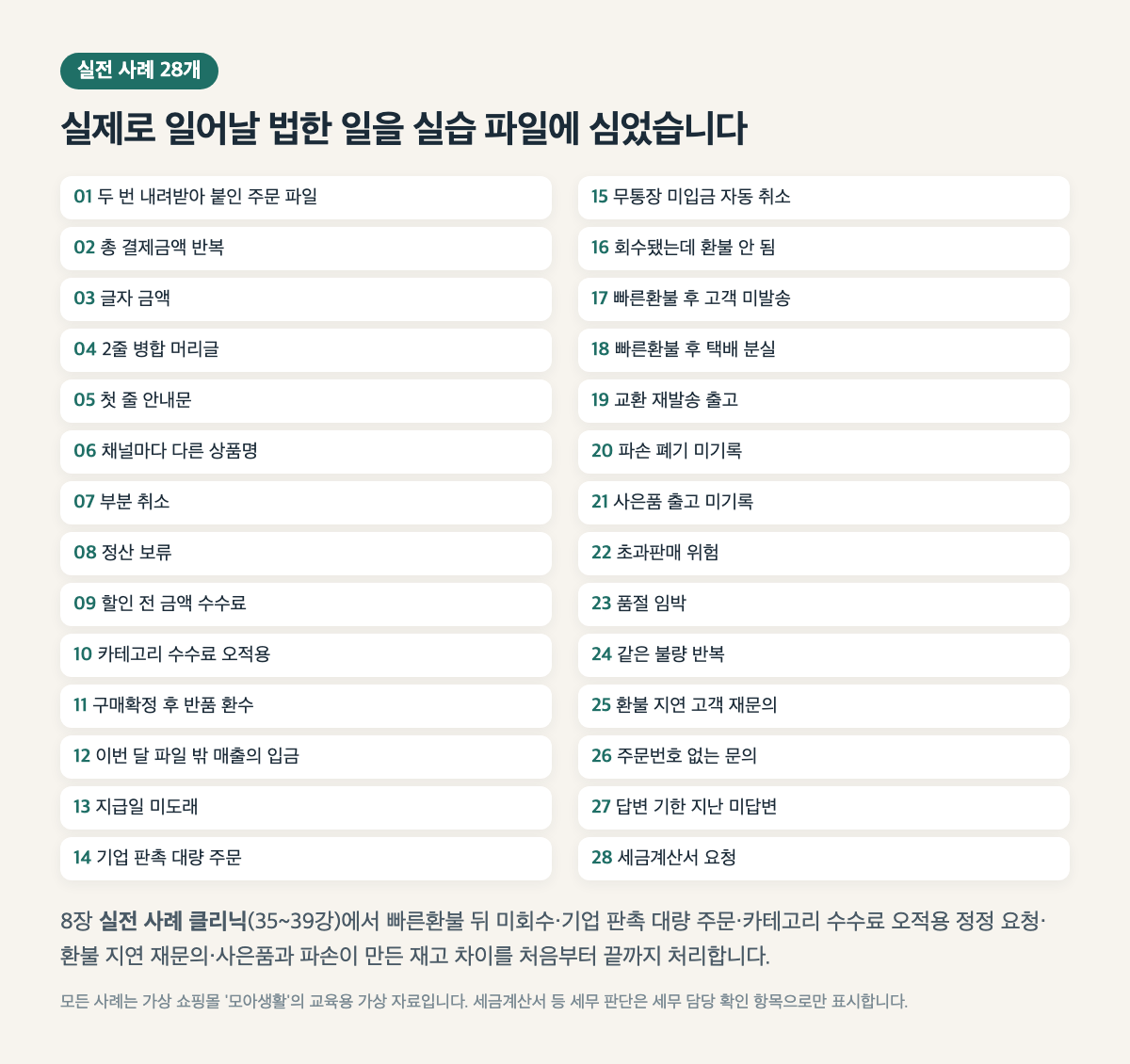
Turn half a day of month-end closing into 30 minutes of uploading files and checking results. Give Claude Cowork 16 sample channel files in Smart Store, Coupang, and Cafe24 formats, and build an integrated order sheet → settlement reconciliation (orders ↔ settlements ↔ bank statements, with zero unexplained discrepancies) → returns P&L → inventory and purchase orders → pending customer service list → month-end closing skill. Give instructions in Korean—no coding or formulas—and verify everything against the original files. Learn from 28 real-world cases and actual Claude execution logs.

1 learners are taking this course

Level Beginner

Course period Unlimited

claude
claude
Excel
Excel
Business Productivity
AI
AI
Google Sheets
Google Sheets
claude
claude
Excel
Excel
Business Productivity
AI
AI
Google Sheets
Google Sheets

What you will gain after the course

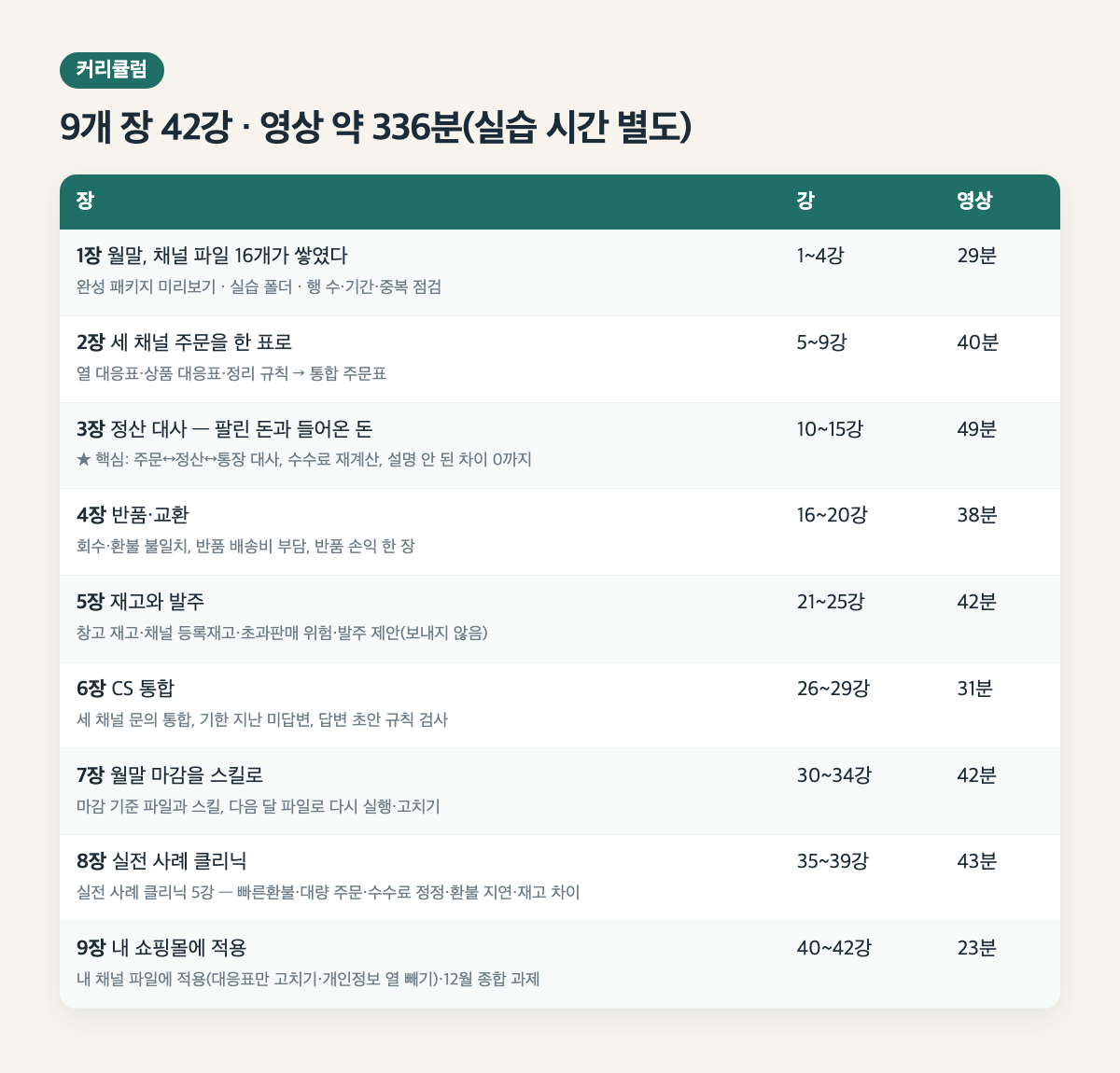
  • Open the practice folder in Claude Cowork and organize what the 16 channel files contain in a table.

  • First check the number of rows, date range, duplicates from downloading twice, the first line of the notice, merged headers, and text amounts like "12,000 won".

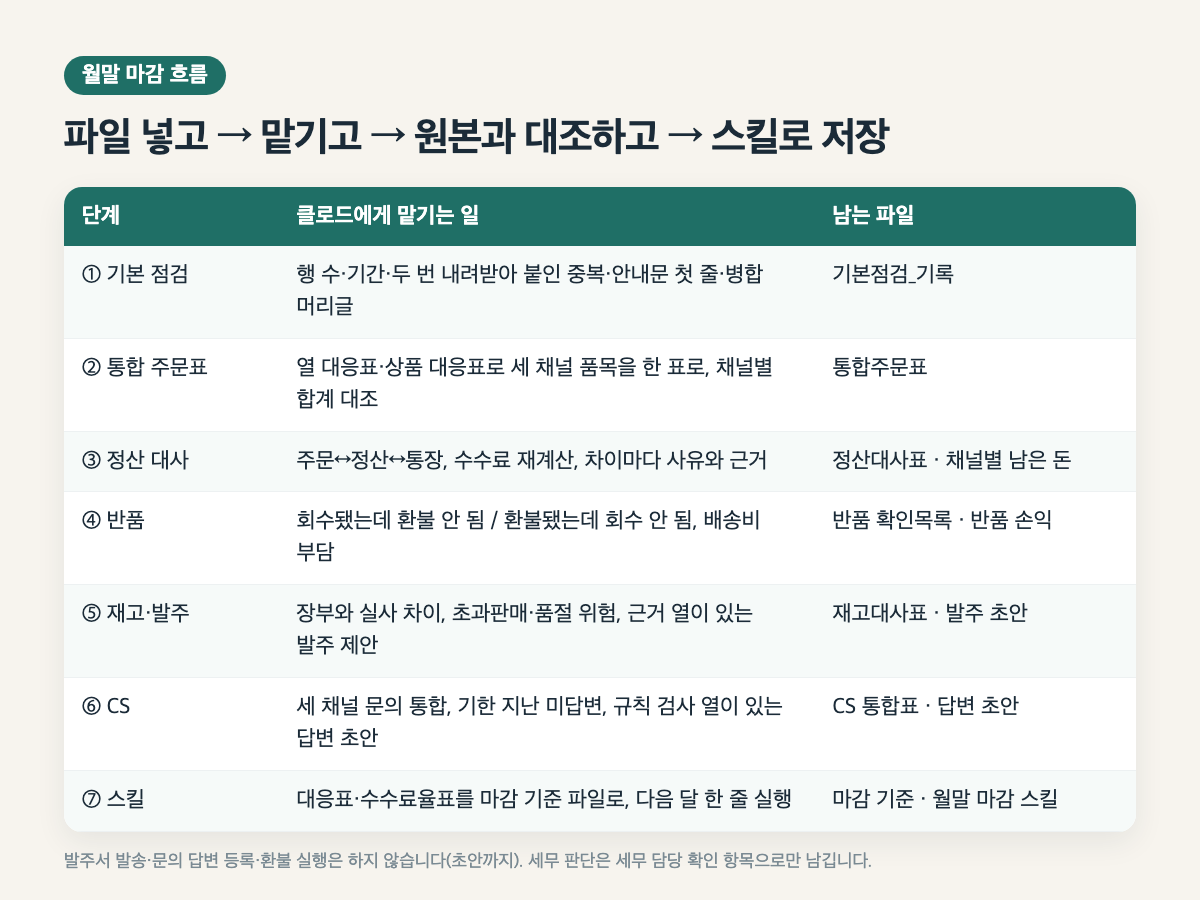
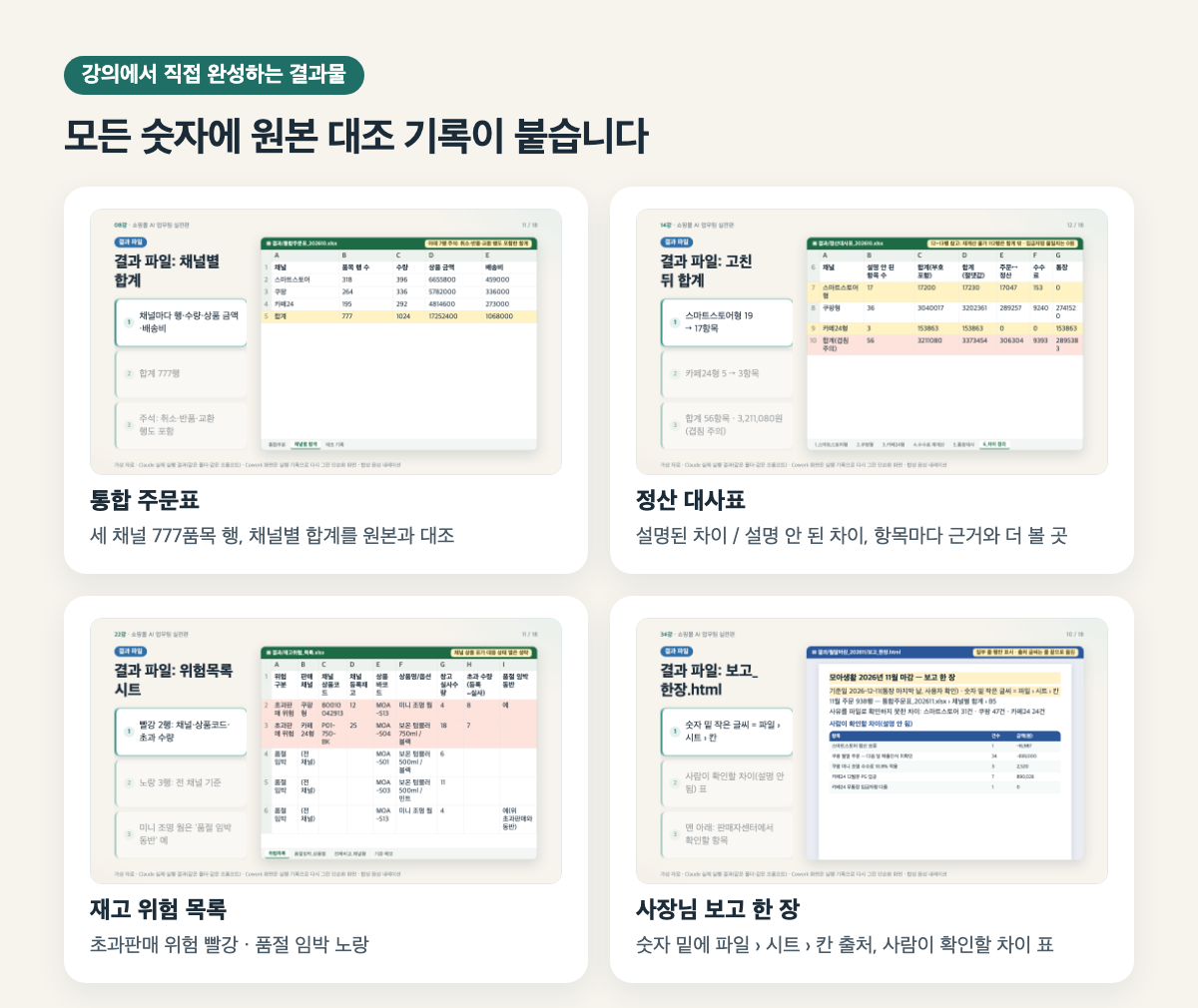
  • Create a unified order sheet by mapping columns and products across Smart Store-, Coupang-, and Cafe24-format files with different column and product names.

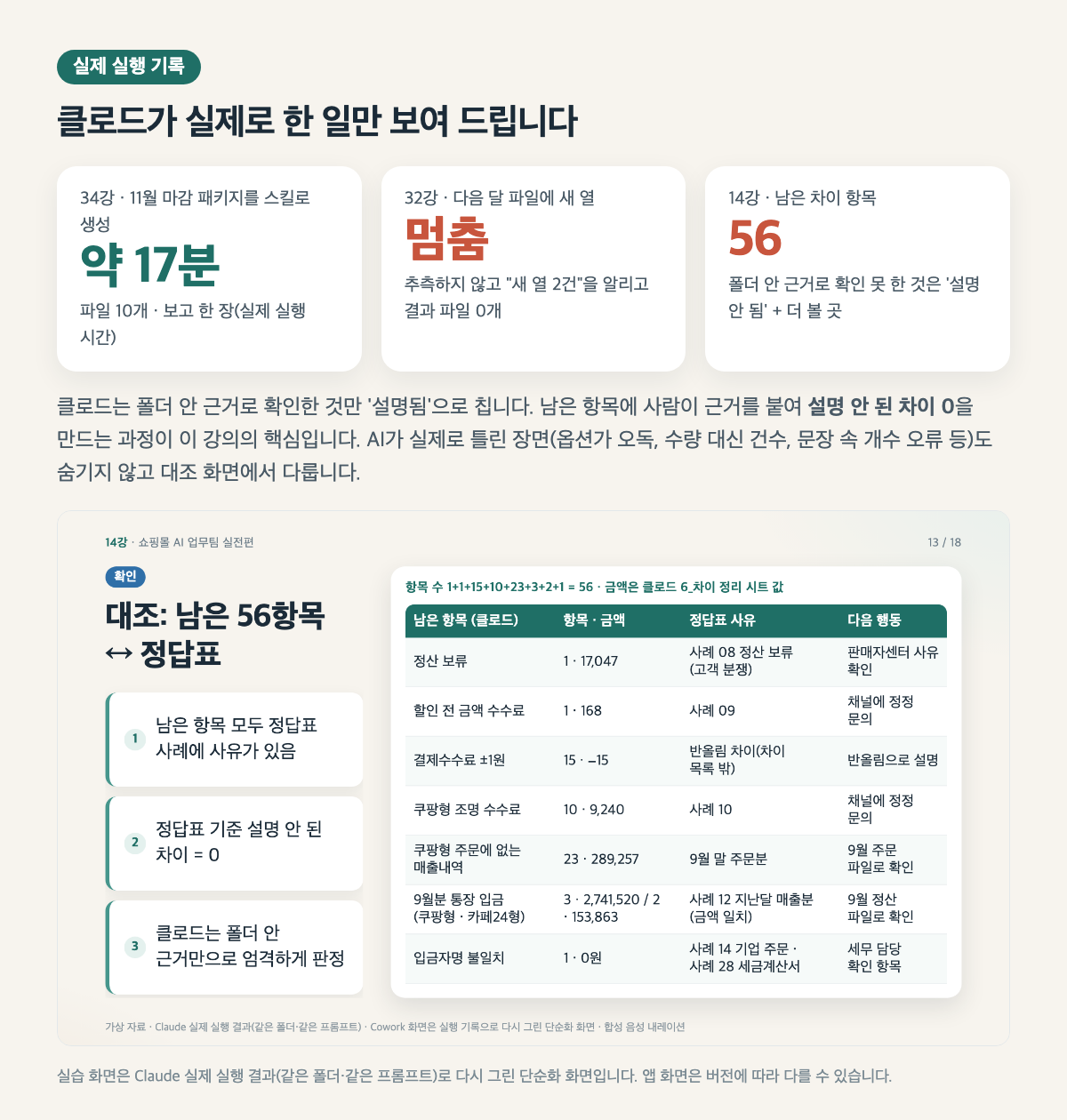
  • Reconcile orders ↔ settlements ↔ bank deposits, recalculate fees, and document the reason and supporting evidence for every discrepancy until there are zero unexplained differences.

  • Identify discrepancies between return pickups and refunds, who bears the return shipping costs, differences between recorded and physical inventory, risks of overselling or stockouts, purchase order recommendations, and unanswered inquiries past their deadlines.

  • Use the mapping table and fee schedule as the month-end closing reference files, build a month-end closing skill, then rerun it on the following month’s file after the columns change and make corrections.

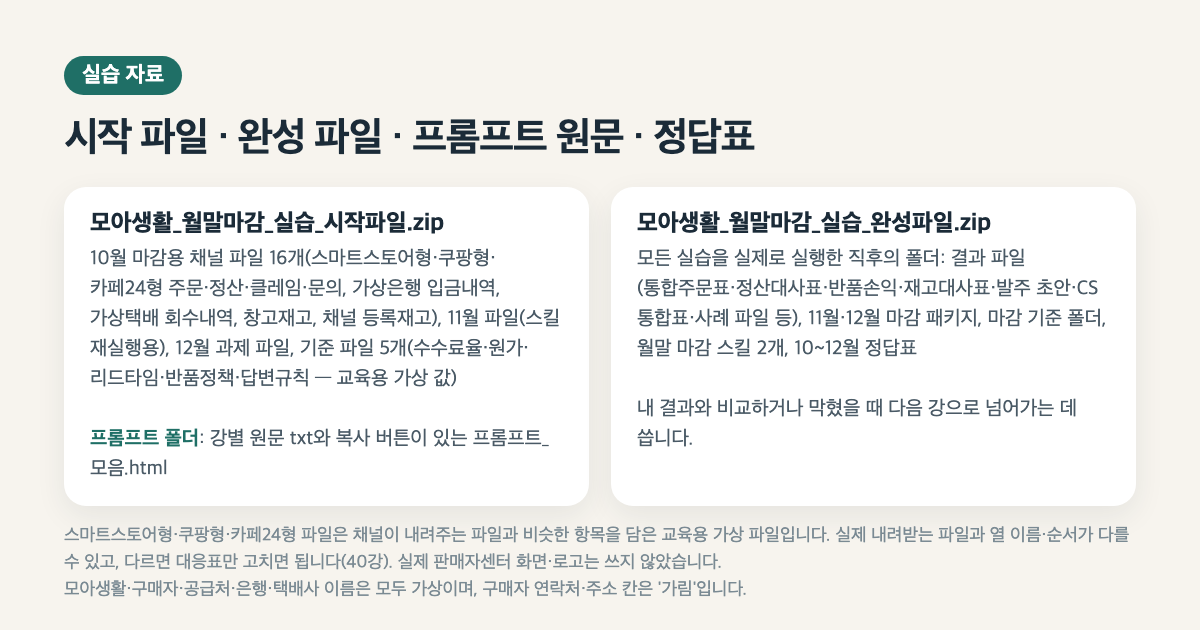
  • I’ll correct and apply only the mapping table in the file for my channel, then hand it over without any personal information columns, such as the buyer’s name, contact details, or address.


Turn half a day of month-end closing into 30 minutes of uploading files and checking the results.

Turn a half-day of month-end closing into 30 minutes of dropping in files and checking the results. Have Claude Cowork work with 16 virtual channel files in Smart Store, Coupang, and Cafe24 formats to create an integrated order table → settlement reconciliation (orders ↔ settlements ↔ bank statements, until unexplained discrepancies are reduced to zero) → return profitability analysis → inventory and replenishment → a list of unresolved customer service cases → a month-end closing skill. Give instructions in Korean, with no coding or formulas, and verify the results against the originals. Learn through 28 hands-on cases and actual Claude execution logs.


What you’ll learn

  • Open the practice folder in Claude Cowork and organize what the 16 channel files contain into a table.

  • First check row counts, date ranges, duplicates from downloading files twice, the first lines of instruction notes, merged headers, and text-formatted amounts like "12,000 won".

  • Create a consolidated order table by mapping column names and product names across Smart Store-, Coupang-, and Cafe24-style files using column and product mapping tables.

  • Reconcile orders ↔ settlements ↔ bank deposits, recalculate fees, and document the reason and supporting evidence for every discrepancy until unexplained discrepancies reach 0.

  • Identify collection/refund discrepancies, return shipping cost burdens, differences between book and physical inventory, overselling and out-of-stock risks, purchase order recommendations, and unanswered inquiries past their deadlines.

  • Use the mapping table and fee rate table as the reference files for closing, create a month-end closing skill, then rerun it on next month’s file after the columns change and make any necessary fixes.

  • For my channel files, I only update and apply the mapping table, and leave out personal information columns such as buyer names, contact details, and addresses before handing them over.


Please review before taking the course.

  • No coding, formula, or command-line knowledge required.

  • A paid Claude plan (a plan that allows you to use Cowork—the requirements may change, so check the official information), the Claude desktop app, and internet access.

  • You don’t need an Excel program (open the resulting file in Cowork Preview or Google Sheets).

  • Familiar enough to have downloaded an Excel file from Seller Center (the exercise uses a sample file)

  • The Smart Store-style, Coupang-style, and Cafe24-style files are training mock files containing fields similar to those in files provided by the channels. Their column names and order may differ from actual downloaded files; if they do, you only need to update the mapping table (Lesson 40). No actual Seller Center screens or logos were used.

  • The practice screens in the course are simplified recreations based on actual results from running Claude (using the same practice folder and prompt). App screens, button names, and locations may vary depending on the app version and settings.

  • Tax and VAT filings and accounting records are not covered. Tax-related judgments are listed only as items to confirm with the tax team.

  • We do not send purchase orders, register inquiry responses, or issue refunds (drafts only).

  • The execution screen shows a record of actual execution on macOS. Windows procedures are based on official documentation.

  • The voice is AI-generated locally. All practice materials are fictional and for educational purposes; they are not associated with any real company, online store, or person.

Recommended for
these people

Who is this course right for?

  • Operators of 1–5-person online stores selling through two or more channels, such as Smart Store, Coupang, and their own website (Cafe24)

  • An operations staffer with no development experience who manually reconciles order, settlement, claims, and inquiry spreadsheets at the end of every month.

  • Those who have listened to “Building an AI Team for E-Commerce with Claude” (Part 1) and want to see it through to a practical, finished result.

  • For anyone who needs a way to verify AI-generated settlement figures against the original rather than taking them at face value.

Need to know before starting?

  • No coding, formulas, or command-line knowledge required.

  • A paid Claude plan (one that supports Cowork—the requirements may change, so check the official guidance), the Claude desktop app, and internet access.

  • You don’t need Excel (open the output file in the Cowork preview or Google Sheets).

  • I’ve only downloaded and viewed an Excel file from Seller Center (the exercise was done using a mock file).

Hello
This is dorian05202988

Career Verified

A data craftsman with over 20 years of experience in databases and IT. As a DBA and manager of a DB Platform team, I work with database platforms and specialize in MySQL, PostgreSQL, Oracle, MongoDB, SQL tuning, AWS, Terraform, and Python. Drawing on experience in the gaming, finance, and IT services industries, I explain database and cloud architecture. I have published 『Oracle Practical Tuning: Learning SQL Patterns』 and 『Oracle Pro*C Practical Project Guide』, and have presented on serverless architectures, database selection, and multi-database strategies at AWS Summit 2018 and 2019 and DataYa Nolja 2020. Recently, I have been working on slow-query analysis and tuning recommendations using Bedrock LLM, automated DB specification sizing, and query workflows through a DB metadata MCP server and Slack bot. I explain database automation for developers and AI applications for non-developers through hands-on exercises tailored to the audience and objectives of each course. Rather than applying AI suggestions as-is, I teach a decision-making framework that verifies result equivalence, execution plans, and observability conditions, and defers action when the supporting evidence is insufficient. Company operational data and credentials are not included in the course materials.
More

Curriculum

All

42 lectures ∙ (5hr 35min)

Course Materials:

Lecture resources
Published: 
Last updated: 

Reviews

Not enough reviews.
Please write a valuable review that helps everyone!

dorian05202988's other courses

Check out other courses by the instructor!

Similar courses

Explore other courses in the same field!

Limited time deal

$70,400.00

20%

$68.20