
inflearn logo

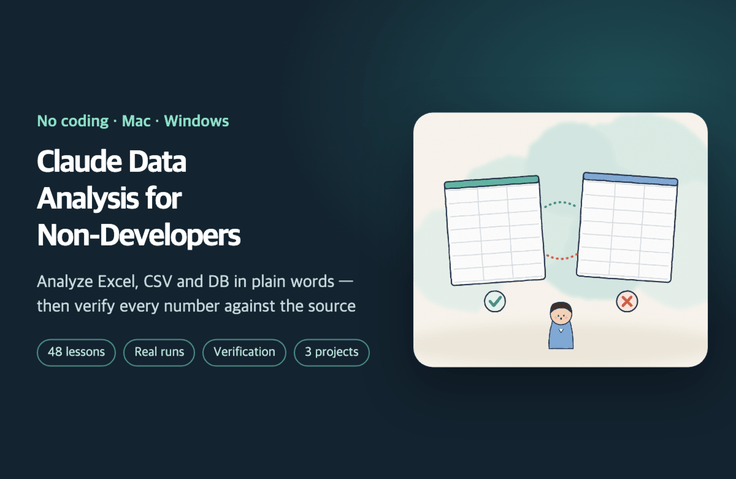
Claude Data Analysis and Cross-Checking for Non-Developers

Analyze Excel, CSV, and database files with Claude Code using natural language—no coding required—and check the AI’s numbers against the originals to catch errors yourself. Learn through actual execution logs, from the data dictionary and source fingerprints to metric definitions, aggregation, cross-checking through two independent paths, a one-page report with numbered evidence, and skills for next month.

1 learners are taking this course

Level Beginner

Course period Unlimited

claude
claude
data-analysis
data-analysis
Excel
Excel
LLM
LLM
claude
claude
data-analysis
data-analysis
Excel
Excel
LLM
LLM

What you will gain after the course

  • Have Claude Code (the Code tab in the desktop app) handle Excel, CSV, and database files, then ask it to analyze them in plain language.

  • Before analysis, create a data dictionary and a source fingerprint (row count, totals, period, and unique keys).

  • Write a metric definition document by decomposing "revenue has declined" into the metric, denominator, and time period, then aggregate and decompose the data in a way that leaves a clear record.

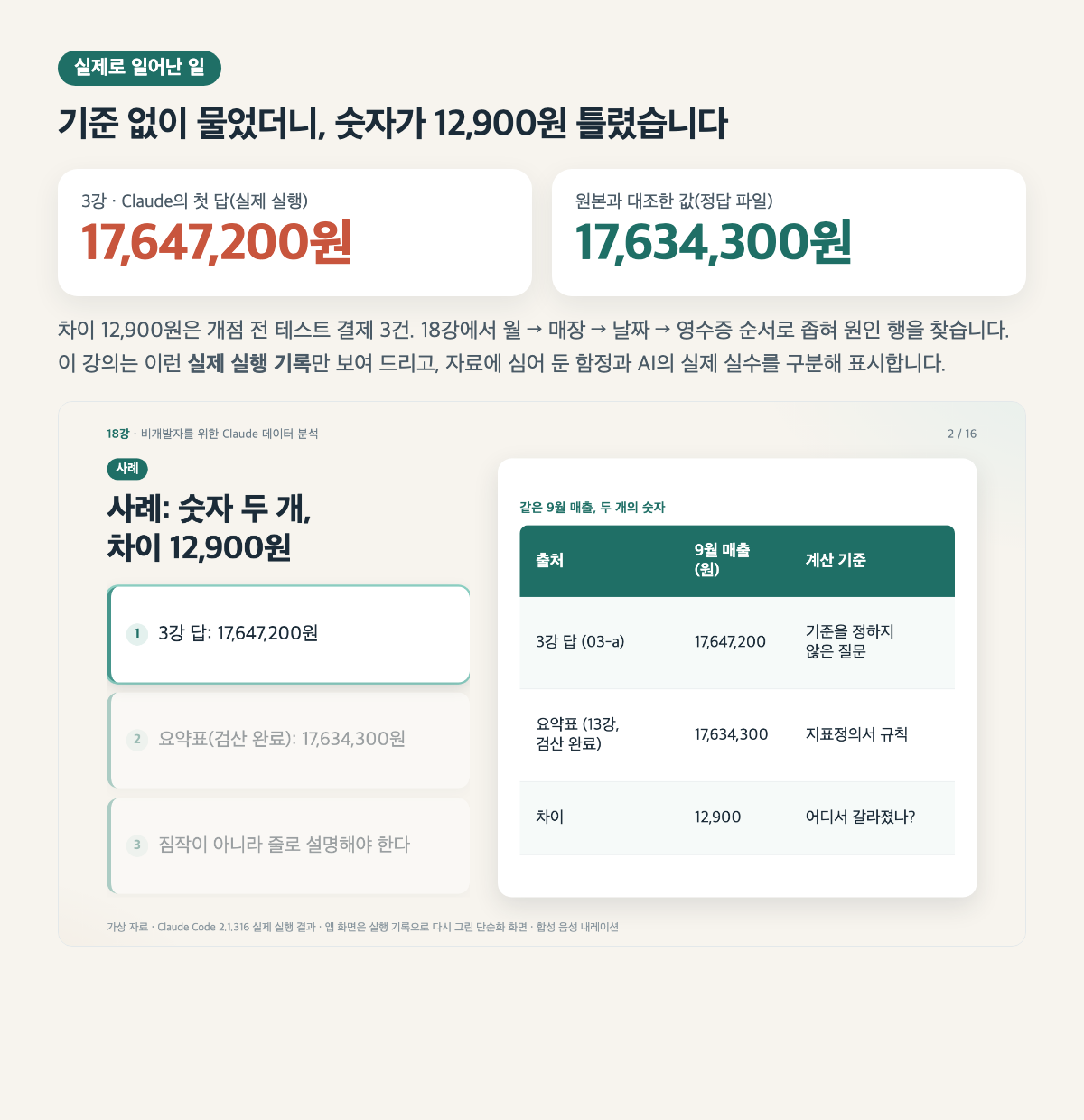
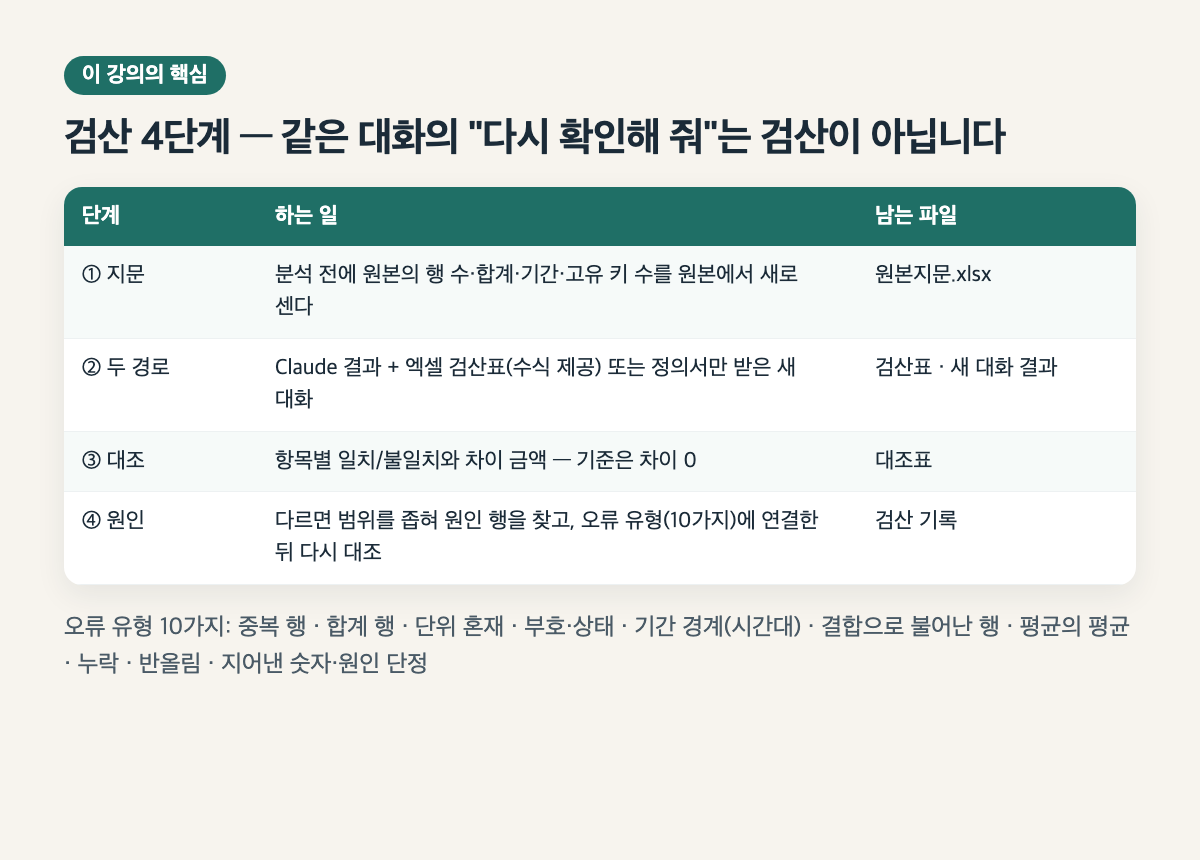
  • Cross-check the AI results using two methods—an Excel verification sheet and a new conversation—and, if they differ, trace the discrepancy to the row causing it.

  • Write questions that catch 10 types of errors (duplicates, total rows, units, status, time zones, joins, averages of averages, omissions, rounding, and fabricated numbers).

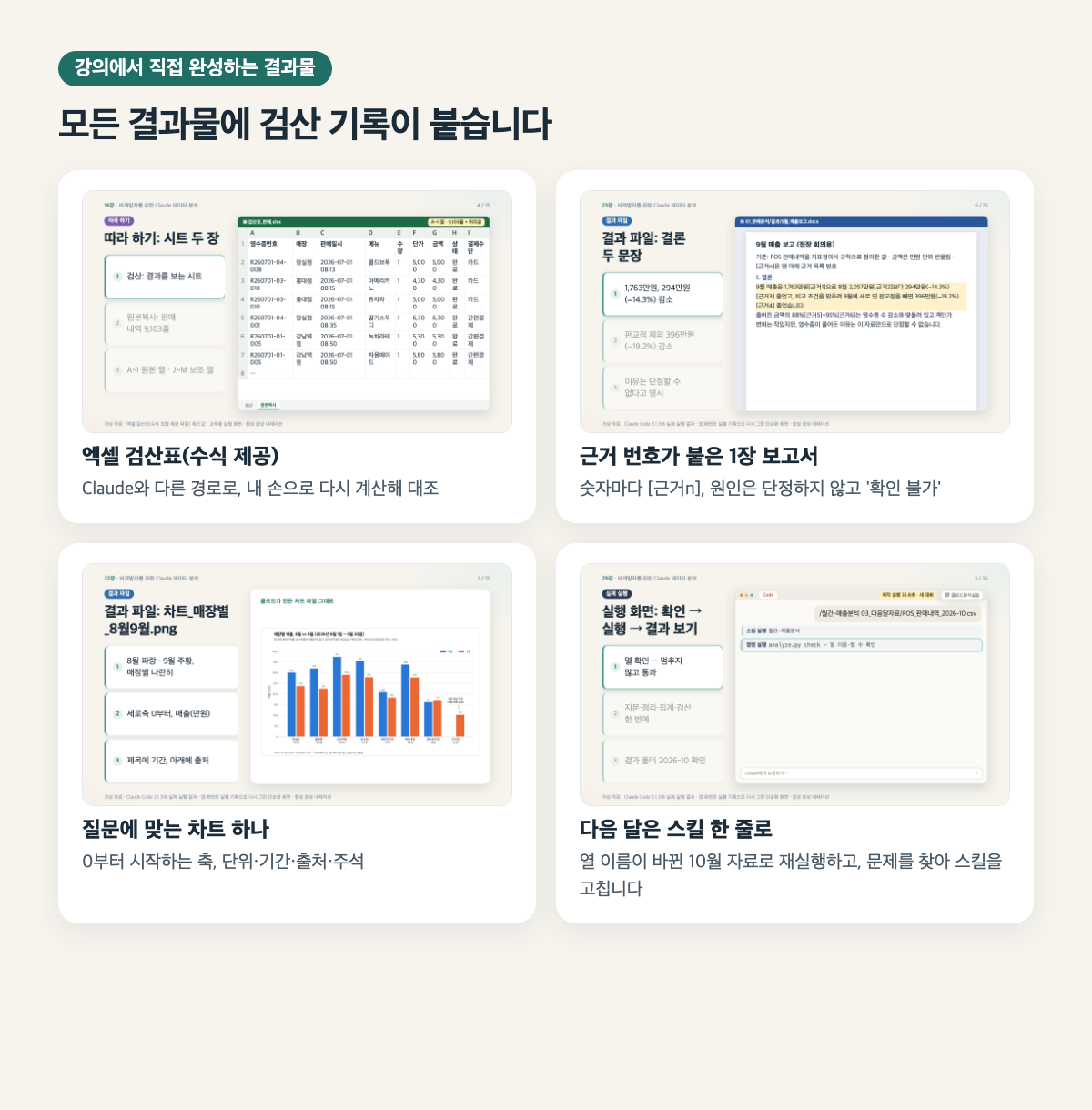
  • Write a one-page report with a source reference number for each figure, and save the analysis procedure as a rules file and skill so it can be run again next month.


Let AI Handle the Analysis; I’ll Verify the Numbers

Without coding, have Claude Code analyze Excel, CSV, and database files using natural language, then compare the AI’s numbers against the originals to catch errors yourself. Learn from actual execution records, from the data dictionary and source fingerprint through metric definitions, aggregation, cross-checking via two methods, and a one-page report with evidence references—all the way to a skill for next month.


What You’ll Learn

  • Give Claude Code (the Code tab in the desktop app) your Excel, CSV, or database files and ask it to analyze them in plain language.

  • Before analysis, create a data dictionary and a fingerprint of the source data (row count, totals, date range, and unique keys).

  • Break down "sales declined" into the metric, denominator, and time period; document the metric definition; and aggregate and decompose the data in a way that leaves an audit trail.

  • Cross-check the AI results using two methods—an Excel verification sheet and a new conversation—and, if they differ, trace the discrepancy back to the row that caused it.

  • Write questions that catch 10 types of errors: duplicates, total rows, units, statuses, time zones, joins, averages of averages, omissions, rounding, and fabricated numbers.

  • Write a one-page report with a source reference for every number, and save the analysis procedure as a rules file and skill so you can run it again next month.


Please check before enrolling.

  • No coding, SQL, or statistics knowledge required.

  • A paid Claude plan (Pro or above, or a company Team or Enterprise plan—the official documentation excludes the free plan)

  • macOS 13 or later, or Windows 10 (1809) or later

  • Some experience using SUMIF and pivot tables in Excel (or Google Sheets)

  • The app screens shown in the lecture are simplified recreations based on actual execution records. Button names and locations may vary depending on the app version and language settings.

  • The screenshots show actual execution on macOS. The Windows instructions are based on the official documentation.

  • The voice is a locally synthesized AI voice. All practice materials are fictional and for educational purposes.

Frequently Asked Questions

Q. Do I need to know SQL or Python?
A. No. All exercises use Korean prompts that you can copy and paste. Even in the database lesson, you won’t read or write SQL; you’ll only learn how to check the results by counting records. Claude will show you the commands it plans to run and ask for your permission.

Q. Which plan do I need?
A. According to the official documentation (2026-11), Claude Code is available with Pro or higher, or with a Team or Enterprise account. It is not included in the free plan. If you use a company account, your administrator may have disabled the feature, so check first.

Q. Does it work on Windows?
A. Yes, both Mac and Windows are supported. The execution screens in the course show actual runs on a Mac, and for steps that differ on Windows, we also provide instructions based on the official documentation.

Q. Will I get the exact same numbers as in the course?
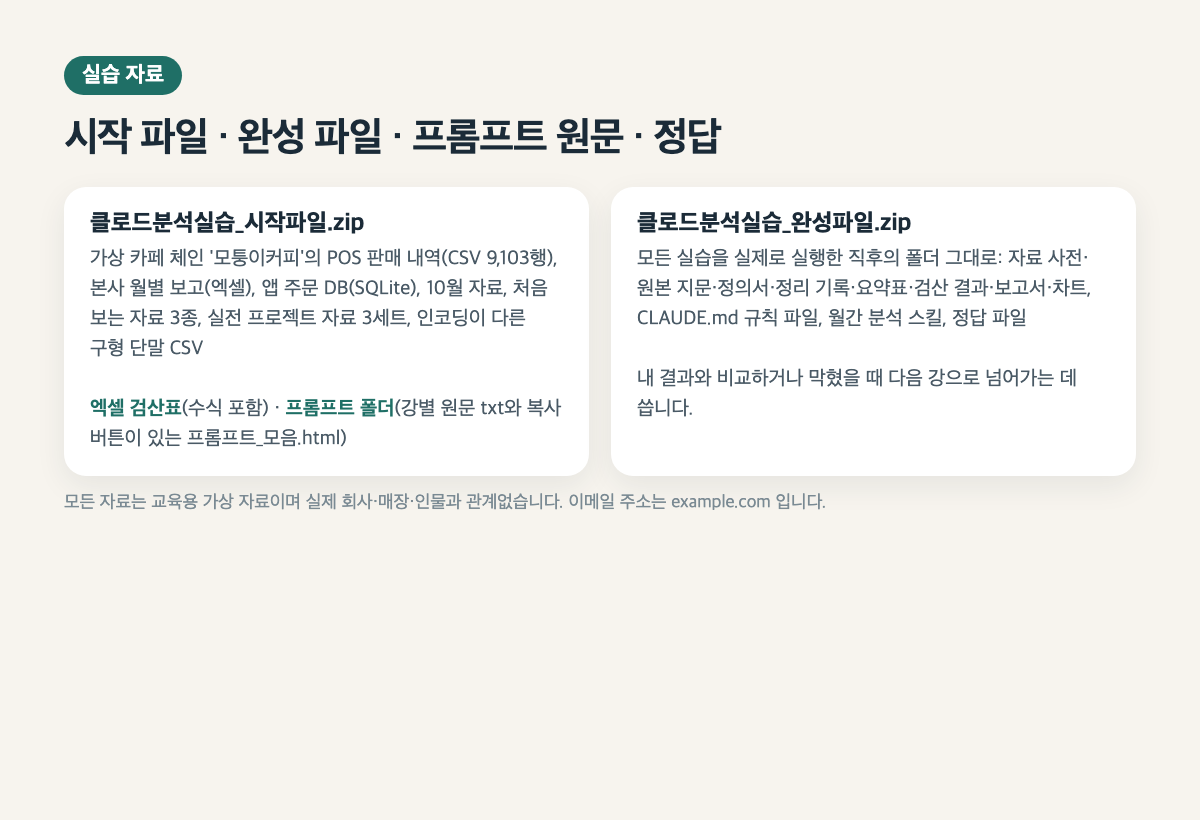
A. AI results may vary slightly each time you run them. So rather than focusing on the results shown on screen, this course teaches you how to check whether an answer is correct even when results differ, using the original problem, an Excel verification spreadsheet, and a fresh-chat check. We also provide the answer file and the completed file.

Q. What if I don’t have Excel?
A. The verification sheet is an Excel formula file. You can open it in Google Sheets and similar programs, but we haven’t tested it directly in those environments. We recommend using Excel.

Q. Can I use it directly with company materials?
A. Follow your company’s policies first. Lesson 34 covers checking which tools and accounts are approved, using copies with personal information redacted, read-only extracts, and responsibility for verifying results. All exercises use fictional data.

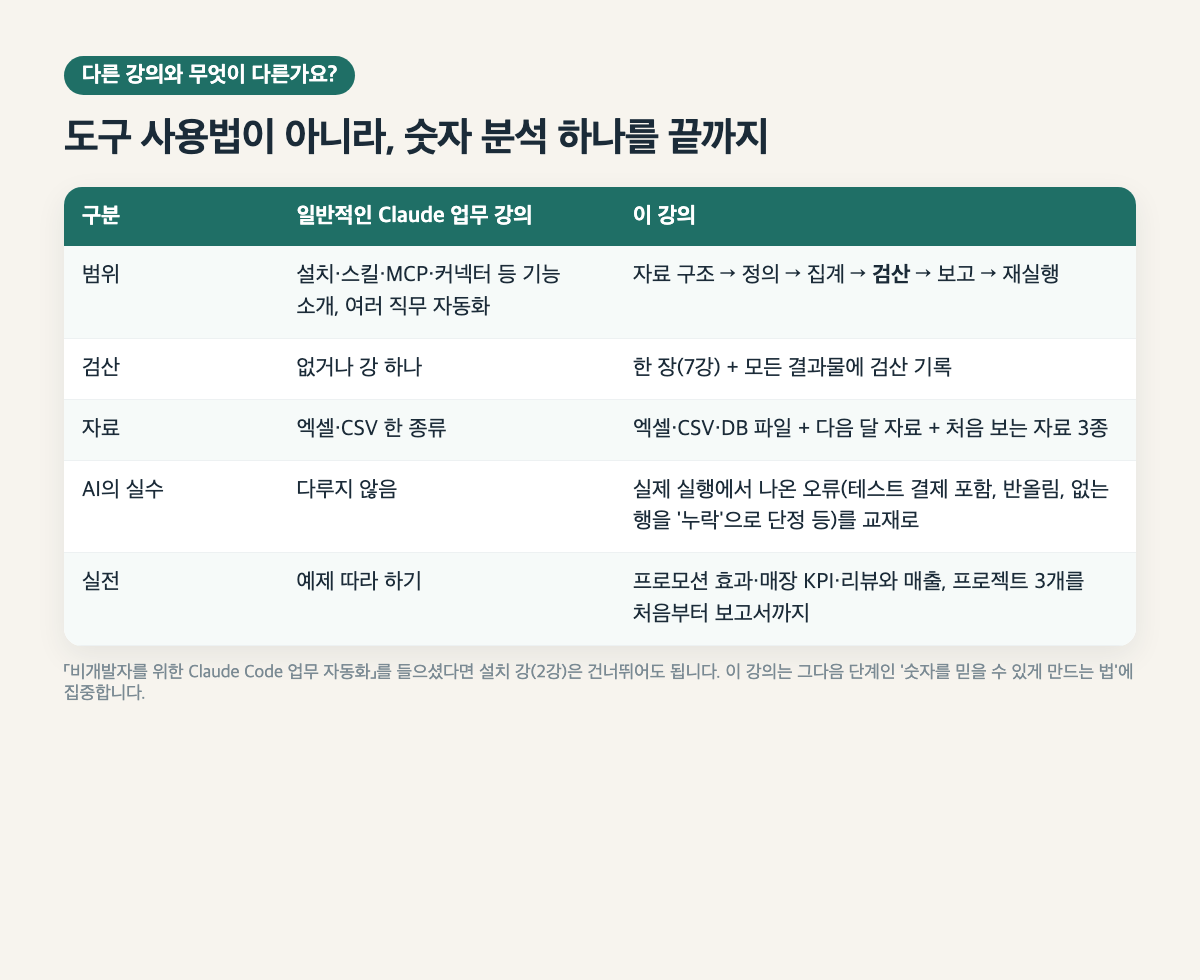
Q. How is this different from “Work Automation with Claude Code for Non-Developers”?
A. That course broadly covers work automation across various roles, such as compiling information, email, and meeting summaries. This course takes a deep dive into one type of analysis—numerical analysis—from understanding data structures and checking calculations to producing reports with supporting evidence and rerunning the process the following month. The practice materials for the two courses do not overlap.

Q. Are prompts provided?
A. Yes. We provide the exact prompts used in the course as individual .txt files for each lecture and as a prompt_collection.html file with a copy button.

Recommended for
these people

Who is this course right for?

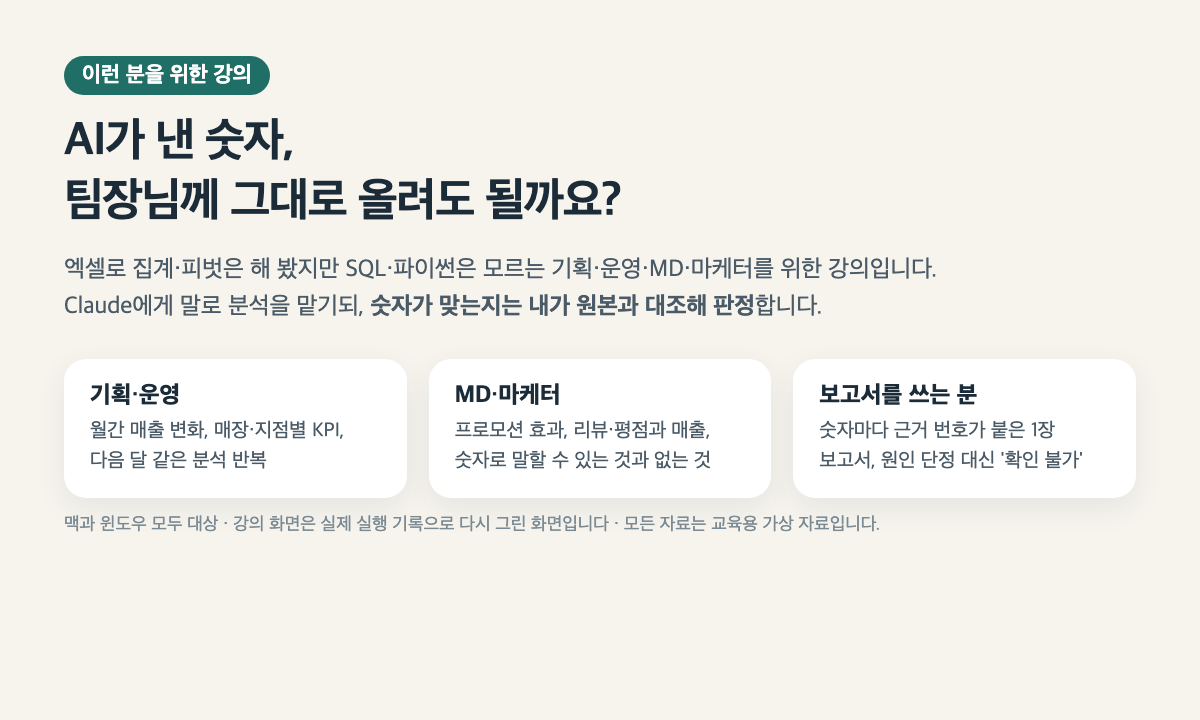
  • Planners, operations staff, merchandisers, and marketers who have used Excel for aggregations and pivot tables but don’t know SQL or Python

  • For anyone unsure whether it’s okay to report AI-generated analysis figures as-is.

  • For those who repeat the same sales and KPI analysis every month

  • For those looking for the next step after “Claude Code Workflow Automation for Non-Developers”

Need to know before starting?

  • No coding, SQL, or statistics knowledge required.

  • Claude paid plan (Pro or higher, or company Team or Enterprise — free plans are excluded according to the official documentation)

  • macOS 13 or later or Windows 10 (1809) or later

  • Basic experience using SUMIF and pivot tables in Excel (or Google Sheets)

Hello
This is dorian05202988

Career Verified

A data craftsman with over 20 years of experience in databases and IT. As a DBA and manager of a DB Platform team, I work with database platforms and specialize in MySQL, PostgreSQL, Oracle, MongoDB, SQL tuning, AWS, Terraform, and Python. Drawing on experience in the gaming, finance, and IT services industries, I explain database and cloud architecture. I have published 『Oracle Practical Tuning: Learning SQL Patterns』 and 『Oracle Pro*C Practical Project Guide』, and have presented on serverless architectures, database selection, and multi-database strategies at AWS Summit 2018 and 2019 and DataYa Nolja 2020. Recently, I have been working on slow-query analysis and tuning recommendations using Bedrock LLM, automated DB specification sizing, and query workflows through a DB metadata MCP server and Slack bot. I explain database automation for developers and AI applications for non-developers through hands-on exercises tailored to the audience and objectives of each course. Rather than applying AI suggestions as-is, I teach a decision-making framework that verifies result equivalence, execution plans, and observability conditions, and defers action when the supporting evidence is insufficient. Company operational data and credentials are not included in the course materials.

More

Curriculum

All

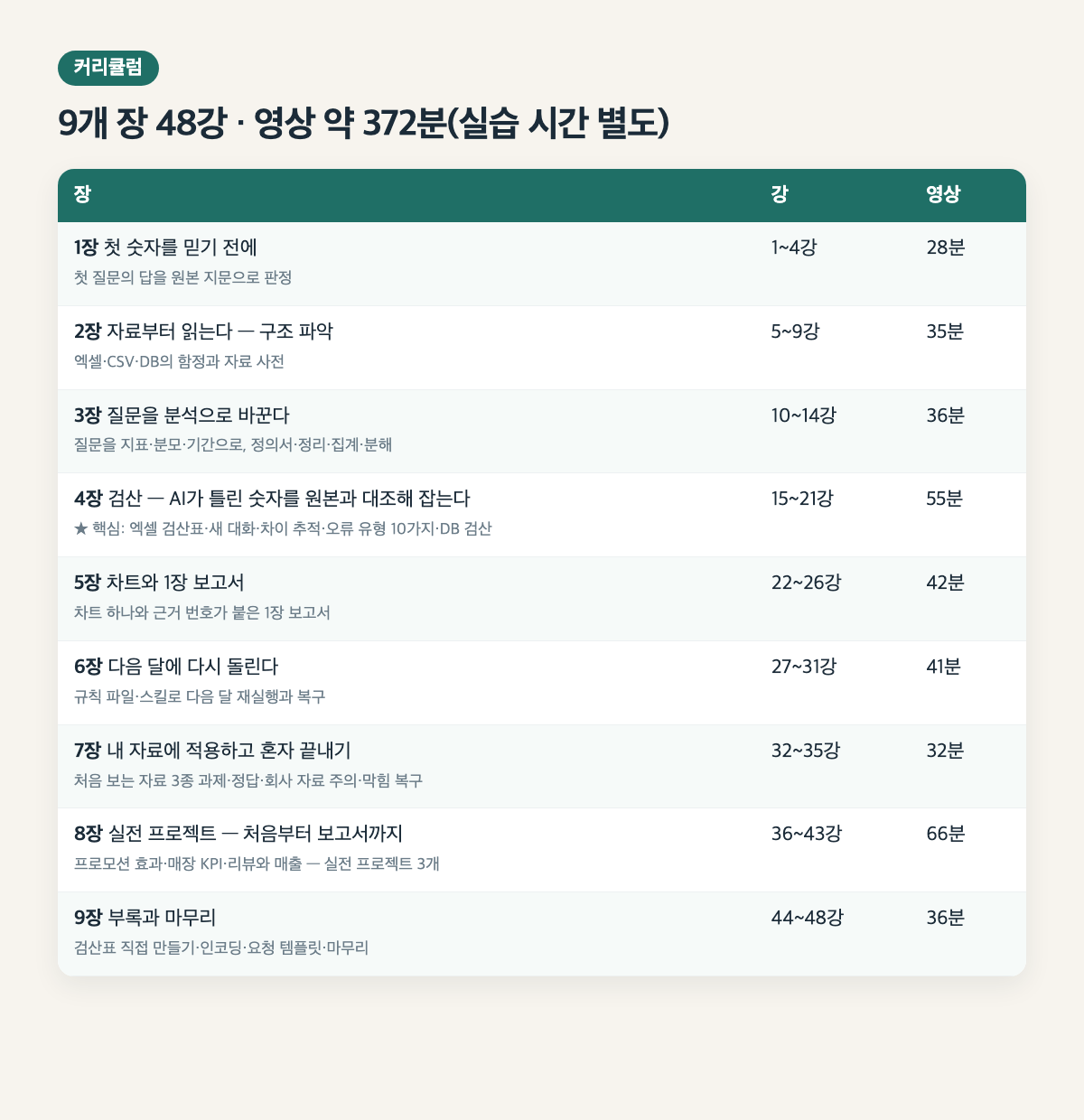
48 lectures ∙ (6hr 12min)

Course Materials:

Lecture resources
Published: 
Last updated: 

Reviews

Not enough reviews.
Please write a valuable review that helps everyone!

dorian05202988's other courses

Check out other courses by the instructor!

Similar courses

Explore other courses in the same field!

Limited time deal

$123,200.00

30%

$136.40