
inflearn logo

Development Automation with Claude Code—from Consoles to GUIs, 3D, and Web Applications

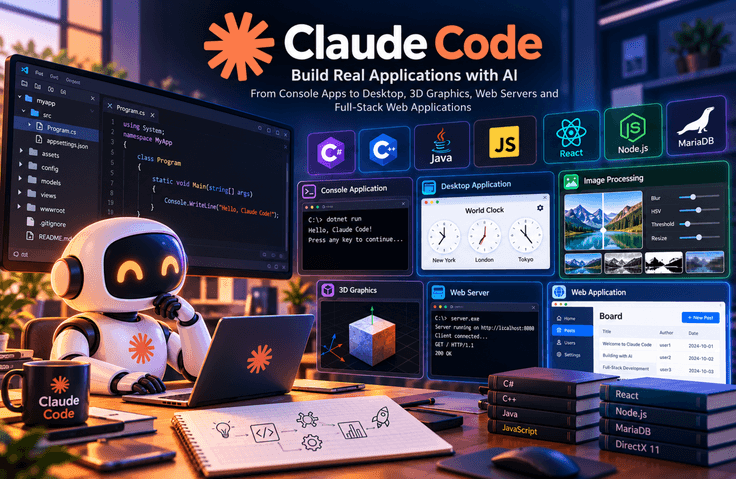
This course covers the process of automatically developing a program from start to finish using Anthropic’s coding agent, Claude Code. It consists of 10 lessons totaling approximately 5 hours and 47 minutes, and is a hands-on course that follows the instructor’s workflow on screen as they enter prompts, review the results, and request revisions. This is the advanced course in the “Programming with Claude” series. The beginner course covered learning programming with Claude, while the intermediate course focused on creating executable programs. In this advanced course, rather than simply copying and pasting code, you delegate the entire development process to Claude Code, with the developer reviewing the results at the end. The course begins with a C# console program and covers how to specify the .NET Framework version as well as the Visual Studio solution-project structure. It then moves between languages and development environments, including C++ ASCII art, JavaScript physics-effect animation, and C# and Java 17 GUI programs. It also includes a process for requesting comments in the generated code to understand how it works. From the middle of the course onward, larger programs are improved step by step. A world clock program created based on a drawing of the screen layout is enhanced with a time zone settings window and configuration file storage. An image-processing program is expanded with Gaussian blur, HSV adjustment, binarization, grayscale conversion, and resizing features in sequence. The course also covers explaining slow slider responsiveness and requesting performance improvements. Finally, you will create a program that renders 3D objects with DirectX 11, a C++ Win32 API-based web server, and a bulletin board application integrating React, Vite, a Node.js backend, and MariaDB. To follow along with the hands-on exercises, you need a paid Claude plan (Pro or higher) and a Windows development environment. .NET Framework 4.6.1 and Visual Studio 2022, Java 17 and Eclipse, Node.js, and MariaDB are used in different lessons. Although you will not write the code yourself, it is recommended that you have a basic programming background so you can review the results generated by the AI.

2 learners are taking this course

Level Basic

Course period Unlimited

claude
claude
prompt engineering
prompt engineering
C#
C#
C++
C++
React
React
claude
claude
prompt engineering
prompt engineering
C#
C#
C++
C++
React
React

What you will gain after the course

  • You can enter a prompt in Claude Code to create and run a C# console program.

  • You can request comments in the generated code to understand how it works.

  • You can create the desired GUI layout by providing the screen design as an image.

  • You can create an image processing program with features for image loading, Gaussian blur, HSV adjustment, binarization, grayscale conversion, and resizing.

  • Can create a DirectX 11-based 3D rendering program and a C++ Win32 API web server.

  • You can delegate tasks such as starting and stopping the development server and checking the database connection to Claude Code.

  • You can specify the .NET Framework version and Visual Studio solution-project structure to generate code in the desired format.

  • You can request programs to be created using different languages and development environments, such as C++, Java, and JavaScript.

  • The program can be improved incrementally by adding a time zone settings window and the ability to save and load configuration files.

  • You can specifically describe the performance issue of slow responsiveness and request improvements.

  • You can build a bulletin board application connected to React, Vite, a Node.js backend, and MariaDB.

Practical Programming Completed with Claude Code: From Consoles to Web Applications

Learn how to automate the entire program development process using Claude Code. Create actually executable programs using a wide range of languages and technologies, from C#, C++, Java, and JavaScript to React, Node.js, and MariaDB.

Through step-by-step exercises, learn how to generate code through prompts, improve errors and performance issues, and connect user interfaces with databases. Go beyond simply generating code by learning how to communicate requirements clearly, review the results, and develop programs to a high level of completion.

The techniques covered in this course can be applied in a wide range of fields, including software development, web application creation, workflow automation, image processing, 3D graphics, and improving in-house development productivity.

Recommended for developers, job seekers, planners, and IT professionals who want to apply AI coding agents to practical work based on foundational programming knowledge. Follow real-world development examples and experience a new way of developing with Claude Code.

What You’ll Learn

Key Learning Content (Core Keywords)

1. Program Development Using Claude Code

  • Enter a clear prompt in Claude Code to generate and run a C# console program

  • Specify the .NET Framework version and the Visual Studio solution and project structure

  • Add comments to the generated code to understand how the program works

2. Utilizing Various Programming Languages and Development Environments

  • Creating programs in various languages, including C++, Java, and JavaScript

  • Implementing GUI programs using Java 17 and C#

  • Improve the result by specifically describing the screen layout and desired features.

3. Expanding Program Functionality and Improving It Step by Step

  • Add time zone settings and configuration file save/load functionality to the world clock program

  • Implement image loading, Gaussian blur, and HSV adjustment features

  • Add image binarization, grayscale conversion, and resizing features

  • Analyze performance issues and improve response speed through specific requests

4. 3D Graphics and Web Server Development

  • Create a 3D object rendering program using DirectX 11

  • Implementing a web server based on the C++ Win32 API

  • Convey requirements to AI, check the execution results of the generated code, and make revisions.

5. Building Full-Stack Web Applications

  • Developing a Web Frontend Using React and Vite

  • Connect a Node.js backend to a MariaDB database

  • Create a bulletin board application integrating the frontend, backend, and database

  • Start and stop the development server, and check the database connection status

6. Strengthening Practical Skills by Utilizing AI Coding Agents

  • Learn how to write effective prompts to achieve the desired results

  • Focus on defining requirements and reviewing results instead of writing code directly

  • Discovering and systematically resolving program errors and performance issues

  • Using AI for software development, web development, work automation, and improving development productivity

Through this course, you will experience practical development processes using Claude Code, from simple code generation to developing GUI programs, image processing, 3D graphics, web servers, and full-stack web applications.

Before You Enroll

Prerequisites & Notices Before Enrollment

1. Prerequisite Knowledge and Course Preparation

  • A paid Claude plan (Pro or higher) is required to use Claude Code's features.

  • A Windows development environment is required, and some exercises may be difficult to follow exactly on macOS and Linux.

  • Visual Studio 2022, .NET Framework 4.6.1, Java 17 and Eclipse, Node.js, MariaDB, and other development tools specific to each course are used.

  • Even if you do not write code yourself, we recommend acquiring basic programming knowledge so that you can review AI-generated code and its execution results.

  • If you don’t have much programming experience, taking the “Programming with Claude” beginner and intermediate courses first may help with your learning. However, they are not prerequisites.

2. Course Structure and Learning Method

  • This is a hands-on course consisting of 10 lectures, totaling approximately 5 hours and 47 minutes.

  • You can learn by following the instructor’s process of entering prompts, generating code, running programs, and making modifications.

  • It is recommended that you take each lecture in order, set up the development environment yourself, and verify the practice results.

  • Don't just enter prompts; verify how the generated code works, and if errors or performance issues occur, refine the requirements and repeat the process of making corrections.

  • Since issues may arise with the development environment and program execution, it is recommended that you set aside sufficient time for hands-on practice.

3. Information on Questions and Learning

  • If you have any questions about the lecture content or hands-on exercises, you can ask them using the questions and discussion features provided by the course platform. The available features and response methods may vary depending on the platform’s policies.

  • Please check the announcements and update history on the course page to see whether the course has been updated or additional materials have been provided.

  • Since the practice results may vary depending on the version of the development tools or the environment being used, if an error occurs, it is recommended to check the environment in use and the error message together.

Recommended for
these people

Who is this course right for?

  • A developer who wants to try automating development tasks with Claude Code

  • Practitioners who want to see real-world examples of what prompts are given to AI coding agents and how they are provided.

  • Learners who want to compare ways of using AI across various languages and development environments, such as C#, C++, and Java

  • Planners and PMs looking to try a development approach focused on organizing and reviewing requirements rather than writing code directly

  • Person responsible for evaluating the adoption of AI agents as internal development productivity tools

  • 'Programming with Claude' beginner and intermediate course learners

Need to know before starting?

  • A paid Claude plan (Pro or higher) is required. Claude Code is included with paid plans.

  • A Windows development environment is required. Since the exercises involve .NET Framework and DirectX, it is difficult to follow them as-is on macOS or Linux.

  • Visual Studio 2022, .NET Framework 4.6.1, Java 17 and Eclipse, Node.js, and MariaDB are used for each session.

  • While you may not write the code yourself, a basic understanding of programming that enables you to review the results is recommended.

  • It is easier to understand if you first take the beginner and intermediate courses in “Programming with Claude.” (They are not prerequisites.)

Hello
This is it learner

IT training programs led by hands-on experts and professional instructors in various IT fields, offering practical, hands-on courses in programming, software development, data analysis, artificial intelligence, networking, information technology, and more. Through educational content that reflects the latest IT technologies and industry trends, these programs help learners acquire both theoretical knowledge and practical skills while adapting to the rapidly changing IT environment.

More

Curriculum

All

10 lectures ∙ (5hr 47min)

Course Materials:

Lecture resources
Published: 
Last updated: 

Reviews

Not enough reviews.
Please write a valuable review that helps everyone!

it learner's other courses

Check out other courses by the instructor!

Similar courses

Explore other courses in the same field!

Limited time deal ends in 6 days

$3,226.00

9%

$22.00