inflearn logo

[Korean Subtitles] Mastering Claude & Gemini 3.1: From Prompting to Video Generation

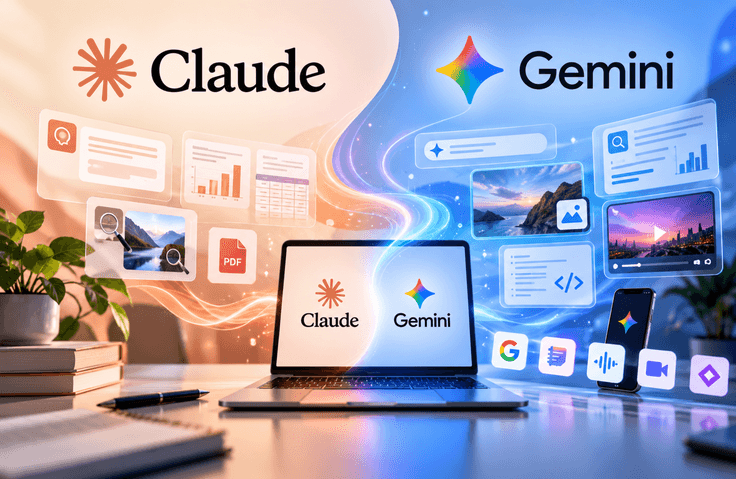
This course is a hands-on program designed to systematically teach the core features of Claude and Google Gemini 3.1, the two most prominent AI platforms as of 2026. The first half begins with the basics of using Claude AI and covers, step by step, the four essential elements of writing effective prompts, the Artifacts feature for automatically generating documents, tables, and charts, and how to create your own customized AI assistant using the Projects feature. You will also learn file-processing capabilities that can be used immediately in real-world work, including image analysis and PDF summarization. The second half compares the differences among the three latest Gemini 3.1 models—the fast model, the thinking model, and Pro—and teaches you how to write documents and code using Canvas, as well as how to generate reliable reports through Deep Research. It also broadly covers realistic image generation and text-rendering techniques with Nano Banana 2; AI video production using Veo 3.1 and Flow; source-based analysis and AI-generated audio and slides with NotebookLM; real-time camera conversations through Gemini Live on smartphones; creating expert assistants with Gems; and Gemma 4, a locally installable AI. Each section includes hands-on prompts and demonstrations, allowing you to apply what you learn immediately to your work and daily life. From beginners encountering AI for the first time to existing users, this comprehensive course enables you to master the latest features of both platforms in one program.

1 learners are taking this course

Level Beginner

Course period Unlimited

generative-art
generative-art
prompt engineering
prompt engineering
claude
claude
gemini
gemini
Video Production
Video Production
generative-art
generative-art
prompt engineering
prompt engineering
claude
claude
gemini
gemini
Video Production
Video Production

What you will gain after the course

  • Claude AI Prompt Design and Artifact Utilization

  • Gemini 3.1 Canvas · Deep Research · Advanced Prompts

  • AI Video Production Using Veo3.1 and Flow

  • Using Claude Projects and Image Analysis

  • Nano Banana 2 image generation and text rendering

  • Using NotebookLM, Gems, Smartphone Live, and Gemma4

From Claude AI to Gemini 3.1! A Master Class in Practical Generative AI Applications

Learn the core features of Claude AI and Google Gemini 3.1, and discover practical generative AI skills you can use right away in your daily life and work!

Learn step by step, from prompt writing and document creation to in-depth research, image generation, and AI video production. You’ll also learn how to use various AI tools, including NotebookLM, Gems, Gemini Live, and Gemma4, to create your own AI assistant and boost your work productivity.

It is a practical course that can be applied to various areas, including marketing content creation, report writing, data organization, educational material development, and video content production. It provides step-by-step guidance, from the basics to practical applications, so even beginners who are new to AI can follow along.

What You’ll Learn

Core Keywords

In this course, you will learn the key features of Claude AI and Google Gemini 3.1 step by step, and master how to use various generative AI tools in your work and daily life.

1. Using Claude AI and Prompt Engineering

  • Principles and practical techniques for writing prompts to obtain effective responses

  • Create various outputs, such as documents, tables, and charts, using Claude AI Artifacts.

  • Configuring a customized AI assistant using the Projects feature

  • How to use file-based tasks such as image analysis and PDF summarization

2. Advanced Use of Google Gemini 3.1

  • Characteristics of each Gemini model and how to choose the right model for your purpose

  • Improving the accuracy and quality of outputs through advanced prompt techniques

  • In-depth research and report writing using Deep Research

  • Document creation, coding, and content optimization using Canvas

3. AI Image Generation and Editing

  • Realistic image generation using Nano Banana 2

  • Designing Image Generation Prompts to Achieve the Desired Results

  • Image creation techniques for maintaining character consistency

  • How to Render Text in Images Naturally and Accurately

  • Image Retouching, Editing, and Compositing Using Google Flow

4. AI Video and Multimedia Content Creation

  • Basic Features of Veo 3.1 and How to Write Video Generation Prompts

  • Hands-on AI Video Creation with Google Flow

  • Improving Video Quality Through Scene Composition and Prompting

  • AI music generation and various content creation using Gemini

5. Enhancing Research and Learning Productivity with AI

  • Source-based analysis and information organization using NotebookLM

  • Creating Learning Content Using AI Voice and Slide Generation Features

  • Configuring Specialized AI Assistants for Specific Purposes Using Gems

  • Voice conversations and real-time camera sharing using Gemini Live on a smartphone

  • Basic concepts of the local AI model Gemma 4 and how to use installable AI tools

Learning Objectives and Expected Outcomes

Upon completing this course, learners will understand the various features of Claude AI and Google Gemini and be able to select and use the appropriate AI tools for their purposes. They will develop the ability to efficiently perform practical tasks using AI, such as writing reports, conducting research, creating images and videos, and organizing learning materials.

Because the course focuses on hands-on practice, from writing prompts to creating outputs, even beginners who are new to AI can start with the basics and apply what they learn to their own work and projects.

Before You Enroll

Prerequisites & Notices

1. Prerequisite Knowledge Before Taking the Course

  • No prior knowledge of artificial intelligence (AI) or programming is required.

  • Even beginners using Claude AI and Google Gemini for the first time can follow along easily.

  • For the exercises, you will need a computer or smartphone with internet access.

  • A Google account is required to use features such as Gemini, NotebookLM, and Google Flow.

  • Some Claude AI features may require a paid plan.

  • For the Gemini Live practice on a smartphone, an Android or iOS smartphone is recommended.

2. Course Quality and Effective Learning Methods

  • All lectures are centered around on-screen demonstrations and hands-on practice, allowing you to learn how to use actual AI tools step by step.

  • We recommend following along directly with the prompts and practice exercises introduced while watching the lectures.

  • After learning each feature, try applying it to your own work or areas of interest.

  • Rather than using AI-generated outputs as they are, it is important to develop the habit of checking their accuracy, wording, and sources.

  • The availability of some AI features may vary depending on service policies, account type, region, and subscription plan.

3. Questions and Learning Support

  • If you have questions while learning or encounter issues during hands-on practice, you can post them on the course’s Q&A board.

  • When writing a question, providing specific details about the feature where the problem occurred, the prompt you used, and the error message will help you receive a more accurate answer.

  • You can also learn various ways to use the tools and troubleshoot problems by referring to other students’ questions and answers.

4. Course Update Information

  • Generative AI tools may have new features added, or their existing features and methods of use may change.

  • The features covered in the course may differ from the actual service interface, so check each service’s latest official documentation when necessary.

  • Whether the course content will be revised or receive additional updates in the future will be determined according to the course operation plan.

Recommended for
these people

Who is this course right for?

  • Office workers who are new to AI but want to properly learn Claude and Gemini and apply them directly to their work.

  • An AI user who has only used ChatGPT and is curious about Claude and Gemini’s distinctive features

  • Office workers who want to automate repetitive tasks such as report writing, data organization, and image analysis with AI

  • Marketers and solo entrepreneurs who want to create promotional videos, posters, and image content themselves using AI

  • IT enthusiasts who want to quickly get up to speed on the latest AI features (video generation, deep research, music generation, local AI, etc.)

  • Students, teachers, freelancers, and anyone else who wants to use AI tools for learning and improving productivity

Need to know before starting?

  • A computer or smartphone with internet access

  • Google account (required to use Google services such as Gemini, NotebookLM, and Flow)

  • Claude AI account (you can start with a free account; some features require a paid plan)

  • No prior knowledge of AI or programming is required (complete beginners can also take the course)

  • An Android or iOS smartphone is recommended for the hands-on Gemini Live practice.

Hello
This is it learner

IT training programs led by hands-on experts and professional instructors in various IT fields, offering practical, hands-on courses in programming, software development, data analysis, artificial intelligence, networking, information technology, and more. Through educational content that reflects the latest IT technologies and industry trends, these programs help learners acquire both theoretical knowledge and practical skills while adapting to the rapidly changing IT environment.

More

Curriculum

All

26 lectures ∙ (6hr 10min)

Course Materials:

Lecture resources
Published: 
Last updated: 

Reviews

Not enough reviews.
Please write a valuable review that helps everyone!

it learner's other courses

Check out other courses by the instructor!

Similar courses

Explore other courses in the same field!

Limited time deal ends in 6 days

$16,500.00

50%

$25.30