
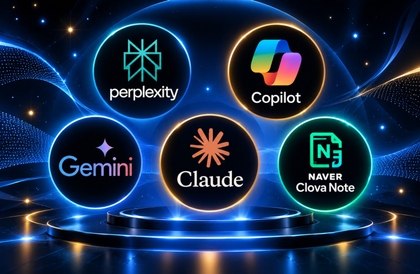
5 AI Assistants for Office Workers – Perplexity, Copilot, Gemini, Claude, Clova Note
it learner
Early Bird
8%
$25.30Beginner / Business Productivity, summarization, productivity-power-tools, Engineer Big Data Analysis, prompt engineering
When you look back on a day at work, certain tasks repeat themselves. You search for information, write reports, attend meetings and take notes, create Excel spreadsheets and PowerPoint presentations, and organize and share the results in documents. These five tasks are essentially the backbone of office work. This course covers those five stages in order, assigning one suitable AI tool to each. Perplexity is used for research and organizing information, Claude for writing documents and creating drafts, Naver ClovaNote for automating meeting minutes, Microsoft Copilot for support with office tasks, and Google Gemini for integration with Google services. This is not a course that simply lists tools; it teaches you how to decide which tool to insert at which point in your workflow. Each tool is covered in the same three-step format. In Lesson 1, you will learn the background behind the tool, what it does well and poorly, and where the boundary lies between its free and paid plans, before taking a look around the official website. In Lesson 2, you will learn the basics by going through the menus and settings. In Lesson 3, you will practice using real-world work scenarios. Examples include creating business and business-trip report templates, researching popular restaurants in Jongno, Seoul and organizing the information into promotional presentation materials, drafting a business report PPT introducing a product to a client, recording a sales report meeting and turning it into meeting minutes, creating a marketing logo image, and preparing approval forms and accounting ledgers in Google Docs. In particular, this course spends considerable time showing how much the results can vary depending on how you phrase your questions. You will see firsthand that even the same request can produce completely different results when written in two lines versus ten, using specific instructions such as generating tables, creating charts, specifying list formats, and downloading files. All you need is a PC connected to the internet and a web browser. You will need to sign up for each of the five services, and the course is based on their free usage options. However, each tool has different limitations. Microsoft Copilot becomes especially useful when integrated with Office applications, so its value increases significantly in an environment that uses Microsoft Office. For real-time recording practice with ClovaNote, the mobile app is more reliable than a PC microphone. These details will be explained as they come up in the relevant sections. It is perfectly fine if you have never used an AI tool before. By the end of the course, you will be able to decide, "Which tool should I open for this task?" and formulate questions on your own to get the results you want.

Beginner
Business Productivity, summarization, productivity-power-tools






![[AI Practice] Getting Started with Paper Implementation for AI Research Engineers with PyTorchCourse Thumbnail](https://cdn.inflearn.com/public/courses/334289/cover/b8885796-1e67-4983-9432-bcda0daae927/334289.png?w=420)