inflearn logo
inflearn logo

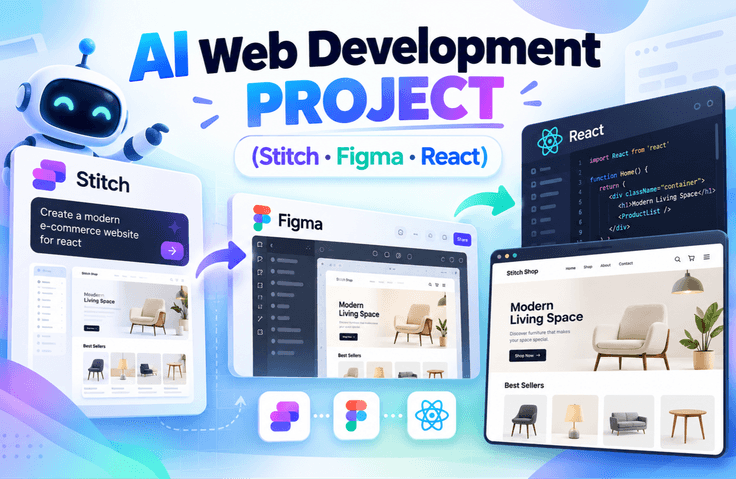
AI Web Development Practical Project (Stitch · Figma Make · React)

"A hands-on web development project course that covers everything from planning and design to implementation and deployment using Generative AI." We will complete the entire process together step-by-step—starting from idea conception, quickly creating designs with AI, implementing a functional website with React, and finally deploying it to the internet. Latest AI tools like Stitch and Figma Make will assist with your design work, and even complex coding will be taught in a way that is easy to follow step-by-step.

(5.0) 2 reviews

47 learners

Level Basic

Course period Unlimited

React
React
Figma
Figma
stitch
stitch
Generative AI
Generative AI
React
React
Figma
Figma
stitch
stitch
Generative AI
Generative AI

What you will gain after the course

  • You will personally complete the entire project workflow, from planning and design to implementation and deployment.

  • You will learn the process of applying it to an actual project, rather than just a simple introduction of features.

  • You will learn according to the practical workflow, from service architecture design to component configuration.

  • You can learn step-by-step AI utilization strategies to achieve your desired results.

  • You will get to build an actual service-oriented project, rather than just a simple example.

You must be signed up for the services below before the class.

  • chatGPT

  • Figma - Some features during the class are only available with a paid membership.

  • Stitch - It is still in beta, so there are no functional limitations ^^ (As of February 13, 2026)

  • Github


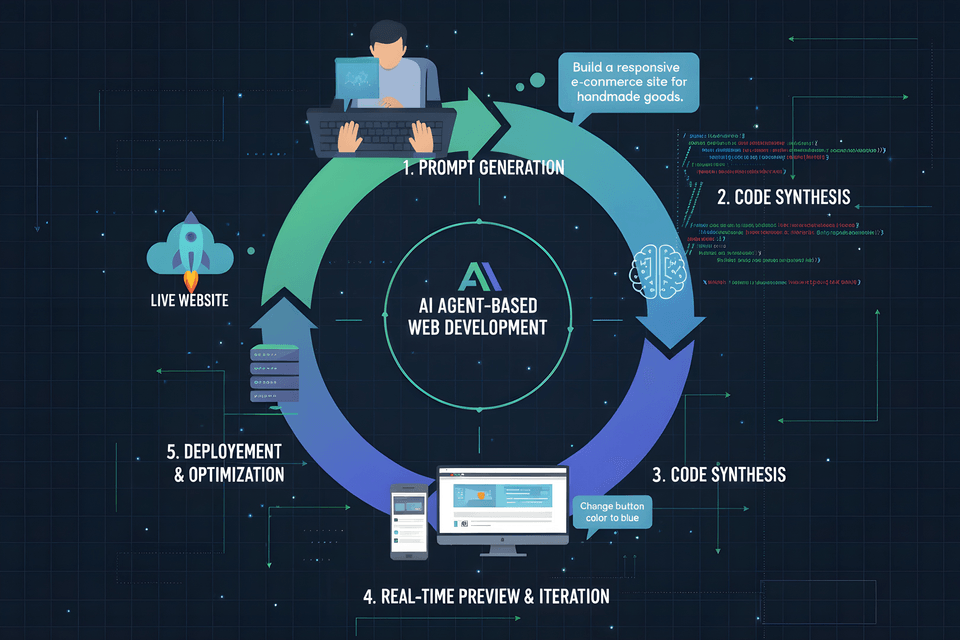
1️⃣ What is Vibe Coding?

"Coding with AI" does not simply mean a feature that writes code for you.
In this course, we introduce a new development method that designs the entire process from planning to design, implementation, and deployment through prompts. You will clearly understand how this differs from the traditional line-by-line coding approach and why this method is gaining attention now. You will experience the starting point of a paradigm shift in development using AI.

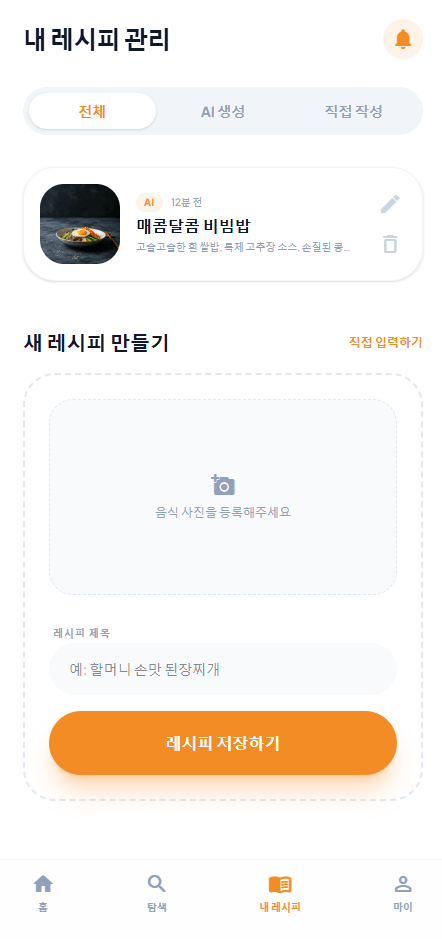
Vibe Coding Process

Learning Content

  • Understanding the concept of Vibe Coding and its differences from traditional development methods

  • Understanding the prompt-centric development structure

  • Establishing a perspective of utilizing AI as a 'design tool' rather than just an 'assistant tool'

  • Understanding the overall project flow from planning to design, implementation, and deployment

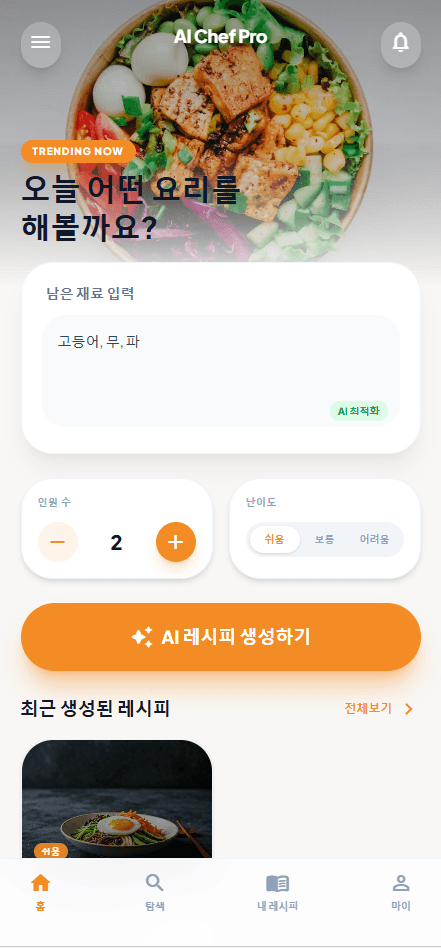
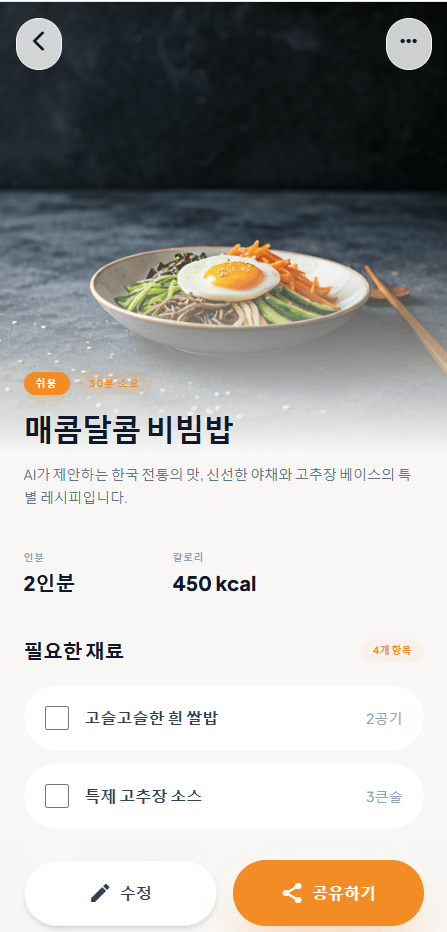
Cut to the chase and check out the finished version first

https://ai-chef-ai-studio-m67o.vercel.app/

First Page:

- Try modifying the number of people and the difficulty level.

- Try clicking on the recent recipe list. It will take you to the details page.

- Try clicking on "My Recipes" at the bottom

- Try clicking on "My Link" at the bottom.


Detail Page

- Try clicking the back button in the top left corner.


Login Page

- Try clicking the login button.

(Entering your email and password will take you to the home screen.)

- Try clicking the sign-up link

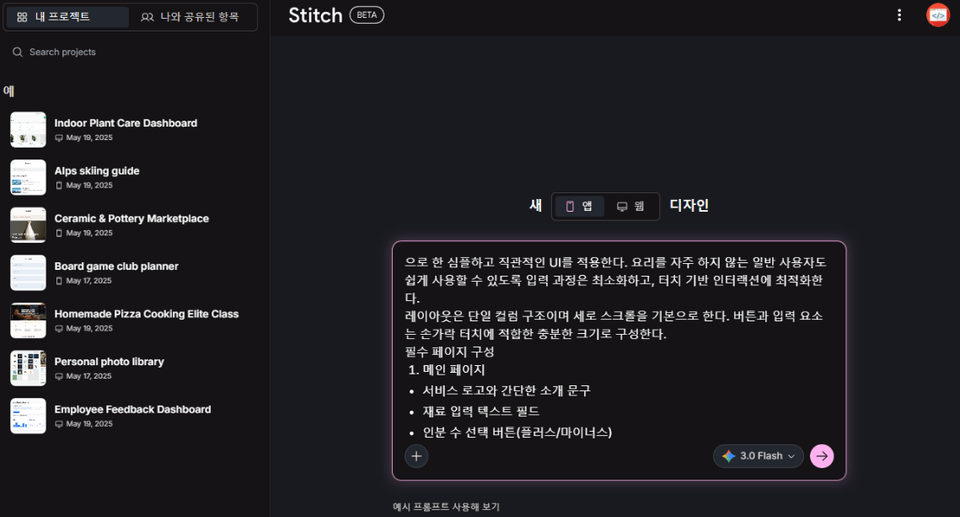
2️⃣ How to request designs from AI

Have you ever asked an AI to "create a design like this," only to get a result that didn't meet your expectations?
In this course, you will systematically learn how to make requests that an AI can accurately understand and implement. You will master strategies for deriving desired results through structured prompts rather than vague instructions. You will experience firsthand how a single well-crafted sentence can create a high-quality design.

  • Learning prompt writing principles for deriving designs

  • Understanding the difference between function-oriented prompts and UI-oriented prompts

  • How to design based on a mobile-first approach

  • How to structure and organize requirements so that AI can understand them


3️⃣ Generating Designs and Enhancing Quality

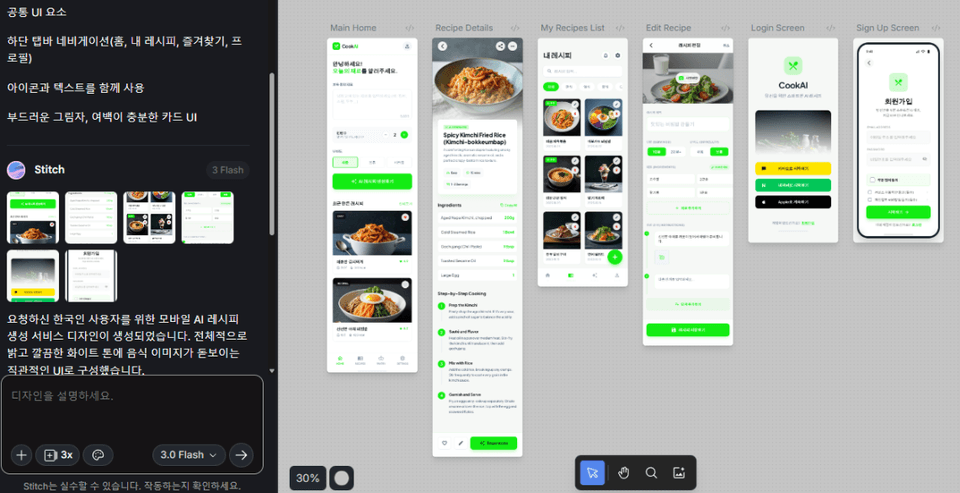
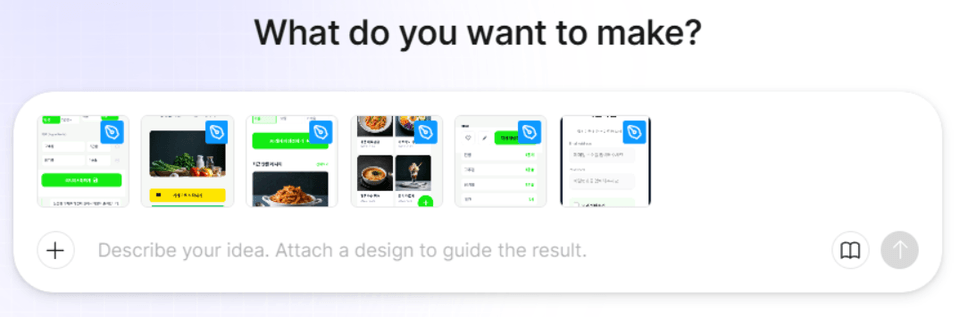
We will actually generate designs using AI and iteratively modify them to fit the desired direction.
You will experience the process of refining the results by providing specific feedback, such as "Modify this part" or "Adjust the color to be a bit brighter." You will learn practical ways to improve design quality through interaction with AI.

  • Hands-on practice of actual design generation using Stitch

  • How to write prompts for partial revision requests

  • UI Component-Level Modification Strategy

  • Learning the Iterative Prompting method

Generating designs through prompts

4️⃣ Implementing Design into Code

You will see firsthand the process of a completed design being transformed into actual working code.
You will understand the flow of how a simple screen image expands into an executable application. You will experience that design and implementation are not separate stages, but a single connected process.

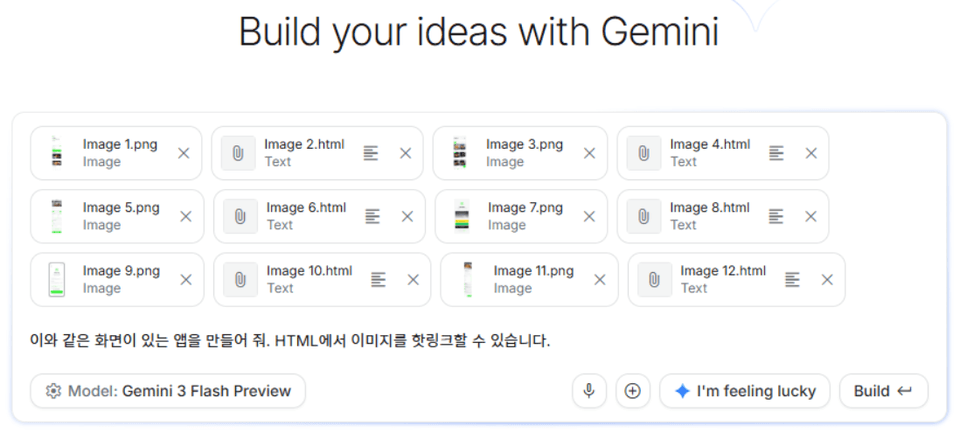
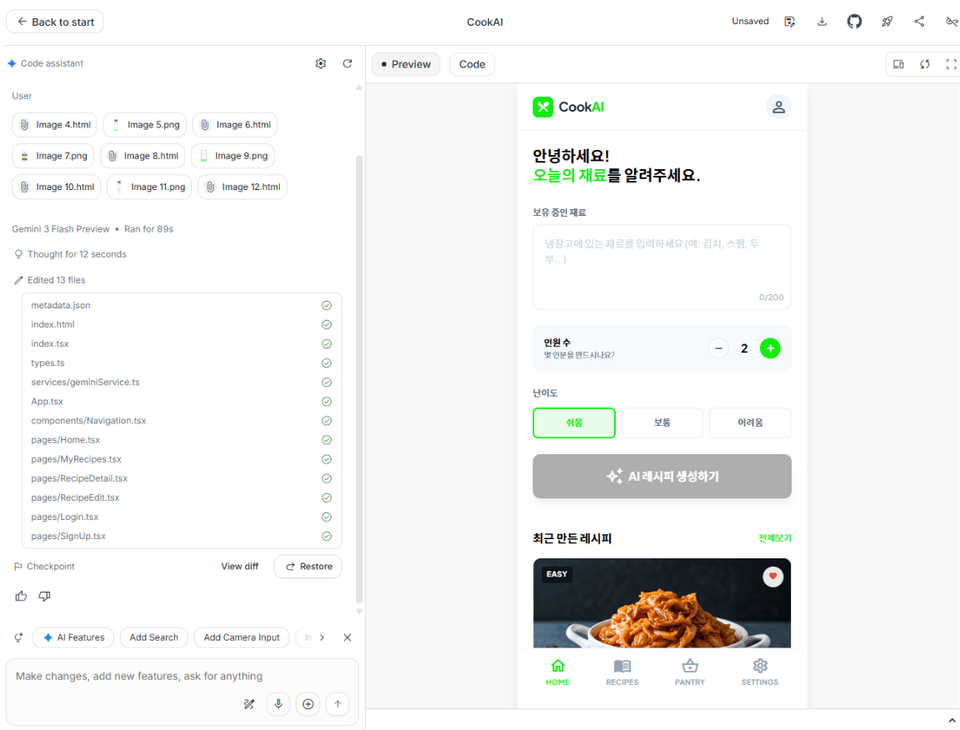
Generating Code from Design - AI Studio

By entering prompts into Google's AI Studio, you generate code based on a design and then progressively enhance its quality by using prompts to modify functions and structures.


Learning Content

  • Understanding the overall flow of converting design into code

  • Code generation practice using AI Studio

  • Learning how to modify code and improve features based on prompts

  • Establishing a development mindset that connects design and implementation

5️⃣ Deploying the Completed Project to the Internet – Basic Level

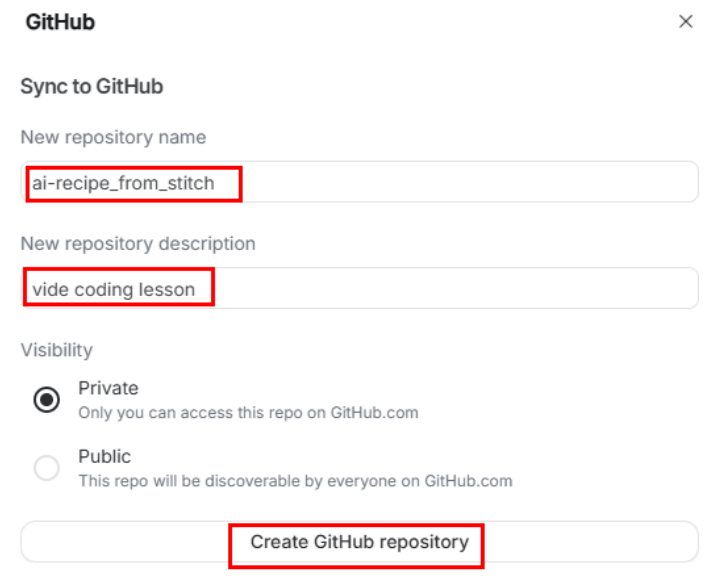
You will practice the process of saving the website you created to GitHub and deploying it to a real internet environment.
Going beyond simply running it locally, you will expand it into a service with a URL that anyone can access. The moment you share the deployment link, you will experience what it's like to have created a finished product.

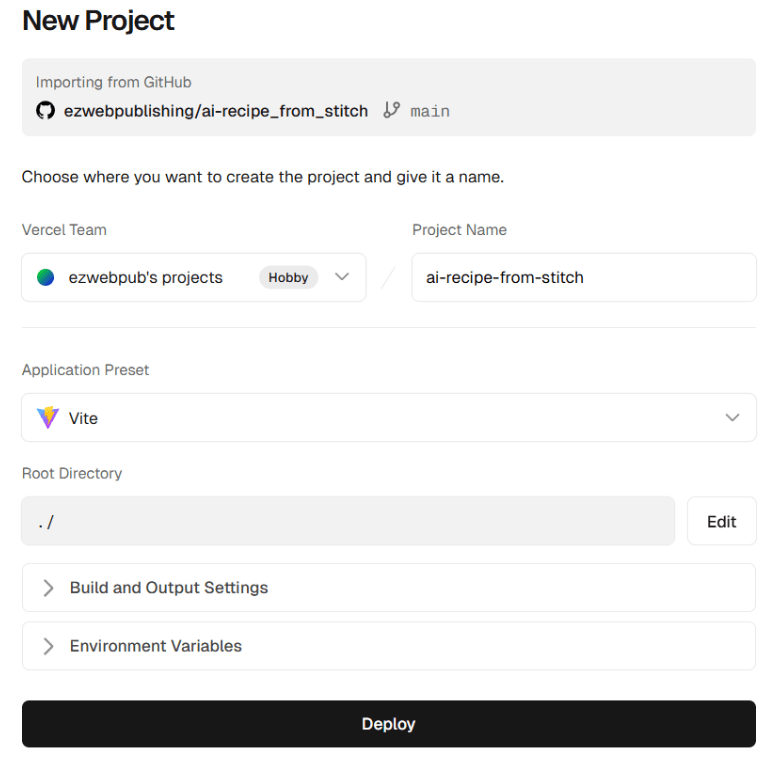
We will proceed with the deployment through Vercel by linking it with a GitHub repository and understand the workflow where redeployment occurs automatically whenever the code is changed.


Learning Content

  • Understanding how to manage project versions and upload them using GitHub

  • Hands-on practice for website deployment using Vercel

  • Understanding the integration structure between Git repositories and deployment platforms

  • Understanding the flow of Continuous Deployment (CD) upon code changes

6️⃣ Developing Like a Designer - Figma Make

Learn another workflow for developing through design tools.
Instead of there being only one right way, you will develop a flexible development mindset to choose the appropriate method based on the situation and purpose. You will understand the advantages of each by comparing design-centric and prompt-centric approaches.

You will create code based on designs generated using Figma Make and expand the structure and functionality through prompt commands. Additionally, we will cover how to implement high-quality websites using only prompts without any design..


Learning Content

  • Understanding Figma-based development workflows

  • Code generation practice using Figma Make

  • Understanding the difference between design-based development and prompt-based development

  • Learning strategies for choosing the right development method for each situation

Generating Code from Design - Figma Make

7️⃣ Comparing the two methods and finding your own style

The process of completing a real service using code generated through the Figma-based method will also be carried out.
After experiencing both workflows learned previously, you will compare the pros and cons of each and analyze which method is more suitable for you. Moving beyond simple imitation, you will develop a development perspective that allows you to choose and design on your own.

Through this process, you will establish your own AI-driven development style.


Learning Content

  • Understanding the process of turning Figma-based code outputs into actual production-ready services

  • Comparative analysis of prompt-centric development and design-based development

  • Summary of the pros and cons of each method and their use cases

  • Designing an AI development workflow optimized for individuals

Please note that since the design is generated via AI, the design created through the prompt may differ from the lecture screen.

Recommended for
these people

Who is this course right for?

  • Those who are curious about web development using AI

  • Beginners who want to experience the entire web development workflow all at once

  • Job seekers who need a practical portfolio project

  • Those who want to learn both design and development together

  • Those who want to learn new development methods suited for the AI era

Need to know before starting?

  • It's okay even if you are new to web development.

  • It is enough if you have at least heard of HTML and JavaScript.

  • You can follow along even if you are new to React.

  • It is okay if you have no experience using AI tools.

Hello
This is ezweb

2,773

Learners

61

Reviews

4

Answers

4.9

Rating

13

Courses

■ [Current] ESTSOFT KDT Frontend Instructor
■ Green Computer Art Academy Web Publishing and Frontend Instructor
■ Operator of Web Publishing YouTube Channel 'Rock's Easyweb'
■ The Joeun Computer Academy Web Publishing Instructor
■ Hanbit Computer Academy Web Publishing Instructor
■ Frontend Publisher, Professional Frontend Publishing Instructor
■ UI/UX Web Design Portfolio Instructor


[ Books ]
Published on 2021.07.19 / The Complete Figma Guide for Web Design & Web Publishing / BJ Public

Published on 2022.08.25 / Coding for the First Time with Web Publishing / Youngjin Publishing

Published 2023.10 /2024 SD Edu Yu-seonbae Web Design Technician Practical Exam Tutoring Notes / Sidae Gosi Planning

2024.11 Reprint /2025 SD Edu Yoo-Sunbae Web Design Technician Practical Exam Tutoring Notes / Sidae Gosi Planning

2025.11 Reprint /2026 SD Edu Yoo-Sunbae Web Design Technician Practical Exam Tutoring Notes / Sidae Gosi Planning


[ Awards ]
2022.08 Green Computer Art Academy Jongno Branch - Outstanding Instructor 2021.06 Green Computer Art Academy Jongno Branch - Outstanding Instructor 2018.06 Green Computer Academy Sinchon Branch - Outstanding Instructor 2017.05 Green Computer Academy Sinchon Branch - Outstanding Instructor 2016.05 Green Computer Academy Sinchon Branch - Outstanding Instructor 2015.10 Green Computer Academy Sinchon Branch - Outstanding Instructor


More

Curriculum

All

11 lectures ∙ (2hr 2min)

Published: 
Last updated: 

Reviews

All

2 reviews

5.0

2 reviews

  • kmh89927a9623님의 프로필 이미지
    kmh89927a9623

    Reviews 1

    Average Rating 5.0

    5

    100% enrolled

    • mrnobody님의 프로필 이미지
      mrnobody

      Reviews 8

      Average Rating 5.0

      5

      100% enrolled

      Thank you for the great lecture.

      • ezweb
        Instructor

        Thank you for your valuable review!

    ezweb's other courses

    Check out other courses by the instructor!

    Similar courses

    Explore other courses in the same field!

    Limited time deal ends in 03:33:10

    $4,950.00

    70%

    $13.20