inflearn logo

Figma Reference - Complete Guide to Creating a Responsive E-Commerce Website

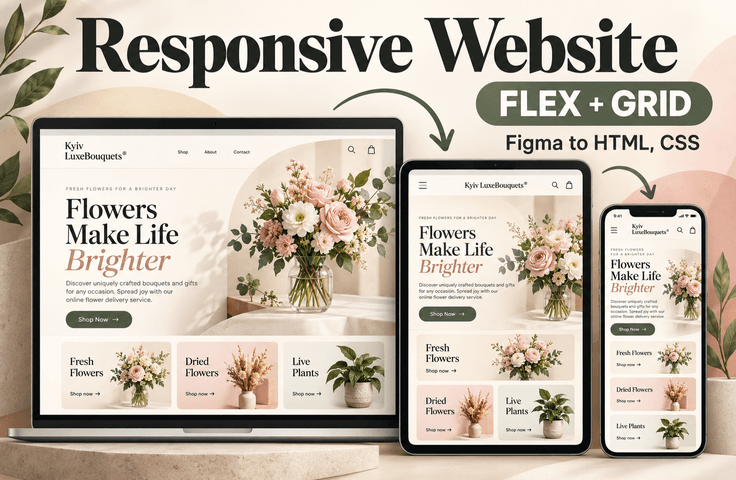
Do you have a basic understanding of HTML, CSS, and JavaScript (jQuery)? But are you unsure how to build an entire website? If so, challenge yourself to implement a shopping mall homepage by referring to a design. We’ll show you how to build a website by studying a completed design and understanding the project’s intent and detailed design elements.

(4.8) 5 reviews

51 learners

Level Basic

Course period Unlimited

Figma
Figma
HTML/CSS
HTML/CSS
JavaScript
JavaScript
jQuery
jQuery
Figma
Figma
HTML/CSS
HTML/CSS
JavaScript
JavaScript
jQuery
jQuery

Reviews from Early Learners

4.8

5.0

김가희

100% enrolled

It was a class where we did publishing based on Figma, and it seems like it was a useful experience to gain practical experience. It was helpful because I was able to learn how to deploy the site to GitHub at the end. They teach you the fundamentals thoroughly!

5.0

mr.nobody

100% enrolled

Creating a site in Figma has been very helpful. Thank you for the great lecture.

5.0

pcdo.omco

19% enrolled

I will listen carefully.

What you will gain after the course

  • Interpreting Figma Designs and Extracting Images

  • Set up the initial HTML/CSS files

  • Writing CSS variables and global styles

  • Configure web font usage

  • Layout Design: Using Grid and Flexbox

  • Implementing Responsive CSS Using Media Queries

  • Implementing Responsive CSS Using Container Queries

  • Creating a Review Slider Using Swiper.js

  • Creating a mobile menu and shopping cart toggle slide using jQuery

  • Deploying a Website Using GitHub Pages

Turn a Figma design into a fully realized, responsive website

Have you learned HTML, CSS, and JavaScript but
felt at a loss about “how to turn a finished design into an actual website”?

This course is not just a simple explanation of syntax;
it is a hands-on project course where you analyze a shopping mall design mockup created in Figma and implement it directly as a responsive website.

From how to read designs,
through image extraction, shared style configuration, layout design, interaction implementation, responsive handling, and final deployment,
you can learn step by step in line with the actual workflow.

Recommended for people like these

  • Those who have learned the basics of HTML, CSS, JavaScript, and jQuery but
    lack experience creating a real website from start to finish


  • Those who want to learn
    how to translate a Figma design into HTML structure and CSS styles

  • Those preparing for a job as a web publisher or a portfolio who need
    hands-on experience creating responsive websites.

  • For those who want to naturally master Grid, Flexbox, media queries, and container queries within a single project

Key topics covered in this course

1) Interpreting the Figma Design and Preparing the Project

Extract the images and styles needed from the design mockup,
and learn the workflow and preparation process for web publishing.

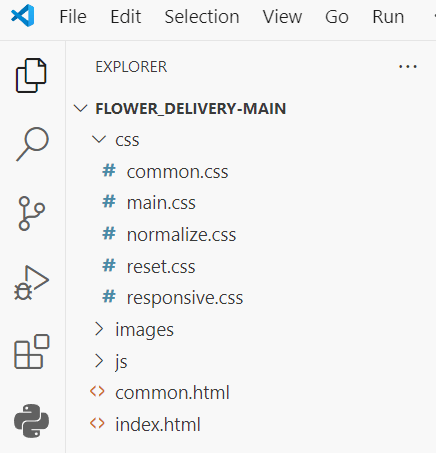
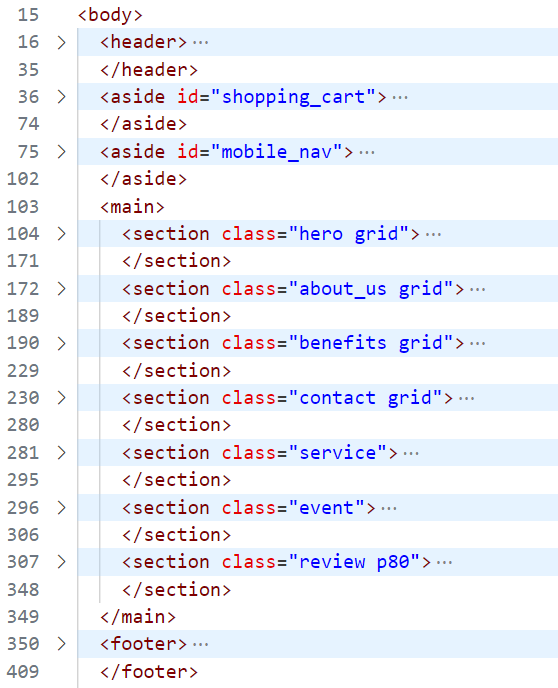
You will also learn how to separate the images, css, and js folders and create common files such as
common.html and common.css to build a project structure that is easy to maintain.


2) Setting Up Common Styles and the Basic Environment

Use reset.css and normalize.css to reset the browser’s default styles,
and learn how to systematically manage common design elements such as colors, fonts, and spacing by writing CSS variables and global styles.

It also includes applying Google Fonts,
so you can naturally recreate the feel of the actual design mockup on the web.


3) Designing Layouts with Grid and Flexbox

After analyzing the main areas of the website,
you will design and implement the main page structure by combining Grid and Flexbox.

It is designed to help you understand not only how to follow along with the code, but also how to divide and arrange each area in a design.


4) Implementing Interactions and Visual Effects

Rather than just creating static layouts,
you will also implement interactions that enhance the user experience yourself.

  • A scroll-sticky effect implemented using pure CSS only

  • Button animations using CSS and jQuery

  • A review slider using Swiper.js

  • Mobile menu toggle using jQuery

  • Shopping Cart Toggle Interaction

Through this process, you will learn not only basic publishing but also
the sense of how to build dynamic web pages.


5) Completing the Responsive Website

Implement responsive CSS so the website naturally adapts to
PC, tablet, and mobile screens.

In particular, in this course, you will experience more flexible and modern responsive implementation methods by using
not only media queries but also container queries
.


6) Complete the Deployment

Organize the completed project and,
clean up unnecessary source files, then
deploy it as a real website via GitHub Pages or Netlify.

In other words, you will complete not just a “result that runs only on your computer,”
but also a portfolio project that you can actually share via a URL.

What You Can Gain After Taking the Course

After completing this course, you can expect to develop the following skills.

  • Ability to interpret Figma designs and extract the necessary resources

  • The ability to design practical project structures that include shared files and styles

  • Ability to efficiently manage styles using CSS variables, web fonts, and global styles

  • Ability to implement responsive layouts using Grid and Flexbox

  • Ability to implement sliders and UI interactions using Swiper.js and jQuery

  • Experience deploying static sites via GitHub Pages / Netlify

Project Environment Setup

  • Install Essential Figma Plugins

    • Export Original Images

    • Export Styles to CSS Variables

    • Font Scanner

  • Project File Structure

    • Create directories: images, css, js

    • Create common HTML and CSS files: common.html, common.css

Save the images needed for the website from the design, and write the styles and tags to be applied commonly in common.html and common.css to create a website that maintains consistency and is easy to maintain later.

Project File Structure

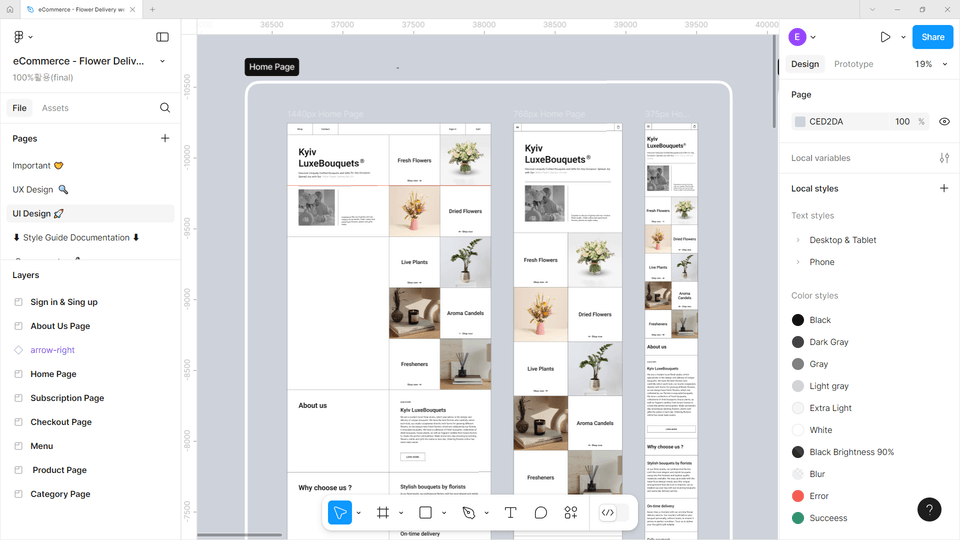
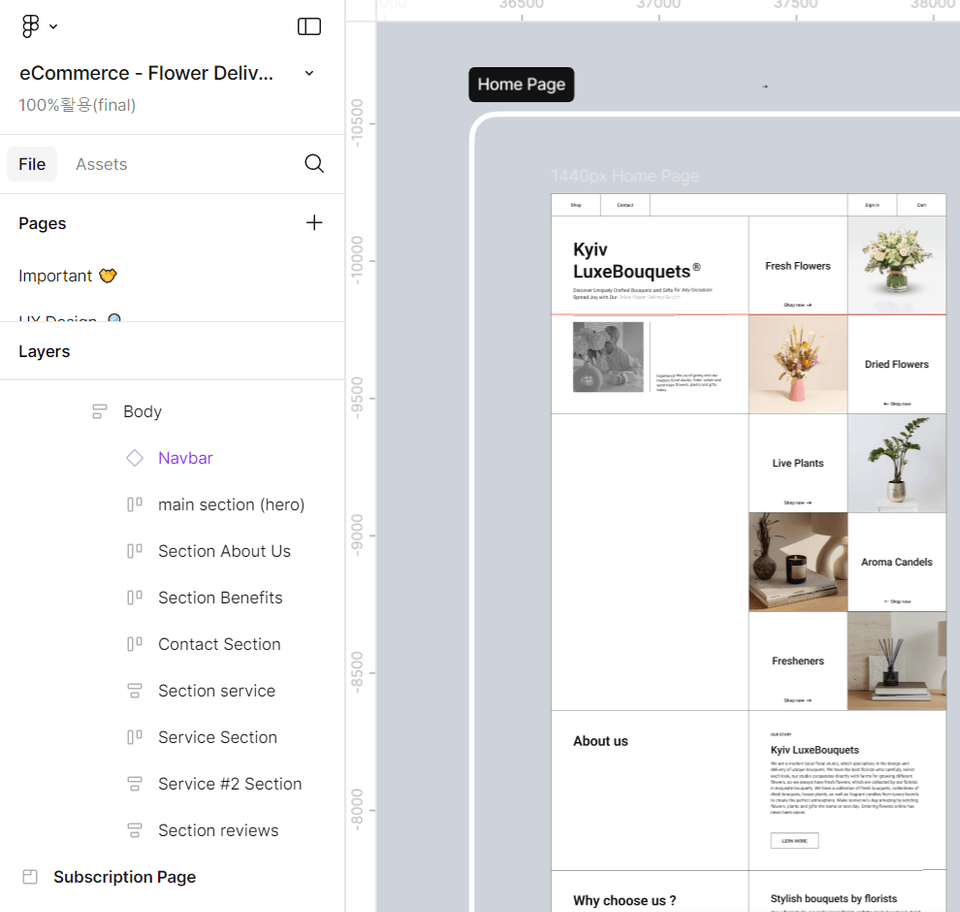
Understanding Figma Designs

  • Learn how to easily extract the images and styles you need from Figma.

  • Learn the basics of implementing design mockups on the web.

In this course, you’ll learn how to write HTML structures and CSS styles by referring to the design while implementing the Home Page (main page).

Understanding Figma Designs

Set Up the Basic File Structure

  • Prepare for a clean start with reset.css and normalize.css.

  • We will create a folder structure and common files for efficient work.

Configure the project by resetting HTML’s built-in properties with reset.css and using normalize.css to create a consistent UI across all browsers.

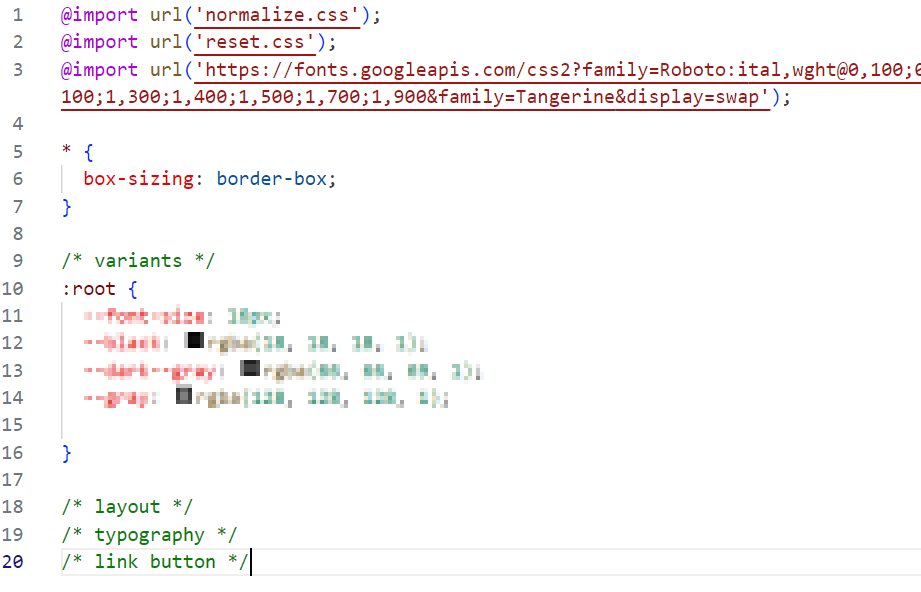
Setting up the basic styles

  • Set frequently used colors and font sizes as variables.

  • Apply beautiful fonts with Google Fonts.

Writing Common CSS

Building the Layout

  • Create flexible layouts with Grid and Flexbox.

  • Design the main sections of the website.

Main Area HTML

Identifying the Main Areas in the Design

Scroll Animation

  • Let's use CSS properties to create an effect that keeps an element fixed while scrolling.

  • Implement it purely with CSS, without writing any scripts.


Implementing an Element That Stays Fixed When Scrolling

Adding Life to Buttons

  • Create a cool button effect with CSS and jQuery.

  • Create a 3D button that makes people want to click it.

Button animations using CSS and jQuery

Button animations using CSS and jQuery

Create a review slider

  • Create a fresh slider with Swiper.js.

  • Create a slider that works well on all devices.

Implementing a Review Slider Using Swiper.js

Implementing Interactive Features

  • Let's create convenient cart functionality with jQuery.

  • Complete a user-friendly cart design.

  • Let's create a functional mobile menu.

Implementing Interactive Features (Mobile Menu, Shopping Cart)

Complete the responsive design

  • Polish it so it works perfectly on all devices.

  • Implement a convenient menu and cart for mobile devices, too.

Complete the responsive design (PC, tablet, mobile)

Deploy

  • Optimize your website’s performance.

  • Showcase your work to the world with GitHub Pages or Netlify.

Organize recurring code for reuse and remove unnecessary source code.

Upload your static site to GitHub Pages or Netlify and deploy it so anyone can visit it.

Conclusion

This course does not involve implementing an actual online shopping mall. To implement a real shopping mall, integration with a database is required. Please continue studying backend languages and databases to learn about this aspect. In this course, you will complete the screens that end users will see by using HTML, CSS, and JavaScript (jQuery) as a web publisher, referring to the design.

After mastering this course, if you are interested in web development, check out the content below and challenge yourself to become a frontend or backend developer!

  • JavaScript Frameworks/Libraries

    • react, vue.js, Angular

  • Learn TypeScript

  • Basic Understanding of Backend Development

    • REST APIs and HTTP request/response structure

    • How to work with JSON data

  • Basic backend experience

    • Creating a simple server using Node.js and Express.js

    • Database connections (MongoDB, Firebase, MySQL, etc.)

Recommended for
these people

Who is this course right for?

  • Learners with basic knowledge of HTML, CSS, and jQuery.

  • A beginner developer with limited publishing experience who wants to complete a real project.

  • People who have no experience using design tools (Figma) but want to learn.

  • Learners who want to learn the practical processes of implementing and publishing responsive websites.

  • People who want to learn the basic principles of web publishing and front-end development.

  • Those who have basic coding knowledge but find it difficult to apply it comprehensively

Need to know before starting?

  • html

  • css

  • javascript

  • jquery

Hello
This is ezweb

Career Verified

3,004

Learners

78

Reviews

4

Answers

4.9

Rating

15

Courses

I am a frontend specialist instructor who teaches everything from web publishing to practical JavaScript and React, as well as AI-assisted development.

I have taught non-majors, beginners, and job seekers at ESTSOFT KDT and Green Computer Academy, among others. I break down complex concepts into small hands-on exercises and favor project-based classes in which learners complete the deliverables themselves.

Key Educational Areas

  • HTML/CSS Web Publishing

  • JavaScript Basics and Web Interactions

  • React-based frontend development

  • Implementing Web Services Using Firebase

  • Figma UI design and development integration

  • Web Development with Generative AI

  • Web Design Technician Practical Exam

Corporate and institutional training

I conduct training for corporate practitioners, KDT courses, and special lectures at universities and academies.

We develop curricula and hands-on projects tailored to the learners, their prior knowledge, the training duration, and the intended outcomes. We offer in-person instruction, live online classes, and recorded educational content production.

Online Educational Content Production

We handle the following online educational content production tasks.

  • Lecture curriculum and learning objective design

  • Creation of course materials and presentations

  • Step-by-step practice code and example project setup

  • Writing lecture scripts for recording

  • Lecture filming and content delivery

Main Activities

  • ESTSOFT KDT Frontend Course

  • Green Computer Academy Web Publishing & Front-End Course

  • Operating the web publishing YouTube channel ‘ezweb’

  • Authored books in the fields of web publishing and web design

Publications

We accept inquiries about delivering courses for companies and institutions and producing online educational content.

Inquiries: ezwebpub@gmail.com

More

Reviews

All

5 reviews

4.8

5 reviews

  • skylove62557603님의 프로필 이미지
    skylove62557603

    Reviews 10

    ∙

    Average Rating 5.0

    5

    100% enrolled

    It was a class where we did publishing based on Figma, and it seems like it was a useful experience to gain practical experience. It was helpful because I was able to learn how to deploy the site to GitHub at the end. They teach you the fundamentals thoroughly!

    • ezweb
      Instructor

      Thank you for your valuable feedback. I'm glad it was helpful. Thank you!

  • pcdoomco8345님의 프로필 이미지
    pcdoomco8345

    Reviews 16

    ∙

    Average Rating 5.0

    5

    19% enrolled

    I will listen carefully.

    • ezweb
      Instructor

      Thank you. If you have any questions, please leave them in the comments. ^^

  • mrnobody님의 프로필 이미지
    mrnobody

    Reviews 8

    ∙

    Average Rating 5.0

    5

    100% enrolled

    Creating a site in Figma has been very helpful. Thank you for the great lecture.

    • ezweb
      Instructor

      Glad it helped. We hope for your continued support. ^^

  • doosanking8820님의 프로필 이미지
    doosanking8820

    Reviews 3

    ∙

    Average Rating 5.0

    5

    33% enrolled

    • bonggyeong9225님의 프로필 이미지
      bonggyeong9225

      Reviews 2

      ∙

      Average Rating 4.5

      4

      38% enrolled

      Your attention to even the smallest details truly shows that this is a lecture from a genuine designer.
      ezweb's other courses

      Check out other courses by the instructor!

      Similar courses

      Explore other courses in the same field!

      25% off for new members

      $32.90

      25%

      $42.90