inflearn logo

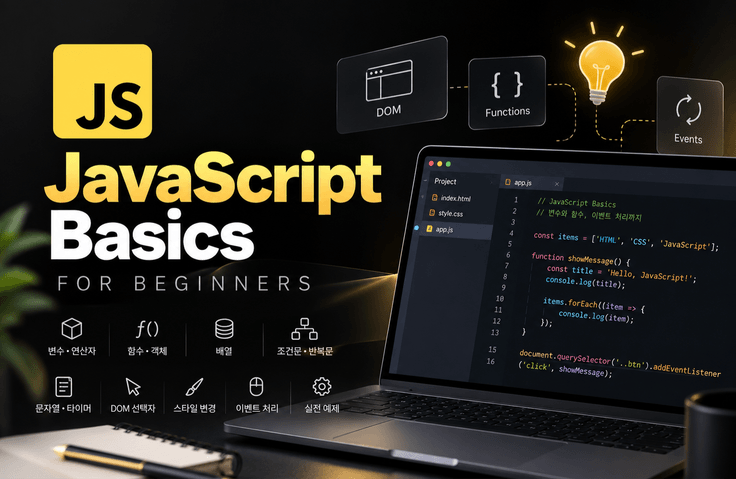
HTML/CSS Next Is JavaScript! JavaScript Basics for Web Development

If you’ve learned HTML/CSS, it’s time to make web pages interactive with JavaScript. Build a solid foundation in JavaScript by learning programming basics such as variables, functions, arrays, conditional statements, and loops, along with controlling DOM elements, handling events, and implementing UI components like tabs and accordions—then take the next step toward frontend learning with React and other technologies.

(5.0) 1 reviews

20 learners

Level Basic

Course period Unlimited

HTML/CSS
HTML/CSS
JavaScript
JavaScript
css-flexbox
css-flexbox
vanilla-javascript
vanilla-javascript
HTML/CSS
HTML/CSS
JavaScript
JavaScript
css-flexbox
css-flexbox
vanilla-javascript
vanilla-javascript

What you will gain after the course

  • JavaScript Fundamentals

  • You can select elements using JavaScript.

  • You can change the element’s style.

  • Various events can be applied.

  • Can implement UI/UX effects

🚀 The Next Step After HTML/CSS: JavaScript is HereNow

If you’ve created a webpage’s structure with HTML and designed it with CSS, it’s now time to add behavior and interactivity to the webpage with JavaScript.

A webpage where the screen changes when a button is clicked, content changes based on user input, and tabs or accordion menus move. JavaScript is the key language for implementing these features.

In this course, rather than simply memorizing syntax,

JavaScript fundamentals → DOM element manipulation → events → real-world UI implementation

We will learn in the following order.

See for yourself how variables and functions are used on actual web pages, and experience the process of making static pages built with HTML/CSS interactive with JavaScript.

🤖 Why JavaScript Fundamentals Are Still Essential in the AI Era

We are now in an era where AI can quickly generate JavaScript code.

However, to understand why AI-generated code works, modify it to achieve the desired functionality, and find problems when errors occur, you need to understand the fundamental principles of JavaScript.

In particular, frontend technologies such as React and Next.js are also based on JavaScript.

By developing the ability to ask AI for code, along with the fundamentals needed to read, understand, and modify generated code, you can use AI as a more effective development tool.

🎯 Recommended for the following learners

For those learning JavaScript for the first time
This course is suitable for those who have finished learning HTML/CSS and are just starting programming.

For those who want to expand their web publishing skills
Recommended for those who want to create interactive web pages that respond to clicks, input, scrolling, and more, beyond static pages.

For those who have learned JavaScript syntax but struggle to apply it
This will help those who know about variables, functions, and conditional statements but are unsure how to apply them to actual HTML elements.

For those who want to learn frontend technologies such as React
You can learn the basic concepts of JavaScript, the DOM, and events needed before studying React.


💡 What will you learn?

STEP 01. JavaScript Programming Fundamentals

We start with the core JavaScript syntax that forms the foundation of programming.

  • Variables and Operators

  • Functions and objects

  • Creating and Using Arrays

  • Conditional statements and logical operators

  • Loops such as for, while, forEach, and for...of

Rather than memorizing every piece of syntax, we focus on understanding the flow of the code.

STEP 02. Using Strings and Timers

Learn string processing commonly used in web development and behavior based on time.

  • Extracting and Merging Strings

  • Changing String Content

  • JavaScript Timers

Understand the basic principles of processing data with JavaScript and executing code at specific times.

STEP 03. Controlling Web Pages with JavaScript

Connect the syntax learned earlier with actual HTML/CSS.

  • Selecting DOM Elements

  • Change the style of the selected element

  • Controlling Multiple Elements Using Loops

  • Events such as click, mouseover, and mouseout

  • Input element events such as change

From here, you will get hands-on experience with how JavaScript syntax is used on real web pages. In the current course as well, DOM selection, style changes, and events are covered in separate lessons. Inflearn

STEP 04. Learn Modern JavaScript Syntax

Learn the key ES6 syntax to understand modern JavaScript code.

  • let, const

  • Template literals

  • Arrow functions

Learn more concise and modern ways to write JavaScript by comparing them with traditional syntax.

STEP 05. Implementing Practical UI with JavaScript

By combining the syntax, DOM, and events you’ve learned so far, you’ll directly implement UI elements commonly found on real websites.

Back to Top
Implement a feature that uses scrolling and events to move to the top of the page.

Tabs
Implement a tab UI where the content changes when a menu is selected.

Accordion
Implement an accordion UI where content expands and collapses when clicked.

Rather than simply following and writing completed code, you will see how the JavaScript you learned earlier connects to implementing actual UIs.


✅ After completing the course, you will be able to do the following:

After completing the course, you will understand the core syntax of JavaScript and be able to write code yourself, as well as control program flow using conditional statements and loops.

You will also develop the foundational skills to select and modify DOM elements, implement functionality that responds to user events, and create functional web pages by combining HTML/CSS with JavaScript.

Above all, you can build a strong foundation in JavaScript for learning the next stages of web development, such as jQuery, React, and TypeScript.

🛠 Prerequisites for Taking the Course

Even beginners learning JavaScript for the first time can take this course.

However, since the exercises involve directly controlling HTML elements and CSS styles with JavaScript, learning will be easier if you know the basic syntax of HTML and CSS.

No prior experience with JavaScript is required.

For the exercises, we use Visual Studio Code and the latest web browsers, such as Chrome, and recommend that you go beyond simply watching the lectures by writing and running the example code yourself.

If you are new to HTML/CSS, it’s fine to start by learning the free basics course first.

HTML Basics Course
CSS Basics Course

Implementing Moving Tabs

Implementing an Accordion

Implementing a Back to Top Scroll Animation

Frequently Asked Questions

Q1. What kind of language is JavaScript (JS)?

JavaScript is a programming language for dynamically manipulating web pages. It adds interactions and logic to the static structures created with HTML and CSS, enabling you to implement mouse clicks, button actions, animation effects, and more.

Q2. Can I take this course even if I haven’t learned HTML/CSS?

This course is designed to require foundational web publishing knowledge (HTML·CSS), so knowing the basic document structure will make it easier to learn.

Q3. What will I learn in this course?

This course covers the following topics:

  • Basic syntax such as variables, operators, functions, objects, and arrays

  • Building a logical flow with conditional statements and loops

  • Selecting HTML elements and changing styles

  • Event handling (click, hover, etc.)

  • Implement simple practical examples such as a back-to-top button, tab menu, and accordion.

Q4. What can I create after taking this course?

By taking this course, you will gain the ability to control HTML elements programmatically.
For example:

  • Changing the content when a button is clicked

  • Switching tab menus

  • Apply effects based on scrolling
    and implement interactive UIs directly in code.

📚 If you’ve mastered the basics of JavaScript, it’s time to move on to the next step!

If you understand JavaScript’s basic syntax, the DOM, and events, expand your learning to the next step based on your goals.


If you want to learn web publishing in greater depth
you can learn how to implement various practical UI elements, such as tabs, accordions, and slides, using jQuery.


If you want to expand into frontend development
Learn about React components, Props, State, and more, and take on the challenge of building a real-world project.

Recommended for
these people

Who is this course right for?

  • Those who have learned the basics of HTML

  • Those who have learned the basics of CSS

  • Those who want to implement dynamic effects on a webpage

  • Those who want to get a job as a web publisher

  • Those aspiring to become frontend developers

Need to know before starting?

  • HTML

  • CSS

Hello
This is ezweb

Career Verified

3,003

Learners

78

Reviews

4

Answers

4.9

Rating

15

Courses

I am a web front-end instructor specializing in everything from practical front-end training and on-site lectures for companies and institutions to producing online courses.

■ Specialized Front-End Courses
HTML/CSS, JavaScript, React, Firebase, Figma, AI-assisted web development, and more
I provide step-by-step training from web publishing to practical front-end development.

■ Available to lecture at companies, organizations, and educational institutions
Training for corporate practitioners, KDT programs, university and academy special lectures, etc.
Curricula can be tailored to the target audience and their skill level, and on-site lectures can be provided.

■ Online course design and production available
From planning online lecture curricula to creating teaching materials, PPTs, hands-on materials, and sample code,
we can handle the entire process of producing online educational content, including lecture filming and content delivery.

■ Both online and offline classes available
In addition to offline academy classes, we offer various formats tailored to the educational environment,
including live online classes and recorded content production.


■ Key Activities

  • ESTSOFT KDT Frontend Course

  • Green Computer Academy Web Publishing and Front-End Courses

  • Runs the web publishing YouTube channel ‘ezweb’.

  • Authored books on web publishing and web design


■ Books
2021.07 / The Complete Guide to Using Figma for Web Design & Web Publishing / BJ Public

2022.08 / Web Publishing for Those New to Coding  / Youngjin Publishing

2023.10 / 2024 SD Edu Yuseonbae Web Design Craftsman Practical Exam Tutoring Notes / Sidaegosi Planning

2024.11 / 2025 SD Edu Yuseonbae Web Design Technician Practical Exam Tutoring Notes / Sidae Exam Planning

2025.11 / 2026 SD Edu Yoo Seon-bae Web Design Craftsman Practical Exam Tutoring Notes / SidaeGosi Planning

 

More

Reviews

All

1 reviews

5.0

1 reviews

  • mrnobody님의 프로필 이미지
    mrnobody

    Reviews 8

    ∙

    Average Rating 5.0
    5

    100% enrolled

    Thank you for the great lecture.

    ezweb's other courses

    Check out other courses by the instructor!

    Similar courses

    Explore other courses in the same field!

    25% off for new members

    $11.00

    25%

    $11.00