inflearn logo

Master Excel 2019 Macro VBA from the Basics

Learn Macro VBA with Excel 2019!! However, you can also practice with 2016 and 2013 versions. Macros and VBA fill in the gaps that Excel alone lacks.

(4.9) 14 reviews

94 learners

Level Basic

Course period 3 months

Excel
Excel
VBA
VBA
Business Productivity
Excel
Excel
VBA
VBA
Business Productivity

Reviews from Early Learners

4.9

5.0

이설하

100% enrolled

It was nice to be able to learn a variety of useful functions^^

5.0

이동준

100% enrolled

Thank you for the great class.

5.0

손지훈

8% enrolled

I am satisfied

What you will gain after the course

  • Writing and Editing Macros

  • Branching and looping statements

  • Key properties and methods

For big data and large-scale statistical work
A complete summary of new Excel 2019 features!

Essential for any job
Excel 2019!

To use Excel properly for work,
Macro and VBA skills are essential.

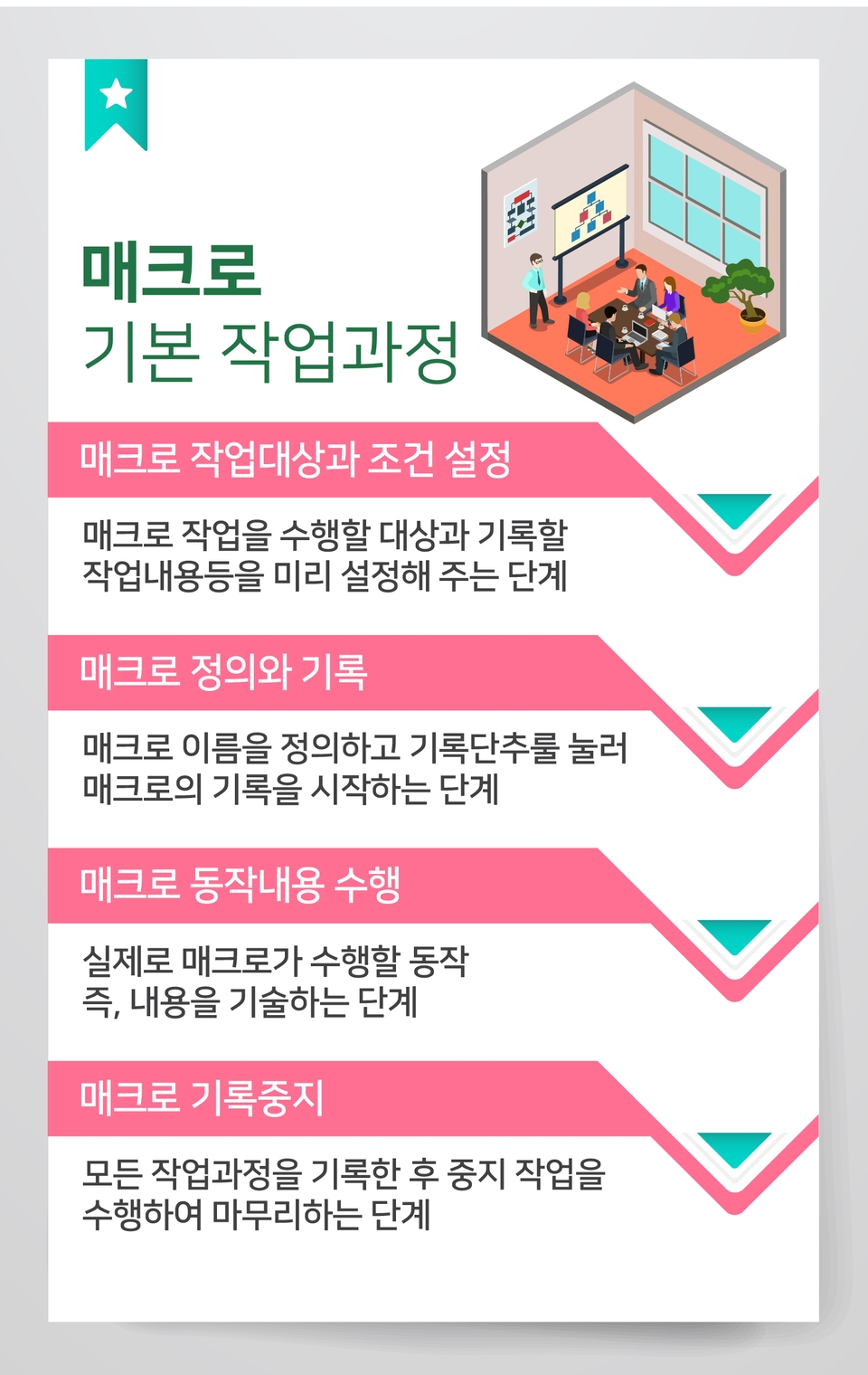
  • Batch process a series of repetitive Excel tasks and save them for repeated use.
  • Repeat processing is only possible for a given portion of the work

  • An abbreviation for Visual Basic Application, a type of scripting language derived from the Visual Basic program.
  • Built-in programs to overcome the limitations of office programs and achieve more flexible work results


1. When Excel's basic functions are not enough

  • When performing [special tasks of cells], [repetitive tasks], etc.!

2. When you want to create a function with calculation functions that are essential for your work.

  • When creating a special function like [Convert customer's lunar birthday to solar calendar]!

3. When you want to create an Excel automatic program

  • When setting up a [program for managing product registration and inquiries, etc.]!


Lecture materials
Provides.

  • We provide a PDF file summarizing the lecture contents. You can download the materials from [Section 0] - [How to write and run macros - Overview of macros and VBA, understanding the concepts] .
  • You can also download the source files (working files) used in the lecture from [Section 0] - [Macro Editing - Creating and Editing Filtering Task Macros] .

Recommended for
these people

Who is this course right for?

  • I know a little about Excel, but I want to learn about macro VBA.

  • People who work in statistics

Need to know before starting?

  • Excel

Hello
This is comt

Career Verified

1,928

Learners

172

Reviews

4

Answers

4.8

Rating

37

Courses

Back when Apple's MAC computers made it possible to design even better.

It's already been well over 25 years since I first started teaching Adobe Photoshop and Illustrator at the academy~~^^

I remember the days when, instead of calling the instructors Teacher Eom, Teacher Ha, and Teacher Gu, we used to call them Eom-T and Gu-T.

Together with those teachers, we started using ComTee as an abbreviation for Computer Teacher!

I will continue to be a "Computer Teacher" who works hard to share knowledge for all those who are learning.

Thank you!!

Thank you!!

Together with everyone, we've come to use "Com-T" as a shorthand for Computer Teacher! We will continue to be a Computer Teacher that works hard to share knowledge for all learners. Thank you!!

Together with everyone, we've come to use "Com-T" as a shorthand for Computer Teacher! We will continue to be a Computer Teacher that works hard to share knowledge for all learners. Thank you!!
More
Published: 
Last updated: 

Reviews

All

14 reviews

4.9

14 reviews

  • hj1125kim1999님의 프로필 이미지
    hj1125kim1999

    Reviews 9

    ∙

    Average Rating 5.0

    5

    100% enrolled

    thank you

    • comt
      Instructor

      Thank you for taking the class. Make it familiar with many applications. If you use it in practice, it will be helpful to learn the shortcuts.

  • miae173652님의 프로필 이미지
    miae173652

    Reviews 1

    ∙

    Average Rating 5.0

    5

    100% enrolled

    I think it helped a lot.

    • comt
      Instructor

      Yes, thank you for your review. There are many functions and formulas in Excel, but there are many times when you can't use them. If you apply Excel to your work, ask yourself~ Isn't there a function or method that can handle this easily? And then look for it, and you'll find out about it and make your work easier and learn about the functions^^ It'll kill two birds with one stone!

  • jihoonth9107님의 프로필 이미지
    jihoonth9107

    Reviews 60

    ∙

    Average Rating 5.0

    5

    8% enrolled

    I am satisfied

    • comt
      Instructor

      Thank you so much for your review. Excel is a program that has a lot to learn, but macros and VBA are even more important for application, so I hope you can use them in various ways in your work. I hope you are always healthy and happy.

  • snowsummer님의 프로필 이미지
    snowsummer

    Reviews 9

    ∙

    Average Rating 5.0

    5

    100% enrolled

    It was nice to be able to learn a variety of useful functions^^

    • comt
      Instructor

      Thank you for your review. There are so many functions. Excel is a fun program to apply. I will also update the 100-lecture Excel course.

  • dj3416lee1723님의 프로필 이미지
    dj3416lee1723

    Reviews 6

    ∙

    Average Rating 5.0

    5

    100% enrolled

    Thank you for the great class.

    • comt
      Instructor

      Thank you. If you use VBA well, there can be infinite results, so please apply it a lot^^

comt's other courses

Check out other courses by the instructor!

Similar courses

Explore other courses in the same field!

25% off for new members

$13.10

25%

$23.10