OK even if you only know HTML/CSS/JS! A hands-on project completed with React and Firebase

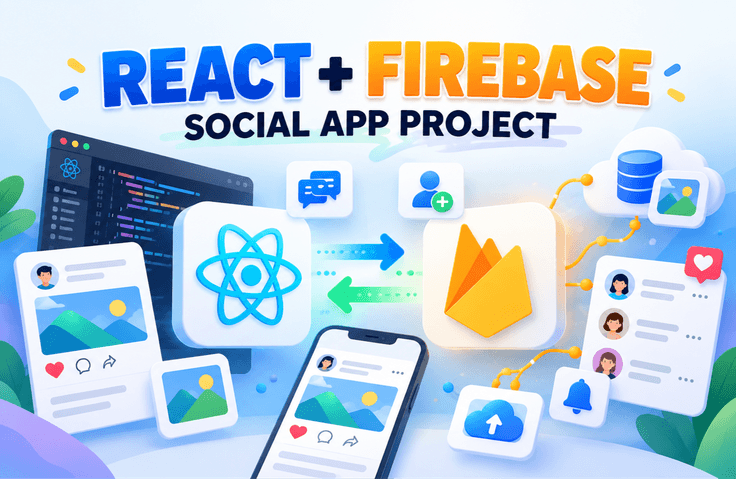
This course teaches you how to build a web application using React and Firebase, implementing core features used in real-world services such as login, post management, file uploading, and profile management. You will build a complete web service step-by-step, implementing email and social login via Firebase Authentication, Firestore-based data storage and real-time data processing, file uploading using Firebase Storage, and profile management features. This course is designed for frontend developers to understand how to quickly implement web services using Firebase without the need for complex server construction.

6 learners are taking this course

Level Basic

Course period Unlimited

React
React
Firebase
Firebase
firebase-firestore
firebase-firestore
firebase-database
firebase-database
React
React
Firebase
Firebase
firebase-firestore
firebase-firestore
firebase-database
firebase-database

What you will gain after the course

  • You can understand how to build a development environment, including creating and configuring a Firebase project.

  • You can learn how to integrate React applications with Firebase services.

  • You can implement sign-up and login features using Firebase Authentication.

  • You can learn how to implement social login features such as Google.

  • You can implement post registration, retrieval, modification, and deletion functions using Firestore.

  • You can implement image preview and file upload functions using Firebase Storage.

  • You can implement user profile editing and profile timeline features.

  • You will even be able to experience the process of deploying a completed web application.

At a Glance

In this course, you will directly implement a fully functional web application from start to finish using React and Firebase.

Sign-up and login using Firebase Authentication,
creating, reading, updating, and deleting posts using Firestore Database,
image upload functionality using Firebase Storage,
and even user profile management features—you will build the core functions used in real-world services step-by-step.

Additionally, you will experience the process of deploying the completed application as a real web service using Firebase Hosting.

This course is suitable for those who want to learn how to quickly build web services using only React + Firebase without complex server setup.

Through this course, you will personally complete an SNS-style web application with login functionality.

Here are the key learning contents for each section.

Section 1. Project Introduction and Development Environment Setup

First, we will take a look at the overall structure and features of the web application that will be completed through this course.
You will gain an understanding of the overall flow of how to implement features frequently used in actual services, such as user login, writing and viewing posts, file uploads, and profile management.

Afterwards, you will create a Firebase project and proceed with the basic configuration.
You will use the Firebase console to create a project and configure it so that Firebase can be used in a web application.

Additionally, you will learn how to create a React application and integrate it with Firebase.
By understanding the environment setup and initial structure, you will be prepared to use Firebase features naturally in subsequent hands-on sessions.

Section 2. Implementing User Authentication Features

Implement a user login system utilizing Firebase Authentication.

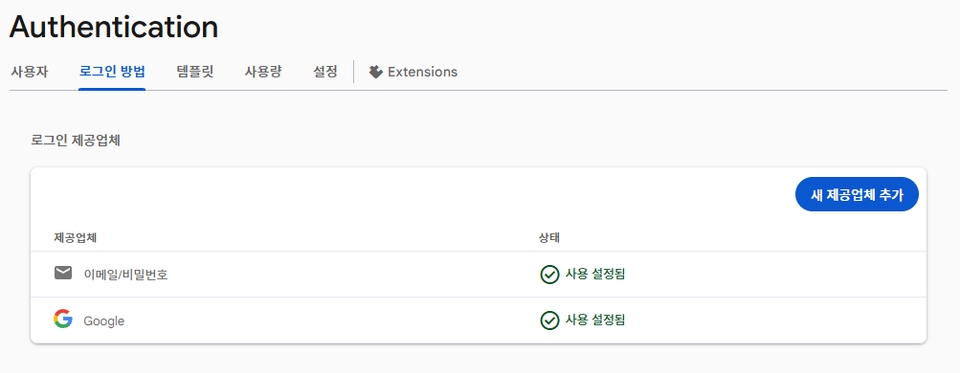
First, understand the basic concepts of Firebase Auth and implement the email-based login feature.
Create a login form in React and perform the actual login process through the Firebase Authentication API.

You will also learn how to improve user convenience by implementing social login features such as Google accounts.
By implementing login state management and logout functionality, you can experience the authentication flow used in actual services.

Firebase Login: Setting up Email/Password and Google

Section 3. Implementing Post Functionality (Database)

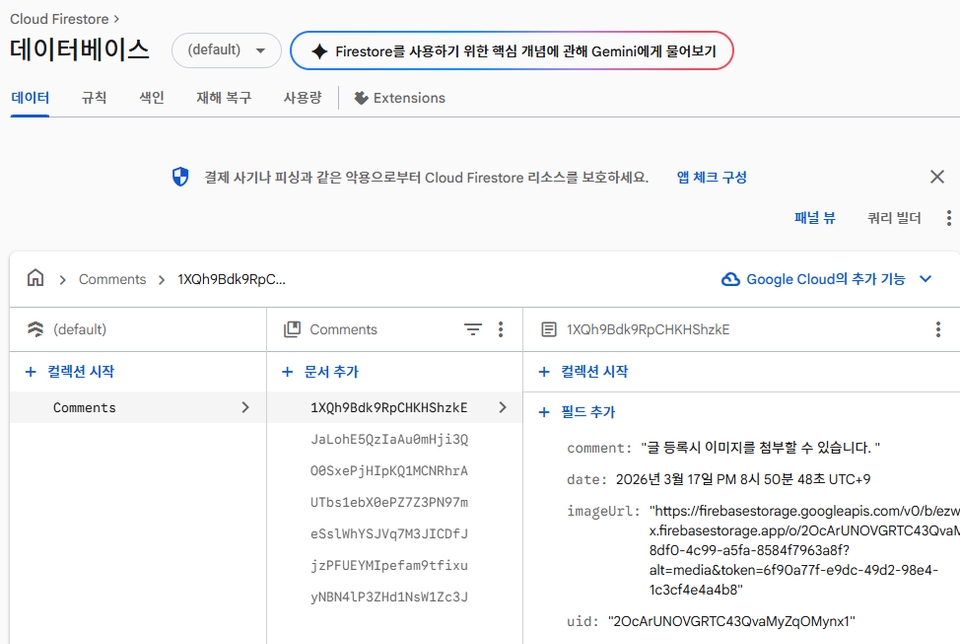
We will implement the post functionality using the Firebase Firestore database.

Implement a feature that saves user-entered posts to the database and displays the list of saved posts on the screen.
Additionally, utilize Firebase's real-time data capabilities to ensure the screen updates automatically whenever a new post is added.

We will also implement features to edit or delete posts written by the user.
In particular, we will learn how to handle permissions so that only the author can edit or delete their own posts.

Through this process, you will practice basic CRUD (Create, Read, Update, Delete) functions using Firebase Firestore.


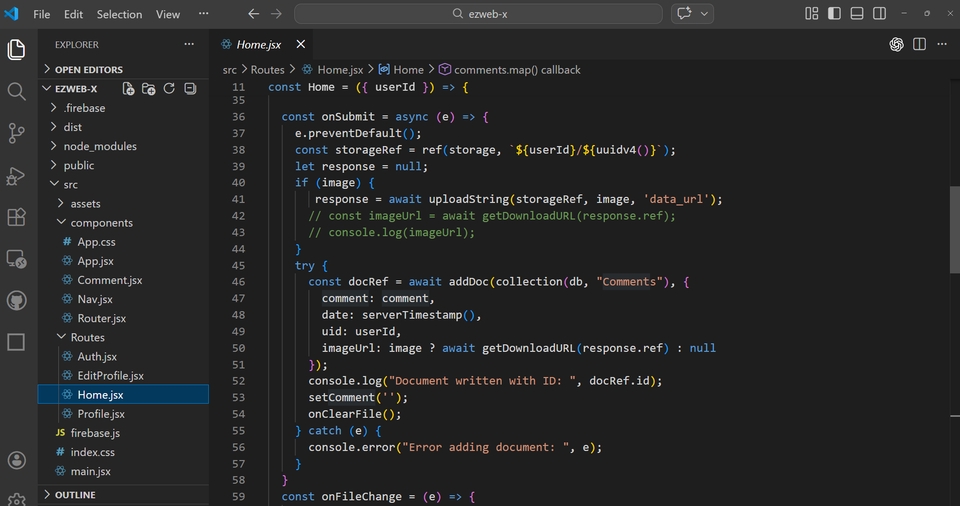
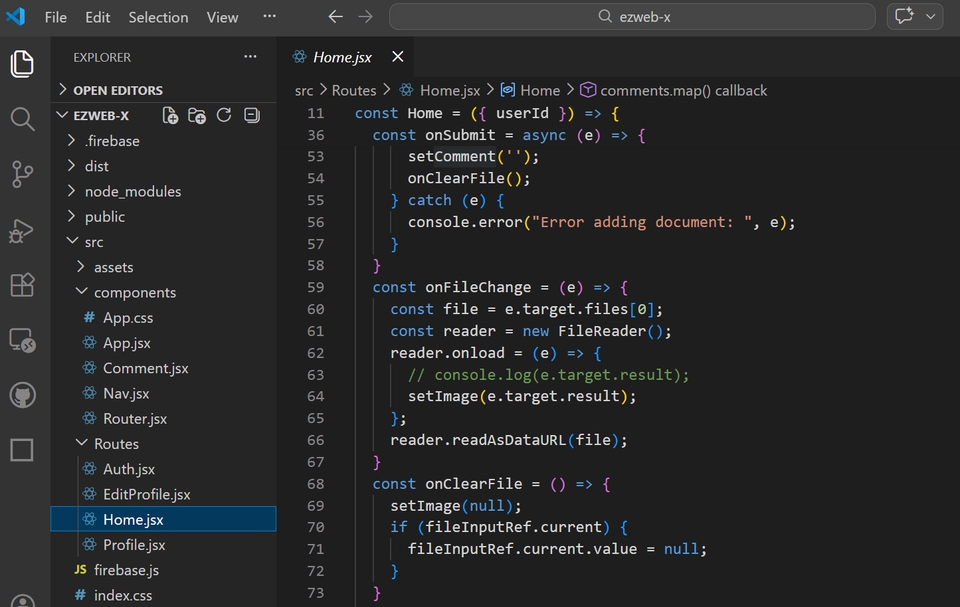
When attaching text and images and clicking the submit button, the post registration function is executed.

The post is saved to the Firebase database.

Section 4. Implementing File Upload Functionality

We will implement the file upload function using Firebase Storage.

We will implement a feature that provides a preview before uploading when a user attaches an image.
Afterward, we will learn how to upload the selected file to Firebase Storage and save the URL of the uploaded file along with the data.

We will also implement a way to delete files that are no longer needed.
You can learn the basic methods of managing files in a web application using Firebase Storage.

Preview the attached image using the FileReader API.

File Preview

Section 5. Implementing User Profile Features

Implement the user profile management function.

Users can upload their profile images and edit their profile information.
The uploaded images are stored in Firebase Storage, and the user profile is updated using the corresponding image URL.

Learn how to change the username and profile picture using Firebase's updateProfile API.
It also covers how to ensure that the uploaded image is reflected in the actual user information.


Through this, you can implement personalization features based on user accounts.

Changing the profile image

Section 6. Implementing the Profile Timeline

We will implement a timeline feature that allows logged-in users to view the posts they have written on their own profile page.

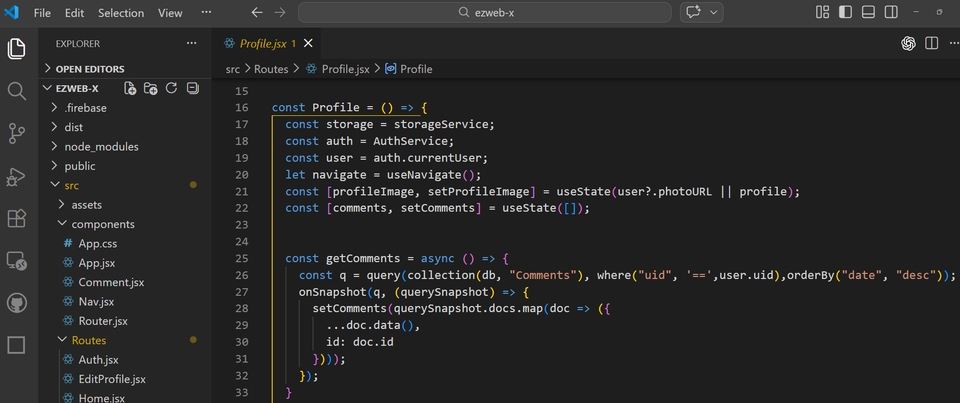
Learn how to retrieve only the data created by a specific user (uid) using the query features of Firebase Firestore.
We will also explore how to sort data and fetch only the necessary information using orderBy and where.

Through this, you can understand how to handle user-specific data retrieval and data sorting.

Retrieve data using where and orderBy.

Section 7. Web Application Deployment

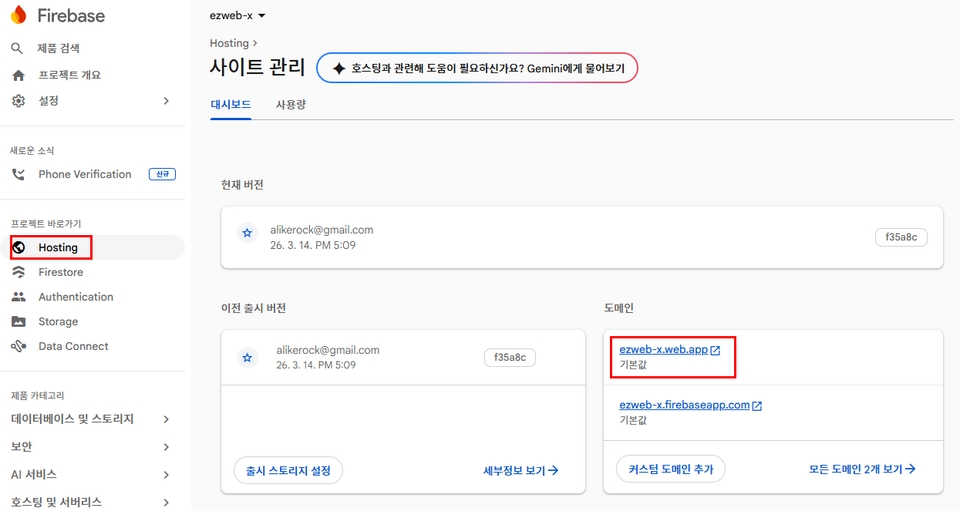
In the final section, we will deploy the completed React application using Firebase Hosting.

We will practice the process of installing the Firebase CLI, initializing the project, and deploying the built React application to Firebase Hosting.

Firebase Hosting enables fast service delivery based on CDN and provides free SSL certificates, allowing for easy setup of secure connections.

Through this process, you can experience the entire journey of launching a developed web application as an actual live service.

Deploy using Firebase Hosting.

Why should you take this course?

1️⃣ Build a full-featured Firebase-based web app yourself

It is not just a simple explanation of functions; you will
complete a web application with a real-world service structure that includes login, posts, file uploads, and profile management.


2️⃣ You can implement web services without a backend

By using Firebase, you can implement
everything from authentication and databases to file storage and deployment without any separate server development.

Even beginners can experience full-stack web development relatively easily.


3️⃣ You can naturally learn React practical patterns

As we progress through the course, we will learn the following practical patterns together.

  • React component structure design

  • State management and data flow

  • Real-time data processing

  • User permission handling

  • File upload handling


4️⃣ Experience everything up to actual service deployment

It doesn't just end with development;
you will directly deploy the completed web application using Firebase Hosting.

Through this, you can experience the entire process from development to service launch.


5️⃣ This is a step-by-step practical lecture for beginners.

We explain everything
step-by-step from environment setup to deployment so that even those new to Firebase and React can understand.

Precautions Before Taking the Course

1. Method of providing practice source code for each session

As this course is conducted as a practice-oriented lecture, completed source codes for each session are not provided separately.
Therefore, we recommend that you learn by writing the code yourself while watching the lectures.

However, to allow you to check the overall structure after completing the course, the final source code from the stage immediately preceding deployment is provided.

The source files for the pre-deployment stage are provided in Session 17.

2. Provision of Lecture Notes

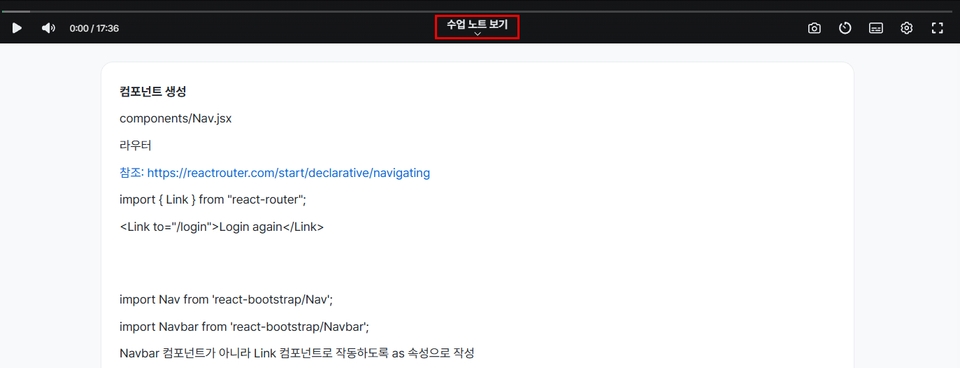
The core content covered in each session is organized and provided in the form of lecture notes.
The notes used during the video explanations are provided as lecture notes.

Lecture Notes Provided

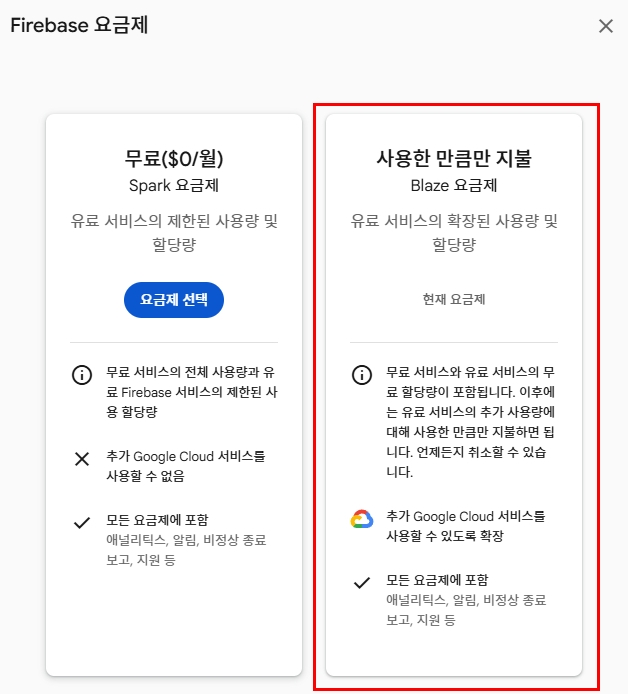
3. Information regarding Firebase billing settings

Billing setup may be required when creating a Firebase project.
Under normal lecture practice conditions, no actual charges will occur.

However, in the process of implementing the file upload function (Firebase Storage),
a switch to a paid plan (Blaze Plan) is required.

In this case, actual charges may occur depending on usage, so we recommend the following.

  • If you do not use the file upload function, you do not need to upgrade your billing plan.

  • If you no longer plan to use the project after the lecture practice is finished,
    it is recommended to delete or shut down the Firebase project.

Blaze plan required when implementing file upload functionality

Practice Environment Guide

Operating System

  • Windows

  • macOS

(Most steps can be carried out identically in a Linux environment.)

Development Tools

The practice sessions will be conducted using the following tools.

  • Node.js (LTS version)

  • npm

  • Visual Studio Code, other editors are also possible

  • Google Chrome

Key Technologies Used

The core technologies used in this lecture are as follows.

  • React

  • Firebase Authentication

  • Firebase Firestore Database

  • Firebase Storage

  • Firebase Hosting

Firebase Account

A Google account is required
for the course practice. You will use your Google account to log in when creating a Firebase project.

Recommended for
these people

Who is this course right for?

  • Those who want to build a real-world web application using React

  • Those who want to learn how to implement web services using Firebase without a backend

  • Those who want to directly implement actual service features such as login, message boards, and file uploads.

  • Those who want to try creating a web application project for their portfolio

  • Those who want to experience simple backend functions while learning frontend development

  • Those who want to experience the development workflow of Firebase-based web services from scratch.

Need to know before starting?

  • It is recommended that you have a basic understanding of HTML / CSS syntax.

  • It is helpful if you know the basic syntax of JavaScript.

  • It will be helpful for the course if you have a basic understanding of React concepts (components, state, props).

Hello
This is ezweb

2,802

Learners

63

Reviews

4

Answers

4.9

Rating

14

Courses

■ [Current] ESTSOFT KDT Frontend Instructor
■ Green Computer Art Academy Web Publishing and Frontend Instructor
■ Operator of Web Publishing YouTube Channel 'Rock's Easyweb'
■ The Joeun Computer Academy Web Publishing Instructor
■ Hanbit Computer Academy Web Publishing Instructor
■ Frontend Publisher, Professional Frontend Publishing Instructor
■ UI/UX Web Design Portfolio Instructor


[ Books ]
Published on 2021.07.19 / The Complete Figma Guide for Web Design & Web Publishing / BJ Public

Published on 2022.08.25 / Coding for the First Time with Web Publishing / Youngjin Publishing

Published 2023.10 /2024 SD Edu Yu-seonbae Web Design Technician Practical Exam Tutoring Notes / Sidae Gosi Planning

2024.11 Reprint /2025 SD Edu Yoo-Sunbae Web Design Technician Practical Exam Tutoring Notes / Sidae Gosi Planning
2025.11 Reprint /2026 SD Edu Yoo-Sunbae Web Design Technician Practical Exam Tutoring Notes / Sidae Gosi Planning

 

[ Awards ]
2022.08 Green Computer Art Academy Jongno Branch - Outstanding Instructor 2021.06 Green Computer Art Academy Jongno Branch - Outstanding Instructor 2018.06 Green Computer Academy Sinchon Branch - Outstanding Instructor 2017.05 Green Computer Academy Sinchon Branch - Outstanding Instructor 2016.05 Green Computer Academy Sinchon Branch - Outstanding Instructor 2015.10 Green Computer Academy Sinchon Branch - Outstanding Instructor


More

Curriculum

All

18 lectures ∙ (5hr 11min)

Course Materials:

Lecture resources
Published: 
Last updated: 

Reviews

Not enough reviews.
Please write a valuable review that helps everyone!

ezweb's other courses

Check out other courses by the instructor!

Similar courses

Explore other courses in the same field!

Limited time deal

$9,350.00

50%

$15.40