inflearn logo

HTML/CSS, followed by JavaScript and React: An Introduction to Front-End Development with AI

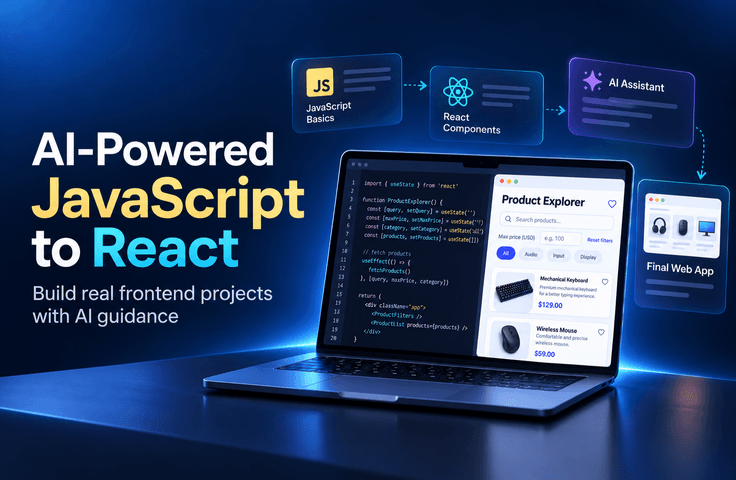
From the next step after HTML/CSS through completing a React product browsing app, this is an introductory JavaScript and React course where you learn by writing code yourself. You can learn in two ways: follow along with the videos and implement everything yourself, or get AI suggestions using prompts from the study notes and selectively apply only what you need. Across 30 lessons (approximately 13 hours and 30 minutes), you’ll learn core JavaScript syntax, the DOM and events, and React components, props, and state in one continuous flow, then directly verify your results through testing and builds.

2 learners are taking this course

Level Basic

Course period Unlimited

JavaScript
JavaScript
React
React
github-copilot
github-copilot
javascript-dom
javascript-dom
AI
AI
JavaScript
JavaScript
React
React
github-copilot
github-copilot
javascript-dom
javascript-dom
AI
AI

What you will gain after the course

  • The ability to read core JavaScript syntax (variables, functions, arrays, objects, and map) and write simple logic yourself

  • Experience implementing search and filtering functionality on static HTML/CSS screens using the DOM and events

  • Understanding components, props, and state by building the same functionality separately in JavaScript and React

  • The habit of selecting and modifying AI suggestions instead of using them as-is, and verifying them with Vitest

  • A React product browsing app featuring search, category/price filters, favorites, and detailed views (portfolio)

🤖 In an era when AI writes code for you, why can’t I fix my own code?


AI can suggest code quickly. However, determining whether that code meets the requirements, fixing errors, and applying it to a real service are the developer’s responsibilities.

If your fundamentals are weak, you may end up copying AI’s answers as they are, and even when a small problem arises, you won’t know where to start fixing it.

This course is not about learning “how to ask AI to create code for you.” You will first learn the core syntax of JavaScript, the DOM, and events, then naturally expand into React’s component and state structure. AI is used as a learning partner, while the focus remains on developing the ability to read, modify, and verify generated code yourself.


In one line: The ability to write code yourself is central, and AI is a supplement.


Preview the completed project

▶ View the completed pure JavaScript version

https://alikerock.github.io/ai-js-react_vanila/

▶ View the completed React version

https://ai-js-react.vercel.app/

Recommended for people like these 🙋

  • For those who have learned HTML/CSS but feel lost about what to learn next.

  • Those who have learned JavaScript syntax but get stuck when moving on to React

  • Those who have tried AI coding tools but find it difficult to determine whether the code they receive is correct and fix it.

  • Those who want to experience the full project workflow—from organizing requirements to implementation, testing, and building—beyond small examples.

Prerequisite knowledge

  • A level at which you can create simple web pages with HTML/CSS (tag structure and basic styling)

  • Basic usage of VS Code and web browsers (developer tools)

  • No prior experience with JavaScript or React is required.

What makes this course different 💡


The perfect progression after HTML/CSS

You’ll progress one step at a time, in the order of JavaScript fundamentals → DOM and events → React.


Build the same feature twice (JavaScript → React)

First, build search and filtering in JavaScript, then reimplement the same functionality in React. This is where you gain a hands-on understanding of the differences between the two approaches.


Even if you get stuck, you can start over

Start and complete code are provided for every lesson. If you get stuck, start again from the start code for that lesson.


Hands-on implementation is central; AI is used selectively

It may be faster to leave everything to AI, but when problems arise, you won’t know what to fix. You will enter most of the code yourself to learn the underlying principles, and use AI only to organize requirements or suggest implementation approaches. You decide what to incorporate.


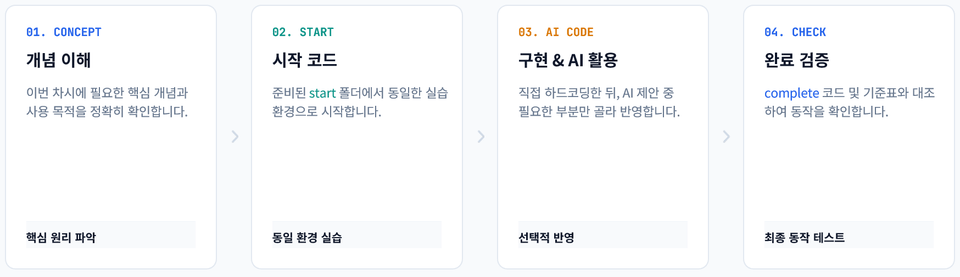
4-Step Learning Process: Hardcode Directly → Derive and receive suggestions for requirements with AI → Choose and implement from the suggestions → Verify through the execution results

🛤️ Two Learning Methods to Suit Your Style


Method 1. 🎬Follow along with the video

Method: Follow the video instructions and enter the code yourself

Recommended for: Those new to JavaScript

Materials: Video


Method 2. 📝Learning Notes + AI

Method: Ask AI for suggestions using the prompts in the notes, then select and proceed with only the parts you need

Recommended for: Those who want to experience working with AI

Materials: Video + study notes (required)

  • Both methods use the same video. {{Please indicate where the learning notes are provided (e.g., the Class Materials tab).}}

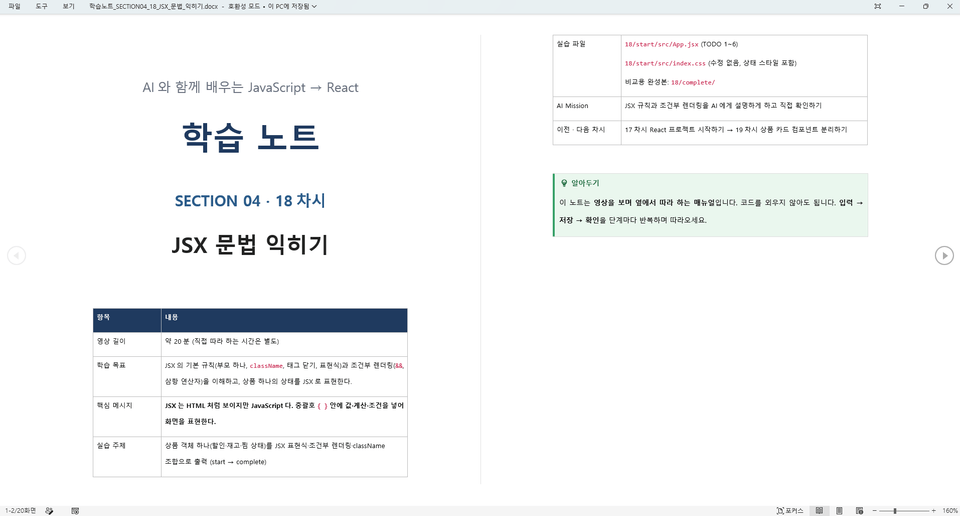
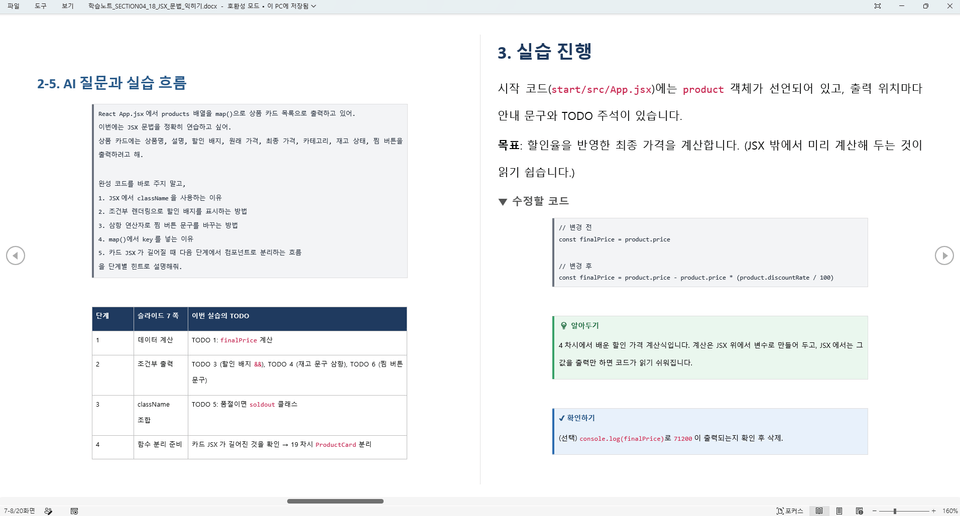
  • The learning notes are a manual to keep open beside the video and follow along with. They organize the prompts to enter, the code to write, and ways to check when you get stuck.


Here’s what you’ll learn 📚


🌱 Section 1 · AI and JavaScript: First Steps

Learn how to use AI as a coding partner rather than an answer generator, set up a JavaScript execution environment, and run your first code.

  • Lesson 1 - What Should You Learn After HTML/CSS? Why You Need JavaScript

  • Lesson 2 - How to Use AI as a Coding Partner, Not an Answer Sheet

  • Lesson 3 - Getting Started with JavaScript - Variables and Data Types


Getting Started with JavaScript - Variables and Data Types

🧩 Section 2 · The Power to Read Code: JavaScript Core Syntax

Learn variables, conditional statements, functions, arrays, objects, and map. Build the foundation to read and explain AI-generated code on your own.

  • Lesson 4 - Code Makes Decisions on Its Own: Operators and if Statements

  • Lesson 5 - No More Repetitive Code: Understanding Functions at a Glance

  • Lesson 6 - Arrays: The Container for Product Lists

  • Lesson 7 - How to Represent a Single Product: Objects and Data Structures

  • Lesson 8 - From for to map: The Easiest Way to Work with Lists

  • Lesson 9 - Your Ticket to React: Essential Modern JS Syntax

Modern JS Syntax

🖱️ Section 3 · The Power Behind Interactive Screens: DOM and Events

Select elements and handle click and input events to render product cards from data, then implement search and category filtering yourself.

  • Lesson 10 - Get Hands-On with Elements on the Screen (DOM Selection)

  • Lesson 11 - A Web That Responds When Clicked: Event Handling (Separation of Structure)

  • Lesson 12 - Change the Screen with Code: Text, Styles, and Classes

  • Lesson 13 - Cards Galore Just by Adding Data: List Rendering

  • Lesson 14 - Build a product search that finds items instantly as you type

  • Lesson 15 - Complete the Category Filter with a Single Button Click

Category filter

⚛️ Section 4 · Expanding Your Thinking from JavaScript to React

Rebuild the feature you just created using a component, props, and state structure. This section helps you experience the difference between the two approaches firsthand.

  • Lesson 16 - Why React? Experiencing the Limitations of Direct DOM Manipulation

  • Lesson 17 - Your First React Project (Vite)

  • Lesson 18 - Understanding JSX: JavaScript That Looks Like HTML, JSX

  • Lesson 19 - Build the Screen Like LEGO: Separating the Product Card Component

  • Lesson 20 - From Parent to Child: Passing Data with Props

  • Lesson 21 - When Values Change, the Screen Changes Too: useState

  • Lesson 22 - Handling Clicks and Input with React: Events and Forms

  • Lesson 23 - Complete a List with Just One Array: map and key

  • Lesson 24 - Design Before Building: Search Requirements and State Design

Understanding JSX

🛒 Section 5 · A React Product Exploration Project Completed with AI

From organizing requirements to implementing search, combined category and price filters, wishlisting, and product details. Wrap up with Vitest tests and a build, then compare code reviews and refactoring points using Copilot and Claude Code.

  • Lesson 25 - Starting the Project: Organizing Requirements and Designing the Structure

  • Session 26 - Implementing Product Search with React

  • Session 27 - Combined Filters: Search + Category + Price Conditions

  • Lesson 28 - Favorite Products You Like and View Their Details

  • Lesson 29 - Will It Really Work Well? Verifying with Vitest

  • Lesson 30 - AI Code Review, Refactoring, and Project Completion

Verify with Vitest

The person who created this course

I’m a front-end instructor who has taught everyone from non-majors to beginners, covering everything from HTML/CSS to JavaScript and React.

At ESTSOFT KDT, Green Computer Academy, and other institutions, I have met many people who feel lost about “what to do after HTML/CSS.” That’s why I have created project-based classes that break down complex concepts into small hands-on exercises and guide students to complete their own finished projects.

I have authored web publishing and web design books, including “Learning to Code for the First Time with Web Publishing,” and run the web publishing YouTube channel 'ezweb'.


Do you have any questions?


Q. 🔰 I’m new to coding—can I keep up?

Basic knowledge is enough. We start step by step with JavaScript, and provide start code for each lesson so anyone can begin practicing in the same environment.


Q. 🤖 Which AI tool do you use, and is it paid?

The primary tool is GitHub Copilot, and you can complete the course using the free plan. {{Add one line after checking whether the free plan’s monthly usage limit could prevent you from completing the exercises}} In the later code review and refactoring sections, we also use Claude Code to compare the results from the two tools. Claude Code is paid, and we explain this upfront in the course. Installation instructions will be made available through a link to the instructor’s YouTube video.


Q. 💳 Is it difficult to take the course without paying for Claude Code?

Claude Code is only used in the section comparing the two tools, and the final work is done with Copilot. Even without paying, you can follow along by watching the comparison process in the video.


Q. 📓 Is it enough to just watch the videos, or do I also need the learning notes?

You can learn by simply following along with the videos. If you choose the second learning method (working with AI through prompts), the study notes are essential.

Things to Note Before Taking the Course

Practice Environment

  • Operating systems: Windows, macOS

  • Tools: VS Code, web browser (Chrome recommended), Node.js

  • AI tools: GitHub Copilot (basic, free plan available), Claude Code (for comparison in the latter part, paid and optional)

Learning Materials

  • Start / complete code for each lesson

  • Learning Notes (A Manual to Follow Alongside the Video)


Recommended for
these people

Who is this course right for?

  • Beginners who have completed the basics of HTML/CSS and are about to start hands-on projects with JavaScript and React

  • Those who have tried JavaScript but find the transition to React difficult

  • Learners who want to use AI coding tools while developing the ability to understand and modify the generated code

  • Those who want to experience the full project workflow—from defining requirements through implementation, testing, and building—beyond small examples.

Need to know before starting?

  • Able to create simple web pages with HTML/CSS (tag structure, basic styling)

  • Basic usage of a code editor (VS Code) and web browser (developer tools)

  • Willingness to use AI coding tools such as GitHub Copilot or Claude

Hello
This is ezweb

Career Verified

3,014

Learners

79

Reviews

4

Answers

4.9

Rating

16

Courses

I am a frontend instructor specializing in teaching everything from web publishing to practical JavaScript and React, as well as AI-assisted development.

I have taught non-majors, beginners, and job seekers at ESTSOFT KDT and Green Computer Academy, among others. I break down complex concepts into small hands-on exercises and focus on project-based classes in which learners complete the final product themselves.

Key Areas of Education

  • HTML/CSS Web Publishing

  • JavaScript Fundamentals and Web Interactions

  • React-based frontend development

  • Implementing web services using Firebase

  • Figma UI Design and Development Integration

  • Web Development with Generative AI

  • Web Design Technician Practical Exam

Corporate & Institutional Training

We provide training for corporate practitioners, KDT programs, and special lectures at universities and academies.

We structure the curriculum and hands-on projects according to the target audience’s prior knowledge, instructional hours, and desired outcomes. We offer in-person classes, live online instruction, and recorded educational content production.

Online Educational Content Production

We carry out the following online educational content production tasks.

  • Lecture curriculum and learning objective design

  • Creation of course materials and presentations

  • Organizing step-by-step practice code and example projects

  • Writing lecture scripts for filming

  • Lecture filming and content delivery

Key Activities

  • ESTSOFT KDT Front-End Course

  • Green Computer Academy Web Publishing and Front-End Course

  • Operates the web publishing YouTube channel ‘ezweb’

  • Authored books in web publishing and web design

Books Authored

We accept inquiries about delivering lectures at companies and institutions, as well as producing online educational content.

Inquiries: ezwebpub@gmail.com

More

Curriculum

All

36 lectures ∙ (12hr 5min)

Course Materials:

Lecture resources
Published: 
Last updated: 

Reviews

Not enough reviews.
Please write a valuable review that helps everyone!

ezweb's other courses

Check out other courses by the instructor!

Similar courses

Explore other courses in the same field!

Limited time deal

$26.40

48%

$51.70