inflearn logo

Introduction to Mobile Web Development: Perfectly Implementing Figma Designs with Javascript

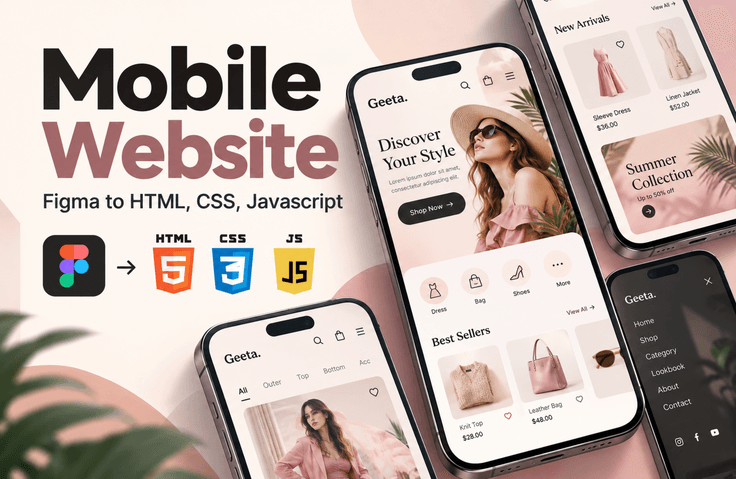
Have you taken your first steps into web development? We have a special offer for those who are just getting started with HTML, CSS, and javascript! Do you want to create a mobile website to keep up with the mobile era, but are unsure where to begin? Don’t worry. By analyzing and implementing a Figma mobile design yourself, you’ll naturally learn the fundamentals of responsive web development. Based on a sophisticated mobile design, you’ll explore everything from subtle interactions that capture users’ attention to techniques that adapt perfectly to a variety of screen sizes. We’ll share our know-how to help your website shine on every device. Shall we get started together?

(5.0) 2 reviews

34 learners

Level Basic

Course period Unlimited

Figma
Figma
HTML/CSS
HTML/CSS
JavaScript
JavaScript
Web Design
Web Design
Mobile App Design
Mobile App Design
Figma
Figma
HTML/CSS
HTML/CSS
JavaScript
JavaScript
Web Design
Web Design
Mobile App Design
Mobile App Design

Reviews from Early Learners

5.0

5.0

박인정

33% enrolled

This is really a beneficial lecture. Even following along requires stamina. I tend to forget previous lectures, so I should do repeated learning when I get the chance ^^

What you will gain after the course

  • Interpreting Figma Designs and Extracting Images

  • Set up the initial HTML/CSS files

  • Writing CSS Variables and Global Styles

  • Configure web font usage

  • Layout Design: Using Grid and Flexbox

  • Implementing Responsive CSS

  • Creating a Main Slide Using Swiper.js

  • Aside Menu Navigation Using Javascript

  • Modify the product quantity using JavaScript

  • Changing the Grid View Using Javascript

Implement a mobile website using HTML/CSS and Javascript, referring to the Figma design. Analyze the mobile design and try implementing a website that is easy to maintain.

You’ll be able to learn more smoothly if you have a basic understanding of HTML, CSS, and JavaScript.

For learning each part, please check the links below.

📱 Turn a Figma design into a real mobile website!


A Practical Web Publishing Project: Turning Design into Code

Have you learned HTML, CSS, and JavaScript but lack experience creating a website from scratch?

Have you ever wondered where to start after looking at a Figma design, how to structure the HTML, and in what order to write the CSS and JavaScript?

In this course, you will experience the entire process of analyzing a mobile fashion shopping mall design created in Figma and implementing it as a real website.

From design analysis to image extraction, HTML structure planning, CSS styling, and JavaScript interaction implementation, you’ll practice each step hands-on.

Rather than simply recreating the screen, this course teaches you the workflow of real-world web publishing and helps you complete a finished project that you can use in your portfolio.

📱 Turn a Figma design into a real mobile website!


A Practical Web Publishing Project: Turning Design into Code

Have you learned HTML, CSS, and JavaScript but lack experience creating a website from scratch?

Have you ever wondered where to start after looking at a Figma design, how to structure the HTML, and in what order to write the CSS and JavaScript?

In this course, you will experience the entire process of analyzing a mobile fashion shopping mall design created in Figma and implementing it as a real website.

From design analysis to image extraction, HTML structure planning, CSS styling, and JavaScript interaction implementation, you’ll practice each step hands-on.

Rather than simply recreating the screen, this course teaches you the workflow of real-world web publishing and helps you complete a finished project that can be used in your portfolio.


🎯 Project to Complete in This Course

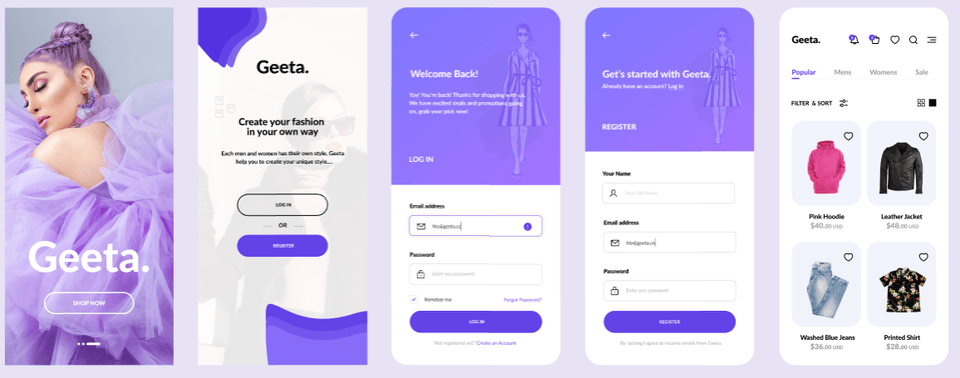
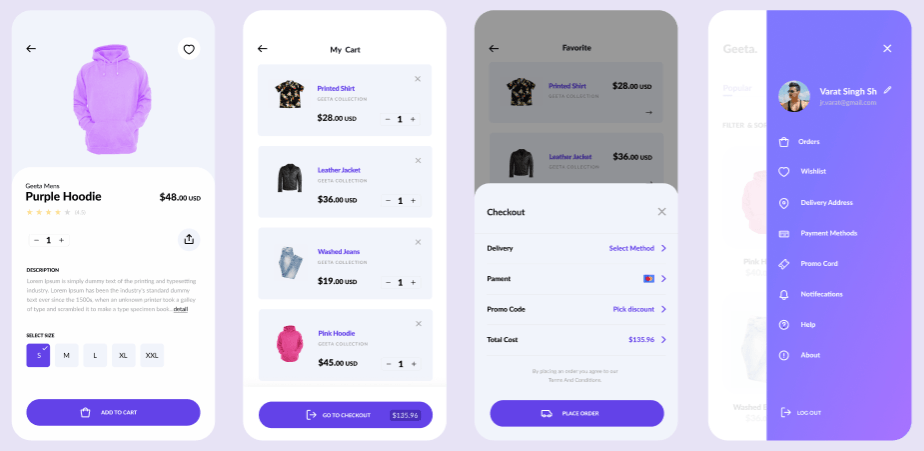
Mobile fashion shopping mall 'Geeta'

Based on the Figma design, you’ll create the main pages of a mobile shopping mall and implement various user interactions using JavaScript.

You will create a total of 8 screens.

  1. Intro page

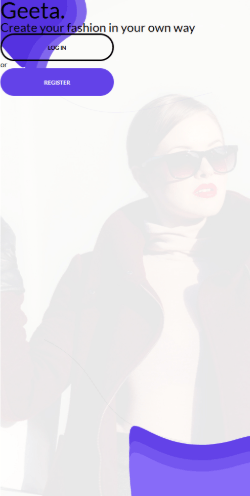
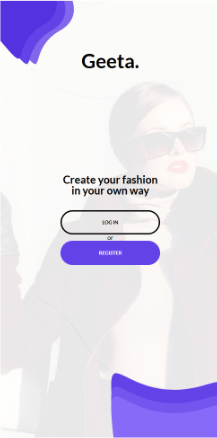
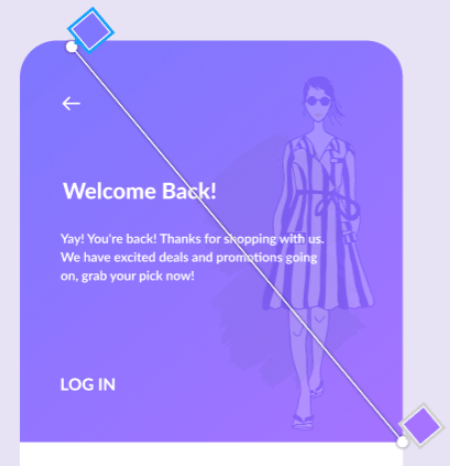
  2. Login/Sign-Up Selection Page

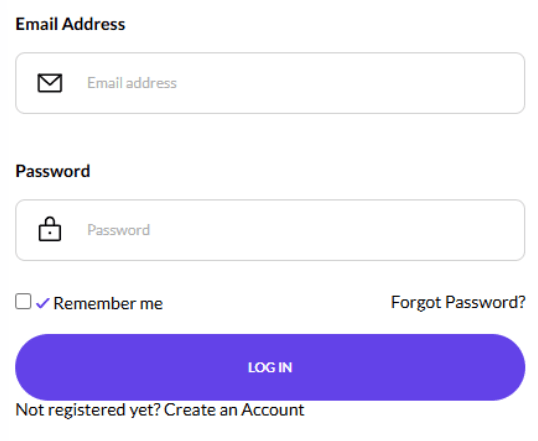
  3. Login page

  4. Sign-Up Page

  5. Product Home Page

  6. Product Detail Page

  7. Shopping Cart Page

  8. My Page

Write HTML and CSS according to the design mockup, and add various interactions commonly used on actual mobile websites.

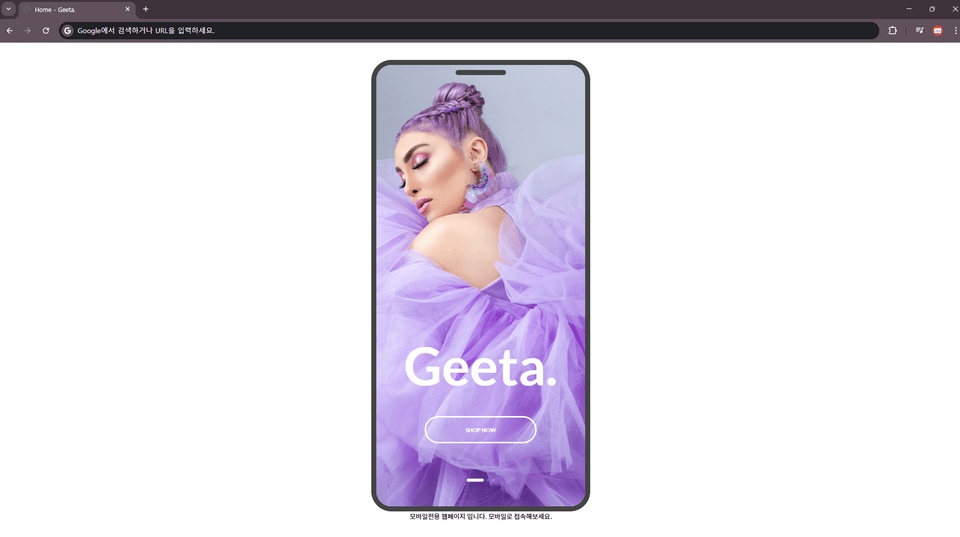
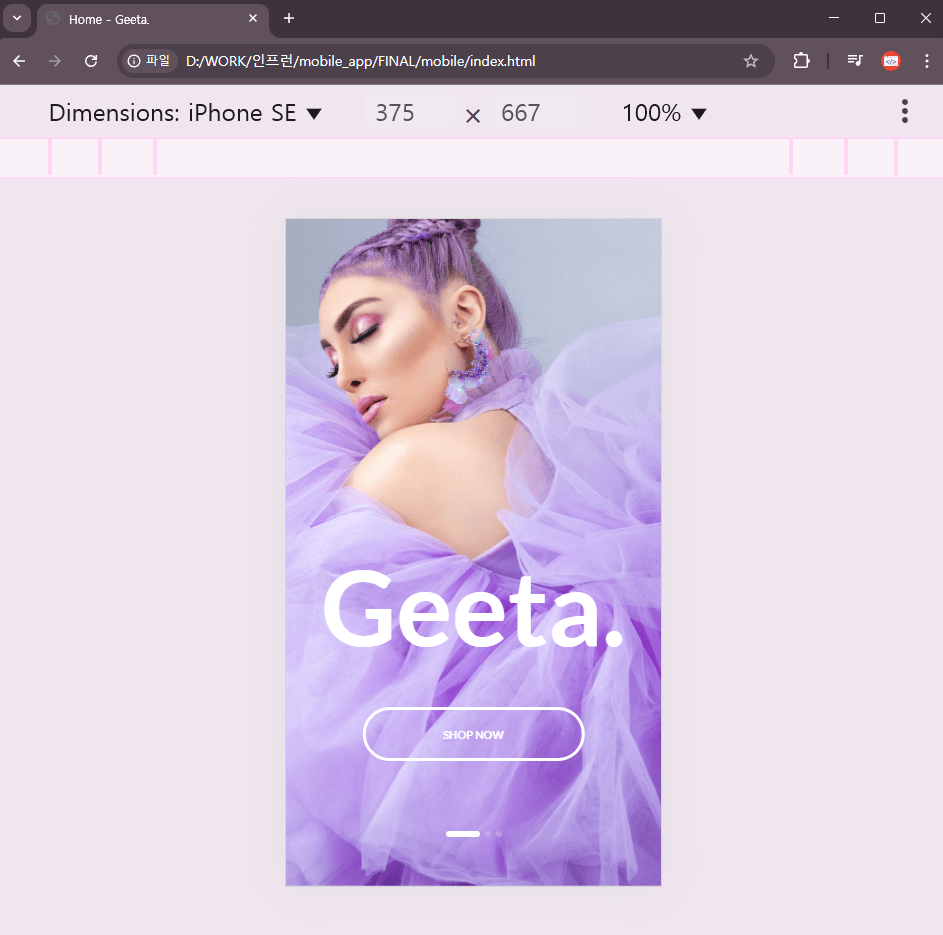
In particular, the completed website displays differently depending on whether it is accessed on a PC or mobile device.

  • PC access: Display the mobile website within a smartphone mockup

  • Mobile access: Display a dedicated page optimized for mobile devices without a mockup

Through this, you can gain experience with device detection using JavaScript and implementing adaptive mobile websites.

※ This does not involve connecting actual member authentication, a product database, or a payment system. The focus is on implementing the screens needed for web publishing and creating front-end interactions.

💡 Recommended for those who...

1. Those who have learned HTML/CSS/JavaScript but lack project experience

You can gain experience applying basic syntax comprehensively to the creation of real websites.

2. Those who want to turn Figma designs into code

You will experience the process of analyzing a design, extracting the necessary images, and building it into an actual webpage.

3. Those preparing for a career as a web publisher

It is suitable for those who want to go beyond simple examples and complete a portfolio project consisting of multiple pages and interactions.

4. Those who want to build their mobile web publishing skills

You can learn layouts and interactions suitable for mobile screens, as well as how content is displayed on different devices.

🚀 What will you learn?


STEP 01. Figma Design Analysis and Project Preparation

Before building the website, review the Figma design and prepare the necessary resources.

  • Preview of the Completed Project

  • Figma Design Analysis

  • Extract images and prepare the necessary image resources

  • Project Folder and File Structure

Review the design, plan the necessary tasks, and prepare the resources for use in web publishing.


STEP 02. Implementing the Common Structure and Styles for the Mobile Website

Implement the elements commonly used across each page of the mobile website.

  • Writing CSS Reset and Common Styles

  • Using CSS Variables

  • Applying web fonts and establishing font hierarchy

  • Layout composition using Flexbox and Grid

  • Styling form elements such as inputs, checkboxes, and radio buttons

Learn how to create a consistent website while systematically managing common elements.


STEP 03. Mobile Interactions Completed with JavaScript

Apply JavaScript to a static design to create a responsive mobile UI.

Intro page

Using the Swiper.js library, implement automatically transitioning slides and customize the pagination elements to match the design.

Login and Sign-Up Screen

Learn how to use background images and gradients, and how to customize the default checkbox to match your desired design.

Product Home Page

Implement a highlight animation that plays when a category is selected, along with functionality to change the product grid view.

We also create the interaction for opening and closing the My Page.

Product detail page

Implement user interactions such as displaying product ratings, changing quantities, and selecting sizes.

Cart and payment screens

Implement interactions for changing quantities and deleting items in the shopping cart, and create the payment options screen.

After writing the HTML structure and CSS styles for each feature, complete them step by step by adding JavaScript.


STEP 04. Implementing an Adaptive Web That Distinguishes Between PC and Mobile

Learn how to use JavaScript to display web pages differently depending on the device being used to access them.

  • Device detection using navigator.userAgent

  • Display a mobile page in a smartphone mockup on a PC

  • Display a mobile-specific page on mobile devices

  • Handling page navigation based on the device

Experience how to present a single mobile design appropriately across different access environments.

✅ After completing the course, you’ll be able to do the following.


  • You can analyze Figma designs and prepare the resources needed for web publishing.

  • You can create the layout of a mobile website using HTML and CSS.

  • You can create a consistent UI using CSS variables and shared styles.

  • You can implement various interactions with JavaScript, such as menus, slideshows, and product selection.

  • You can create an adaptive mobile website that displays different layouts depending on the device used to access it.

  • You can use the multi-page mobile web publishing project as a portfolio.

This course is designed around creating a portfolio for employment.

This course introduces the process of creating a mobile-only website.

When accessing the completed webpage on a PC, the page is displayed confined within a mobile mockup. At this point, JavaScript is used to determine whether the device accessing it is a mobile device.

.

In practice, instead of creating a mobile mockup like this, you use the entire screen or implement a responsive design. If you’re interested in implementing responsive web pages, please refer to the course at https://inf.run/Gx3Ty.

We introduce how to implement an adaptive mobile website where, if the accessing device is mobile, the mockup disappears and only the content is displayed, optimized for that device.

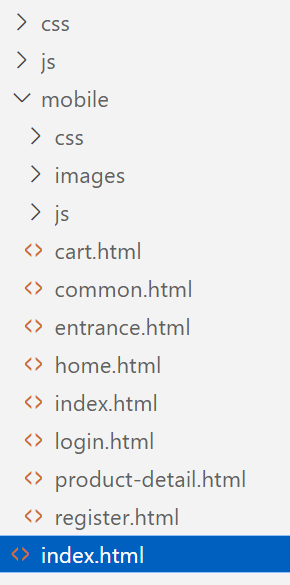
This is the file structure of the completed version.

When accessed on a PC, the index.html file in the root folder should open and display the content within a mobile mockup. When accessed on a mobile device, it should instead open the index.html file in the mobile folder rather than the one in the root folder.

  • Install the required plugin

    • Export Original Images

    • Photoroom - AI and Background Remove

    • Font Scanner

Figma design to reference

Complete the pages below by referring to the Figma design.

  • Intro Page

  • Login–Sign-up Selection Page

  • Login

  • Sign Up

  • Product Home

  • Product Detail Page

  • Shopping Cart

  • My Page

Here is an introduction to the main learning content.

📒Intro Page

Detecting Mobile Devices

Learn how to identify a user's device using JavaScript and redirect them to either a mockup or a mobile-specific page depending on the device. In this process, you will learn how to distinguish devices by checking the unique browser property, navigator.userAgent.

Using Swiper JS Parameters

Using the most widely used JavaScript library, Swiper.js, we will implement an automatic slider and change the style of the pager, which is provided as a circle by default.

Changing the Pager Style

📒Login - Sign-Up Selection Page

Specify multiple background images for a single element and position each one to match the design.


📒Login, Sign Up

Use linear-gradient to set the page header’s background. Check the background properties in the design and write the styles accordingly.


Among the input elements, checkboxes cannot have their browser-default style changed. Make elements that cannot be changed disappear from the screen, then apply styles to other elements to match the design.

A checkbox whose style cannot be changed


A checkbox whose style changes when checked

📒Product Home Page

Implement the notification popup and the number count on the shopping cart icon using user attributes.


Implement an animation where the highlight line moves when clicked using CSS and JavaScript.

Highlight Movement Animation

Click the grid view button to change the product layout, and click the wishlist button to change its color.

Change the product layout.

Clicking the button on the right displays the My Page.

My Page animation

📒Product Detail Page

When you change the rating, it is displayed on the screen; you can change the product quantity and select the size.

Display the star rating, change the quantity, and select the size.

📒Cart Page

You can change the quantity of items in the shopping cart and delete them. Finally, when you click the Checkout button, the payment options will appear.

Change the quantity of cart items, delete them, and proceed to payment.

📒Conclusion

This course does not involve implementing an actual shopping mall. As a web publisher, it is a process of referring to a design and creating only the framework of the final screen. Therefore, when entering information on the login page and clicking the submit button, the practical implementation would involve validating the entered information, checking it against the database server, determining whether it matches, and then redirecting to the main page. However, in this course, it is temporarily linked using the value of the action attribute.

Since this is a static page implemented using only HTML, CSS, and Javascript, features such as logging in, signing up, adding items to the shopping cart, deleting items, and proceeding with payment are only implemented to the extent of linking between pages. Please keep this in mind.

In publishing work, there is no need to handle the processes connected to form input. Front-end or back-end developers complete the work by integrating the web publisher’s output with the database and writing server-side scripts.

If you are curious about the web publishing → front-end → back-end process, please refer to the board on my YouTube channel or the video on building an online shopping mall.

Communication channels (survey, 1:1 open chat room)✒

Students can share their opinions and ask questions at any time through the Google survey and 1:1 open chat room introduced in the News section.


Recommended for
these people

Who is this course right for?

  • Those with a basic knowledge of HTML, CSS, and JavaScript

  • Those who lack experience with publishing work but want to complete a real-world project.

  • Those who want to learn design, design references, and web publishing

  • Those who want to learn the practical publishing process

  • Those who have basic coding knowledge but struggle to apply it comprehensively

  • Those who want to implement all interaction effects using pure JavaScript

Need to know before starting?

  • html

  • css

  • javascript

Hello
This is ezweb

Career Verified

3,005

Learners

78

Reviews

4

Answers

4.9

Rating

15

Courses

I am a frontend specialist instructor who teaches everything from web publishing to practical JavaScript and React, as well as AI-assisted development.

I have taught non-majors, beginners, and job seekers at ESTSOFT KDT and Green Computer Academy, among others. I break down complex concepts into small hands-on exercises and favor project-based classes in which learners complete the deliverables themselves.

Key Educational Areas

  • HTML/CSS Web Publishing

  • JavaScript Basics and Web Interactions

  • React-based frontend development

  • Implementing Web Services Using Firebase

  • Figma UI design and development integration

  • Web Development with Generative AI

  • Web Design Technician Practical Exam

Corporate and institutional training

I conduct training for corporate practitioners, KDT courses, and special lectures at universities and academies.

We develop curricula and hands-on projects tailored to the learners, their prior knowledge, the training duration, and the intended outcomes. We offer in-person instruction, live online classes, and recorded educational content production.

Online Educational Content Production

We handle the following online educational content production tasks.

  • Lecture curriculum and learning objective design

  • Creation of course materials and presentations

  • Step-by-step practice code and example project setup

  • Writing lecture scripts for recording

  • Lecture filming and content delivery

Main Activities

  • ESTSOFT KDT Frontend Course

  • Green Computer Academy Web Publishing & Front-End Course

  • Operating the web publishing YouTube channel ‘ezweb’

  • Authored books in the fields of web publishing and web design

Publications

We accept inquiries about delivering courses for companies and institutions and producing online educational content.

Inquiries: ezwebpub@gmail.com

More

Curriculum

All

21 lectures ∙ (8hr 24min)

Course Materials:

Lecture resources
Published: 
Last updated: 

Reviews

All

2 reviews

5.0

2 reviews

  • injungcom12169821님의 프로필 이미지
    injungcom12169821

    Reviews 7

    ∙

    Average Rating 5.0

    5

    33% enrolled

    This is really a beneficial lecture. Even following along requires stamina. I tend to forget previous lectures, so I should do repeated learning when I get the chance ^^

    • hmsojy4663님의 프로필 이미지
      hmsojy4663

      Reviews 1

      ∙

      Average Rating 5.0

      5

      62% enrolled

      ezweb's other courses

      Check out other courses by the instructor!

      Similar courses

      Explore other courses in the same field!

      25% off for new members

      $32.90

      25%

      $42.90