[2026 Examination Standards] Perfect Guide for the Web Design & Development Technician Practical Exam
This is a specialized practical exam lecture optimized for the Web Design & Development Craftsman (formerly Web Design Craftsman) practical exam, strictly adhering to the exam standards effective from January 1, 2025, to December 31, 2027. Coding Works' Web Design & Development Craftsman practical exam lectures, covering HTML+CSS+JQUERY publishing, are different.
It includes fully produced instructional videos for all exam types (Types A, B, C, D, E, and F) for the 2026 Web Design & Development Craftsman exam.
Thank you for explaining it in detail and it was very helpful! However, I think there might be some parts that are difficult to follow for a complete beginner who doesn't know anything about HTML. I recommend that you familiarize yourself with the concepts and then watch it.
5.0
DDD
100% enrolled
I'm learning a lot!
First of all, the first thing I'm going to talk about is the topic of "It's hard to study on your own"!
Of course, you can try to study anything, but as you know, if it's difficult, you'll quickly give up (or put it off).
I bought this X-book and prepared for the exam, but... I only read the book for the written part, and for the practical part, the video was just explaining it by copying and pasting text from somewhere... It was really frustrating.
However, since KakaoTalk has become so well-developed these days, I went around open chat rooms here and there, but honestly, there wasn't a place that explained it well... Even for me, if it had been a long time since I passed, I think they would answer more questions from people in the field!
So one of them recommended this "Coding Works Teacher"!
Thanks to that, I didn't even look at the introduction and paid right away because they said they would teach me the basics. (This is a true story)
And then I started watching slowly from the first lecture, but the facts wouldn't be easy to understand...
However, I only had one thought that I had to follow it, so I watched the lectures from theory [in order], and before I knew it,
I had already made them on my own without following the videos.
That's when I realized. Oh, this is just the beginning...
Type A is the easiest, and there are many points that can be understood from various perspectives!
In other words, people who quickly grasp the processor that needs to be applied even when making other things learn easily,
but even though I didn't know a lot, I just kept thinking about why it had to be like that and why it had to be like this to get the results.
On the third day, I succeeded in making the layouts for A, B, and C, and on the seventh day, I finished the complete versions of A, B, and C on my own, without any guides, just with the experience of having listened to one lecture.
After that, D and E types are steps that anyone who can make it without looking at C types can do, so I think those who are impatient right now might think that they can't get past D and E because C isn't done properly!
In the end, I passed, and although it wasn't a high score (I'll leave out all the details), I was able to leave the exam room in 1 hour and 20 minutes with just one lecture from Coding Works. (I only asked questions when I couldn't do anything.)
That's all for my experience!
I'll summarize
1. Why you should pay for Coding Works lectures: No matter how hard you look, there's no one around you who can teach you 1:1.
2. Self-study is hard and you won't understand no matter how many famous books you buy, so you'll definitely give up in the middle. 3. When you see this comment while looking for good lectures here and there, just click the payment button without a second of hesitation.
4. There are many ways to deal with various variables, and if you are desperate, I think you have an 80% chance of passing if you study hard for at least 7 days and up to 14 days. No? I think it's 90%.
5. If you don't understand and feel like something is not going well, practice until you can type only the parts from the previous exams automatically.
6. Not only do new questions not appear often in the exam room, but the D and E types that are taught in the lecture are also high-quality processors.
7. The computer is smarter than you. When it doesn't work, blame yourself and practice steadily.
8. Don't doubt that you will pass. From the moment you click purchase, you will be able to enjoy the maximum in all choices.
5.0
yemee
41% enrolled
As a designer, I had absolutely no coding background, and I looked up all the YouTube lectures, but I gave up on the qualification because I didn't understand anything. The deadline for exemption from written exams was the first quarter of this year, so I postponed and postponed it until I decided to give it a try, but I think it was 1-2 months after I submitted my application that I really started studying.
I really felt why the teacher's lectures have so many reviews while studying. He explained the concepts so easily that even I, an idiot, was able to understand the concepts and solve the problems. After listening to the layout + problem 1 class and solving it, I got the feeling that I could change 2-4 like this, and I didn't need to memorize the difficult sentences.
I got a job while studying, so I couldn't study hard in the latter half, so I only practiced the new types with selection and concentration. With the belief that D and E would definitely come out... Fortunately, I got the D type, and I was able to leave the test room in about 2 hours? The result was 91 points! I felt good because I got a much higher score than I expected. ㅎㅎ
As a side note, I studied thinking that the coding that the teacher taught was the correct answer, but when I looked at other lectures, I saw that there were really, really many different ways to achieve the same result. After learning that, I realized that this lecture was a very well-made lecture from a beginner's perspective.
Starting from this opportunity, I will continue to study without giving up coding :-) Thank you for helping me achieve good results~
What you will gain after the course
HTML+CSS+JQUERY Core Theory
Creating a personal portfolio website for employment in web publishing
Improving website creation skills and know-how
Passed the Web Design & Development Technician practical exam with a high score
🚩 2026 Web Design & Development Technician Written and Practical Exam Schedule
Changes in the 2026 Web Design and Development Technician Practical Exam Public Questions
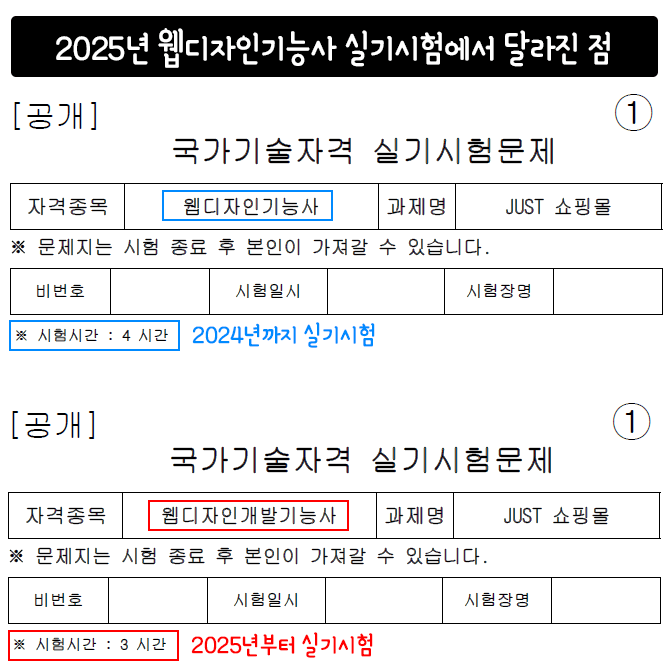
I downloaded the new 2026 public sample questions from the official Web Design & Development Technician website and compared them with the 2024 questions. There are no changes to the exam content itself, but there are two other changes.
First, the practical exam time has been adjusted from the existing 4 hours to 3 hours, increasing the difficulty of the exam. Second, the name of the certification has changed from the existing 'Web Design Technician' to 'Web Design Development Technician'.
No additions have been made to the 2026 exam. Should there be any changes or additions for 2026, they will be updated as quickly as possible at no additional cost. (As of January 6, 2026)
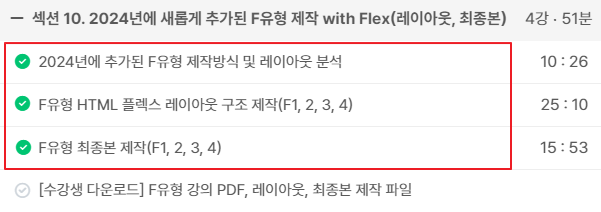
Update completed for Type F layout production and final version production videos (2024.1.16)
The production videos for the four F-type variations (F1, 2, 3, 4) added starting in 2024 have been updated. There are no new production modules specifically for the F-type. Rather, you can simply think of it as one more layout being added. I believe the four added F-type variations won't be a significant burden in your preparation for the practical exam.
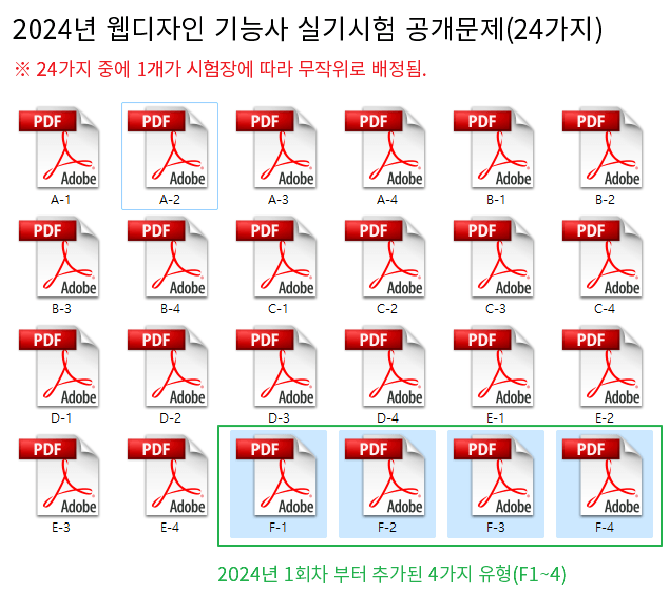
😧4 new F-types added starting from the 1st practical exam of 2024
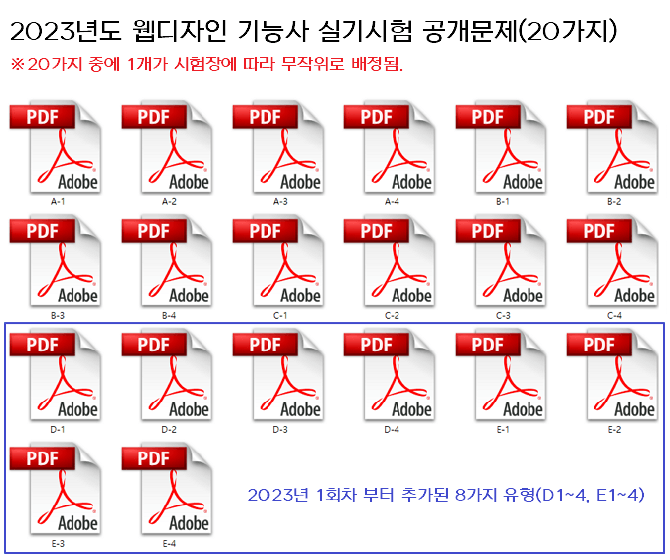
Up until 2023, there were a total of 20 types, with 4 variations each for Type A, Type B, Type C, Type D, and Type E, but starting from the first exam of 2024, four Type F variations have been added. Therefore, you must study a total of 24 types. The organizers significantly increased the difficulty of the exam in 2023, and they have raised the difficulty level a bit more starting from 2024.
✅ The instructional video for Type F, added in 2024, is currently being prepared.
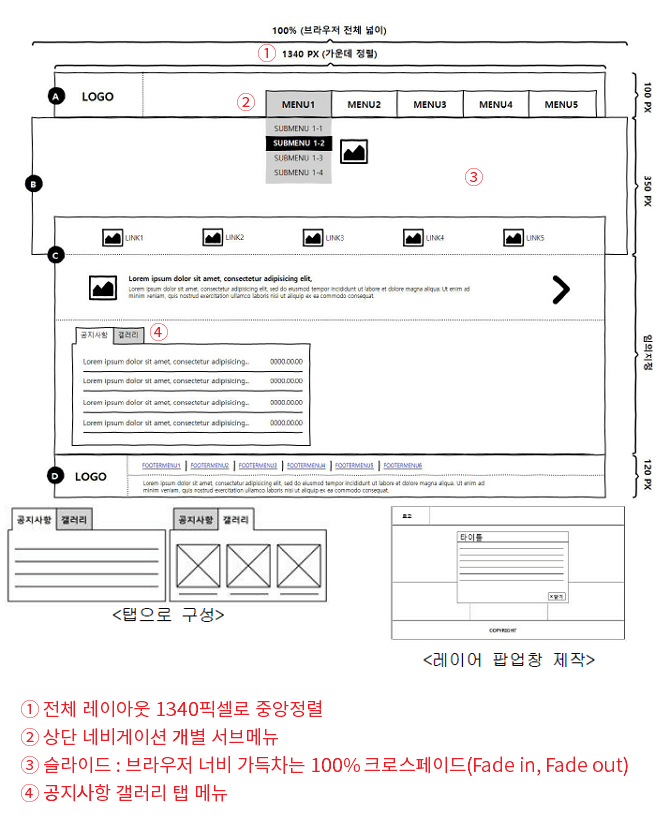
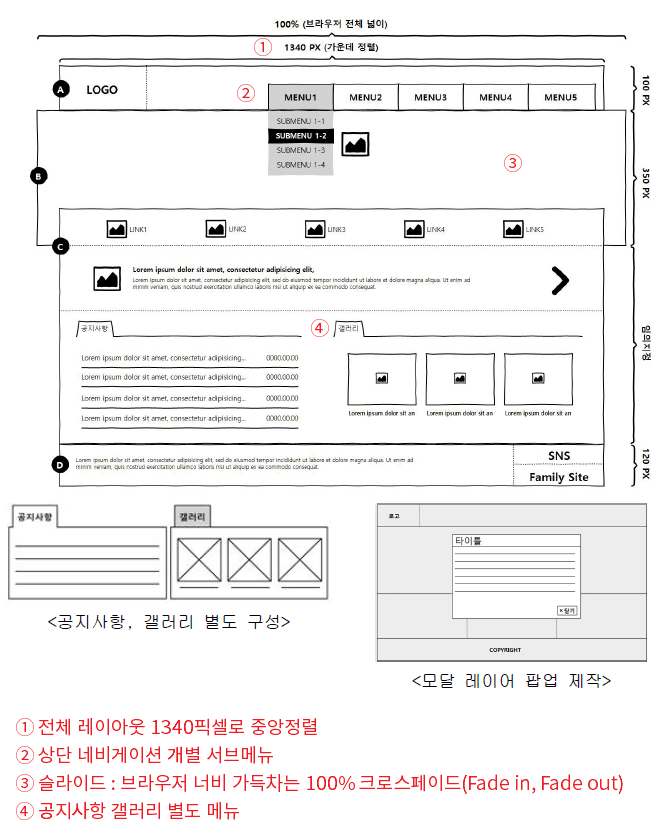
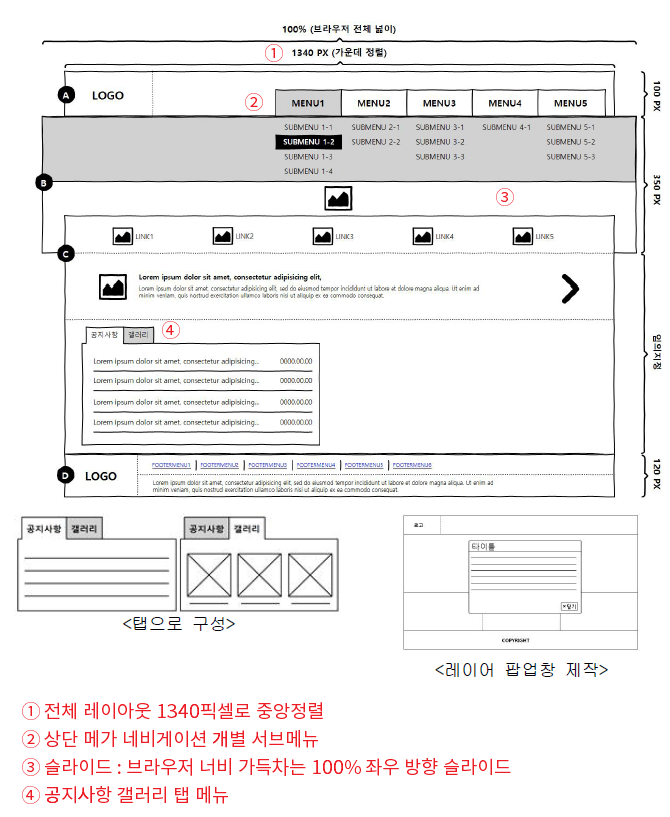
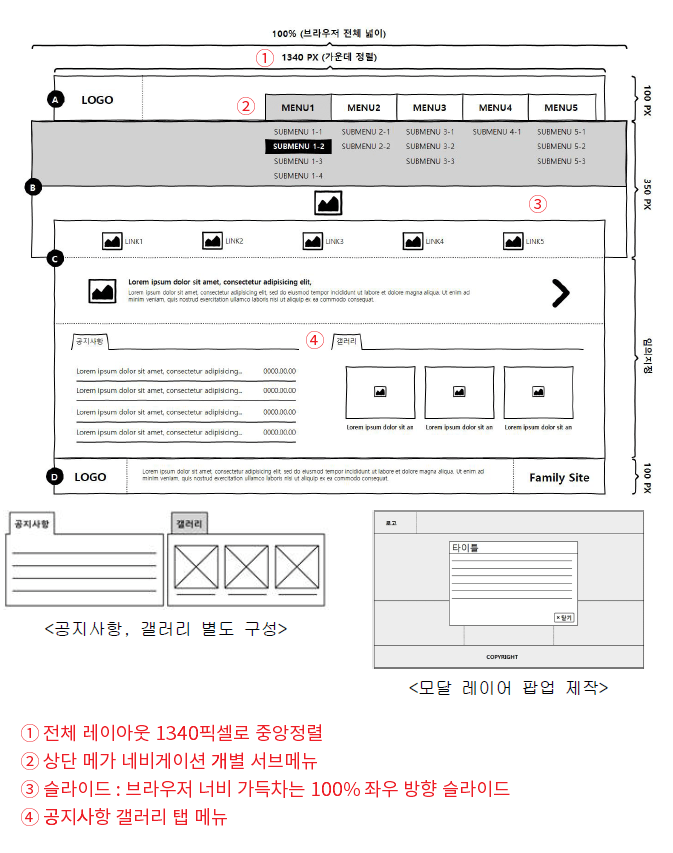
Since the 1st practical exam of 2024 is 2024.03.16~2024.03.29, you can study the current content excluding Type F. If you are already proficient in Types A, B, C, D, and E, Type F is not significantly different, except for a slight variation in the overall layout.However, in terms of the overall layout design, it seems tricky because while it is center-aligned at 1340 pixels, only the slide section must be set to 100% of the browser width.
※ For Type F, the slide method, tab menu, navigation, and modal are all the same as Types A, B, C, D, and E.
※ The 2026 released exam PDF file is the same as the 2025 version. (Download the PDF from Section 14)
🚩2023 Released Questionsvs 2026 Released Questions
🚩 Introduction to the 4 newly added 2026 public task F-types
▼ F1 Layout and Module Production Details
▼ F2 Layout and Module Production Details
▼ F3 Layout and Module Production Details
▼ F4 Layout and Module Production Details
🌈Type F Student Practical Exam Review (2024.3.30 / by Ddinga)
I took the F3 Open Banking (Type 23) exam today!
This isn't a question about the coursework, but since you mentioned you didn't have anyone around you who had taken the Type F exam,
I remembered that the information was inaccurate, so even though it might seem a bit overstepping, I wanted to share this with other examinees and
I am writing this post right after my exam to be of some help to you, teacher!
For some reason, I had a strange feeling about Type F all week, and I guess I must have had a hunch that it would be on the exam today. T_T
1. According to the lecture
I studied by grouping slide-image and slide-banner inside .slide,
On the exam paper, the part we called `slide-banner` was referred to as <Shortcut> in the instructions, and the `shortcut` part inside `content-inner` was referred to as the banner. Although it was just a difference in the names used to group the code, I thought it might be better for those preparing for Type F to study by changing the code names so they are less confused! While reading the 'Shortcut' instructions in the middle of the exam, I got confused because I was writing it as `slide-banner` like usual, so I just unified the code names to match the names requested in the instructions!
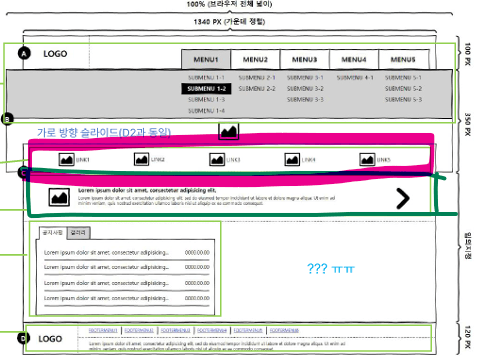
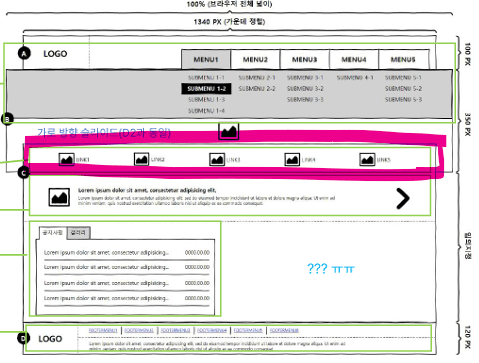
2. I have something to tell you regarding the pink highlighted part~ I'm not sure if you remember..ㅠㅠ On 24.03.27, I posted a question because I was worried there might be instructions to enter text in the Type F slide-banner link section..!
Unfortunately, just as I expected, the exam instructions required text to be included for each anchor. The provided text notepad contained the text that needed to be inserted.ㅠㅠ And the total number of images included was 5, the same as the layout. However, there were no specific instructions on where to place the text on the image, so I...
I entered the text using span tags and, just like putting a span on a gallery image, I used display:block to place them vertically and arranged them that way. Instead of creating images with Illustrator or Photoshop, I had to insert the provided images..!
After arranging them, it looked like random photos were just pasted on top of the slide image, so I applied a background color and adjusted the transparency to make them look like icons that are separate from the slide image.
3. And about the notice section! The part on the right where you wrote "???" in light blue was indeed blank!! However, the part that surprised me about the notice section was that since the tab-inner width might not be very wide, I had studied how to handle layout and text truncation using em / b tags for the notice section before going, but there was no date input! So, I simply inserted the anchor, set it to block, and decorated it with center alignment.
The two mistakes I made were not adding a border-bottom to the footer menu and setting the width of the menu sub-background to the header size (I accidentally made it like the Type A sub-back ㅠ). Everything else works fine, and I finished the exam feeling satisfied that I did well enough!! ㅠㅠ I'll be so incredibly embarrassed and ashamed if I fail because of those two issues..ㅠㅠㅠㅠ Still, I feel very proud that I can now understand and build many different structures on my own.
And since Type F is a type I've never seen before...
Today, 12 people took the exam at my test center, and 6 of them gave up midway and left.. It took me about 2 hours and 20 minutes to finish all the checks and submit, and by that time, only 3 people including myself had submitted, while 3 others were still there when I left the classroom.
The results are announced on April 9th, and I really hope I passed ㅠㅠ Even though it was an online class rather than in-person, I learned so much from you ㅠㅠ Thank you so much ㅠㅠ!
😊 jQuery Slide Production Update Completed (2023.3.11)
The jQuery-style slide production video has been updated. Since 2023, with the addition of Type D and Type E, the difficulty of the practical exam has increased, making it necessary to create slides in a simpler and more convenient way. Therefore, the existing jQuery-style video has been replaced with a newly produced one.
If you create it using the existing CSS slider method, there may be some point deductions. Although there is a CSS slider lecture, I recommend using jQuery to create the slider. (In fact, you can study whichever of the two methods is more comfortable for you, and it will not affect your passing the exam at all.)
In the case of CSS slides, the transition back to Slide 1 after Slides 1, 2, and 3 feels a bit awkward. However, jQuery slides transition naturally from Slide 3 back to Slide 1, 2, and 3. In short, you can create a more seamless slider than you can with CSS.
If you look at the jQuery code, it is short, so I think you will find it very easy to understand. ※ The jQuery code is 6 lines, but the actual functioning code is only 3 lines.
▼ You can watch the jQuery-style slide production video and download the files below
😊 D-type and E-type production lecture updates completed (2023.1.12)
The update for the D and E type production lectures, which were newly added to the Web Design Technician practical exam starting in 2023, has been completed. The added videos total nearly 7 hours in length. Since the difficulty and amount of study material for the D and E types have increased, please prepare and start studying in advance.
The update for the Type D and Type E production lectures, newly added in 2023, has been completed. The Type D and Type E production lectures can be found in Section 09. As mentioned in the production videos, you must complete all of Types A, B, and C before proceeding to the Type D and Type E production lectures.
2024 Web Design Technician Practical Exam Introductory video for the newly added Type D and Type E production lecture updates
🚩Introduction to 8 additional items for the newly added 2023 public questions
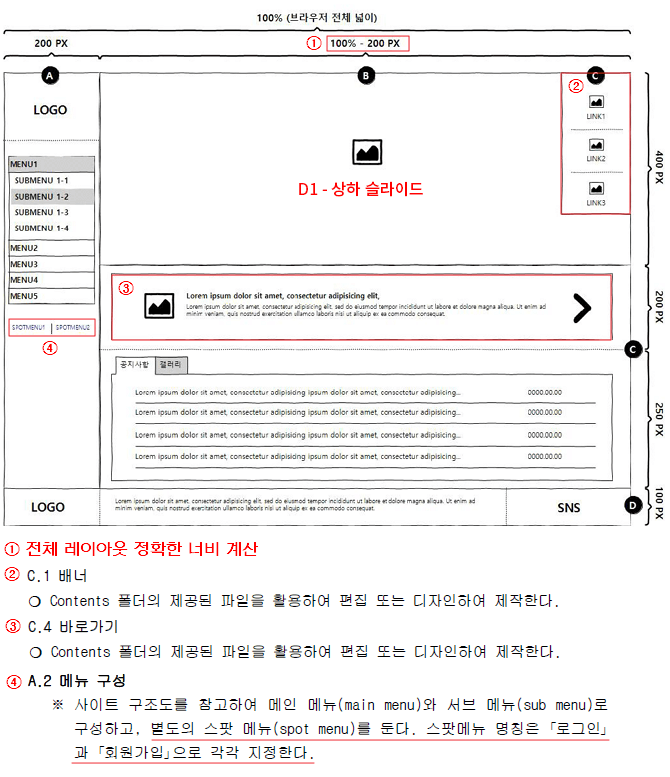
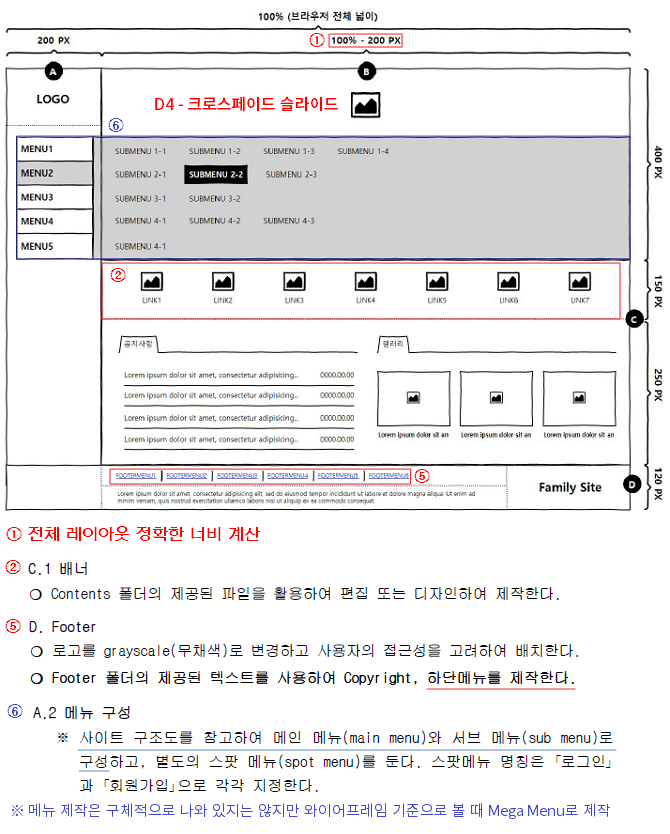
▼ D1 Layout and Module Production Details
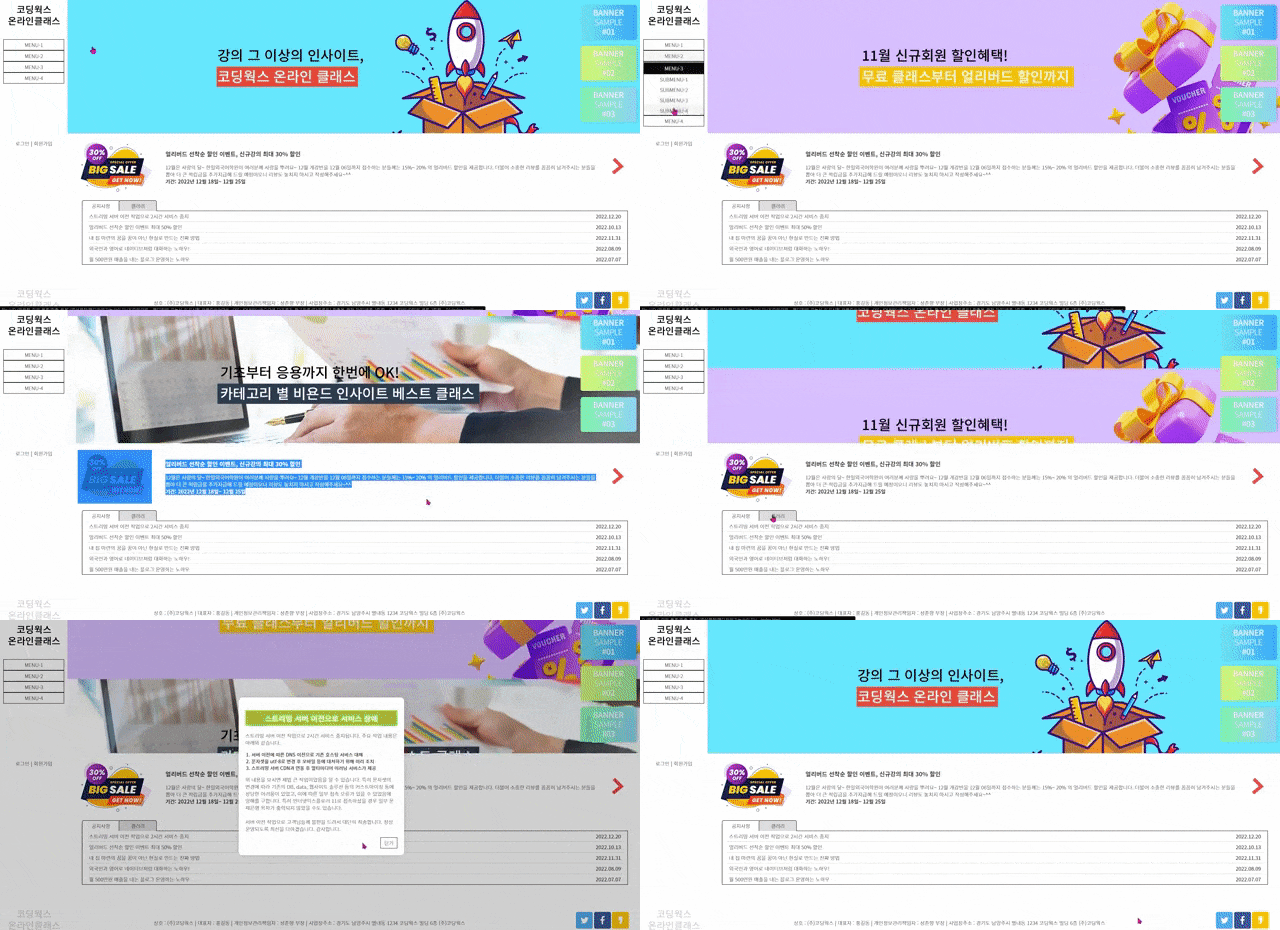
▼ Preview of the final version of Type D (D1) newly added in 2023
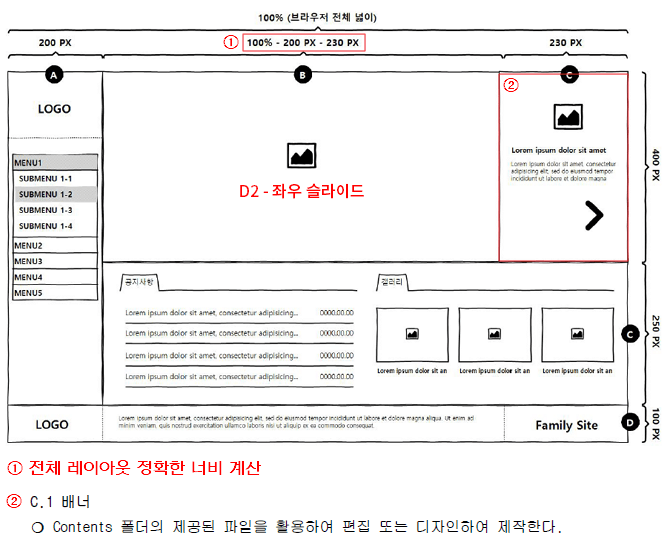
▼ D2 Layout and Module Production Details
▼ Preview of the final version of D-type (D2) newly added in 2023
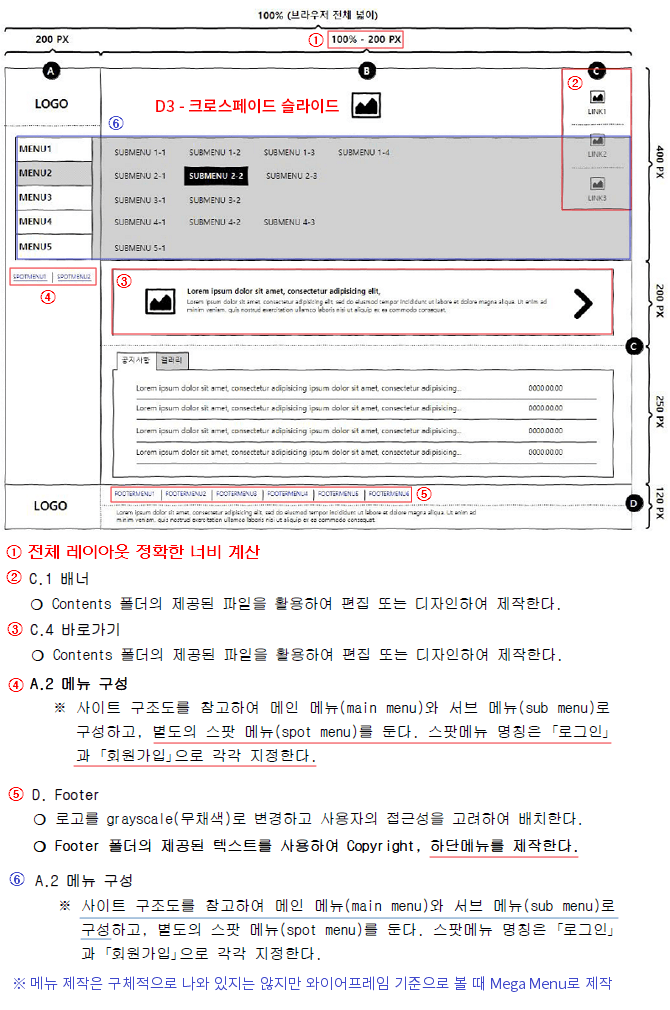
▼ D3 Layout and Module Production Details
▼ Preview of the final version of Type D (D3) newly added in 2023
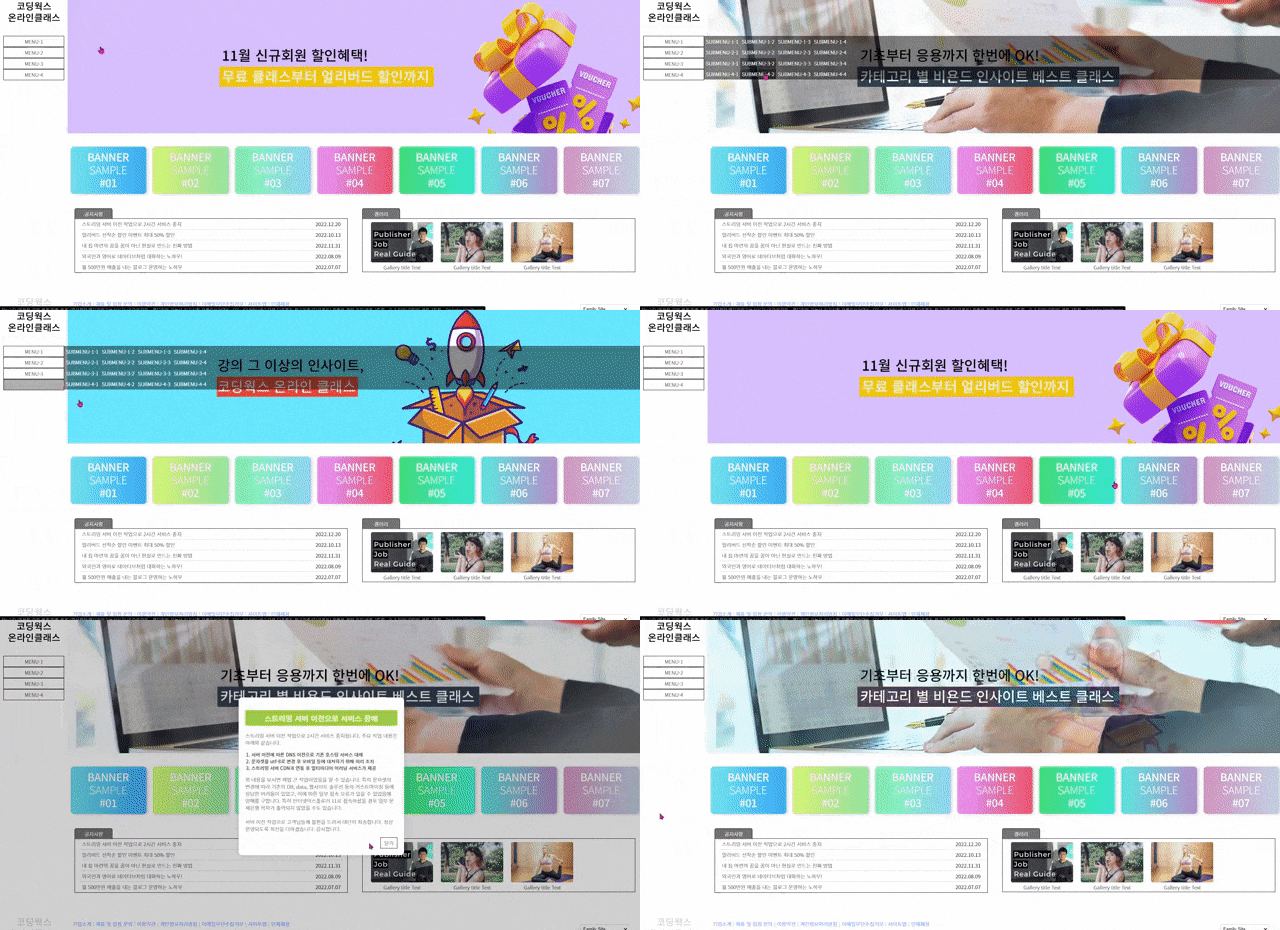
▼ D4 Layout and Module Production Details
▼ Preview of the final version of Type D (D4) newly added in 2023
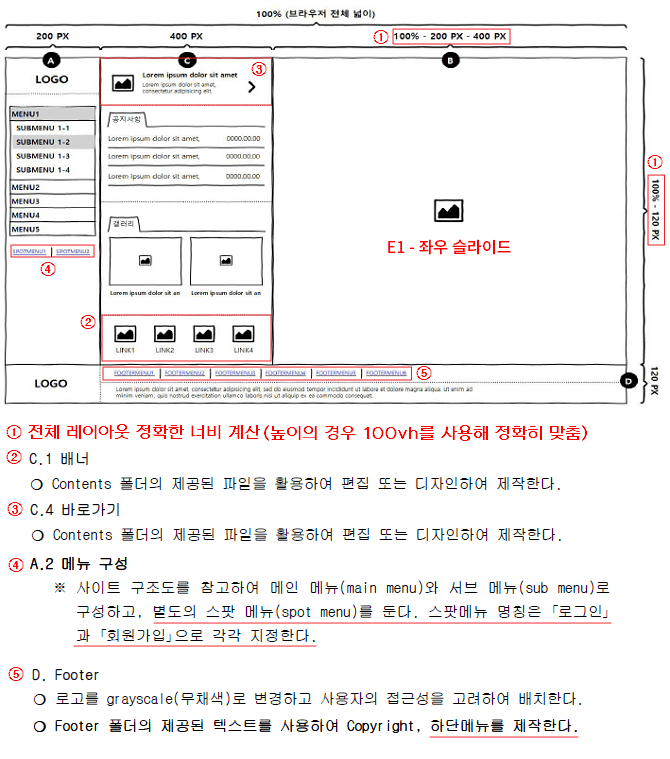
▼ E1 Layout and Module Production Details
▼ Preview of the final version of Type E (E1), newly added in 2023
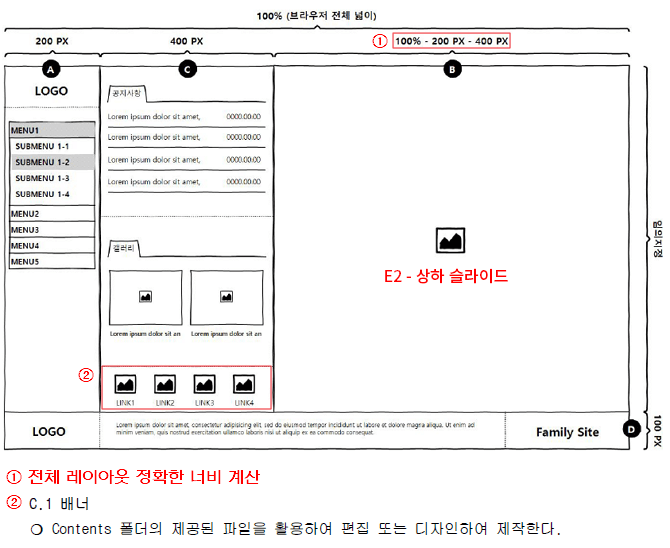
▼ E2 Layout and Module Production Details
▼ Preview of the final version of Type E (E2), newly added in 2023
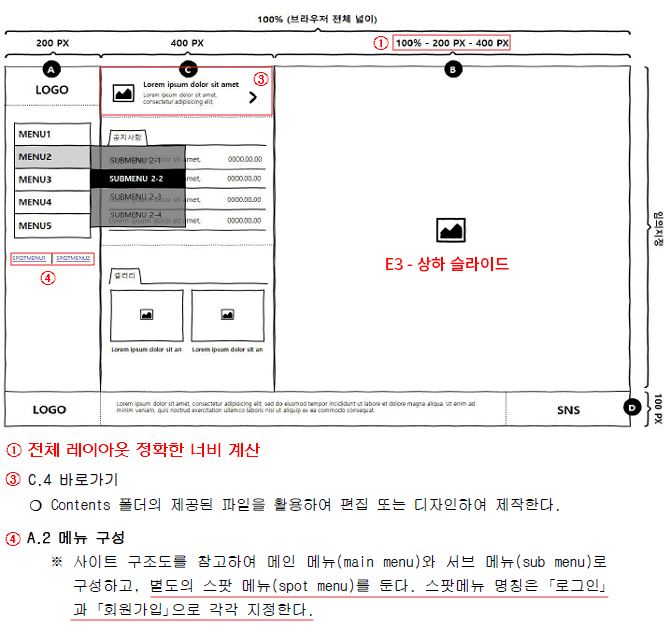
▼ E3 Layout and Module Production Details
▼ Preview of the final version of Type E (E3) newly added in 2023
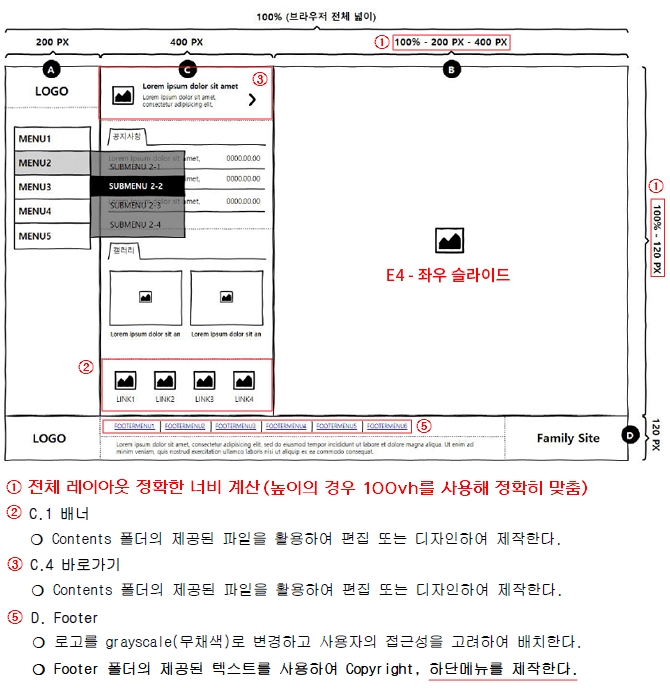
▼ E4 Layout and Module Production Details
▼ Preview of the final version of E-type (E4) newly added in 2023
For those preparing for the 2026 Web Design Specialist Practical Exam, please make sure to check this!
[Additional Information] Starting from the 1st session of 2024, 4 more F-types have been added. (Total of 24 types)
2026 Web Design Specialist practical exam questions are the same as the 2025 questions.
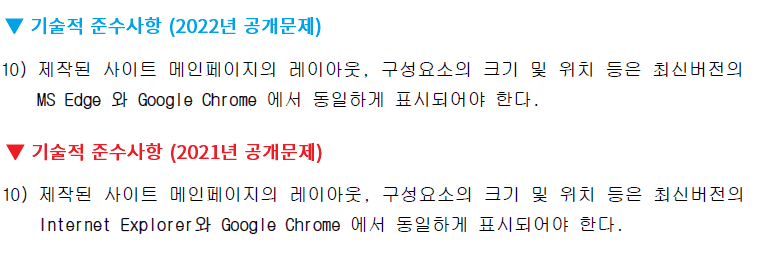
The only change since 2022 is that in Technical Compliance Item No. 10 on page 5 of the public questions, the requirement for the output to work well in Internet Explorer has been changed to MS Edge. Checking the results in MS Edge instead of Internet Explorer means that you can use almost all CSS properties, including FLEX. In other words, you can consider the burden of cross-browsing to be almost gone when creating your work. (Since this is an exam, I recommend that you study and take the test using the methods covered in the lecture for a safe pass.)
Coding Works with you! The Perfect Guide for the Web Design & Development Technician Practical Exam, updated for the 2026 examination standards.
- The Web Design & Development Technician practical exam is by no means an easy test!! - High scores and passing the Web Design & Development Technician certification! Simple and concise code guarantees it. - Get your Web Design & Development Technician certification, get hired as a web designer, and increase your salary~!!
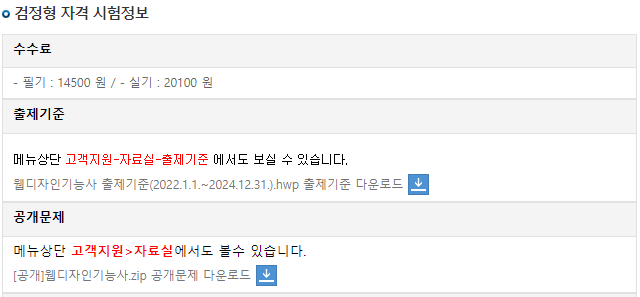
🚩 2026 Web Design & Development Technician Practical Exam Content Standards
The current Web Design & Development Technician exam standards are valid from 2025.01.01 to 2027.12.31. This course has been produced as a practical exam lecture perfectly aligned with the current exam standards.
🚩 2026 Web Design & Development Technician Practical Exam Text Editor
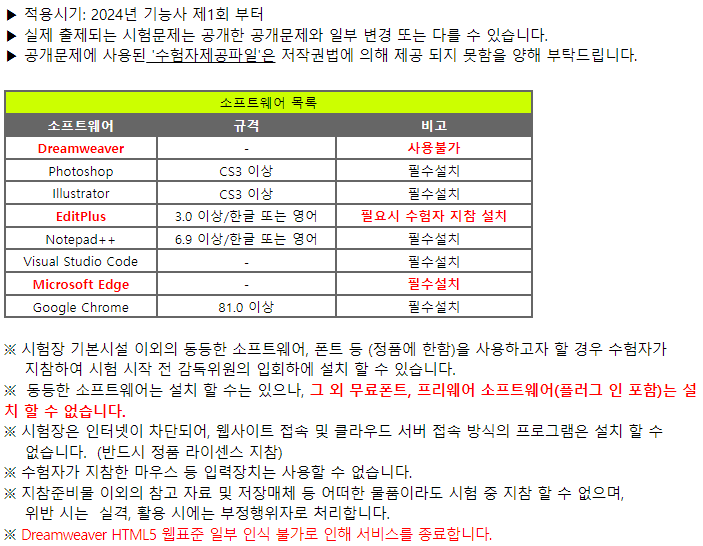
Starting from the 3rd practical exam of 2021, only the Visual Studio Code text editor can be used. According to the official Q-Net website, Brackets and Dreamweaver, which were previously installed as text editors, can no longer be used from 2022 onwards. Therefore, the conclusion is that you should prepare for the exam using either Notepad++ or Visual Studio Code. Of course, since there is no reason to use EditPlus or Brackets, you should study for the practical exam using Visual Studio Code.
Web Design Technician Practical Exam Software Guide on the Official Q-Net Website
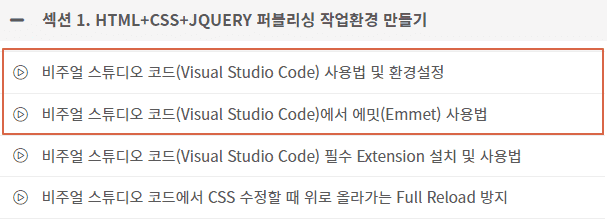
As stated in the guidelines above, it says, ""Plugins (separate applications, additional features) cannot be installed."" This means that since Visual Studio Code extensions are not installed, Visual Studio Code must be used with only its default features for the practical exam. Therefore, please study by installing Visual Studio Code without installing any separate extensions. You must prepare for the exam in the same environment as the practical testing center. Among the four Visual Studio Code lectures shown in the image below, please study only the two marked with red boxes. Of course, if you are learning Visual Studio Code for practical work, you should study all four.
[Must-Read] How to use the text editor before starting your studies
Among the Visual Studio Code tutorials in this course, you only need to watch the 2 videos marked with red boxes for the Web Design Specialist practical exam. (Extensions are not installed at the practical exam site.)
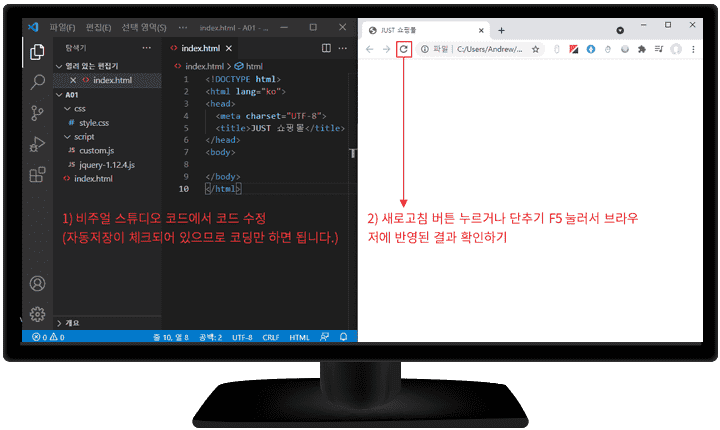
Activating the Auto Save feature in Visual Studio Code
Auto-save is a built-in feature of Visual Studio Code, not an extension, so for detailed instructions on how to enable it, please check the CodingWorks Inflearn blog. https://inf.run/RPaoi
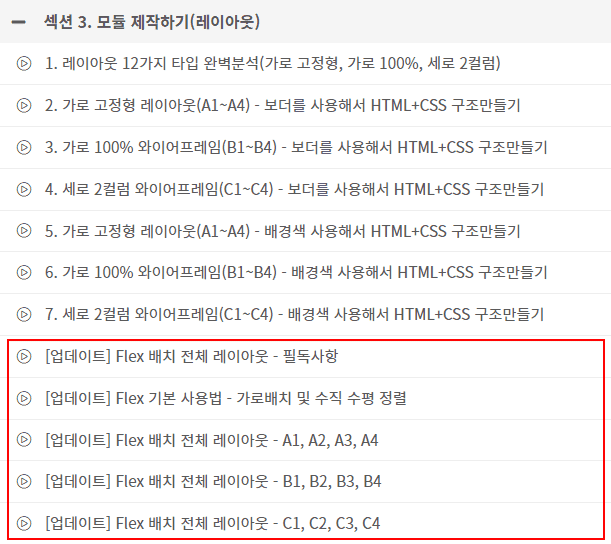
[Update] Flex Layout Full Page Creation Lecture Video
1) Starting from 2022, the technical compliance requirements for the Web Design Specialist practical exam include cross-browser checking with Edge and Chrome. The previous IE (Internet Explorer) has been officially excluded. 👍
2) Learn Flex layout after thoroughly mastering the traditional method of horizontal alignment using float (Flex layout is not mandatory) You should refrain from learning Flex layout without knowing Float and Position layout.
3) If you use it, it is recommended to use Flex layout only for the overall layout (refrain from using Flex for detailed positioning)
※ We recommend using Flex for the final layout production only after you have sufficiently learned the traditional method of using Float for positioning.
⚡ For effective learning, please be sure to refer to Coding Works Publishing YouTube.
Please follow along with the theoretical video lectures on the CodingWorks Publishing YouTube channel. While not all theory videos are on the YouTube channel, almost all the important ones are available. Since there are many videos, it is recommended to search for them as shown in the example below to find what you need.
▲ This is a review from a student who passed the Web Design Technician practical exam after taking the CodingWorks course on Inflearn. It's so rewarding~^^
▲ This is a postuploaded by a student who passed the Web Design Technician practical course by CodingWorks on Inflearn. Moments like this are so rewarding~!!
August practical exam review! Date written: 2023-09-13
Hello! It's been a while since I posted a question! To get straight to the point, I received a call today saying I passed with 89 points and have completed my application for the booklet-type certificate :) Actually, I was juggling other work and couldn't study properly, so I ended up cramming for a month at the last minute.. I'm writing this lengthy post hoping that my method might be of some help to those currently preparing for the Web Design Technician certification. You might find it puzzling when I say "one-month cramming," so let me explain first - I majored in video, advertising, and design, and last summer I studied web design and passed the written exam, but I got a job (in the design field) before preparing for the practical exam, so I ended up getting the certification late ^-^;; One-month cramming was possible because I had studied it before ㅜㅜ
To tell you about how I studied, rather than just following along with the lectures, I studied by trying to create things myself using the information I had, and then watching the lectures to see and learn how the teacher did it.
To give a specific example,
If I learned the Type A layout, I tried creating Type B myself, and if I learned wireframe theory, I first created it myself using only that theory. Although it takes a long time while studying, the speed of memorization is fast, and once I create it myself even once, I am able to make it on my own by the second or third time.
Also, just as the teacher mentioned throughout the video, I think it made a big difference that I manually typed out the framework every single time, even when the teacher was copying and pasting previous work.
It might be an obvious way to study, but because it takes up a lot of time and I try to build things myself first, there are things that don't work at first. In those moments, I think, "Why is this happening?" and then I learn why it didn't work while listening to your lecture. I believe that part plays a huge role in my learning. I wrote this at length in the hope that it might be even a little bit helpful. Thank you :)
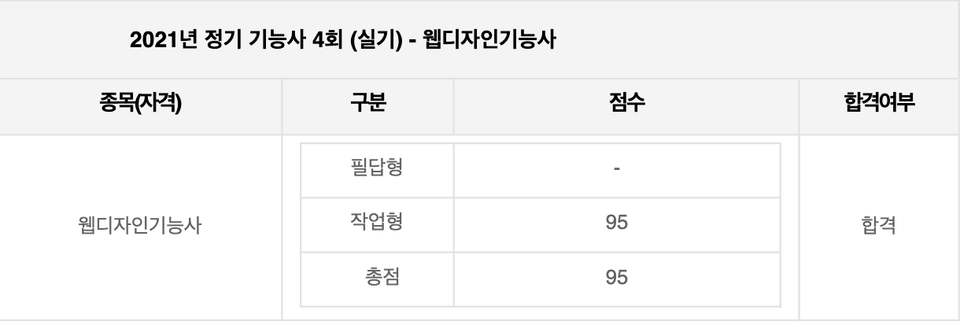
2021 Web Design Technician 4th Practical Exam Review
I was able to take the exam successfully thanks to you! Author: f1rstf1y9 / 2021.12.05 10:28 PM
I'm posting a thank-you note on the community first, and I'll write a proper course review after I pass!
I am actually a university student majoring in this field, so I have taken HTML and CSS related courses twice as major requirements. In those classes, the content didn't really stick, and I just memorized everything for the sake of the exams only to forget it all once they were over. As a result, even when preparing for the Web Design Technician practical exam, my foundational knowledge was so lacking that I didn't even know how to start. However, after taking CodingWorks' lectures, I finally feel like I've received proper instruction. Although the exam ended today, I think the content I learned through this course will stay in my memory for a long time.
After registering for the exam, I tried self-studying with YouTube lectures, but I was struggling because the material just wouldn't stick, much like when I was taking my major courses. That's when I discovered this course. Since I found it while watching free lectures and had only about a month left until the exam, I hesitated over whether it was right to invest money in this course at that point. It turns out I didn't even need to worry haha.
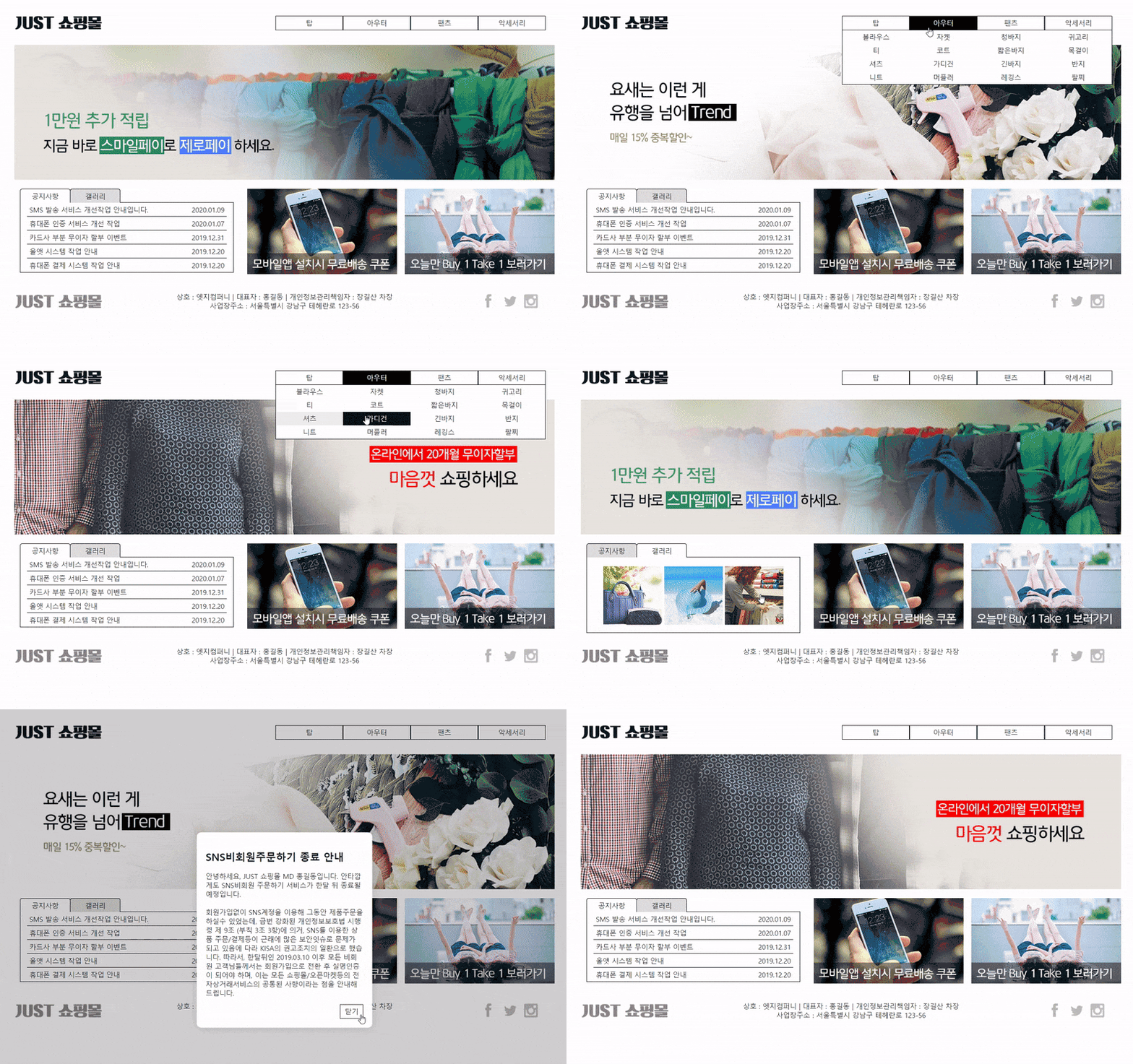
To leave a personal review of the exam in case others might see it: I had been using Visual Studio Code well even before taking the course, so I continued studying with it and skipped the Brackets-related lectures. I even intentionally registered for a test center that had VS Code available. However, when I arrived at the test center today, they only had Brackets... I was flustered at first, but the shortcuts were exactly the same as what I learned in the lectures, and since the lecture content itself used Brackets, the interface felt familiar. I was able to adapt without much trouble and finish the exam successfully! The exam task was the "JUST Shopping Mall," which was a type covered in the final project lectures, so I wrote most of the code without any issues. After checking it several times, I was the first to submit! If it weren't for this course, I might have had to walk out in the middle like some others... ㅠㅠ I'm so glad I took CodingWorks' course. haha
Thank you for the great lecture, and I'll write a review once the results are out :) ------------------------------------------------------------------------------------ I passed!
Coding Works' Web Design Technician practical exam lecture is different. I am confident it is the best!
💡Course Features
A customized course that guarantees passing the practical exam with a total of 30 hours, 112 lectures, and 18 core materials
A total of 27 core theory lectures on HTML+CSS+JQUERY
3 final practical exam production videos including all production modules
Essential Photoshop CS6 usage and image creation videos for the Web Design Specialist practical exam
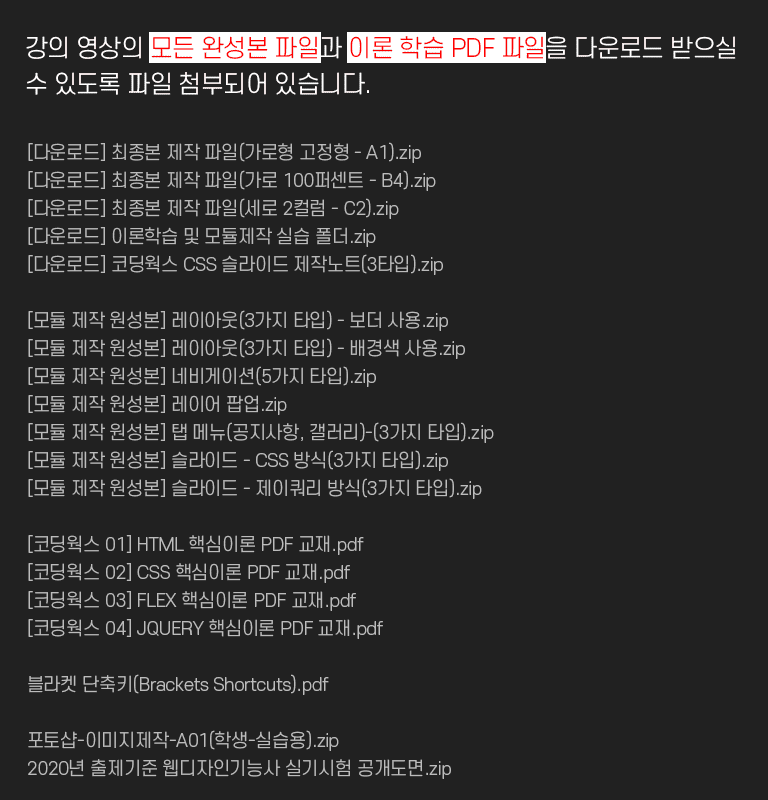
Download not only the HTML+CSS theory textbook but also all production modules and the 3 final production files
CodingWorks lectures are real lectures aimed not just at passing, but at how high of a score you can achieve.
Detailed videos covering everything from the atmosphere of the testing center on the day of the practical exam, procedures, tips, submission methods, to how to apply for the certificate.
💡Target Audience
- Those who want to pass the Web Design Technician practical exam - Those who want to perform website maintenance and modifications on their own - Those who want to switch careers from web design to web publisher or strengthen their HTML+CSS+JQUERY publishing skills - Web planners who want to increase their understanding of web publishing - Developers who want to increase their understanding of front-end publishing
💡Learning Objectives
- You can pass the Web Design Technician practical exam with a high score. - You can systematically improve your HTML+CSS+JQUERY publishing skills. - You can enhance your know-how in website production.
- You can create a personal portfolio website for employment in web publishing.
💡Requirements
- Basic computer literacy and internet browser usage skills - Basic English typing skills for coding
💡 What are the features of CodingWorks' Web Design Technician practical exam course?
- Lecture content optimized for the 2024 examination standards (perfect analysis and application of 12 types) - Simple and clear code guarantees high scores and a stable pass - A systematic course to develop skills that can be used immediately in practice - Substantial lecture content totaling over 30 hours - A special lecture conducted by a skilled instructor who directly teaches students in the field - Provides HTML+CSS+JQUERY theory study guide PDF files
💡 Who teaches the CodingWorks Web Design Technician practical exam online course?
- An instructor who is both a working web publisher and an offline lecturer at famous academies - An instructor with sufficient teaching experience and know-how to provide high-quality lectures - An instructor who has taught Web Design Specialist practical exam preparation classes for many years, passing on special secrets for success - An instructor who understands the level and needs of students preparing for the Web Design Specialist practical exam perfectly - An instructor who suggests realistic and efficient learning methods using code that is easy for beginners and entry-level students to understand
🙋🏻♂️ Instructor Introduction
(Current) Freelance Frontend Publisher
Green Computer Academy Web Publishing Instructor
The Joeun Computer Academy Web Publishing Instructor
Web Publishing Instructor at Ezen Computer Academy
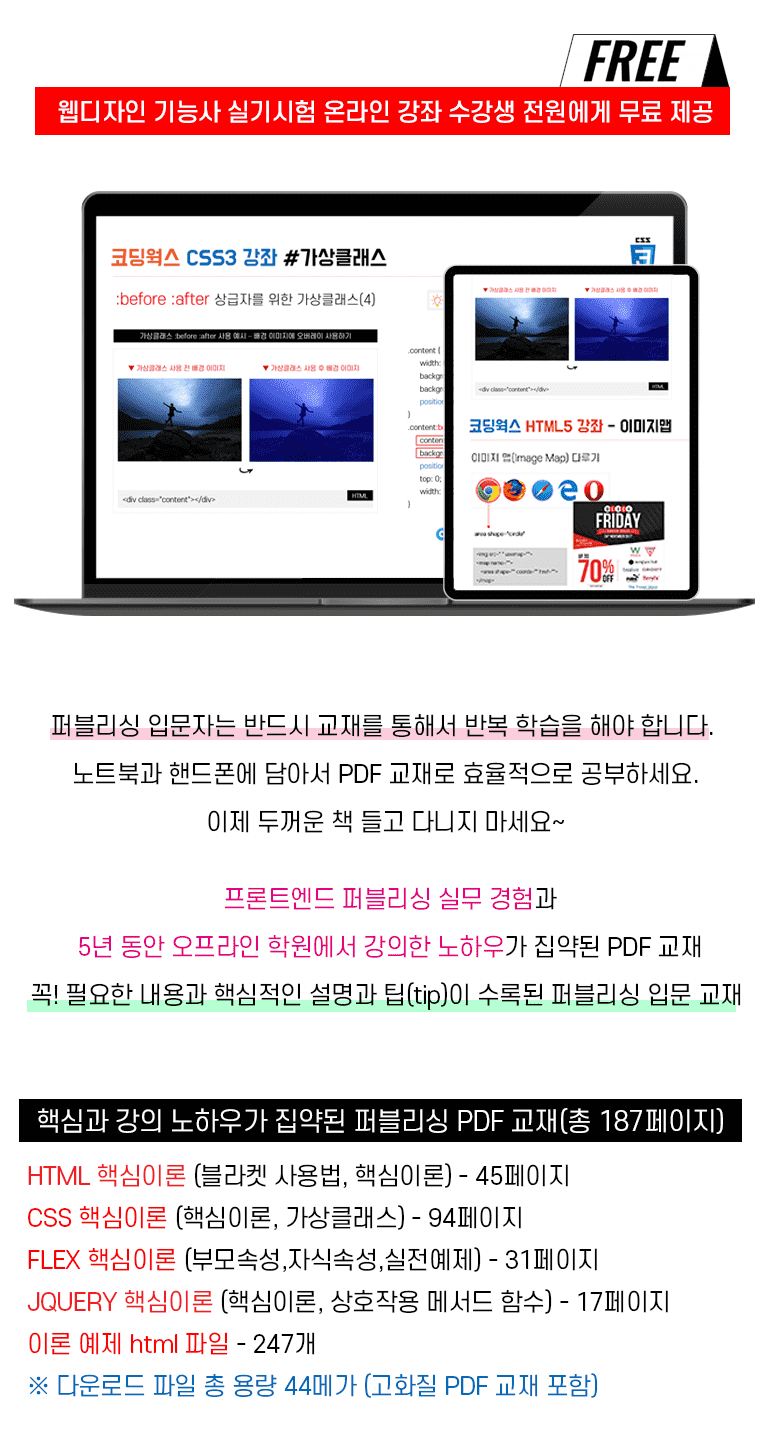
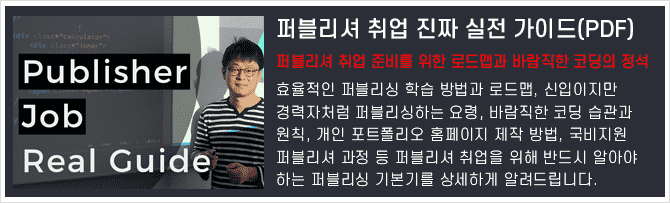
▲ View details of the CodingWorks Publishing PDF textbook provided for free to students
📝Module Creation Preview - Slide (Slide)
▼ Horizontal Slide
▼ Vertical Slide
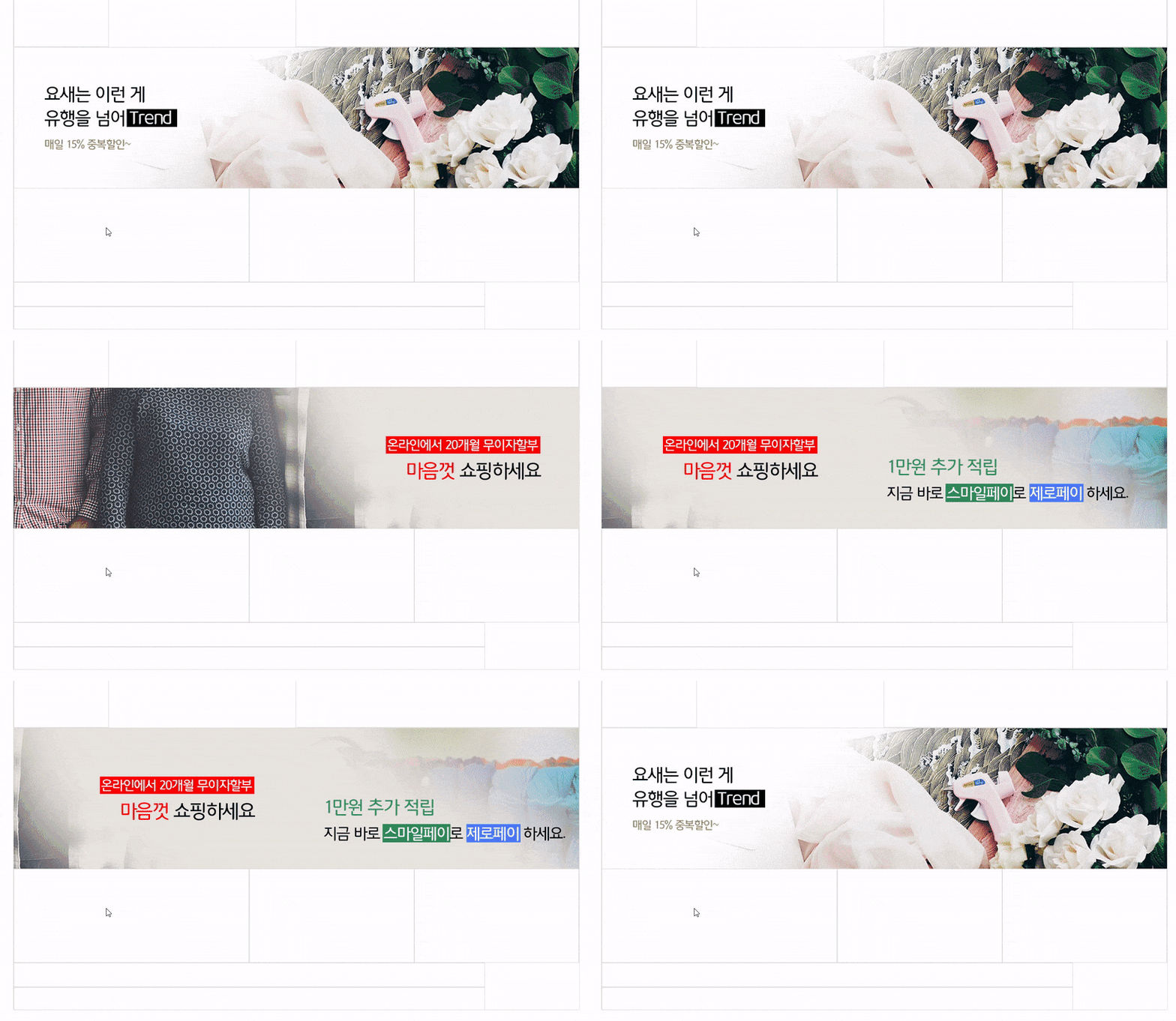
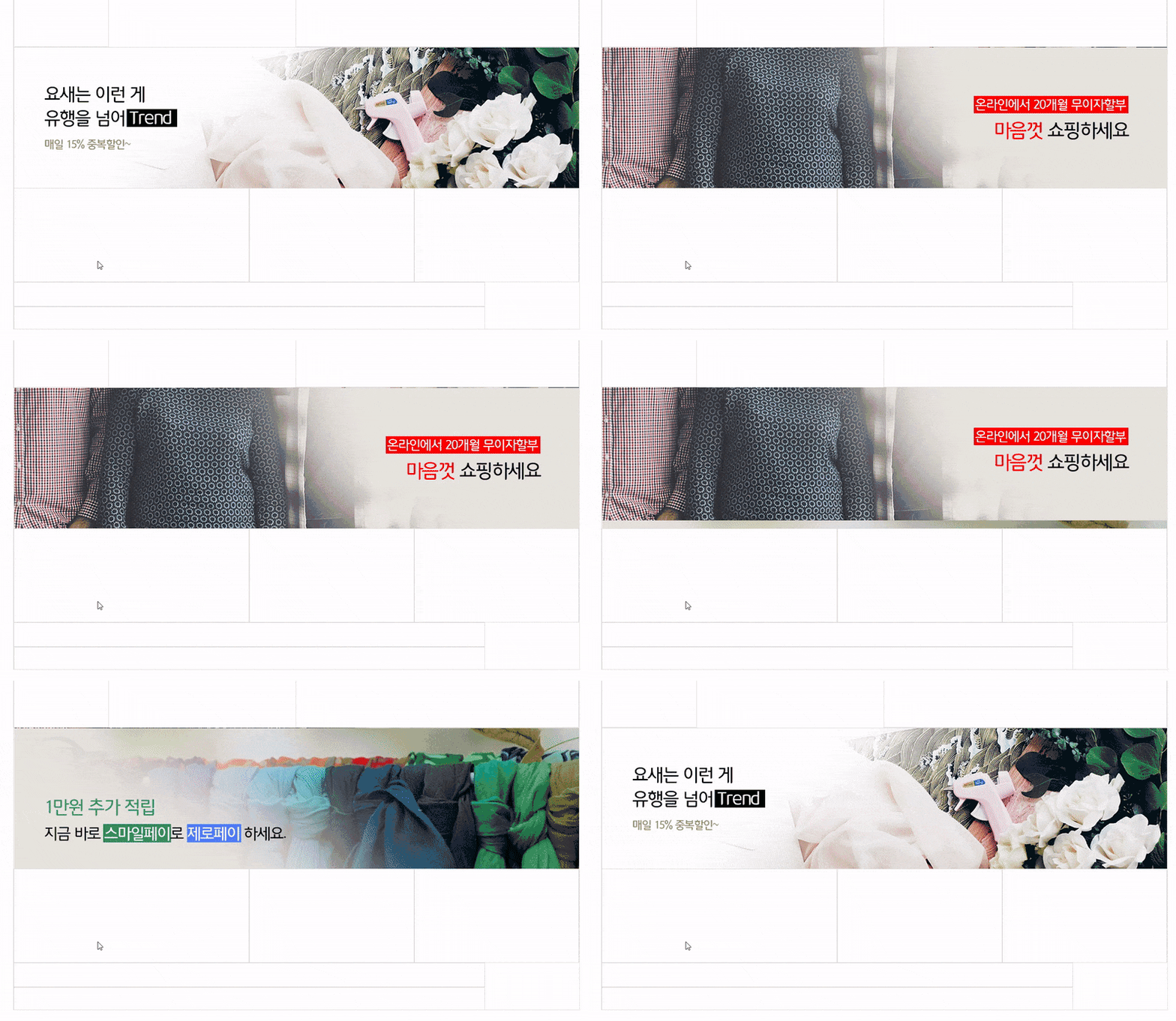
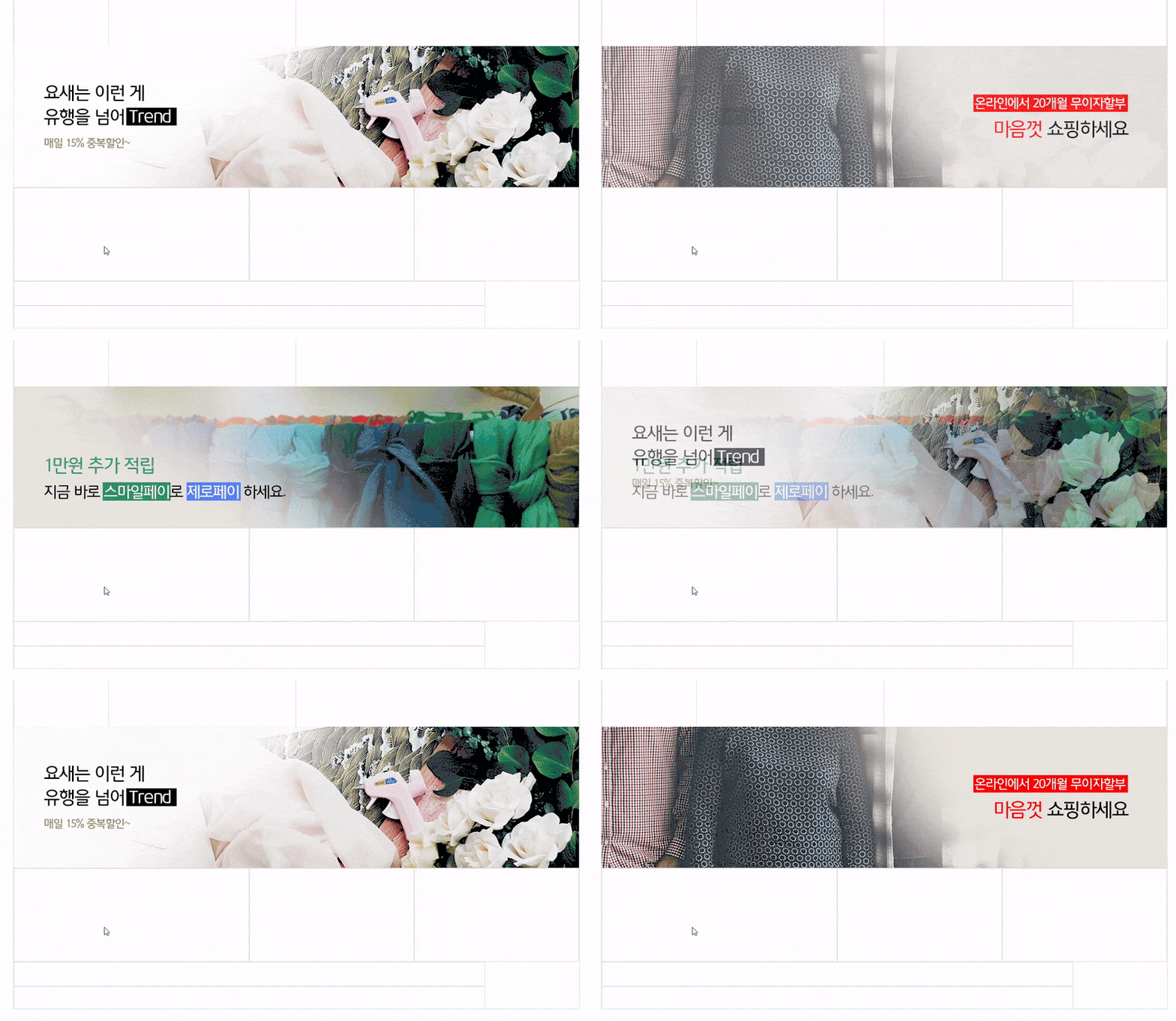
▼ Cross-fade Slide
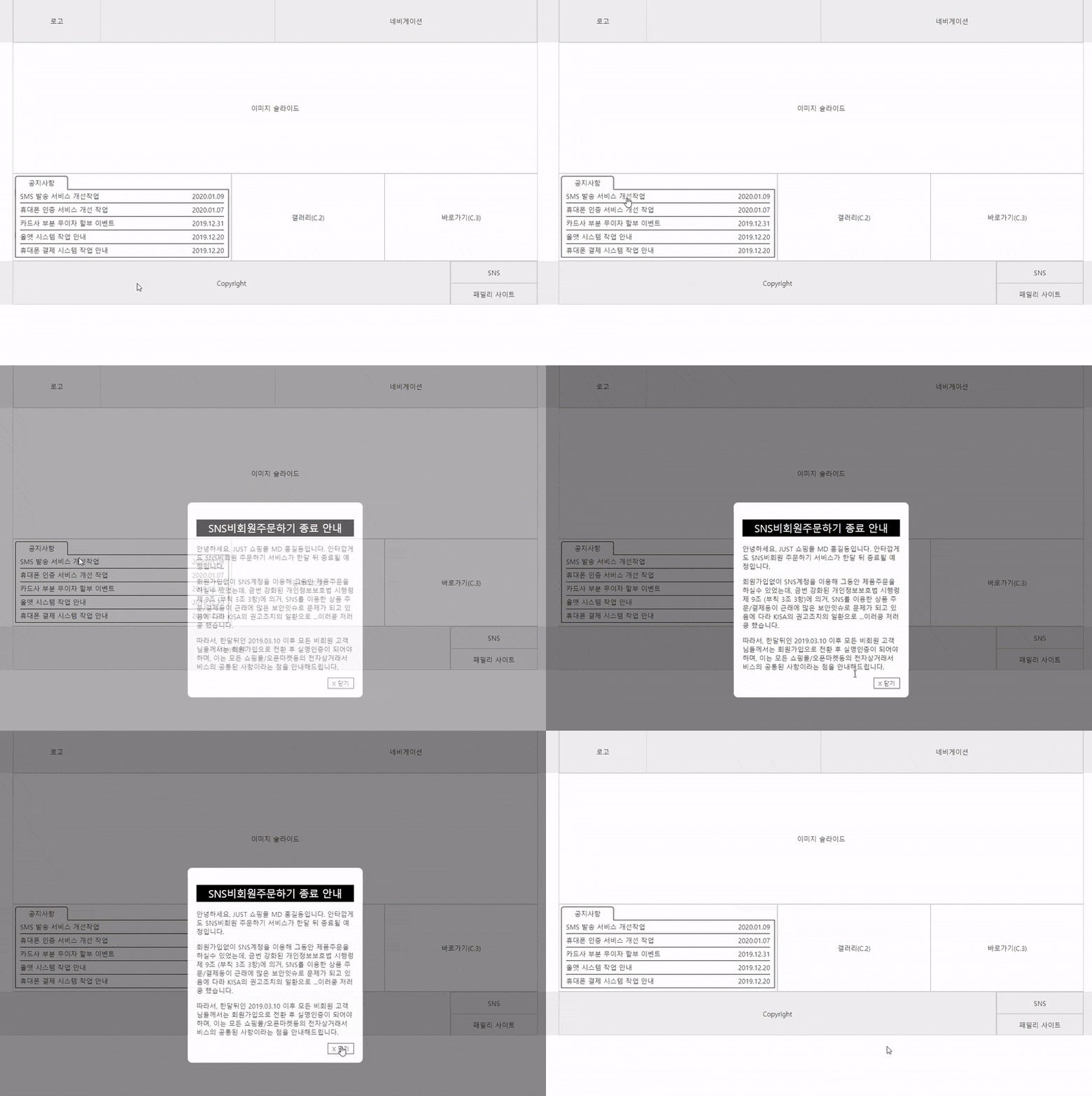
📝Module Production Preview - Layer Popup (Modal)
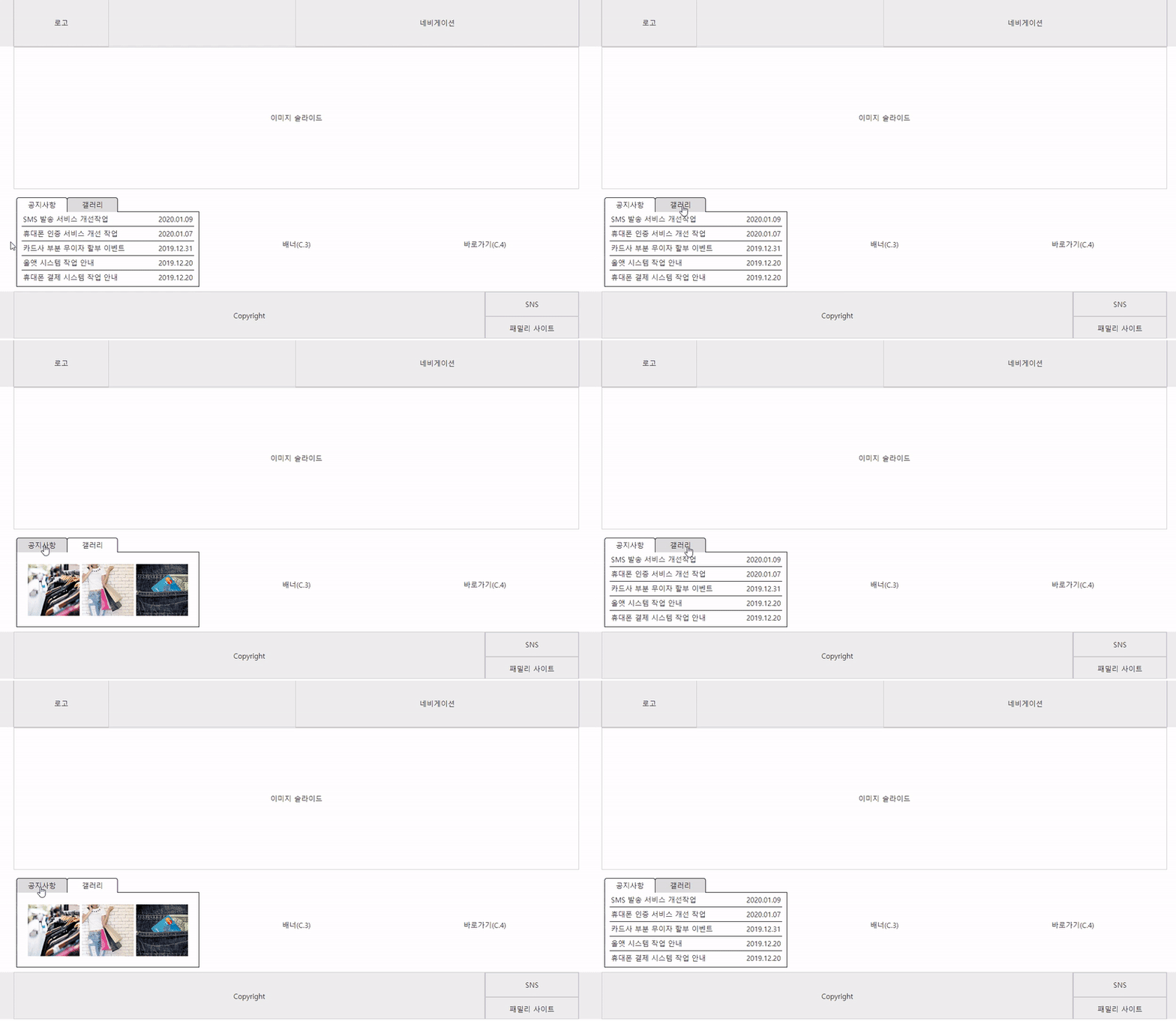
📝Module Creation Preview - Notice Tab Menu
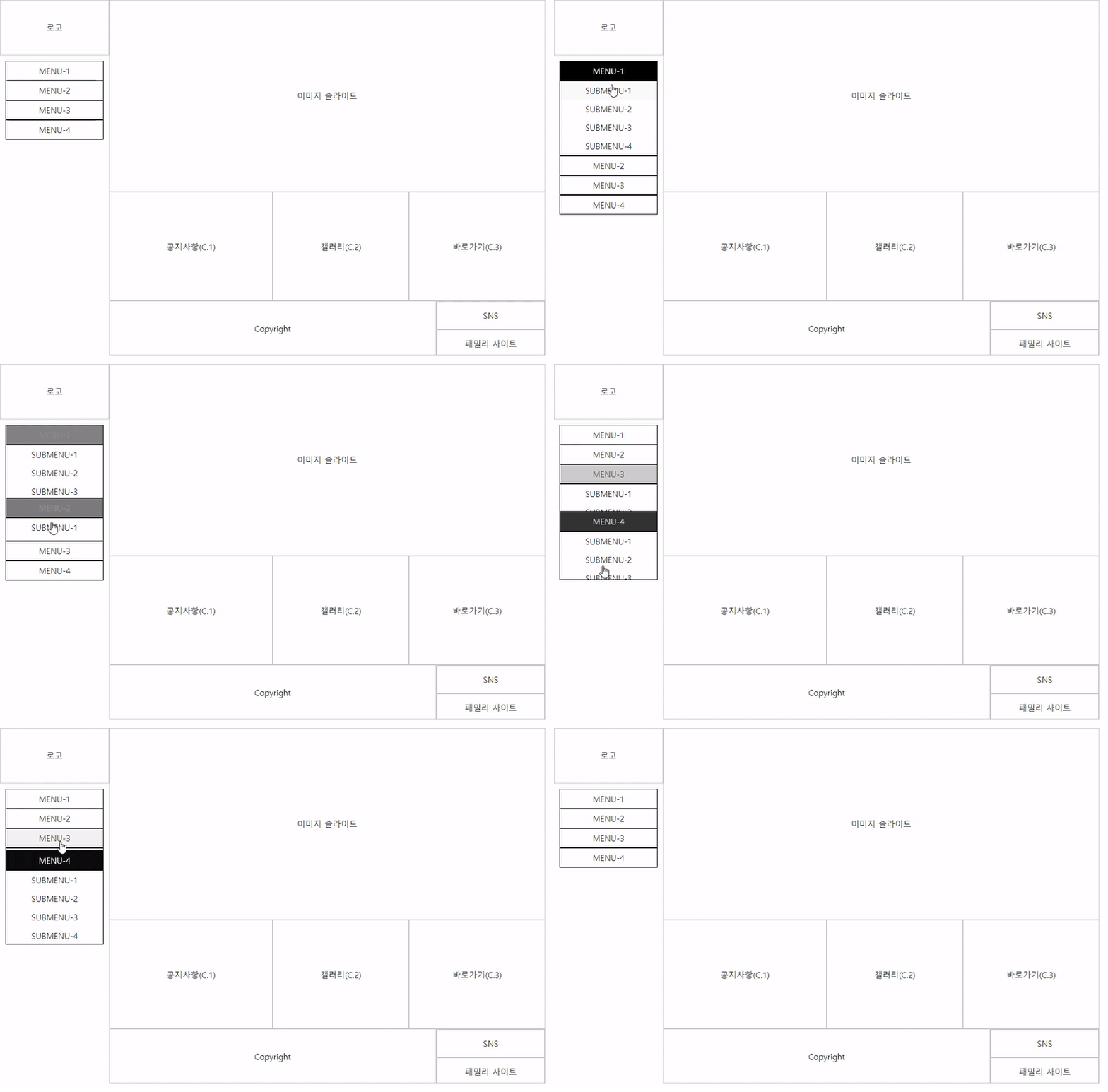
📝Module Creation Preview - 5 Types of Navigation
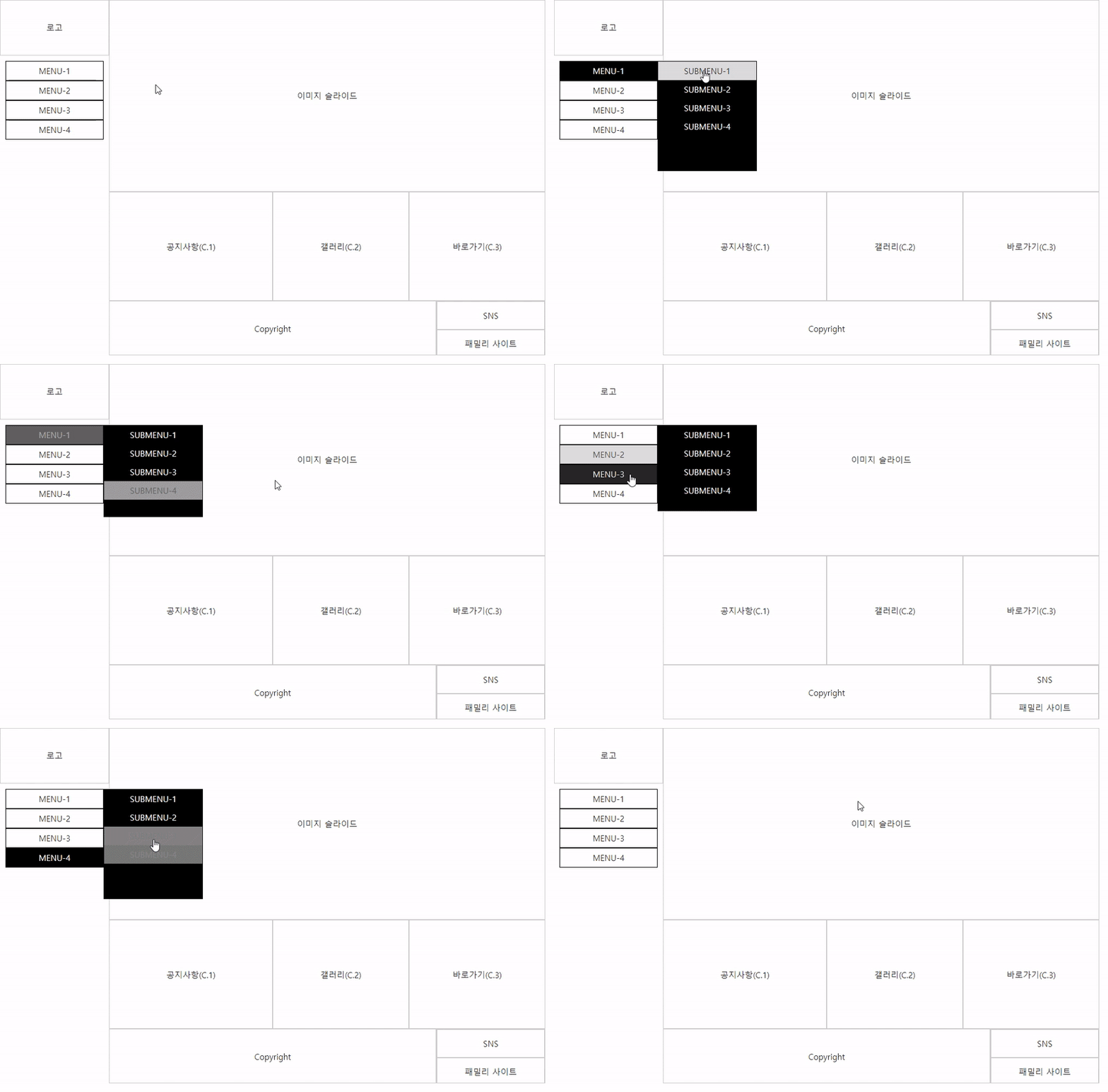
▼ Navigation: Individual submenus dropping down from the left
▼ Navigation: Individual submenus dropping to the right from the left side
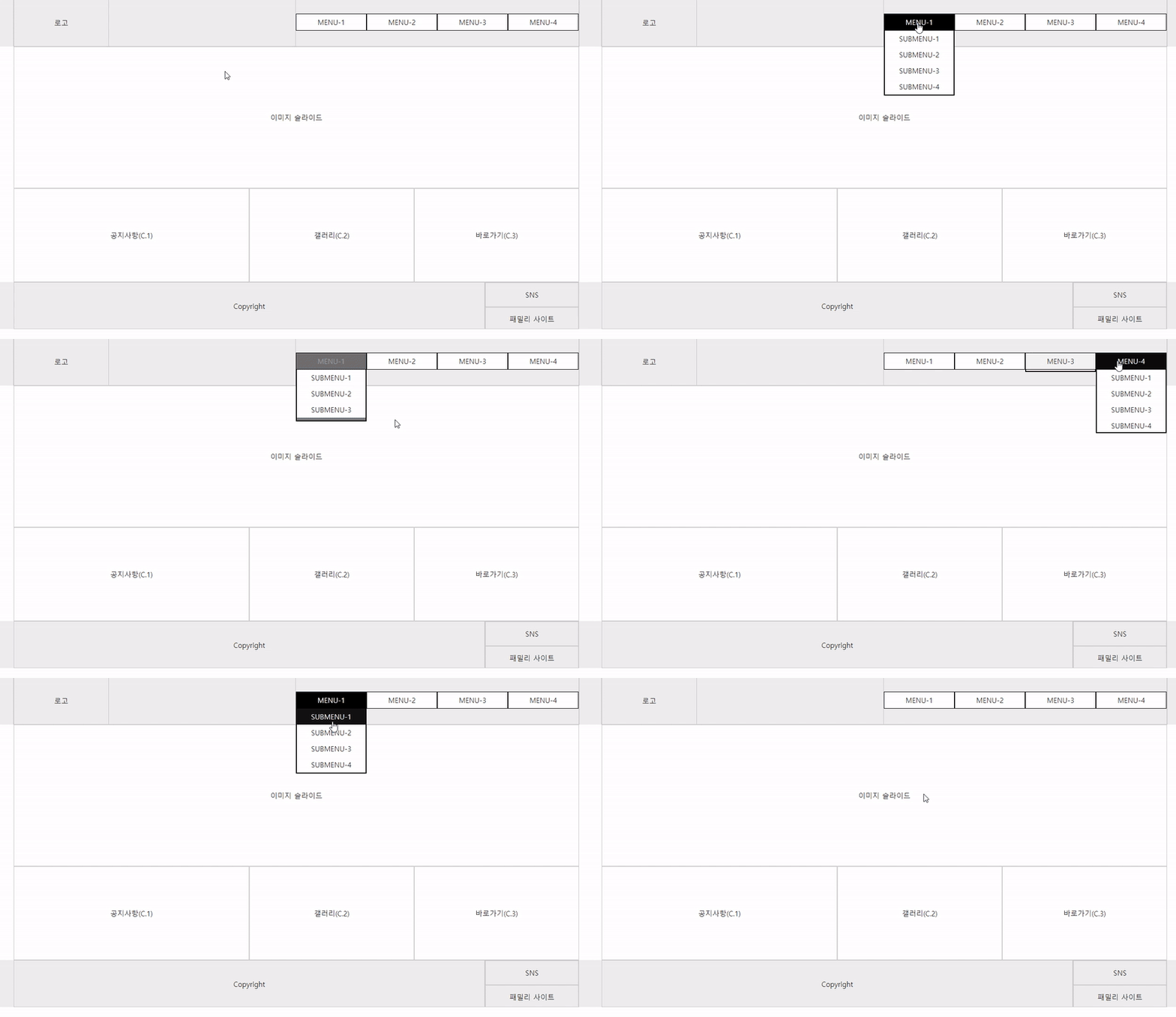
▼ Individual submenus dropping down from the top navigation
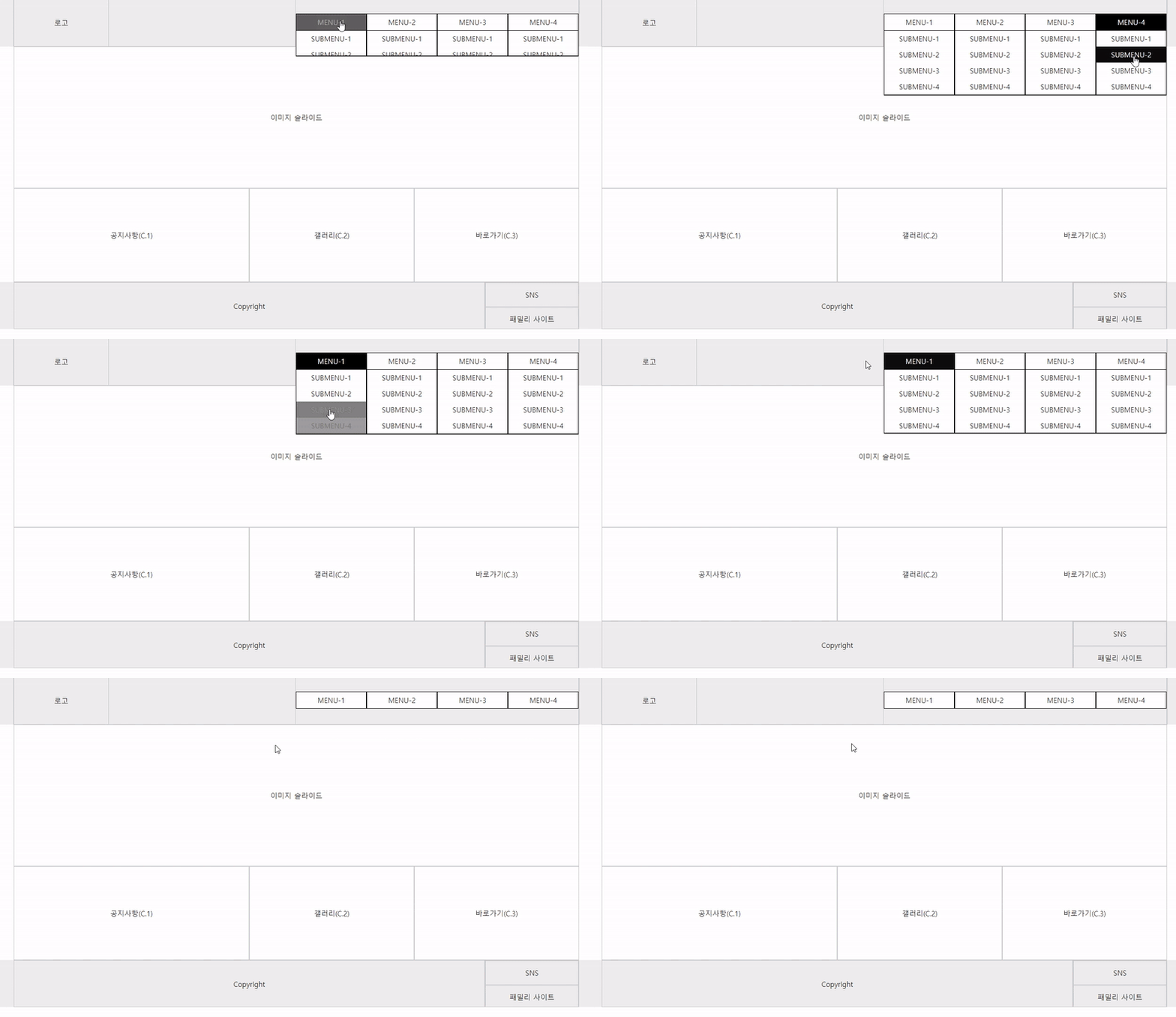
▼ Mega menu where all submenus drop down from the top navigation
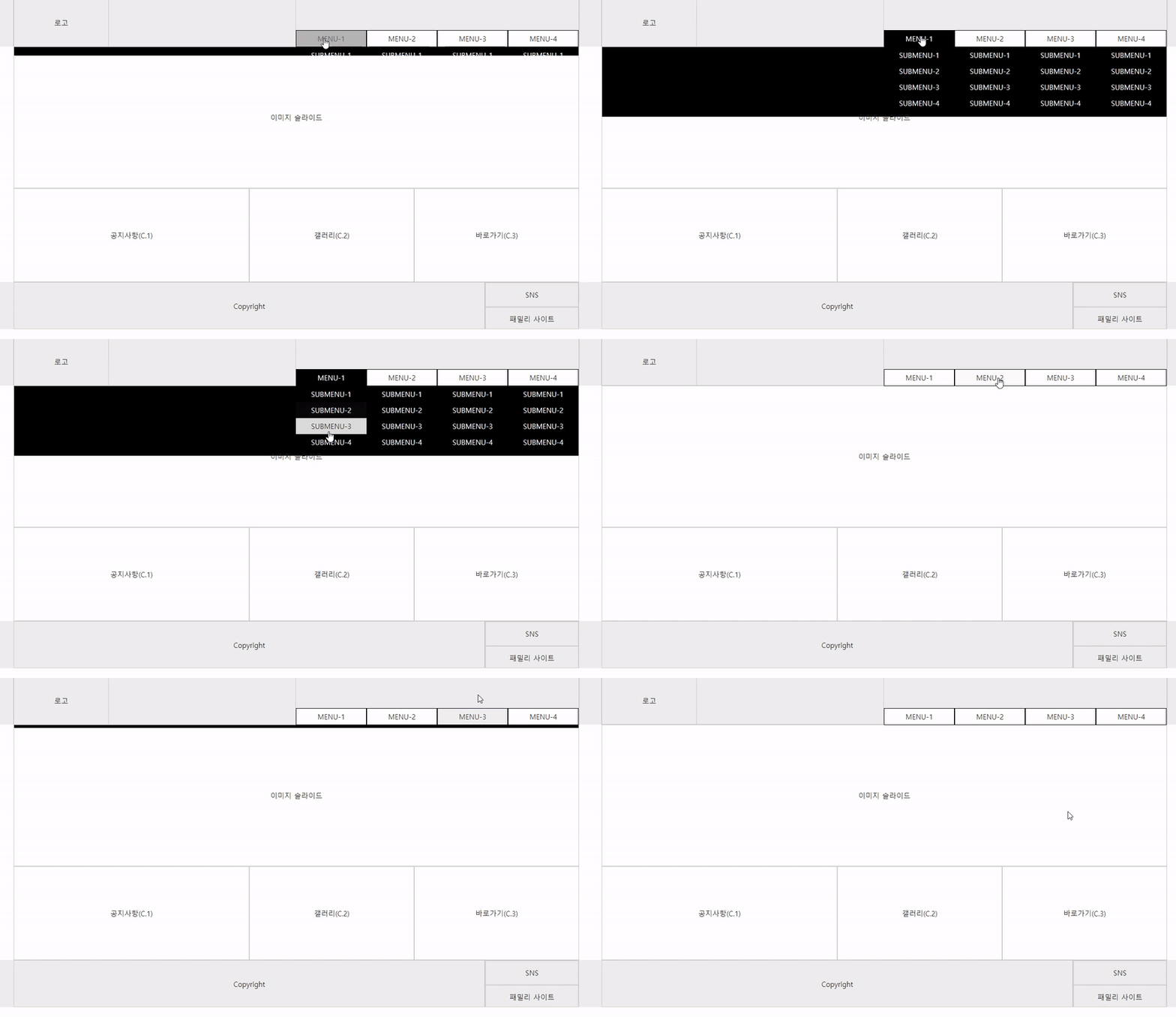
▼ Mega menu where all submenus at the top of the navigation drop down along with the background
📝 Preview of Final Version Production
▼ Fixed-width final version
▼ Horizontal 100% Final Version
▼ Vertical 2-column final version
Notes for the Practical Exam Site
Internet access is not available at the testing site. Therefore, the Live Server extension cannot be installed.
When coding in Visual Studio Code, you must save your work and refresh the browser to see the changes.
When you arrive at the testing center, you can simply configure the settings below before taking the exam.
Please refer to the Coding Works blog content below.
[Must-Read] Essential Visual Studio Code settings for the Web Design Specialist practical examhttps://inf.run/MpGqe
🙋🏻♂️ Must-read information regarding PDF textbooks
Q. The jQuery section in the PDF textbook doesn't seem to have much content?
A) Due to the nature of jQuery, its content is so vast that it is difficult to include everything in a PDF textbook. Therefore, it covers basic usage and essential functions, events, and methods. Furthermore, since CSS and FLEX are more important than anything else for publishing beginners, 170 pages—accounting for 90% of the PDF textbook—are dedicated to them.
Q. How is the Coding Works Publishing Core Theory PDF textbook different from other textbooks on the market?
A. We have excluded content that you don't need to know right away or that is less important, and included only the absolutely essential core information! The Coding Works textbook is a PDF manual created by further reinforcing materials used in offline academies for several years. In particular, it contains many of Coding Works' unique lecture tips that cannot be found in commercial textbooks.
Q. What is the file size of the download content?
A) The total size of the content to be downloaded is 42MB. The PDF theory textbook has been uploaded as 5 separate files for your convenience. You can download them individually. Also, the practice example files are well-organized into folders once you unzip them.
Q. I plan on printing it out to read; is the PDF textbook high quality?
A) The PDF files are produced in high-quality 300dpi, so you can get clean prints even if you print them out.
Q. What is the intended use for the downloaded content?
A) All downloaded content consists of files produced in-house by Coding Works. Coding Works PDF textbooks must not be used for any purpose other than the personal learning of the individual who registered for the course, nor should they be distributed to others. Additionally, you may not edit the parts of the PDF files that indicate Coding Works to use them as teaching materials.
l, cs
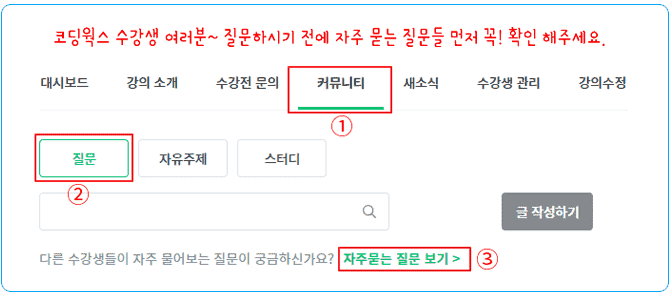
🙋🏻♂️ Please read this before asking a question!!
Please ask any questions you have while studying. When asking a question, you must include the details of what is not working, the code, and a screenshot of the browser result. For the code, please copy and upload all HTML, CSS, and JS code so that I can provide an accurate answer.
To receive an accurate answer, please provide a screenshot of the browser result and copy and paste your code.
Creating a publisher's personal portfolio website for interviews and employment, scss, sass, flex, grid, html, css, html/css, website, web publisher, publisher employment, website, coding, coding, jquery, javascript, jQuery, JavaScript, layout, interactive web, interactive web, web design, web design, portfolio, publishing, responsive web, Web Design Craftsman practical exam, bootstrap, bootstrap, css frameworks, framework
Recommended for these people
Who is this course right for?
Those who are starting web coding for the first time
Those who wish to handle website maintenance, modifications, and improvements on their own
Those who wish to transition from web design to web publishing or strengthen their HTML+CSS+JQUERY publishing skills.
Web planners who want to improve their understanding of web publishing
A developer who wants to improve their understanding of front-end publishing
Those who want to pass the practical exam for the Craftsman Web Design certification
Need to know before starting?
Basic computer literacy and the ability to use internet browsers
■ [Current] Government-funded Publishing & Frontend Instructor ■ [Current] Freelance Frontend Publisher ■ [Current] Operator of HTML+CSS+JQUERY Publishing YouTube Channel 'Coding Works' ■ Green Computer Academy Web Publishing Instructor ■ The Joeun Computer Academy Web Publishing Instructor ■ Ezen Computer Academy Web Publishing Instructor ■ Frontend Publisher, Professional Frontend Publishing Instructor ■ UI/UX Web Design Portfolio Lectures ■ Web Design Technician Practical Certification Class Lectures ■ Easy & Edu Frontend UI/UX Design and Publishing
As a designer, I had absolutely no coding background, and I looked up all the YouTube lectures, but I gave up on the qualification because I didn't understand anything. The deadline for exemption from written exams was the first quarter of this year, so I postponed and postponed it until I decided to give it a try, but I think it was 1-2 months after I submitted my application that I really started studying.
I really felt why the teacher's lectures have so many reviews while studying. He explained the concepts so easily that even I, an idiot, was able to understand the concepts and solve the problems. After listening to the layout + problem 1 class and solving it, I got the feeling that I could change 2-4 like this, and I didn't need to memorize the difficult sentences.
I got a job while studying, so I couldn't study hard in the latter half, so I only practiced the new types with selection and concentration. With the belief that D and E would definitely come out... Fortunately, I got the D type, and I was able to leave the test room in about 2 hours? The result was 91 points! I felt good because I got a much higher score than I expected. ㅎㅎ
As a side note, I studied thinking that the coding that the teacher taught was the correct answer, but when I looked at other lectures, I saw that there were really, really many different ways to achieve the same result. After learning that, I realized that this lecture was a very well-made lecture from a beginner's perspective.
Starting from this opportunity, I will continue to study without giving up coding :-) Thank you for helping me achieve good results~
I'm learning a lot!
First of all, the first thing I'm going to talk about is the topic of "It's hard to study on your own"!
Of course, you can try to study anything, but as you know, if it's difficult, you'll quickly give up (or put it off).
I bought this X-book and prepared for the exam, but... I only read the book for the written part, and for the practical part, the video was just explaining it by copying and pasting text from somewhere... It was really frustrating.
However, since KakaoTalk has become so well-developed these days, I went around open chat rooms here and there, but honestly, there wasn't a place that explained it well... Even for me, if it had been a long time since I passed, I think they would answer more questions from people in the field!
So one of them recommended this "Coding Works Teacher"!
Thanks to that, I didn't even look at the introduction and paid right away because they said they would teach me the basics. (This is a true story)
And then I started watching slowly from the first lecture, but the facts wouldn't be easy to understand...
However, I only had one thought that I had to follow it, so I watched the lectures from theory [in order], and before I knew it,
I had already made them on my own without following the videos.
That's when I realized. Oh, this is just the beginning...
Type A is the easiest, and there are many points that can be understood from various perspectives!
In other words, people who quickly grasp the processor that needs to be applied even when making other things learn easily,
but even though I didn't know a lot, I just kept thinking about why it had to be like that and why it had to be like this to get the results.
On the third day, I succeeded in making the layouts for A, B, and C, and on the seventh day, I finished the complete versions of A, B, and C on my own, without any guides, just with the experience of having listened to one lecture.
After that, D and E types are steps that anyone who can make it without looking at C types can do, so I think those who are impatient right now might think that they can't get past D and E because C isn't done properly!
In the end, I passed, and although it wasn't a high score (I'll leave out all the details), I was able to leave the exam room in 1 hour and 20 minutes with just one lecture from Coding Works. (I only asked questions when I couldn't do anything.)
That's all for my experience!
I'll summarize
1. Why you should pay for Coding Works lectures: No matter how hard you look, there's no one around you who can teach you 1:1.
2. Self-study is hard and you won't understand no matter how many famous books you buy, so you'll definitely give up in the middle. 3. When you see this comment while looking for good lectures here and there, just click the payment button without a second of hesitation.
4. There are many ways to deal with various variables, and if you are desperate, I think you have an 80% chance of passing if you study hard for at least 7 days and up to 14 days. No? I think it's 90%.
5. If you don't understand and feel like something is not going well, practice until you can type only the parts from the previous exams automatically.
6. Not only do new questions not appear often in the exam room, but the D and E types that are taught in the lecture are also high-quality processors.
7. The computer is smarter than you. When it doesn't work, blame yourself and practice steadily.
8. Don't doubt that you will pass. From the moment you click purchase, you will be able to enjoy the maximum in all choices.
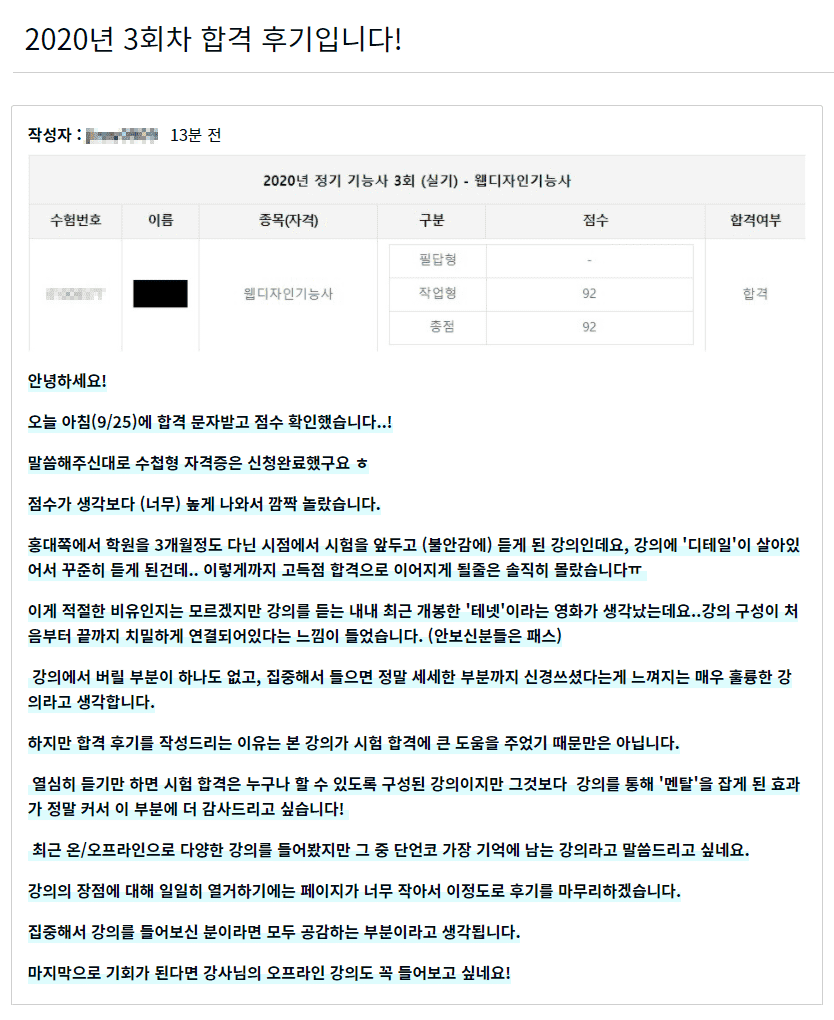
Hello! I got my 3rd practical exam results today, and I came here to write a review because I passed with a score of 92! First of all, thank you so much to the instructor for the great lecture. You answer my questions really quickly, and the lecture content was explained step by step from the basics for non-majors to study, which was great. (I especially listened to the YouTube lectures that the instructor uploaded in parallel, and I understood them faster.) I think it is a specialized class that can be understood in a short period of time. It was a class that was worth the tuition fee at all! Thank you. I cleared the exam in 1 hour and 40 minutes and confidently came in first place. Thank you, teacher :) I will come to listen to other lectures!
Thank you for your course review, seohyeon. And I sincerely congratulate you on passing the exam with a high score. I also cleared it in 2 hours when I took the exam, but you cleared it in 1 hour and 40 minutes, which is amazing. I think it was the result of your own hard work, although the lectures helped~!!
Thank you for explaining it in detail and it was very helpful! However, I think there might be some parts that are difficult to follow for a complete beginner who doesn't know anything about HTML. I recommend that you familiarize yourself with the concepts and then watch it.
This is Coding Works. First of all, thank you for your review~
I thought that if there were too many HTML theory videos, the beginning part of the learning would be too long, so I simplified the HTML theory part, but I'm glad you liked it. If you think the HTML theory part is lacking, there are many videos on my YouTube channel that explain it in detail, so please refer to those videos.
I'm glad that Coding Works' online lectures are helpful~^^
I hope you pass the web design technician practical exam with a high score.
1. The lecture content is easy.
2. The markup is clean. There is no meaningless repetition of width and height every time. It was good to be able to hear a detailed explanation rather than just being told to write it like this without asking.
3. The wireframes used as examples themselves are sophisticated.
4. It was good to be able to learn new methods, such as creating image slides using only CSS.
5. It was good to be able to ask questions.
The course review isn't that long, but I think this is the first time someone has written something so specific and easy to understand. You'll pass with a high score. Fighting!
























![[Latest] Web Design Technician Practical Exam: 3-Hour Finish! 24-Question Master Class with FlexboxCourse Thumbnail](https://cdn.inflearn.com/public/files/courses/339952/cover/01kcbxt5jcwsqamk5dxg5x3a7w?w=420)

![Modern Web Interactive CSS3 Bootcamp [Full vers.]Course Thumbnail](https://cdn.inflearn.com/public/courses/334857/cover/4ccc6c75-74aa-4aba-b3d9-8aabe36e9452/334857.jpg?w=420)
![[Code Camp] Powerful CSSCourse Thumbnail](https://cdn.inflearn.com/public/courses/329921/cover/325131ea-9c57-427e-98b9-4e207a1dff98/thumbnail-css.png?w=420)

![[HTML Starter] Bootcamp for Complete Beginners and Non-MajorsCourse Thumbnail](https://cdn.inflearn.com/public/courses/334738/cover/8a838278-6535-473c-9f5f-ed44e79581b1/334738.jpg?w=420)

![[Fantasy Pig's Feet] From design to codingCourse Thumbnail](https://cdn.inflearn.com/public/courses/332845/cover/5d0ef569-50e5-4300-96ed-3205d526795b/332845.png?w=420)

![Modern Web Interactive CSS3 [PART2/3]Course Thumbnail](https://cdn.inflearn.com/public/courses/335745/cover/db39333d-68a5-4ca7-9629-dac891711a94/335745.jpg?w=420)


![Spring Framework in my hands [Spring 2]Course Thumbnail](https://cdn.inflearn.com/public/courses/329630/cover/e05f1532-5d1d-440e-be03-c21c42cd5566/329630-eng.png?w=420)
