inflearn logo

It’s OK if you only know HTML/CSS/JS! A hands-on project completed with React and Firebase

Even in the AI era, developers need the ability to understand code and complete real-world services. Build practical web development skills by using React and Firebase to implement everything from login, data management, and image uploads to deployment, based on a foundation in HTML/CSS/JavaScript.

18 learners are taking this course

Level Basic

Course period Unlimited

React
React
Firebase
Firebase
firebase-database
firebase-database
firebase-firestore
firebase-firestore
React
React
Firebase
Firebase
firebase-database
firebase-database
firebase-firestore
firebase-firestore

What you will gain after the course

  • You can understand how to set up the development environment, including creating and configuring a Firebase project.

  • You can learn how to integrate a React application with Firebase services.

  • You can implement sign-up and login functionality using Firebase Authentication.

  • You can learn how to implement social login features such as Google login.

  • You can implement functionality to create, retrieve, update, and delete posts using Firestore.

  • You can implement image previews and file upload functionality using Firebase Storage.

  • You can try implementing user profile editing and profile timeline features.

  • You can also gain experience in deploying a completed web application.

"You’ll miss out if you don’t claim it now! Just subscribe to YouTube and pay half the course fee"

Subscription & Like & Comment Event

Complete a simple mission and get a 50% off coupon instantly. Don’t miss this incredible limited-time offer—claim it now!

Participate in the YouTube subscription & comment verification event: https://forms.gle/wcD2wRVeaG7B7fSj7

At a glance

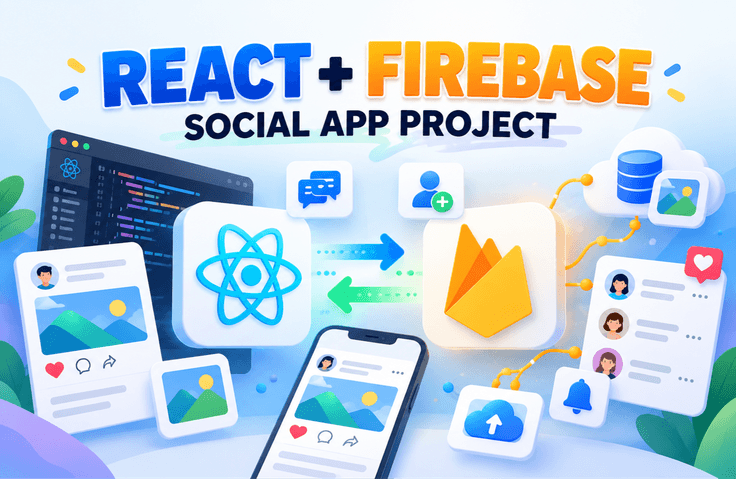
In this course, you will build a fully functional web application from start to finish using React and Firebase.

Implement core features used in real-world services step by step, including sign-up and login with Firebase Authentication,
creating, viewing, editing, and deleting posts using Firestore Database,
image upload functionality with Firebase Storage,
and user profile management.

You will also experience the process of deploying the completed application as a real web service using Firebase Hosting.

This course is suitable for those who want to learn how to quickly build web services using only React + Firebase without setting up a complex server.

Through this course, you will complete an SNS-style web application with a login feature yourself.

Here are the key learning points for each section.

Section 1. Getting Started with React, Firebase, and Your First Project

First, you will take a look at the overall structure and features of the web application you will complete through this course.
You will understand the overall process of implementing commonly used features in real-world services, such as user login, post creation and viewing, file uploads, and profile management.

Next, you will create a Firebase project and complete the basic setup.
Using the Firebase console, you will create a project and configure it so that Firebase can be used in a web application.

You will also learn how to create a React application and integrate it with Firebase.
Understand the environment settings and initial structure to prepare for using Firebase features smoothly in the subsequent exercises.

Section 2. From Login to Logout! Complete User Authentication

Implement a user login system using Firebase Authentication.

First, understand the basic concepts of Firebase Auth and implement email-based login.
Create a login form in React and handle the actual login process through the Firebase Authentication API.

You will also learn how to improve user convenience by implementing social login features such as Google account login.
By implementing login state management and logout functionality, you can experience the authentication flow used in real-world services.

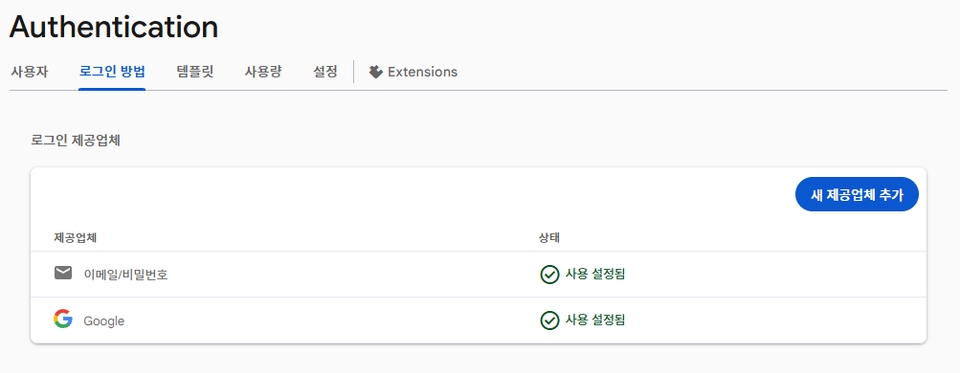
Firebase Login: Set Up Email/Password and Google Sign-In

Section 3. Complete CRUD for Posts! Handling Real-Time Data

Implement the post feature using the Firebase Firestore database.

Implement functionality to save user-entered posts to the database and display the saved post list on the screen.
Also, use Firebase's real-time data feature to configure the screen to update automatically when a post is added.

You will also implement functionality to edit or delete posts written by users.
In particular, you will learn how to handle permissions so that users can only edit or delete their own posts.

Through this process, you will practice the basic CRUD (Create, read, update, delete) operations using Firebase Firestore.


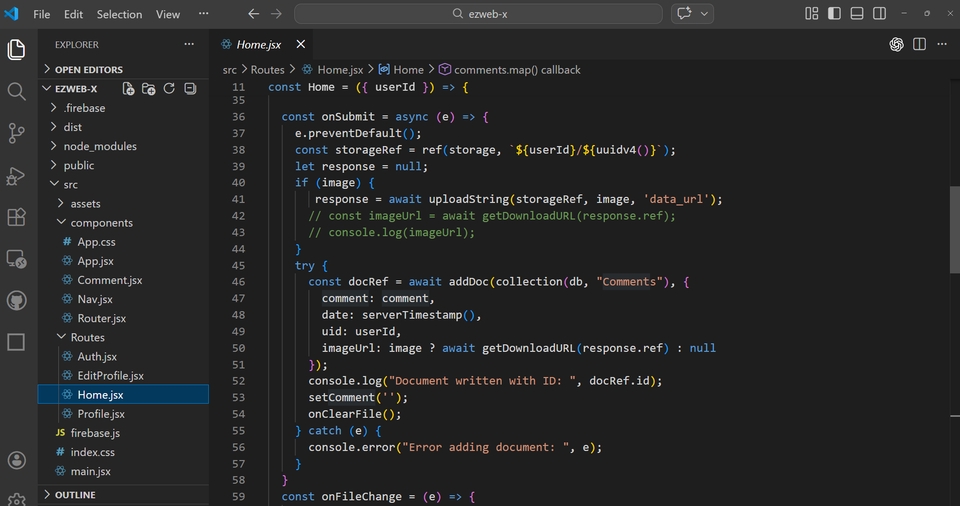
Attach text and images, then click the Send button to execute the post creation function.

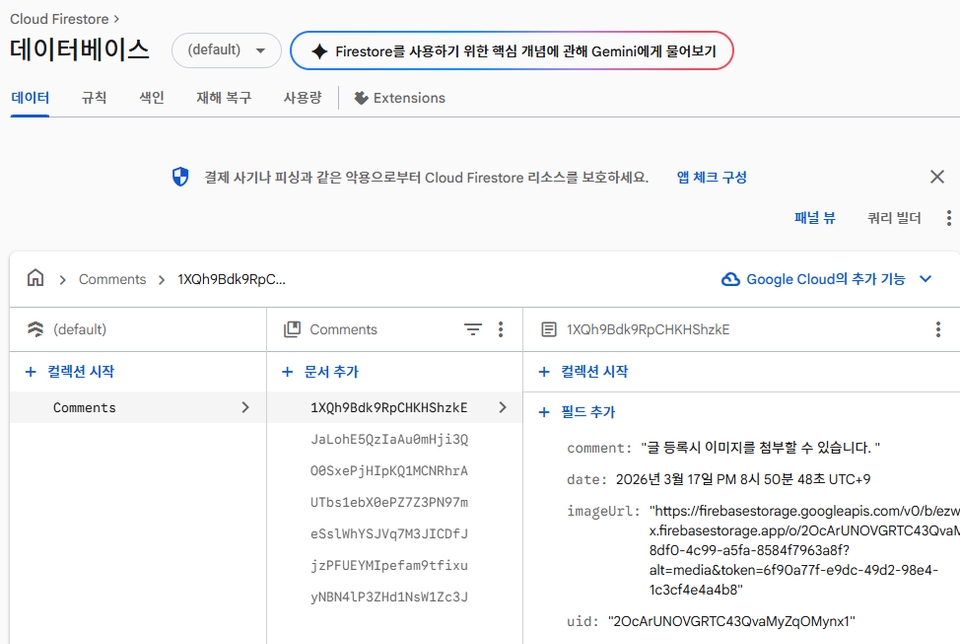
The post is saved to the Firebase database.

Section 4. Upgrade the post feature with image uploads!

Implement file upload functionality using Firebase Storage.

Implement a feature that provides a preview before uploading when the user attaches an image.
You will then learn how to upload the selected file to Firebase Storage and save the uploaded file's URL together with the data.

You will also implement a way to delete files that are no longer needed.
You can learn the basics of managing files in web applications using Firebase Storage.

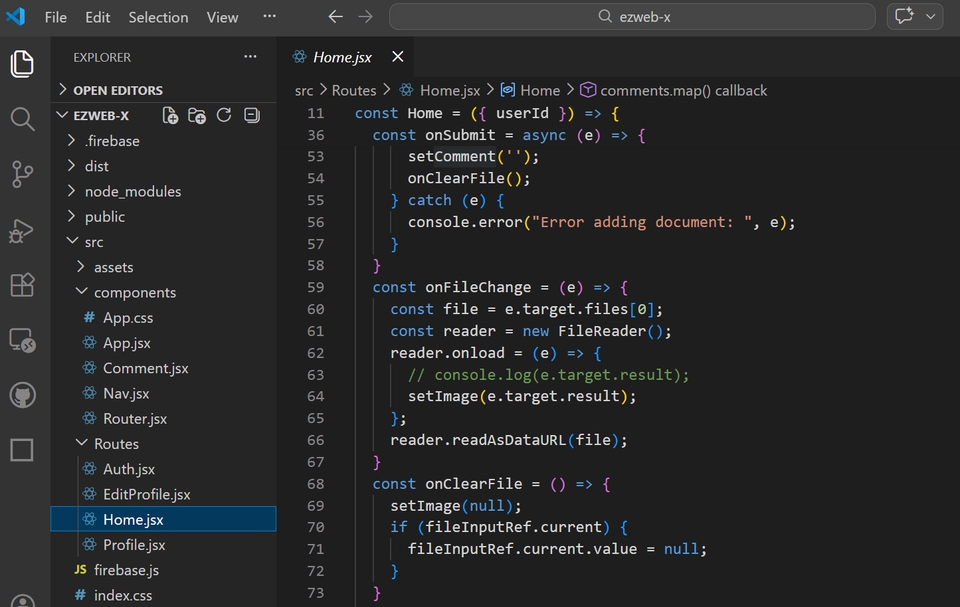
Preview the attached image using the FileReader API.

File Preview

Section 5. Completing Your Own Profile and Timeline

Implement user profile management functionality.

Users can upload their own profile image and edit their profile information.
Uploaded images are stored in Firebase Storage, and the user profile is updated using the image URL.

Learn how to change the username and profile picture using Firebase’s updateProfile API.
You will also learn how to ensure that uploaded images are reflected in the actual user information.


This allows you to implement user account-based personalization features.

Change the Profile Image

Implement a timeline feature that allows logged-in users to view the posts they have written on their own profile page.

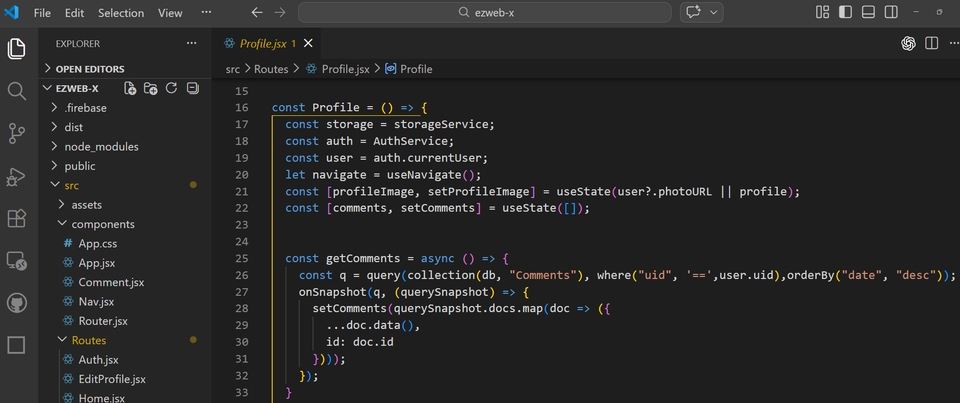
Learn how to retrieve only the data created by a specific user (uid) using Firebase Firestore’s query functionality.
You will also learn how to sort data and retrieve only the data you need using orderBy and where.

Through this, you can understand how to retrieve data for each user and sort the data.

We retrieve data using `where` and `orderBy`.

Section 6. Publish Your Web App to the World and Wrap Up the Project!

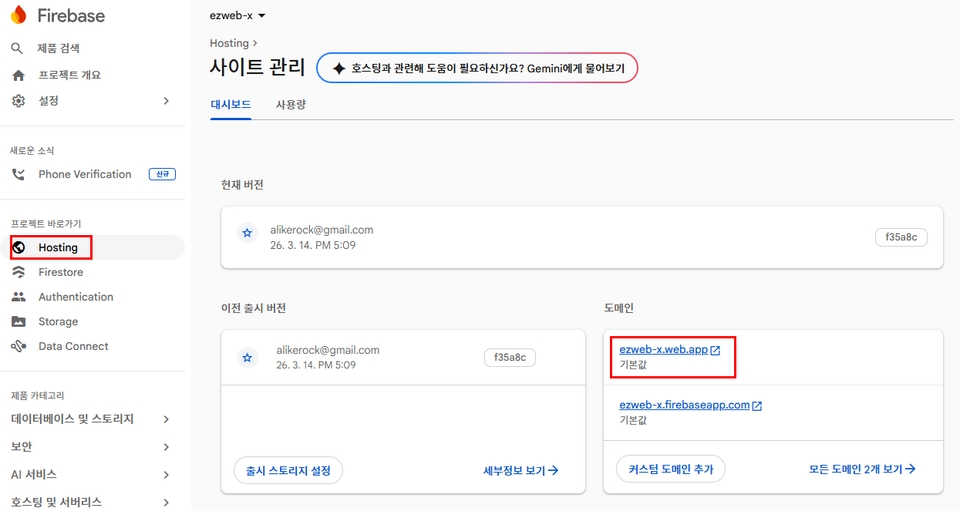
In the final section, you will deploy the completed React application using Firebase Hosting.

You will practice installing the Firebase CLI, initializing the project, and deploying the built React application to Firebase Hosting.

Firebase Hosting is CDN-based, enabling fast service delivery, and provides free SSL certificates, making it easy to set up secure connections.

Through this course, you can experience the entire process of making the web application you developed available as an actual service.

Deploy using Firebase Hosting.

Why should you take this course?

1️⃣ Build a full-featured Firebase-based web app yourself

Rather than simply explaining features,
you will complete a web application with a real-world service structure that includes login, posts, file uploads, and profile management.


2️⃣ You can build a web service without a backend

With Firebase, you can implement everything from
authentication, databases, and file storage to deployment without separate server development.

Even beginners can relatively easily gain full-stack web development experience.


3️⃣ You can naturally learn practical React patterns.

As you progress through the course, you will learn the following practical patterns along the way.

  • React component structure design

  • State management and data flow

  • Real-time data processing

  • User authorization handling

  • File upload handling


4️⃣ Experience the entire process through actual service deployment

It doesn’t end with development.
You will deploy the completed web application directly using Firebase Hosting.

Through this, you can experience the entire process from development to making the service public.


5️⃣ A step-by-step hands-on course for beginners.

Even those new to Firebase and React can follow along, as we carefully explain each step
from environment setup through deployment.

Important notes before enrolling

1. How Practice Source Code Is Provided for Each Lesson

As this course is conducted with a focus on hands-on practice, completed source code for each lesson is not provided separately.
Therefore, we recommend writing the code yourself while watching the lectures.

However, to allow you to review the overall structure after completing the course, the final source code from the stage immediately before deployment is provided.

In Lesson 17, the source files from the stage just before deployment are provided.

2. Lecture Notes Provided

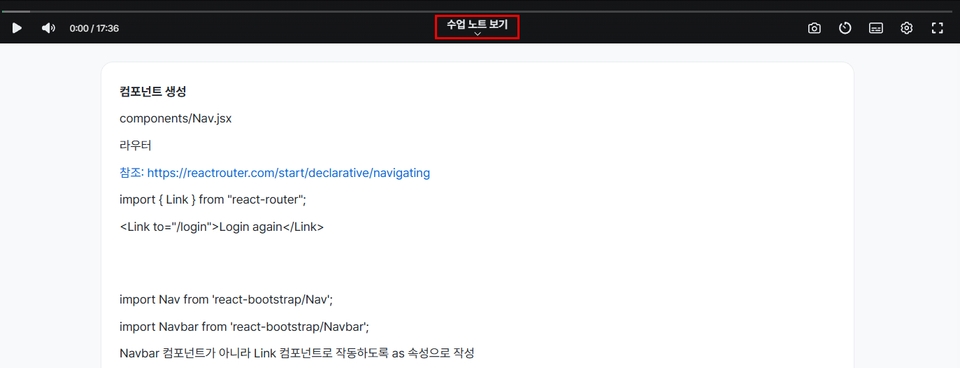
The key content covered in each lesson is provided in the form of lecture notes.
The notes used to explain the material in the videos are provided as lecture notes.

Lecture Notes Provided

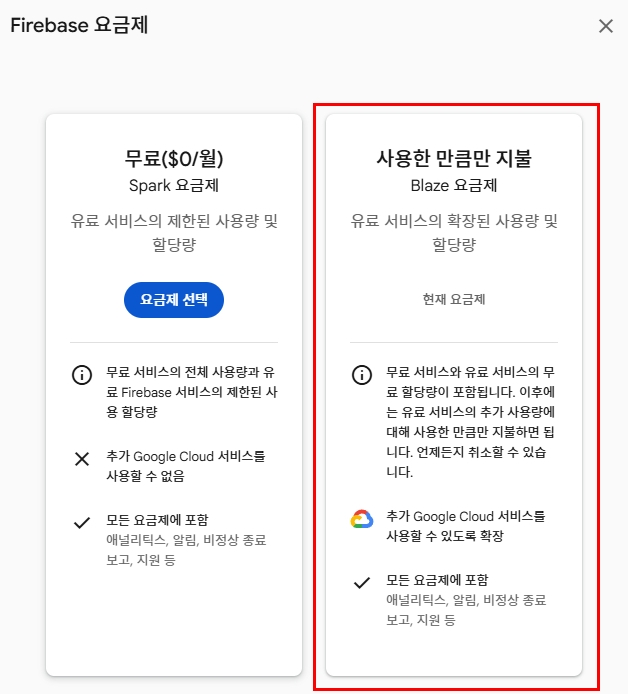
3. Information Regarding Firebase Billing Setup

When creating a Firebase project, billing setup may be required.
In the usual course exercises, you will not actually be charged.

However, when implementing the file upload feature (Firebase Storage),
you need to switch to the paid plan (Blaze Plan).

In this case, actual charges may be incurred depending on usage, so we recommend the following.

  • If you do not use the file upload feature, you do not need to upgrade your plan.

  • If you no longer use the project after completing the course exercises,
    we recommend deleting or shutting down the Firebase project.

The Blaze plan is required to implement the file upload feature.

Practice Environment Guide

Operating System

  • Windows

  • macOS

(Most of the exercises can also be carried out in a Linux environment.)

Development Tools

The hands-on exercises will be conducted using the following tools.

  • Node.js (LTS version)

  • npm

  • Visual Studio Code; other editors are also supported

  • Google Chrome

Key Technologies Used

The key technologies used in the course are as follows.

  • React

  • Firebase Authentication

  • Firebase Firestore Database

  • Firebase Storage

  • Firebase Hosting

Firebase account

You need a Google account for the course exercises.
When creating a Firebase project, you will log in using your Google account.

Recommended for
these people

Who is this course right for?

  • Those who want to build a real web application using React

  • Those who want to learn how to build web services without a backend using Firebase

  • Those who want to directly implement actual service features such as login, bulletin boards, and file uploads.

  • Those who want to create a web application project for their portfolio

  • Those who want to learn frontend development while also gaining experience with basic backend functionality.

  • Those who want to experience the web service development process based on Firebase from the beginning

Need to know before starting?

  • It would be good if you understand the basics of HTML/CSS syntax.

  • It will be helpful if you are familiar with basic JavaScript syntax.

  • A basic understanding of React concepts (components, state, and props) will be helpful for taking this course.

Hello
This is ezweb

Career Verified

3,004

Learners

78

Reviews

4

Answers

4.9

Rating

15

Courses

I am a frontend specialist instructor who teaches everything from web publishing to practical JavaScript and React, as well as AI-assisted development.

I have taught non-majors, beginners, and job seekers at ESTSOFT KDT and Green Computer Academy, among others. I break down complex concepts into small hands-on exercises and favor project-based classes in which learners complete the deliverables themselves.

Key Educational Areas

  • HTML/CSS Web Publishing

  • JavaScript Basics and Web Interactions

  • React-based frontend development

  • Implementing Web Services Using Firebase

  • Figma UI design and development integration

  • Web Development with Generative AI

  • Web Design Technician Practical Exam

Corporate and institutional training

I conduct training for corporate practitioners, KDT courses, and special lectures at universities and academies.

We develop curricula and hands-on projects tailored to the learners, their prior knowledge, the training duration, and the intended outcomes. We offer in-person instruction, live online classes, and recorded educational content production.

Online Educational Content Production

We handle the following online educational content production tasks.

  • Lecture curriculum and learning objective design

  • Creation of course materials and presentations

  • Step-by-step practice code and example project setup

  • Writing lecture scripts for recording

  • Lecture filming and content delivery

Main Activities

  • ESTSOFT KDT Frontend Course

  • Green Computer Academy Web Publishing & Front-End Course

  • Operating the web publishing YouTube channel ‘ezweb’

  • Authored books in the fields of web publishing and web design

Publications

We accept inquiries about delivering courses for companies and institutions and producing online educational content.

Inquiries: ezwebpub@gmail.com

More

Curriculum

All

18 lectures ∙ (5hr 11min)

Course Materials:

Lecture resources
Published: 
Last updated: 

Reviews

Not enough reviews.
Please write a valuable review that helps everyone!

ezweb's other courses

Check out other courses by the instructor!

Similar courses

Explore other courses in the same field!

25% off for new members

$15.40

25%

$15.40