inflearn logo

An advertising video production project using free AI tools and Blender

Is it difficult to create high-quality ad videos with AI and Blender? I’ll help you solve that with practical campaign know-how. Create ad videos now using only free AI tools and Blender. In this course, you’ll learn the entire ad production process through hands-on projects—from creating 3D products in Blender and writing storyboards with GPT to generating videos with Veo, creating music with Suno, and editing in CapCut. The course is also designed as a modular program, so you can start with whichever section you prefer: Blender, AI Course (GPT·Veo·Suno), or Editing (CapCut). Whether you’re a beginner or looking to apply these skills in your work, you can take the course to suit your goals.

(5.0) 3 reviews

23 learners

Level Beginner

Course period Unlimited

Blender
Blender
Video Production
Video Production
Content Creation
Content Creation
video
video
3d-modelling
3d-modelling
Blender
Blender
Video Production
Video Production
Content Creation
Content Creation
video
video
3d-modelling
3d-modelling

Reviews from Early Learners

5.0

5.0

uzqueen

100% enrolled

This course is well-structured step-by-step, covering everything from basic settings and fundamental modeling to product design and rendering, so that even those learning Blender for the first time can follow along without feeling overwhelmed. Rather than just learning functions, it was great for practice and review as it provides actual images, videos, prompts, and editing materials used in real commercial video production. In particular, I liked that I could experience the entire process from storyboarding to video production and editing using GPT, Veo, Suno, and CapCut. Since it is a modular curriculum, you can learn in order from the beginning or efficiently select and listen to the parts you need according to your own goals. I highly recommend this course to those who want to learn Blender rendering or create a commercial video portfolio using AI. I believe it is an excellent course for beginners to follow, and the provided materials are solid enough to help you produce a final result.

5.0

nanana

94% enrolled

I was worried because it was my first time learning this, but the explanations were so detailed and easy to understand that I could follow along without any trouble! I think even beginners can take this course without feeling overwhelmed. haha It's also great that there are various examples prepared so I can practice them myself~~ I'm planning to apply what I've learned to create other works as well!!!

What you will gain after the course

  • Creating advertising visuals through product modeling, lighting, mapping, and rendering using Blender.

  • Building an integrated workflow from storyboarding to video generation using AI tools such as GPT, Veo, and Suno

  • Create polished, real-world ad videos in both long- and short-form formats with CapCut.

  • Complete a portfolio project that can be applied to a real advertising campaign.

Title: An Advertising Video Production Project Created with Free AI Tools and Blender

Subtitle: A modular, hands-on project course where you complete a single advertisement, from creating a GPT storyboard and producing Veo footage to making Suno music and editing the video in CapCut

SECTION 01.

"Advertising Video Production Project Made with Free AI and Blender"

  • Blender rendered images → GPT storyboard → Veo video production → Suno music production

    → Edit in CapCut → Complete the ad video

  • Free tools and free AI: 1. Blender, 2. GPT, 3. Veo, 4. Suno, 5. CapCut

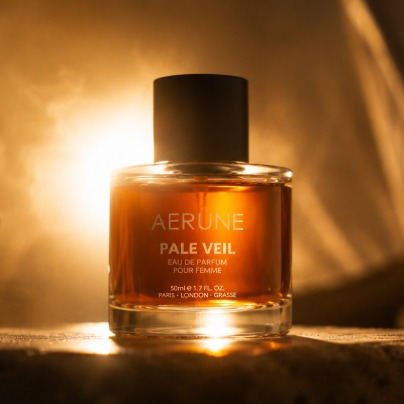
Actual Results: AERUNE Perfume Advertisement Video

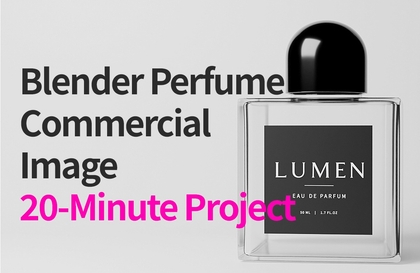
Blender actual render image of the perfume product

SECTION 02.

What You’ll Be Able to Create After Taking This Course

Long-form AERUNE perfume ad video

AERUNE Perfume Advertisement Video Short-Form

Follow the actual advertising production process to create long-form and short-form ads.

[Projects You Can Create After the Course]

  • Perfume Ad Image

  • Advertisement Storyboard

  • AI Advertising Video

  • Advertising Background Music

  • Long-form ad video

  • Short-form advertising video

[Tools & Skills for Creating Deliverables]

  • TOOL: Blender, CapCut, AI tools (GPT, Veo, Suno)

  • SKILL : 3d-modelling, video production, content creation, Visualisation


SECTION 03.

Most AI video courses start with a focus on prompts.

But product advertising is different.

The product’s shape and proportions, materials, reflections, lighting, and brand identity must be designed first.

Generative AI produces different results every time, even when you enter the same prompt.

In this course, you’ll create a reference image in Blender, then use AI to expand the advertising visuals.

You can learn a practical production workflow that ensures both consistent results and high-quality advertising visuals.

Most AI video courses

  • Prompt-Focused

  • Variations in the final output

[This Course]

  • Create reference images in Blender

  • Maintain Consistent Ad Quality

  • Real-World Ad Production Workflow


  • Create reference images with Blender

  • Designing a storyboard with GPT

  • Create an ad video with Veo


  • Create background music with Suno.

  • Final editing with CapCut

  • Free AI-Centered Production Pipeline

AERUNE Perfume Ad Short-Form Video: Final Output

SECTION 04.

Instructor Introduction

Nickname: TSLab.

Experience

  • 25 years of experience teaching design and working in the field

  • Former Full-Time University Professor

  • Former Visiting Professor in the University Design Department

  • Author of 3ds Max Visual Effects

  • Former director of a specialized design academy (16 years / specialized portfolio instruction)

  • Served as Head of the XR Business Division

  • Former Director of the Digital Twin Business Division

  • Experience in 3D and Advertising Content Production

  • Researching and teaching AI-based advertising production

Based on practical experience, the entire advertising production process has been organized into a single project.

Selected examples of work from professional projects and training programs

SECTION 05.

Modular Learning System

You can start in any order.

This course is designed with a modular learning structure, allowing you to start with whichever section best suits your goals.

[Recommended Path for Beginners]

  • Blender → GPT → Veo · Suno → CapCut

[Recommended Path for AI Users]

  • GPT→ Veo · Suno → CapCut → Blender

[Recommended Path for Video Editors]

  • CapCut → GPT → Veo · Suno → Blender

Start wherever you like, learn in whatever order you prefer, and create a finished ad video.

SECTION 06.

Advertising Video Production Process

  • How to Create a Finished Ad Video with Free AI Tools and Blender

  • Follow an actual advertising production pipeline and experience everything from planning through final editing.

1. Perfume bottle render image → 2. Storyboard creation → 3. Generate images for each scene → 4. Generate videos for each scene → 5. Create music (BGM) → 6. Video editing → 7. Complete advertisement

1. Perfume bottle render image

2. Storyboard Creation

3. Scene-by-scene image generation

4. Scene-by-Scene Video Generation

5. Music (BGM) Production

6. Video Editing

7. Complete the Advertisement

SECTION 07.

Full Curriculum

[Course Curriculum]

00_Preface (2 lectures)

01_Blender Basic Modeling (4 lectures)

02_Blender Perfume Bottle Creation (4 lessons)

03_AI COURSE (3 lessons)

04_EDITING (1 lecture)

05_Final Project Completion

14 lessons in total (the files for each lesson have been uploaded to the course materials)

SECTION 08.

Introduction to the Blender Section

[Product Creation Using Blender]

  • Mug modeling

  • Door Handle Modeling

  • Teacup Modeling

  • Creating the opening for the perfume bottle

  • Perfume Bottle Concept

  • Perfume Bottle Modeling

  • Perfume Bottle Lighting, Mapping, and Rendering

  • Additional Lecture: Advanced Lighting and Mapping


  • (Three-point lighting, IOR comparison, Normal comparison, Roughness comparison, UV creation, glass and liquid texture comparison)


Actual screen from the perfume bottle lighting, mapping, and rendering course.

Addtional Lecture: Advanced Lighting and Mapping course footage

SECTION 09.

Introduction to the GPT Section

[Advertising Planning Using GPT]

  • Advertisement Storyboard Creation

  • Scene Design

  • Image Generation

  • Image Upscaling

Part of the GPT image upscaling prompt

Actual work screen for image generation using GPT prompts

SECTION 10.

Introduction to the Veo section

[Creating Advertising Videos with Veo]

  • Image to Video

  • Camera movement

  • Product Styling

  • Creating Advertising Scenes

Scene image created with a GPT prompt

Video created with Veo Image to Video

SECTION 11.

Introduction to the Suno Section

[Creating Advertising Music with Suno]

  • Creating BGM for an Advertisement

  • Set the Mood

  • Emotional Direction

  • Enhancing the Quality of the Ad

Suno BGM Production Prompt

SECTION 12.

Introduction to the CapCut Section

[Final Editing Using CapCut]

  • Cut editing

  • Add background music

  • Narration editing

  • Text Animation

  • Apply effects

  • Long-form production

  • Short-Form Video Production

CapCut Video Editing: Short-Form Content in the Actual Production Workspace

SECTION 13.

Provided Materials

[Real-World Project Materials Provided]

All the original files and production materials used in the actual project are provided.

Follow along with the course and create the same ad video yourself.

01-01Blender Basic Modelings (4 files)

01-02 Blender Product Design (4 files)

02-Perfume Bottle Blender Render Images (1 item)

03-Storyboard Images (2 items)

04-Scene_Images (11 items)

05-Scene_Videos (10 items)

06-Prompts (3 items/GPT, Veo, Suno)

07-AERUNE_Advertising Video (2)

08-Images for CapCut Editing (1 item)

09-Curriculum (4 items)

SECTION 14.

Recommended for people like these.


Advertising Video Portfolio Creator

  • Those who need an advertising video portfolio

Blender beginners

  • New to Blender


Those interested in AI video production

  • GPT

  • Veo

  • Suno


Video editor

  • Using CapCut


Create your own ad video right now.

Planning → Modeling → Storyboarding → Video Production → Music Production → Editing → Finished Advertisement

#Blender, #VideoProduction, #ContentCreation, #3d-modelling, #visualisation, #CapCut

Recommended for
these people

Who is this course right for?

  • A creator interested in producing advertising content that combines 3D design and AI video production.

  • Designers and marketers looking to strengthen their practical skills in creating product advertising visuals.

  • Video production beginners who want to learn systematically, from getting started with Blender to using AI tools.

  • For those who need a video portfolio created

  • Anyone interested in advertising production

  • Video Production Beginner

  • Blender beginners

  • Designers and marketers who want to deepen their practical skills in creating advertising videos using Blender and AI.

  • Creators who want to maximize the impact of their ads through high-quality 3D visualizations

Need to know before starting?

  • Basic computer operation and file management skills

  • A basic interest in video production or design and a willingness to learn.

  • Internet access and account creation availability for using AI tools

Hello
This is thestorm011007

Career Verified

93

Learners

10

Reviews

5.0

Rating

2

Courses

I am TSLab., with 25 years of experience.

• Author of 3ds Max Visual Effects

• Former full-time university lecturer

• Former Visiting Professor of Design Department at University

• 16 years as Director of a specialized design academy

• Head of XR Development Department

• Director of Digital Twin Business Division

• Currently teaching 3D, video, and AI-related courses

Based on my practical design and educational experience, I am researching product advertisement production workflows using Blender and AI. Additionally, I am researching practical 3D+AI video production workflows using various tools such as 3ds Max, Maya, Houdini, and Unreal Engine.

More

Curriculum

All

18 lectures ∙ (5hr 31min)

Course Materials:

Lecture resources
Published: 
Last updated: 

Reviews

All

3 reviews

5.0

3 reviews

  • uzqueen님의 프로필 이미지
    uzqueen

    Reviews 3

    ∙

    Average Rating 3.7

    5

    100% enrolled

    This course is well-structured step-by-step, covering everything from basic settings and fundamental modeling to product design and rendering, so that even those learning Blender for the first time can follow along without feeling overwhelmed. Rather than just learning functions, it was great for practice and review as it provides actual images, videos, prompts, and editing materials used in real commercial video production. In particular, I liked that I could experience the entire process from storyboarding to video production and editing using GPT, Veo, Suno, and CapCut. Since it is a modular curriculum, you can learn in order from the beginning or efficiently select and listen to the parts you need according to your own goals. I highly recommend this course to those who want to learn Blender rendering or create a commercial video portfolio using AI. I believe it is an excellent course for beginners to follow, and the provided materials are solid enough to help you produce a final result.

    • thestorm011007
      Instructor

      Thank you for the detailed course review. Also, please try making other advertisement videos as well. Thank you.

  • minhwan1225656님의 프로필 이미지
    minhwan1225656

    Reviews 2

    ∙

    Average Rating 5.0

    5

    94% enrolled

    I was worried because it was my first time learning this, but the explanations were so detailed and easy to understand that I could follow along without any trouble! I think even beginners can take this course without feeling overwhelmed. haha It's also great that there are various examples prepared so I can practice them myself~~ I'm planning to apply what I've learned to create other works as well!!!

    • thestorm011007
      Instructor

      This is the first course review. Thank you for the positive feedback. I hope you create your own advertisement videos through this course.

  • seonggeunseo9978님의 프로필 이미지
    seonggeunseo9978

    Reviews 13

    ∙

    Average Rating 5.0

    5

    33% enrolled

    • thestorm011007
      Instructor

      Thank you for your top score and review. I hope you make lots of wonderful videos. Thank you^^

Similar courses

Explore other courses in the same field!

25% off for new members

$114.00

25%

$154.00