inflearn logo
inflearn logo

Project and task management for becoming a pro at Excel - MS Planner

Do you want to do a good job? Do you want to manage your work schedule well so that you don't miss anything and can see it at a glance? Learn how to create and manage projects, teams, or your own tasks using Planner to become a pro at work.

(4.7) 15 reviews

91 learners

Level Beginner

Course period 3 months

MS-Office
MS-Office
MS-Office
MS-Office

Reviews from Early Learners

Reviews from Early Learners

4.7

5.0

min3476

36% enrolled

Communication through questions and answers is not smooth.

5.0

팀즈뽀개기

100% enrolled

It fits perfectly in your ears!

5.0

Chang Hun Kim

100% enrolled

I listened very well to your kind explanation.

What you will gain after the course

  • How to Stay on Top of Your To-Do List

  • How to visualize and manage project progress efficiently

  • How to Visualize and Manage Your Tasks Efficiently

  • How to manage my work and schedule with Planner

The lecture was updated to the latest version on January 17, 2025. Please take the lecture~ 😊

👉 Go to the latest version update lecture

Lecture Introduction 📝

I want to do a good job . How about you ?

To do your work well, you need to manage it well . How do you check which of the many tasks you should do first , which ones you have done , which ones you haven't done , or which ones you have missed ?

Also , if I am involved in a project , I need to check how much progress the project has made , if there are any problems , and if there have been any changes in the middle .

How do you organize so many things ?

Diary ? Memo ? Calendar ? Outlook ?

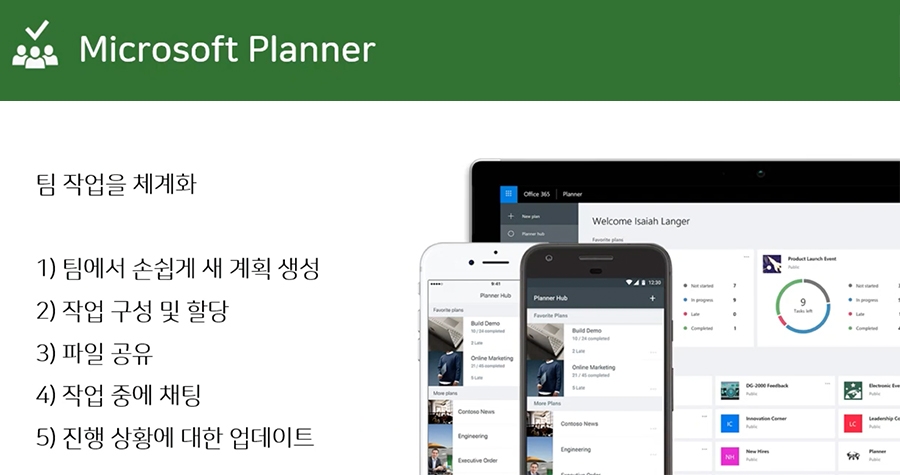
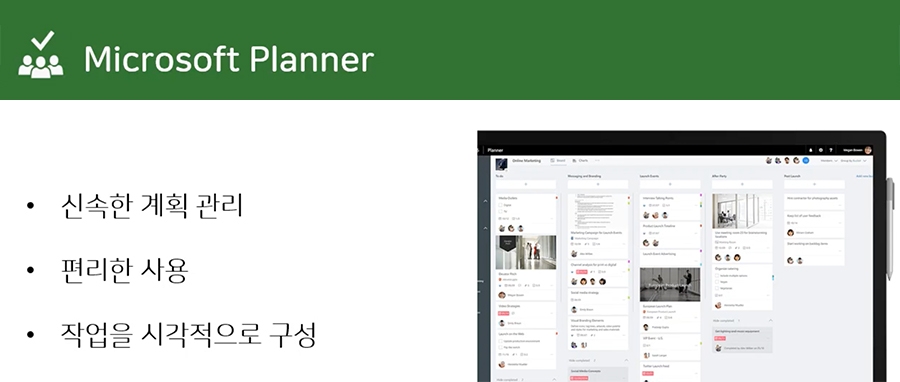
Planner is a program that allows me to organize and see my work at a glance . Planner is available for free if you are using Office 365 , and is a very useful tool that allows me to see my work at a glance . Learn how to create and manage projects, teams, or my work using Planner !

What I learned in class ✏️

In this course, you will learn how to visualize and manage your work and projects efficiently.


- Understand what Microsoft Planner is and
get to know the screens and menus
- Planner notification settings
- Create a new plan, create/move/copy/set deadlines/labels for tasks within the plan
- Export the plan to an Excel file
- Sync your plan with your Outlook calendar
- Link Planner to a team in Teams
- Manage your tasks on the go with Mobile Planner

Tools covered in the lecture 💡

  1. Microsoft Planner
  2. http://tasks.office.com/

Expected Questions Q&A 🙋🏻‍♂️

Q. Do I need to buy tools to take the course?
A.
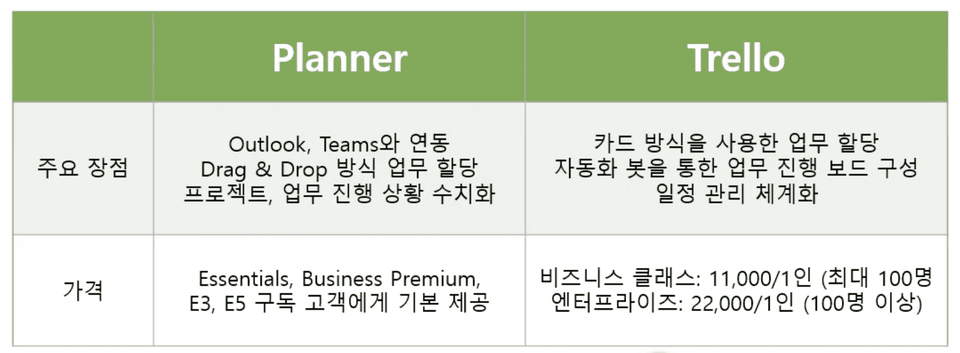
It is provided free of charge to Office 365 subscribers, and a trial version is also available.

However, it is not provided free of charge to Business Apps or Enterprise Apps subscribers.


Q. Do I need any prior knowledge to take the course?
A. No~~~!! Anyone can do it easily if they just follow the lecture content!

Recommended for
these people

Who is this course right for?

  • For those who have trouble organizing their to-do list in their diary and post-it notes

  • If you are having trouble managing Trello, Asana, Outlook, and other electronic notes

  • If you want to visualize your work through Planner and manage it at a glance

  • If you want to become a pro-filler!

Hello
This is omas

2,643

Learners

298

Reviews

165

Answers

4.6

Rating

47

Courses

Nice to meet you! We are "Omas", Microsoft 365 experts.
As Microsoft 365 experts, we will help you work more easily and smartly.

Introducing Omas's instructors!!

Instructor Hyunjung Ko
Microsoft MVP (Microsoft 365 Apps & Services, 2016 – Present)


Official Blog & Café


YouTube


Books 

  • Microsoft 365 Business for Users & Admins

  • OMAS: My Smart Work using Office 365

  • Office 365 Quick Guide Series 1. Creating a SharePoint Site for Collaboration

  • Office 365 Quick & Easy Series 2. BI that business users can apply to work immediately without expert help

  • Office 365 Quick & Easy Series 3. From Basics to Advanced All at Once! OneDrive for Business

  • Office 365 Quick Series 4. Creating mobile apps your company needs: PowerApps

  • Office 365 in SMBs: My Smart Work using Office 365

  • Using OneNote 2016! - Basic Edition

  • OneNote 2016 Utilization! - Advanced Guide

  • Female office workers, never do this! A cheerful look at how to succeed in your professional life by thinking outside the box.


Recognitions

  • MS-102 - Microsoft 365 Certified: Administrator Expert

  • MS-100 - Microsoft 365 Identity and Services

  • Teams Meetings and Meeting Rooms Technical Assessment

  • MS-700 - Microsoft 365 Certified: Teams Administrator Associate

  • MS-900 - Microsoft 365 Certified: Fundamentals

  • AZ-104 - MS Azure Administrator Associate

  • AZ-900 - Microsoft Certified: Azure Fundamentals

  • SC-900 - Microsoft Certified: Security, Compliance, and Identity Fundamentals

  • PL-900 - Microsoft Certified: Power Platform Fundamentals

  • Exam 347: Enabling Office 365 Services

  • Microsoft Office Specialist Word 2016 Expert

  • Microsoft Office Specialist PowerPoint 2016 Core

  • Certificate of Qualification. Presentation Speech 1st  Level

Other Qualifications

  • Presentation Speech Level 1 (Korea Vocational Skills Certification Association, Ministry of Employment and Labor)

  • CS Instructor Level 1 (Korea Vocational Competency Assessment Association, Ministry of Trade, Industry and Energy)

  • e-Learning Senior Consultant (Korea U-Learning Association)

  • e-Learning Instructor Level 2 (Korea U-Learning Association)

  • Computer Science Teacher Certificate (Minister of Education)

  • Lifelong Education Specialist Level 2 (Seoul University of Buddhism and Culture)

More

Reviews

All

15 reviews

4.7

15 reviews

  • ridmeybike님의 프로필 이미지
    ridmeybike

    Reviews 4

    Average Rating 5.0

    5

    100% enrolled

    It fits perfectly in your ears!

    • omas
      Instructor

      That's lucky!!!! Fighting~~~!!! 🙌🙌🙌

  • min34763722님의 프로필 이미지
    min34763722

    Reviews 1

    Average Rating 5.0

    5

    36% enrolled

    Communication through questions and answers is not smooth.

    • omas
      Instructor

      What kind of communication wasn't smooth? If you leave questions related to the lectures, we answer them all~ Since you're still taking the course, please post your questions on the Q&A board~

  • hunking20786님의 프로필 이미지
    hunking20786

    Reviews 1

    Average Rating 5.0

    5

    100% enrolled

    I listened very well to your kind explanation.

    • omas
      Instructor

      This one course review gives me a lot of strength~ ^^ Thank you!! I support professional workers!!

  • dmstkdgo178476님의 프로필 이미지
    dmstkdgo178476

    Reviews 2

    Average Rating 5.0

    5

    100% enrolled

    • finetree815477님의 프로필 이미지
      finetree815477

      Reviews 1

      Average Rating 4.0

      4

      100% enrolled

      omas's other courses

      Check out other courses by the instructor!

      Similar courses

      Explore other courses in the same field!

      $8.80