Everything You Need to Know About CSS3 for Intermediate to Advanced Publishing
[Everything about CSS3 for Intermediate and Advanced Publishing] You can definitely acquire the publishing theory that is lacking in the lecture. You may know the theory to some extent, but there are often times when you cannot confidently publish something you want to create. This is an essential course for learning the theory in depth and acquiring solid publishing skills for intermediate and advanced publishing levels. [Everything about CSS3 for Intermediate and Advanced Publishing] The lecture is designed for those who aim for intermediate and advanced skills from beginners, and you can learn all the CSS3 theory and skills and know-how to apply the theory.
Practical skills and tips using highly useful CSS3 properties
Everything about form elements and attributes for publishers
Developing publishing theories that will raise your level!
In the lecture [ Everything about CSS3 for intermediate to advanced publishing ] You can acquire a solid understanding of publishing theory. An essential course for developing intermediate to advanced publishing skills!!
Transform your vague theoretical skills into intermediate-level skills! A solid theoretical foundation makes the difference in publishing results.
This course covers everything about CSS3 for intermediate to advanced publishing, including practical skills and tips usingCSS selectors, CSS floats and positions, the display property, the box model and table styles, CSS pseudo-classes, and useful CSS3 properties.
All About CSS3!What You'll Learn
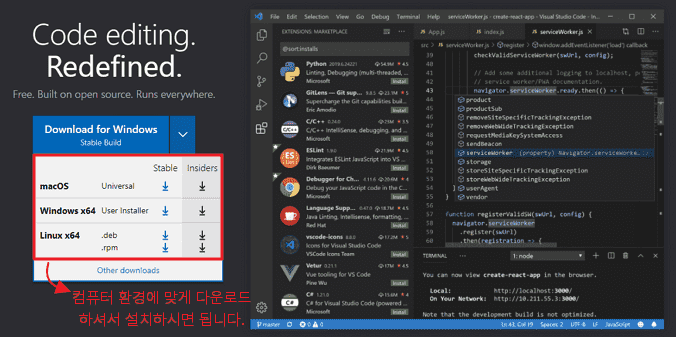
Section 1. How to use Visual Studio Code and required extensions
You will learn in detail how to use Visual Studio Code essentials and extensions. You will also learn in detail how to use Emmet, which is essential for using the text editor.
Section 2. All About CSS Selectors
Learn everything about selectors, which are the starting point of CSS and the standard that distinguishes between beginner and intermediate CSS, including basic required selectors, using selectors with tags, class nesting, adjacent sibling selectors, attribute selectors, matching selectors in media queries, and selector precedence.
Section 3. All About CSS Floats and Positions
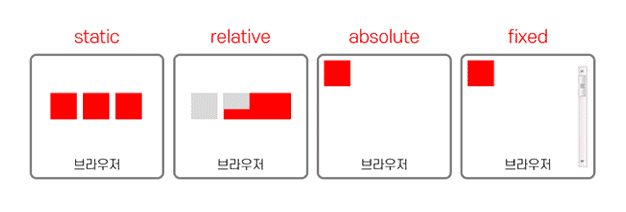
Apart from your ability to use Flex and Grid, the float and position properties are fundamental to all publishing work. CSS Float and Position You will gain a complete understanding of the float and position properties, which are the foundation of publishing in everything.
Section 4. All About the Display Property
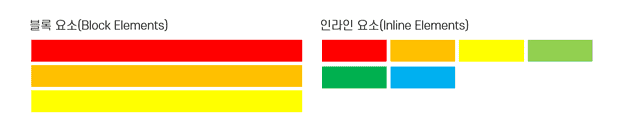
All CSS theories are important, but if I had to pick one, it would definitelybe understanding the display property. You will learn everything about the display property, which affects all publishing tasks, from macroscopic publishing tasks such as layout design to button creation and detailed element placement.
Section 5. All About Box-Model and Table Styles
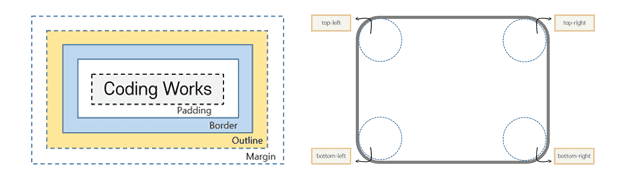
Learn everything about the box modelof individual elements, including the size of the element, margins, and spacing . Also, learntable styles for pretty table designs .
Section 6. All About CSS Pseudo Classes
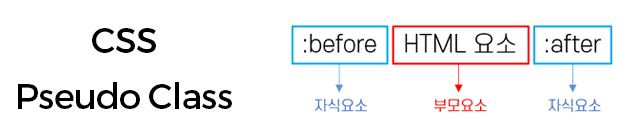
The essential theory for advancing to intermediate-level publishing skills is understanding and utilizing CSS pseudo-classes. Learn everything about CSS pseudo-classesused in publishing practice .
Section 7. Practical Skills and Tips for Using Highly Utilizable CSS3 Properties
There are numerous publishing skills and know-how that cannot be limited to theory. Knowing the theory well and being able to apply it in this way and that kind of situation are two different things. Based on solid theory, learn publishing skills and know-how that are absolutely necessary in practice.
💬 Lecture-related expected questions & must-reads
Q) How is it different from Season 1 and 2 of [HTML+CSS+JS Portfolio Practical Publishing], a Coding Works lecture?
[HTML+CSS+JS Portfolio Practical Publishing] Season 1 and Season 2 lectures are lectures that focus on creating practical publishing examples. Of course, there are explanations of theories, but since the lectures are centered on creating examples, there is not much explanation of theories. However, [All About CSS3 for Intermediate-Advanced Publishing] lectures focus on learning CSS theories for practical publishing. Therefore, creating practical publishing examples is not given much weight. It is an intermediate-advanced CSS theory lecture that teaches intermediate-advanced publishing theories.
Q) How much improvement in publishing skills can I expect after completing the course?
It's an obvious answer, but it's case by case. However , the content of the course [All About CSS3 for Intermediate-Advanced Publishing] is almost all the skills that intermediate-advanced publishers working in the field know and are realistically applying in the field. It's a course that reduces the time spent entering HTML and teaches more theoretical content. Of course , there are many theoretical contents in the lecture, but I think it's the student's job to repeat and apply them to make them their own .
Q) What level of web coding skills are required before taking the course?
First, you need a basic understanding of HTML+CSS . It is possible for beginners, but it may be a bit difficult for beginners. I think beginners can learn the basics of HTML+CSS on the Coding Works YouTube channel and then come to the lecture to understand the lecture well.
Q) Does the video include the entire process of coding HTML and CSS?
This course has a lot of theoretical material to learn. So, in order to reduce typing time and increase the amount of learning, there is no separate time to type HTML code in the video. The HTML structure is shown at the beginning of the video, and if you input the HTML and prepare, the CSS coding is explained one by one while inputting it. So, it is recommended that you learn how to use Visual Studio Code and Emmet sufficiently and then study.
Q) Can't I use the Brackets text editor?
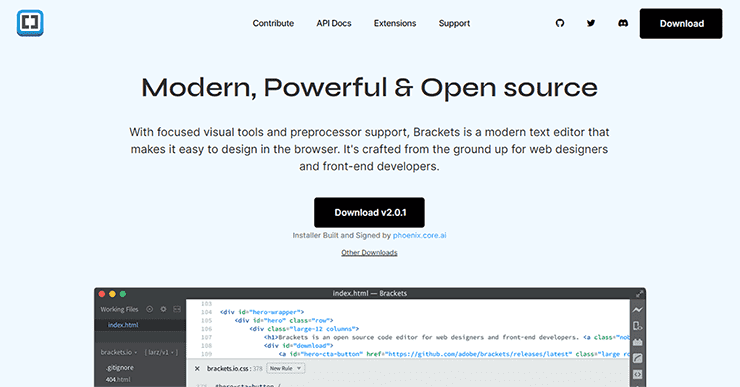
In the previous version, Brackets was no longer usable due to many problems such as not being able to install extensions after being dropped by Adobe. However, with the release of the new version of Brackets text editor, everything is now working properly.
Brackets is now available again with Visual Studio Kodi.
Please uninstall the existing version and download and install the new version (Version 2) from the official website.
This lecture was created using Visual Studio Code . Visual Studio Code is a free program with no usage restrictions. All lecture videos are explained based on Visual Studio Code.
Q) Is the learning order to be learned in order from the beginning?
As you move from one section to the next, the content from the previous section will be mentioned and repeated. Therefore,we recommend that you study in the order of the sections.
However, students can take the lectures in Section 7. Practical Skills and Tips Using Highly Utilizable CSS3 Properties in any order they need.
Q) Where can I ask questions if I don't understand something while studying?
If you have any questions, please post a post on the [Questions & Answers] board and I will answer you as soon as I confirm, even if it is not right away. Also, please be as specific as possible with your questions. It is not easy to get a sufficient answer when your question is not specific. So when you ask a question, it will be much easier to answer if you attach the HTML, CSS coding screen you are writing, and a browser capture screen along with the content you are curious about .
❤ News of passing the publisher exam for Coding Works students
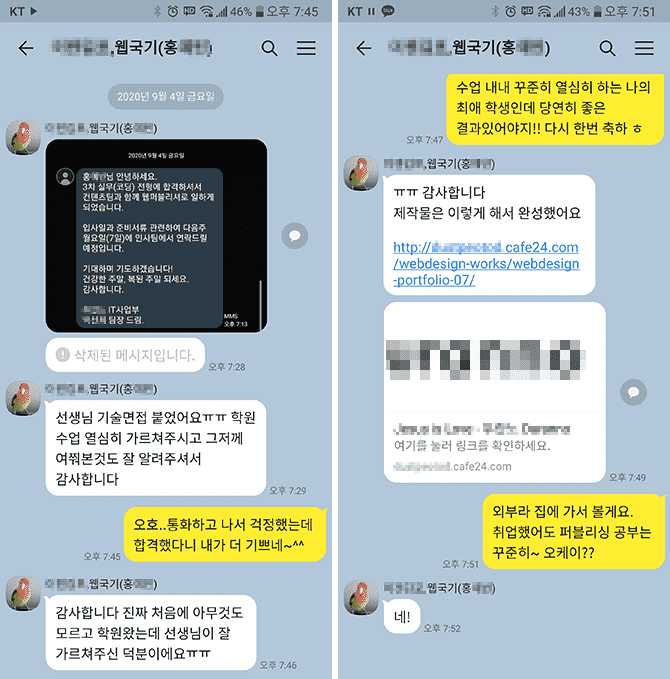
▲ A student who studied under me for about 4 and a half months in a nationally funded publishing course received a KakaoTalk message saying that he got a job.
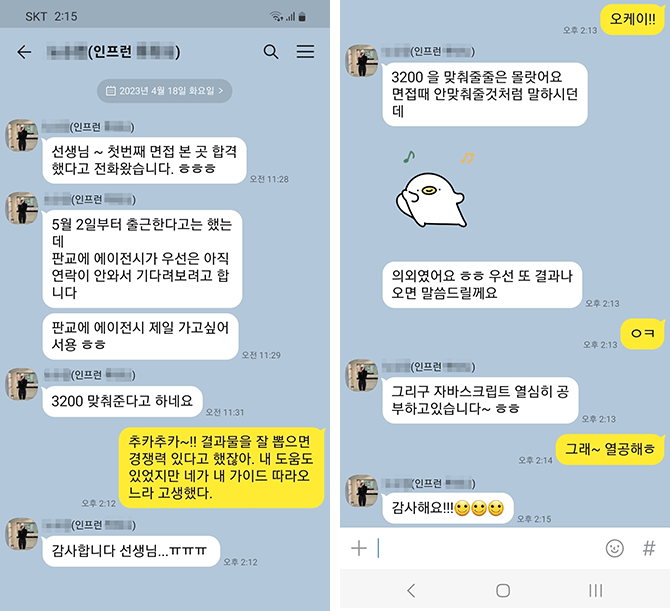
▲ I received a KakaoTalk message about the interview results for students who took the offline course on creating a personal portfolio at Coding Works (April 24, 2023).
❤ Email sent by a Coding Works student after getting a job at a publisher
Hello teacher :)
Teacher, I am Kim O-jeong, a student who was taking Inflearn's lectures. I am a student who sent an email this summer asking for advice on my personal portfolio. Do you remember?😊😊
It's nothing else than, I'm sending this email to tell you that I successfully landed a job at a publisher with the portfolio I received advice on from you!
Even!! The company contacted me first after seeing the portfolio I posted on Saramin, and I was interviewed via Zoom and passed! The company matched my desired salary, and I was able to join a company where I could do only publisher work, not design or development work.
It was a company looking for an experienced publisher, and they contacted me, a new employee, and asked me why they contacted me. He said that he looked at a lot of other people's portfolios, but he contacted me because the "Functional Definition" in my portfolio caught his eye.
I think this is all thanks to the teacher's lectures. If I hadn't taken the teacher's class, my portfolio would have just been ordinary, but I was able to successfully get a job thanks to the great tips the teacher gave me!
Although I have never actually met him, While creating my portfolio, I relied on it a lot, trusted it, and worked hard while watching the teacher's lectures!
I feel like my skills have improved a lot in the three months I spent listening to the teacher's lectures and creating a portfolio, more than the skills I built up while taking long classes at the academy.
I desperately wanted it, I believed and did as the teacher said and the results were really good.
Thank you so much!
Be careful of corona I hope to see you again with another great lecture :)
Hello teacher~ I'm Inflearn student OOO~ I found out the email address from another student's answer..😊😊
I just wanted to say thank you 😊😊
I've had a hard time taking your class and submitting my resume for about two weeks now... I passed the interview at a company and decided to come to work.. Thank you so much..😭😭
Actually, I was worried because I'm 32 years old. I submitted a lot of resumes, but I didn't get any calls. But this company's HR manager said that he doesn't like people who graduated from private academies 😊😊 The company I decided to join is small, but it has developers and web designers. They said they would train them for three months and then put them into practice. It's a bit far and the salary is low, but I'm going to study hard and try to increase my salary~ 😊😊
Thank you so much for everything. You answered my questions so well, and I am so amazed that I got a job after taking this online class.
I will continue to study and improve my skills by listening to your lectures. Fighting~!
🙋🏻♂️ Please read before asking questions~!!
If you have any questions while learning, please ask. When asking questions, you must upload the content that is not working, the code, and a screenshot of the browser result. In the case of code, you must upload all HTML, CSS, and JS codes so that we can give you an accurate answer.
If you only describe your problem in text without any code in your question, it will be difficult to give you an accurate answer unless it is really simple. Then, I will have no choice but to reply again saying, 'Please upload HTML, CSS, JS code and browser capture~', which will be cumbersome and take more time to find a solution.
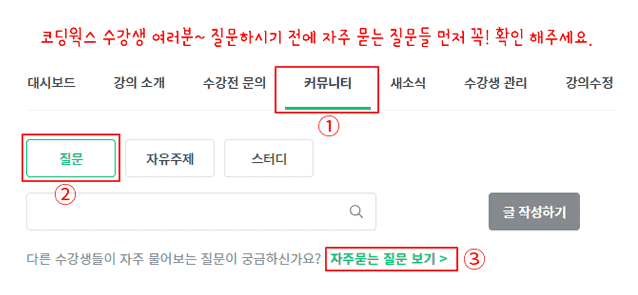
▲ Please check the frequently asked questions in the relevant lecture community first~
⚡ For effective learning, please refer to the Coding Works Publishing YouTube channel!
Please watch the theory video lectures on the Coding Works Publishing YouTube channel in parallel. Of course, not all theory videos are on the YouTube channel, but most of the important theory videos are there. Since there are many videos, it is recommended to search for videos as in the example below.
■ [Current] Freelance Front-end Publisher ■ [Currently] Operating HTML+CSS+JQUERY publishing YouTube channel 'Coding Works' ■ Green Computer Academy Web Publishing Instructor ■ Jo Eun Computer Academy Web Publishing Instructor ■ Now a Computer Academy Web Publishing Instructor ■ Front-end publisher, front-end publishing specialist instructor ■ UI/UX Web Design Portfolio Lecture ■ Web Design Technician Practical Certification Course ■ Easy & Edu Front-end UI/UX design and publishing
Interview and employment-inducing publisher personal portfolio homepage production, scss, sass, flex, grid, html, css, html/css, website, web publisher, publisher employment, website, coding, coding, jquery, javascript, jquery, javascript, layout, interactive web, interactive web, web design, web design, portfolio, publishing, responsive web, web design technician practical exam, bootstrap, bootstrap, css frameworks, framework
Recommended for these people
Who is this course right for?
Those who know the theory to some extent but need solid intermediate to advanced theory
Those who want to systematically learn the basics and skills of publishing
Need to know before starting?
Those who want to learn publishing theory systematically and consistently from the beginning
Those who want to acquire intermediate to advanced publishing theory skills beyond the beginner level
Hello This is
12,805
Learners
762
Reviews
2,114
Answers
4.9
Rating
23
Courses
■ [현재] 국비 퍼블리싱 & 프론트엔드 강사 ■ [현재] 프리랜서 프론트엔드 퍼블리셔 ■ [현재] HTML+CSS+JQUERY 퍼블리싱 유튜브 채널 '코딩웍스' 운영 ■ 그린 컴퓨터 아카데미 웹 퍼블리싱 강사 ■ 더조은 컴퓨터 아카데미 웹 퍼블리싱 강사 ■ 이젠 컴퓨터 아카데미 웹 퍼블리싱 강사 ■ 프론트엔드 퍼블리셔, 프론트엔드 퍼블리싱 전문강사 ■ UI/UX 웹 디자인 포트폴리오 강의 ■ 웹디자인 기능사 실기 자격증반 강의 ■ 이지앤에듀프론트엔드 UI/UX 디자인 및 퍼블리싱
I only developed backend and HW linkage, so I became greedy about web publishing, and I learned CSS well through the 1300-minute lecture. I think I have now gone beyond the basic HTML and CSS level, so it is good.
I studied pretty hard, but it was a bit ambiguous to say that I was good at publishing. However, I feel like I'm getting through these parts one by one, so it's good. I think this is a good lecture that can perfectly cover CSS publishing theory. I haven't finished it yet, but I'm sure it's good for intermediate level students.
I'm so satisfied with the lecture because it explains everything systematically and in detail. After listening to the basic lectures on YouTube, it was difficult to apply them in practice because I didn't have the fundamentals 😭 That's why I bought the lecture, and now I'm finally starting to understand CSS 😭 Thank you!
To be honest, I didn't mind the price because I was learning the aging know-how from the teacher. I will study more and try to improve my skills based on what you have taught me. Thank you so much.







![Modern Web Interactive CSS3 [PART1/3]강의 썸네일](https://cdn.inflearn.com/public/courses/335744/cover/32ae213b-41d5-4c80-8408-b64b8d286b58/335744.jpg?f=avif&w=420)

![Modern Web Interactive CSS3 [PART3/3]강의 썸네일](https://cdn.inflearn.com/public/courses/335746/cover/77dcadeb-88d7-4410-939e-265755e39733/335746.jpg?f=avif&w=420)


![[2025 Exam Criteria] Web Design Technician Practical Exam Complete Guide강의 썸네일](https://cdn.inflearn.com/public/courses/324878/course_cover/12211037-e74b-46b3-8942-46d465b81bba/webdesign-cover-02.png?f=avif&w=420)
![Properly Learning JavaScript: Mastering Object-Oriented Programming & Applied Strategy AI Tic-Tac-Toe Part 2 [Intermediate]강의 썸네일](https://cdn.inflearn.com/public/files/courses/336946/cover/01jv48md3p02hgkwt4yh1svf3j?f=avif&w=420)


