














Creating Stunning Web UI Styling with Tailwind CSS

The [Stunning Web UI Styling with Tailwind CSS] course covers the currently hottest framework, Tailwind CSS v3.4.1, in depth over 19 hours, ranging from theory to building a practical responsive website. A long course duration doesn't always guarantee quality. However, I am confident that this is a high-quality course that also happens to be comprehensive. In particular, it covers all Tailwind CSS theories in detail for 8 hours and 30 minutes, allowing those with a weak foundation in CSS to thoroughly learn the core concepts. This course is centered around Tailwind CSS styling as created by developers and publishers.

(5.0) 30 reviews

337 learners

Level Basic

Course period Unlimited

TailwindCSS
TailwindCSS
Responsive Web
Responsive Web
HTML/CSS
HTML/CSS
TailwindCSS
TailwindCSS
Responsive Web
Responsive Web
HTML/CSS
HTML/CSS

Reviews from Early Learners

Reviews from Early Learners

5.0

5.0

pcdoomco4

8% enrolled

This time, a new lecture came out, so I bought it. As always, the details of the lecture prove that it is not superficial but very detailed, so I felt that Coding Works is the answer at least for web publication-related lectures. There is really no need to look for other instructors' lectures, and if you properly digest this one lecture, you will definitely feel your skills improving, so you cannot help but become a Coding Works fan. I will listen to this lecture well.

5.0

Thomas

100% enrolled

It helped me a lot.

5.0

My Dream

100% enrolled

This lecture was a great help to me. I recommend it to those who are interested in Tailwind CSS. Personally, I would like to request a lecture on TailwindCSS practical application. Please give me a practical lecture like the "SCSS(SASS)+FLEX Practical Responsive Web Project" that I took before. (I think Tailwind CSS is the perfect CSS for me.^^)

What you will gain after the course

  • Systematic Learning and Application of Core Tailwind CSS Theories

  • Using Flex and Grid Easily and Conveniently with Tailwind CSS

  • Tailwind utility classes and all CSS properties

  • Creating practical examples using Tailwind CSS

  • A solid understanding of CSS theory through easy explanations

  • Web publishers who need Tailwind CSS skills and results

  • Creating a Responsive Career Resume & Portfolio Introduction Web Page with Tailwind CSS

[Video Update News] Tailwind CSS v4.0 has been officially released.

On January 22, 2025, two videos related to Tailwind CSS v4.0 were updated, and the PDF textbook file was also updated. Please check the updated videos and PDF textbook file.

▼ Video Update List

  • [Update] Tailwind CSS v4.0 CLI Installation and Environment Setup

  • [Update] Tailwind CSS v4.0 Custom Theme Configuration

▼ Textbook Update List

  • [Download] Must-Read Tips & Core Theory for Mastering Tailwind CSS

Stunning Web UI Styling with Tailwind CSS

'19 hours of substantial lesson content and class time based on thorough material and examples'

'8 hours and 30 minutes of Tailwind CSS theory lessons taught by an experienced publisher'

'Creating practical examples to complete the theory and building responsive web pages'

'A teaching method where everything is coded manually from scratch instead of copying and pasting code from the official website'

'CodingWorks PDF textbook containing everything from Tailwind CSS installation and environment setup to all theoretical concepts'

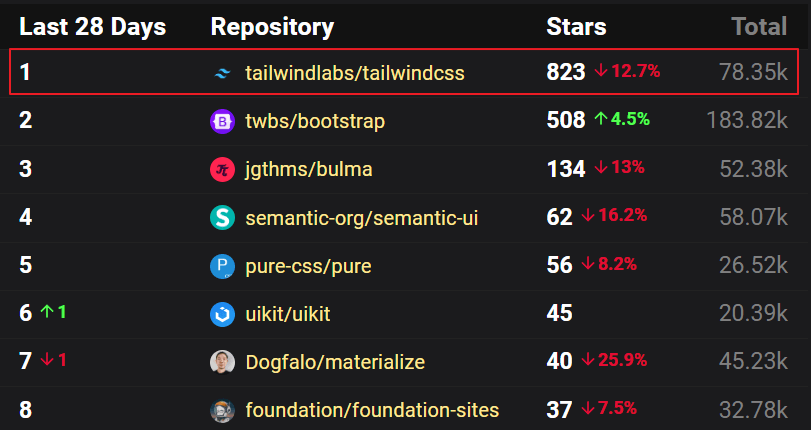
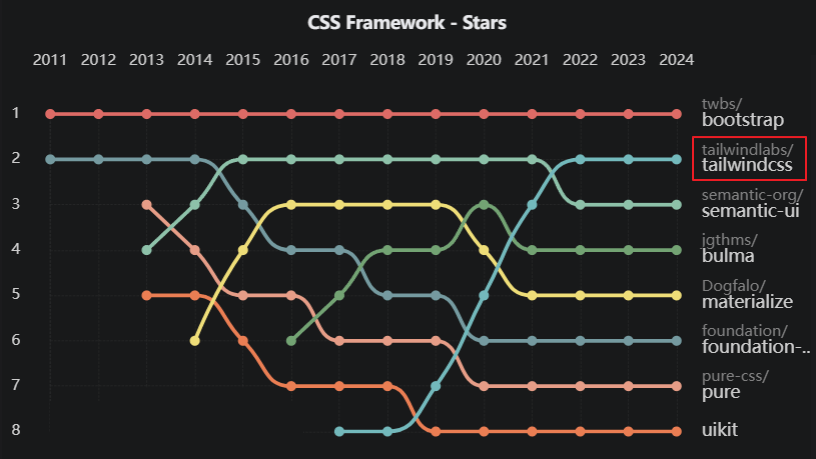
CSS Frameworks Ranking in 2023

Tailwind CSS, which has consistently enjoyed popularity and ranked first in satisfaction in the CSS Frameworks Ranking, is currently the hottest CSS framework worldwide. I believe the most representative reasons for its popularity are the ability to perform creative styling using utility classes and the significantly fast turnaround time for creating high-quality designs.

🎯Tailwind CSS Official Website: https://tailwindcss.com/

Image Source: OSS Insight (https://ossinsight.io/collections/css-framework/)

What is Tailwind CSS?

As a CSS framework that pursues a Utility-First approach, it allows for fast and efficient use by intuitively representing CSS properties within classes.

Almost all CSS properties needed for web UI styling are predefined as built-in classes, so you can use them by combining the designated classes effectively.

Therefore, since you can style while looking only at the HTML file without having to check a separate CSS file, it significantly improves focus and offers the distinct advantage of faster workflow.

  • Utility-First: Styling within HTML code by utilizing pre-set utility classes

  • As an example, if you want to apply a margin of 4 (1rem), padding of 2 (0.5rem), center-align text, and add an underline to a div, you can intuitively insert the class names pre-defined by Tailwind—that is, utility classes—into the class attribute. <div class="m-4 p-2 text-center underline">...</div>

  • In the traditional CSS approach, it has been done as follows.

  • div { margin: 1rem; padding: 0.5rem; text-align: center; text-decoration: underline; }

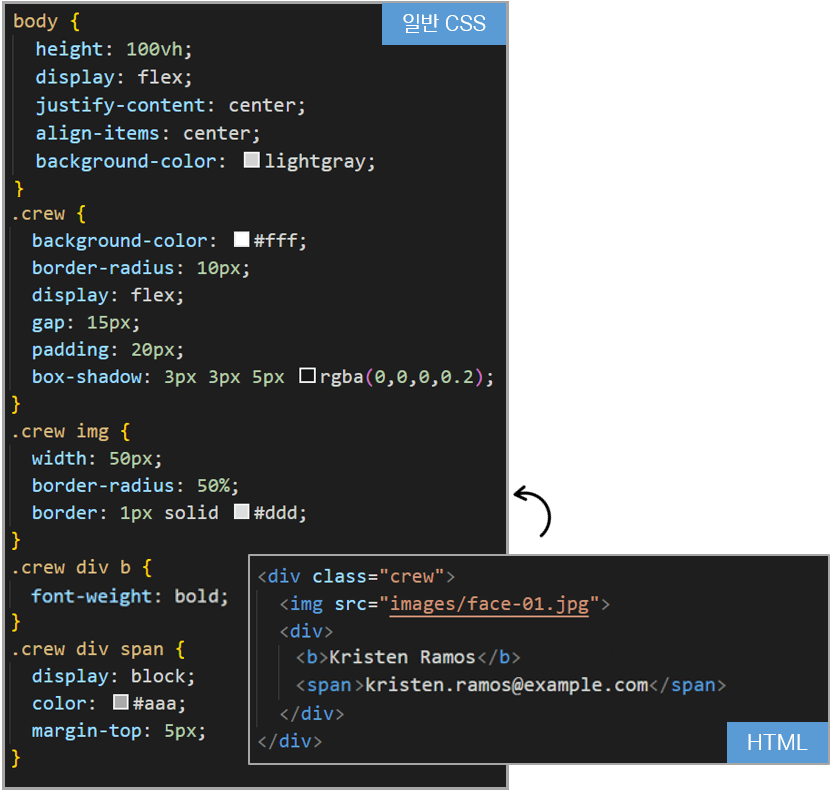
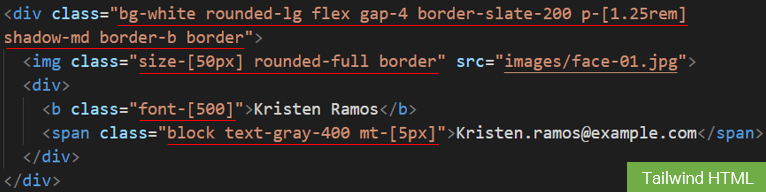
Comparison of Tailwind CSS vs. Regular CSS Code

▲ Assuming we are creating the UI above


▲ Standard CSS approach code


▲ Tailwind CSS style code


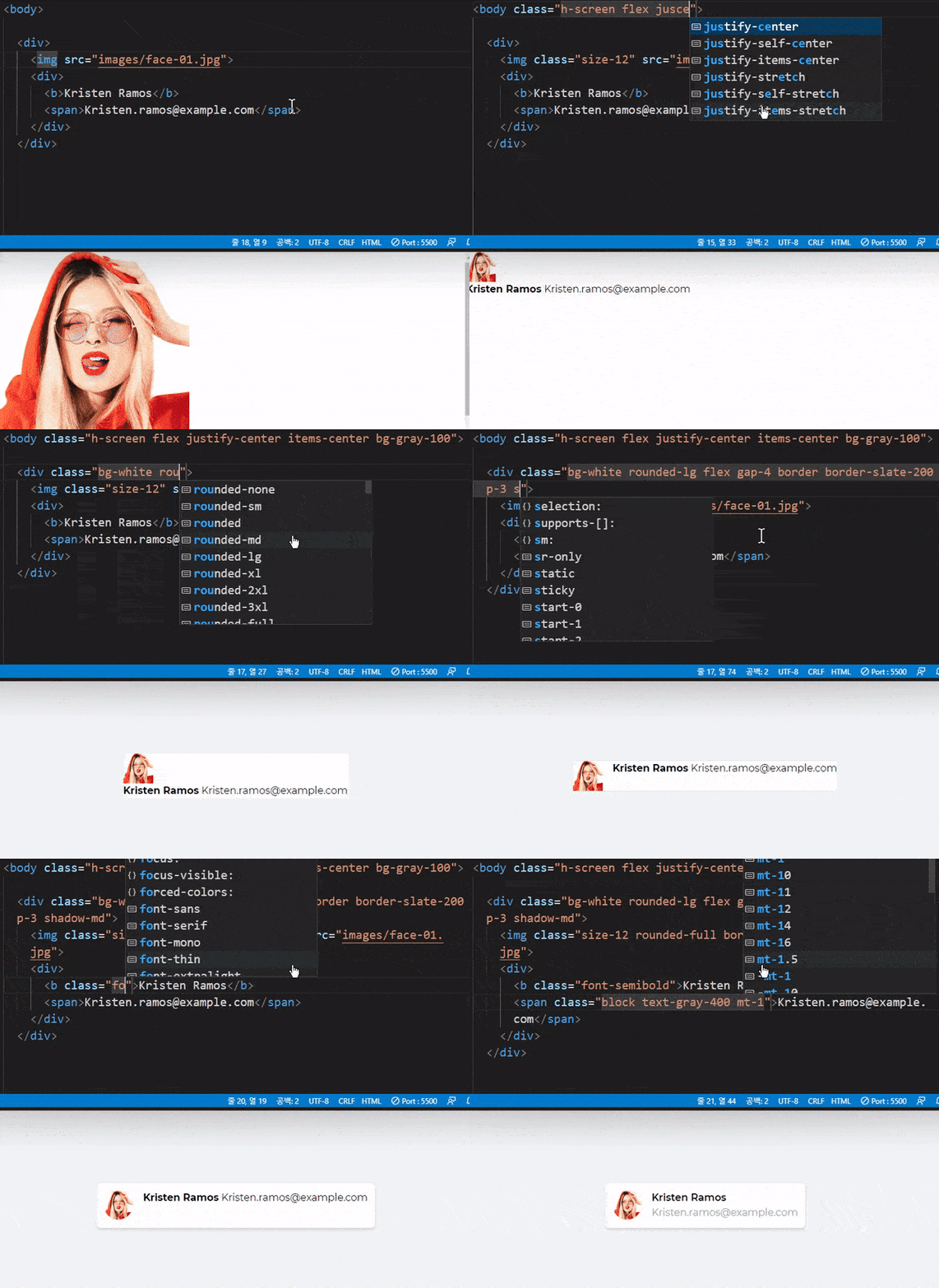
Styling with Tailwind CSS...

The traditional CSS method involves the inconvenience of switching back and forth between HTML and CSS files, but with Tailwind CSS, you can style while looking only at the HTML code, as shown in the example above.

The Tailwind CSS approach achieves the same styling results but offers the significant advantages of better focus and faster speed because you only need to look at the HTML code compared to traditional CSS methods.


What CodingWorks considered the biggest disadvantage of Tailwind CSS before preparing the lecture

About a year before Coding Works started preparing the Tailwind CSS course, I watched a few YouTube videos to get a sense of what Tailwind CSS was, and as a publisher, I had two main concerns.

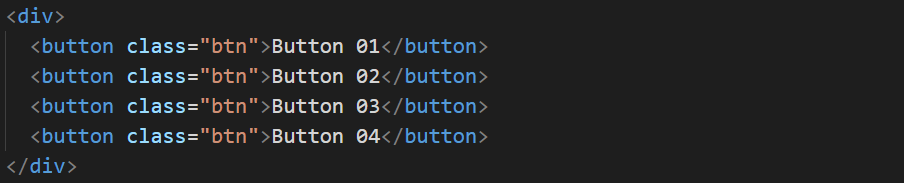
The first concern was that while it seemed good, repeatedly adding the same class names felt very unproductive and made the HTML look messy. Furthermore, because the same class names were used repeatedly, I couldn't edit them all at once; I had to edit them as many times as they were used... I thought, "Isn't this a bit impractical for real-world work?"

However, as I began preparing for the lecture in earnest, I scoured the official website and studied more deeply by looking at overseas materials and lectures from international YouTubers, since there was almost no information available in Korean. This led me to realize that my previous concerns were unnecessary and based on a hasty judgment made without deep knowledge. You can minimize the repetitive use of class names by using child selectors as shown below. When modifying using the Tailwind CSS child selector method, you only need to make the change once in the parent element of the buttons.


My second concern was that while standard CSS allows you to create a style once and easily reuse it by applying the class name wherever needed, I thought Tailwind CSS wouldn't be able to do that... I worried that it would be really inconvenient when doing publishing work in practice. In short, I thought style reuse was impossible. However, as shown in the example below, you can use Tailwind CSS components to achieve the exact same style reuse as standard CSS.

Like me, I hope you don't turn away from Tailwind CSS after only seeing its drawbacks in blogs or short YouTube videos. If you study it more deeply, you will realize it is quite a decent CSS framework. I want you to know that it allows for detailed and creative CSS styling, and that proficiency in Tailwind CSS can be a very strong competitive advantage for employment or career transitions.

Differences from other CSS frameworks

Even when trying to change the design in existing CSS frameworks like Bootstrap or Semantic UI, detailed modifications are difficult and efficiency is very low. Even for simple design changes, you have to go through the difficult process of using developer tools. However, Tailwind CSS is designed from the ground up to allow for high-freedom web UI styling.

In short, while existing CSS frameworks often result in websites that look similar despite being different, using Tailwind CSS allows for completely unique website styling depending on the creator.


To put Tailwind CSS simply..

'While doing creative styling

The No.1 CSS framework that reduces production time'

Tailwind CSS, which has immense advantages and charm despite a few drawbacks


😊Advantages of Tailwind CSS

  • Development time can be shortened through rapid development.

  • There is no need to worry about class names.

  • You can focus on your work while looking only at the HTML.

  • Good for applying a consistent design system.

  • Working with responsive layouts is very simple.

  • The use of components can compensate for messy HTML code.

  • Easy to maintain.

  • Framework independence (can be used alongside other frameworks) ex) Bootstrap + Tailwind CSS

😞Disadvantages of Tailwind CSS

  • There is a learning curve as it requires time and effort to reach a certain level of proficiency. (Especially for developers)

  • There is a significant lack of learning courses produced in Korean, making it difficult to find information.


  • The same class names are used repeatedly in the HTML code.
    - This disadvantage can be significantly resolved by using Tailwind CSS child & descendant selectors as learned in the lecture.

  • Until you get used to it, there is a high level of dependence on the official documentation in the beginning.

  • It is convenient and fast, but code readability drops significantly due to the lengthening HTML code.

  • There is the inconvenience of having to set up a CLI installation environment and compile.

Q) Is the Tailwind CSS course intended for developers or web publishers?

A) The target audience includes both developers and web publishers. Additionally, web designers and UI/UX designers with a basic understanding of HTML+CSS are also eligible to take the course.

  1. While there is a slight learning curve to studying Tailwind CSS theory, it is not as high as you might think. Once you get past the theoretical study, you will be able to create practical web UI publishing examples as smoothly and swiftly as flowing water.

  2. Proficiency in Tailwind CSS and the resulting publishing outputs not only enhance a developer's competitiveness but also serve as a competitive edge for all job roles responsible for publishing tasks. The reason Tailwind CSS skills provide a greater advantage to developers is that publishing is not necessarily a mandatory part of their role. However, if a developer can publish well—and do so beautifully and quickly—they become even more competitive than a professional web publisher.

  3. I believe proficiency in Tailwind CSS takes precedence over traditional CSS frameworks like Bootstrap. This is because Tailwind CSS allows for meticulous and detailed CSS design depending on the creator's skill level.

After taking the Tailwind CSS course, you will be able to create results like these


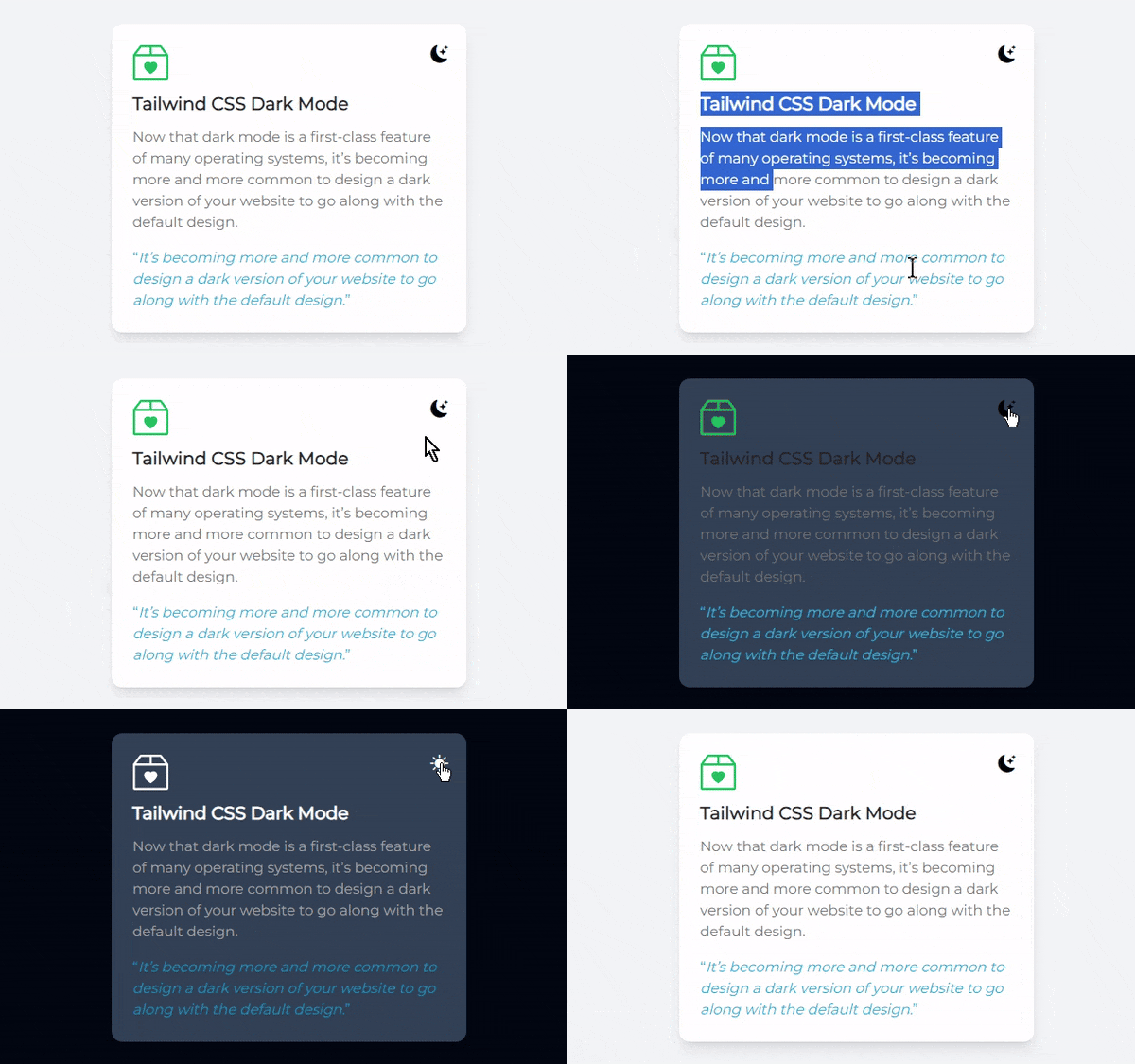
▲ Card UI Design(0) - Creating Dark Mode (ft. SVG)

▲ Card UI Design - Crew Contact List

▲ Card UI Design - Real Estate Price

▲ Section UI Design - Subscribe Form

▲ Section UI Design - Meet the team

▲ Section UI Design - Login Form

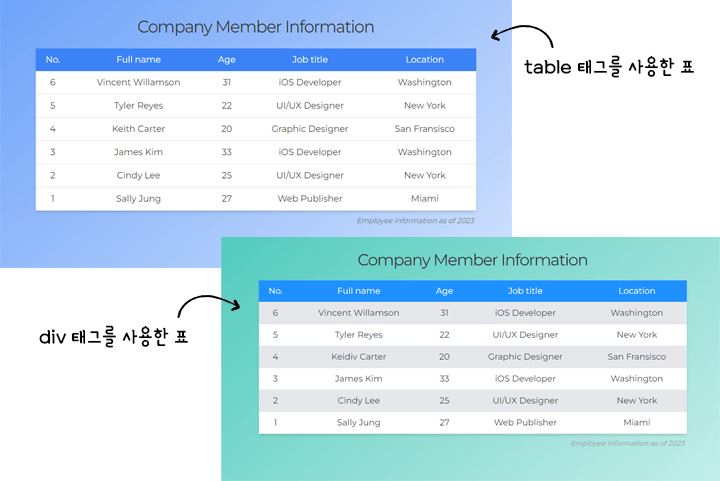
▲ Creating beautiful tables using table and div tags (ft. Pseudo-class theory for checking order)

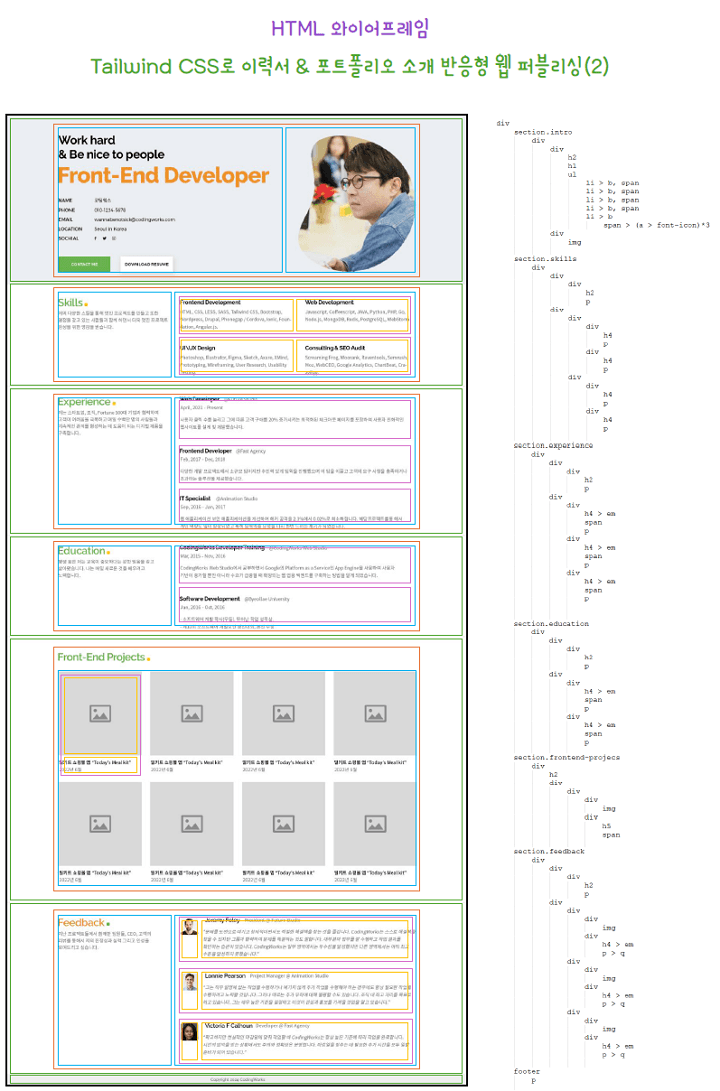
▲ Tailwind CSS Developer & Publisher Career Resume & Portfolio Introduction Responsive Web Creation

🚩Key Features of Coding Works Tailwind CSS Course

  • Tailwind CSS class led by an experienced publisher

  • 19 hours of substantial lesson content and class time based on thorough material and examples

  • A method where everything is coded manually from scratch in class, rather than copying code from the official Tailwind CSS website.

  • Learn by covering all Tailwind CSS theoretical concepts, explaining each in detail individually, and then coding them.

  • Creating various and beautiful practical web UI examples based on Tailwind CSS theory that will satisfy even experienced publishers.

  • Creating a responsive career resume web page with Tailwind CSS for developer and publisher employment and competitiveness (Real learning outcomes)

  • PDF textbook produced by Coding Works, containing everything from Tailwind CSS CLI installation and environment setup to all theoretical concepts.

  • HTML Wireframe Structure Creation Class for Responsive Career Resume Publishing

  • Tailwind CSS course designed for developers and publishers

👍The reason why the class hours are long
Just as I did when teaching at government-funded academies, I believe that there must be systematic steps to become proficient in publishing. Therefore, I think the proportion of theoretical lessons inevitably has to be high. Everyone finds theory classes boring. However, even if you create examples, your skills will not improve without an understanding of the theory.

👍A method of coding directly, not a code-copying class
The thing you should avoid most when learning a CSS framework is copying HTML code from the official site and modifying it piece by piece. If you do that, you won't understand the HTML structure of the CSS framework, and it won't lead to real learning. Therefore, even when learning a framework, you must type every single line of code yourself. That is the only way to improve your skills.

👍HTML Wireframe Structure Creation Class
To create practical examples and a responsive career resume, you will learn how to build HTML wireframe structures by creating them yourself. Since Tailwind CSS rarely uses custom class names, you must build a solid HTML wireframe structure to avoid mistakes when applying Tailwind CSS class names.

👍The reason for creating a responsive career resume as the final project
Every learning process must have a final result at the end. This allows you to feel a sense of accomplishment, and it is important to have the experience of applying the theories you've studied to a real-world project to improve your skills. That is why we are creating a responsive career resume.

📖 Tailwind CSS Textbook (PDF) created by Coding Works

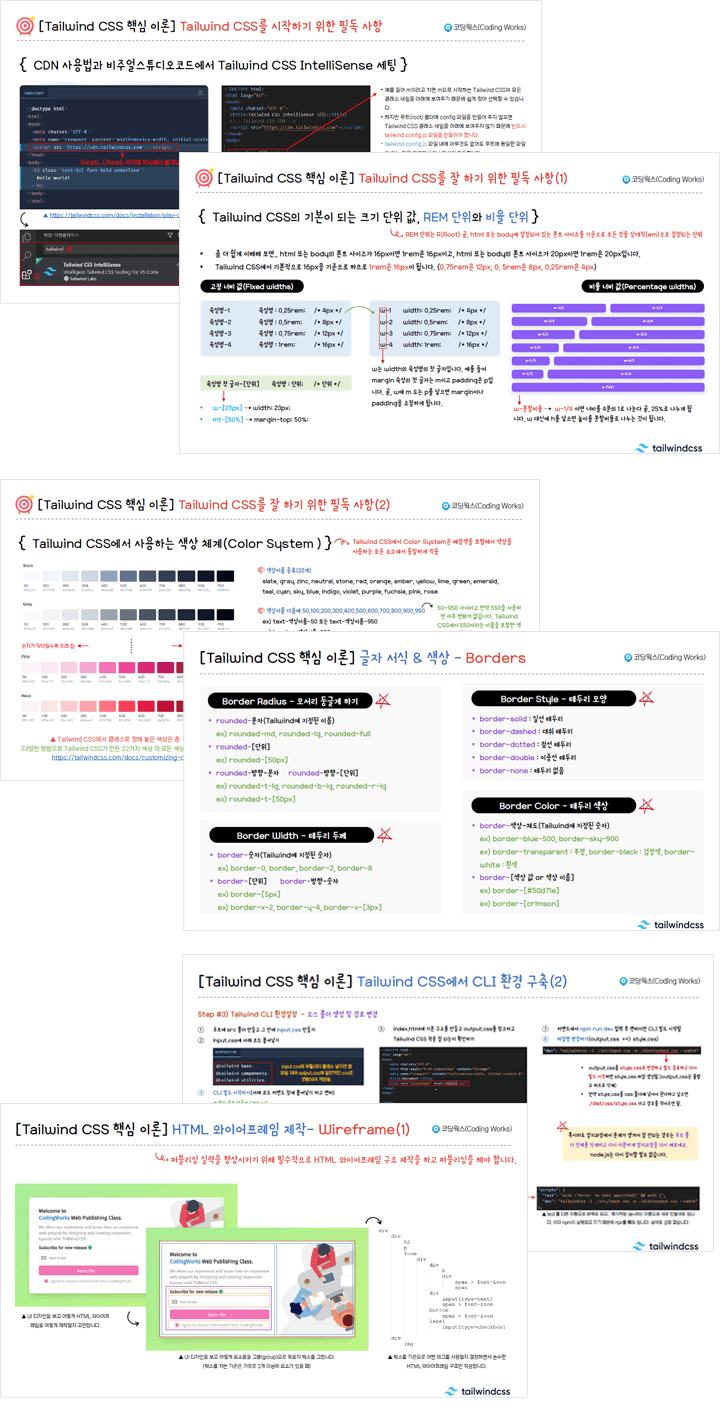
The Tailwind CSS textbook (PDF) consists of a total of 45 pages. It summarizes only the essential core information from the vast content of the official Tailwind CSS website in an easy-to-understand manner. In addition to the theoretical lessons, it contains detailed information on Tailwind CSS styling, ranging from initial setup to CLI installation and configuration for real-world projects, as well as HTML wireframe structures.

The official Tailwind CSS website is in English and contains a vast amount of information, including many non-essential details. Studying theory through the official site can lead to a loss of focus and easily dampen your motivation to learn.


📖 Providing Final Versions and Reference Materials

In the theory classes, we provide key items, completed versions of practical examples, and completed responsive web versions for developer resumes and portfolios. Additionally, a curated list of websites helpful for publishing is provided. Theory classes are conducted based on the Tailwind CSS textbook (PDF) produced by Coding Works.

All materials can be downloaded from [Section 5. Download Student Reference Materials].


Notes before taking the course

  • Since Tailwind CSS IntelliSense is required, please use Visual Studio Code as your text editor.

  • If the target audience is an experienced publisher, it is fine to watch the theory lessons at double speed and move straight to creating practical examples. However, if the target audience is a developer or publisher with a weak foundation in publishing, I highly recommend studying the theory lessons thoroughly.

  • Before the practical example lesson, please unzip [Tailwind CSS(v3.4.1) Theory and Practical Example Complete Version], delete everything except for the images folder in each individual folder, and then follow along with the lesson.

Prerequisite Knowledge

  • You only need to have a basic knowledge of HTML and CSS.

Note

  • The installation and use of Tailwind CSS in JavaScript frameworks such as React or Vue are not covered in this course.

  • I am sorry, but even if you ask questions regarding the use of Tailwind CSS in React or Vue environments, I will not be able to provide an answer as I am not familiar with those frameworks.

  • I would appreciate it if you could only ask questions related to the Tailwind CSS covered in the class, as well as general CSS properties and their applications.

How to use Visual Studio Code

The course <SCSS(SASS)+FLEX Real-world Responsive Web Project with Figma> is a course produced using Visual Studio Code. Visual Studio Code is a free program with no usage restrictions. All lecture videos are explained based on Visual Studio Code.

Please learn the basic usage through the Coding Works YouTube video below before studying <Section 1. [Tailwind CSS Core Theory] Handling Basic Elements (ver 3.4.1)>.

  • Visual Studio Code Usage and Configuration (Watch Video)

  • How to use Emmet in Visual Studio Code (Watch Video)

  • Essential Visual Studio Code Extension Installation and Usage (Watch Video)

  • Preventing Full Reload that jumps to the top when editing CSS in Visual Studio Code (Watch Video)

Download Visual Studio Code from the official website (Click)

  • The installation video for the Live Sass Compiler Extension is not on YouTube, but you must install it.

  • Installing the essential extensions and practicing briefly before starting the theoretical study will help you follow the class much more smoothly.

🖐Frequently Asked Questions

If you have any questions other than the ones listed below, please post them on the course community Q&A board, and I will do my best to answer them.

Q) How much prior knowledge of HTML+CSS is required?
If you have basic experience using HTML+CSS, you will be able to follow along and achieve the level of skill and results you expect.

Q. Are there any notes regarding the course (required environment, other precautions, etc.)?
There is a lot of content, and the class moves at a fast pace. However, it doesn't skip over things without sufficient explanation; everything is explained in detail. I believe you will be able to follow along well. Please make sure to familiarize yourself with the basic usage of Visual Studio Code before the theoretical lessons.

And if possible, it is recommended to have a dual monitor setup. It doesn't matter for the theoretical lessons, but using a single monitor might be a bit inconvenient when building the responsive career resume web page in the final section.

Q) Is it okay if I have no experience using CSS Frameworks?
It doesn't matter at all. Tailwind CSS has a completely different system from existing frameworks, so you can think of it as learning general publishing.

Q) What should I do if I want to study more CSS theory while taking the class?
In this case, since the Coding Works YouTube channel covers most CSS theories, you can search for and study the specific topics you need on the channel.

Please follow along with the theoretical video lectures on the CodingWorks Publishing YouTube channel. While not all theory videos are on the YouTube channel, almost all the important ones are available. Since there are many videos, it is recommended to search for them as shown in the example below to find what you need.

CodingWorks Publishing YouTube Channel: https://www.youtube.com/codingworks

About the Instructor

[Stunning Web UI Styling with Tailwind CSS] course creator Coding Works has taught publishing theory, application, and personal portfolio website creation to over 300 government-funded publishing course students to date. In particular, as an instructor who has specialized in publishing lectures for many years, they guide the entire preparation process for employment as a publisher from A to Z, ensuring that most students can find jobs immediately after completing the course. Furthermore, while conducting publishing-related lectures on Inflearn, they have received evaluations that their courses have been very helpful to Inflearn students as well.

Recommended for
these people

Who is this course right for?

  • Those who need systematic learning and application of core Tailwind CSS theories

  • Developers who want to access and utilize CSS in a simple and easy way

  • Publishers who need to improve their competitiveness for employment or career changes by adding Tailwind CSS skills.

  • Those who want to make their developer career resume responsive

  • Those who want to make their web publisher career resume responsive

Need to know before starting?

  • HTML+CSS Basics

Hello
This is codingworks

13,052

Learners

784

Reviews

2,122

Answers

4.9

Rating

23

Courses

■ [Current] Government-funded Publishing & Frontend Instructor
■ [Current] Freelance Frontend Publisher
■ [Current] Operator of HTML+CSS+JQUERY Publishing YouTube Channel 'Coding Works'
■ Green Computer Academy Web Publishing Instructor
■ The Joeun Computer Academy Web Publishing Instructor
■ Ezen Computer Academy Web Publishing Instructor
■ Frontend Publisher, Professional Frontend Publishing Instructor
■ UI/UX Web Design Portfolio Lectures
■ Web Design Technician Practical Certification Class Lectures
■ Easy & Edu Frontend UI/UX Design and Publishing

🌏CodingWorks Inflearn Lecture List - https://www.inflearn.com/users/@codingworks
🌏Inflearn CodingWorks Lecture Learning Order (Learning Roadmap) - https://www.inflearn.com/blogs/2351
🌏CodingWorks Inflearn Publishing Blog - https://www.inflearn.com/users/@codingworks/blogs
🌏CodingWorks Publishing YouTube Channel - https://www.youtube.com/codingworks
🟣View Inflearn In-Focus CodingWorks Interview: https://www.inflearn.com/pages/infocus-8-20230704

More

Curriculum

All

52 lectures ∙ (19hr 29min)

Course Materials:

Lecture resources
Published: 
Last updated: 

Reviews

All

30 reviews

5.0

30 reviews

  • twozeronine님의 프로필 이미지
    twozeronine

    Reviews 6

    Average Rating 4.8

    4

    100% enrolled

    Even if you follow the practical lecture and follow it exactly, there are some parts that are wrong. Also, when there is a change in the middle of the practical lecture, you have to revise it again. It is very tiring to keep looking at 4 screens at once - the code I am working on, the web window, the lecture video, and the source code of the lecture video. I think it would have been better if the lecture content was organized sequentially. However, despite that, it is a really good lecture for learning tailwind css.

    • codingworks
      Instructor

      Thank you for your course review~

  • orangewebcenter2238님의 프로필 이미지
    orangewebcenter2238

    Reviews 46

    Average Rating 4.7

    5

    100% enrolled

    It helped me a lot.

    • codingworks
      Instructor

      Thank you for your course review~

  • ds4odk님의 프로필 이미지
    ds4odk

    Reviews 4

    Average Rating 5.0

    5

    100% enrolled

    This lecture was a great help to me. I recommend it to those who are interested in Tailwind CSS. Personally, I would like to request a lecture on TailwindCSS practical application. Please give me a practical lecture like the "SCSS(SASS)+FLEX Practical Responsive Web Project" that I took before. (I think Tailwind CSS is the perfect CSS for me.^^)

    • codingworks
      Instructor

      Thank you for your course review!!

  • jungsik님의 프로필 이미지
    jungsik

    Reviews 43

    Average Rating 5.0

    5

    100% enrolled

    Thank you for your hard work.

    • codingworks
      Instructor

      Thank you for your review. You achieved 100% in less than a week since the course opened. That's amazing!!

  • pcdoomco44801님의 프로필 이미지
    pcdoomco44801

    Reviews 3

    Average Rating 5.0

    5

    8% enrolled

    This time, a new lecture came out, so I bought it. As always, the details of the lecture prove that it is not superficial but very detailed, so I felt that Coding Works is the answer at least for web publication-related lectures. There is really no need to look for other instructors' lectures, and if you properly digest this one lecture, you will definitely feel your skills improving, so you cannot help but become a Coding Works fan. I will listen to this lecture well.

    • codingworks
      Instructor

      Thank you for your first review!!

codingworks's other courses

Check out other courses by the instructor!

Similar courses

Explore other courses in the same field!

$59.40