Kevin's Easy-to-Understand Java Developer Roadmap Story
Kevin
Free
Beginner / Java
4.7
(133)
3,900+
Kevin's Easy-to-Understand Java Developer (Web Developer) Roadmap Story

Beginner
Java

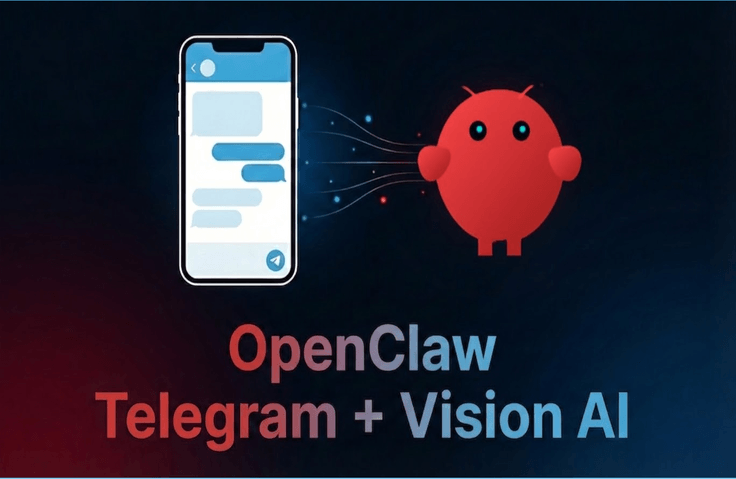
This is an introductory course on a mobile AI assistant workflow with vision capabilities: when you send a photo of a receipt via Telegram on your smartphone, OpenClaw and Gemini 2.5 Flash automatically analyze it and organize the data into your PC workspace.
68 learners
Level Basic
Course period Unlimited
Reviews from Early Learners
5.0
kbjun22
I feel like I learned the important aspects of AI Agents in a fun way in a short amount of time. Thank you for the useful lecture!
How to create your own bot with Telegram BotFather and securely integrate it with the OpenClaw gateway
How to set up a multimodal agent that understands text and images simultaneously by connecting the Gemini 2.5 Flash vision model to OpenClaw
Implement the full workflow: Send a photo of a receipt taken on a smartphone to Telegram → Analyze with AI → Automatically save to the workspace/expenses folder.
How to design agent behavior rules by customizing AGENTS.md rules so that it automatically analyzes, saves, and summarizes receipt images when they are received.
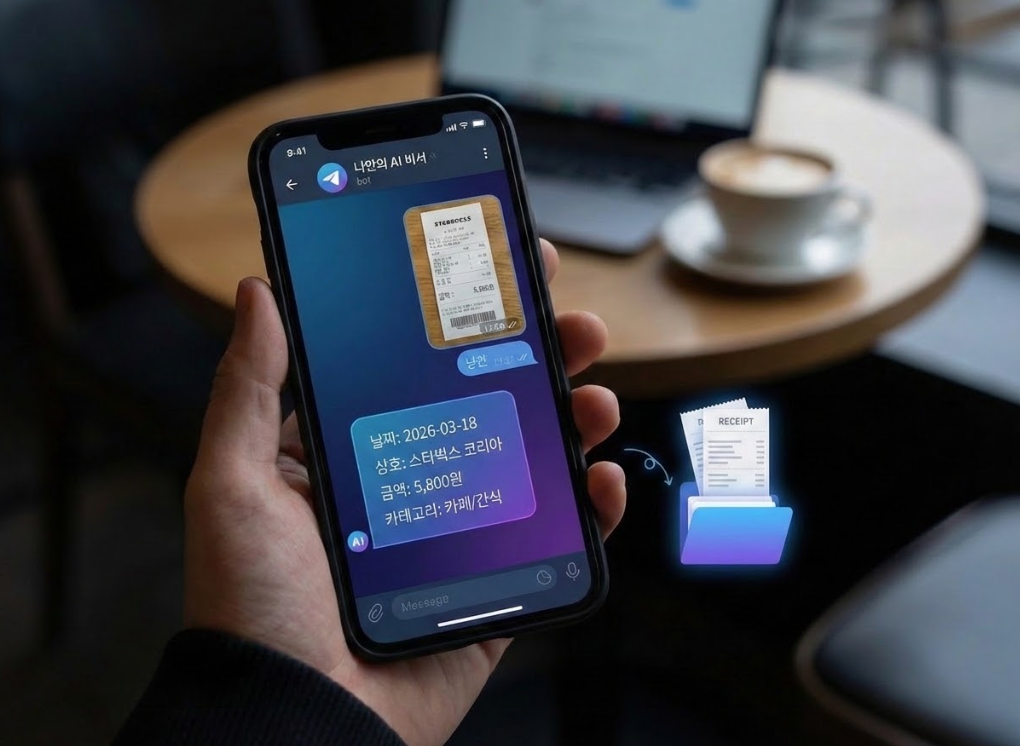
What if you had an assistant that automatically analyzes and organizes everything just by sending a "single photo of a receipt," even when you're out at a cafe or on the subway? Now, even without opening your laptop, your own AI agent within Telegram takes care of your household accounts and work records for you.
In this course, you will use OpenClaw and the Gemini 2.5 Flash vision model to create your own Telegram remote assistant that can be called from a smartphone, and configure a fully automated routine from “sending a photo → automatic analysis → saving to the expenses folder.”
If you have completed Part 1, you can naturally continue with the hands-on practice. Even if you haven't taken Part 1, as long as you can access OpenClaw through a browser, you can easily follow along using the provided pre-course checklist.
For example,
- Freelancers can enjoy coffee at a cafe and simply upload photos of their receipts to Telegram, and by the time they get home, they can receive expense records already organized by date and category.
- Business owners can take a photo of a pile of daily sales receipts as they are and upload them, and receive back a Markdown report organized by month and category.
- Office workers can upload lunch, coffee, and taxi receipts all at once on the subway during their commute home, and check a summary report of today's expenses by the time they arrive.
This course does not focus on "just any AI assistant that works," but on a remote AI assistant that can be operated safely.
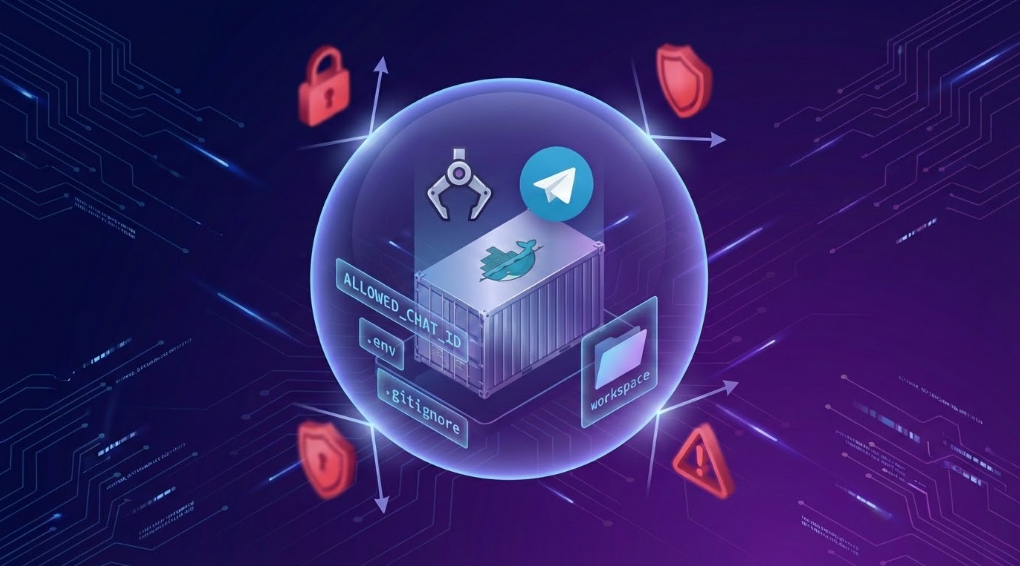
The OpenClaw practice session is conducted entirely within a Docker container, physically limiting the scope of what the agent can access to the workspace folder.
Also, at the end of the lecture, we will examine risk scenarios that can actually occur, such as the leakage of Telegram bot tokens and the exposure of personal information in receipts.
It always includes a "Security Special Lecture" utilizing ALLOWED_CHAT_ID whitelisting, Docker sandboxing, and .gitignore settings,
“How to use OpenClaw with peace of mind even when controlling it remotely from outside the home” was designed to be the core takeaway.
- We design the practice to be conducted strictly within a Docker environment, ensuring that even in the event of a mistake or an attack, only designated folders are accessible rather than the entire system.
- This is a rare OpenClaw security-specialized lecture that covers everything from Telegram bot token and chat ID management to the protection of receipt data (business name, amount, card information, etc.) all at once.
- In the final session, a separate security special lecture section will summarize everything so that it can be applied immediately to actual operations.
You can call the OpenClaw agent directly from Telegram on your smartphone and build a remote control environment where you can inquire about and check the status of your workspace even from outside your home.
By activating the Gemini 2.5 Flash vision feature, you can create an image analysis pipeline that automatically recognizes and extracts the date, merchant name, amount, and category from receipt photos.
You will design and implement a fully automated receipt assistant routine that follows the process of "Photo transmission → Automatic analysis → Cumulative storage as Markdown in the expenses/ folder."
By utilizing the ALLOWED_CHAT_ID whitelist, Docker sandbox, and .gitignore settings, you will acquire the practical security sense to safely operate a Telegram-integrated AI agent.
By modifying AGENTS.md and linking shortcut commands, you can design a personalized AI assistant workflow that executes your own repetitive task routines via Telegram inline buttons.
AI Model
Google Gemini 2.5 Flash (Multimodal model with Vision support)
Agent
OpenClaw.AI
Infrastructure & Execution Environment
Docker
Docker Compose (Local container execution and volume mounting)
Messaging / Interface
Telegram Bot API
Dedicated Telegram bot created via BotFather
Configuration Files & Scripts
openclaw.json
Model and token configuration via environment variables
Markdown-based agent configuration files (IDENTITY.md, AGENTS.md, SOUL.md)
Other Tools
Local Ubuntu Terminal
Distribution of practice code and guides via GitHub Repository
Environment with OpenClaw web access
⭐ If you have the Docker-based OpenClaw environment built in Part 1, you can use it as is.
⭐ If you haven't taken Part 1, please prepare in advance until you can access OpenClaw from your browser by following the official documentation or course instructions.
Telegram Account and App
You need to install the Telegram app on your smartphone and create an account.
It will be more convenient for the practice if you can use either Telegram Web or the Desktop version on your PC (or browser).
Since you need to be able to create a bot by chatting with BotFather, it is recommended to keep your Telegram notifications and login status active.
Gemini API key issuance and availability
A Google account capable of issuing a Gemini API key from Google AI Studio or Google Cloud.
Please check the billing policy and be prepared to keep your issued API key in a safe place.
You need to check if external API calls are blocked in your network environment (company, school network, etc.).
Completion of Part 1 (or equivalent experience)
If you have taken [Part 1: Basics] OpenClaw.AI Master Class: Build Your Own Autonomous AI Agent with Gemini and Docker,
you can minimize environment setup explanations in Part 2 and focus on Telegram, Vision, and Security.
If you haven't taken Part 1, we recommend that you are somewhat familiar with installing Docker, running containers, and basic terminal usage.
Basic Docker / Terminal experience
Experience executing basic commands such as docker compose up and docker ps.
Learning will be easier if you are comfortable with basic development environments, such as using VS Code, the terminal, and cloning GitHub repositories.
Practice in a personal environment
We recommend practicing on a personal laptop or desktop rather than a company PC or a server containing sensitive data.
We will quickly check the OpenClaw environment created in Part 1 and provide a checklist of only the essential elements required for the Part 2 hands-on practice.
For those who have not taken Part 1, we provide a "Minimum Setup Guide + Pre-check List" so that you can still access OpenClaw through your browser.
Create your own Telegram bot using BotFather and establish a secure communication channel by pairing Telegram with the agent.
We will practice remote file exploration, where you can send messages via Telegram from outside the home—such as at a cafe or on the subway—to search for workspace files and receive reports in table format.
Activate the Gemini 2.5 Flash vision model to provide the OpenClaw agent with "eyes that can read and understand" receipt images.
You will learn how to reliably increase receipt recognition accuracy by mastering prompt and configuration patterns that automatically recognize and extract the date, business name, amount, and items.
When you send a receipt photo to Telegram, you will complete a routine where the analysis results are automatically accumulated and saved as Markdown in the expenses/ folder.
By utilizing AGENTS.md and Telegram inline buttons (shortcut commands), we will implement a shortcut-based assistant workflow where specific routines are executed with just a single button press.
We will examine security vulnerabilities that can occur in real life, focusing on issues such as Telegram bot token leaks, account hijacking, and the exposure of sensitive information in receipts.
Through Docker sandboxing, workspace permission hardening, allowlist/allowFrom configurations, and data retention policies and checklists, we establish operational standards that ensure peace of mind when deploying remote AI assistants into actual business tasks.
Hello everyone, I'm Kevin.
While Part 1 focused on "establishing a secure AI agent headquarters within my PC," Part 2 focuses on extending that headquarters to the Telegram in your pocket.
The primary goal of this course is to "personally build" a workflow where OpenClaw automatically analyzes and organizes receipt photos, even when sent from a cafe, the subway, or on your way home from work.
However, if we only increase convenience and neglect security, a remote assistant can become a half-baked assistant at any time. Therefore, in Part 2, we have structured the curriculum in a way that captures both convenience and security simultaneously from the initial design stage, without leaving security out of the discussion.
The security philosophy covered in the OpenClaw Basic Part 2 lecture series is simple.
First, practice is always executed only inside a Docker container, physically confining the scope that the agent can touch to the workspace folder.
Second, by using whitelist settings such as allowFrom in the Telegram channel, it is restricted from receiving any commands from IDs other than those I have authorized.
Third, when saving receipt analysis results, design the prompt and file structure to store only the minimum necessary information for business, such as date, merchant name, and amount, while ensuring sensitive information like card numbers is not retained.
In the early part of the course, we will focus on system implementation, and by the end of the course, I hope you will take away more than just a "well-functioning remote assistant"—one that fundamentally incorporates all three principles to become an “assistant you can trust and rely on.”
Good luck!
All example codes, templates, checklists, and lecture materials used in this course are provided through a
public Github Repository.
Within the repository, you can refer primarily to the following locations.
docs/guides/ : Free guide documents such as the Part 2 practice environment pre-check list, Telegram integration guide, and the 10 Commandments of Security
lesson-files/ : Practice files used in each lesson
results/ : Configuration files or results automatically generated while proceeding with the practice
samples/ : Practice data
The Github Repository link is as follows.
⭐ I have explained how to use the materials in the Github Repository in the README.md file located in the root directory, so please make sure to read it carefully.
The receipt analysis result files generated during the practice process are saved in the workspace/expenses/ folder by default.
Since this folder may contain personal spending details such as business names, amounts, and dates:
When using cloud synchronization (e.g., Dropbox, Google Drive, iCloud), please exclude the workspace/expenses/ folder from synchronization, or
It is recommended to sync only to a personal account (private storage).
When uploading to a remote repository such as GitHub, be sure to add expenses/ and the original image folder to .gitignore,
Ensure that they are not accidentally committed or pushed.
If you are bringing the example to a company/team repository, it is recommended to replace the actual receipts with dummy data.
If you wish to use the learning materials and code from the lecture in personal spaces such as blogs, you must include the lecture title, the instructor's name, and a link to the lecture. Please understand that unauthorized distribution beyond this is not permitted.
Who is this course right for?
Those who have already used ChatGPT and Gemini but now want to create practical workflows connected to their own PC
Those who find organizing receipts and expenses tedious and want to create a personal household account book/expense management automation that automatically organizes everything just by taking a photo.
Developers or office workers who have followed OpenClaw Basics Part 1 up to Docker and workspace, and want to expand into mobile and Telegram channel integration.
Those who want to experience Telegram bots and multimodal AI all at once
Need to know before starting?
Completion of OpenClaw Basics Part 1, or a basic understanding of Docker-based OpenClaw installation and workspace volume mounting.
An environment where you can create a bot using a Telegram account, the smartphone app installation, and BotFather
Google Gemini API Key (Paid 2.5 Flash available plan)
Basic terminal experience (being able to run simple CLI commands is sufficient)

Career Verified
6,923
Learners
307
Reviews
133
Answers
4.8
Rating
11
Courses
Main languages or technologies: Java, Spring Framework, RxJava, Reactor, Spring WebFlux
Worked as a Backend Developer at Penta Security Inc. (From 2015.07 To 2022.01)
Worked as a Senior Educational Software Engineer (Backend) at Code States Co., Ltd. (https://www.codestates.com)
(From 2022.03 To 2024.01.31)
- Working as a freelance developer and instructor (Since 2024.02)
- Author of
Hello, I'm Kevin. ^^
I am very happy to meet you all as an instructor here on Inflearn.
As is the case in any field, I believe that for a software developer in particular, constantly honing one's skills to keep up with ever-changing trends is the only way to survive. I am one of those developers who enjoys developing software while maintaining a mindset of always learning.
I started my courses on Inflearn with the hope that my knowledge and experience could be of even a little help to others.
I will continue to reach out to students through various courses that provide practical help. Thank you.
Questions and feedback are always welcome, so please feel free to reach out via email (it.village.host@gmail.com).
All
13 lectures ∙ (1hr 45min)
Course Materials:
All
6 reviews
4.8
6 reviews

Reviews 21
∙
Average Rating 4.1
5
This lecture highlighted the strengths of openclaw in that it can be utilized outside of the computer space. I enjoyed watching it as much as Part 1. I also felt a bit greedy and wished there were additional configuration examples for other platforms like Discord or Slack besides Telegram. Trying to set it up with other messengers turned out to be more difficult than I thought...
Thank you for leaving your review and feedback. As you mentioned, I will seriously consider adding setup instructions for other messenger programs to future lectures. Thank you!
Reviews 8
∙
Average Rating 5.0
5
I feel like I learned the important aspects of AI Agents in a fun way in a short amount of time. Thank you for the useful lecture!
Thank you for leaving a review. I will continue to provide lectures that are both fun and helpful. Thank you!
Reviews 2
∙
Average Rating 5.0
Reviews 6
∙
Average Rating 5.0
5
I'm not sure if Part 2 was helpful for you. Thank you for leaving a review!
I had already tried it to some extent through the internet and YouTube before signing up for the lecture, and I am following along well~ I'm looking forward to both the intermediate and advanced levels~
Check out other courses by the instructor!
Explore other courses in the same field!
25% off for new members
$16.40
25%
$26.40
![[Basic Part 2.5] OpenClaw.AI Master Class: Fundamentals of Multi-Agent Team Design and Role SeparationCourse Thumbnail](https://cdn.inflearn.com/public/files/courses/341784/cover/01knxyn4p6xrrydvz16tkf6yvb?w=420)

![[Part 1: Basics] OpenClaw.AI Master Class: Create Your Own Autonomous AI Agent with Gemini and DockerCourse Thumbnail](https://cdn.inflearn.com/public/files/courses/340904/cover/01kk1e4bcwnwdyjnmg641hz67w?w=420)
![[Java Practical Project UI Edition] Building a Movie Information Application Based on Spring Core + JavaFXCourse Thumbnail](https://cdn.inflearn.com/public/files/courses/339441/cover/01kj4awdp9ttmxq0a0xfb5gq90?w=420)
![[Java Advanced Practical Project] Spring Core + H2 Based Food Truck Kiosk System DevelopmentCourse Thumbnail](https://cdn.inflearn.com/public/files/courses/336594/cover/01k8hetsq20rg69zw5ve0q5729?w=420)
![[Java Practical Project for Beginners] Object-Oriented Thinking Training - 3 Mini-Project PracticesCourse Thumbnail](https://cdn.inflearn.com/public/files/courses/332861/cover/01jnnnmekpqfka8z96w6vysytd?w=420)



![Excel Vibe Coding: Automate Ribbon Menus with AI Without Knowing VBA [Power Tools Masterclass]Course Thumbnail](https://cdn.inflearn.com/public/files/courses/343602/cover/01m2mmj8wt743mqhjr5bxsby5c?w=420)