From Events to SPAs, the Essential Engine of the Interactive Web - [Mastering the DOM Part 2]

This course goes beyond simple DOM manipulation to provide an in-depth look at how to dynamically construct and respond to web UIs within real-world user interactions. It is designed to help you master common professional challenges by directly implementing the essence of the event system, bubbling and capturing, event delegation, real-time UX feedback, and performance optimization using throttle & debounce. Based on an understanding of the DOM tree structure, you will develop the ability to flexibly connect event flows with state changes.

(4.7) 6 reviews

73 learners

Level Basic

Course period Unlimited

HTML/CSS
HTML/CSS
JavaScript
JavaScript
React
React
Web API
Web API
DOM
DOM
HTML/CSS
HTML/CSS
JavaScript
JavaScript
React
React
Web API
Web API
DOM
DOM

What you will gain after the course

  • Practical usage of addEventListener and removeEventListener

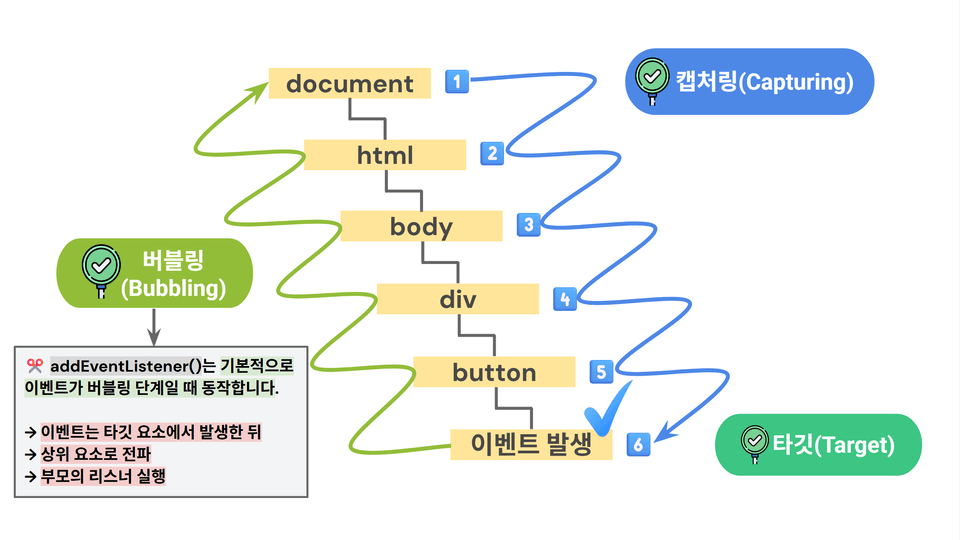
  • Event Flow: Complete understanding of the Capture → Target → Bubbling structure

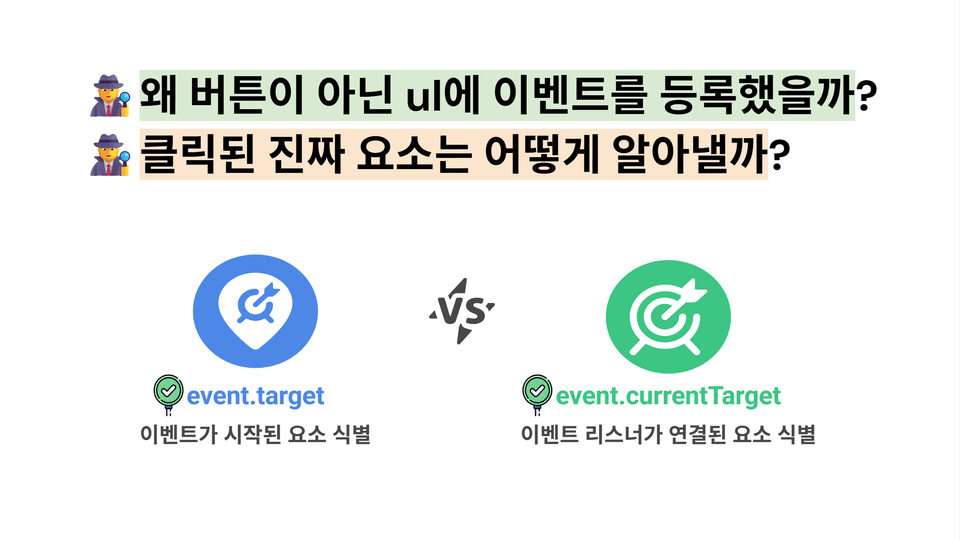
  • Differences and usage of event.target, currentTarget, and this

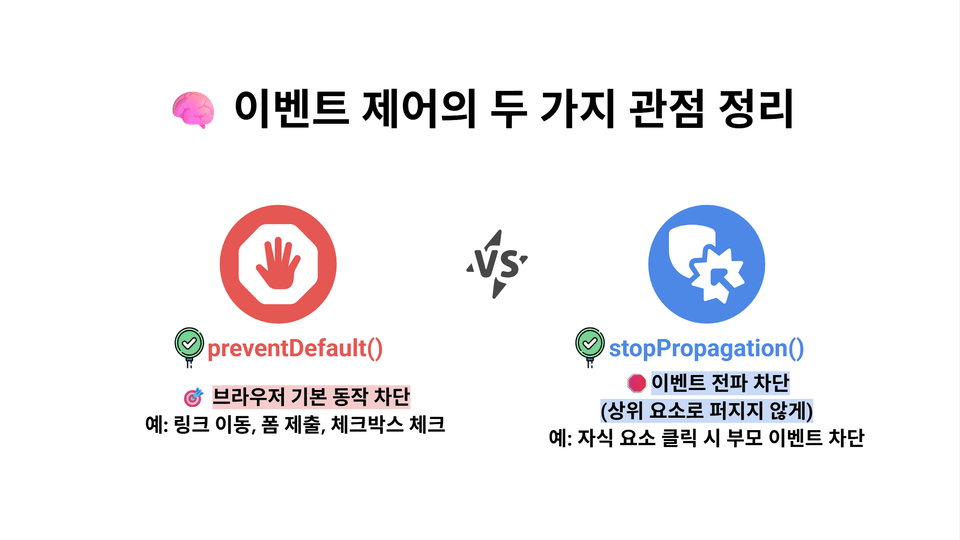
  • How preventDefault and stopPropagation actually work

  • Efficiently handling dynamic elements with event delegation

  • Implementation of Real-time Validation and UX Feedback System

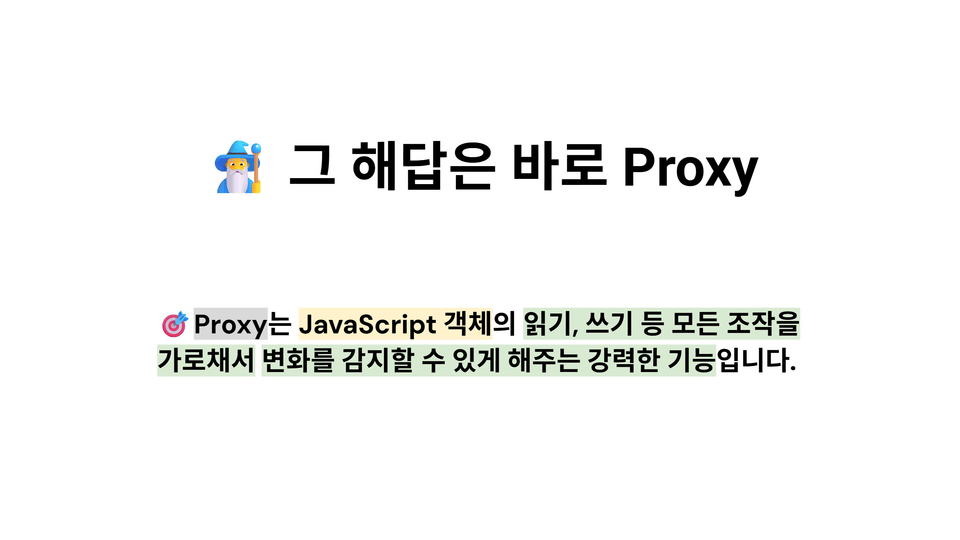
  • Designing a Reactive State Connection Structure Using Proxy Objects

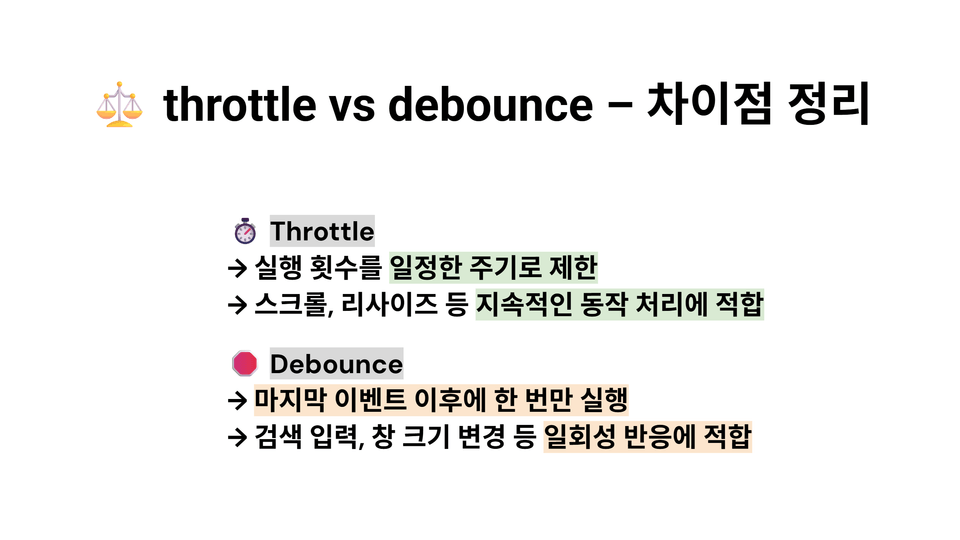
  • Controlling high-frequency events using throttle and debounce

  • How to attach events to dynamically created/deleted DOM elements

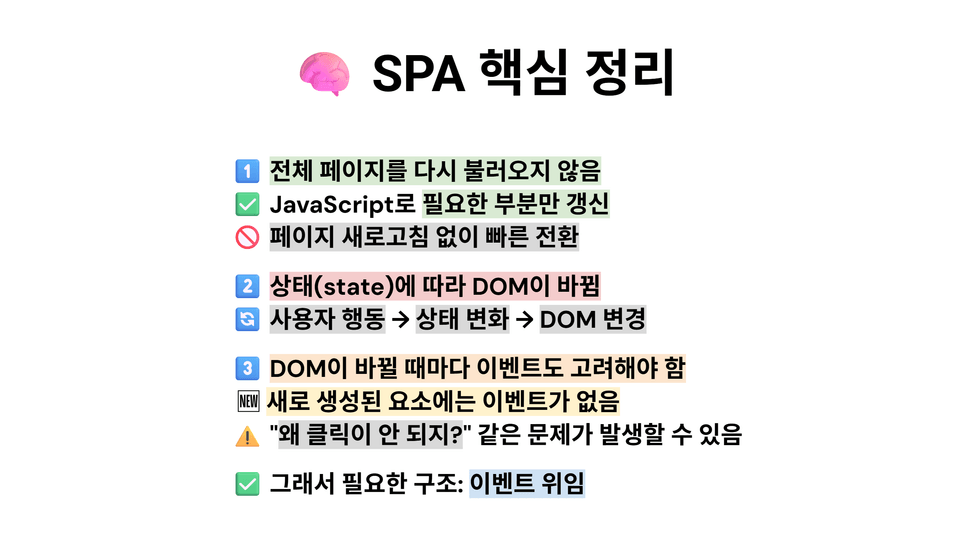
  • How to synchronize state changes and DOM events in an SPA architecture

🚀The Secret to Interactions That React in a Single Click: Everything About DOM Events

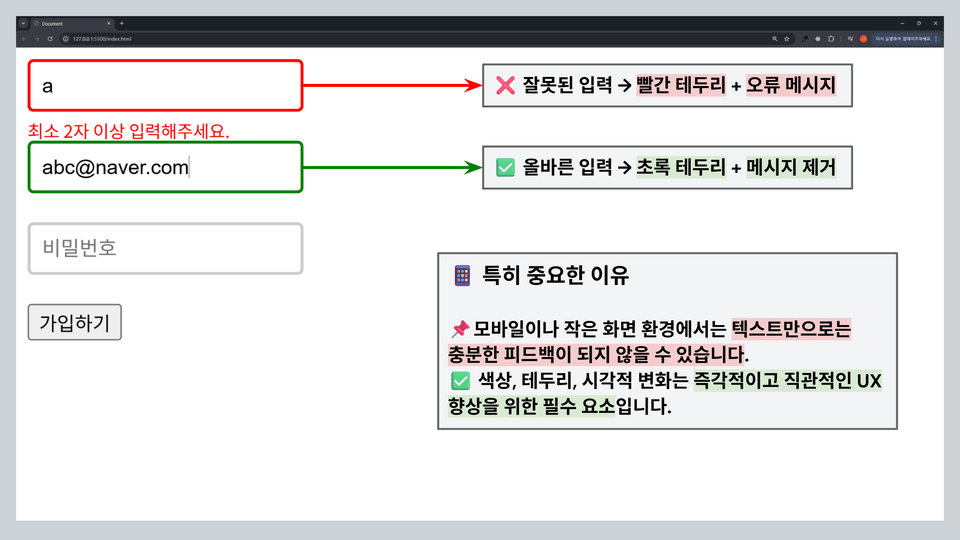
🚦Showing a red border when an input value is incorrect,
🖱 having a tooltip naturally follow the mouse hover,
🗑 and cleanly deleting dozens of dynamic items with a single button...

How are these UIs created?
We interact with websites every day, but we often don't know the sophisticated operating principles of the event system happening inside.

In this course, you will completely master those principles by visualizing and practicing everything from the basics to performance optimization.


This is a practice-oriented course that covers the working principles of the DOM event system and overall dynamic UI implementation techniques using them. Beyond simple conceptual explanations, you will learn by implementing step-by-step everything from mouse events to keyboard input, event flow control, event delegation, and performance optimization techniques.

In particular, the core of this lecture is to visually compare, debug, and practice event elements that are easy to confuse, such as target, currentTarget, stopPropagation, mouseover, and mouseenter. Through the process of following the practice examples, verifying them visually, and building the structure yourself, DOM events will transform from mere theory into a "familiar tool."

Finally, you will expand into state-based UI using Proxy, experiencing firsthand the event-state structures used in actual frameworks. Understanding this structure will make it much easier to grasp the internal flows of libraries like React and Vue.

From beginners to intermediate learners, this is the DOM Event Mastery course that is a must-watch for anyone who wants to go beyond simple event registration and learn the 'essence of web interaction and performance optimization strategies.'

📌Recommended for these people

🎯 Beginners who want to make websites more dynamic with JavaScript

This is the first event introductory guide for those who are familiar with HTML/CSS but feel overwhelmed by implementing interactions such as click, input, and mouse events.

🧱 Publishers who want to design UIs, such as button clicks and list deletions

It is suitable for designers and publishers who want to learn how to connect events that make designs actually function.

🧪 Hands-on learners who want to learn by seeing and verifying for themselves instead of simple memorization

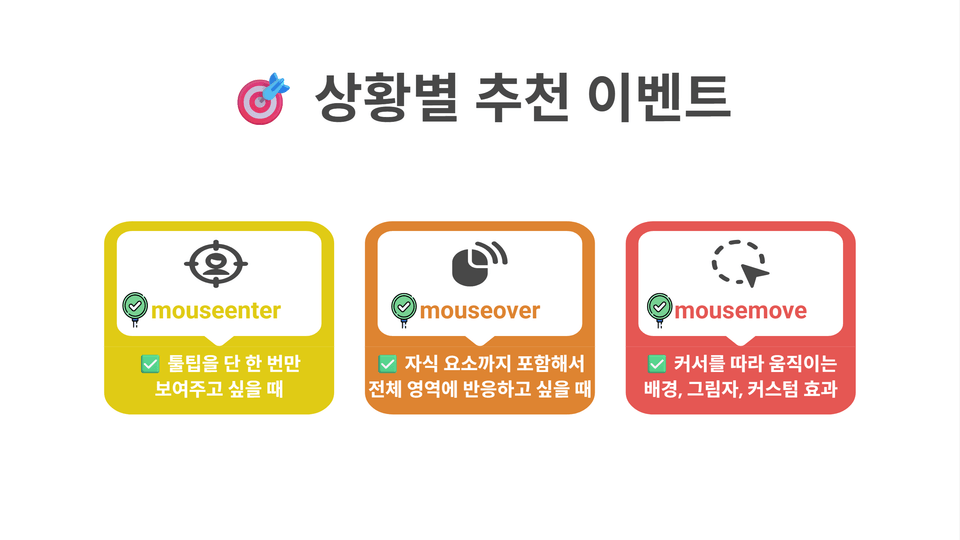
You can clearly understand concepts that are confusing when only explained in words, such as the difference between mouseover and mouseenter, through practical examples and debugging.

🔀 Frontend learners who have learned React or Vue but are confused by event flow

If concepts like target, currentTarget, and stopPropagation are still not clearly organized in your head, this lecture will establish a solid foundation for you.

Performance-oriented developers who want to implement debounce and throttle themselves

This is a practical, code-focused lecture for those who are curious about the true principles and operating mechanisms of event performance optimization, rather than just memorizing and using code.

🧩 Those with project experience who want to experience the efficiency and structure of event delegation firsthand

Move away from the method of registering individual events every time you click li, and learn firsthand how to control dozens of elements with a single listener.

🧠 Intermediate developers who want to gain a deep understanding of DOM and events through debugging

Instead of simple API calls, you will track in real-time through the console how events flow and are processed within the browser.

🏗 Developers who want to master pre-framework concepts by building their own SPA structure

Experience firsthand what React/Vue does internally through a structure of state tracking using Proxy and automatic UI reflection.

🧼 Practical learners who want to implement UX structures frequently used in real-world projects

We will practice recurring patterns used in real-world projects, such as changing border colors when input values are invalid, displaying messages, and conditionally activating buttons.

🔍 For all developers who thought they knew events well, but feel lost when it's time to actually use them

If you aren't clear on why you use preventDefault in form.submit, or if the event flow feels vague, this lecture will be the most lucid guide for you.

Features of this course

📌 100% Visual-based Explanation: Visualized explanations covering addEventListener structure, bubbling/capturing flow, and even event delegation

📌 70% Practice, 30% Implementation: All concepts are practiced directly with HTML/CSS/JS and verified visually

📌 Real-world missions provided throughout: Repetitive training on input validation, list deletion, dynamic UI implementation, state connection, etc.

📌 Essential knowledge before frameworks: Mastering event flow and state-rendering connection structures before moving to React/Vue

📌 Training 'interaction intuition' rather than simple conceptual memorization: UX-centered perspective control and user behavior flow analysis

🎓 After completing the course

  • You can freely utilize all options and flows of addEventListener.

  • You can perfectly control input events from the mouse, keyboard, input fields, and more.

  • You can completely and visually distinguish between confusing concepts such as target, currentTarget, and stopPropagation.

  • You can accurately explain the differences and selection criteria for mouseover, mouseenter, and mousemove

  • You can design event delegation structures for real-world projects.

  • You can directly implement and apply debounce and throttle functions for performance optimization.

  • You can implement UX-centered event structures such as real-time input validation, border color feedback, and dynamic list deletion.

  • You can directly create a Proxy-based automatic state-UI connection structure.

  • You can understand the basic SPA structure where multiple DOM elements are manipulated simultaneously with a single state.

  • You will develop the eye and intuition to debug and trace the entire event structure through the console.

🎯 This is what you will learn

Understanding the structure of event objects

Analyze all properties of the event object, such as target, currentTarget, and type, and learn how to utilize them in practice.

🐭 Subtle differences in mouse events

When and how are mouseover, mouseenter, and mousemove different? We will compare them accurately by visualizing the actual flow.

Event Propagation Control Techniques

Understand the difference between stopPropagation and stopImmediatePropagation and how they work in the actual DOM flow through experiments.

📝 Designing Input Validation

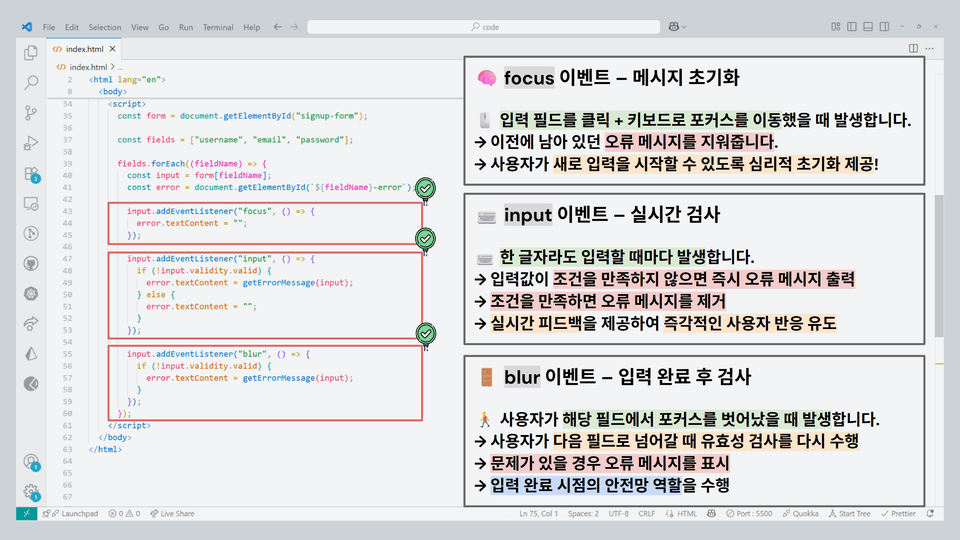
We will design input validation logic using input, focus, and blur events, and create a practical form validation structure.

🎨 Real-time Visual Feedback UI

Implement user-friendly UX patterns, such as changing border colors and displaying error messages based on input values, using CSS + JS.

🪢 Mastering Event Delegation Patterns

Design an event delegation structure that automatically applies even to dynamically added items and apply it to a real-world project.

🕵 Event Flow Debugging and Visualization

Trace how events propagate through the capturing → target → bubbling phases using the browser debugger and tools.

🔁 Proxy-based State-UI Binding

By creating a structure where the UI automatically updates when the state changes using Proxy objects, you will experience the inner workings of frameworks like React.

🧠 Complete understanding of throttle vs debounce

You will implement throttle and debounce, which are event control techniques for performance optimization, and learn firsthand when and why to use them.

🧩 DOM Event-Based SPA Architecture Design

You will learn the structure by building a real mini-project to understand how state, events, and rendering are connected in an SPA environment.

🧩 These are the missions we cover

Mission A – Real-time Input Feedback Mission
Practice Goal: Implement a UX that responds visually to user input immediately.
Content Summary: Use input, blur, and focus events to validate input values. If invalid, a red border and error message appear; if valid, the border turns green. Learn the structure for improving user experience through real-time feedback.

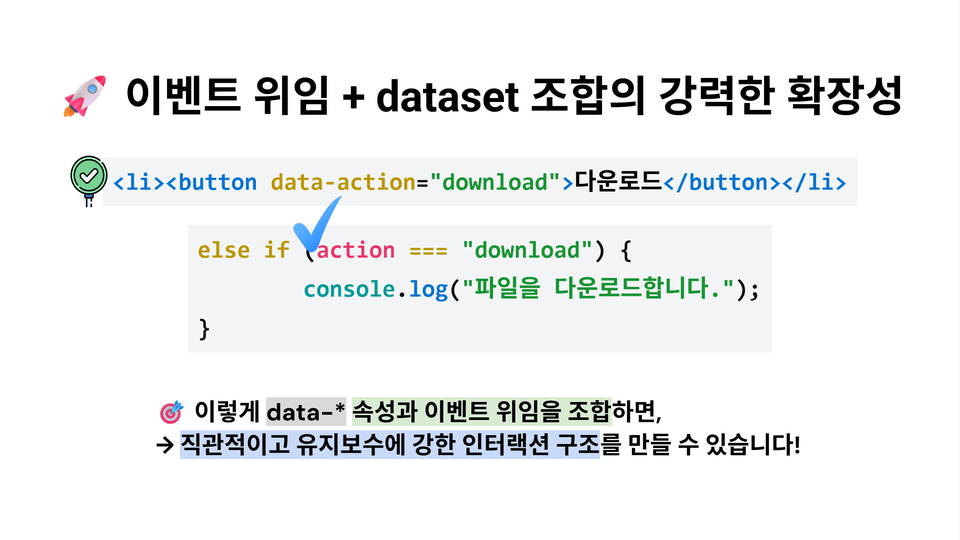
Mission B – List Deletion Mission via Event Delegation
Practice Goal: Learn how to efficiently apply events to dynamic elements.
Content Summary: Register only a single listener to the <ul>, then identify the location of the clicked button using event.target and closest() to delete only that specific item. Practice the event delegation strategy, which allows the listener to be maintained even during repeated rendering.

Mission C – Performance Optimization Mission
Practice Goal: Implement a structure where the screen updates automatically according to changes in the state object
Content Summary: Use Proxy to detect values in the state object and automatically update display.textContent when these values change. Learn the core principles of SPA by creating a screen that reacts dynamically without a re-render function.

Mission D – State-Linked SPA Structure Mission
Practice Goal: Stably manage dynamic lists by combining state and event delegation
Content Summary: Render a list based on the todos state managed by a Proxy, and configure the screen to react automatically just by changing the state when the completion button is pressed. Items created dynamically can also be controlled without issues through event delegation.

Mission E – Event Flow Tracking and Debugging Mission
Practice Goal: Maintain performance by controlling throughput for heavy events
Summary: Apply throttle and debounce functions to frequent events such as scroll, mousemove, and input to reduce unnecessary processing and minimize browser load. You will learn practical optimization strategies that consider both UX and performance.

Notes Before Taking the Course

Learning Materials

  • All lectures are provided with a summary PDF, practice code files, and exercises and mission assignments.

  • Each resource is organized step-by-step to match the flow of the lecture, allowing for efficient review and practice.

Prerequisites and Important Notes

  • You can follow along smoothly if you are familiar with the basic structure of HTML/CSS and basic JavaScript syntax.

  • In particular, it is recommended to have a basic understanding of addEventListener, if/else, forEach, and object access methods.

  • The course can be taken in both Mac/Windows environments, and you can practice with just a web browser without any additional installation.

  • We recommend using the latest version of the Chrome browser.

  • (Optional) Part 1: Completed the basic concepts of DOM structure and API

Recommended for
these people

Who is this course right for?

  • Beginner to intermediate developers who want to structurally understand the DOM event flow

  • A frontend developer who wants to personally design UIs with a lot of real-time interaction.

  • Learners who experience difficulty with event delegation, target detection, and state linking

  • Those who want to create an efficient event system with JavaScript

  • Those whose goal is to implement practical UIs such as search bars, checklists, and real-time error detection.

  • A developer who experienced performance bottlenecks due to duplicate event execution

  • Those who want to control UI state with pure JS without a framework

  • Those who want to learn the internal workings of Proxy and SPA structures

  • Designers/planners who want to understand real-time form feedback and automatic rendering structures

  • A team developer who wants to improve redundant DOM event handling code

Need to know before starting?

  • Basic understanding of HTML/CSS fundamental tags and DOM structure

  • JavaScript Basic Syntax

  • Experience with querySelector and DOM element selection/manipulation

  • (Optional) Part 1: Completed the basic concepts of DOM structure and API

Hello
This is nhcodingstudio

1,353

Learners

69

Reviews

30

Answers

4.8

Rating

16

Courses

Hello, welcome to Our Neighborhood Coding Studio!

Our Neighborhood Coding Studio is an educational group founded by developers who majored in Computer Science at leading North American universities such as Carnegie Mellon, Washington, Toronto, and Waterloo, and gained practical experience at global IT companies like Google, Microsoft, and Meta.

It originally began as a study group created by computer science majors in the U.S. and Canada to study and grow together. Although we were at different universities and in different time zones, the time we spent solving problems together and learning from one another was very special, which naturally led to this thought.

"What if we pass on this exact way we studied to others?"

That question was the starting point for Our Neighborhood Coding Studio.

Currently, approximately 30 incumbent developers and computer science students are in charge of their respective fields of expertise, directly designing and teaching a curriculum that spans from introductory to practical levels. Beyond simple knowledge transfer, we provide an environment where you can learn from the perspective of a real developer and grow together.

“Real developers must learn from real developers.”

We systematically cover the entire process of web development from start to finish, but we don't stop at theory; we help you build your skills through practice and practical, real-world feedback.
Our philosophy is to care about and lead the growth of each and every student.

🎯 Our philosophy is clear.
"True learning comes from practice, and growth is completed when we are together."

From beginners starting development for the first time to job seekers looking to enhance their practical skills and teenagers exploring their career paths,
Neighborhood Coding Studio aims to be the starting point for everyone and a reliable companion walking right beside you.

Now, don't struggle alone.
Neighborhood Coding Studio will be there for your growth.


Welcome to Neighborhood Coding Studio!

Neighborhood Coding Studio was founded by a team of developers who studied computer science at top North American universities such as Carnegie Mellon, the University of Washington, the University of Toronto, and the University of Waterloo, and went on to gain hands-on experience at global tech companies like Google, Microsoft, and Meta.

It all began as a study group formed by computer science students across the U.S. and Canada, created to grow together by sharing knowledge, solving problems, and learning from one another.
Though we were attending different schools in different time zones, the experience was so meaningful that it led us to one simple thought:

"What if we shared this way of learning with others?"

That thought became the foundation of Neighborhood Coding Studio.

Today, we are a team of around 30 active developers and computer science students, each taking responsibility for their area of expertise—designing and delivering a curriculum that spans from foundational knowledge to real-world development.
We’re not just here to teach—we’re here to help you see through the lens of real developers and grow together.

“To become a real developer, you must learn from real developers.”

Our courses take you through the entire web development journey—from start to finish—focused on hands-on practice, real-world projects, and practical feedback.
We care deeply about each learner’s growth and are committed to supporting your path every step of the way.

🎯 Our philosophy is simple but powerful:
"True learning comes from doing, and true growth happens together."

Whether you're just getting started, preparing for your first job, or exploring your future in tech,
Neighborhood Coding Studio is here to be your launchpad—and your trusted companion on the journey.

You don’t have to do it alone.
Let Neighborhood Coding Studio walk with you toward your future in development.

More

Curriculum

All

59 lectures ∙ (3hr 11min)

Course Materials:

Lecture resources
Published: 
Last updated: 

Reviews

All

6 reviews

4.7

6 reviews

  • bkw96032393님의 프로필 이미지
    bkw96032393

    Reviews 4

    Average Rating 5.0

    5

    31% enrolled

    • nhcodingstudio
      Instructor

      Hello Mr. Byun Giwon 😊 Thank you so much once again from the bottom of my heart. It's truly encouraging that you've joined us through Part 2 and have continued on to take Part 3 as well. Part 2 covers the moment when DOM structure actually 'starts to move,' focusing on event flow and delegation, and the principles of interaction that lead to SPA architecture. If the structural understanding from Part 1 expanded into action through Part 2, then Part 3 will show how those results connect to browser rendering and performance optimization. Thank you for always listening consistently and cheering us on. If you have any questions during the course or parts you'd like to know more about, please feel free to ask anytime. If there's anything you need help with, I'll always be happy to assist you wholeheartedly. 💬 Have a great day today, and I hope we can continue growing together on your learning journey ahead. 🌿 👉 https://open.kakao.com/o/gC10Fnoh

  • wkdska15905720님의 프로필 이미지
    wkdska15905720

    Reviews 2

    Average Rating 4.5

    5

    31% enrolled

    • nhcodingstudio
      Instructor

      Hello wkdska1590! 😊 Thank you so much for coming back again and leaving such a valuable review! 🙏 You've worked really hard completing [DOM Complete Mastery Part 2] following Part 1. I hope this course gave you a clear understanding of event flow, the core of web interactions, and how SPAs work. If you've grasped not just the structural understanding but also how the browser actually 'operates', you've already taken another step forward as a skilled frontend developer. The next step, [DOM Complete Mastery Part 3 - From DOM to Pixels, Complete Mastery of Browser Rendering and CRP], is now ready for you. By learning how the interactions you created in Part 2 are actually rendered on screen and how performance optimization works, you'll gain much deeper insights. I hope you'll show great interest in this course as well! 🚀 Additionally, I'm continuously releasing a React series that extends the knowledge from the DOM series into practical applications. It systematically covers everything from fundamentals to real-world implementation, so I'd be grateful if you could join me on that journey. Please feel free to ask questions anytime during your learning, and I'll be waiting for you in the open chat room where I communicate with students. 🌿 I'll always be cheering for your growth. Thank you! 📮 https://open.kakao.com/o/gC10Fnoh

  • olminje님의 프로필 이미지
    olminje

    Reviews 3

    Average Rating 5.0

    5

    100% enrolled

    I was able to easily understand the deep concepts of the DOM, and I found answers to questions that hadn't been resolved through other lectures, even for the difficult parts. Thank you! I'll go listen to the next part diligently!

    • nhcodingstudio
      Instructor

      Thank you, minguring! 🙏 I'm so happy to hear that the difficult parts were resolved through the lecture. DOM events may seem complex at first, but once you grasp the principles, you'll be able to handle them much more freely in future projects. 🚀 I'm so glad to hear that you'll be listening to the next part diligently as well. In Part 3, I've prepared content where we'll follow along with how browsers actually render screens, including stories about performance optimization. I think you'll have many "Ah, so that's how the screen works!" moments while watching. 🌟 Please feel free to leave any questions in the open chat room anytime. You can discuss with other students, and I frequently visit to provide answers as well. 📮 👉 [https://open.kakao.com/o/gC10Fnoh] I'm always cheering for your passion, minguring, and I'll definitely see you in the next lecture! ✨

  • deungchon12101337님의 프로필 이미지
    deungchon12101337

    Reviews 1

    Average Rating 5.0

    5

    31% enrolled

    • nhcodingstudio
      Instructor

      Thank you, Smith Peter! Your valuable review really gives me great strength. It's because of feedback like this that I can prepare lectures with more passion and create much better content. I will continue to meet you with even more substantial and in-depth lectures. Also, [DOM Complete Mastery Part 3] – Critical Rendering Path Perfect Analysis and Practical Optimization lecture is scheduled to be released at the end of August. Based on the understanding of events and SPA covered in this Part 2, you'll be able to perfectly master browser rendering performance and optimization as well. 😊 And whenever you have questions or need help with development, please feel free to use the open chat room below. You can communicate with other students, and I also visit frequently to share thoughts together! 📮 Open Chat Room: https://open.kakao.com/o/gC10Fnoh I sincerely support your development journey always. I hope we can meet again in the next lecture! 🚀

  • abcd123123님의 프로필 이미지
    abcd123123

    Reviews 330

    Average Rating 5.0

    5

    31% enrolled

    • nhcodingstudio
      Instructor

      Thank you, Byeongjoo Jeong! 🙏 It's truly a great source of strength that you've consistently stayed with us from Part 1 through Part 2. Topics like DOM events and SPA can feel complex and unfamiliar at first, but as you work through the principles one by one, you'll find that the flow becomes clear at some point. I hope that through this course, the parts that previously felt vague have become at least a little clearer for you. 🚀 As you continue your learning journey, if there are any parts that are difficult to understand, points where you get stuck during practice, or questions that arise while applying concepts to actual projects, please don't hesitate to reach out comfortably. I want to sincerely answer even small questions and work together to find solutions through the process of thinking together. 💬 Also, through the open chat room below, you can freely communicate with other students and share opinions with me anytime. I believe you'll gain more inspiration through the process of learning while sharing each other's experiences. 📮 👉 [https://open.kakao.com/o/gC10Fnoh] I sincerely support Byeongjoo Jeong's consistent learning journey, and I'll always be here to help you continue growing together and taking on new challenges. Once again, I deeply appreciate your valuable participation and support! ✨

nhcodingstudio's other courses

Check out other courses by the instructor!

Similar courses

Explore other courses in the same field!

$23.10