From DOM to Pixels, Mastering Browser Rendering and CRP - [Mastering DOM Part 3]

This course covers the entire Critical Rendering Path (CRP) process, from the moment the browser receives HTML to create the DOM, to combining it with the CSSOM and painting pixels on the screen. Moving beyond simple DOM manipulation, you will learn how CSS and JS impact performance, as well as practical strategies to noticeably improve real-world web performance—including image and font optimization, Lazy Loading, Intersection Observer, virtual lists, and hands-on practice with DevTools.

(5.0) 7 reviews

100 learners

Level Basic

Course period Unlimited

HTML/CSS
HTML/CSS
JavaScript
JavaScript
React
React
DOM
DOM
frontend
frontend
HTML/CSS
HTML/CSS
JavaScript
JavaScript
React
React
DOM
DOM
frontend
frontend

Reviews from Early Learners

Reviews from Early Learners

5.0

5.0

YU NA Joe

63% enrolled

The method of finding the cause using dev tools and the analysis were excellent.

5.0

leo pug

30% enrolled

I love you

5.0

호우

30% enrolled

I'm listening well!

What you will gain after the course

  • You can understand the entire process of how a browser renders the screen, from the DOM to the pixels.

  • You can understand the impact of CSS and JS loading on performance and apply optimization strategies.

  • You can improve core performance metrics by analyzing the Critical Rendering Path (CRP).

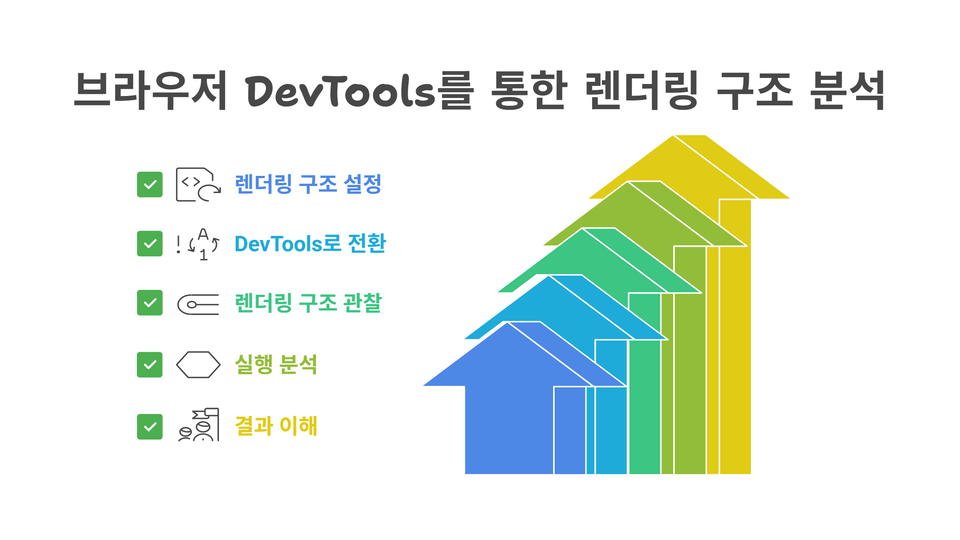
  • You can track and resolve actual rendering bottlenecks using DevTools.

  • Thousands of data points can be rendered quickly using a Virtual List.

  • You can optimize images, fonts, and iframes using Lazy Loading.

  • You can implement exposure detection, infinite scroll, and more with Intersection Observer.

  • I can confidently explain common interview concepts such as CRP and DOMContentLoaded.

  • You can learn performance optimization principles that are also applicable to SPA frameworks.

  • You can develop the ability to fundamentally resolve web performance issues.

  • You can directly handle slow UI issues that frequently occur in practice, from identifying the causes to implementing solutions.

  • You can learn the principles of the browser rendering process by implementing it directly in code.

  • You can practice the latest CSS optimization techniques, such as will-change and GPU acceleration.

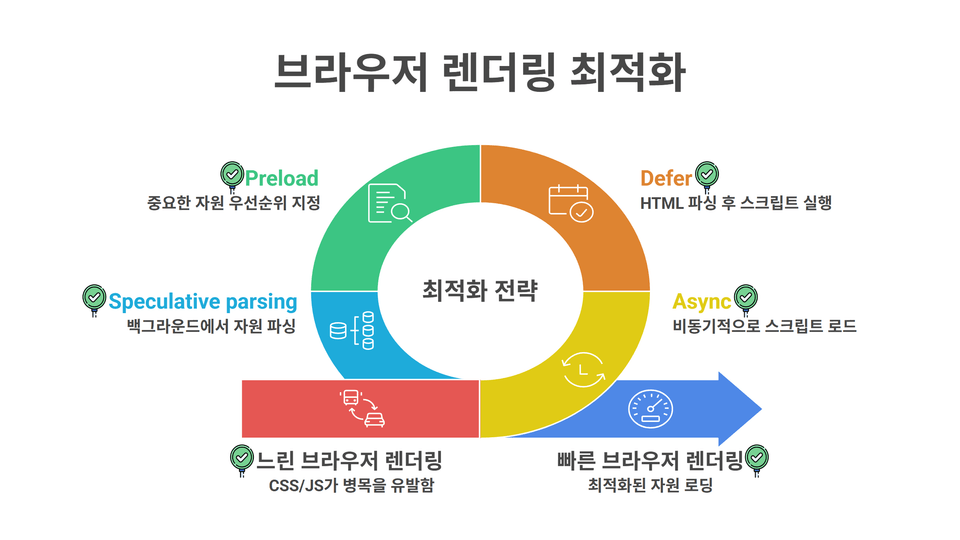
  • You can choose script loading strategies (async, defer, preload) depending on the situation.

  • Through the performance optimization mission, you can make what you've learned your own.

From DOM to Pixels: Mastering Browser Rendering and CRP

🚀 From DOM to pixels, witness every moment of browser rendering and master optimization!
🖼
When the screen suddenly shakes (Layout Shift),
🎨
when the entire page is repainted (Paint) just by changing a single button,,
and those moments when animations aren't smooth and start to stutter...

Why do these phenomena occur?
And what process does the browser go through to turn HTML and CSS into screen pixels?

This course completely explores that very secret, the Browser Rendering Pipeline (CRP, Critical Rendering Path), from the basics to practical optimization.

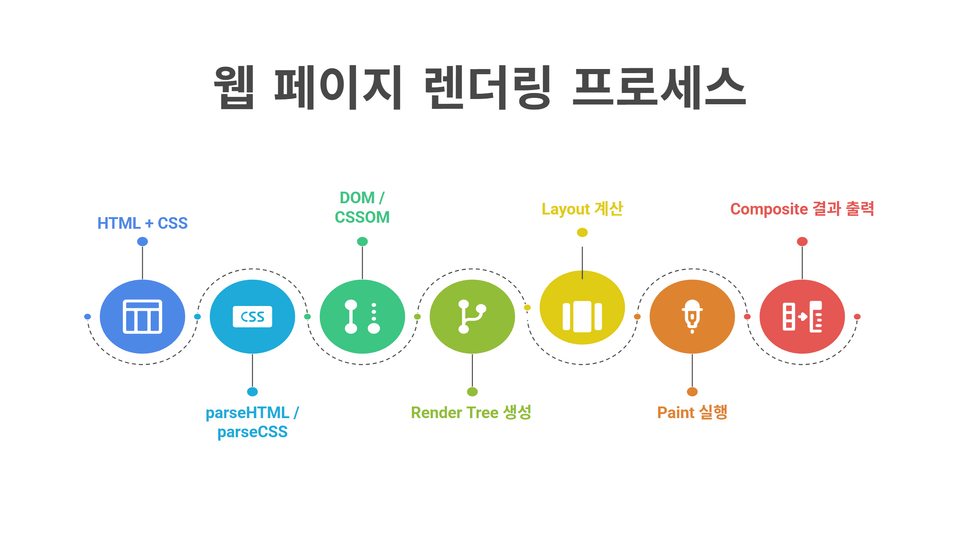
In the process of implementing every stage of rendering—DOM, CSSOM, Render Tree, Layout, Paint, and Composite—directly through code and tracking them in real-time with DevTools, you will systematically master the principles of how a browser builds a screen. This course is designed to go beyond the mere theory of "how rendering happens" and help you develop practical skills to analyze and optimize actual slow-performing pages.

In particular, you will learn to identify bottlenecks using visual diagnostic tools such as the Performance tab, Paint Flashing, and FPS monitoring, and study performance metrics that Google prioritizes, including CLS (Layout Shift), Recalculate Style, and Composite Layers. At the end of the course, you will gain the ability to efficiently handle large-scale UIs without a framework by practicing the implementation of a Virtual List that optimizes thousands of DOM elements.

After completing this course, you will develop the intuition to visually identify and manually improve how the browser interprets the DOM, exactly when performance breaks down, and how to fix it. If you understand the underlying CRP before moving on to frameworks like React or Vue, performance optimization and debugging will become much easier.

🎯 Frontend developers for whom web performance optimization feels vague

If you're wondering why the page is still slow even after reducing the code, you can find the answer by tracing the browser's internal operations step-by-step.

🧱 Publishers/Designers who have implemented a UI but cannot explain 'why it is slow'

If you are wondering why the page is still slow even after reducing the code, you can find the answer by tracing the browser's internal operations step-by-step.

🧩 Those with experience in projects handling large-scale DOMs and lists

By implementing a Virtual List, you will learn how to design a structure that smoothly handles thousands of elements and develop a sense for optimization., bạn sẽ học được cách tự thiết kế cấu trúc xử lý mượt mà hàng nghìn phần tử và rèn luyện tư duy tối ưu hóa.

💻 Engineers who need to improve Core Web Vitals in practice

You can learn optimization strategies directly linked to Google performance metrics such as CLS and LCP..

🔍 Learners who want to solidify their browser fundamentals before moving on to React/Vue

You can first understand the principles of CRP, which serve as the background for why Virtual DOM and optimization techniques are necessary. hay các kỹ thuật tối ưu hóa lại cần thiết.

Developers who want to identify why animations are stuttering and FPS is dropping

You will learn how to design GPU-friendly animations by analyzing down to the frame level with the Performance tab..

📱 Developers concerned about performance degradation in mobile environments

This is suitable for those who want to solve layout shifts, scroll stuttering, and input delay issues occurring on low-end devices using DevTools and optimization techniques.

🌐 Planners/Developers who consider both search visibility and SEO performance

You can understand how Core Web Vitals scores affect search rankings and enhance both user experience and search performance through CLS/LCP/FID optimization..

📌 Key Features of This Course

  1. 100% Visual Learning
    Observe the browser rendering pipeline firsthand through code and DevTools.

  2. Balanced learning of theory and practice
    Core concepts are explained clearly and verified immediately through practice code and DevTools analysis for a balanced learning experience.

  3. Practical Mission Training
    Solve project missions that replicate real-world problems such as CLS optimization, dashboard rendering diagnostics, and shopping cart/checkout page optimization.

  4. Mastering Core Web Vitals
    Through hands-on practice measuring and improving Core Web Vitals such as CLS, LCP, and FCP, you can enhance both search visibility and UX.

  5. Strengthen Rendering Performance Analysis Skills
    You will gain proficiency in using DevTools performance tools, such as Paint Flashing, FPS monitoring, and Layers visualization.

  6. Mastering Performance Optimization Strategies
    Systematically train on minimizing unnecessary Layout/Paint, utilizing GPU composition, separating Critical CSS, and implementing async/defer loading.

  7. Essential Knowledge Before Moving to Frameworks
    We deeply cover the internal mechanisms of CRP, which are essential to understand for performance optimization in libraries like React and Vue.

  8. Practical UX Improvement Experience
    Experience firsthand the improvement of real UX metrics, such as stable layouts, fast first rendering (LCP improvement), and maintaining 60fps animations.

  9. Professional project intuition
    Go beyond simple coding practice and develop the practical skills to diagnose and resolve performance bottlenecks that occur in real-world service environments.

🎯 Here is what you will learn

🧱 Implementing the Rendering Pipeline Yourself

Simulate the process where HTML and CSS lead to DOM/CSSOM → Render Tree → Layout → Paint → Composite through code. bằng mã code.

🔍 Analyze DOM & CSSOM with DevTools

In the Elements / Computed tab, visually check the DOM structure, final styles, and Box Model calculations..

📈 Track CRP with the Performance tab

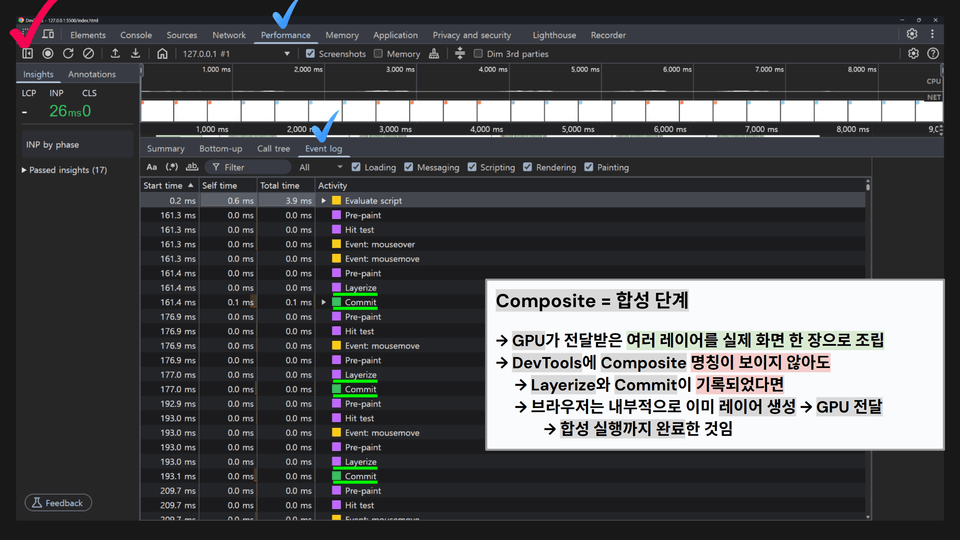
Check the Recalculate Style → Layout → Paint → Composite execution flow and the Layerize·Commit process on the timeline. trên dòng thời gian (timeline).

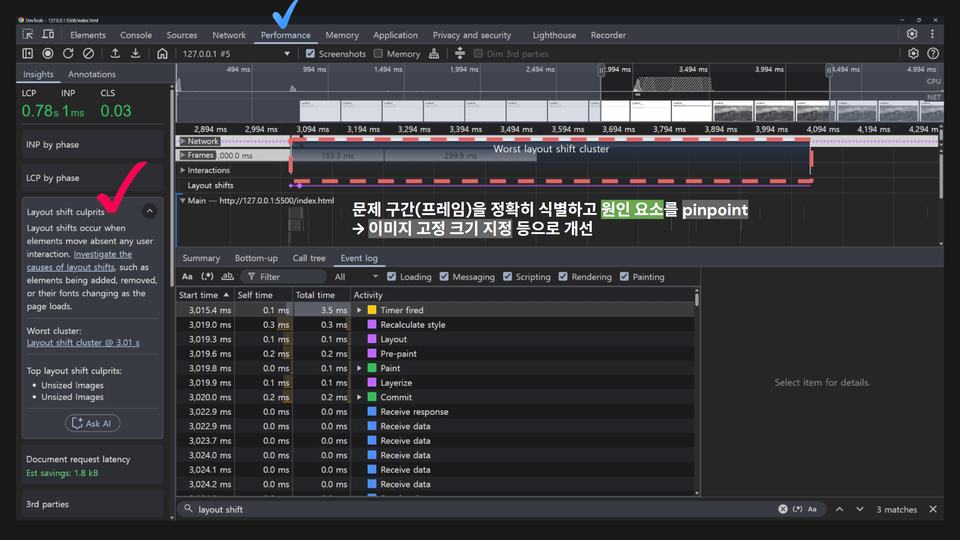
📐 Layout Shift & CLS Optimization

Experiment with unexpected layout shifts and learn how to measure and improve CLS scores.

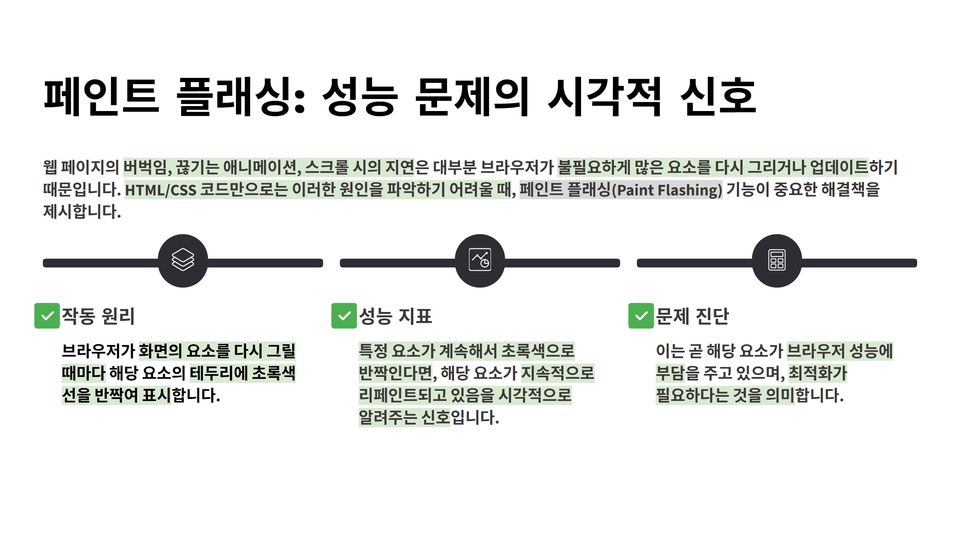
🎨 Paint Flashing & Layers Visualization

Identify elements that are repeatedly painted and analyze GPU layer separation in 3D.

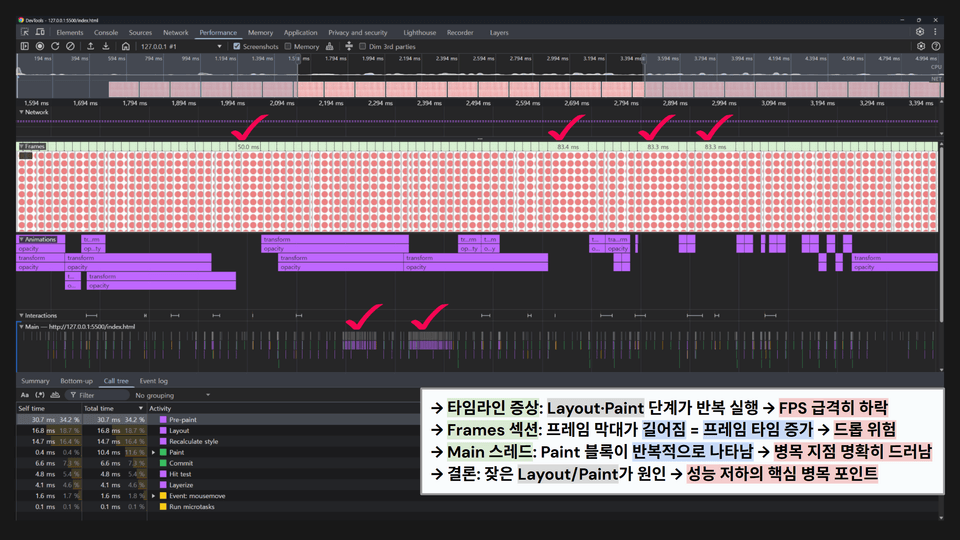
FPS & Frame Performance Analysis

Measure FPS and frame time to identify animation bottlenecks and optimize them.

🛠 Practical Performance Optimization

Practice CLS improvement and techniques such as Lazy Loading, Virtual List, and Infinite Scroll using real-world examples like reservations, payments, and dashboards.

🚀 Improving render-blocking elements

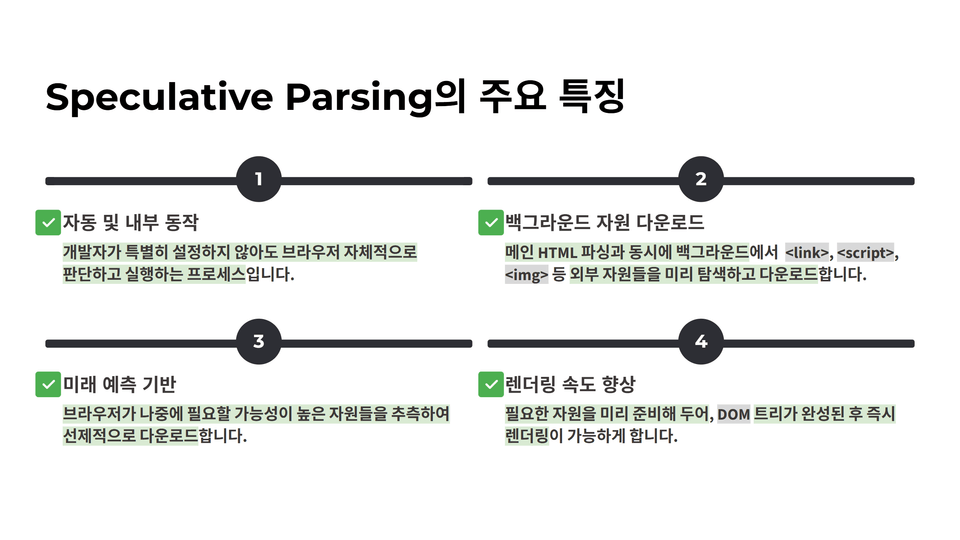
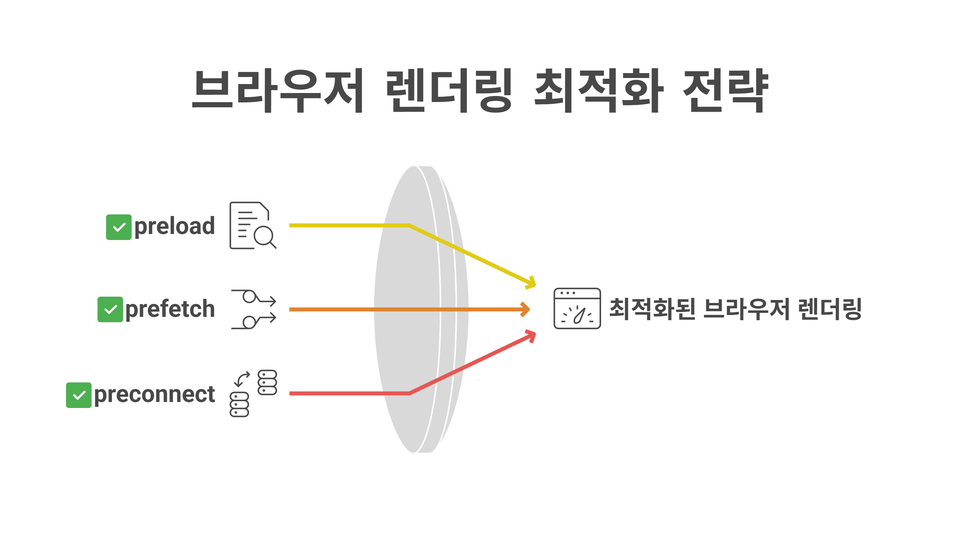
Extract Critical CSS and speed up LCP/FCP using JS async/defer, preload·preconnect·prefetch..

📂 Utilizing Browser Lifecycle

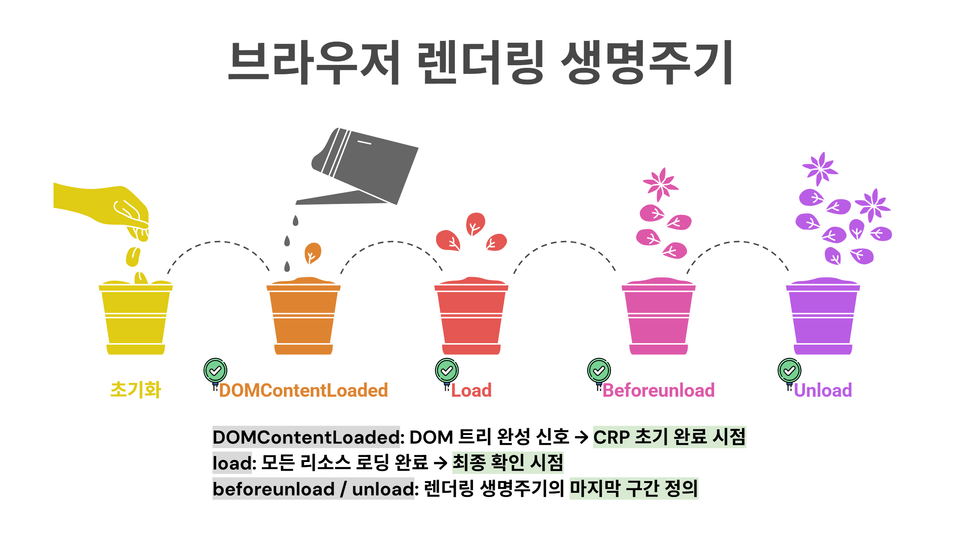
Understand the timing of DOMContentLoaded, load, beforeunload events and optimize UX protection and session logging. để tối ưu hóa việc bảo vệ trải nghiệm người dùng (UX) và ghi nhật ký phiên làm việc (session logging).

🧩 Comprehensive Strategy for Overall CRP Optimization

We will go through the entire rendering flow from DOM to pixels, and comprehensively summarize performance metrics and optimization patterns. đến các điểm ảnh, tổng hợp đầy đủ các chỉ số hiệu suất và mô hình tối ưu hóa.

🧩 We cover these types of practical missions

In this [DOM Mastery Part 3] lecture, you will learn by solving practical missions based on real-world service development scenarios, rather than simple code examples.


Mission #1 – Heading Style Correction Mission
Learning Objective: Develop the ability to track and fix UI issues that deviate from the designer's mockup.
Content Summary: Use the DevTools Elements/Styles panels to analyze incorrect CSS properties of the heading and correct the styles to match the mockup.

🎨 Mission #2 – Promotion Price List Redesign Mission
Learning Objective: Analyze distracting layout issues and improve the UI.
Content Summary: Track unnecessary style conflicts using DevTools, then clean up the price list section and improve the visual hierarchy through code refactoring.

📏 Mission #3 – CLS Optimization Mission
Practice Goal: Measure Layout Shift issues numerically and implement a stable UI.
Summary: Track Layout Shift events in the Performance tab, calculate CLS scores, and complete a flicker-free page by applying image sizing and font loading strategies.

📊 Mission #4 – Dashboard Rendering Bottleneck Diagnosis Mission
Practice Goal: Check the performance of a dashboard with many KPI cards, tables, and mini-charts.
Content Summary: Use Paint Flashing and the Layers tab to identify frequent re-rendering sections, and ensure frame stability through GPU composition (transform/opacity) based optimization.

🧾 Mission #5 – Reservation/Receipt UX Optimization Mission
Practice Goal: Optimize actual reservation and payment receipt scenarios.
Content Summary: Compare the performance before and after optimization using the Performance tab, and reduce unnecessary Recalculate Style and Paint to ensure the reservation/payment flow operates smoothly.

🛒 Mission #6 – Shopping Cart & Checkout Page Performance Improvement Mission
Practice Goal: Maintain stable performance in the core e-commerce flow.
Content Summary: Minimize Layout costs when adding/removing items from the cart and optimize resource loading during the checkout stage to maintain a seamless user experience.

Mission #7 – Browser Lifecycle Management Mission
Practice Goal: Correctly control browser initialization and session logging.
Content Summary: Analyze event timings such as DOMContentLoaded, load, and beforeunload, and design a structure that ensures UX data protection and log stability.

🎯 Mission #8 – Critical CSS Optimization Mission
Practice Goal: Resolve CSS issues that block initial rendering.
Content Summary: Keep only the core Above-the-Fold area as Critical CSS and separate the rest using lazy loading to significantly improve page loading speed.

Mission #9 – JS async/defer Optimization Mission
Practice Goal: Optimize scripts that block rendering.
Content Summary: Adjust the execution timing of script tags using async and defer attributes to improve page rendering speed without blocking.

🚀 Mission #10 – Preload & Prefetch Strategy Mission
Learning Objective: Improve LCP and increase initial perceived speed.
Content Summary: Maximize performance by using preload, preconnect, and prefetch to load core images, fonts, and resources in advance.

🎬 Mission #11 – Media Landing Page Optimization Mission
Practice Goal: Improve the initial performance of pages with large-scale images and videos.
Content Summary: Shorten LCP/FCP and improve perceived performance by applying Video lazy loading and Image Lazy Loading.

📱 Mission #12 – New Product Feed Performance Optimization Mission
Practice Goal: Maintain performance even in large-scale data feeds.
Summary: Implement Virtual List and Infinite Scroll, and combine them with Media/Script Lazy Loading to provide a fast UX.

Notes before taking the course

Prerequisites and Important Notes

  • You will be able to follow along smoothly if you have a basic understanding of HTML/CSS structure and fundamental JavaScript syntax.

  • In particular, it is recommended to be familiar with addEventListener, if/else, forEach, and object access methods.

  • The course is available on both Mac and Windows environments, and you can practice using only a web browser without any additional installation.

  • We recommend using the latest version of the Chrome browser.

  • (Optional) Part 1: [DOM Mastery Part 1] – Everything About Structure Navigation and Manipulation


  • (Optional) Part 2: [DOM Mastery Part 2] – From Events to SPA, the Essential Engine of Interactive Web


Recommended for
these people

Who is this course right for?

  • A frontend beginner who wants to build a fast website

  • A startup developer who wants to reduce user churn caused by slow pages.

  • A job seeker who wants to add a "Performance Optimization Project" to their portfolio.

  • A designer and developer worried about slow loading speeds due to images, fonts, and videos.

  • Developers who have experienced performance degradation due to a large number of list items in frameworks like React or Vue

  • JavaScript learners who were confused by attributes like "async" and "defer"

  • Web publishers who need to improve Core Web Vitals scores in actual services

  • Those who have tried performance analysis using developer tools but felt lost on where to start making improvements.

  • A junior frontend developer interested in scroll and rendering optimization in SPA-based projects.

  • An enthusiastic learner who wants to dig deep into the question, "Why is my web app slow?"

Need to know before starting?

  • Basic understanding of HTML/CSS fundamental tags and DOM structure

  • JavaScript Basic Syntax

  • Experience with querySelector and DOM element selection/manipulation

  • (Optional) [Mastering the DOM Part 1] – Everything About Structural Navigation and Manipulation

  • (Optional) [Mastering the DOM Part 2] – From Events to SPA, the Essential Engine of the Interactive Web

Hello
This is nhcodingstudio

1,353

Learners

70

Reviews

30

Answers

4.8

Rating

16

Courses

Hello, welcome to Our Neighborhood Coding Studio!

Our Neighborhood Coding Studio is an educational group founded by developers who majored in Computer Science at leading North American universities such as Carnegie Mellon, Washington, Toronto, and Waterloo, and gained practical experience at global IT companies like Google, Microsoft, and Meta.

It originally began as a study group created by computer science majors in the U.S. and Canada to study and grow together. Although we were at different universities and in different time zones, the time we spent solving problems together and learning from one another was very special, which naturally led to this thought.

"What if we pass on this exact way we studied to others?"

That question was the starting point for Our Neighborhood Coding Studio.

Currently, approximately 30 incumbent developers and computer science students are in charge of their respective fields of expertise, directly designing and teaching a curriculum that spans from introductory to practical levels. Beyond simple knowledge transfer, we provide an environment where you can learn from the perspective of a real developer and grow together.

“Real developers must learn from real developers.”

We systematically cover the entire process of web development from start to finish, but we don't stop at theory; we help you build your skills through practice and practical, real-world feedback.
Our philosophy is to care about and lead the growth of each and every student.

🎯 Our philosophy is clear.
"True learning comes from practice, and growth is completed when we are together."

From beginners starting development for the first time to job seekers looking to enhance their practical skills and teenagers exploring their career paths,
Neighborhood Coding Studio aims to be the starting point for everyone and a reliable companion walking right beside you.

Now, don't struggle alone.
Neighborhood Coding Studio will be there for your growth.


Welcome to Neighborhood Coding Studio!

Neighborhood Coding Studio was founded by a team of developers who studied computer science at top North American universities such as Carnegie Mellon, the University of Washington, the University of Toronto, and the University of Waterloo, and went on to gain hands-on experience at global tech companies like Google, Microsoft, and Meta.

It all began as a study group formed by computer science students across the U.S. and Canada, created to grow together by sharing knowledge, solving problems, and learning from one another.
Though we were attending different schools in different time zones, the experience was so meaningful that it led us to one simple thought:

"What if we shared this way of learning with others?"

That thought became the foundation of Neighborhood Coding Studio.

Today, we are a team of around 30 active developers and computer science students, each taking responsibility for their area of expertise—designing and delivering a curriculum that spans from foundational knowledge to real-world development.
We’re not just here to teach—we’re here to help you see through the lens of real developers and grow together.

“To become a real developer, you must learn from real developers.”

Our courses take you through the entire web development journey—from start to finish—focused on hands-on practice, real-world projects, and practical feedback.
We care deeply about each learner’s growth and are committed to supporting your path every step of the way.

🎯 Our philosophy is simple but powerful:
"True learning comes from doing, and true growth happens together."

Whether you're just getting started, preparing for your first job, or exploring your future in tech,
Neighborhood Coding Studio is here to be your launchpad—and your trusted companion on the journey.

You don’t have to do it alone.
Let Neighborhood Coding Studio walk with you toward your future in development.

More

Curriculum

All

42 lectures ∙ (2hr 15min)

Course Materials:

Lecture resources
Published: 
Last updated: 

Reviews

All

7 reviews

5.0

7 reviews

  • bobo님의 프로필 이미지
    bobo

    Reviews 3

    Average Rating 5.0

    5

    33% enrolled

    • nhcodingstudio
      Instructor

      Hello, rlaqhguse. I am the knowledge sharer. First of all, thank you so much for taking the course <From DOM to Pixels, Mastering Browser Rendering and CRP - [Mastering DOM Part 3]> and for leaving such a precious review. The feedback you provided is a huge source of strength for me. As the browser rendering process and the Critical Rendering Path (CRP) are the core of web performance optimization, I sincerely hope this course has been of practical help in your growth as a more in-depth frontend developer. To support your passionate learning, I would like to offer you a small benefit. If there are any additional courses you wish to take among our curriculum, please feel free to contact me at the email address below. I will send you a discount coupon immediately after checking. Inquiry Email: jeony0535@naver.com Thank you once again for taking the time to leave such kind words. I will sincerely root for your growth :D

  • bkw96032393님의 프로필 이미지
    bkw96032393

    Reviews 4

    Average Rating 5.0

    5

    60% enrolled

    • nhcodingstudio
      Instructor

      Hello Byeon Giwon 😊 Thank you so much for leaving such a warm review. 🙏 I'm truly delighted that you found the course engaging. This [DOM Complete Mastery Part 3] was designed to follow the entire process of how browsers render screens from start to finish, allowing you to directly experience moments when performance actually improves. If that process came across as interesting to you, I feel incredibly rewarded as the creator. Every single word of encouragement you've left becomes a great source of strength that keeps me going with these courses. I'll continue to bring you performance optimization courses that can be directly applied in real work, as well as deeper content like the upcoming React rendering series. If you have any questions during your studies or topics you'd like to learn more about, please feel free to share them anytime. 💬 I'd love to create an even better learning journey together through our conversations. Thank you once again, and have a wonderful day! 🌿 I'm also running an open chat room where students can discuss together, so please feel free to drop by when you have time. 👉 https://open.kakao.com/o/gC10Fnoh

  • hochoi86214872님의 프로필 이미지
    hochoi86214872

    Reviews 11

    Average Rating 5.0

    5

    30% enrolled

    I'm listening well!

    • nhcodingstudio
      Instructor

      Hello howu 😊 Thank you so much for leaving such a warm review. 🙏 It's truly encouraging to hear that you're enjoying the course. This course is designed to go beyond simply learning theory - it allows you to visually observe how browsers create screens through the DOM and develop the intuition to improve performance in real-world scenarios. I'm really gratified if those aspects came across as interesting to you. Each word of encouragement like this becomes a great driving force in creating the course. I will continue to repay you with courses that contain even more in-depth and practical content. If you have any questions or want to learn more about something while taking the course, please feel free to reach out anytime. 💬 I'd love to discuss even small questions together and create a better learning experience. Once again, thank you sincerely for your precious encouragement, and have a great day today! 🌿 We're also having conversations with students in the open chat room, so please feel free to drop by when you have time. 👉 https://open.kakao.com/o/gC10Fnoh

  • yunajoe9062님의 프로필 이미지
    yunajoe9062

    Reviews 3

    Average Rating 4.3

    5

    63% enrolled

    The method of finding the cause using dev tools and the analysis were excellent.

    • nhcodingstudio
      Instructor

      Hello YU NA Joe! 😊 Thank you so much for leaving such a valuable review. 🙏 I'm truly delighted to hear that the DevTools utilization techniques and analysis processes covered in [DOM Complete Mastery Part 3] were helpful to you. I believe that the ability to directly observe browser performance and trace the root causes, rather than just stopping at theory, is the most essential skill needed in real-world work. It means a lot to me as a creator that you recognized both the enjoyment and usefulness of this approach. Given your interest in principles and analysis, I think you'll be able to develop great insight into how React internally optimizes rendering through the currently released [Learn React Properly Part 1] or the upcoming [React Part 2]. If you have any questions while studying, please feel free to ask anytime. 💬 I'll continue to deliver in-depth content that you can apply directly to your work. Have a great day! 🌿 We're also communicating with students in an open chat room, so please drop by when you have time. 👉 https://open.kakao.com/o/gC10Fnoh

  • robot99172146님의 프로필 이미지
    robot99172146

    Reviews 6

    Average Rating 5.0

    5

    30% enrolled

    I love you

    • nhcodingstudio
      Instructor

      Hello leo pug! I love you too 😊😊 I'm so happy to receive such an intuitive and passionate review. As the creator, I feel incredibly rewarded knowing that the [DOM Complete Mastery Part 3] course brought you such great satisfaction. Thank you for conquering the complex process of how browsers render screens together with me! To keep that overflowing energy going, I'll continue to repay you with deeper and more heartfelt courses. I'm currently working hard on the React series to make it a great source of love for your development journey, so please look forward to it! If you have any questions while studying or achievements you'd like to share, please feel free to visit the open chat room or forum anytime. I'll always be cheering passionately for your future. Have a wonderful day full of happiness! 🌿🔥 👉 https://open.kakao.com/o/gC10Fnoh

nhcodingstudio's other courses

Check out other courses by the instructor!

Similar courses

Explore other courses in the same field!

$26.40