강의

멘토링

로드맵

Project and task management for becoming a pro at Excel - MS Planner

Do you want to do a good job? Do you want to manage your work schedule well so that you don't miss anything and can see it at a glance? Learn how to create and manage projects, teams, or your own tasks using Planner to become a pro at work.

(4.7) 15 reviews

91 learners

Level Beginner

Course period 3 months

MS-Office
MS-Office
MS-Office
MS-Office

Reviews from Early Learners

4.7

5.0

min3476

36% enrolled

Communication through questions and answers is not smooth.

5.0

팀즈뽀개기

100% enrolled

It fits perfectly in your ears!

5.0

Chang Hun Kim

100% enrolled

I listened very well to your kind explanation.

What you will gain after the course

  • How to Stay on Top of Your To-Do List

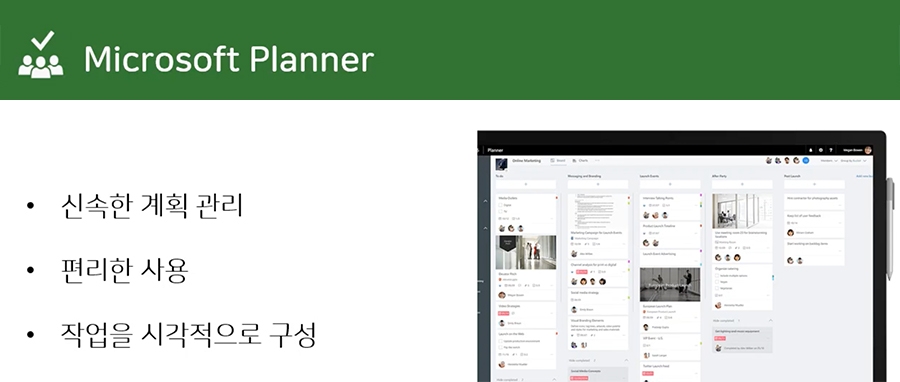
  • How to visualize and manage project progress efficiently

  • How to Visualize and Manage Your Tasks Efficiently

  • How to manage my work and schedule with Planner

The lecture was updated to the latest version on January 17, 2025. Please take the lecture~ 😊

👉 Go to the latest version update lecture

Lecture Introduction 📝

I want to do a good job . How about you ?

To do your work well, you need to manage it well . How do you check which of the many tasks you should do first , which ones you have done , which ones you haven't done , or which ones you have missed ?

Also , if I am involved in a project , I need to check how much progress the project has made , if there are any problems , and if there have been any changes in the middle .

How do you organize so many things ?

Diary ? Memo ? Calendar ? Outlook ?

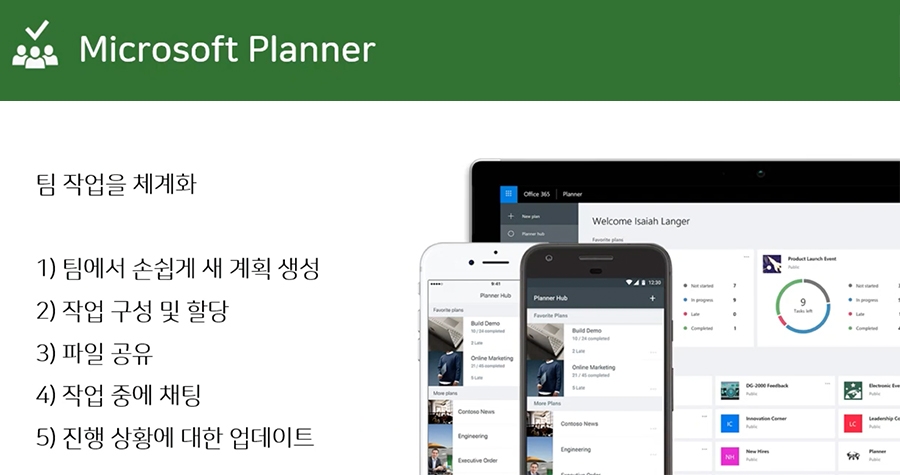
Planner is a program that allows me to organize and see my work at a glance . Planner is available for free if you are using Office 365 , and is a very useful tool that allows me to see my work at a glance . Learn how to create and manage projects, teams, or my work using Planner !

What I learned in class ✏️

In this course, you will learn how to visualize and manage your work and projects efficiently.


- Understand what Microsoft Planner is and
get to know the screens and menus
- Planner notification settings
- Create a new plan, create/move/copy/set deadlines/labels for tasks within the plan
- Export the plan to an Excel file
- Sync your plan with your Outlook calendar
- Link Planner to a team in Teams
- Manage your tasks on the go with Mobile Planner

Tools covered in the lecture 💡

  1. Microsoft Planner
  2. http://tasks.office.com/

Expected Questions Q&A 🙋🏻‍♂️

Q. Do I need to buy tools to take the course?
A.
It is provided free of charge to Office 365 subscribers, and a trial version is also available.

However, it is not provided free of charge to Business Apps or Enterprise Apps subscribers.


Q. Do I need any prior knowledge to take the course?
A. No~~~!! Anyone can do it easily if they just follow the lecture content!

Recommended for
these people

Who is this course right for?

  • For those who have trouble organizing their to-do list in their diary and post-it notes

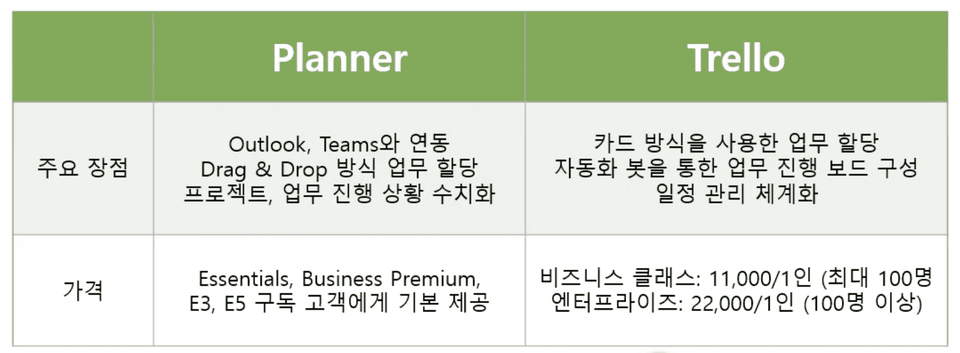
  • If you are having trouble managing Trello, Asana, Outlook, and other electronic notes

  • If you want to visualize your work through Planner and manage it at a glance

  • If you want to become a pro-filler!

Hello
This is omas

Career Verified

2,660

Learners

306

Reviews

166

Answers

4.6

Rating

45

Courses

Nice to meet you! I am ""Omas"", a Microsoft 365 expert.
As a Microsoft 365 expert, I will help you work more easily and smartly.

Introducing Omas's instructors!!
 

Instructor Hyunjung Ko
Microsoft MVP (Microsoft 365 Apps&Services, 2016 ~ Present)
Microsoft Certified Trainer (Active)


Official Blog & Café


YouTube


Books 

  • Microsoft 365 Business for Users & Admins

  • My Smart Work using Office 365, OMAS

  • Office 365 Quick Series 1. Creating a SharePoint Site for Collaboration

  • Office 365 Quick & Easy Series 2. BI that business practitioners can apply to work immediately without expert help

  • Office 365 Quick & Easy Series 3. From Basics to Practical Use All at Once! OneDrive for Business

  • Office 365 Quick & Easy Series 4. Creating mobile apps your company needs with PowerApps

  • Office 365 in SMBs: My Smart Work Using Office 365

  • OneNote 2016 Utilization! - Basic Edition 

  • OneNote 2016 Tips & Tricks! - Advanced Guide

  • Female professionals, never do this! A cheerful and unconventional take on the secrets to success in the workplace.


Recognitions

  • MS-102 - Microsoft 365 Certified: Administrator Expert

  • MS-100 - Microsoft 365 Identity and Services

  • Teams Meetings and Meeting Rooms Technical Assessment

  • MS-700 - Microsoft 365 Certified: Teams Administrator Associate

  • MS-900 - Microsoft 365 Certified: Fundamentals

  • AZ-104 - MS Azure Administrator Associate

  • AZ-900 - Microsoft Certified: Azure Fundamentals

  • SC-900 - Microsoft Certified: Security, Compliance, and Identity Fundamentals

  • PL-900 - Microsoft Certified: Power Platform Fundamentals

  • Exam 347: Enabling Office 365 Services

  • Microsoft Office Specialist Word 2016 Expert

  • Microsoft Office Specialist PowerPoint 2016 Core

  • Certificate of Qualification. Presentation Speech 1st  Level

Other Qualifications

  • Presentation Speech 1st Level (Korea Vocational Competency Test Association, Ministry of Employment and Labor)

  • CS Instructor Level 1 (Korea Vocational Competency Assessment Association, Ministry of Trade, Industry and Energy)

  • e-Learning Master Consultant (Korea U-Learning Association)

  • e-Learning Instructor Level 2 (Korea U-Learning Association)

  • Computer Science Teacher Certification (Minister of Education)

  • Lifelong Education Specialist Level 2 (Seoul World University of Culture and Arts)

Reviews

All

15 reviews

4.7

15 reviews

  • min34763722님의 프로필 이미지
    min34763722

    Reviews 1

    Average Rating 5.0

    5

    36% enrolled

    Communication through questions and answers is not smooth.

    • omas
      Instructor

      What kind of communication wasn't smooth? If you leave questions related to the lectures, we answer them all~ Since you're still taking the course, please post your questions on the Q&A board~

  • ridmeybike님의 프로필 이미지
    ridmeybike

    Reviews 4

    Average Rating 5.0

    5

    100% enrolled

    It fits perfectly in your ears!

    • omas
      Instructor

      That's lucky!!!! Fighting~~~!!! 🙌🙌🙌

  • zet님의 프로필 이미지
    zet

    Reviews 1

    Average Rating 5.0

    5

    100% enrolled

    I got a lot of ideas for how our team could use and leverage Microsoft Planner.

    • omas
      Instructor

      Wow~ I'm so glad you got some ideas from the lecture! I hope you use them well! 👍👍

  • hunking20786님의 프로필 이미지
    hunking20786

    Reviews 1

    Average Rating 5.0

    5

    100% enrolled

    I listened very well to your kind explanation.

    • omas
      Instructor

      This one course review gives me a lot of strength~ ^^ Thank you!! I support professional workers!!

  • yongun2lee2549님의 프로필 이미지
    yongun2lee2549

    Reviews 14

    Average Rating 5.0

    5

    100% enrolled

    It was a helpful lecture

    • omas
      Instructor

      Thank you~~ ^^

omas's other courses

Check out other courses by the instructor!

Similar courses

Explore other courses in the same field!