


Computer Application Skills Level 1 & 2 Written Exam - Spreadsheet General

Through this course, learners can develop the ability to obtain a Computer Application Skills certification. This course is structured according to the examination standards as a preparation course for acquiring the Computer Application Skills certification. You can learn and apply basic knowledge of Computer Application Skills subjects to prepare for certification acquisition. (Computer Application Skills Level 1 & 2 Written Exam - Spreadsheet General)

(5.0) 6 reviews

4,087 learners

Level Beginner

Course period 12 months

Excel
Excel
MS-Office
MS-Office
VBA
VBA
Computer Specialist in Spreadsheet & Database
Excel
Excel
MS-Office
MS-Office
VBA
VBA
Computer Specialist in Spreadsheet & Database
날개 달린 동전

Recommend Course to grow and earn commission!

날개 달린 동전

Marketing Partners

Recommend Course to grow and earn commission!

Reviews from Early Learners

Reviews from Early Learners

5.0

5.0

everick9

13% enrolled

thank you!!!!!!

5.0

할수있다

100% enrolled

Thank you, I listened carefully

5.0

다빈

83% enrolled

I like it because it's easy to understand and explains things in detail.

What you will gain after the course

  • Enter and edit spreadsheets

  • Using Spreadsheet Formulas

  • Spreadsheet Data Management

Attention job seekers!
Develop your computer skills and apply for a job 👨‍💻

📢 Please check before taking the class!

  • This course does not offer Q&A sessions with knowledge sharing experts regarding the course content. Please keep this in mind when registering for the course.

To acquire computer skills
If you want to challenge yourself! 📖

Computer Proficiency Level 1 & 2 Written Exam - General Spreadsheet 📐

This course is designed to help you obtain a computer proficiency certification, and is structured to reflect actual exam criteria. Learn and apply the basic knowledge for each computer proficiency subject to achieve certification!

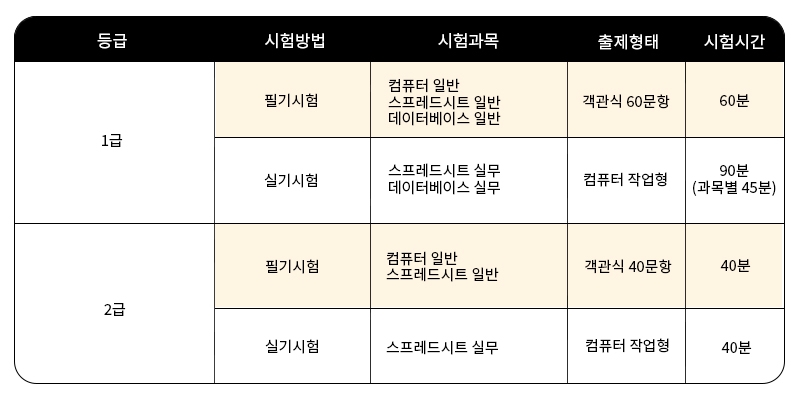
Computer Proficiency Test Information 💻

Acceptance criteria

  • Written Exam: 40 points or more per subject out of 100 and an average of 60 points or more
  • Practical: 70 points or higher out of 100 (Level 1 requires 70 points or higher in both subjects)

Practical program

  • MS Office 2016

Test Registration & Other Details

  • Korea Chamber of Commerce and Industry Qualification Evaluation Division website 👉 Go to

What you'll learn 📚

Enter and edit

  • Manage and save worksheets
  • Data, Input, Shortcuts, Data Types
  • File Options, Paste, Cells, Insert, Delete
  • Cell formatting, date formatting, conditional formatting
  • Fill, Sheet Tab, Save Method

Using formulas

  • Operator, cell reference, formula error
  • Rounding, date functions, math functions
  • IF function, rank.eq, reference function
  • (Level 1) offset, database functions, present value functions
  • Formula error message, vlookup function

Data Management, Macros

  • (Level 1) Arrays, array formulas, array constants
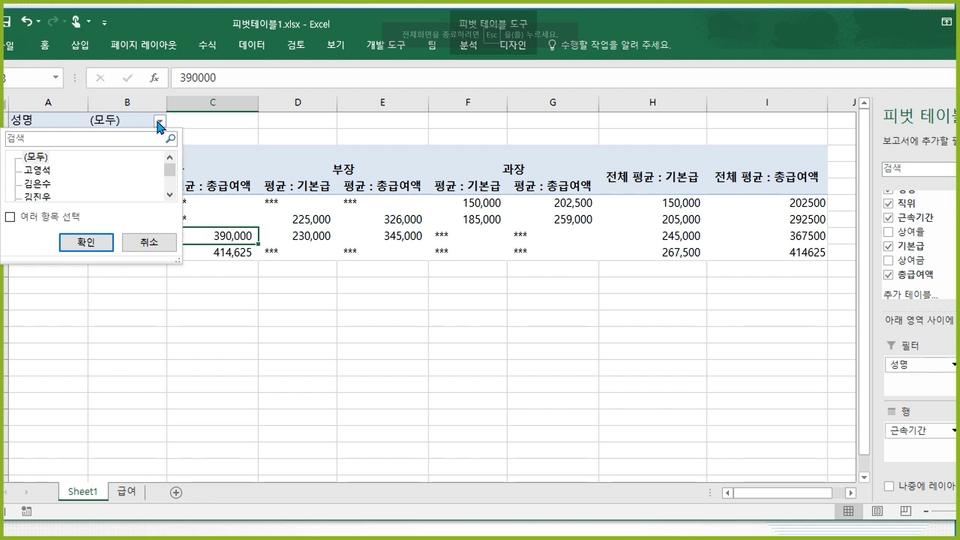
  • Sort, filter, advanced filter, external data
  • Query join, subtotal, goal seek, scenario, print
  • Charts, sparklines, trend lines
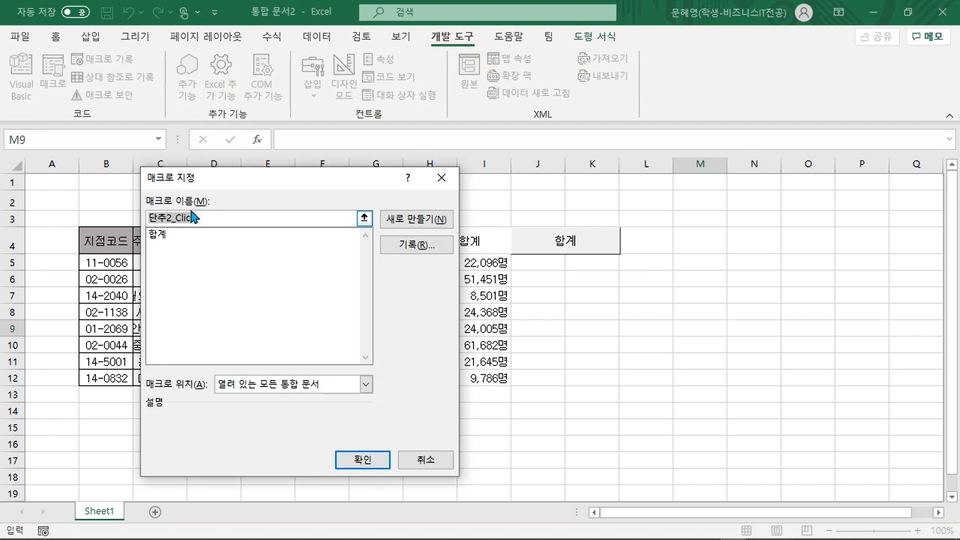
  • msgbox, inputbox, macro, vba/vbe, programming, basic configuration
  • (Level 1) Objects, Methods, Events

Database General Level 1/2 Mock Exam

  • Filter, Sort, Scenario (Level 1/Level 2)
  • Macros, Scenarios, Advanced Filters (Level 1/Level 2)
Data management (external data, query joins, subtotals)
Macros and Programming (msgbox, inputbox, macros)

Computer skills that are easy, light, and informative!

  • ✅ Everything from theory to problem solving is included in one place.
  • ✅ Review your theoretical knowledge by solving practice problems for each section.
  • ✅ We offer mock exams filled with past exam questions. Use them for a final check before your actual exam!

Recommended for
these people

Who is this course right for?

  • Anyone who wants to obtain a computer skills certificate

  • Anyone who wants to learn how to use computers for work

Hello
This is usefulit

8,278,851

Learners

6,391

Reviews

4.6

Rating

309

Courses

I will help you grow through useful IT lectures.

Published: 
Last updated: 

Reviews

All

6 reviews

5.0

6 reviews

  • hyde31633589님의 프로필 이미지
    hyde31633589

    Reviews 349

    Average Rating 5.0

    5

    100% enrolled

    Thank you, I listened carefully

    • everick93569님의 프로필 이미지
      everick93569

      Reviews 317

      Average Rating 4.9

      5

      13% enrolled

      thank you!!!!!!

      • dibin49925710님의 프로필 이미지
        dibin49925710

        Reviews 1

        Average Rating 5.0

        5

        83% enrolled

        I like it because it's easy to understand and explains things in detail.

        • ks1119choi1404님의 프로필 이미지
          ks1119choi1404

          Reviews 6

          Average Rating 5.0

          5

          100% enrolled

          I liked the detailed explanation

          • jin1015님의 프로필 이미지
            jin1015

            Reviews 58

            Average Rating 4.8

            5

            100% enrolled

            Thank you for the great lecture~

            usefulit's other courses

            Check out other courses by the instructor!

            Similar courses

            Explore other courses in the same field!

            $42.90