

inflearn logo

Computer Literacy Certification Level 1 & 2 Written Exam - Computer Fundamentals

Through this course, learners can acquire the ability to obtain a computer proficiency certificate. This course is designed to meet the examination criteria for obtaining a computer proficiency certificate. You can learn and utilize basic knowledge of the computer proficiency subject to prepare for obtaining the certificate.

(4.5) 38 reviews

74,407 learners

Level Beginner

Course period 12 months

MS-Office
MS-Office
Computer Specialist in Spreadsheet & Database
MS-Office
MS-Office
Computer Specialist in Spreadsheet & Database

Reviews from Early Learners

4.5

5.0

마유

100% enrolled

Explanations were clear, and subtitles were thorough!

5.0

할수있다

100% enrolled

Thank you, I listened carefully

5.0

사람

13% enrolled

Thank you

What you will gain after the course

  • Computer operating system

  • Computer Systems Administration

  • Internet Utilization

  • Level 1 Computer Proficiency Written Exam Criteria

  • Computer Proficiency Level 2 Written Exam Criteria

  • Computer Proficiency Level 1 Written Mock Exam

  • Computer Proficiency Level 2 Written Mock Exam

Get computer skills and get a job 👩‍💻

Please check before taking the class!

  • This course does not offer Q&A sessions with knowledge sharing experts regarding the course content. Please keep this in mind when registering for the course.

Computer Proficiency Test Information 💻

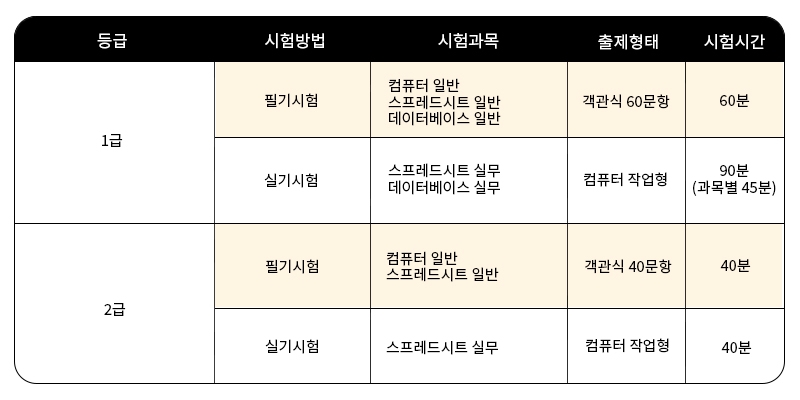
  • Acceptance criteria
    • Written Exam: 40 points or more per subject out of 100 and an average of 60 points or more
    • Practical: 70 points or higher out of 100 (Level 1 requires 70 points or higher in both subjects)
  • Practical program
    • MS Office 2016
  • Test Registration & Other Details
    • Korea Chamber of Commerce and Industry Qualification Evaluation Division website 👉 Go to

Lecture Introduction 📚

Lecture Structure

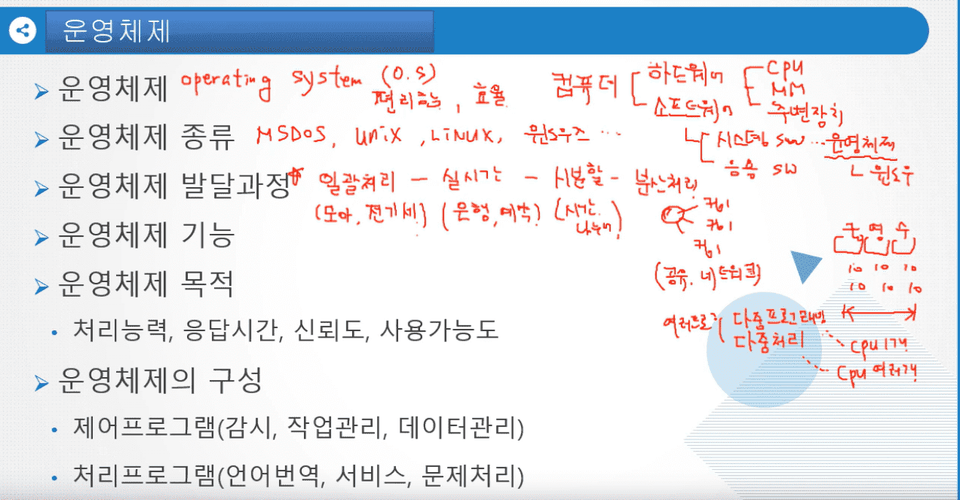
Use of the operating system
  • Use of the operating system
    • Overview of the operating system, functions of the operating system, and structure of the operating system
    • Configuring and setting shortcut keys, taskbar, and desktop in Windows
    • Basics of File Explorer, Files, Folders
    • Recycle Bin, Notepad, Paint, and Print functions
  • Control Panel and Settings
    • Category-specific features in Control Panel, Programs and Features in Control Panel, Personalization
  • Wired and wireless network settings
    • Network concept, network components, network-related commands

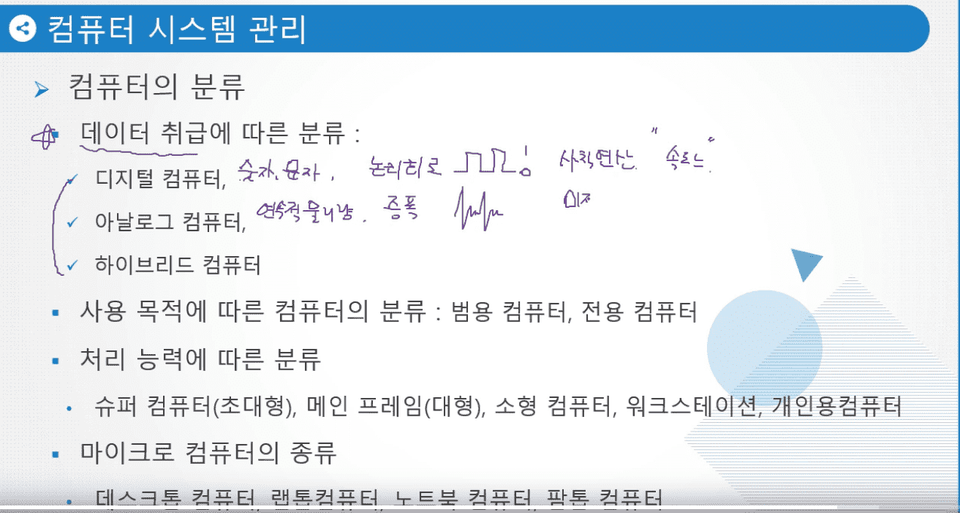
Computer Systems Administration

  • Computer Systems Administration
    • Computer concepts and principles, computer development process, and computer development and characteristics by generation.
    • Data representation units, information processing methods, and types of information processing systems
    • External representation, error detection and correction codes, complement
    • Configuration of central processing unit, main memory, and auxiliary memory
    • Input devices, output devices, software
    • PC maintenance and repair, language translation courses, web programming languages

Internet use

  • Internet use
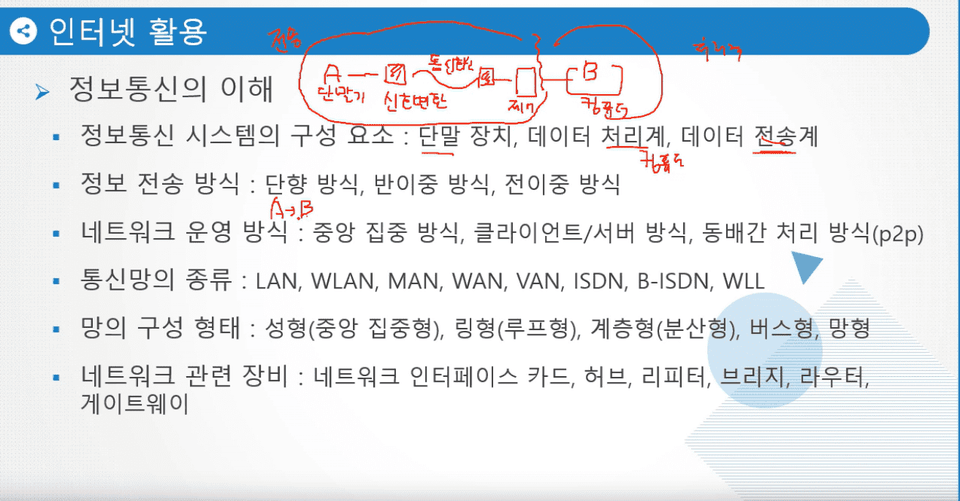
    • Understanding Information and Communication, Overview of the Internet, and the Internet Address System
    • Protocol functions, Internet services, and web browsers
  • Use of multimedia
    • Multimedia
    • Multimedia hardware/software
    • multimedia data
  • Computer System Protection
    • Virus/Vaccine
    • Information Security Overview
    • Information security techniques

Lecture Features ✨

  • It covers everything from theory to problem solving all in one place.
  • Review your theoretical knowledge by solving practice problems for each section.
  • We offer mock exams consisting of past exam questions. Use these mock exams to review your progress before the actual exam.

Recommended for
these people

Who is this course right for?

  • Anyone who wants to obtain a computer skills certificate

  • Anyone who wants to learn how to use computers for work

Hello
This is usefulit

8,278,000

Learners

6,433

Reviews

4.6

Rating

308

Courses

I will help you grow through useful IT lectures.

Curriculum

All

24 lectures ∙ (10hr 19min)

Course Materials:

Lecture resources
Published: 
Last updated: 

Reviews

All

38 reviews

4.5

38 reviews

  • my1014star7714님의 프로필 이미지
    my1014star7714

    Reviews 1

    Average Rating 5.0

    5

    100% enrolled

    Explanations were clear, and subtitles were thorough!

    • pii02123511님의 프로필 이미지
      pii02123511

      Reviews 98

      Average Rating 5.0

      5

      13% enrolled

      Thank you

      • xorn82559014님의 프로필 이미지
        xorn82559014

        Reviews 84

        Average Rating 5.0

        5

        8% enrolled

        Thank you for the great lecture.

        • hyde31633589님의 프로필 이미지
          hyde31633589

          Reviews 350

          Average Rating 5.0

          5

          100% enrolled

          Thank you, I listened carefully

          • qorrofmf4928님의 프로필 이미지
            qorrofmf4928

            Reviews 1

            Average Rating 2.0

            2

            71% enrolled

            It's good that it's easy to understand, but there's so much to write down while listening ㅠㅠㅠ Please, write things like meanings in the lecture file so that I can focus entirely on the lecture explanation. I don't know how many times I skipped back while listening to the lecture. It was so hard to listen to the lecture ㅠㅠ And the space to write explanations was so narrow that it was really..........hard.

            usefulit's other courses

            Check out other courses by the instructor!

            Similar courses

            Explore other courses in the same field!

            25% off for new members

            $16.40

            25%

            $26.40