Making a C language shooting game
kosart
$8.80
Intermediate / C
4.6
(13)
100+
This is a lecture on creating a console shooting game using the C language. Basic knowledge of C language programming is required.

Intermediate
C

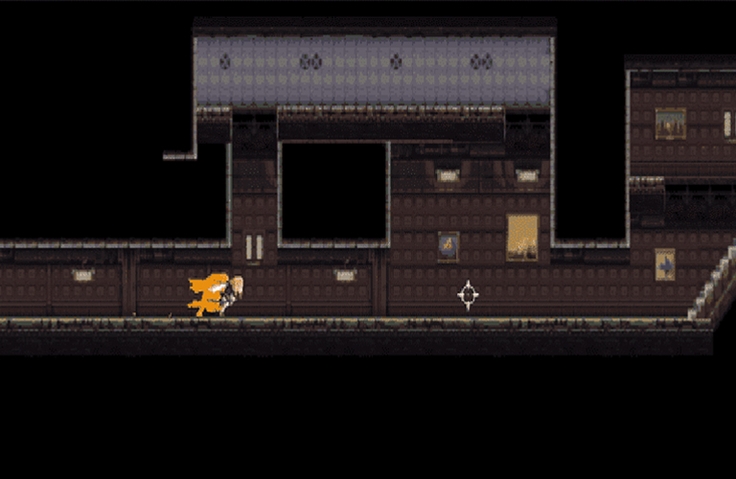
This course enhances your skills by creating a Katana Zero-style game using the Unity engine and C# programming. The basic version focuses on fundamental content, making it easy to follow along if you have prior experience with Unity.
Reviews from Early Learners
5.0
eom5005
It's a shame that the volume isn't large enough to be completed in one day. I can't say it's cost-effective, but I'm satisfied with the content. I'm willing to listen to the intermediate and advanced versions when they come out~
5.0
두흠양
I'm currently in the process of creating a personal project with a Katana Zero-style combat system as part of a government-funded education bootcamp. I've finished the basic setup and object placement, but I was struggling with finding assets similar to Katana Zero's characters and figuring out how to implement combat logic and other mechanics. In the midst of this confusion, this lecture video became a ray of light for me. I will use this lecture video as a reference to create a great personal project. Thank you.
5.0
Lyon Kim
I am a current developer. I am not a game developer. This course is a good course to learn how to handle player movements and effects, etc. If you have basic Unity skills, you can apply it to add to the missing parts or organize the code. The content is short, so it is easy to watch quickly. The downside is that there is noise in the video sound, and the lecture speed sometimes slows down, but it is not a big problem if you watch it by increasing the video speed. Personally, from a non-game developer's perspective, it was really helpful for detailed animation and effect control. Thank you. I am willing to purchase the next course.
C# Programming
Unity Game Development
Are you feeling like giving up before even making a game because the foundational knowledge you need to learn seems too vast? This course is designed to help you stay engaged by following along and creating actual games. It was created to help you indirectly acquire the essential functions and techniques needed for games, so you can use them to create your own games.
You can learn various features such as player movement, jump states, animations, attack motions, attack effects, hit effects, wall jumping, and more.
The Basic Edition mainly explains the features created in the player. By following along and creating actual games, you can better master detailed features we haven't used before, and after completion, you'll gain more confidence in job hunting or solo development.
.gif?w=960)
.gif?w=960)
*The course images are sprites created through direct outsourcing work, so please use them for learning purposes only. Commercial use is prohibited.
I've added intermediate-level missions. I've also uploaded the intermediate-level project that I created separately at the end of the corresponding lecture.
Red Monster Implementation Collision Magic
Magic parrying bounce
I added a project at the end that includes various features such as post-processing effects.
Thank you.
Who is this course right for?
Aspiring game developer
Someone who wants to learn C# programming by making games.
Need to know before starting?
C# Programming
Unity Basics

Career Verified
1,137
Learners
62
Reviews
53
Answers
4.3
Rating
21
Courses
Coding Academy Hard Training
Office workers, students, and indie developers gather here to study.
I mainly teach Java or game programming portfolio courses.
Blockchain exchanges, stock exchanges, game servers, game clients—company and freelance development.
CEO of a game development and game education company
Academy lecturing, freelance outsourcing, and indie development
(Unity Korea, Korea Chamber of Commerce and Industry, Etivers Learning) Unity Bootcamp Offline Lecture
Extensive development and teaching experience, including Unity lectures at the Content Talent Campus (Hongneung).
R&D and lecture activities with current industry developers, indie developers, and the KOSAT team
Like Lion Education Instructor
Recruitment for the 2nd generation of the new indie team has begun
All
33 lectures ∙ (4hr 50min)
Course Materials:
1. Introduction
01:50
2. Student Projects
05:03
13. Attack Effect 2
10:01
15. Shadow Effect 1
10:01
16. Shadow Effect 2
10:01
All
16 reviews
4.3
16 reviews

Reviews 10
∙
Average Rating 4.9
5
It's a shame that the volume isn't large enough to be completed in one day. I can't say it's cost-effective, but I'm satisfied with the content. I'm willing to listen to the intermediate and advanced versions when they come out~
thank you
Reviews 1
∙
Average Rating 3.0
Reviews 2
∙
Average Rating 4.0
3
I'll just list the pros and cons. For reference, I learned Unity before and recently made a portfolio again, so I'm preparing to get a job in the game industry again. Pros: Difficulty level that's not as hard as I thought (recommended for beginners) Simple effects and basic theories are good. Cons: The source code isn't organized at all (you don't have to think about this) If you add up all the meaningless time, it'll probably be about 3 lectures. Overall review I bought it for 40,000 won on a discount, but it's okay for a beginner who doesn't know anything, but if someone who knows even a little bit listens to it, it's not so great... Still, I learned a lot about effects and camera control. I really hope an advanced version comes out. I'm willing to buy it if an advanced version comes out.
Thank you for the detailed review.
Reviews 1
∙
Average Rating 4.0
4
I also wanted to know how to attack enemies or how to climb up to the second floor by breaking through the wall and standing on the wall, but it's a shame.
If we produce an intermediate version in the future, we will take into consideration the parts you mentioned.
Reviews 4
∙
Average Rating 4.5
3
For reference before reviewing, I am a developer who is in charge of the programming team at an overseas game company. I am taking various lectures as a hobby to study the development styles of other developers. I wrote this review with the hope that it will be helpful to instructors who are taking the course or creating the next course. [Advantages] 1. It is good for beginners who have completed the basics of C# and Unity to refer to. 2. There are parts that you can learn such as animation, character control, and camera if you follow it several times. [Disadvantages] 1. The microphone noise is loud. 2. Those who are not familiar with the basics of C# and Unity can only simply copy it. Beginners should study on their own by Googling why this calculation is done in some parts, although not all. 3. The code is not organized. When used live, critical parts are often seen. It is not suitable for those who are aiming for intermediate skills. 4. Since it does not cover all the conditional processing of characters, there are bugs such as animations that do not match some patterns or characters flying away. 5. The curriculum list is not accurate. Since most of them are cut into 10-minute sections per class, there are many cases where the title is different from the work. 6. Since the lecture script is not well-known, there are many meaningless parts here and there. If the above shortcomings are improved, I think it will be a good lecture that beginners can enjoy and learn.
Thank you for the detailed review.
Check out other courses by the instructor!
Explore other courses in the same field!
25% off for new members
$32.90
25%
$42.90