Create a team site for collaboration with SharePoint

For each team, each project, and even for internal employees or external collaboration partners, a team site is absolutely necessary for collaboration. However, it is difficult to build a team site for collaboration every time, not to mention the cost, time, and management, so we use cafes such as Naver or Daum, or rent Band or other services. You can create various sites for collaboration through Microsoft's SharePoint. Learn how to do it through the lecture!

(4.8) 9 reviews

103 learners

Level Beginner

Course period 3 months

MS-Office
MS-Office
SharePoint
SharePoint
MS-Office
MS-Office
SharePoint
SharePoint

Reviews from Early Learners

4.8

5.0

김태은

80% enrolled

Get to know M365 better

5.0

jhong

100% enrolled

You explain it very well

5.0

naeun.lee

100% enrolled

It was a very informative lecture. Thank you!

What you will gain after the course

  • How to build a team site with SharePoint

  • Differences between communication sites and team sites

  • Understanding SharePoint

  • How to Create a Team Site for Collaboration with SharePoint

  • How to use the created collaboration site

  • How to share your team site and set permissions

SharePoint, a space where you can collaborate both internally and with external partners!


As a company's operations progress, close collaboration is required across teams, departments, and projects. This collaboration occurs not only among internal employees but also with external staff and partners.

However, much of the data created through such important collaboration exists unmanaged in various places, including NAS, personal external hard drives, portal drives, personal computers, and USB drives.

Despite being important, data is exposed to potential threats, such as being shared or copied without proper authorization. To address this issue, efforts are being made to build collaborative websites. However, cost, management, and maintenance challenges make this difficult, leading many to resort to using free cafes, bands, and other services. This leads to further data mismanagement, exposing data to security threats, loss, and damage, and making collaboration even more difficult.

Microsoft's SharePoint is a service that solves these problems in one fell swoop and helps you create team sites for collaboration.

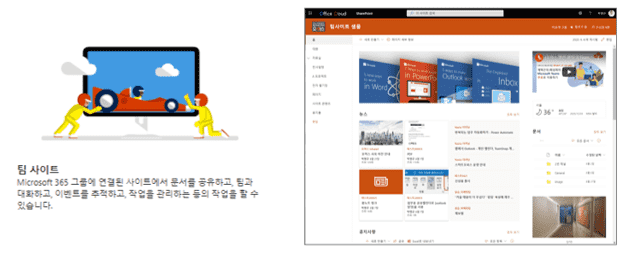
Streamline your work processes by sharing files, data, news, and resources with your colleagues through collaborative team sites built in SharePoint, allowing you to manage all your team's work within one site. Simply create a site and collaborate easily and securely across PCs, Macs, and mobile devices without any additional work.

In this course, you will learn how to create a team site for collaboration using SharePoint and invite the right people to collaborate with you .


What will you learn? ✒️


What you will learn in this course ✏️

In this lecture, we will use the team site feature of SharePoint to create a team site for collaboration.

1. Overview
1) Course Introduction
2) Understanding SharePoint


2. Practice by following along

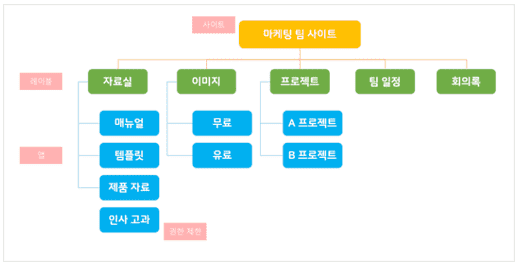
▲ The team site with the structure above is constructed in the following order.

1) Create a team site
2) Add apps and configure the menu
3) Designing the site
4) Create a news post
5) Configure the home screen
6) Invite members and set permissions

3. Using the site
1) General use
2) Additional Uses


Tools covered in the lecture ⭐

Recommended for
these people

Who is this course right for?

  • Anyone who needs a team site for collaboration with permissions set up

  • People who need team collaboration

  • Anyone who wants to create a SharePoint site

  • Anyone who needs a replacement site for their team file server

  • Anyone who wants to manage data permissions

  • For those who want to manage permissions by staff and users

  • Anyone who needs to create a team site for collaboration as a team leader

Need to know before starting?

  • I'll tell you from the beginning! If you follow along step by step, you'll soon have a collaboration site for your team!

Hello
This is omas

Career Verified

2,866

Learners

332

Reviews

167

Answers

4.6

Rating

47

Courses

Nice to meet you! I am ""Omas"", a Microsoft 365 expert.
As a Microsoft 365 expert, I will help you work more easily and smartly.

Introducing Omas's instructors!!
 

Instructor Hyunjung Ko
Microsoft MVP (Microsoft 365 Apps&Services, 2016 ~ Present)
Microsoft Certified Trainer (Active)


Official Blog & Café


YouTube


Books 

  • Microsoft 365 Business for Users & Admins

  • My Smart Work using Office 365, OMAS

  • Office 365 Quick Series 1. Creating a SharePoint Site for Collaboration

  • Office 365 Quick & Easy Series 2. BI that business practitioners can apply to work immediately without expert help

  • Office 365 Quick & Easy Series 3. From Basics to Practical Use All at Once! OneDrive for Business

  • Office 365 Quick & Easy Series 4. Creating mobile apps your company needs with PowerApps

  • Office 365 in SMBs: My Smart Work Using Office 365

  • OneNote 2016 Utilization! - Basic Edition 

  • OneNote 2016 Tips & Tricks! - Advanced Guide

  • Female professionals, never do this! A cheerful and unconventional take on the secrets to success in the workplace.


Recognitions

  • MS-102 - Microsoft 365 Certified: Administrator Expert

  • MS-100 - Microsoft 365 Identity and Services

  • Teams Meetings and Meeting Rooms Technical Assessment

  • MS-700 - Microsoft 365 Certified: Teams Administrator Associate

  • MS-900 - Microsoft 365 Certified: Fundamentals

  • AZ-104 - MS Azure Administrator Associate

  • AZ-900 - Microsoft Certified: Azure Fundamentals

  • SC-900 - Microsoft Certified: Security, Compliance, and Identity Fundamentals

  • PL-900 - Microsoft Certified: Power Platform Fundamentals

  • Exam 347: Enabling Office 365 Services

  • Microsoft Office Specialist Word 2016 Expert

  • Microsoft Office Specialist PowerPoint 2016 Core

  • Certificate of Qualification. Presentation Speech 1st  Level

Other Qualifications

  • Presentation Speech 1st Level (Korea Vocational Competency Test Association, Ministry of Employment and Labor)

  • CS Instructor Level 1 (Korea Vocational Competency Assessment Association, Ministry of Trade, Industry and Energy)

  • e-Learning Master Consultant (Korea U-Learning Association)

  • e-Learning Instructor Level 2 (Korea U-Learning Association)

  • Computer Science Teacher Certification (Minister of Education)

  • Lifelong Education Specialist Level 2 (Seoul World University of Culture and Arts)

More

Curriculum

All

10 lectures ∙ (2hr 1min)

Published: 
Last updated: 

Reviews

All

9 reviews

4.8

9 reviews

  • mkkim7870님의 프로필 이미지
    mkkim7870

    Reviews 2

    ∙

    Average Rating 5.0

    5

    100% enrolled

    The content was simple but useful~

    • omas
      Instructor

      Thank you~ ^^

  • taeeunkim127123님의 프로필 이미지
    taeeunkim127123

    Reviews 1

    ∙

    Average Rating 5.0

    5

    80% enrolled

    Get to know M365 better

    • omas
      Instructor

      Wow! I'm glad we became familiar with each other~ 😊 Fighting!

  • jhong5299님의 프로필 이미지
    jhong5299

    Reviews 2

    ∙

    Average Rating 5.0

    5

    100% enrolled

    You explain it very well

    • omas
      Instructor

      Wow!!! Thank you for the encouraging comment!!! Have a nice day! 😁😁

  • kjhpingu913789님의 프로필 이미지
    kjhpingu913789

    Reviews 4

    ∙

    Average Rating 5.0

    5

    100% enrolled

    I listened to the lecture well. Thank you for your hard work.

    • omas
      Instructor

      Thank you for your hard work in taking the class~ ^^ I hope you have a great collaboration!

  • naeunlee2368님의 프로필 이미지
    naeunlee2368

    Reviews 2

    ∙

    Average Rating 5.0

    5

    100% enrolled

    It was a very informative lecture. Thank you!

    • omas
      Instructor

      Thank you~ I hope you can create a site where we can collaborate conveniently! Fighting~

omas's other courses

Check out other courses by the instructor!

Similar courses

Explore other courses in the same field!

Limited time deal ends in 7 days

$24.20

29%

$34.10