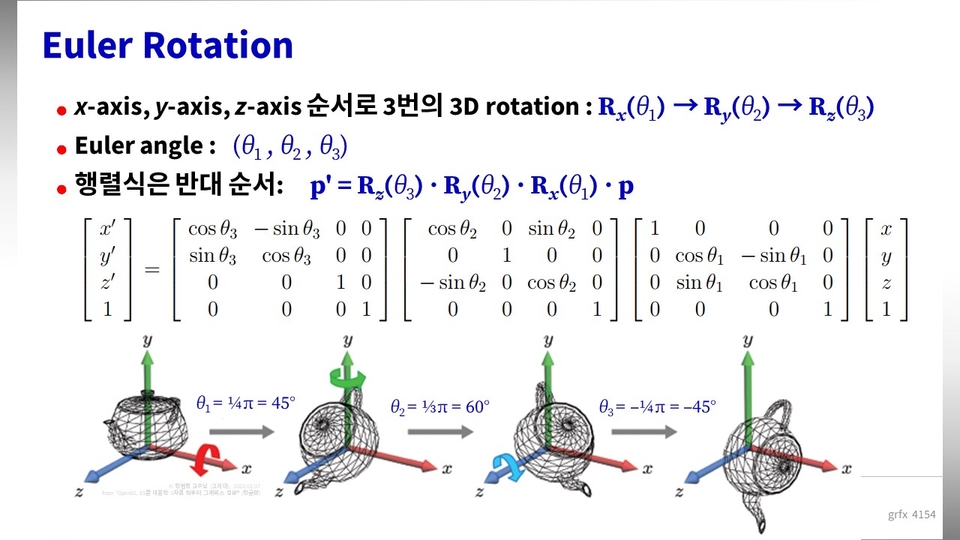
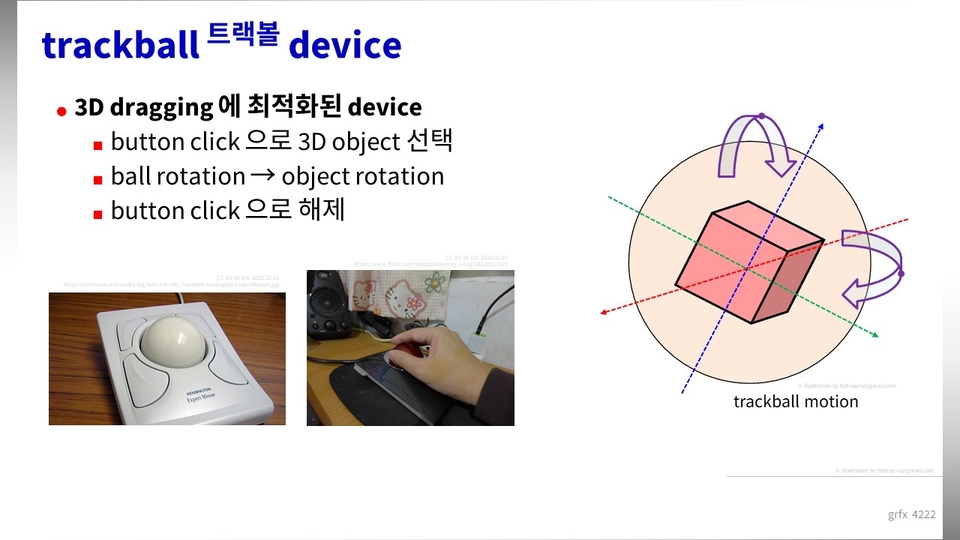
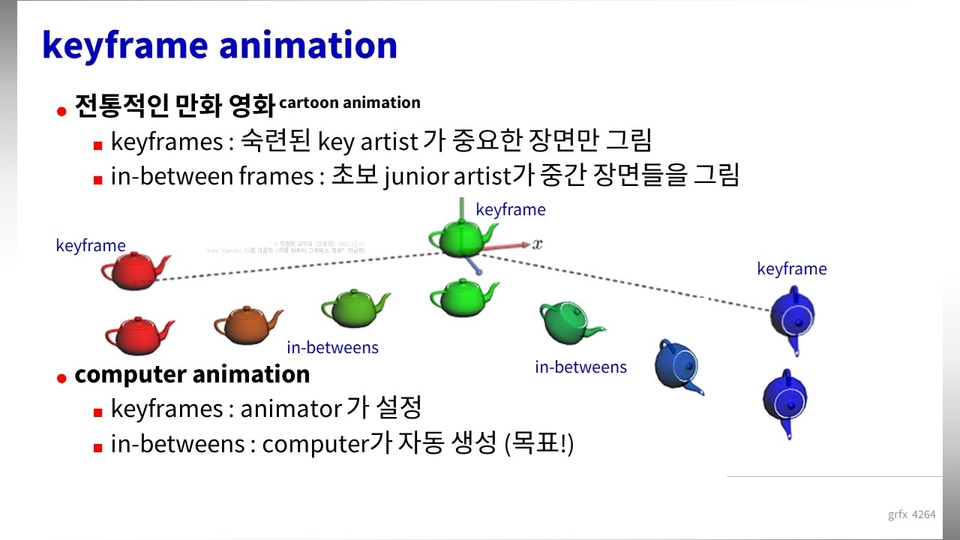
✅ Out of the entire series (1) to (7), (4) coordinate transformation, rotation, virtual trackball, VBO, IBO ✅ OpenGL, 3D graphics programming, from basic theory to ✅ advanced GLSL shader code (vector, matrix, Blinn-Phong shading, texture mapping) are covered.
This seems to be the most detailed and clear lecture among all the lectures on OpenGL, DirectX, and game engines.
5.0
thestand9
96% enrolled
It was difficult material, but I liked how it was explained step by step.
What you will gain after the course
Game Engine / Client-side 3D Graphics Core Features
3D Graphics Basics + Math + Shader Implementation Code
OpenGL Shader Language (GLSL) + Game Engine Algorithm
This lecture is - Part (4) Coordinate Transformation, Rotation, Virtual Trackball, VBO, IBO
The upgraded "Season 2" will open at the end of May with nine series lectures.
"Season 1" will continue with lectures (1) - (7).
"Season 2"upgraded (1) to (7) of "Season 1" and added new (8) and (9).
Those who have taken (1) to ( n ) of "Season 1" can continue from ( n +1) of "Season 2".
Learn in theory, implement in code 3D Graphics Programming with OpenGL!
Using OpenGL 3D graphics programming
Explains 3D graphics programming with OpenGL Shader Language (GLSL) .
Implement the core functions of 3D graphics used in game engines directly with GLSL programs .
The "OpenGL Shader 3D Graphics Programming" course teaches you how to create vibrant 3D graphics using the GLSL programming language . The course is structured to provide both theoretical and practical knowledge of 3D graphics programming, based on OpenGL, which is widely used in various fields.
👉 If you're interested in 3D graphics programming, take this course to become a 3D graphics master!
Is this perhaps my story?
Those who want to systematically study the basic theory of 3D graphics, 3D coordinate system, camera simulation, etc.
Those who want to write 3D graphics output programs , such as game rendering engines, using OpenGL
Anyone who wants to understand GLSL shader language, which is widely used on PCs, mobile phones, and the web.
Anyone who wants to understand the exact meaning of various game engine terms and setting parameters
✅ By following geometric concepts and formulas, you can simulate a camera with a computer program to create accurate images.
✅ You can understand the exact meaning of the parameters used in the game engine.
3D Computer Graphics Core 3-Step
Solid concept explanation
Learn the necessary concepts step by step, from the basic concepts of computer graphics to the mathematical development process and actual code.
Practice is essential!
You can follow along step by step based on actual working source code through rich programming practice.
Focus on the important parts
For source code that has already been explained, we will minimize redundant explanations and focus on learning the parts that have changed or need to be emphasized.
OpenGL Shaders (4) 3D Graphics Explore the learning content
Paid courses are being released sequentially, from (1) to (7), so course reviews are scattered and not yet public. The paid courses currently have the following reviews:
I think this is the most well-organized OpenGL lecture I've ever heard.
The explanation was detailed and helpful. I had a hard time learning OpenGL, but it was very helpful.
(Formulas related to 3D graphics) The formulas themselves are not difficult, but the process of deriving them is not easy to understand. Thank you for explaining them in detail, which helped me understand.
Q. What is the relationship with WebGL?
WebGL is the JavaScript version of OpenGL, which is explained in this lecture.
OpenGL was originally developed for C/C++, and this course will use C/C++ as the foundation for its explanation. Later, with the advent of HTML5, OpenGL was adopted as the standard for 3D graphics for the web. WebGL is a grammar change that allows OpenGL to be used in JavaScript.
If you're familiar with JavaScript, you'll have no trouble applying the basic theory and explanations based on C/C++. The difficult part of studying WebGL isn't the grammar, but rather the functions, internal structure, mathematical theory, and optical calculations of OpenGL/WebGL. Regardless of whether you're studying OpenGL or WebGL, you need to learn the same theory, and this lecture explains it well. Some people actually study WebGL while taking this lecture.
Q. What is the relationship with Vulkan?
In terms of 3D graphics libraries, Vulkan came after OpenGL. However, OpenGL was geared towards application programmers, while Vulkan is geared towards some system programmers. Therefore, in many cases, Vulkan's learning curve is significantly higher.
In many cases, if you don't have extensive experience with 3D graphics, we recommend learning OpenGL before Vulkan, transitioning to Vulkan only when you're fully prepared. In fact, even in foreign countries, Vulkan courses are rarely offered for beginners, rather than as professional courses.
The Vulkan course will be offered as an advanced course for experts after this OpenGL course is completed.
Q. What hardware specifications are required for the training?
We'll be practicing with OpenGL 3.3 or higher. Any desktop or laptop within the past five years should be fine for this exercise. (A graphics card or chip equipped with an NVIDIA or AMD graphics card is recommended. At the very least, recent chips from the Intel GMA series are recommended.)
However, it is necessary to create a development environment by installing the necessary development software .
Q. Do I need to install software for the practice environment?
You need to install a graphics driver that supports OpenGL 3.3 or higher, as well as public libraries like GLFW, GLEW, and GLM. While the lecture explains how to install these libraries, it's not as simple as clicking an exe file. You'll need to install the necessary libraries in the DLL folder on Windows and the include and lib folders of the Visual Studio compiler . (In Linux, you can install them using the apt command.)
Q. Is there a reason for setting a course deadline?
The reason for setting a deadline for the course is that, given the nature of the computer field, the course content is likely to become outdated after that amount of time. By then, I'll be back with a new lecture. 😄
Q. Are there subtitles in the video?
While some class videos include subtitles, most do not. Subtitles may be replaced without notice if new subtitles are produced.
📢 Please check before taking the class!
This lecture is the fourth lecture in the "OpenGL Shader 3D Graphics Programming" series.
The lecture is based on Windows 10/11 operating system + Visual Studio 2019/2022 C++ compiler .
We provide the PPT used in the lecture as a PDF file according to the learning content.
Some of the illustrations and photos used in the lecture videos and PDF files are not in the public domain but are protected by separate copyrights. In these cases, the knowledge sharer obtained limited permission from the copyright holder for use. Therefore, if others wish to use these images, they must obtain permission from the original copyright holder. Please be aware of this.
Hello. 🌞 Thank you for your good review. The graphics field has a lot of geometry and optical processing, so it is impossible to avoid calculating formulas. I tried to explain it as easily as possible, but I am glad that it was helpful. Thank you. 🍀