Jira is the most suitable 'collaboration' and 'communication' tool for applying Agile techniques within organizations, which have recently become an issue!
I am using Jira at work, but I had a hard time applying it to my work because I didn't learn it properly. I like that the instructor calmly explains the basics.
5.0
손현영
8% enrolled
The instructor explains things in an easy-to-understand way and the practice is very easy to follow, so I think it would be great to use it as a manual when you don't remember things later :)
5.0
wonjun.mun
92% enrolled
Your ability to organize lecture materials and convey lecture content is excellent!!
Thank you for the great lecture.
What you will gain after the course
Basic concepts and usage of Jira
Understanding Jira's Agile Board
Use Jira's issue search and filter functions and create a dashboard
Using real Jira practice Master everything from basics to practice 🎓
Among the communication and collaboration tools suitable for the non-face-to-face environment that has accelerated since the COVID-19 pandemic, Based on Jira,the hottest Atlassian core product You can increase your capabilities for hot products by implementing CI/CD.
Jira Basic Course 👨🏫
This training is a Jira Basics course for the cloud version, designed for anyone using Atlassian to learn how to utilize it. Through systematic hands-on practice, you'll learn the fundamental concepts of Jira, a collaboration solution that extends beyond development teams to business teams.
This is helpful for people like this🔑
📝 How to use Jira Anyone who wants to learn
💼 Agile with the introduction of Jira Companies that want organizational culture
🧑💻 About DevOps A development team with many concerns
We must do this process! Why you should take this course✨
#1
Direct training from current engineers at Atlassian Korea's official Platinum Partner
#2
Practical know-how delivered through references from many years of corporate training
#3
Practical training that uses and follows actual Jira based on basic understanding through early education.
#4
Jira provides a collaboration and communication solution for building an agile organizational culture.
Learn this 📚
1. Jira Overview
Learn about Jira, how to set it up, and how to use it.
2. Issue (part 1)
Learn about issues, the basic unit of Jira, and how to use them.
3. Practice creating basic issues and adding fields
Learn how to create and configure each issue type provided by Jira.
4. Issue (part 2)
Learn about issues, the basic unit of Jira, and how to utilize them.
Learn about the JQL feature for issue search types and how to set up a dashboard with filter functions to suit your needs.
10. Practice searching for issues and checking filter/board settings.
Learn how to use the filter function and check the board through the issue search function provided by Jira.
11. Practice using the dashboard
Learn Jira's dashboard features through hands-on practice.
12. Useful Links
Learn how to use useful links to help you use Jira.
Expected Questions Q&A 💬
Q. Why should I learn Jira?
Jira,a tool usedsince the waterfall approach , has recentlygained recognition as the most optimized tool for agile-style collaboration. Agile strives to quickly reflect user needs and respond flexibly. It focuses on rapid releases rather than perfection, and the product and team learn through planning, execution, and repeated releases in small increments. In this process, transparent sharing of learning, rather than individual team members' learning, is crucial, and Jira facilitates this process!
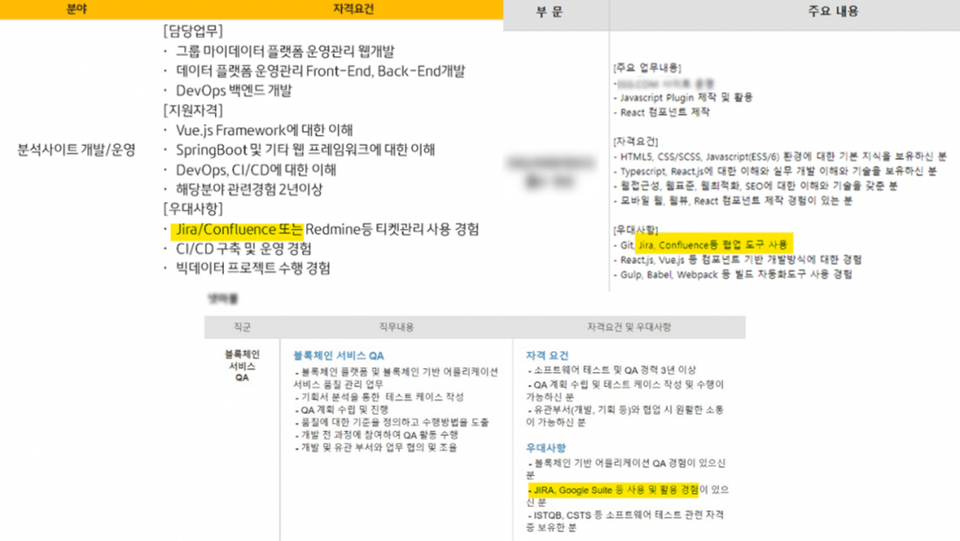
>> Many companies are currently pursuing agile andare giving preference to those with experience using collaboration tools such as Jira and Confluence.
Q. Is this a course that non-majors can also take?
Yes, we welcome anyone with a passion for learning Jira.
Q. What are the benefits of learning Jira?
1. Jira enables project management that helps you focus on critical, collaborative work and improves team efficiency. 2. You can secure visibility for each task through project boards, reports, and dashboard functions. 3. Improve team communication!
Introducing the Knowledge Sharer ✒️
Coach Kim Du-hyeon
Key resume and skills
Current) Open Source Consulting Director / Conducted training for Atlassian Jira & Confluence users and administrators
Formerly worked as an engineer, quality assurance, onboarding training, technical marketing, and PM at a domestic IT security and CDN vendor.
Education history
Atlassian Jira & Confluence Administrator and User Training
Kakao, Hyundai, Samsung, LG, Kookmin Bank, Shinhan Bank, Kyobo Life, Hana Tour, and many other SMBs, including startups, are participating.
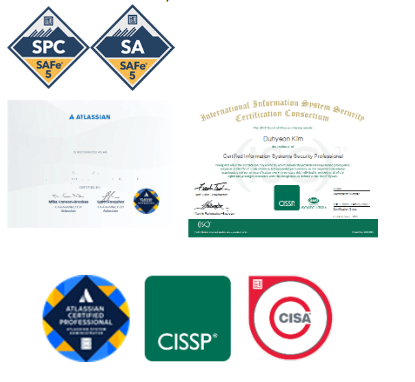
Certification
Certified Scaled Agile 5.0 Program Consultant (SPC)
Certified SAFe® 5 Agilist (SA)
Atlassian Certified System Administrator
Certified Information Systems Security Professional
Certified Information Systems Auditor
Recommended for these people
Who is this course right for?
Anyone who wants to learn how to use Jira
Business teams that want to introduce Jira internally to create an agile organizational culture
Development and operations teams with many concerns about DevOps and ALIM
I am using Jira at work, but I had a hard time applying it to my work because I didn't learn it properly. I like that the instructor calmly explains the basics.
The instructor explains things in an easy-to-understand way and the practice is very easy to follow, so I think it would be great to use it as a manual when you don't remember things later :)
Thank you for taking the course ^^ We will work hard to create a more excellent course! If you have any questions while taking the course, please feel free to leave a question at any time!



















![[Latest version update] Project and task management to become a pro at planning - MS PlannerCourse Thumbnail](https://cdn.inflearn.com/public/courses/336001/cover/9368db08-c64b-42ca-8ad1-e7a872bffc0e/336001.jpg?w=420)
![[Basics] Understanding Google Workspace Gemini Through IllustrationsCourse Thumbnail](https://cdn.inflearn.com/public/files/courses/344659/cover/ai/3/eb2892c4-0d1f-45bf-94c5-c2a3cb4b8073.png?w=420)
![[RPA] UiPath Studio Advanced Development CourseCourse Thumbnail](https://cdn.inflearn.com/public/files/courses/334859/cover/ai/0/b11c8640-2939-4c35-9f89-bf7c540c1b6c.png?w=420)



![[Smart Working in Practice] Working Smarter with Monday.comCourse Thumbnail](https://cdn.inflearn.com/public/courses/328127/cover/b5f0e902-1c41-4ac5-8778-2165c1b4a0d7/328127-eng.png?w=420)