inflearn logo

Claude Code | Agent Design for PM/PO Service Planners

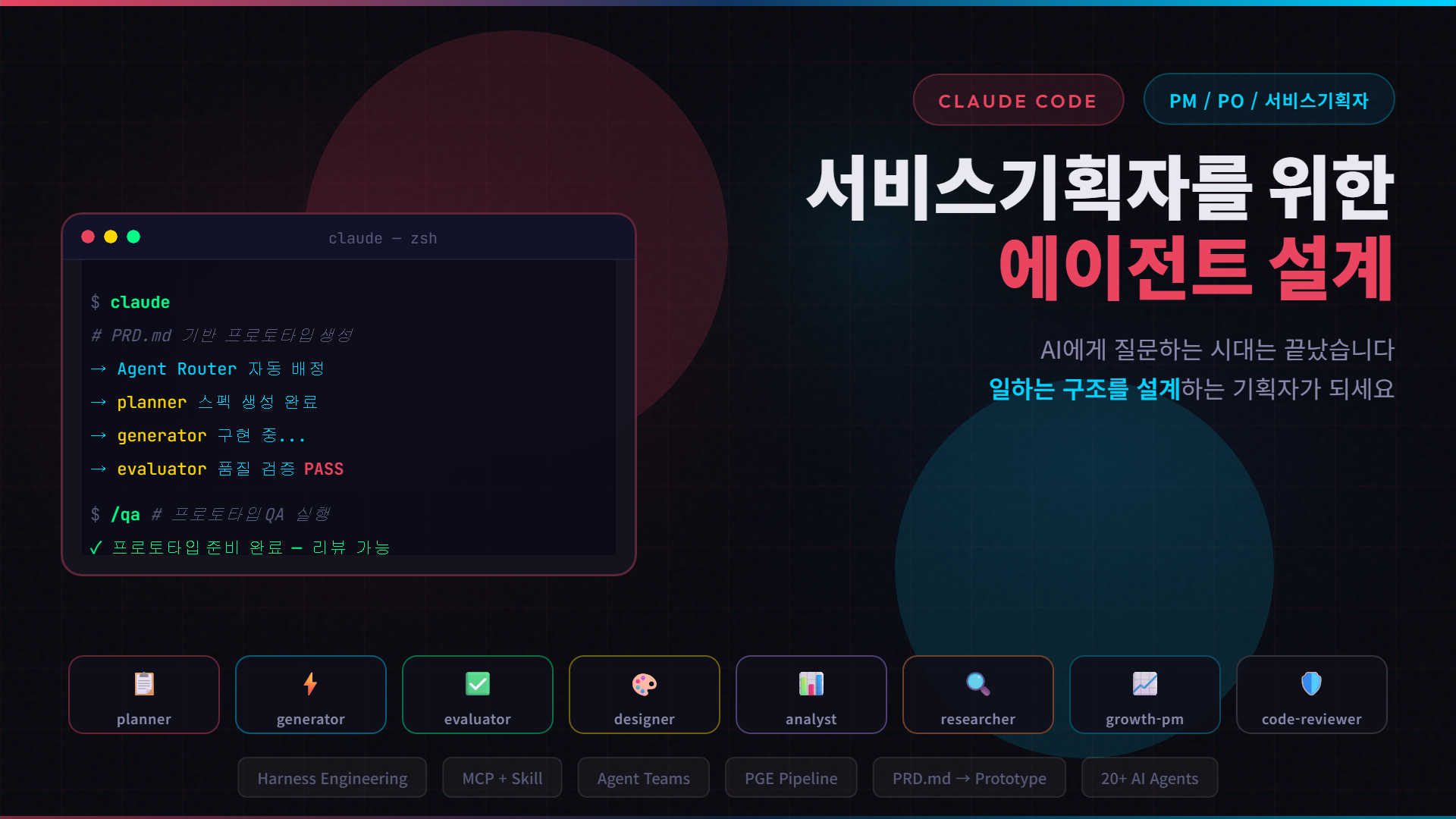
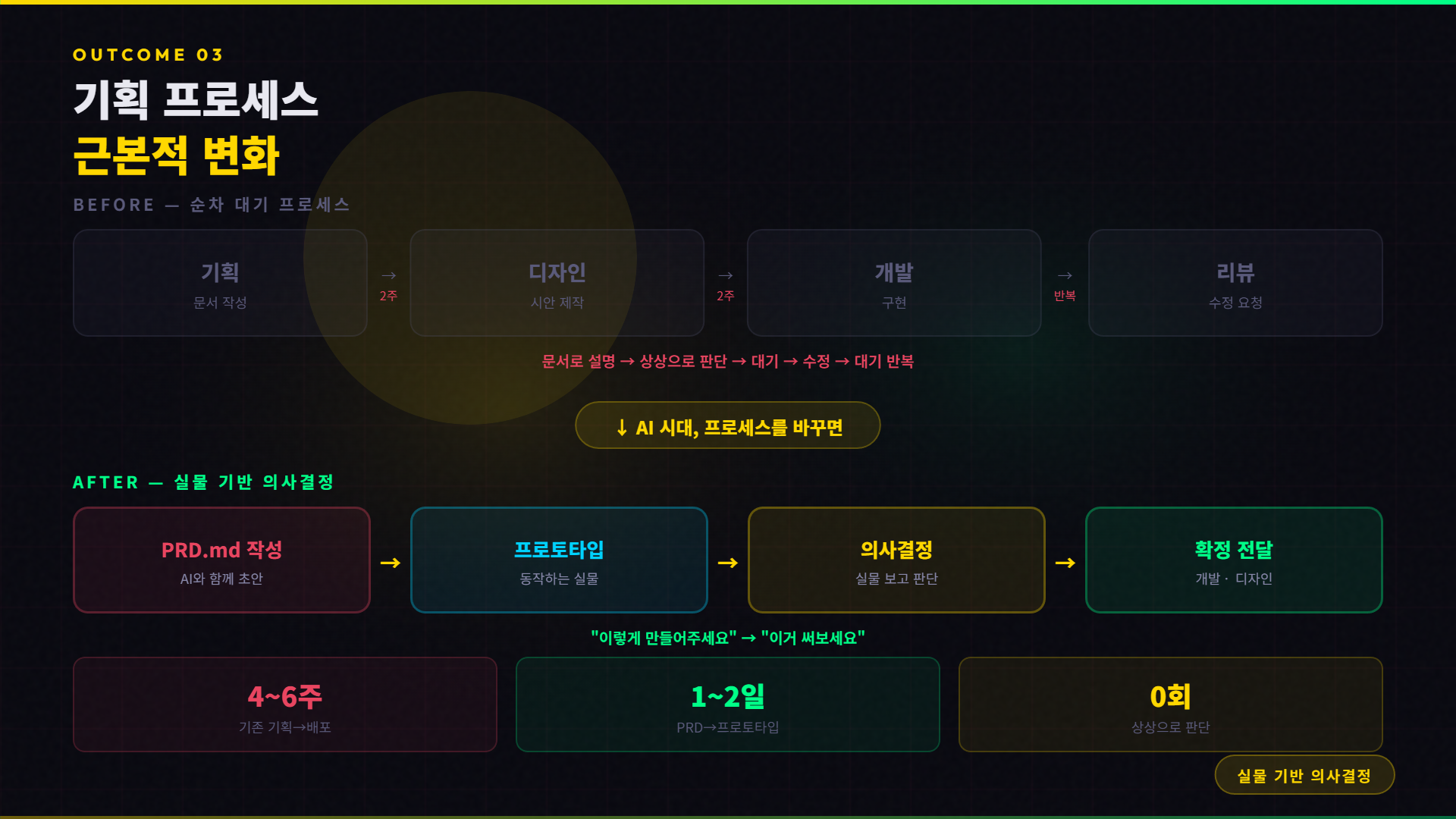
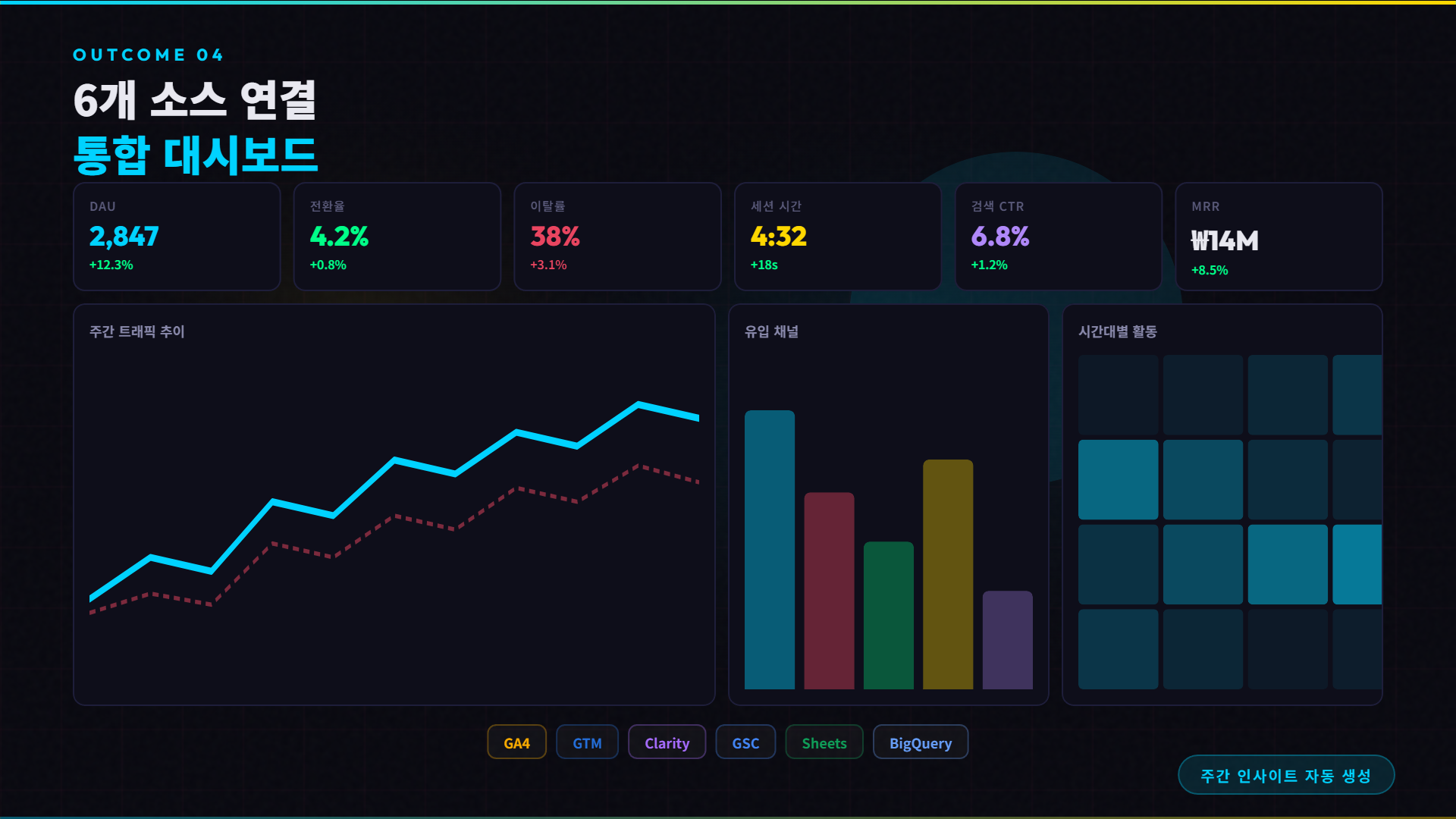
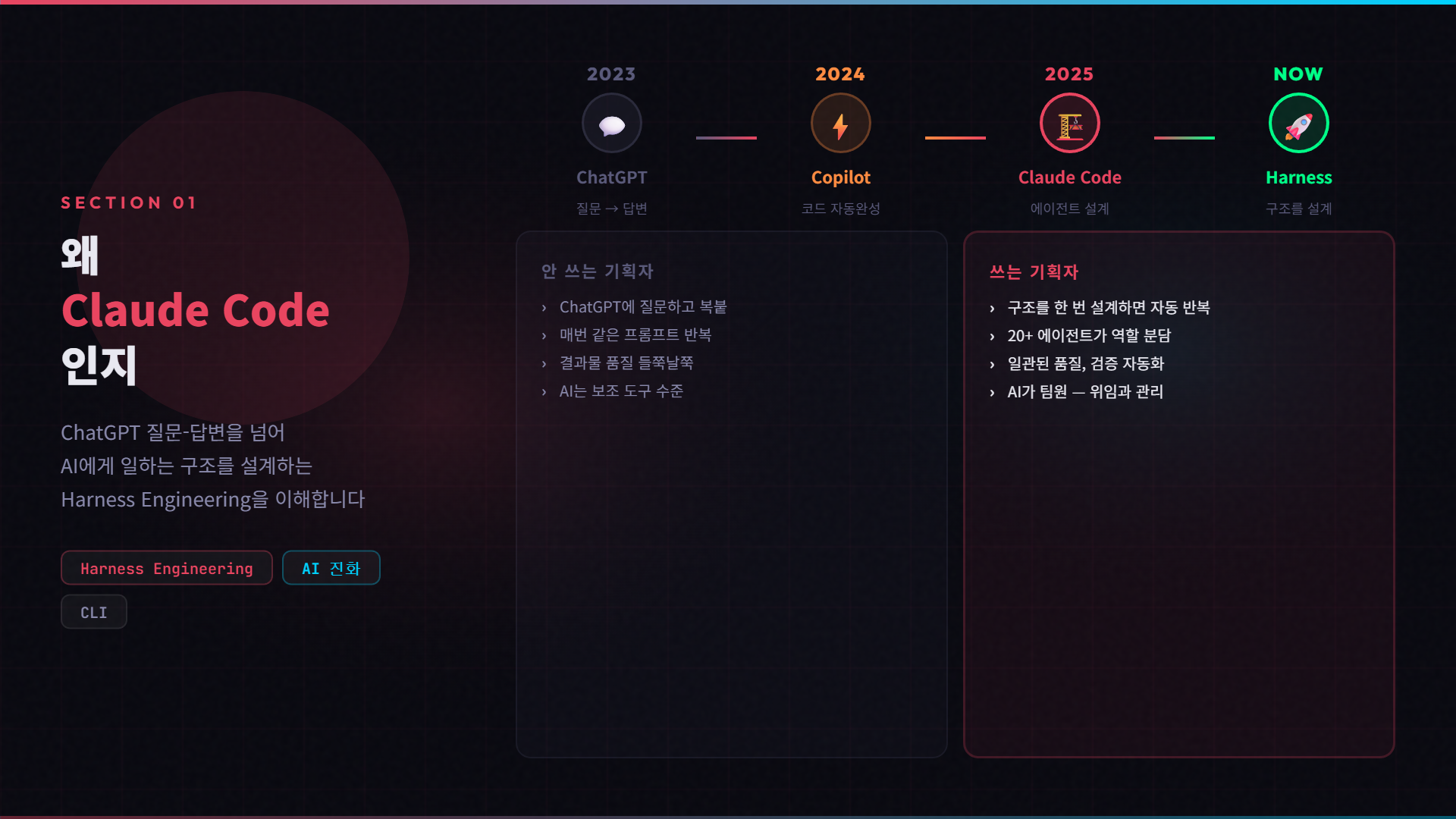
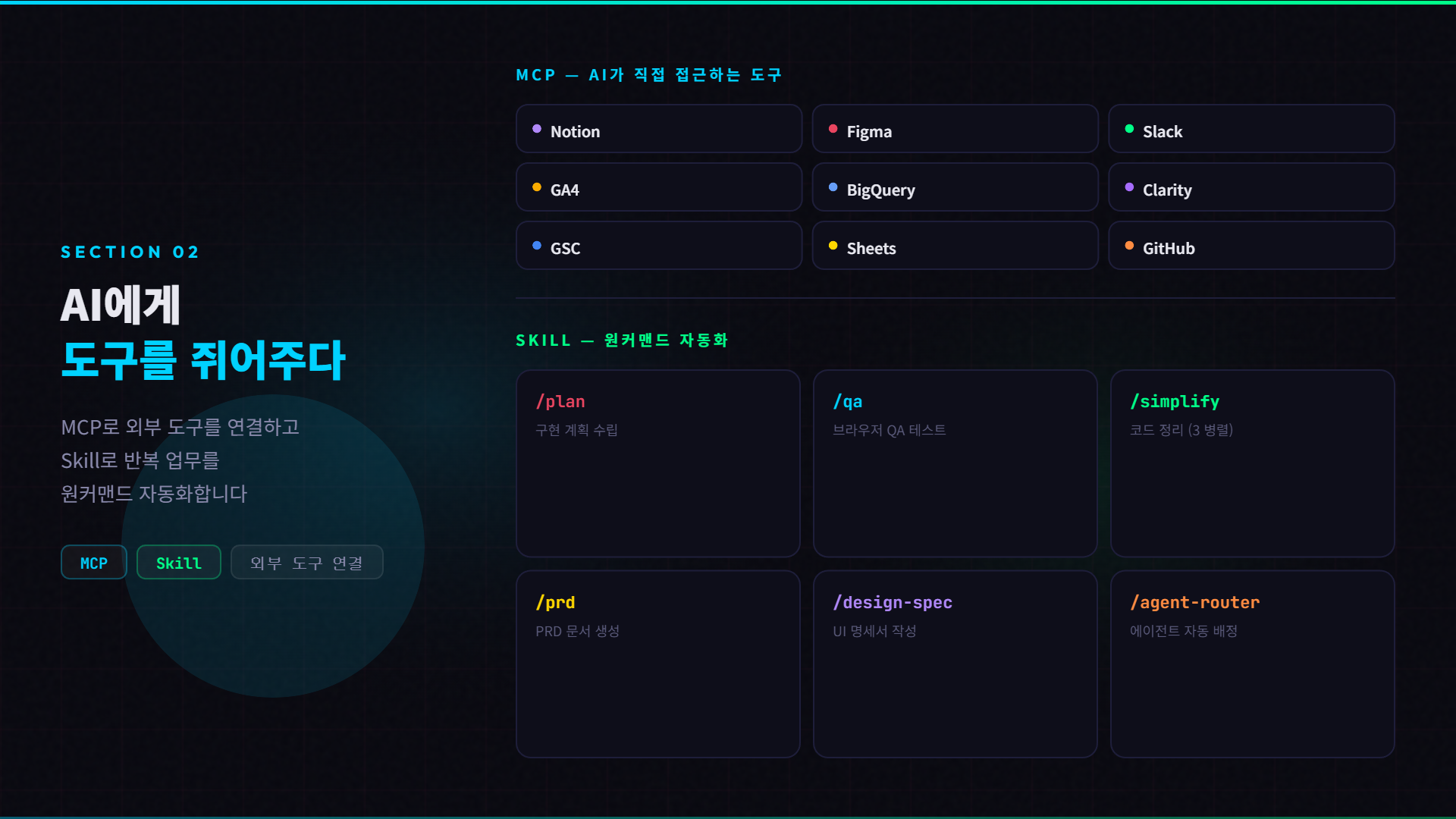
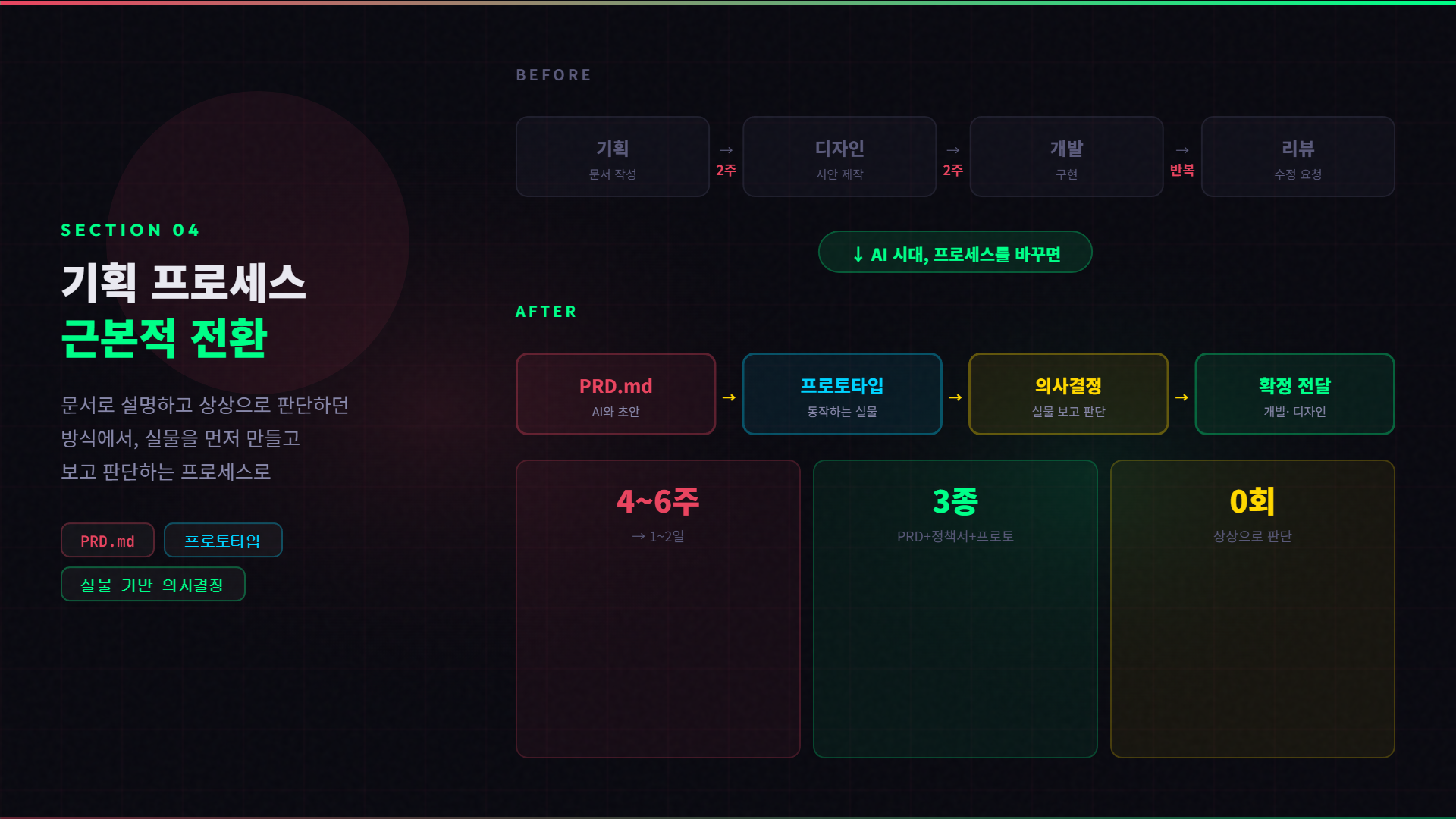
[Problems This Course Solves] - The limitations of planners who have ideas but cannot build them directly - Inefficient decision-making based on imagination: "Please make it like this" - Bottlenecks caused by requesting and waiting for the development team for every data analysis or API verification - The reality of using AI tools but remaining at the level of simple ChatGPT Q&A [What You Will Learn] 1. Redesigning the Planning Process in the AI Era - Traditional: Planning → Design → Development (Sequential waiting) - Shift: Writing PRD → Generating Prototype → Decision-making based on the actual product → Delivery after confirmation - Moving from planning explained through documents to planning demonstrated through actual products 2. Designing AI Agents for PMs - Harness Engineering: Designing a working structure rather than just asking AI questions - CLAUDE.md, Rules, Hooks, MCP, Plugins — The roles and design principles of each layer - Agent Router: A structure where a single request is automatically assigned to the optimal agent - PGE Pipeline: Planner → Generator → Evaluator, quality control design for large-scale tasks 3. Building Your Own AI Team - Planning/Research, Product, Design, Development, Marketing — 20+ agents across 5 columns - Actual workflows where a solo planner manages a team of experts - Connecting external tools via MCP (Notion, Figma, Slack, data sources) - Automating repetitive tasks with one-command "Skills" 4. Practical Automation of Supplementary Tasks - GA4 + Clarity + GSC + BigQuery → Integrated dashboard + automatic weekly insight generation - Direct calling of in-house APIs → Scenario verification → Quality evaluation reports - BigQuery cohort analysis → Aha Moment hypothesis verification - A/B testing, Notion synchronization, UI/UX audit automation --- Who should take this course: - PM/PO/Service Planners tired of waiting times and review cycles in the planning process - Those who want to properly design AI as a professional work tool - Those who want to make data-driven decisions themselves but lack analysis team resources - Non-developers who want to move past their fear of the "terminal" [Prerequisites] - None. We guide you through everything from installation to setup. - No coding experience required. We focus on design and application from a PM's perspective. [Changes After Taking the Course] - Increase decision-making speed by creating working prototypes directly from a single PRD.md - Design and operate your own team of AI agents - Directly automate data analysis, API verification, and report generation

13 learners are taking this course

Level Basic

Course period Unlimited

Business Productivity
Planning Document
Planning Document
AI
AI
AI Agent
AI Agent
Model Context Protocol
Business Productivity
Planning Document
Planning Document
AI
AI
AI Agent
AI Agent
Model Context Protocol

What you will gain after the course

  • Designing an Agent Tailored to My Tasks (Harness)

  • Process for removing bottlenecks in the existing planning->design->development workflow

  • Designing My Own AI Workflow to Increase Productivity by 200%

  • A system that automatically generates integrated dashboards and weekly insight reports by connecting 6 data sources, including GA4, BigQuery, and Clarity, without a data analyst.

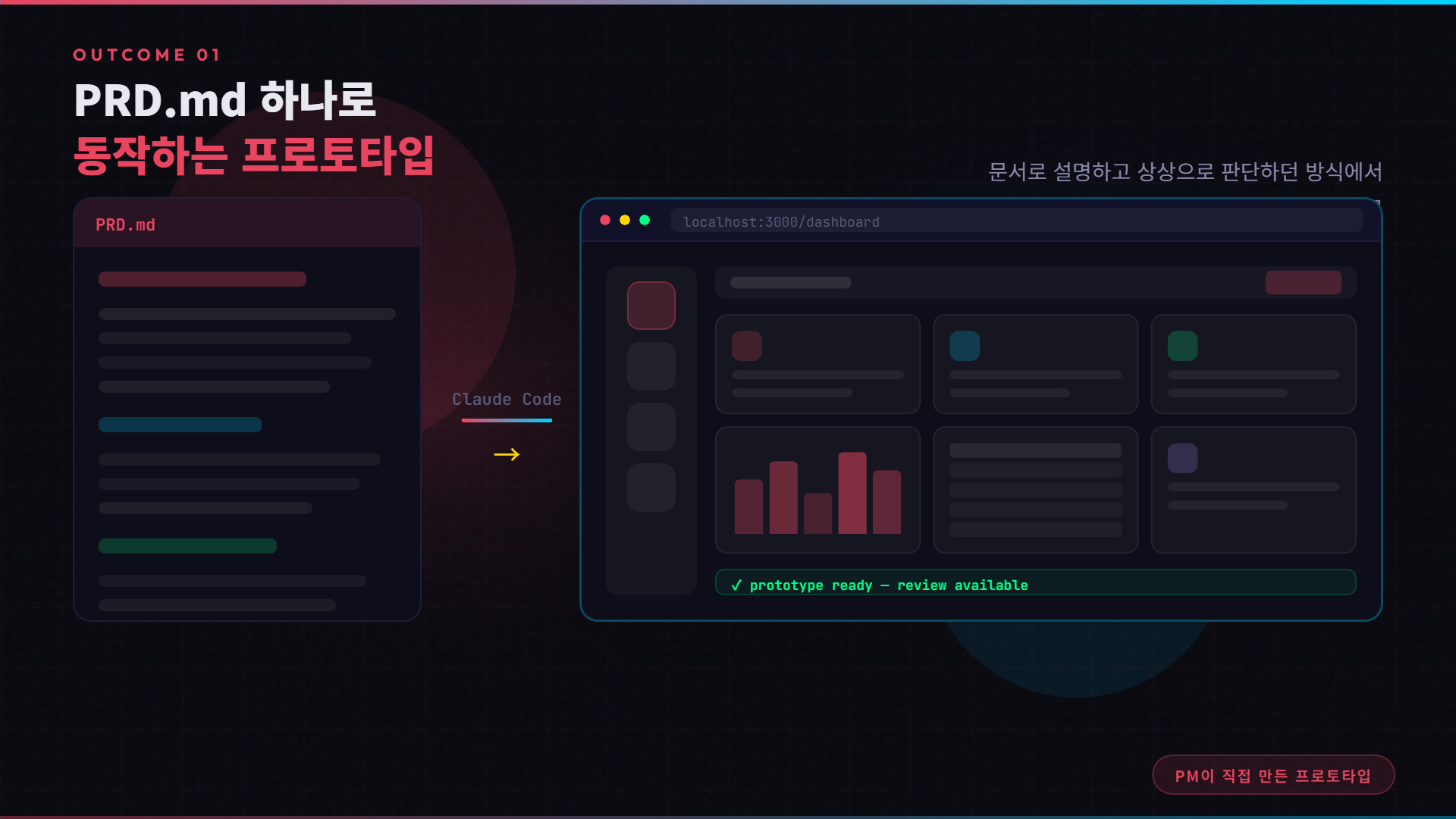
  • A planner who builds a working prototype themselves with just a single PRD.

Designing PM/PO/Service Planner Agents Using Claude Code

Stop asking AI questions. Design your work structure and improve your productivity

[What you will learn through this lecture]
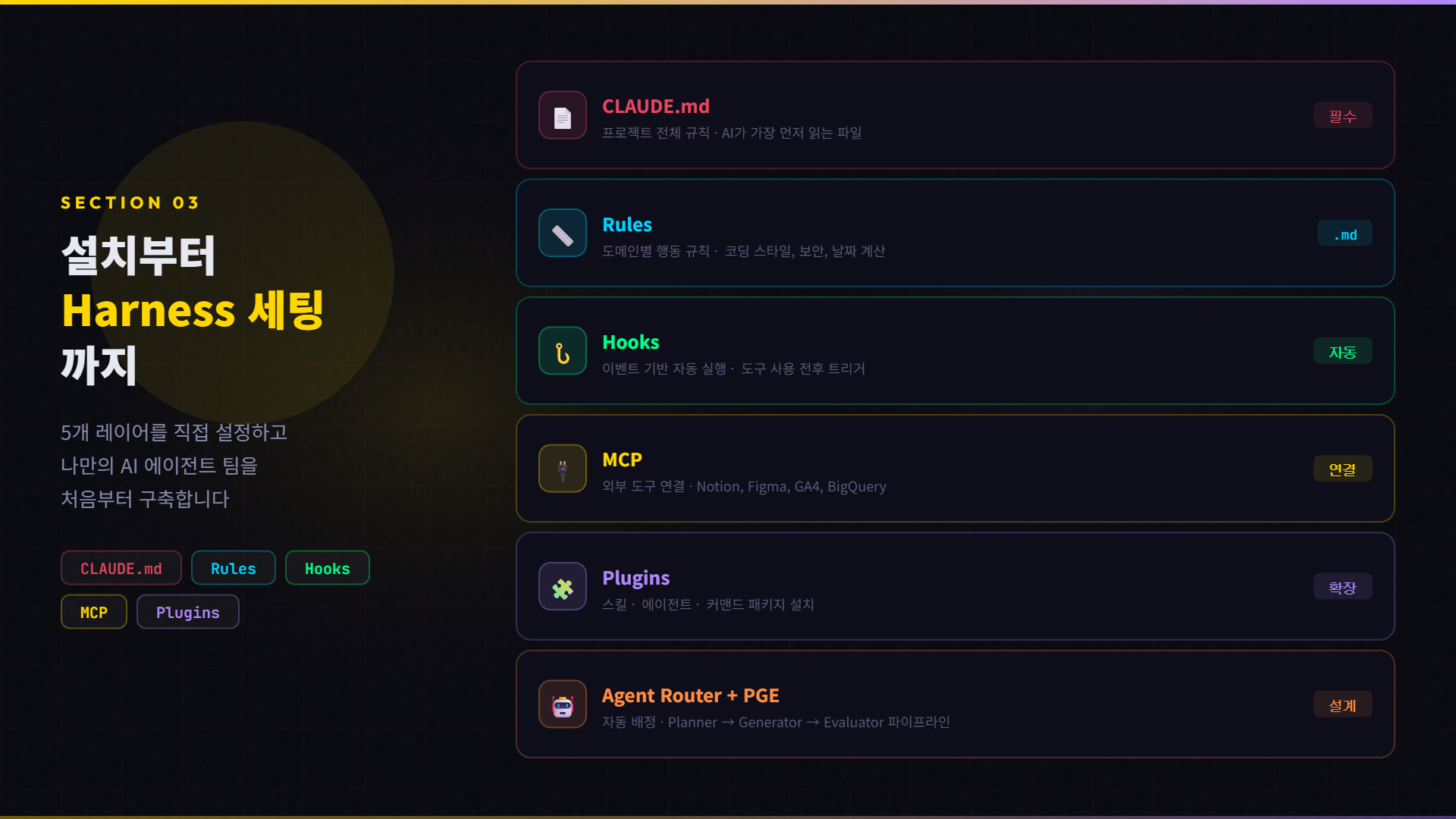
- Claude Code's Harness Engineering concept: How to design work structures instead of just asking AI questions
- Redesigning the planning process from the perspective of PM/PO/Service Planners
- Building your own AI Agent workflow with 5 layers: CLAUDE.md, Rules, Hooks, MCP, and Plugins
- Practical automation of supplementary tasks such as data analysis, API verification, and cohort analysis, and where they are primarily used
- In-house PM/PO service planning, and startup CEOs concerned about processes
- Product management requiring data-driven decision-making
- Any organization with a Planning → Design → Development process

[Reference Materials / Real-world Cases]

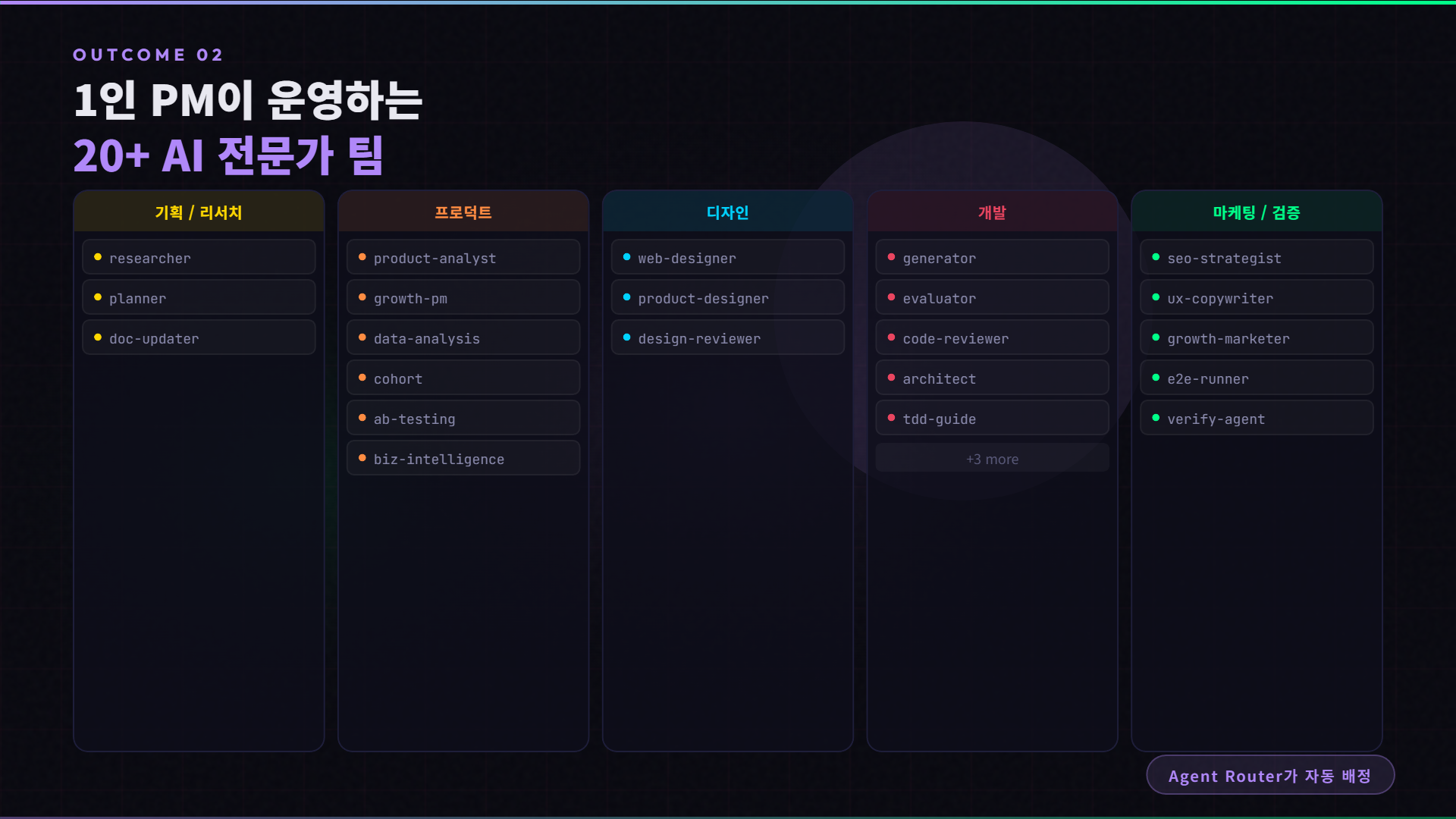
- Kanban board configuration of 20+ AI agent teams currently in operation
- Actual workflow from PRD.md → Prototype → Decision making


[Background of Course Planning]

thoughtful - Started from the thought that "decision-making would be much faster if the planner could show the actual product themselves," after repeating cycles of handing over planning documents and waiting 2 weeks for design and 2 weeks for development
- Planned this to share the experience of how my way of working fundamentally changed after applying Claude Code's Harness Engineering, whereas previous attempts with AI tools like ChatGPT and Cursor remained at a simple Q&A level
- The course contains the exact structure currently being applied in practice, as I design and manage a team of over 20 AI experts as an in-house PM

After taking this course, you will be able to create these results

PRD and Prototype

Changes in existing deliverables

AI Agent Team Composition

Team composition tailored to my company/work/organization

Changes in legacy processes

Changing legacy processes by overcoming them with AI

Data analysis that does not rely on developers

Direct integration of GA4 (GTM), Clarity, and marketing-related tools

# You can design a "work structure" for AI, not just ask it "questions"
- CLAUDE.md, Rules, Hooks, MCP, Plugins - Build your own agent workflow with 5 layers

# You can eliminate bottlenecks in existing processes to fit the AI era
- 4–6 weeks of waiting for planning → design → development: Create a prototype in just 1–2 days with a single PRD.md
# You can directly automate supplementary tasks
- Data dashboards, API validation, cohort analysis, and weekly reports executed directly by the PM without waiting for analysis or development teams

# You can run a team of 20+ AI experts all by yourself

- When a single request is made, the Agent Router automatically assigns the optimal agent: establishing a one-person PM system covering everything from planning and design to development and marketing.

Learning Content

Why Claude Code? (f. Harness Engineering)

Why you should use Claude Code even if you are not a developer, and the concept of Harness Engineering

MCP and Skill

Learn how to directly provide AI with external tools such as Notion, Figma, Slack, and data sources.

Setting up your own agent team

How to set up the entire Harness structure, from installing Claude Code to designing your own team of 20+ AI agents.

PM/PO/Service Planner's Utilization of Claude Code

  • A proven process to resolve planning bottlenecks

  • + Data analysis using Claude Code

Inquiries before taking the course

  • Please provide detailed notes on any reference materials or requirements needed for the course.

  • It helps students fully understand the content covered in the lecture and increases learning satisfaction.

Inquiries before taking the course

Prerequisite Knowledge

  • No coding experience required — we will guide you through everything from installation to setup. Code

    This is not a lecture about writing code, but a lecture about designing the structure of how AI works.

  • It is even better if you have practical experience as a PM/PO/Service Planner — Planning→Design→Development

    If you have experience with the process, you will immediately feel the relevance of the lecture content. If you have practical experience

    You can still take the course even if you don't have it.

  • Claude Pro subscription required! Claude Code is available on paid plans, Claude Pro or higher. We recommend subscribing before taking the course.

Recommended Learning Method

  • Learn by following along | We recommend that you don't just watch the video, but actually install and set up Claude Code yourself as you go.

  • Modify it to fit your own work | The workflow shown in the lecture is based on my own

    These are based on real-world practice. Do not simply copy them; instead, modify the configuration files to fit your own workflow.


  • Please take the courses in order — the concepts in the earlier sections serve as the foundation for the later sections.


    ※ In particular, please complete Sections 1–3 (Concepts + Setup) first before proceeding to Sections 4–5 (Practical Application).

    proceed.

Recommended for
these people

Who is this course right for?

  • PMs/POs/Service Planners who have used AI but can't seem to get beyond the level of simple ChatGPT Q&A.

  • Those who are wondering, "Does a planner have to code?" but don't yet realize that the answer is design, not coding.

  • Service Planners/PMs/POs who need to increase productivity

  • Non-development professionals who want to improve their AI capabilities

  • CEOs who are concerned about processes related to planning, design, development, and marketing

Need to know before starting?

  • Practical experience as a PM/PO/Service Planner is preferred.

  • No coding experience required - we guide you through everything from installation to setup. We focus on design and application from a PM's perspective.

Hello
This is reve

169

Learners

20

Reviews

6

Answers

4.5

Rating

2

Courses

Curriculum

All

14 lectures ∙ (2hr 29min)

Published: 
Last updated: 

Reviews

Not enough reviews.
Please write a valuable review that helps everyone!

Similar courses

Explore other courses in the same field!

Limited time deal

$8,485.00

28%

$72.60