

Chief Choi's Excel Pivot Table Master Class

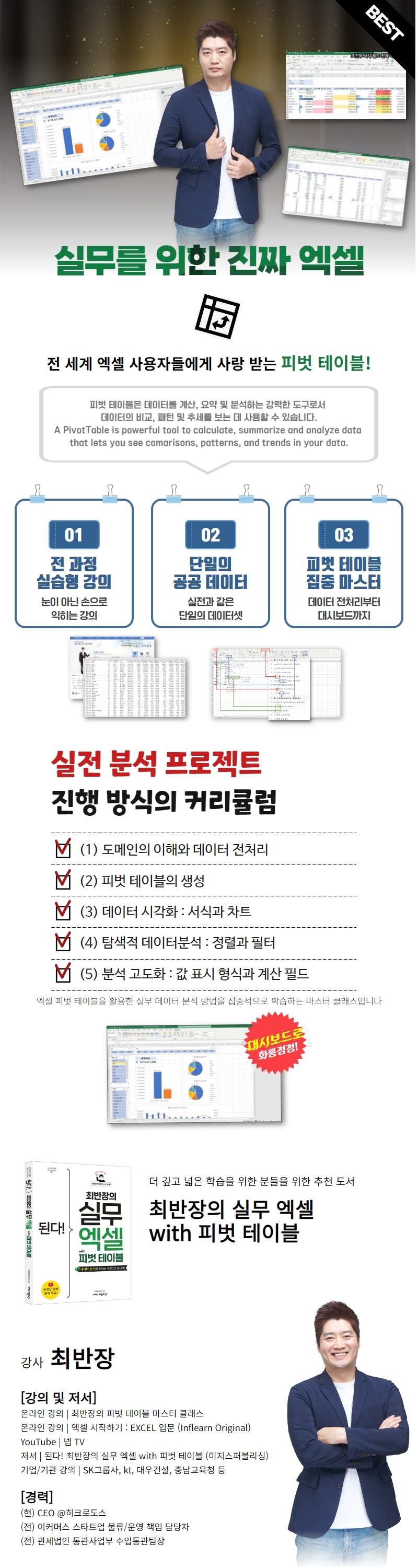
This course will teach you how to use Excel Pivot Tables to quickly and easily analyze data and create dynamic automated reports in your daily life and practice. Pivot Tables are easy and powerful. Through this course, you can begin the process of solving problems through data analysis.

(4.8) 수강평 114개

강의소개.상단개요.수강생.short

난이도 초급

수강기한 무제한

Excel
Excel
MS-Office
MS-Office
Excel
Excel
MS-Office
MS-Office

먼저 경험한 수강생들의 후기

먼저 경험한 수강생들의 후기

4.8

5.0

나쁜 코알라

100% 수강 후 작성

<<If you need to utilize data in Excel right now, choose it without hesitation. (You don't need to know anything about Excel)>> This lecture is of a level of difficulty that is acceptable for those who need to utilize data in the field without any basic knowledge of Excel. If Choi Banjang's other introductory lecture <Getting Started with Excel: Introduction to Excel (Inflearn Original)> is a lecture that covers the menu structure of Excel, this lecture will allow you to press the pivot table and utilize it right away after completing it. (Although you may not know until the end why the menu at the top of Excel is called the 'ribbon menu') Personally, I think it would be more effective for Excel beginners to 'take this lecture first' and <Introduction to Excel>. I will say it again, this is a lecture that even beginners can take. And it is a lecture that allows you to utilize data right away. I also found the humor of the team leader to be my style, so it was fun. I hope you stay healthy and continue to produce great lectures. Thank you.

5.0

인프런

100% 수강 후 작성

Thank you for the great lecture! You explained it in an easy-to-understand way, so I was able to learn in a fun way!

5.0

ecstasy7sp

100% 수강 후 작성

It was very helpful with practical content and easy to understand explanations.

강의상세_배울수있는것_타이틀

  • Data analysis using pivot tables

  • Create accurate reports quickly and easily

  • Data visualization using pivot tables and pivot charts

  • Data filtering to focus analysis on the data you need

  • How to Create an Excel Dashboard Using Slicers and Timelines

  • Data summary technology using various operations

  • Advanced analytics techniques using value display formats

Master Excel data analysis with pivot tables!
Use Excel freely in your work and daily life.

강의소개.콘텐츠.추천문구

학습 대상은 누구일까요?

  • People who want to solve problems through data analysis in their work and daily life

  • Office worker who creates data-based reports on a regular basis (daily, weekly, monthly, etc.)

  • Office worker who uses a calculator to create reports using Excel data

  • People who want to try data analysis but don't know how to use R or Python

  • People who have stopped learning Excel because it was boring and difficult

선수 지식, 필요할까요?

  • This lecture will serve as prerequisite knowledge for other lectures, meaning that no other prerequisite knowledge is required.

  • Even if you have little experience using Excel, you will have no problem taking the course.

  • If you have any experience using Excel, your learning efficiency will be very high.

  • Here, 'a little' refers to cases where you have experience using the SUM function.

강의소개.지공자소개

2,473

수강생

144

수강평

46

답변

4.8

강의 평점

2

강의_other

I am creating 'Hycrodos', a Microsoft Excel & Power BI training service.

I am deeply interested in customs and trade, productivity tools and data analysis, and startups and organizational culture.


👨‍💻 Actionable Data Analysis
I am researching practical data analysis and productivity tools that can lead to real action in the workplace.
Chief Choi's Excel Pivot Table Master Class @Inflearn💊
Getting Started with Excel: Introduction to Excel (Inflearn Original) @Inflearn💊


🎥 Contents Creator
I am running the YouTube channel 'Nep TV'.


🚩Go to profile (click!)

더보기

커리큘럼

전체

47개 ∙ (강의상세_런타임_시간 강의상세_런타임_분)

해당 강의에서 제공: [object Object]
강의 게시일: 
마지막 업데이트일: 

수강평

전체

114개

4.8

114개의 수강평

  • ecstasy7sp5078님의 프로필 이미지
    ecstasy7sp5078

    수강평 2

    평균 평점 5.0

    5

    100% 수강 후 작성

    It was very helpful with practical content and easy to understand explanations.

    • hicrhodus
      지식공유자

      Thank you for taking our class and leaving a great review!

  • mark [DEL] 20230403051857님의 프로필 이미지
    mark [DEL] 20230403051857

    수강평 5

    평균 평점 5.0

    5

    100% 수강 후 작성

    <<If you need to utilize data in Excel right now, choose it without hesitation. (You don't need to know anything about Excel)>> This lecture is of a level of difficulty that is acceptable for those who need to utilize data in the field without any basic knowledge of Excel. If Choi Banjang's other introductory lecture <Getting Started with Excel: Introduction to Excel (Inflearn Original)> is a lecture that covers the menu structure of Excel, this lecture will allow you to press the pivot table and utilize it right away after completing it. (Although you may not know until the end why the menu at the top of Excel is called the 'ribbon menu') Personally, I think it would be more effective for Excel beginners to 'take this lecture first' and <Introduction to Excel>. I will say it again, this is a lecture that even beginners can take. And it is a lecture that allows you to utilize data right away. I also found the humor of the team leader to be my style, so it was fun. I hope you stay healthy and continue to produce great lectures. Thank you.

    • hicrhodus
      지식공유자

      First of all, thank you for taking the class. I don't know what to do with myself because you praised the parts that I wanted to convey to the students while making the lecture. I hope it will be helpful to you in your work. It was my first lecture, so there were many shortcomings, but I am really grateful that you recognized the good points. I will greet you again with good content.

  • 인프런님의 프로필 이미지
    인프런

    수강평 6

    평균 평점 5.0

    5

    100% 수강 후 작성

    Thank you for the great lecture! You explained it in an easy-to-understand way, so I was able to learn in a fun way!

    • hicrhodus
      지식공유자

      Thank you! I hope it helps you with your work ^^

  • seunghansong5598님의 프로필 이미지
    seunghansong5598

    수강평 5

    평균 평점 5.0

    5

    100% 수강 후 작성

    • jiyeonsong2070님의 프로필 이미지
      jiyeonsong2070

      수강평 1

      평균 평점 5.0

      5

      62% 수강 후 작성

      It helps you understand pivot tables.

      비슷한 강의

      같은 분야의 다른 강의를 만나보세요!

      강의상세.할인문구

      $38,500.00

      30%

      $42.90