A must-have for office workers! Master Excel from A to Z, covering versions 2019 to the latest 2026.
Stop doing patchwork tasks where you just change numbers in Excel templates created by others! This course is a 'practical-optimized all-in-one condensed course' designed to help you master the entire menu manual from Excel 2019 to the latest 2026 version from A to Z, building the self-sufficiency to perfectly handle any data analysis or document creation you encounter in the workplace on your own.
Perfect mastery of all core menus and manuals from Excel 2019 to the latest 2026 version
Essential function application and data processing skills for practical work that reduce simple repetitive tasks by 10 times.
Practice exercises, lesson plans, and key shortcut PDF
⏱️ From tedious overtime to becoming a top-tier Excel user who finishes work in just 3 minutes!
"The ultimate Excel practical cheat key that covers everything from basics to macro automation in a single course"
Are you still working late in front of your monitor, struggling with mysterious formula errors every time? It's time to put an end to meaningless time wasting.
We have compressed the on-site practical know-how of a 14-year business MVP, verified by global corporations and major public institutions, into one single course.
- 📊 A flawless, complete manual with a total of 109 lectures - 🗺️ A systematic build-up curriculum across 15 sessions - ⏱️ An overwhelming compressed guide finished in just 7 hours and 30 minutes
From users of older Excel versions (2019) to those who want to master the cheat keys of the latest 2026 version, we instill a powerful 'practical self-sufficiency' to solve problems on your own in any environment. Now, experience leaving work on time with confidence!
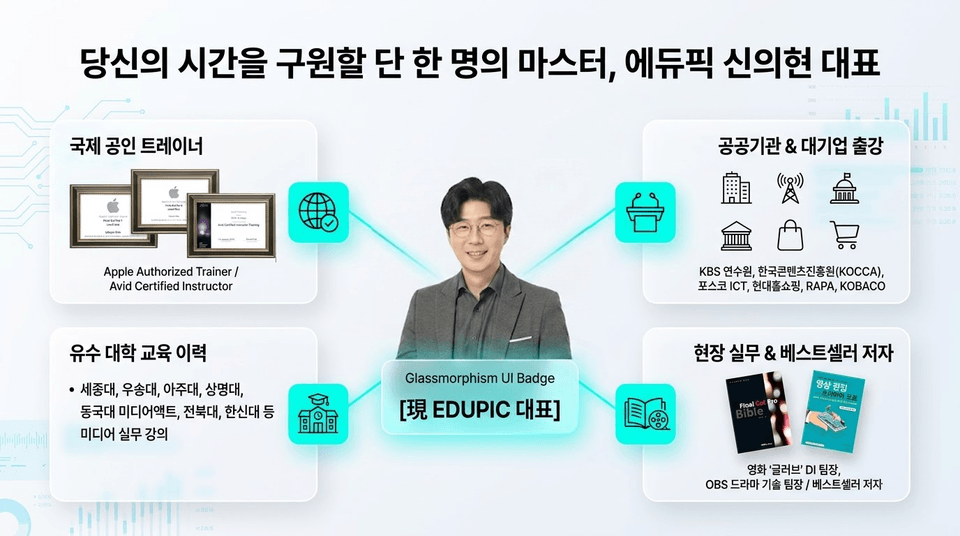
🎓 The one and only master who will save your time, Edupick CEO Shin Eui-hyun
"Who you learn from determines your self-sufficiency in Excel practice."
Experience the know-how of a true expert who has educated countless professionals and majors in proven fields such as global corporations, public institutions, and university lecture halls.
- 🌐 Internationally Certified Trainer:** Apple Authorized Trainer / Avid Certified Instructor - 🏛️ Lectures at Public Institutions & Large Corporations: KBS Training Center, Korea Creative Content Agency (KOCCA), POSCO ICT, Hyundai Home Shopping, RAPA, KOBACO, etc. - 🏫 Educational History at Leading Universities: Practical lectures at Sejong University, Woosong University, Ajou University, Sangmyung University, Dongguk University Media Act, Chonbuk National University, Hanshin University, etc. - 📚 Field Experience & Bestselling Author: DI Team Leader for the movie 'Glove', OBS Drama Technology Team Leader / Bestselling author of business content
Rather than lectures focused only on theory, we deliver only the 'truly useful practical techniques' refined through numerous field experiences and employee training.
⏱️ Just 7 hours and 30 minutes, the time it takes to go from an Excel beginner to a practical master
We have designed the most efficient build-up roadmap for busy professionals. Instead of tedious, long-winded lectures, we condense the core essentials into just 15 sessions and a total of 109 lessons (averaging 30 minutes) to perfectly master practical tasks.
Just follow this systematic 3-step curriculum. We will wide open the high wall of Excel that has been firmly locked.
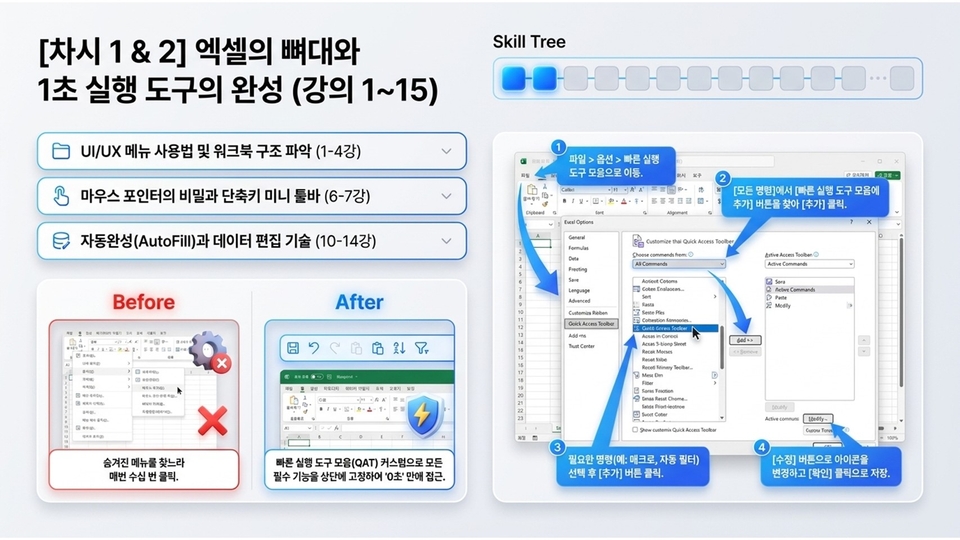
🛠️ [Session 1 & 2] The Foundation of Excel and Completion of 1-Second Execution Tools (Lectures 1-15)
"Are you still clicking your mouse dozens of times just to find hidden menus?"
This is the stage where you understand the basic structure of Excel and build your own optimized environment. Through custom settings that minimize mouse movement, you will reduce your work speed to the '0-second' range.
- 📁 Understanding Structure (Lectures 1-4): Mastering UI/UX menu usage and basic workbook structure - 🖱️ Path Optimization (Lectures 6-7): Secrets of the mouse pointer and utilizing the shortcut mini toolbar - 💾 Editing Techniques (Lectures 10-14): AutoFill and efficient data editing techniques
[Before ➡️ After] Put an end to the days of rummaging through top tabs every time. Create a smart routine by pinning essential, frequently used functions to the top through Quick Access Toolbar (QAT) customization for instant access.
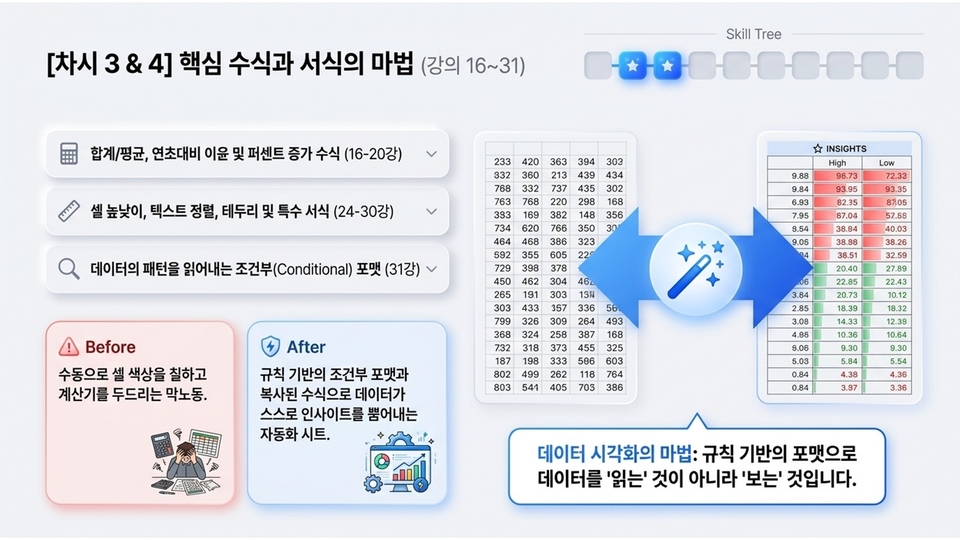
✨ [Session 3 & 4] The Magic of Core Formulas and Formatting (Lectures 16–31)
"Are you still doing manual labor, coloring cells by hand and tapping away on a calculator?"
This is the stage where you automate your sheets so they automatically generate insights from vast amounts of data based on rules. Organize text and numbers to complete the foundation of a well-structured report.
- 🧮 Formula Basics (Lectures 16-20): Master everything from sums/averages to year-over-year profit and percentage increase formulas. - 📐 Layout Formatting (Lectures 24-30): Design cell heights, text alignment, borders, and special formatting. - 🔍 Conditional Formatting (Lecture 31): Techniques to automatically read hidden patterns and trends in data.
[Before ➡️ After] Don't just 'read' numbers. Start the magic of data visualization where you can 'see' the highs and lows of data at a glance using rule-based formatting and copied formulas.
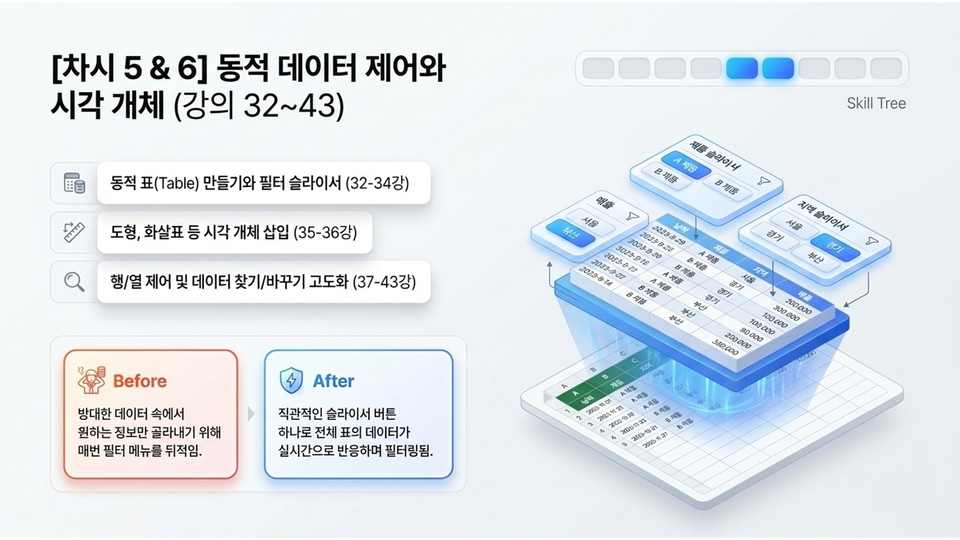
📊 [Session 5 & 6] Dynamic Data Control and Visual Objects (Lectures 32-43)
"Are you still rummaging through narrow filter menus every time just to pick out the information you want?"
This is the advanced layout build-up stage where you structure vast data sheets and control all data in real-time with a single button click.
- 🧮 Dynamic Data (Lectures 32-34): Creating dynamic tables and linking filter slicers - 📐 Visualization Layout (Lectures 35-36): Inserting visual objects like shapes and arrows to enhance report quality - 🔍 Data Advancement (Lectures 37-43): Mastering row/column control and advanced find/replace techniques
[Before ➡️ After] Don't get lost in your data. You will be able to build a smart dashboard environment where the entire table's data filters and reacts in real-time with a single intuitive slicer button.
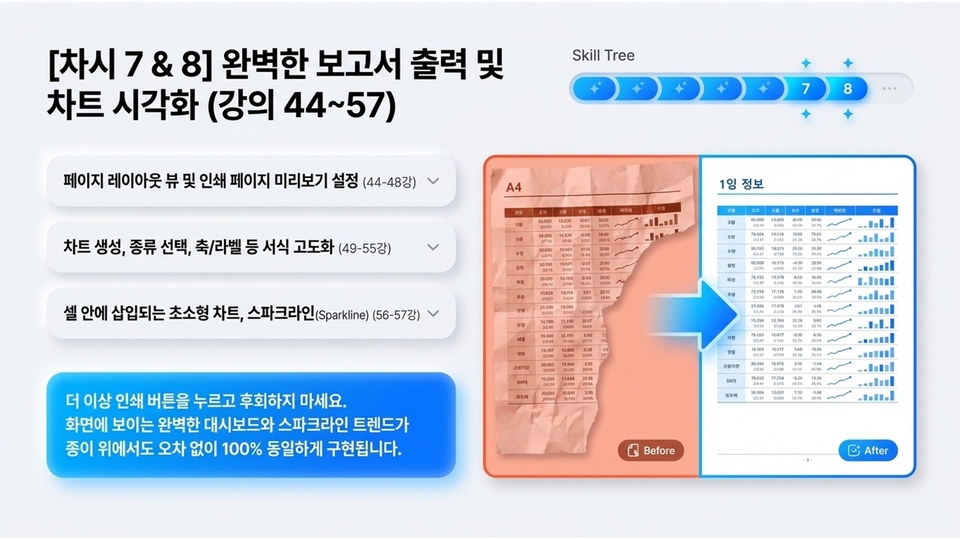
"Have you ever been flustered because your tables were cut off or broken every time you pressed the print button?"
This stage is about implementing the perfect data seen on the screen 100% identically on paper or in PDF reports without errors, and adding visual persuasiveness.
- 🖨️ Output Optimization (Lectures 44-48): A complete guide to Page Layout View and Print Page Preview settings - 📊 Advanced Charting (Lectures 49-55): Creating charts suitable for data, selecting types, and advanced formatting of axes/labels, etc. - 📉 Micro Trends (Lectures 56-57): Utilizing Sparklines that are neatly inserted into cells to show trends
[Before ➡️ After] Don't regret pressing the print button anymore. Neatly organized print layouts and cell-level sparkline trends will elevate the quality of your reports to the next level.
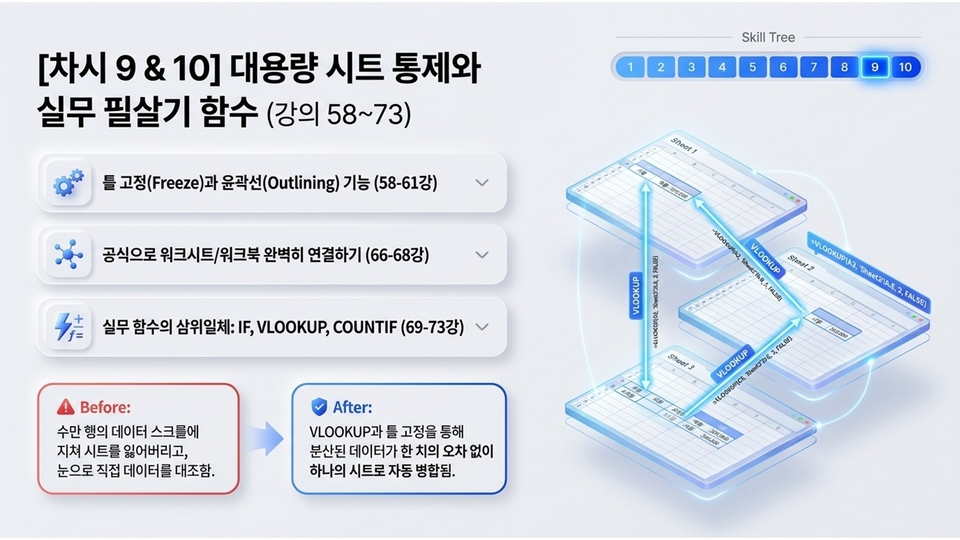
⚡ [Lessons 9 & 10] Controlling Large Sheets and Practical Killer Functions (Lectures 58-73)
"Are you getting lost while scrolling through tens of thousands of rows of data, or manually comparing data with your own eyes?"
This stage is about perfectly connecting massive workbooks and mastering the three core practical functions to automatically merge scattered data all at once.
- ⚙️ Sheet Control (Lectures 58-61): Ensuring readability of large sheets with Freeze Panes and Outlining features - 🔗 Data Linking (Lectures 66-68): Perfectly linking multiple worksheets/workbooks using formulas and equations - ⚡ Essential Practical Functions (Lectures 69-73): The holy trinity of practical functions! Complete mastery of IF, VLOOKUP, and COUNTIF
[Before ➡️ After] Stop straining your eyes and fingers. Experience the amazing transformation where vast amounts of scattered data are automatically merged into a single master sheet without a single error through VLOOKUP and Freeze Panes.
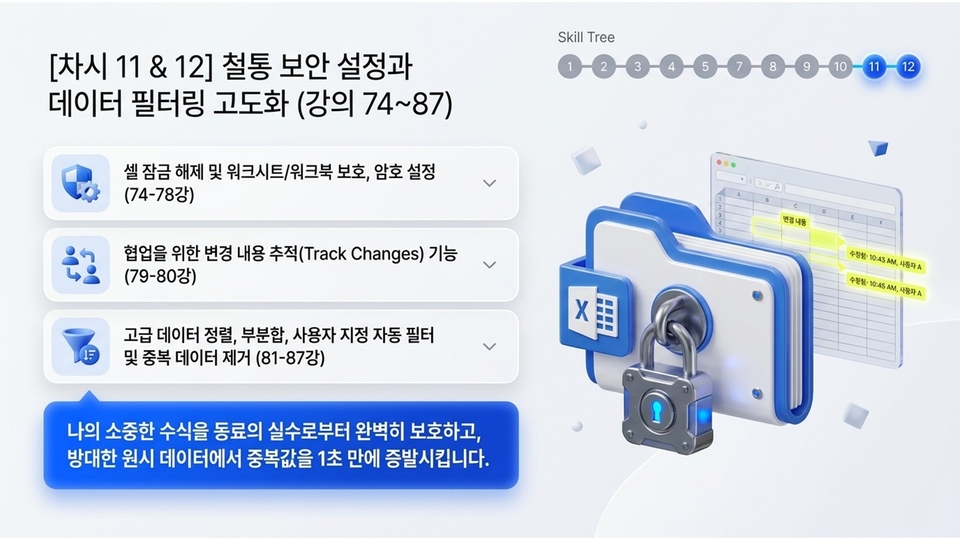
🔒 [Session 11 & 12] Ironclad Security Settings and Advanced Data Filtering (Lectures 74~87)
"Have you ever had a carefully crafted formula deleted or broken by someone else's mistake?"
This stage is about perfectly protecting your precious data during collaboration and neatly filtering out unnecessary duplicates from vast raw data in just one second.
- 🛡️ Ironclad Security (Lectures 74-78): Defending data formulas by unlocking cells, protecting worksheets/workbooks, and setting passwords - 👥 Safe Collaboration (Lectures 79-80): The Track Changes feature that shines when working with colleagues - 🔍 Advanced Filtering (Lectures 81-87): Advanced data sorting, subtotals, custom auto-filters, and removing duplicate data
[Key Points] Perfectly protect your precious formulas from colleagues' mistakes! By mastering sorting and subtotal techniques, you can smoothly pick out only the insights you want from tens of thousands of data points.
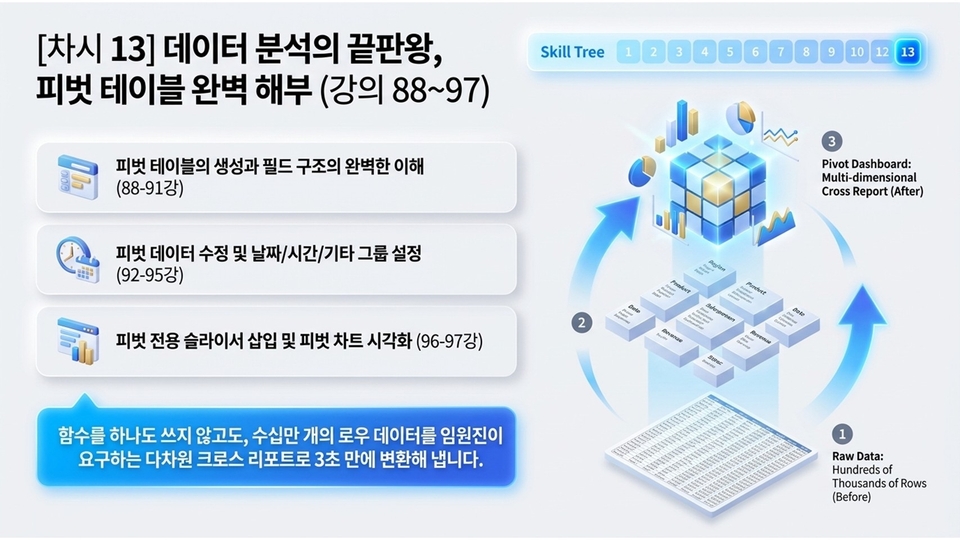
🗂️ [Session 13] The Ultimate Guide to Data Analysis: Mastering Pivot Tables (Lectures 88~97)
"Transform hundreds of thousands of rows of raw data into multi-dimensional reports without using a single function."
This stage allows you to summarize vast amounts of data with just a few clicks and drags—no complex formulas or coding required—and generate the perfect cross-reports requested by executives in just 3 seconds.
- 🏗️ Understanding the Structure (Lectures 88-91): Grasping the creation of pivot tables and the complete mechanism of field structures - 📆 Group Optimization (Lectures 92-95): Modifying pivot data and handling date/time/other grouping settings - 📊 Chart Visualization (Lectures 96-97): Inserting pivot-specific slicers and creating intuitive pivot chart visualizations
[Key Points] Don't get lost in a pile of raw data. Once you master the pivot dashboard features, hundreds of thousands of rows of data will be reborn as multi-dimensional cross-reports that radiate insights on their own.
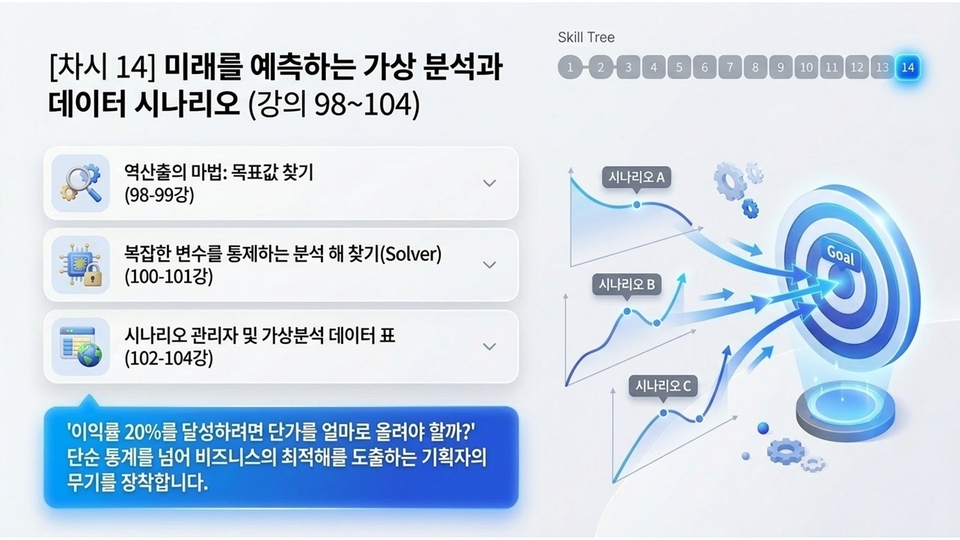
🎯 [Session 14] What-If Analysis and Data Scenarios for Predicting the Future (Lectures 98-104)
"Equip yourself with the planner's weapon that goes beyond simple statistics to derive optimal business solutions."
This stage involves back-calculating variables to achieve specific goals, such as 'reaching a 20% profit margin,' and simulating predictive data based on various business situations (Scenarios A, B, C).
- 🔍 The Magic of Back-calculation (Lectures 98-99): Goal Seek to find the input values needed to achieve a desired result - 🎛️ Controlling Variables (Lectures 100-101): Using Solver to control complex constraints and variables - 📊 Prediction Simulation (Lectures 102-104): How to use Scenario Manager and What-If Analysis Data Tables
[Key Point] Don't write proposals based on vague guesses. By mastering What-If analysis tools, you will become a top-tier planner who derives accurate target data even amidst diverse business variables.
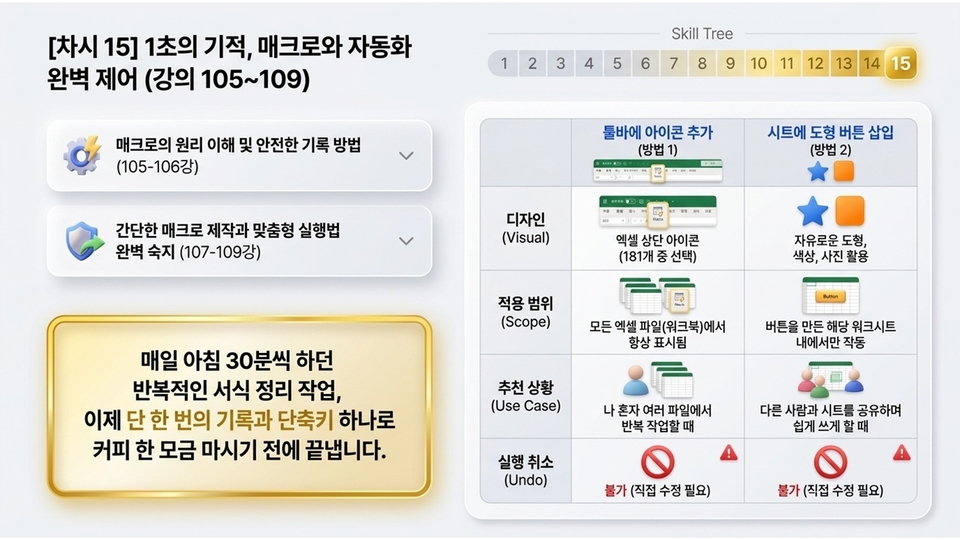
⚙️ [Session 15] The 1-Second Miracle: Perfect Control of Macros and Automation (Lectures 105-109)
"How much longer are you going to manually handle the repetitive formatting tasks that take 30 minutes every morning?"
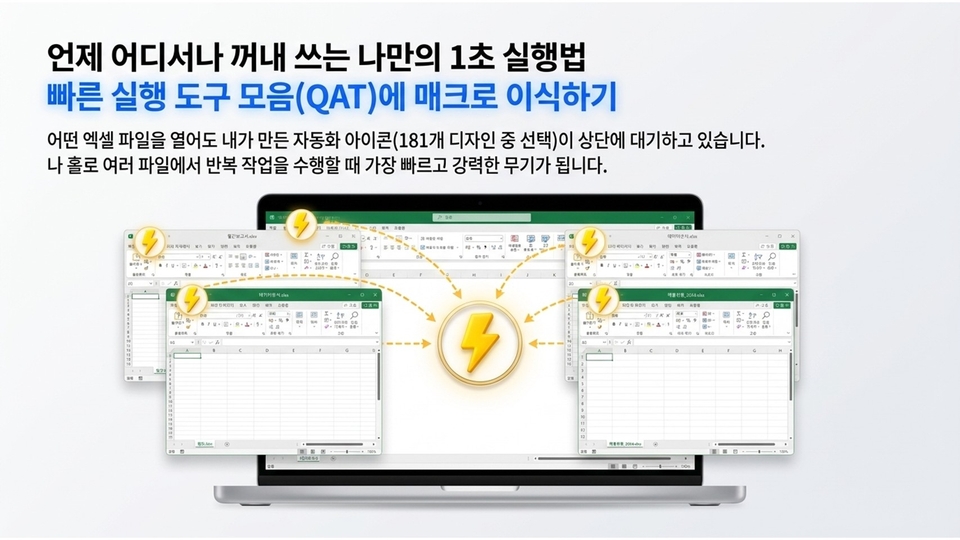
This is the stage where you completely automate tedious routine tasks through a single recording and shortcut assignment. You will also master the differences between adding toolbar icons and inserting buttons directly into sheets.
- ⚙️ Automation Mechanism (Lectures 105-106): Understanding the principles of macros and safe recording methods without errors - 🖱️ Customized Execution (Lectures 107-109): Creating simple macros and mastering the optimal execution methods for various situations
[Before ➡️ After] Experience the amazing miracle of finishing your work before you even take a sip of coffee, all with a single shortcut or shape button. Equip yourself with automation cheat codes that give you perfect control over everything from personal files to sheets shared with colleagues.
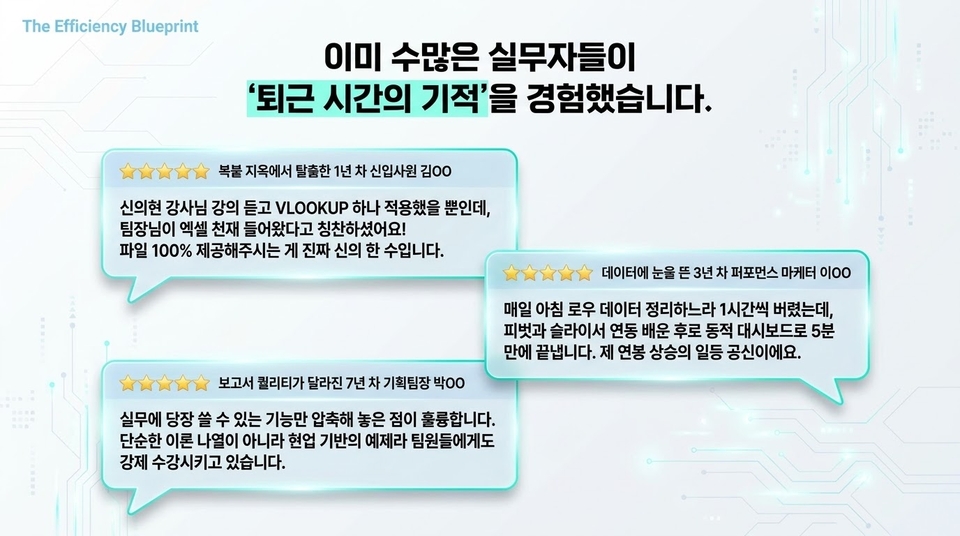
👑 Edupick's overwhelming course satisfaction, already proven by countless professionals
Edupick goes beyond simple feature delivery, aiming for optimal practical education that allows students to achieve immediate results in the field.
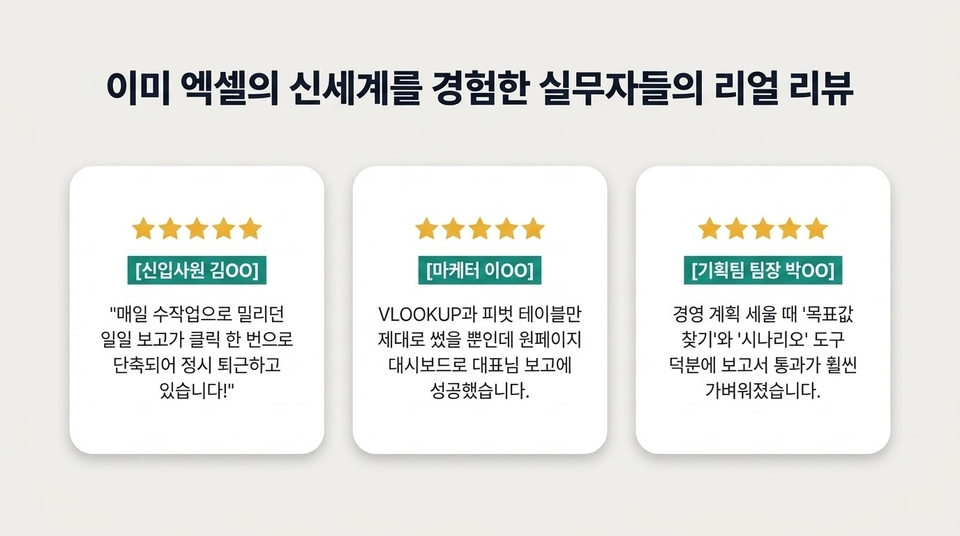
In addition to this [Top-tier Exceller] course presented on Inflearn, various business practical contents provided by Edupick have already received overwhelming satisfaction and praise from numerous junior employees and managers.
- 📈 Field-focused examples: Not just a list of theories, but a 100% practical curriculum used directly in real work - ⏱️ Incomparable efficiency: A clear and compact compressed guide that saves time for busy professionals - 💬 Real endorsements from seniors: Reliability proven by verified student reviews, from new employees leaving on time to managers' reports being approved
The 'miracle of clocking out time' and work efficiency routines experienced by countless professionals will now be transplanted directly into your environment. Become a top-tier professional with Edupick's proven education!
Recommended for these people
Who is this course right for?
An office worker who wants to systematically master every manual, starting from the basic menu.
Those who want to handle documents freely regardless of the Excel version.










![[Master] Mastering Vegas Pro: Building a Solid Foundation CourseCourse Thumbnail](https://cdn.inflearn.com/public/courses/333400/cover/8c977d98-4ade-4399-a43f-5242dcdf3abc/333400.png?w=420)
![[Master] Logic Pro X Fundamentals CourseCourse Thumbnail](https://cdn.inflearn.com/public/courses/333265/cover/c2abe6f9-5ed2-49a9-99de-b2d15085b52d/333265.png?w=420)
![[Master] Basic Sturdy Audition CourseCourse Thumbnail](https://cdn.inflearn.com/public/courses/333264/cover/a3d399a6-6aa3-4c70-814b-1718876c6170/333264.png?w=420)
![[Master] After Effects CC: Building a Solid Foundation CourseCourse Thumbnail](https://cdn.inflearn.com/public/courses/333257/cover/2e365cbe-6ec2-49d3-98fb-73733422e4db/333257.png?w=420)
![[Master] Basic Sturdy Cinema 4D CourseCourse Thumbnail](https://cdn.inflearn.com/public/courses/333255/cover/1eb2a41f-6185-49cf-9981-1bda1d85725d/333255.png?w=420)
![[Master] Follow along with 101 basic and solid Premiere Pro effectsCourse Thumbnail](https://cdn.inflearn.com/public/courses/330105/cover/cd958f98-bb07-438c-a623-8be198a61ac2/330105.png?w=420)
![[Advanced] Mastering Excel: Building a Solid Foundation CourseCourse Thumbnail](https://cdn.inflearn.com/public/files/courses/330004/cover/01m04tf9hsr0m5gzxrskce1nja?w=420)

![[Intermediate] Mastering Excel with a Solid Foundation CourseCourse Thumbnail](https://cdn.inflearn.com/public/files/courses/330003/cover/01m04pa6n703t49hn2dmwpy0ct?w=420)
![[Beginner] Mastering Excel with a Solid Foundation CourseCourse Thumbnail](https://cdn.inflearn.com/public/files/courses/330002/cover/01m01nqapy9skgs8gsn4geedyp?w=420)
![[Master] Solid Fundamentals PowerPoint CourseCourse Thumbnail](https://cdn.inflearn.com/public/courses/330000/cover/19ad29a7-7db7-4a4d-830d-e579c9044c79/330000.png?w=420)
![[Advanced] Mastering Basic Solid Vocabulary CourseCourse Thumbnail](https://cdn.inflearn.com/public/files/courses/329993/cover/01m05r0fqknfxtp3x8z47xe9wv?w=420)
![[Intermediate] Mastering Basic Vocabulary with a Solid Foundation CourseCourse Thumbnail](https://cdn.inflearn.com/public/files/courses/329992/cover/01m05qy1cw6ff6j32fmydcqjrb?w=420)
![[Beginner] Mastering Basic Vocabulary with a Strong Foundation CourseCourse Thumbnail](https://cdn.inflearn.com/public/files/courses/329990/cover/01m05qtvdpfm5nx33ywnh2d2t0?w=420)
![[Master] Basic Strong Motion 5 Conquering CourseCourse Thumbnail](https://cdn.inflearn.com/public/courses/329588/cover/b6f491b5-34d8-48f4-8b94-73c22cc0bcf0/329588.png?w=420)
![[Master] Basic and Solid Illustrator Conquer CourseCourse Thumbnail](https://cdn.inflearn.com/public/courses/329341/cover/216064dd-742e-416b-8e29-863ef43ec2db/329341.png?w=420)
![[Master] Basic and Strong Premiere Pro Conquer CourseCourse Thumbnail](https://cdn.inflearn.com/public/courses/328934/cover/70ec442d-5829-4096-bfe0-8ff9593dad04/328934.png?w=420)
![[Master] Basic and Strong Final Cut Pro X CourseCourse Thumbnail](https://cdn.inflearn.com/public/courses/328720/cover/d98b81f5-001e-4ab1-840b-a151cbe889dd/328720.png?w=420)
![[Master] Basic Strong Cubase Conquering CourseCourse Thumbnail](https://cdn.inflearn.com/public/courses/328633/cover/788fb022-34ce-4708-922b-93ef45644a61/328633.png?w=420)





![[30 Years of Planning] Romance of the Three Kingdoms 'Rule of 3' Strategic Planning / 150-page TextbookCourse Thumbnail](https://cdn.inflearn.com/public/files/courses/340446/cover/01kf9rwyvmwrbgsee6v60dtrra?w=420)






![[30 Years of Planning Experience] The Rule of Romance of the Three Kingdoms 3 / Self-Study / 150-page Textbook + 333-page WorksheetCourse Thumbnail](https://cdn.inflearn.com/public/files/courses/340999/cover/01khqrpwr7s0yy748na4jhdk1p?w=420)