강의

멘토링

커뮤니티

BEST
Game Dev

/

Game Programming

Easy yet powerful Unity editor programming

Introducing Unity's powerful yet easy Editor Programming. We've narrowed it down to the essentials and even have time to create your own tools.

(4.6) 18 reviews

407 learners

Level Basic

Course period Unlimited

  • ttok146566
Unity
Unity
Unity
Unity

Reviews from Early Learners

Reviews from Early Learners

4.6

5.0

Yoonyeol Na

100% enrolled

After watching the lecture, I created an editor and used it whenever I needed it. Although the editor code is a bit troublesome to develop, it increases productivity more than I thought!

5.0

uty1993

100% enrolled

Thanks for helping me learn more about Unity!

5.0

assdfghjkll

100% enrolled

It was difficult to find well-organized information about editors on the Internet, but just by taking this course, you will be able to implement a simple editor.

What you will gain after the course

  • How to Create Tools for Better Productivity

  • Extending the Unity Basic Editor

  • Unity Editor Programming

A guide to programming in the Unity Editor!
Experience the powerful convenience. ✨

Game development is Unity!
Are you using it correctly now?

The most actively used game engine is Unity.
While many game developers use Unity, few actually use it effectively . While editor programming is crucial, it's difficult to truly appreciate its convenience and power without first-hand experience.

In this lecture 💻

Editor programming is an unfamiliar concept to many who use the Unity engine!
In this lecture, I'll cover the core of how to use Unity Editor Scripting, which is like another engine within the game engine, in a compact yet thorough manner.

After taking this course, I hope it will serve as a great guide for anyone who wants to go beyond the limitations of the existing Unity editor and create an improved editor or a custom tool that suits their needs.

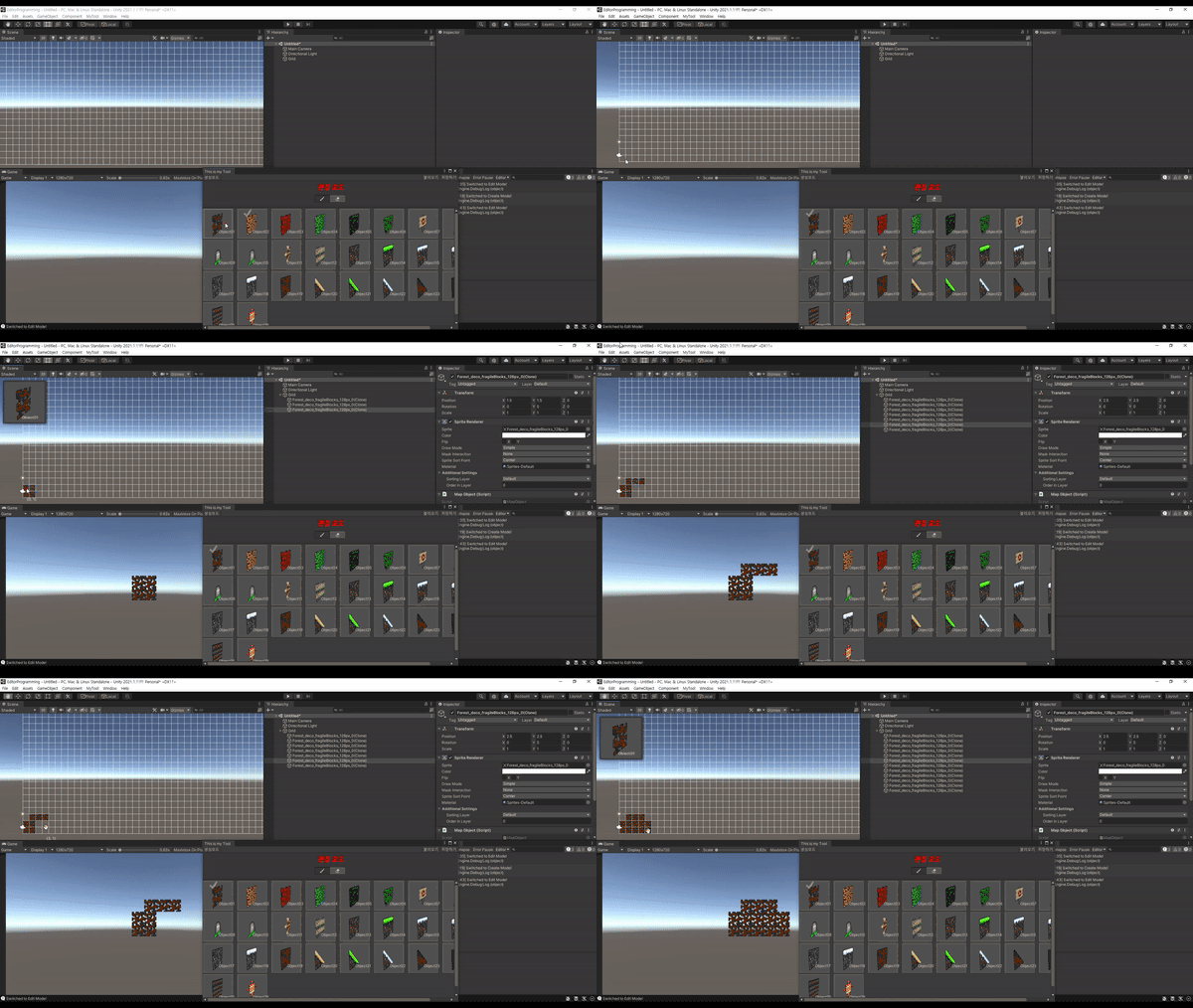
You can make things like this too!

Finally, we will implement the map tool editing mode 😊


To these people
I recommend it.

Unity Engine
Beginners and
New Game Programmer

Unity Editor Scripting
If you have no experience
Someone who only knows vaguely

Through Unity
By creating your own tools
Anyone who wants to contribute to the company


Compact handling
The core of editor programming !

This course covers editor programming/editor scripting, a subject unfamiliar to many, in a compact yet comprehensive manner, creating an environment where you can study by creating various test cases on your own.

1️⃣ Save time! Get only the essentials you need.

This course is structured to be practical and practical, with helpers for code reuse to address areas that could easily become tedious and repetitive.

2️⃣ Editor programming built with my own hands.

We are implementing various convenient features so that students can design their own user-friendly tools.

3️⃣ 3 hours and 20 minutes, focused strategy!

We briefly glanced at complex and inefficient functions, focusing on areas frequently used in actual editor programming.

4️⃣ Map tool creation and implementation OK!

The MapTool that you will create at the end is a form that has the basic form that an actual tool should have, and is structured so that you can learn many parts necessary for practical work even though the difficulty level is not difficult.

Covers essential content for programming in the Unity Editor.

  1. Editor GUI elements
  2. Differences between similar but diverse (Editor)GUI(Layout) classes
  3. GUI Layout System
  4. Configure desired fields through various Editor APIs
  5. Understanding GUI Drawing and Events
  6. How to handle user input and clear events in the editor
  7. Understanding Serialized Object and Serialized Property
  8. Applying various drawing methods to SceneView
  9. Customizing the Component Editor
  10. How to manage asset files in Unity
  1. Utilizing AssetDatabase
  2. Copy&Paste the Editor of another component
  3. Save/Load Map Data using Binary Format
  4. Controlling selected objects in the editor
  5. SceneView raycasting
  6. Managing Assets with ScriptableObject
  7. Frequently used Util functions
  8. Drawing a Grid in SceneView
  9. Appropriately dividing and managing states in the tool
  10. Drawing a grid-shaped GUI element with automatically resizing

Detailed curriculum
Check it out.

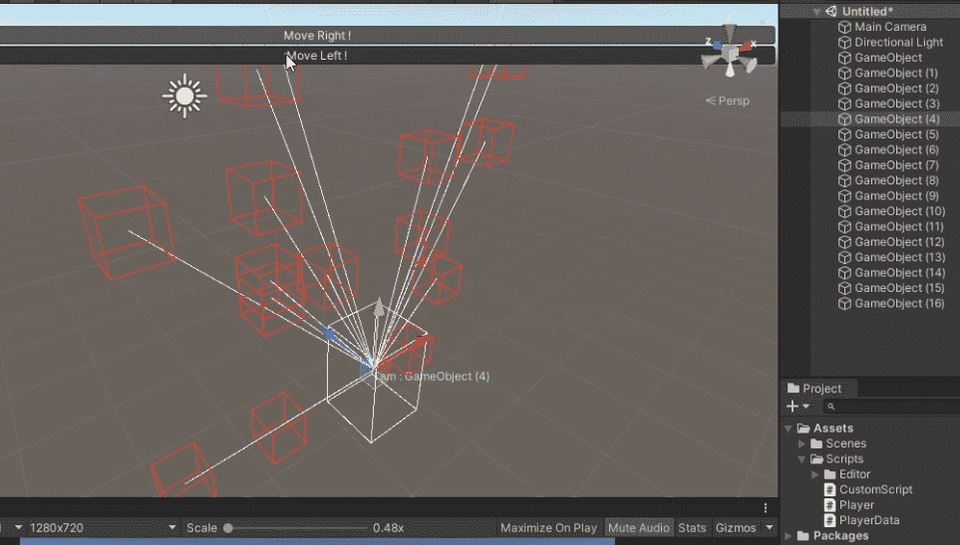
CustomEditor/SceneView Interaction
MapTool Edit Mode

Section 01. Overview

  • To get started with Editor Programming, we'll look at the most basic parts and practice with some of the most commonly used, easy-to-difficulty APIs.

Section 02. Getting Familiar with the GUI

  • You will learn by using similar APIs provided by various GUI classes that may still be unfamiliar.
  • Let's take a look at the four core classes of Editor Programming and understand the differences between them.
  • Explore the GUI LayoutSystem and learn how to choose which API to use for your specific needs.
  • Learn how to draw in various ways, even with the same GUI.

Section 03. Understanding Events

  • Explains the relationship between Unity's GUI system and Events.

Section 04. Using the Existing Editor

  • Explains how to draw in the Inspector View / Scene View.
  • Learn how to apply SerializedObject/SerializedProperty in the Editor Window.
  • Describes the ability to customize properties for drawing.

Section 05. Frequently used utility functions

  • Learn how to manipulate assets directly.
  • Explains how to copy and paste from another editor to draw where needed.
  • Learn how to control user selection.
  • Learn about the ability to optionally persist values.

Section 06. MapTool Implementation

  • Learn about the structure of basic tools and how they are processed based on their status.
  • Learn how to utilize a variety of controls to suit your needs.
  • Describes how to draw a Grid in MapTool and how to interact with it.
  • We implement various convenient features to create a user-friendly tool.

Frequently Asked Questions
Check it out.

Q. What can I use the Unity Editor programming skills I learned?

Regardless of the nature of the project, it can be utilized in any application developed with the Unity Engine, especially for automating repetitive tasks or creating dedicated tools.

Q. Can I create other tools besides the ones shown in the lecture?

Yes, that's right. In this course, we'll learn a variety of fundamental concepts related to Editor Programming, the basics of tool implementation, and then use this knowledge to create MapTool.

Q. Can non-majors also take the course?

If you can understand C# syntax and know basic Unity usage, you will be fine.

A good lecture to watch together

Basic Skills of a Unity Programmer
Essential Skills & Know-How for New Game Programmers

Recommended for
these people

Who is this course right for?

  • Unity Engine Beginner / New Programmer

  • For those who have no experience with Unity Editor Scripting or have vague knowledge of it.

  • People who want to contribute to the company by creating tools

Need to know before starting?

  • C#

Hello
This is

1,402

Learners

75

Reviews

22

Answers

4.5

Rating

4

Courses

As I started as a game developer and mastered various technologies, there is something I came to realize.

"Nothing is difficult. It's just that the explanation is made difficult."

Starting as a game developer and learning various technologies, I realized one thing: "Nothing is inherently difficult. It's just that the explanations are made difficult."

When I first started learning programming, I remember being confused by materials that explained simple concepts in such a complex way. What I always realized after finally understanding them myself was that the "core" was much simpler than I thought.

Currently, I am researching various development methodologies using AI and working on a range of automation projects with Python.

I strive to clearly define "what the learner exactly needs to know" and deliver only those core essentials. Making the complex simple. Making the difficult

I strive to clearly define exactly what the learner needs to know and focus on delivering only those core essentials.

Making the complex simple. Making the difficult easy.

I hope I can be of even a little help to others on their learning journeys. ^^

Curriculum

All

24 lectures ∙ (3hr 20min)

Published: 
Last updated: 

Reviews

All

18 reviews

4.6

18 reviews

  • yun990112님의 프로필 이미지
    yun990112

    Reviews 4

    Average Rating 5.0

    5

    100% enrolled

    After watching the lecture, I created an editor and used it whenever I needed it. Although the editor code is a bit troublesome to develop, it increases productivity more than I thought!

    • insoul009786님의 프로필 이미지
      insoul009786

      Reviews 2

      Average Rating 5.0

      5

      100% enrolled

      • minhahas5943님의 프로필 이미지
        minhahas5943

        Reviews 5

        Average Rating 5.0

        5

        100% enrolled

        • uty19938570님의 프로필 이미지
          uty19938570

          Reviews 31

          Average Rating 4.9

          5

          100% enrolled

          Thanks for helping me learn more about Unity!

          • seongsin님의 프로필 이미지
            seongsin

            Reviews 1

            Average Rating 5.0

            5

            100% enrolled

            It was difficult to find well-organized information about editors on the Internet, but just by taking this course, you will be able to implement a simple editor.

            $13.20

            ttok146566's other courses

            Check out other courses by the instructor!

            Similar courses

            Explore other courses in the same field!