inflearn logo

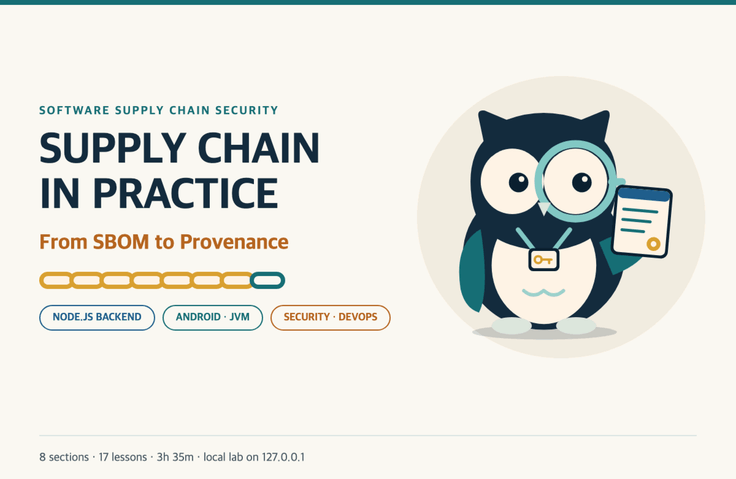
Software Supply Chain Security in Practice: From SBOM to Provenance Attestations

In this hands-on exercise, I’ll recreate on my own PC a dependency attack that starts with a single internal package name, then use SBOMs, PR gates, and provenance attestations in npm and Gradle projects to stop it before deployment.

1 learners are taking this course

Level Basic

Course period Unlimited

devsecops
devsecops
gradle
gradle
npm-ci
npm-ci
devsecops
devsecops
gradle
gradle
npm-ci
npm-ci

What you will gain after the course

  • An eye for examining how dependencies enter, broken down into four stages: name → source → content → execution

  • Settings to prevent npm dependency attacks using scope, .npmrc, lockfiles, and ignore-scripts

  • How to Create and Read CycloneDX and SPDX SBOMs and Check Them for Minimum Elements

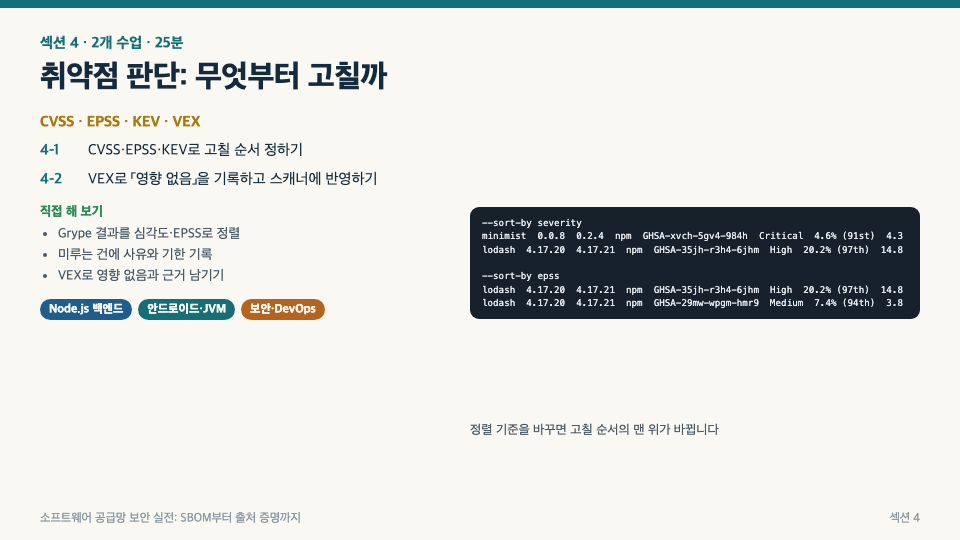
  • How to Prioritize Remediation with CVSS, EPSS, and KEV, and Document “Not Affected” in VEX with Supporting Evidence

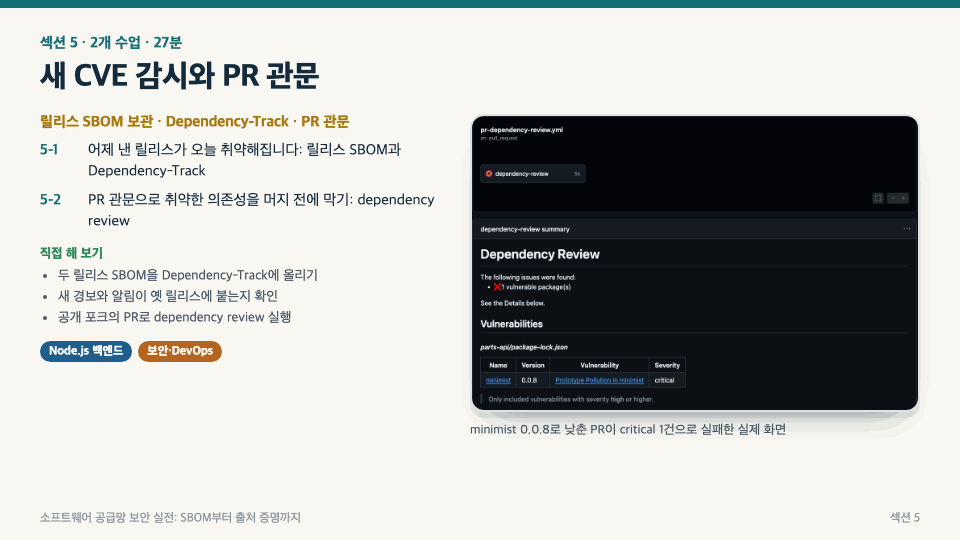
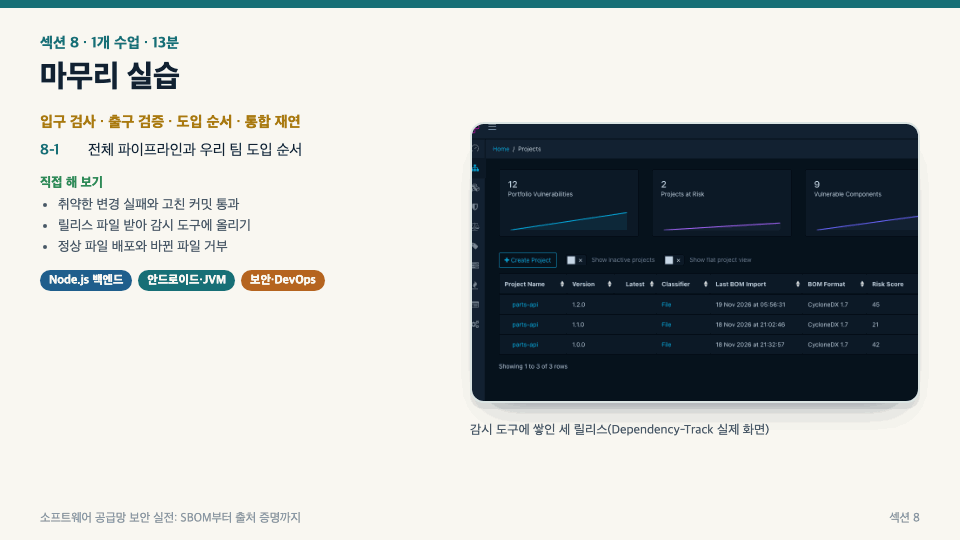
  • A workflow for uploading release SBOMs to Dependency-Track and monitoring for new CVEs

  • A PR gate that blocks vulnerable dependencies before merge using dependency review

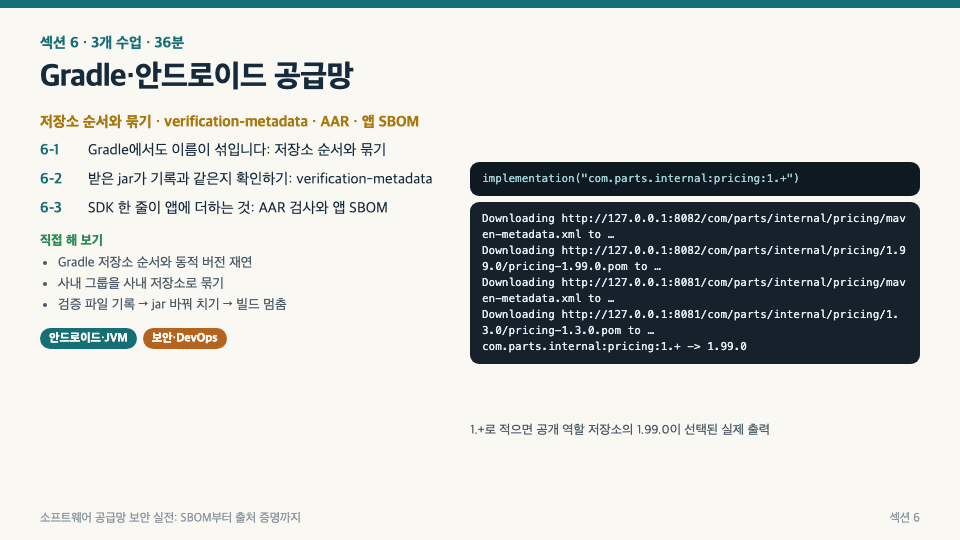
  • Consolidating Gradle repositories, verification-metadata, third-party SDK (AAR) audits, and app SBOMs

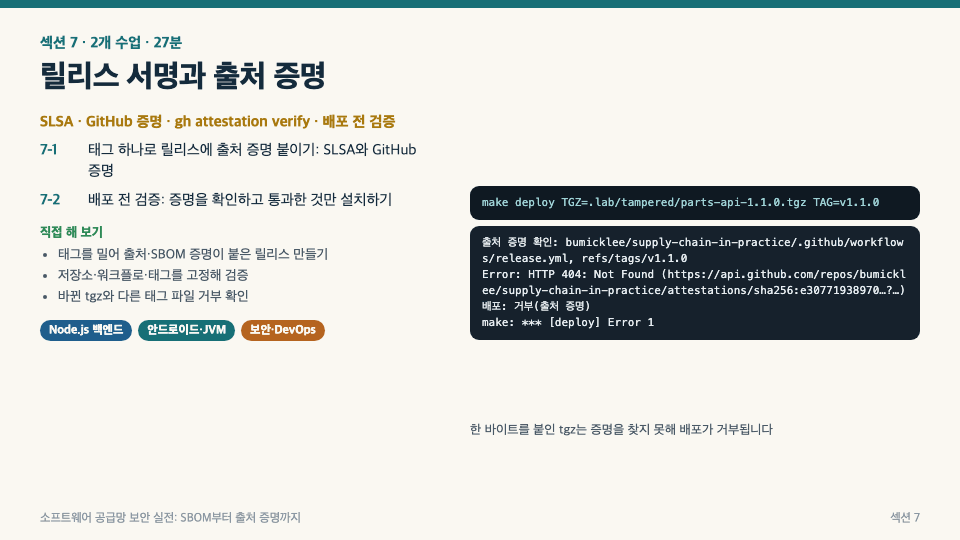
  • A script that attaches provenance attestations to release files and pins and verifies the repository, workflow, and tag before deployment.

Someone else’s code gets into the build through a single internal package name.

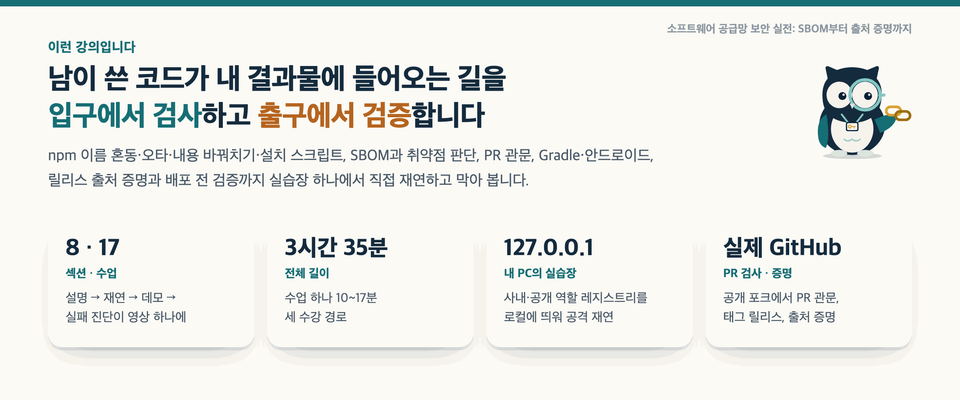
There’s nothing wrong with my code, yet someone else’s code keeps getting in through a single dependency, one line of configuration, or one build step. Using an npm project and a Gradle/Android project, this course takes you from start to finish: reproducing dependency attacks on your own PC, blocking them, documenting them with an SBOM, and attaching provenance attestations to releases so they can be verified before deployment.

  • Each lesson follows the sequence explanation (animation) → reenactment (recreating the structure of a real incident in a lab) → demo (using actual terminal, GitHub, and Dependency-Track screens). All attack reenactments take place only in a local registry on your own PC.

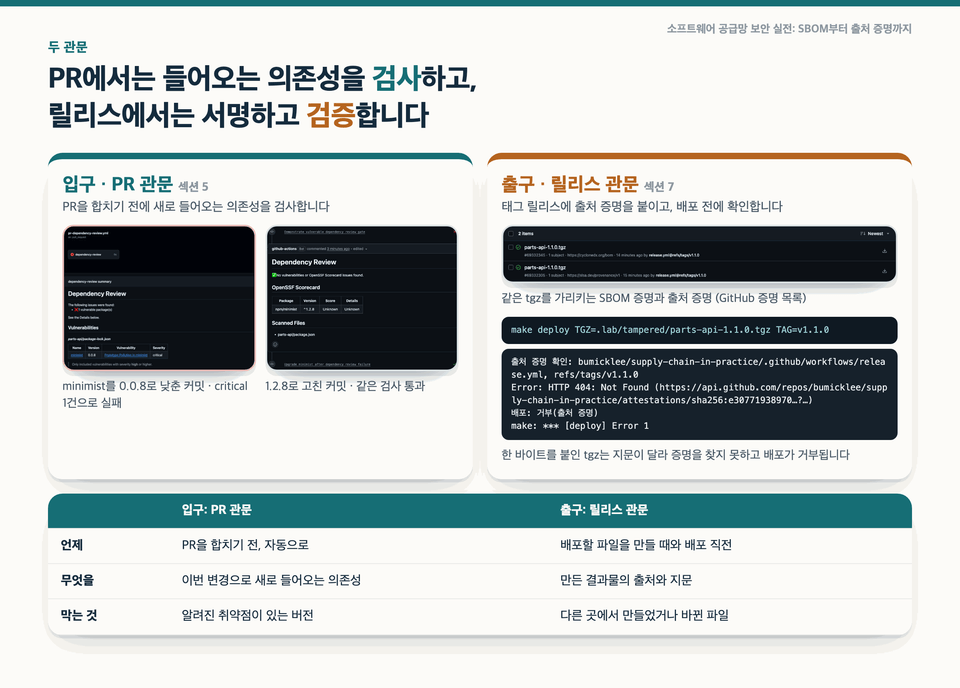
  • You’ll see firsthand how a higher version in a public repository beats an internal package, how a lockfile fingerprint stops a substituted file, and how a PR adding a vulnerable dependency is blocked before merging and how a substituted release file is rejected before deployment.

  • 8 sections, 17 lessons, and 3 hours 35 minutes in total. Choose the learning path that best fits your work: Node.js backend (14 lessons), Android/JVM (11 lessons), or security/DevOps (all 17 lessons).

Why did we create this course? event-stream (2018), Codecov (2021), the Dependency Confusion study (2021), ua-parser-js (2021), and the xz-utils backdoor (2024). All five incidents came in not through company code, but through dependencies and the build process. There are plenty of resources that cover SBOMs, vulnerability assessment, PR checks, signing, and provenance verification separately, but a course that takes you through an entire project, from reproducing an attack to pre-deployment verificationwas hard to find. Courses that cover both Gradle dependency verification and Android SDK checks are even rarer. We created this course to fill that gap.

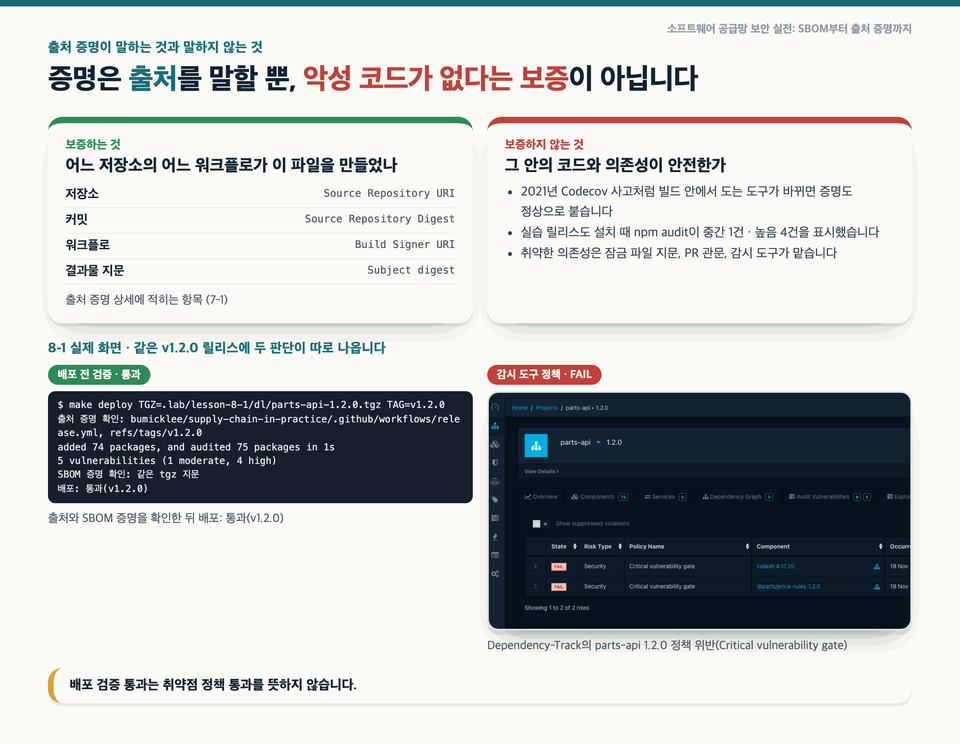
Let me be honest. Provenance attestation only guarantees that “our repository’s workflow created this file”; it does not guarantee that the source code is free of malicious code. A release that passes deployment verification can still fail the vulnerability policy. In fact, in the final exercise, provenance verification passed, but the vulnerability policy of the monitoring tool failed. This course doesn’t claim that one tool is all you need; instead, we’ll look at what each gate checks and what it doesn’t.

What you’ll learn

Section (1) Introduction · Five Incidents and the Practice Lab

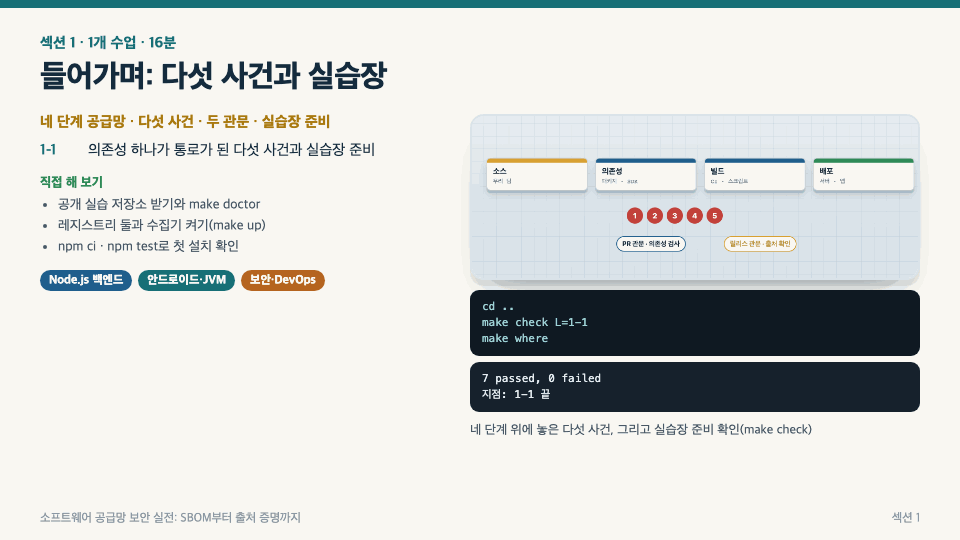
We’ll place five incidents where a single dependency became the entry point on the source → dependency → build → deployment supply chain flow, and look at the two gates this course establishes (the PR gate and the release gate). Clone the public hands-on repository, check that everything is ready with make doctor, then start the local registry and complete your first installation.

Section (2) Reproducing and Defending Against npm Dependency Attacks · Dependency Confusion, Scopes, Integrity, postinstall

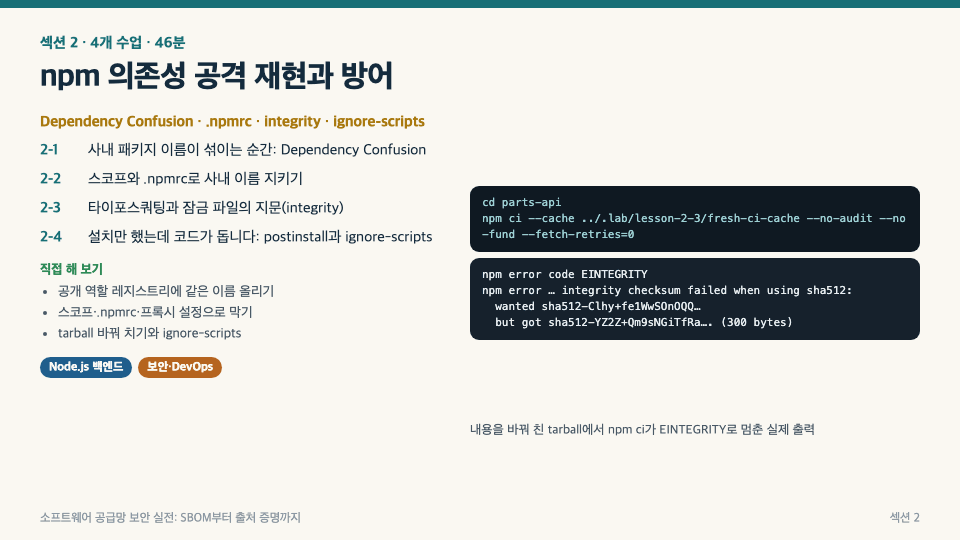
Recreate the scenario where publishing a higher version of an internal package under the same name to a public registry causes the installer to choose it. Use scopes and .npmrc to specify where packages are fetched from, block a name that differs by one character and a substituted file using the lockfile’s integrity fingerprint, and disable postinstall scripts that run just by installing with ignore-scripts. Summarize the four layers of defense: name → source → contents → execution.

Section (3): Creating and Reading SBOMs · CycloneDX, SPDX, purl, Minimum Elements

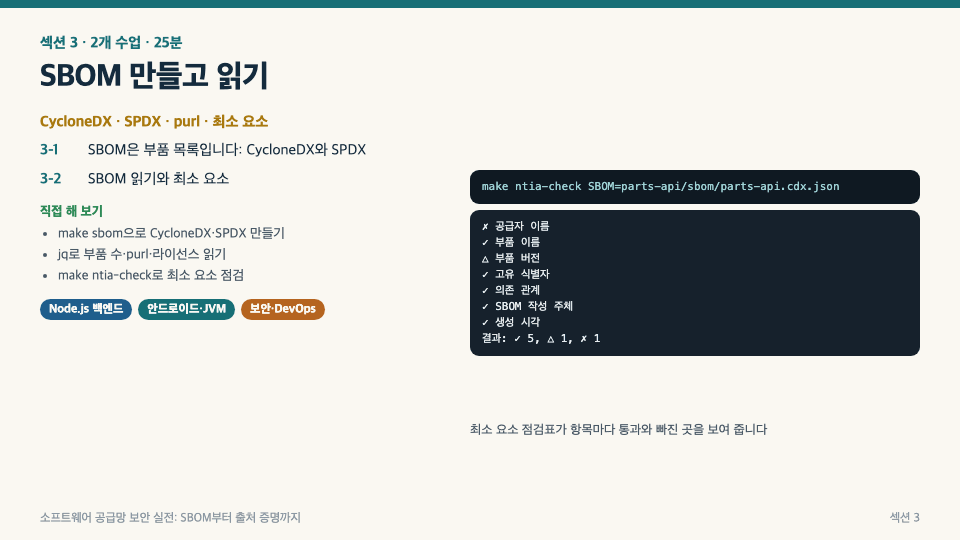
Understand an SBOM as a parts list, then generate both CycloneDX and SPDX formats for the same project and compare the same components side by side. Use jq to extract the component count, transitive dependencies, purls, and licenses, then check for omissions with a minimum-elements checklist. You’ll also see firsthand why the component count changes when you generate one without a lockfile.

Section (4) Vulnerability Assessment: What Should We Fix First? · CVSS, EPSS, KEV, VEX

CVSS answers how severe it is, EPSS how likely it is to be exploited in the future, and KEV whether it has already been exploited. We’ll see how the remediation order changes when scanner results are reordered by each criterion, and record alerts that do not actually affect us as “Not Affected” in VEX, along with supporting evidence, then feed that back to the scanner. We’ll also reenact how an unsupported “Not Affected” can hide new alerts.

Section (5) Monitoring New CVEs and PR Gates · Dependency-Track, dependency review

SBOMs do not track themselves. Upload an SBOM for every release to Dependency-Track and set up policies and alerts so new alerts can be raised for releases that have already shipped. Then, using GitHub’s dependency review, see on an actual PR screen how a PR that adds a vulnerable dependency fails before merging, then passes once the version is fixed.

Section (6) Gradle and Android Supply Chain · Repository Order, verification-metadata, AAR

Names can get mixed up in Gradle, too. We recreate how an internal group gets fetched from a public repository because of repository order, and prevent it by exclusiveContentgrouping repositories. We use **verification-metadata.xml** to verify that the downloaded JAR matches the recorded one, and use a merge report and the app SBOM to identify the permissions and native libraries that third-party SDKs (AARs) add to the app.

Section (7) Release signing and provenance attestations · SLSA, GitHub artifact attestations, pre-deployment verification

A release workflow triggered by pushing a tag attaches provenance and SBOM attestations to the file to be deployed (tgz). The deployment script uses gh attestation verify to verify it against the pinned repository, workflow, and tag, and installs only files that pass, according to the lockfile. You’ll also confirm that files whose contents have been changed, or that were created from a different repository or tag, are rejected.

Section (8) Final Hands-On Exercise · The Full Pipeline and Rollout Sequence

We walk through the entire process from start to finish: blocking a PR with a vulnerable dependency, fixing it and merging it, pushing a tag to create a release with attestations, uploading the SBOM to a monitoring tool, and passing pre-deployment verification. Finally, we outline the order in which our team should adopt each step.

Recommended for
these people

Who is this course right for?

  • A Node.js backend developer who builds and deploys services with npm

  • Developers who build libraries or Android apps with Gradle and include third-party SDKs

  • DevOps and platform personnel responsible for CI/CD and release procedures

  • A security professional who has been asked to submit an SBOM or undergo a supply chain security assessment and doesn’t know where to start.

  • Anyone who has heard terms like SBOM, SLSA, and VEX but has never actually tried them out.

Need to know before starting?

  • It’s enough to have tried running `npm install` or a Gradle build. No security knowledge is required.

  • You should be able to run commands in a terminal and read the output, and have some experience cloning and committing with Git.

Hello
This is brunoleebi8302

Career Verified

I took my first steps as a server developer during the Y2K era, a time of upheaval in the IT industry. Since then, I have moved between developer and infrastructure engineer roles across a wide range of industries, gaining hands-on experience with everything from the fundamentals of technology to complex infrastructure ecosystems. Building on my experience constructing and refining countless systems, I have recently been creating new value in the fields of IT security and convergent technologies.
More

Curriculum

All

18 lectures ∙ (3hr 34min)

Course Materials:

Lecture resources
Published: 
Last updated: 

Reviews

Not enough reviews.
Please write a valuable review that helps everyone!

brunoleebi8302's other courses

Check out other courses by the instructor!

Similar courses

Explore other courses in the same field!

Limited time deal

$38,500.00

22%

$38.50