




강의

멘토링

커뮤니티

NEW
Game Dev

/

Game Art

Complete workflow for CG and VFX inside Blender (Batman scene)

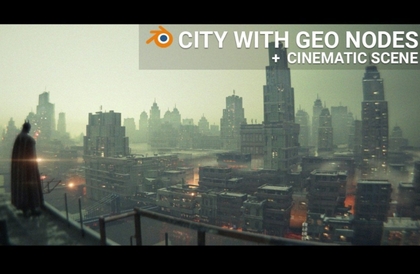
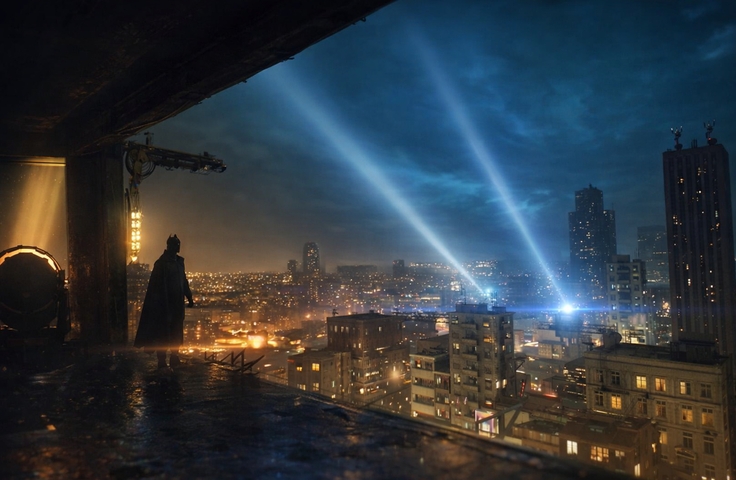
In this course, you will learn a complete CG and VFX workflow inside Blender by creating a cinematic Batman-inspired scene from start to finish. We begin by analyzing real movie footage from The Batman (2022) to build strong visual references for lighting, camera placement, and color grading. Step by step, you will learn how to block a scene, project camera footage, match CG with live-action, and smoothly blend both elements to achieve a cinematic result. Around 90% of the final scene is created in CGI, making this course ideal for learning how professionals combine live footage and CG efficiently. The course focuses on practical techniques, helping you avoid common beginner mistakes in lighting, camera matching, and post-processing. By the end of the course, you will have a complete cinematic shot and a solid foundation in Blender-based CG and VFX workflows that can be reused in your own projects.

2 learners are taking this course

Level Beginner

Course period Unlimited

  • Sime Bugarija
blendervfx
blendervfx
cinematiclighting
cinematiclighting
cameramatching
cameramatching
cgicompositing
cgicompositing
batmanscene
batmanscene
VFX
VFX
game-development
game-development
Blender
Blender
blendervfx
blendervfx
cinematiclighting
cinematiclighting
cameramatching
cameramatching
cgicompositing
cgicompositing
batmanscene
batmanscene
VFX
VFX
game-development
game-development
Blender
Blender

What you will gain after the course

  • Match CGI elements with live-action footage using camera projection in Blender

  • Create cinematic lighting and color grading inspired by real movie references

  • Build and block scenes with correct camera placement

  • Blend CG and live footage smoothly for professional-looking results

  • Apply post-processing techniques to enhance realism and mood

None of this was filmed.

🎞Cinematic CG & VFX in Blender
From Live Footage to a Batman-Style Scene

In this course, you will learn a complete cinematic CG and VFX workflow inside Blender, inspired by the visual style of The Batman (2022).
You will discover how professionals blend live-action footage with CGI, match cameras and lighting, and apply cinematic post-processing to achieve a polished, film-quality result.

The techniques taught in this course are commonly used in:

  • Visual Effects (VFX=

    )

  • Film & Cinematics

  • Game cinematics & trailers

  • 3D motion and environment art


👍Recommended for


Blender basics users ready to move beyond simple exercises

Artists who want to create cinematic CG/VFX scenes

Anyone building CG/VFX shots for portfolio projects

📖 What You’ll Learn

Section 1️⃣: Core Keywords

Camera, Scene Setup & CG Integration

In this section, students will learn how to build a strong foundation for CG and VFX work:

  • Analyzing movie references for lighting, mood, and composition

  • Blocking scenes and placing cameras correctly

  • Using camera projection to align CGI with real footage

  • Matching CG elements to live-action plates

  • Creating smooth transitions between real footage and CGI

Section 2️⃣: Core Keywords

Environment, Lighting & Post-Processing

This section focuses on achieving a cinematic final look:

  • Building background environments (buildings and city elements)

  • Setting up cinematic lighting inspired by real film references

  • Enhancing realism using post-processing techniques

  • Color grading to achieve a dark, moody Batman-style atmosphere

  • Polishing the final shot for presentation or portfolio use

Before You Enroll

Prior Knowledge

  • No advanced knowledge required

  • Basic familiarity with Blender’s interface is recommended

Audio / Video Quality

  • High-quality screen recordings

  • Clear narration explaining each step of the workflow

Recommended Study Method

  • Follow the lessons in order

  • Pause and recreate each step inside Blender

  • Experiment with your own footage after completing the course

Questions & Updates

  • Students can ask questions in the course discussion section

  • The course may receive future updates to improve clarity or workflow

Copyright & Disclaimer

This course is for educational purposes only.
Any movie references used are strictly for learning and analysis.
All original CGI content created in the course belongs to the student.

💡When you complete this course


This course provides a certification of completion in a format suitable for resumes and portfolios.
By completing the course, you can receive this, which can serve as official proof of your learning accomplishments.

💡Learn Smart with Language Options for Audio and Subtitles

You can switch both audio and subtitles according to your learning style.
Select your preferred language.

Recommended for
these people

Who is this course right for?

  • Beginners in Blender who want to learn CG and VFX workflows using real footage

  • 3D artists struggling to match lighting, camera, and CG elements convincingly

  • Creators who want to achieve a cinematic look without complex external VFX software

Need to know before starting?

  • No advanced knowledge is required. Basic familiarity with Blender’s interface is recommended, but all core techniques are explained step by step, making the course accessible to beginners.

Hello
This is

I have been actively using Blender for the last 4 years, mainly for creating film animation. In my courses you can learn a lot about modeling, texturing, lighting creation, post-processing and animation. My goal is to achieve as realistic a render as possible. All my courses are step-by-step and intended for users who have no previous experience in Blender.

Curriculum

All

10 lectures ∙ (2hr 28min)

Course Materials:

Lecture resources
Published: 
Last updated: 

Reviews

Not enough reviews.
Please write a valuable review that helps everyone!

Limited time deal

$29,700.00

30%

$33.00

Sime Bugarija's other courses

Check out other courses by the instructor!

Similar courses

Explore other courses in the same field!