



강의

멘토링

커뮤니티

NEW
Game Dev

/

Game Art

Creating A Cyberpunk Scene In Blender - Tutorial

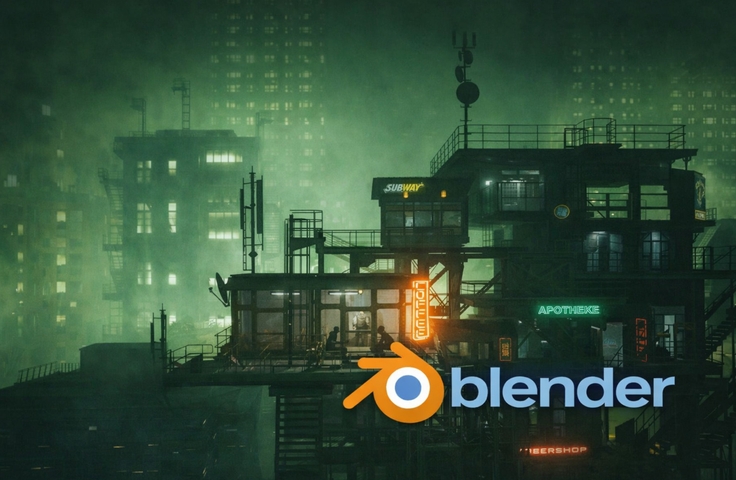
In this course, I guide students step by step through the complete process of creating a detailed cyberpunk-style scene in Blender, starting from Blender’s default cube and ending with a fully rendered, cinematic environment. Throughout the course, I focus on solving the most common problems students face when learning 3D, such as understanding the full modeling workflow, fixing UV issues, adding realistic imperfections, and creating convincing lighting and atmosphere. Every step is recorded in real time, with clear explanations of not only what to do, but why it is done that way. By combining hands-on modeling, texturing, scene building, lighting, and post-processing, this course helps students gain confidence in their Blender workflow and teaches them how to turn a simple idea into a polished, professional-looking scene.

2 learners are taking this course

Level Beginner

Course period Unlimited

  • Sime Bugarija
cyberpunk
cyberpunk
blender
blender
3denvironment
3denvironment
scenecreation
scenecreation
gameart
gameart
Blender
Blender
3d-modeling
3d-modeling
uv-mapping
uv-mapping
texturing
texturing
lighting
lighting
cyberpunk
cyberpunk
blender
blender
3denvironment
3denvironment
scenecreation
scenecreation
gameart
gameart
Blender
Blender
3d-modeling
3d-modeling
uv-mapping
uv-mapping
texturing
texturing
lighting
lighting

What you will gain after the course

  • Model a detailed environment starting from Blender’s default cube

  • Create clean UVs and fix common UV mapping issues

  • Add realistic imperfections using textures and shaders

  • Build a complete cyberpunk-style scene with props and assets

  • Set up cinematic lighting and camera composition

  • Apply post-processing to enhance the final render

  • Understand a full 3D workflow from modeling to final image

Modeling, UVs, lighting always getting stuck here?
Master your Blender workflow by building a cyberpunk scene

This is an actual result created in the course

Create a Cyberpunk Environment in Blender

From Modeling to Cinematic Rendering for Game & 3D Art

Learn how professional 3D artists create immersive cyberpunk environments used in game art, environment design, and cinematic renders. This course takes you through a complete Blender workflow, from a simple cube to a polished final scene.

👍Recommended for

Beginners unsure where to start with full 3D scenes in Blender


Blender users struggling to create polished environments

Game or environment artists wanting better composition and lighting

📖What You’ll Learn

Section 1️⃣: Core Keywords – Modeling,

UVs & Texturing

In this section, students focus on building strong foundations by creating the main environment assets from scratch.

You will learn how to:

  • Model a detailed container-based structure starting from Blender’s default cube

  • Create clean and efficient UV maps

  • Fix common UV and texture stretching issues

  • Add realistic imperfections using textures and shaders

  • Build detailed props such as stairs, fences, cables, and industrial elements

Section2️⃣: Core Keywords – Scene
Building, Lighting & Rendering

This section focuses on turning assets into a complete, atmospheric cyberpunk scene.

You will learn how to:

  • Assemble a full environment using modular assets

  • Set up cinematic camera angles and composition

  • Create moody cyberpunk lighting with neon signs

  • Enhance realism using dust shaders and surface details

  • Render the scene and apply professional post-processing techniques

⭐Before You Enroll

Prerequisites & Notices

  • Prior Knowledge:
    No advanced Blender knowledge is required. Basic familiarity with the Blender interface is helpful, but beginners are fully supported with step-by-step explanations.

  • Audio & Video Quality:
    The course is recorded in high resolution with clear audio. Every step is shown in real time for better understanding.

  • Learning Method:
    This is a project-based course. Students are encouraged to pause, practice each step, and recreate the scene alongside the lessons.

  • Questions & Support:
    Students can ask questions in the course discussion area. Common issues and solutions are addressed throughout the course.

  • Course Updates:
    The course may receive updates to improve clarity or adapt to newer Blender versions when necessary.

  • Copyright & Intellectual Property:
    All course content is for personal learning and portfolio use only. Redistribution, resale, or reuse of the materials for commercial teaching purposes is not permitted.

💡When you complete this course

This course provides a certification of completion in a format suitable for resumes and portfolios.
By completing the course, you can receive this, which can serve as official proof of your learning accomplishments.

💡Learn Smart with Language Options for Audio and Subtitles

You can switch both audio and subtitles according to your learning style.
Select your preferred language.

Recommended for
these people

Who is this course right for?

  • Beginners who want to learn how to create complete 3D scenes in Blender but feel lost about where to start

  • Artists who know basic Blender tools but struggle to finish polished environments

  • Game artists or environment artists who want to improve their scene composition, lighting, and atmosphere

  • Anyone interested in cyberpunk aesthetics and stylized 3D environments

Need to know before starting?

  • No advanced knowledge is required. Basic familiarity with Blender’s interface is helpful, but the course is designed to be beginner-friendly and explains each step clearly. Intermediate users can also benefit by improving their workflow, detailing, lighting, and post-processing skills.

Hello
This is

I have been actively using Blender for the last 4 years, mainly for creating film animation. In my courses you can learn a lot about modeling, texturing, lighting creation, post-processing and animation. My goal is to achieve as realistic a render as possible. All my courses are step-by-step and intended for users who have no previous experience in Blender.

Curriculum

All

27 lectures ∙ (3hr 47min)

Course Materials:

Lecture resources
Published: 
Last updated: 

Reviews

Not enough reviews.
Please write a valuable review that helps everyone!

Limited time deal

$15,900.00

62%

$33.00

Sime Bugarija's other courses

Check out other courses by the instructor!

Similar courses

Explore other courses in the same field!