
inflearn logo

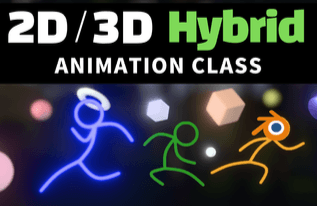
Blender 2D/3D Hybrid Animation Class

Blender, the most talked-about Free Open Source Software worldwide, is evolving beyond a simple 3D tool into an integrated DCC tool that encompasses the entire creative process, from previsualization to compositing in post-production. It also offers a powerful 2D animation toolset not found in traditional 3D tools, so even when users achieve the same results, their workflows can differ greatly depending on their level of understanding. In this class, we’ll explore a range of case studies to share insights on how to make the most of Blender’s potential. We’ll look at how 2D and 3D animation work within Blender, examine the advantages and disadvantages of each approach, and explore practical ways to use them, along with optimal workflows. In the age of generative AI, if you’d like to use Blender as your own creative tool, this class will help you discover new possibilities beyond what you already know about Blender.

(5.0) 6 reviews

54 learners

Level Beginner

Course period Unlimited

Blender
Blender
Blender
Blender

What you will gain after the course

  • Super-simple stickman setup

  • Real-time DOF (Depth of Field) effect for 2D and 3D objects

  • Rigging Setup Using Drivers

Blender 2D/3D Hybrid Animation Class


One of the fastest-growing free and open-source software projects worldwide, Blender has evolved beyond a simple 3D production tool into an integrated DCC tool (Digital Content Creation Tool) that encompasses the entire creative process, from previsualization to post-production compositing.

In particular, it offers powerful 2D animation tools (Grease Pencil) rarely found in traditional 3D software. This gives it a distinctive quality: even when producing the same result, workflow efficiency can vary greatly depending on the user’s understanding and design skills.

2D/3D Real-Time Viewport DOF (Depth of Field)

This class takes an in-depth look at three key areas to help you make the most of Blender’s potential: how 2D and 3D animation work within Blender, the pros and cons of combining the two styles and strategies for using them, and an optimal hybrid workflow demonstrated through case studies based on real projects.

For those who want to make Blender their own creative tool in the age of generative AI, or explore new animation styles that blur the line between 2D and 3D, this class will help you discover possibilities beyond what you already know Blender can do.

Super-Simple Stick Figure Rigging

With existing 3D programs, the complexity of character setup often creates a paradox: creators end up spending nearly all their time on technical setup rather than focusing on what they want to express. In the pipelines of larger companies, precise character setups are necessary even if they take a long time. But for independent creators, the reality is that this traditional approach makes it difficult to keep up with the pace of content creation today. By exploring a basic stick-figure setup workflow in Blender that is simple yet allows for a wide range of expression, we’ll examine a new approach to content creation suited to a new era.

Intuitive Animation Using the Pose Library

One of the biggest recent trends in modeling and animation is probably making use of assets that have already been created. Blender offers a powerful Pose Library feature to help with animation workflows, and its usability has been greatly improved by the Screenshot Thumbnail feature introduced in Blender 4.5. We’ll explore how to use this newly improved, user-centered feature instead of the old, complex, and cumbersome approach.

Setting Up a 2D Animation Controller Using Drivers

Blender provides a timeline and a 2D animation system for 2D animation, while also offering a powerful bone animation system for traditional 3D animation. Combined with Blender’s driver system, the bone system can be used as a setup tool for animating characters with ease.

Let’s look at an example of how to set up a character very simply by controlling the timeline of a 2D animation using Blender’s Time Offset modifier.

A lot has changed in the age of AI. Traditional modeling techniques have lost significant ground to generative 3D modeling services. In times like these, it’s important to plan content from a fresh perspective and build your own workflow for bringing ideas to life quickly.

We hope this class will be helpful to anyone interested in the many ways to use Blender, which is evolving beyond a simple 3D creation tool into the ultimate DCC tool encompassing the entire workflow, from early planning through post-production.

Recommended for
these people

Who is this course right for?

  • Creators interested in a new style that moves between 2D and 3D.

  • Individual creators who want to move away from complex rigging and technical setups and focus on the 'content itself'

  • Anyone looking to establish a new personal workflow tailored to the AI era.

  • A user who wanted to deeply understand the underlying mechanics of Blender’s 2D and 3D systems.

Need to know before starting?

  • It would be helpful if you have a basic understanding of how to use Blender.

Hello
This is blender

Inflearn Verified

Career Verified

1,213

Learners

116

Reviews

39

Answers

4.9

Rating

7

Courses

YouTube Management

Key Experience

  • Former Nexon

Education

  • Graduated from the School of Film, TV & Multimedia (Department of Filmmaking) at Korea National University of Arts

More

Curriculum

All

15 lectures ∙ (3hr 5min)

Published: 
Last updated: 

Reviews

All

6 reviews

5.0

6 reviews

  • blueginkgo님의 프로필 이미지
    blueginkgo

    Reviews 44

    ∙

    Average Rating 5.0

    5

    86% enrolled

    I used Grease Pencil simply for drawing guidelines when modeling, but I really enjoyed the lecture. It made me think about what I could do by combining 3D animation with Grease Pencil, and it also reminded me of tools like Live2D, Adobe animation tools, and Spine. It also made me think I should study Geometry Nodes.

    • gracearttube4982님의 프로필 이미지
      gracearttube4982

      Reviews 3

      ∙

      Average Rating 5.0

      5

      60% enrolled

      I like this lecture because it makes you think about the principles rather than just blindly following along.

      • jojothecat님의 프로필 이미지
        jojothecat

        Reviews 5

        ∙

        Average Rating 5.0

        5

        33% enrolled

        • sk95229447님의 프로필 이미지
          sk95229447

          Reviews 2

          ∙

          Average Rating 5.0

          5

          36% enrolled

          • fkkcloud5531님의 프로필 이미지
            fkkcloud5531

            Reviews 2

            ∙

            Average Rating 5.0

            5

            36% enrolled

            blender's other courses

            Check out other courses by the instructor!

            Similar courses

            Explore other courses in the same field!

            25% off for new members

            $28.50

            25%

            $38.50