inflearn logo

React + TypeScript TodoList App - Introduction to Professional TypeScript Projects

This is a project-oriented course where you will build a "ToDo List" app using React and TypeScript with a professional touch. Beyond simply learning syntax, you will gain practical experience in using TypeScript by completing a real-world service—from component structure design and state management to type application, feature implementation, local storage integration, and deployment.

(5.0) 1 reviews

14 learners

Level Basic

Course period Unlimited

HTML/CSS
HTML/CSS
JavaScript
JavaScript
React
React
TypeScript
TypeScript
HTML/CSS
HTML/CSS
JavaScript
JavaScript
React
React
TypeScript
TypeScript

What you will gain after the course

  • Setting up a React + TypeScript development environment

  • UI Component Architecture Design and State Management Fundamentals

  • Implement add / complete / delete task features

  • Logic optimization using TypeScript

  • Designing code structures resilient to refactoring and maintenance

"You're losing out if you don't get it now! Half off tuition just for subscribing to YouTube"

Subscribe & Like & Comment Event

Complete a simple mission and receive a 50% discount coupon immediately. Seize this all-time great benefit offered for a limited time right now!

Participate in the event: https://forms.gle/wcD2wRVeaG7B7fSj7

🧩 React + TypeScript TodoList App - Introduction to TypeScript Projects

  • A project-oriented course where you build a "ToDo List" app yourself using React + TypeScript

  • Component Structure Design → State Management → Type Application → Feature Implementation → Local Storage Integration → Deployment

  • Applying basic syntax directly to app development, it is structured so that you can naturally acquire TS in a practical React environment.


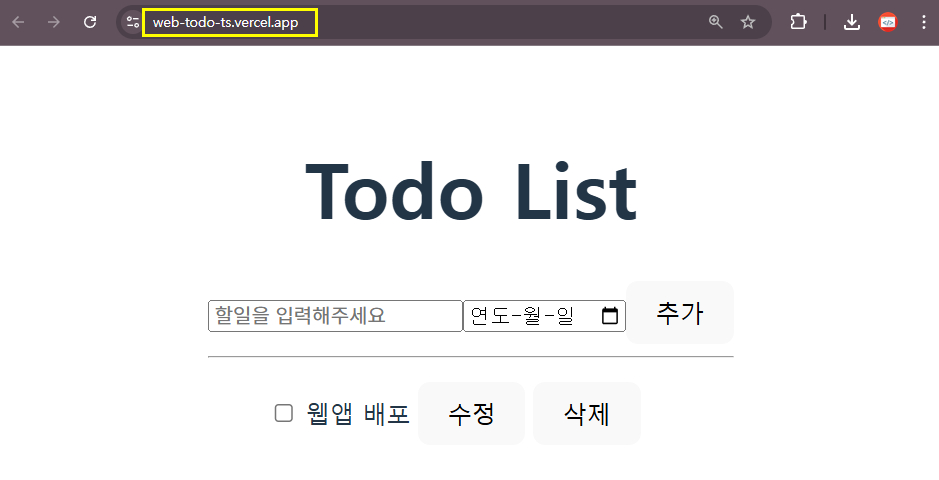
Check out the final deployed version for yourself.

https://web-todo-ts.vercel.app/

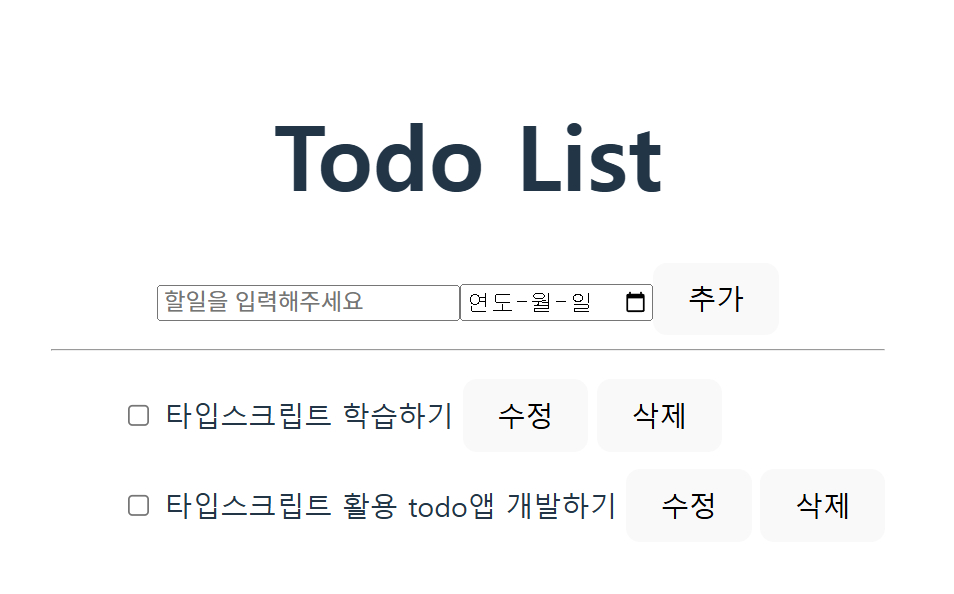
  • Enter the title of the task, select the due date for completion, and click the add button.

  • Try clicking on the task title to toggle it to completed.

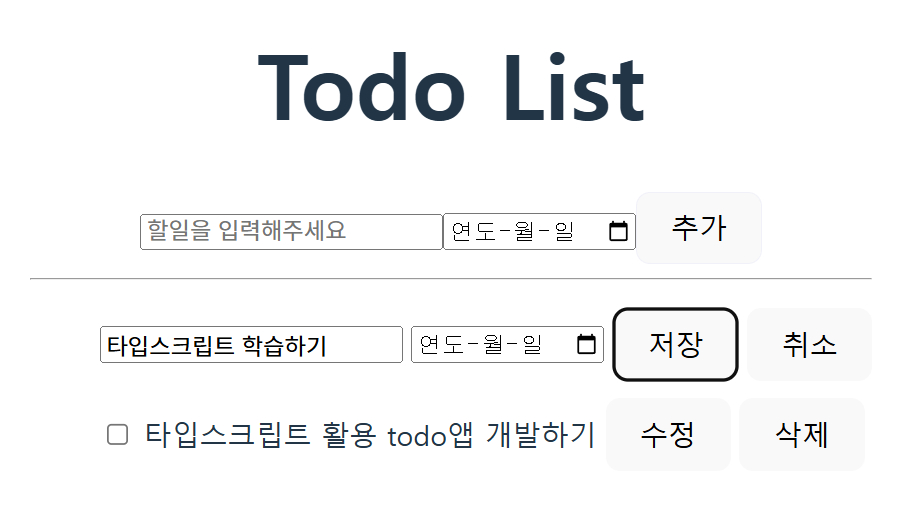
  • Click the edit button and try modifying the todo title.

  • Try deleting a task by clicking the delete button.


Displaying the To-Do List


Edit Todo

Recommended for these people

Those who have learned TypeScript but haven't had the chance to apply it to a real project

Those who have made simple apps with React but feel uneasy about code that lacks type safety

Those who want to complete a React + TypeScript mini-project for their portfolio

After completing the course

  • Learn how to naturally apply TypeScript to React projects.

  • You will acquire the sense of securing both code type safety and productivity at the same time.

  • You will clearly understand component separation and state flow, which are the basics of practical app design.

  • You can use the completed TodoList App directly in your portfolio.

What you will learn

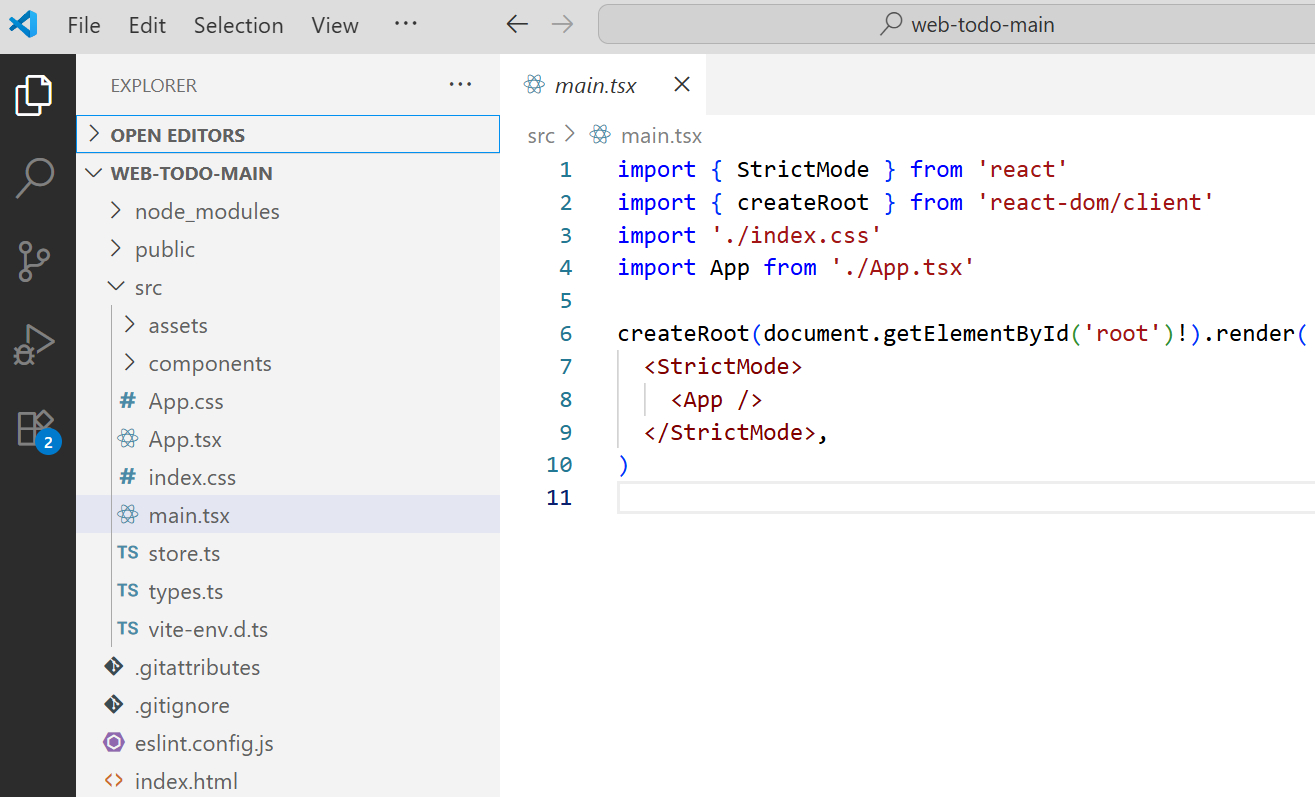
Setting up the React + TypeScript development environment

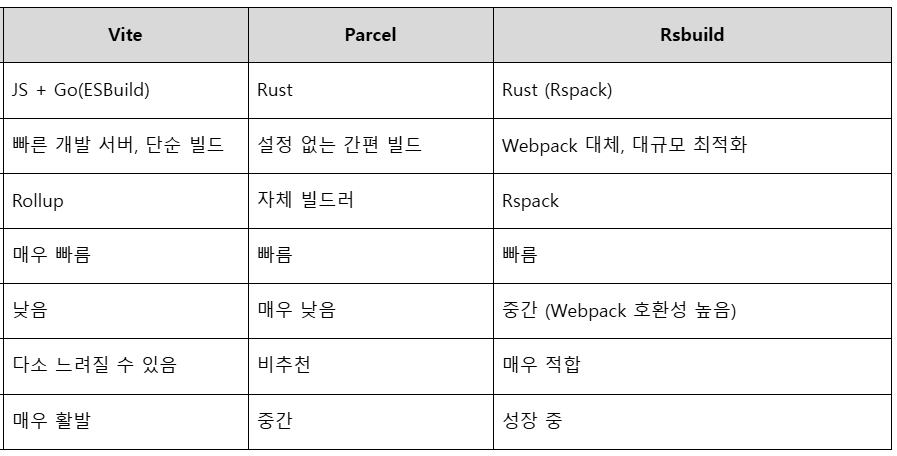
Comparing vite, parcel, and rsbuild and creating an app, setting common types

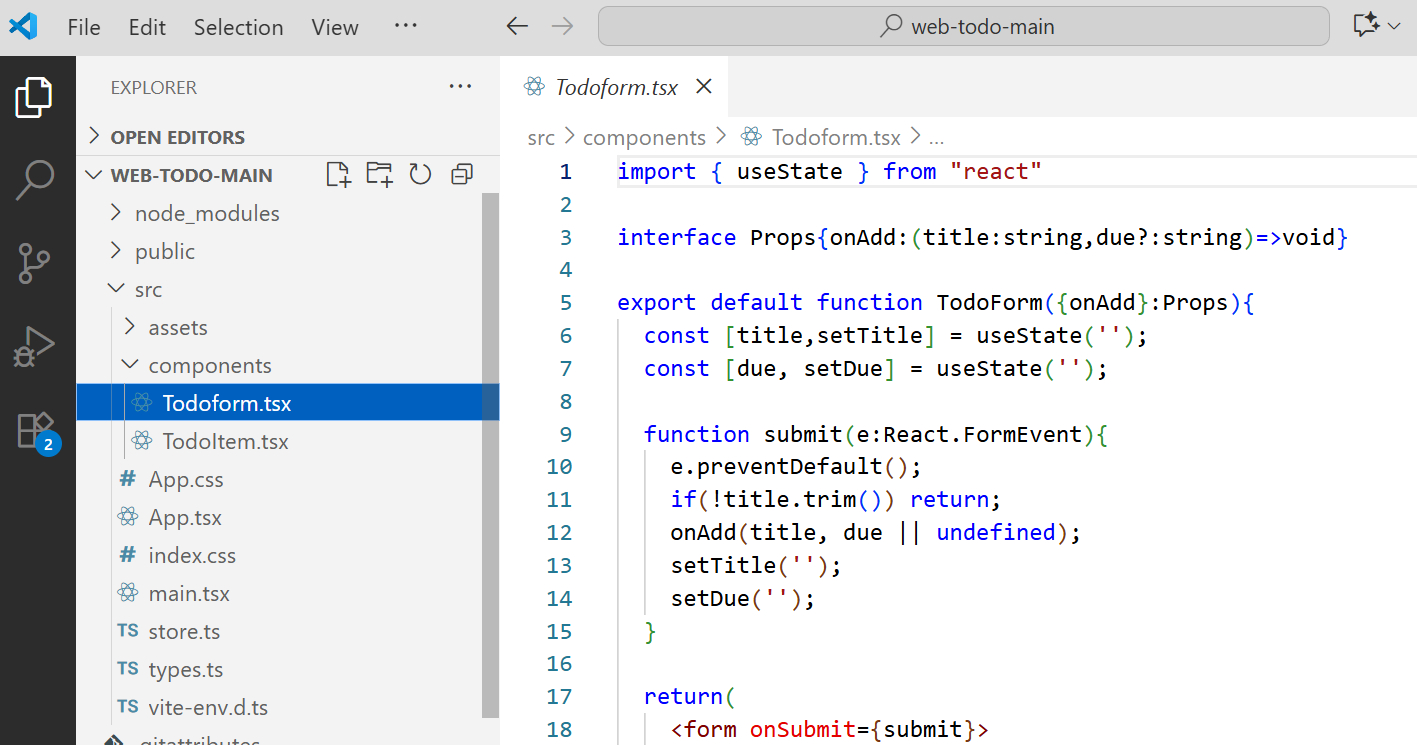
UI component structure design and state management basics

Configuring input forms and to-do list components, and specifying types for props and state

UI component structure design and state management basics

Input form, to-do list component configuration, and defining types for props and state

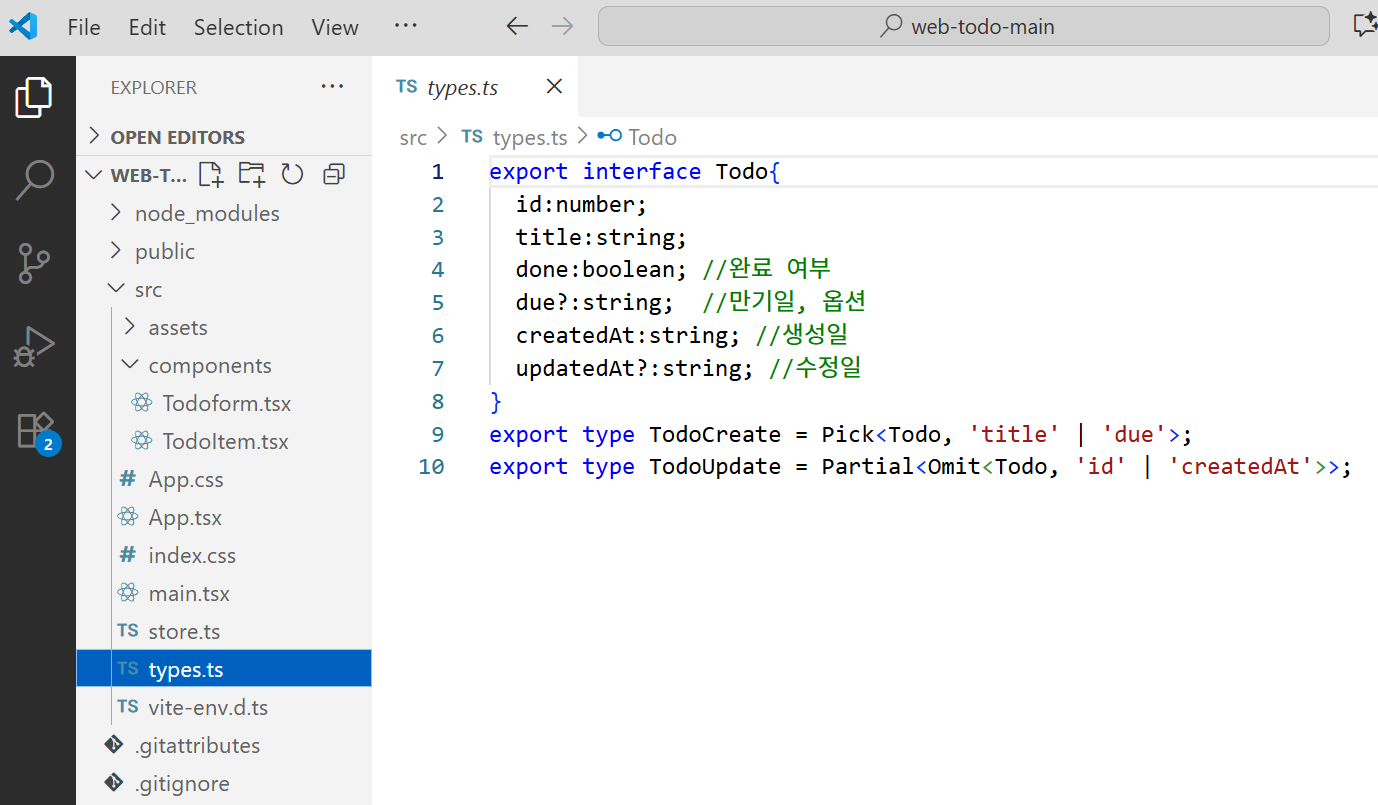
Logic optimization using TypeScript

Practical type utilization including interfaces, union types, and optional properties

Web App Deployment

Deploy the completed project using GitHub and Vercel services.

Deployment using GitHub and Vercel

Notes before taking the course

Prerequisite Knowledge and Precautions

  • This course is a process that even beginners learning React and TypeScript for the first time can take.
    If you know the basic syntax of HTML, CSS, and JavaScript, you can follow along sufficiently,
    and it will be even smoother if you have a simple understanding of basic React syntax (components, props, useState).
    Since it is code-centered, it aims for a hands-on practice class where you learn by building things yourself rather than focusing on theory.

  • As this is a code-oriented lecture, I recommend typing along with me in an IDE (Visual Studio Code) environment.

  • All materials in this lecture, including videos, code examples, images, and lesson plans, are copyrighted by ezweb.
    However, students are free to use the example codes for personal learning and portfolio purposes.
    All examples covered in the lecture are practice codes for educational purposes, and separate permission is required for commercial use.

Recommended for
these people

Who is this course right for?

  • Those who have learned TypeScript but haven't had the chance to apply it to a real project.

  • Those who have built simple apps with React but feel uneasy about code that lacks type safety

  • Those who want to complete a React + TypeScript mini-project for their portfolio

  • Frontend beginners who want to build a solid foundation in component-based design and state management required in practice.

Need to know before starting?

  • html/css

  • javascript

  • typescript

Hello
This is ezweb

2,802

Learners

63

Reviews

4

Answers

4.9

Rating

14

Courses

■ [Current] ESTSOFT KDT Frontend Instructor
■ Green Computer Art Academy Web Publishing and Frontend Instructor
■ Operator of Web Publishing YouTube Channel 'Rock's Easyweb'
■ The Joeun Computer Academy Web Publishing Instructor
■ Hanbit Computer Academy Web Publishing Instructor
■ Frontend Publisher, Professional Frontend Publishing Instructor
■ UI/UX Web Design Portfolio Instructor


[ Books ]
Published on 2021.07.19 / The Complete Figma Guide for Web Design & Web Publishing / BJ Public

Published on 2022.08.25 / Coding for the First Time with Web Publishing / Youngjin Publishing

Published 2023.10 /2024 SD Edu Yu-seonbae Web Design Technician Practical Exam Tutoring Notes / Sidae Gosi Planning

2024.11 Reprint /2025 SD Edu Yoo-Sunbae Web Design Technician Practical Exam Tutoring Notes / Sidae Gosi Planning

2025.11 Reprint /2026 SD Edu Yoo-Sunbae Web Design Technician Practical Exam Tutoring Notes / Sidae Gosi Planning


[ Awards ]
2022.08 Green Computer Art Academy Jongno Branch - Outstanding Instructor 2021.06 Green Computer Art Academy Jongno Branch - Outstanding Instructor 2018.06 Green Computer Academy Sinchon Branch - Outstanding Instructor 2017.05 Green Computer Academy Sinchon Branch - Outstanding Instructor 2016.05 Green Computer Academy Sinchon Branch - Outstanding Instructor 2015.10 Green Computer Academy Sinchon Branch - Outstanding Instructor


More

Curriculum

All

14 lectures ∙ (3hr 23min)
Course Materials:

Lecture resources
Published: 
Last updated: 

Reviews

All

1 reviews

5.0

1 reviews

  • pan5158a1332님의 프로필 이미지
    pan5158a1332

    Reviews 4

    Average Rating 5.0

    5

    64% enrolled

    ezweb's other courses

    Check out other courses by the instructor!

    Similar courses

    Explore other courses in the same field!

    $26.40