




QGIS Python Automation (Vector Edition) Ver.2
UPWISE
Not only will you master Python and GIS! A practical QGIS course, you'll even learn automation using both.

입문
QGIS, GIS, Python
A QGIS course for hands-on learning of diverse map visualization and layout features using QGIS. Get real-world skills via 7 practical thematic map creation examples!!

QGIS Visualization
QGIS Layout
Creation of Actual Thematic Maps Using Public Data
Learn QGIS visualization with 7 thematic maps 🗺️


Let's visualize our own thematic maps using QGIS, a free open source GIS software, and public data!
A restaurant map to find good restaurants? A navigation system to find directions? A travel recommendation map to search for travel destinations?
From the world map stuck on the wall of our childhood room to the various maps we have in our hands today, maps of all kinds are closely related to our lives.
In this day and age where information is overflowing like a flood,
Now it's time to create our own map .
This lecture will teach you how to do it💡

Starting with a simple introduction to GIS and lectures,
The lecture was structured into three sessions .

We first learn the basics of QGIS visualization in Section 1 .
Using public data in vector format
Set the size, color, shape, labeling, etc. that you want.
Practice visualization methods .
And, through Section 2 , we will learn about some useful visualization features of QGIS.
Learn layout . In layout, I create maps.
Create a completed typesetting by adding a title, scale, orientation, legend, image, etc.
You can even learn how to save it as a template .
Section 3 Practical Example uses Seoul City public data.
Let's draw the following seven thematic diagrams .
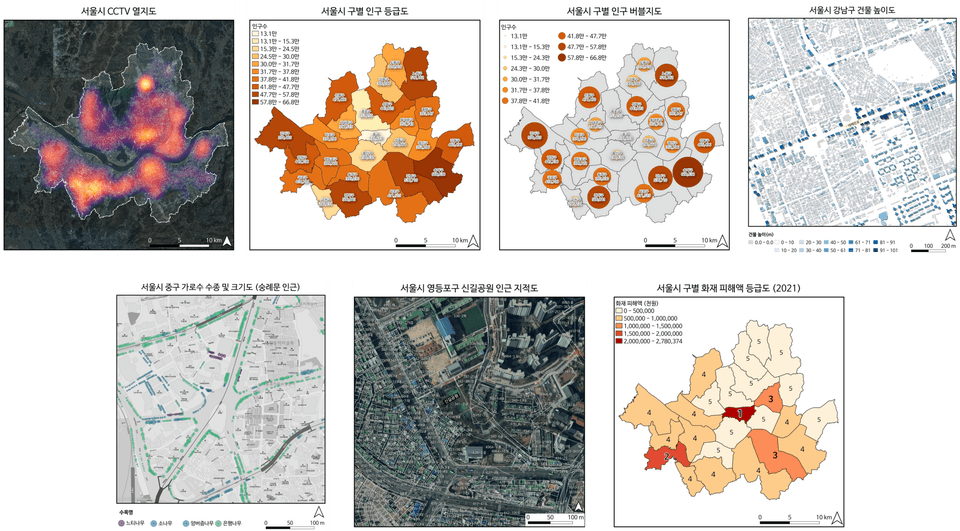
Each thematic map is designed to leverage everything you've learned about QGIS visualization and layout .
All materials and subject templates used in the lecture are provided in one place, organized in an easy-to-view manner.
We provide an environment where you can skip complex data downloads and focus on the lecture .

Map visualization is one of the fundamental functions of GIS.
If you are a student currently learning GIS,
By learning visualization methods, you will become more familiar with GIS and its features more quickly .
Researchers who utilize professional data,
You need to visualize your results in a nice map.
By creating a thematic map using various Seoul City public data,
You will gain experience creating maps with your data .
Thematic maps created with GIS are used in plans, reports, and reporting materials.
It is used in numerous tasks .
The ability to create great maps will enhance your work skills,
We will help you become an indispensable and competent person one step faster.
Q&A 💬
Q. Is it okay if I don't have any experience using QGIS?
This course focuses on QGIS visualization, so it lacks much of the explanation of QGIS analysis functions and basic concepts and applications. However, if you are focusing on visualization, you can take this course without any prior knowledge of these functions.
You don't have to worry because we will explain the basic functions required for visualization, such as installing QGIS, adding layers of files you want to visualize, joining tables, and rewriting fields. 😊
Q. Will I be able to draw the map I have imagined (or seen)?
I think that there are as many maps that can be drawn as there are data in the world. This lecture focuses on visualizing public data, especially vector data, so if the map is based on raster data, the content of this lecture alone may be insufficient.
However, since it covers most of the visualization methods for vector data and includes explanations on typesetting, I expect that you will be able to draw the map you want if you have the available data.
Also, we are planning to open lectures on visualization of raster format data, advanced visualization, etc. in the future, so please look forward to the lectures that will come up in the future. 👍
Q. I need repetitive visualizations. Is there anything in the lecture that would be helpful?
Yes, the QGIS layout feature covered in Section 2 is very efficient for repetitive tasks. If you create a template in advance and simply change the map type/title/other elements, you can easily create a large number of maps under a unified format. 🎉
|
|
|
|
|
| QGIS Trendy Visualizations to Try | QGIS Python Automation (Vector Edition) Ver.2 | QGIS Beginner All-in-One Starter Pack |

Roadmap to becoming a QGIS expert
Who is this course right for?
QGIS user
Students; Researchers; Practitioners requiring map visualization

833
Learners
82
Reviews
68
Answers
4.9
Rating
4
Courses
안녕하세요. GIS/RS를 활용한 분석/연구/강의 전문가 UPWISE 입니다.
기본 정보
서울대학교 환경대학원 석사 학위 취득
서울대학교 환경대학원 박사 과정 수료
GIS, Remote Sensing 등 공간자료를 이용한 연구 전공
GIS 활용 연구 및 분석 경력 다수
파이썬을 이용한 데이터 분석 및 GIS 자료와 융합 활용한 연구 경력 다수
카카오톡 오픈프로필 https://open.kakao.com/me/upwise (강의, 연구-분석 의뢰 등 문의)
특강 이력
-보고서가 달라지는 데이터 시각화- 데이터 활용 역량강화 교육(2기); 경기도 인재개발원 주관; 2022.12.07. & 09.
물기업재직자 역량강화 교육 -디지털 프로그램 실습(초급) & Q-GIS 실습(중급); 수자원공사 주관; 2023.06.19.-20.
QGIS 기초 특강; 강사 자체 주관; 2023.10.07-08.
WISE-UP WORKSHOP 도시공간 데이터 분석; 서울대 환경대학원-BK21 스마트시티 사업단 주관; 2024.02.23.
공공데이터를 활용한 우리 학교 지도 만들기 (동북고등학교); 서울대학교 평생교육원 주관; 2024.05.11.
공공데이터를 활용한 우리 학교 지도 만들기 (삼성고등학교, 서문여자고등학교); 서울대학교 평생교육원 주관; 2024.07.08. - 10.
「2024년 물기업 재직자 역량강화」교육 - 디지털 프로그램 실습(기본) - Q-GIS 실습; 수자원공사; 2024.10.02.
2024년 규제병해충 종합평가회 계획 - QGIS를 활용한 과수화상병 발생 시각화; 충남농업기술원; 2024.10.16.
데이터분석 전문가 양성 과정; 한국환경공단; 2024.10.25.
데이터분석 전문가 양성 과정; 한국환경공단; 2025.04.23.
AI를 활용한 빅데이터 분석가 양성 과정; SeSAC; 2025.07.08-16.
GIS 이해 및 DBMS를 통한 공간 분석 작업 및 데이터 시각화 (기초); 현대NGV; 2025.10.23-24.
GIS 이해 및 DBMS를 통한 공간 분석 작업 및 데이터 시각화 (심화); 현대NGV; 2025.11.10-12.
All
40 lectures ∙ (6hr 42min)
Course Materials:
15. Point : Yeoljido
11:30
All
16 reviews
4.8
16 reviews

Reviews 15
∙
Average Rating 4.4
Edited
4
Hello Prince Song! Thank you for leaving such an encouraging review :) From UPWISE
Reviews 5
∙
Average Rating 5.0
5
Hello Blue! Thank you for leaving such an encouraging review :) From UPWISE
Reviews 2
∙
Average Rating 4.5
4
It seems easier than I thought.. disappointing
Hello ediya1401. Thank you for your valuable course review. It seems we weren't able to fully meet all the content you were expecting from this course. We are planning to renew the course this year by adding advanced features and practical exercises to the existing content. Please check out the additional features after the renewal, and if there are any specific features you would like, please contact me and I will do my best to reflect them in the renewal content. Thank you :) From UPWISE
Reviews 7
∙
Average Rating 4.7
Edited
5
After taking the QGIS Beginner All-in-One Starter Pack (Theory/Practical), I liked it so much that I decided to enroll in this course as well. Compared to the All-in-One course, there is some overlap in the background knowledge needed for the course (GIS concepts) and basic vector data handling (layer joins). However, it was useful to be able to learn new content by going deeper into vector visualization. Additionally, learning the layout function using composition was the second biggest takeaway. So even though there was some overlap with the All-in-One content, it made sense as background knowledge for people taking only this course, and the new content specific to this course - advanced vector visualization and layout composition functions - was useful. The teaching method doesn't just stop at explaining concepts, but includes hands-on practice throughout and ends with practical examples, spending plenty of time to ensure I could fully understand and make it my own.
Hello Mr. Cha Taeyoung. Thank you for taking this course following other courses, and for leaving such detailed and helpful reviews. Also, hearing that you found this course useful gives me, as the instructor, tremendous strength more than anything else. I will come back with useful features in the visualization course that will be renewed this year and other courses that will be released in the future. Thank you :) Best regards, UPWISE
Limited time deal
$42,350.00
30%
$47.30
Check out other courses by the instructor!
Explore other courses in the same field!
![[Free] Getting a Taste of QGIS Trendy Visualization (Presidential Election Result Map)강의 썸네일](https://cdn.inflearn.com/public/files/courses/337567/cover/01jwebxr77n1rygt6nq9azcn4b?f=avif&w=420)

![[Replay of April Regular Training Session] Visualizing at the Individual Record Level with. HEARTCOUNT강의 썸네일](https://cdn.inflearn.com/public/courses/331021/cover/c76dbec1-eb88-4337-9245-6710615ad959/331021-eng.png?f=avif&w=420)

