Power Automate Level 3 - Automation of business card application/external visit registration/parking application
Since the company does not have a separate system developed, tasks such as requesting business cards, registering external visitors, and managing parking requests that require time-consuming manual processing via email and paper printing are managed through a system created using SharePoint+List+Forms and automated with Power Automate.
I skipped flow1,2 and started from 3. Haha (I thought this was the first time..) ㅋ
But it wasn't that difficult. (But if you listen, I recommend listening to 1,2 in order and then 3.)
Anyway, this was really helpful.
After listening to this, I suddenly had an idea to apply to my company, and after that, I was having a meeting with another team and I was talking about how to change the company's process using this Power Automate cloud?? During the meeting..? ㅋ (I was proud of myself ㅋㅋ) ㅋㅋㅋ If you listen to this and deal with inefficient work at your company, data is scattered in many places and not organized, and you manage your data efficiently, you will be able to do so.
Honestly, in my personal opinion, it would be better if managers listened to it rather than the working-level staff and gave them directions on how to do it (But ㅋㅋ I wish my team leader didn't know about this lecture.. ㅎㅎ That's how I feel.) ㅎㅎ
What you will gain after the course
Power Automate (Web)
Automation of business
Automated business card application
Automating external visit registration
Automated parking application
We are creating a system and automating the work that was previously done manually and by email due to lack of a system.
Such as business card application/external visit registration/parking application Leave the repetitive tasks to Power Automate! 🤖
People are the system Cases where it replaces ✍️
I automated my repetitive tasks through Power Automate Step 1 and Step 2 lectures. In step 3, we will think about Business Process Automation and try to automate it.
While it's essential for companies, developing a system is often difficult, so people often take over. For example, while a business card application system would be ideal, developing one separately can be challenging. Consequently,business card applications often require two or three rounds of back-and-forth between the applicant and the person in charge.While it may seem trivial, it consumes significant time for both the applicant and the person in charge.
Beyond business card applications, when registering external visitors or managing parking registrations, forms are printed instead of emailed, and the forms are filled out by hand, which then needs to be managed by the person in charge, resulting in even more time-consuming tasks. Furthermore, because these forms are handwritten, other applicants' entries are visible, posing a risk to privacy.
This lecture was designed to reduce repetitive tasks for managers by creating a system using SharePoint, List, and Forms and automating them with Power Automate, which is ambiguous when developing a system like this, so that they can focus on important tasks.
I recommend this to these people 😀
Are you constantly repeating tasks by exchanging emails? Do you print out the form and fill it out by hand? Are you constantly re-documenting things that were written by hand?
"If there was a system, it wouldn't be a big deal... It's a repetitive task that anyone can do...
If you are wondering, "Is there any way to automate this...?"
This course will help you build and automate systems to reduce repetitive tasks and focus on what matters!
After taking all the lectures, our company
1️⃣ A business card application system will be created and the process will be automated. 2️⃣ An external visitor registration management system is created and the process is automated. 3️⃣ A parking registration management system is created and the process is automated.
What you'll learn 📚
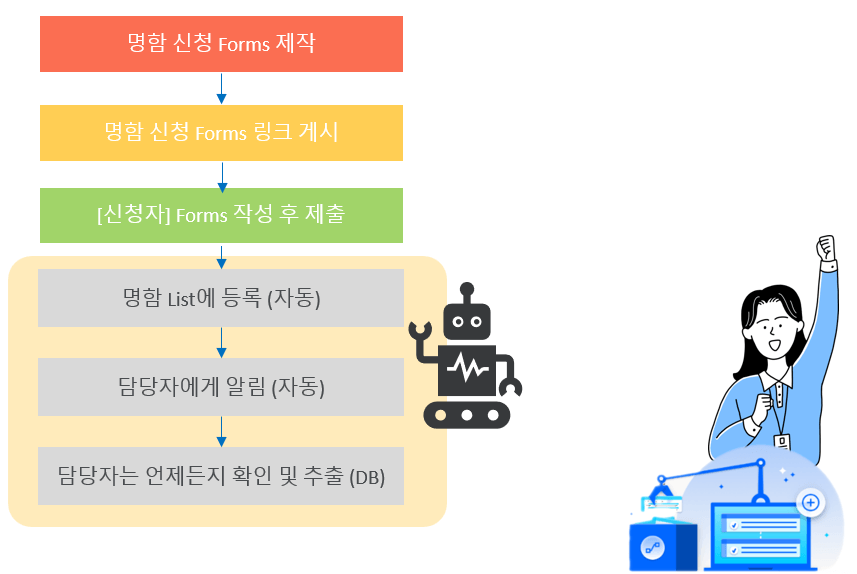
[Automated Business Card Application]
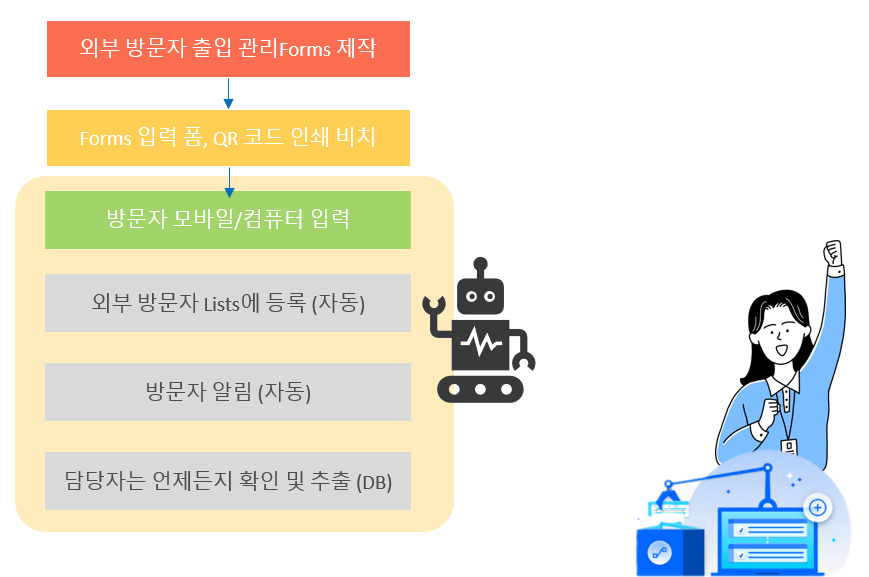
[Automated Access Management for External Visitors]
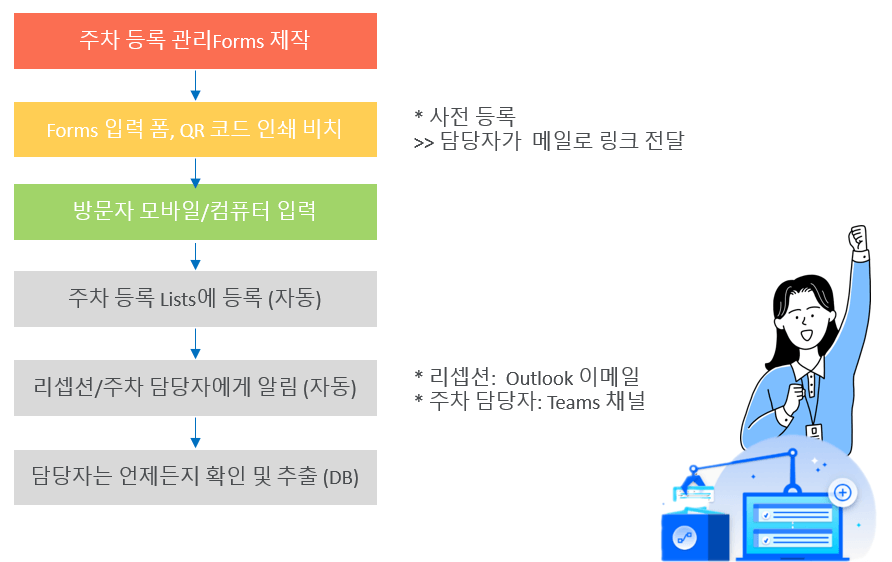
[Automated Parking Registration Management]
Expected Questions Q&A 💬
Q. Do I need to buy any tools to take the course?
No!If you already have a Microsoft 365 Business Standard license or higher, you can use that.If you're not subscribed, you can sign up for a one-month free trial and then subscribe.
Q. Do I need any IT development or programming knowledge to take this course?
No.Even if you're not a developer or a specialist, you can easily follow the lectures!Anyone can do it in no time, even without any programming knowledge.
🔵 Notes before taking the course
Microsoft 365 services required to attend lectures
Or, if you are a Microsoft 365 or Dynamics 365 subscriber, you can use Power Automate for free (not available for free to Business Apps or Enterprise Apps subscribers).
Related Lectures 📢
Recommended for these people
Who is this course right for?
Those who are applying for a business card via email
Those who register for external visits by email or by printing out the information on paper and filling it out manually
For those who print out parking registration on paper and fill it out by hand
People who don't have a system and spend time repeatedly using emails and paper
Anyone who wants to automate repetitive tasks
Anyone who wants to systemize/automate business card application
Anyone who wants to systemize/automate the external visit registration application
Anyone who wants to systemize/automate parking application
I skipped flow1,2 and started from 3. Haha (I thought this was the first time..) ㅋ
But it wasn't that difficult. (But if you listen, I recommend listening to 1,2 in order and then 3.)
Anyway, this was really helpful.
After listening to this, I suddenly had an idea to apply to my company, and after that, I was having a meeting with another team and I was talking about how to change the company's process using this Power Automate cloud?? During the meeting..? ㅋ (I was proud of myself ㅋㅋ) ㅋㅋㅋ If you listen to this and deal with inefficient work at your company, data is scattered in many places and not organized, and you manage your data efficiently, you will be able to do so.
Honestly, in my personal opinion, it would be better if managers listened to it rather than the working-level staff and gave them directions on how to do it (But ㅋㅋ I wish my team leader didn't know about this lecture.. ㅎㅎ That's how I feel.) ㅎㅎ
You've got the gist! Haha
Usually, managers just glance at it and tell the workers to study it and apply it~ 😆If managers and workers think about it together, they'll come up with better ideas and results~
Still, they must be busy, but it's really cool that workers are studying it and applying it to their own work!
If you have any better ideas, please share them~ ^^
Thank you for your valuable feedback. It would be a great help if you could share any areas where you felt we fell short. We will carefully reflect on your comments to improve our future lectures.








![[Office 365] Setting up and understanding Admin CenterCourse Thumbnail](https://cdn.inflearn.com/public/courses/324935/course_cover/6580912e-13aa-4939-92d0-c3b6fded1a43/omas-admincenter.png?w=420)





![[Latest version update] Project and task management to become a pro at planning - MS PlannerCourse Thumbnail](https://cdn.inflearn.com/public/courses/336001/cover/9368db08-c64b-42ca-8ad1-e7a872bffc0e/336001.jpg?w=420)

![[Work Automation Using Free MS RPA] Power Automate Desktop - Automate Repetitive TasksCourse Thumbnail](https://cdn.inflearn.com/public/courses/332826/cover/fd9d8667-48a8-4d2e-b27d-1154f66df679/332826.png?w=420)




![[Work Automation Using Free MS RPA] Power Automate Desktop - Excel AutomationCourse Thumbnail](https://cdn.inflearn.com/public/courses/330201/cover/8adc841c-39de-4770-98d3-2439ed8881a3/330201-eng.png?w=420)
![[Work Automation Using Free MS RPA] Power Automate Desktop EssentialsCourse Thumbnail](https://cdn.inflearn.com/public/courses/329655/cover/8364da63-535b-4613-9b02-3dcdfc21791d/329655-eng.png?w=420)

![[Work Automation Using Free MS RPA] Power Automate Desktop BasicCourse Thumbnail](https://cdn.inflearn.com/public/courses/329047/cover/35cb417d-cd84-47f8-a20f-653724b03a77/329047-eng.png?w=420)

![Do you want to quit your job? If so, you should take the [Excel Function Dictionary] course.Course Thumbnail](https://cdn.inflearn.com/public/courses/328591/cover/e6c500ab-3346-48df-84a8-b7c0876eea16/함수사전(인프런).jpg?w=420)
![[Pass ITQ Excel A in One Go] in 3 daysCourse Thumbnail](https://cdn.inflearn.com/public/courses/329652/cover/b44e11b6-a47e-4993-86ea-a85da9836bb5/329652-eng.png?w=420)

![[First in Korea] ChatGPT × Word Practical Applications: Document Automation for EveryoneCourse Thumbnail](https://cdn.inflearn.com/public/files/courses/338227/cover/01k0rxg0k0xk9q6vefywa4qnbn?w=420)



![[For Beginners] Data Visualization with Power BICourse Thumbnail](https://cdn.inflearn.com/public/courses/327055/cover/455b54c1-3e63-439b-9b60-5d12e12bc303/PowerBI-001 (1).png?w=420)