OpenClaw, the AI Agent that keeps working even when you're away: From initial setup to full automation

Opening a new window, copying, and pasting into a messenger every single time — let today be the last! OpenClaw Practical Course: Your own AI assistant that works directly for you.

(5.0) 6 reviews

18 learners

Level Basic

Course period Unlimited

saas
saas
AI
AI
AI Agent
AI Agent
openclaw
openclaw
saas
saas
AI
AI
AI Agent
AI Agent
openclaw
openclaw

Reviews from Early Learners

5.0

5.0

냥2

61% enrolled

It was a bit difficult since it was my first time using OpenClue, but I was able to follow along because you explained it so easily.

5.0

히릿

100% enrolled

I saw the tool called OpenClaw for the first time, and I liked how it provided step-by-step instructions on how to apply AI agents to actual work!

5.0

핑꿀

78% enrolled

I feel like I can clearly understand the concept of AI agents. It's convenient because I only need to understand the flow even if I don't know how to code.

What you will gain after the course

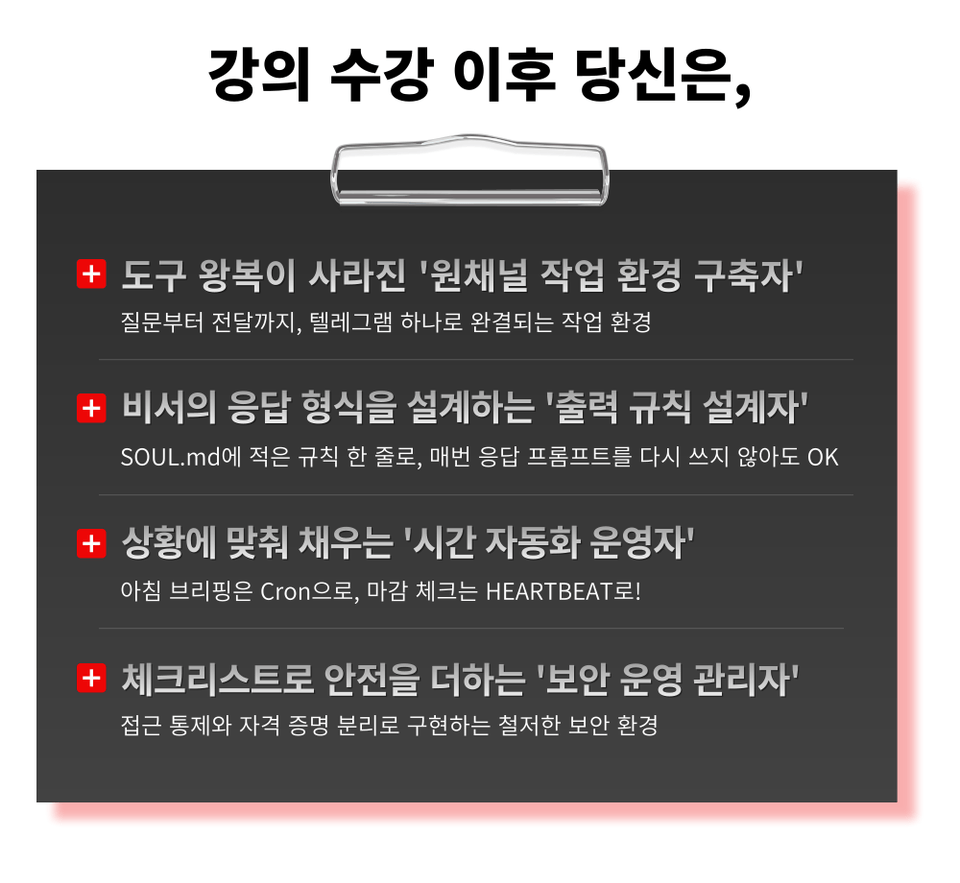
  • A work environment completed entirely within Telegram, from inquiry to delivery.

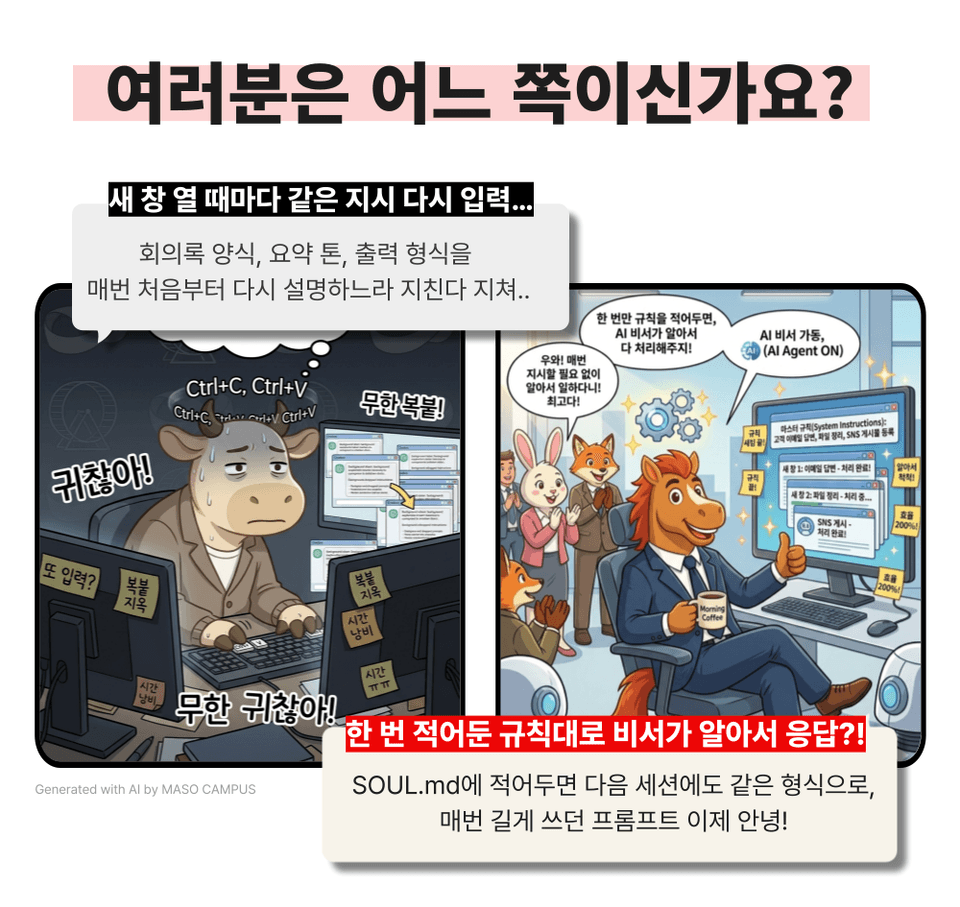
  • With just one line of rules written in SOUL.md, it's OK even if you don't rewrite the response prompt every time.

  • Morning briefings with Cron, closing checks with HEARTBEAT!

  • A thorough security environment implemented through access control and credential separation

Opening a new window, copying, and pasting into messenger every single time — let today be the last!

OpenClaw Practical Course: Your own AI assistant that works for you


Opening a new AI window, copying the answer, and pasting it into your messenger…
If the actual work remains the same while you're busy switching between tools?


Your AI assistant starts working first!


– Every morning at 7 AM, schedules and news arrive automatically on Telegram on time
– Fixed output design for meeting minutes, articles, and reports in a 3-line core-risk-action item format
SOUL.md and MEMORY.md assistant customization to engrave tone and preferences
– HEARTBEAT for regular checks, Cron for scheduled execution – Implementing time automation based on purpose
– From requesting evidence → re-questioning → to verification, the assistant checks the results itself


End complex workflows with OpenClaw, manage all tasks in one place on Telegram!
Take the course today and start your Telegram briefing tomorrow morning.


AI agents that run even when you're away, OpenClaw curriculum features

This is a practical AI assistant introductory course for non-developers, teaching you how to assign tasks with a single word on Telegram without coding.

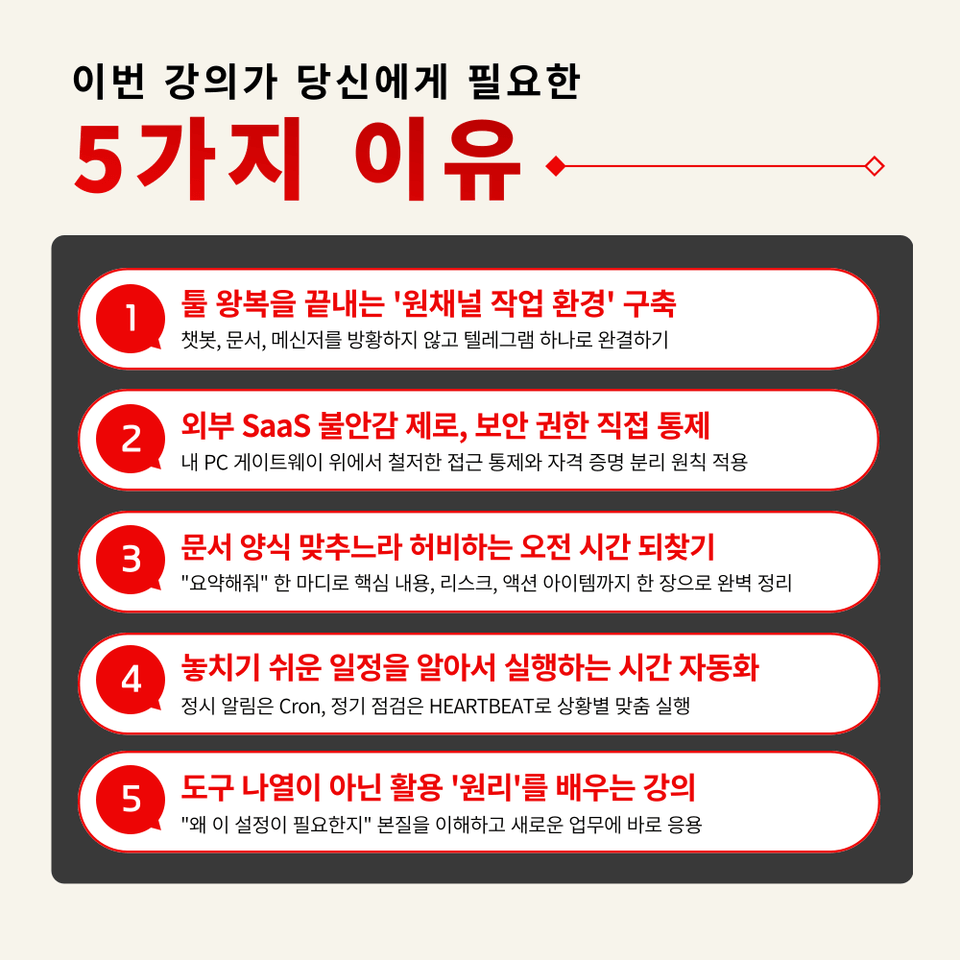
1. Understand the principles of how AI works, not just how to use it
By understanding the Gateway ↔ Agent ↔ Channel flow, you can apply it to tasks not covered in the lecture on your own

2. Installation practice for non-developers to pass smoothly within 30 minutes
From pre-check → botToken registration → to the first conversation test, proceeding along with troubleshooting branch points

3. Customizing your assistant by embedding tone, memory, and repetitive task rules into files
Defining Workspace file roles and fixing assistant response formats tailored to your work style

4. Creating an Information Summary Assistant that organizes minutes, news, and reports into a single format
Design it so that a single command, "Summarize this," automatically outputs 3 key points, risks, and action items

5. Building time automation where schedules and news arrive via Telegram every morning
Configure morning briefings and reminder automation yourself, and explore the expansion roadmap for security audits, cost management, MCP, and n8n


Your own AI assistant that works every day once set up

Create a work environment that is awake even before you clock in, right now!

OpenClaw Practical Lecture: Automating Work Without Coding

1. Sign up for the course

2. Complete about 30 minutes of preparation with Node.js and Telegram by following the lecture

3. Activating your own AI assistant

Telegram works even before I turn it on. OpenClaw practical automation!

“Go beyond being an ‘AI user’ and become a ‘24-hour working colleague’!”


Every morning, getting answers from a chatbot, moving them to documents, and pasting them into messengers…
It is slowly eating away at your day.

With just a single setup, Openclaw transforms into a perfect 'practical briefing room.'


We confidently recommend this to the following people.

– Office workers who do the same work two or three times because they have to move and reshare answers received from chatbots into documents every time
– Practitioners in security-sensitive organizations who need an AI environment that runs on their own PC because the introduction of external SaaS is blocked
– Managers who spend the same amount of time every week on structured tasks such as meeting minutes, news summaries, and report reviews
– Non-developers who are capable of copying and pasting terminal commands but find writing code burdensome
– Those who have repeatedly experienced AI tools disappearing from their routine after a few days of learning them
– Learners who want to organize and start everything from the introductory stage to 'operation, security, and expansion' all at once


From 3-line summaries and risk checks to deriving immediate action items all at once.
Just 3 hours is enough!

Course Features

STEP 1. [Pain Point Diagnosis] Diagnosing where your work is leaking: repetition, context disconnection, and tool fragmentation

Compare the differences between Rule-based, Workflow, and Agent automation, and identify where OpenClaw fits as the right solution


STEP 2. [Installation and First Connection] From WSL/Node.js 22+ to BotFather, passing through all the bottlenecks

From pre-check → installation → botToken registration → first chat test, including troubleshooting branches, even non-developers can complete it within 30 minutes


STEP 3. [Understanding Structure and Customization] Gateway ↔ Agent ↔ Channel, why the assistant remains even when the session is reset

Get hands-on with the roles of the four files—SOUL, MEMORY, HEARTBEAT, and TOOLS—to fix the tone, memory, and repetitive task rules in your own way.


STEP 4. [Practice Output 1] Fixed output of 3 key lines, risks, and action items with a single "Summarize this" command

Agent Reach search enhancement + Evidence request → Re-questioning → Verification routine for the assistant to perform its own quality checks


STEP 5. [Practice Output 2] Completion of an environment where morning briefings and reminders automatically arrive via Telegram

Separate operation of Cron (scheduled execution) and HEARTBEAT (regular health checks) + Error inspection checklist for permissions, time zones, and log units


Today is the last day for those tasks you repeated every day.
Start your own OpenClaw AI assistant that boosts work efficiency right now!

Hand over repetitive tasks to AI with OpenClaw.

When you speak, the AI executes it directly, and a workflow is completed where the results accumulate in your Telegram.

Frequently Asked Questions Q&A

Q. I've never coded before; will I be able to follow along?
A. The course is designed for non-developer office workers. If you can copy and paste commands, you can complete the practice, and we provide troubleshooting steps for parts where people often get stuck.

Q. Is a separate paid subscription required?
A. OpenClaw is open-source and free to use, and creating a Telegram bot is also free. However, the LLM API called by the assistant incurs usage-based charges. In the course, we provide guidance on cost trade-offs by model and operational examples at a level of $3–5 per month based on GPT-4o-mini.

Q. Is it possible in a Windows environment?
A. Yes, it is. For Windows 11 users, we recommend the WSL (Ubuntu) + nvm + Node.js 24 combination. The practice steps include PowerShell and Ubuntu installation, basic customization, and even how to handle network issues like ETIMEDOUT.


Please check before taking the course!

  • Since this is a practice-oriented course, we recommend using a dual monitor setup or an extra device so you can separate the lecture screen from your practice environment.

  • Also, since the practice sessions are based on Windows OS, we recommend taking the course in a Windows environment.

  • The lecture materials and practice files are located in the <00. Textbook Download Center> section.

Recommended for
these people

Who is this course right for?

  • Office workers who do the same task two or three times because they have to move answers received from a chatbot into a document and share them every time.

  • Practitioners in security-sensitive organizations who need an AI environment that runs on their own PC because the adoption of external SaaS is blocked.

  • Managers who spend the same amount of time every week on structured tasks such as meeting minutes, news summaries, and report reviews

  • Non-developers who are comfortable with copying and pasting terminal commands but find writing code burdensome

  • Those who have repeatedly experienced learning AI tools only to have them slip from their grasp after a few days

  • Learners who want to organize everything from the introductory stage to 'operations, security, and scaling' all at once before starting.

Need to know before starting?

  • The course is designed for non-developer office workers. You can complete the hands-on exercises simply by copying and pasting commands, and we provide troubleshooting steps for sections where you are likely to get stuck.

  • OpenClaw is open-source and free to use, and creating a Telegram bot is also free. However, the LLM API called by the assistant incurs usage-based charges. The lecture provides guidance on cost trade-offs by model and includes operational examples, such as maintaining a monthly cost of around $3–$5 based on GPT-4o-mini.

  • It is possible. For Windows 11 users, the combination of WSL (Ubuntu) + nvm + Node.js 24 is recommended, and the practice steps include installing PowerShell and Ubuntu, basic user customization, and even handling network issues such as ETIMEDOUT.

Hello
This is Masocampus

13,492

Learners

2,022

Reviews

153

Answers

4.7

Rating

118

Courses

"I will grow more than yesterday. And, I will help those who strive to grow more than yesterday."

With Actionable Content that embodies the sincerity and aspirations of Maso Campus,

100 million cumulative hours of lectures shared online and offline since 2013!

This precious experience and time are always the source of growth for both Maso Campus and our students.

The Miso Campus team strictly adheres to two principles for the growth of us all. 1. Actionable Content that can be put into practice immediately after learning. 2. Respecting the time and effort of participants.

The Miso Campus team strictly adheres to two principles for the growth of us all.

1. Actionable Content that you can actually use after learning 2. Time-Saving Curriculum that respects the participant's time and effort Grow with Miso Campus's Actionable and Time-Saving Curriculum

1. Actionable Content that you can surely use once you learn it

2. Time-Saving Curriculum that respects the time and effort of participants

We hope you will walk the path of growth together with Masocampus's Actionable and Time-Saving Curriculum.

We hope you will walk the path of growth together with Maso Campus's Actionable and Time-Saving Curriculum.

More

Curriculum

All

23 lectures ∙ (2hr 46min)

Course Materials:

Lecture resources
Published: 
Last updated: 

Reviews

All

6 reviews

5.0

6 reviews

  • cmjang7225님의 프로필 이미지
    cmjang7225

    Reviews 12

    Average Rating 5.0

    5

    87% enrolled

    I didn't know the first thing about coding, but you explained it so clearly that I understood it perfectly! I'll make good use of it!!!

    • masocampus
      Instructor

      Thank you for your valuable review😊 Miso Campus will continue to provide satisfying lectures in the future!

  • yeonseon님의 프로필 이미지
    yeonseon

    Reviews 14

    Average Rating 5.0

    5

    78% enrolled

    I feel like I can clearly understand the concept of AI agents. It's convenient because I only need to understand the flow even if I don't know how to code.

    • masocampus
      Instructor

      Thank you for leaving a course review😊 Miso Campus will always do its best!

  • sjpark01님의 프로필 이미지
    sjpark01

    Reviews 8

    Average Rating 5.0

    5

    61% enrolled

    It was a bit difficult since it was my first time using OpenClue, but I was able to follow along because you explained it so easily.

    • masocampus
      Instructor

      Thank you for taking the course and for your satisfaction😊 I will continue to repay your support with even better lectures in the future.

  • bullae님의 프로필 이미지
    bullae

    Reviews 43

    Average Rating 5.0

    5

    87% enrolled

    I had only heard the name before, but now that I've tried it myself, I like it because it's much easier than I expected.

    • masocampus
      Instructor

      Thank you for taking the course and for your satisfaction😊 I will continue to repay your support with even better lectures in the future.

  • hryoon5235님의 프로필 이미지
    hryoon5235

    Reviews 47

    Average Rating 5.0

    5

    100% enrolled

    I saw the tool called OpenClaw for the first time, and I liked how it provided step-by-step instructions on how to apply AI agents to actual work!

    • masocampus
      Instructor

      Thank you for leaving a course review😊 Miso Campus will always do our best!

Masocampus's other courses

Check out other courses by the instructor!

Similar courses

Explore other courses in the same field!